



In an era where sustainability and compliance are more than buzzwords—they’re business imperatives—monitoring your environmental impact is essential. Whether you’re managing carbon emissions, waste, or energy use, you need a reliable way to track and analyze your data.
That’s where the Environmental Compliance KPI Dashboard in Google Sheets steps in. 🌍
This smart, ready-to-use template empowers your team to monitor key environmental metrics in real-time. No need for expensive tools or complex software—just open the Google Sheet, input your data, and instantly view actionable insights.
⚙️ Key Features of the Environmental Compliance KPI Dashboard
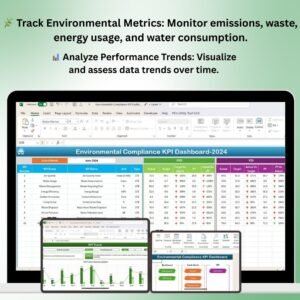
📊 Real-Time Dashboard Overview
Month Selector (📅) – Change the month in cell D3 and watch all metrics auto-update.
MTD & YTD Views – Track actual vs. target vs. previous year for Month-to-Date and Year-to-Date performance.
Trend Arrows (🔼🔽) – Visual indicators highlight KPI improvement or decline.
Target Comparison – Instantly see if you’re meeting or missing your sustainability goals.
📈 KPI Trend Sheet Tab
Dropdown selector to choose any KPI and view historical trends
Displays KPI unit, group, type (UTB/LTB), formula, and definition
🧮 Actual, Target & Previous Year Tabs
Input monthly and yearly data with structured format
Automatically updates visualizations and comparisons
Supports long-term strategy through year-over-year tracking
📋 KPI Definition Sheet
Customize or expand KPI list
Define units, formulas, descriptions, and type of performance (Lower the Better or Upper the Better)
📦 What’s Inside the Dashboard?
✅ 6 Organized Tabs – Dashboard, KPI Trend, Actual, Target, Previous Year, and KPI Definitions
📊 Dynamic Charts & Conditional Formatting
📥 Simple Data Input Structure
🔍 Comparative Metrics for Insights
💡 No Coding Required – 100% Spreadsheet-Based
🚀 How to Use the Product
Download the Google Sheets template
Go to the Actual Numbers tab – Input your MTD and YTD values
Update the Target and Previous Year tabs with your benchmarks
Use the Dashboard tab to analyze KPI performance monthly
Select KPIs in the Trend tab to monitor long-term progress
Customize KPIs in the Definition tab for your specific goals
All dashboards update automatically—no formulas or scripting required!
👥 Who Can Benefit from This Dashboard?
🌱 Sustainability Managers – Monitor and report on environmental impact
🏭 Operations Heads – Track energy, waste, and emissions with clarity
✅ Compliance Officers – Ensure regulatory compliance is always met
💼 Small Business Owners – Get ESG-ready without large investments
📊 Analysts & Reporting Teams – Visualize data for internal or external stakeholders
🔍 Consultants – Use it as a client-ready ESG reporting tool
🔗 Click here to read the Detailed blog post
Watch the step-by-step video Demo:
🎥 Visit our YouTube channel to learn step-by-step video tutorials
👉 Youtube.com/@NeotechNavigators
Compatibility and Requirements
- Works in Google Sheets. You need a free Google account and a web browser.
- You pick the KPI on the KPI Trend sheet from a dropdown. Google explains dropdowns in Create an in-cell dropdown list.
Frequently Asked Questions
Which sheets are included?
Six sheets: Dashboard, KPI Trend, Actual Numbers, Target, Previous Year Number and KPI Definition.
How do I update the dashboard?
Enter your MTD and YTD figures in the Actual Numbers sheet, and your benchmarks in the Target and Previous Year sheets. Then change the month in cell D3 on the Dashboard sheet and the metrics update.
Can I add or change KPIs?
Yes. The KPI Definition sheet lets you edit the KPI list, including the unit, formula, description and type (Lower the Better or Upper the Better).
How do I see the history of one KPI?
Open the KPI Trend sheet and pick a KPI from the dropdown. It shows the historical trend with the KPI unit, group, type, formula and definition.
Is there an Excel or Power BI version?
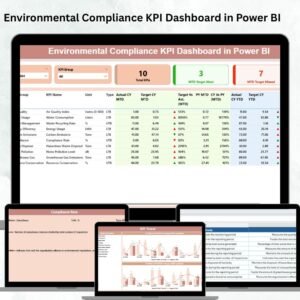
Yes. See the Environmental Compliance KPI Dashboard in Excel and the Environmental Compliance KPI Dashboard in Power BI.
Related Environmental and Compliance Templates
- Environmental Compliance KPI Dashboard in Excel: the same dashboard in Excel
- Environmental Compliance KPI Dashboard in Power BI: the Power BI edition
- Environmental Compliance Checklist in Google Sheets: a checklist for day-to-day compliance tasks
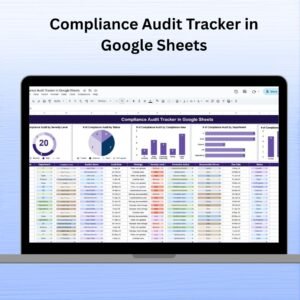
- Compliance Audit Tracker in Google Sheets: track audits in Google Sheets
- Environmental KPI Dashboard in Excel: a wider set of environmental KPIs
Browse all Google Sheets KPI dashboards.



























Reviews
There are no reviews yet.