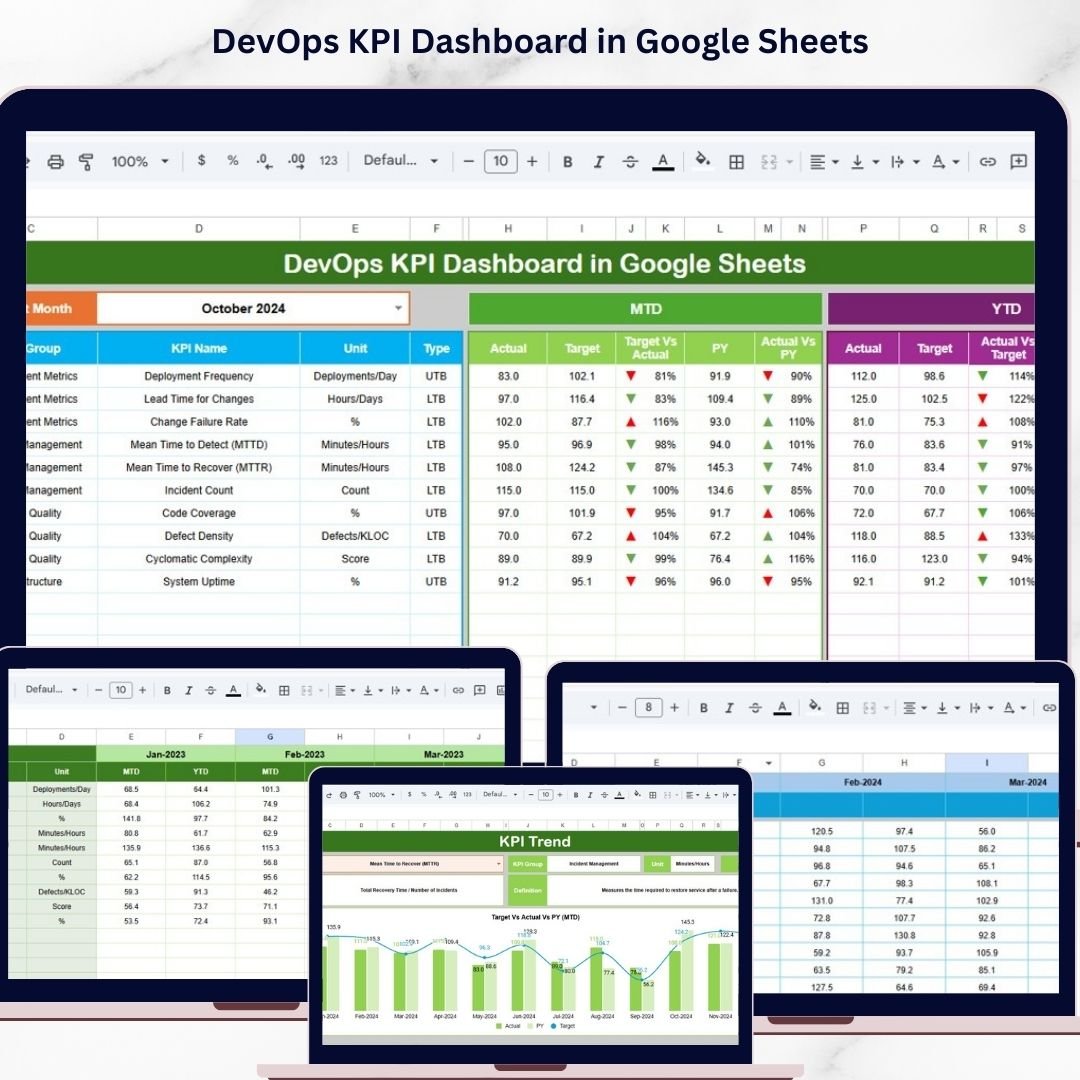
DevOps KPI Dashboard in Google Sheets

Google Sheets - instant download

Original price was: ₹1,999.00.Current price is: ₹999.00.
Details, requirements and demo below
Sale!

DevOps KPI Dashboard in Google Sheets

Original price was: ₹1,999.00.Current price is: ₹999.00.

🚀 Ready-to-Use DevOps Dashboard – Start tracking KPIs instantly with a fully designed Google Sheets template.

📊 Interactive KPI Monitoring – Analyze deployment, uptime, and failure metrics with dynamic charts.

📈 MTD & YTD Analysis – Track both short-term and long-term performance easily.

🎯 Target vs Actual Insights – Compare goals vs performance with automatic calculations.

📉 Visual Performance Indicators – Identify trends using up/down arrow indicators.

📚 KPI Documentation Included – Access KPI formulas, definitions, and types in one place.

🔄 Real-Time Collaboration – Share and update data across teams in Google Sheets.

⚡ Faster Decision-Making – Get instant insights to improve DevOps efficiency.

💡 Customizable Template – Adapt KPIs and structure as per your business needs.

- +

💡 Buy any 2 templates and save 20% automatically at checkout.

Pricing country
Prices follow your selected country; checkout uses your billing country.
Excel Pivot Tables & Dashboards: Basic to Advanced courseLaunch offer
🎓 NEXTGENTEMPLATES ACADEMY
Like this dashboard? Learn to build your own.
Excel Pivot Tables & Dashboards: Basic to Advanced

From your first Pivot Table to the Data Model, DAX, Power Query and a one-page KPI dashboard. 11h 51m of video by PK, with practice files, quizzes and a capstone.

In today’s fast-moving digital environment, organizations must deliver software faster, maintain system stability, and ensure seamless collaboration between development and operations teams. However, managing DevOps performance without a structured system often leads to delays, inefficiencies, and missed insights.

That’s where the DevOps KPI Dashboard in Google Sheets becomes a game-changing solution. 🚀

This ready-to-use dashboard helps you track critical DevOps metrics like deployment frequency, system uptime, failure rate, and lead time—all in one centralized and interactive platform. Instead of juggling multiple spreadsheets or tools, you get a clear and real-time view of your DevOps performance.

Because this dashboard is built in Google Sheets, your entire team can collaborate, update data, and monitor performance from anywhere. With dynamic charts, KPI cards, and performance indicators, decision-making becomes faster, smarter, and more data-driven.

Whether you’re managing CI/CD pipelines, tracking incidents, or improving delivery speed, this dashboard empowers your team with actionable insights to optimize operations and boost efficiency.
DevOps KPI Dashboard in Google Sheets

🚀 Key Feature of DevOps KPI Dashboard in Google Sheets

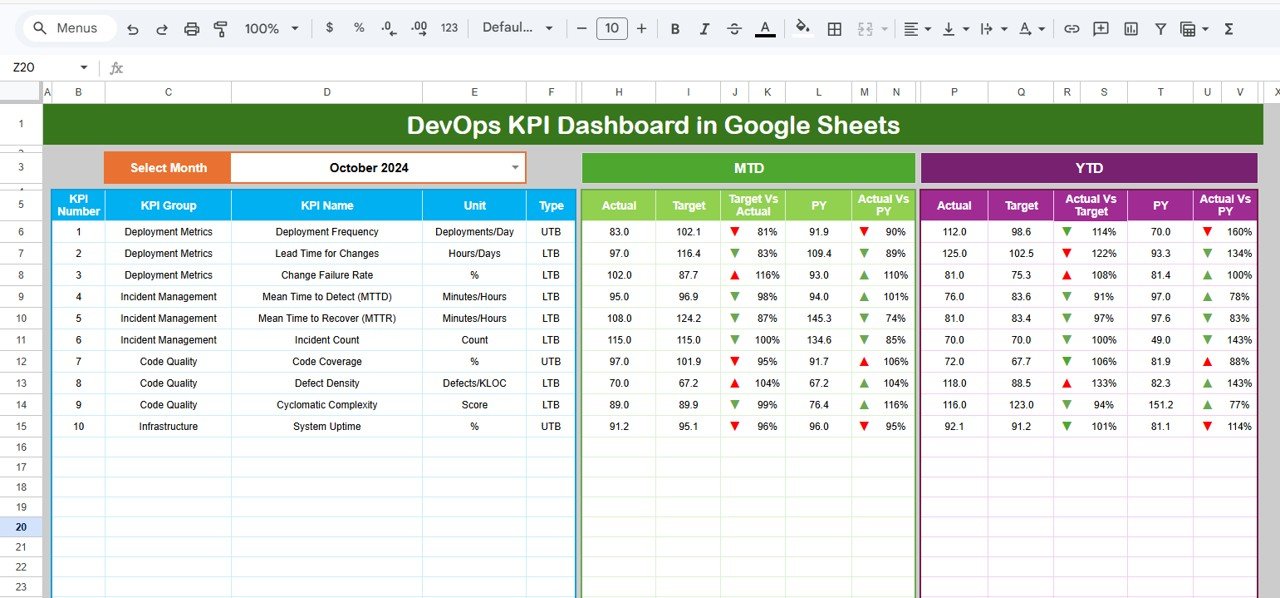
📊 Interactive Dashboard View
Get a complete overview of DevOps performance with dynamic charts, KPI cards, and visual indicators.

📅 Month Selection Control
Analyze data month-wise using a dropdown selection for better tracking and comparison.

🎯 Target vs Actual Comparison
Instantly evaluate performance with automatic calculations and comparison metrics.

📈 MTD & YTD Tracking
Track both Month-To-Date and Year-To-Date performance to monitor progress effectively.

📉 Performance Indicators with Arrows
Quickly identify success or failure using conditional formatting with up/down arrows.

📊 KPI Trend Analysis Sheet
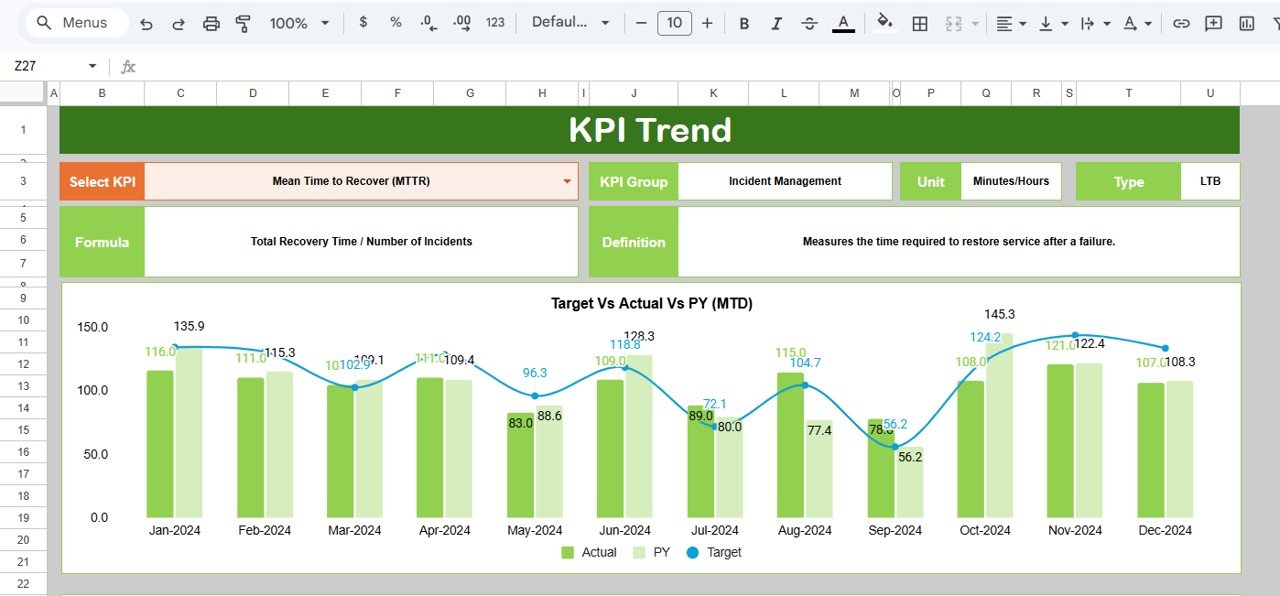
Deep dive into individual KPI performance and trends over time.

📚 KPI Definition & Documentation
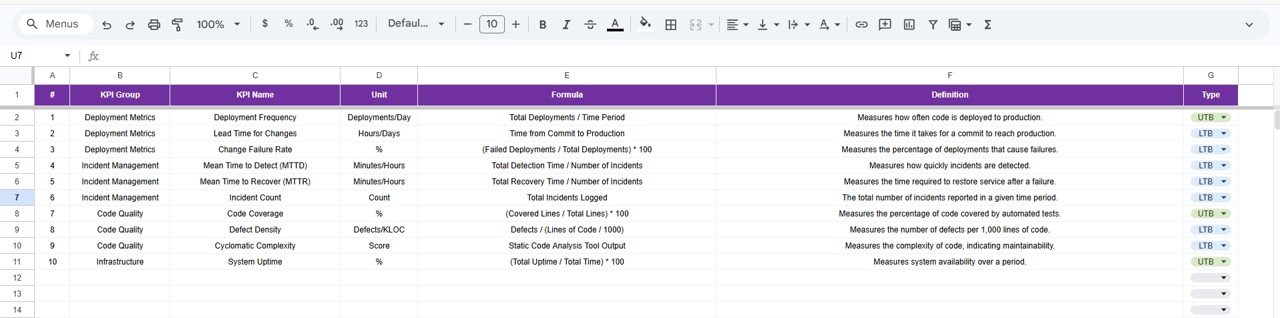
Understand KPI logic with built-in definitions, formulas, and classifications.

🔄 Real-Time Collaboration
Access and update the dashboard from anywhere with Google Sheets.

💡 Easy Customization
Modify KPIs, formulas, and charts according to your business needs.


📦 What’s Inside the DevOps KPI Dashboard in Google Sheets

This template is designed with a structured and user-friendly layout.

✔ 6 Fully Functional Worksheets

1️⃣ Dashboard Sheet – Displays KPI cards, charts, and performance comparisons.
2️⃣ KPI Trend Sheet – Provides detailed KPI insights and trend analysis.
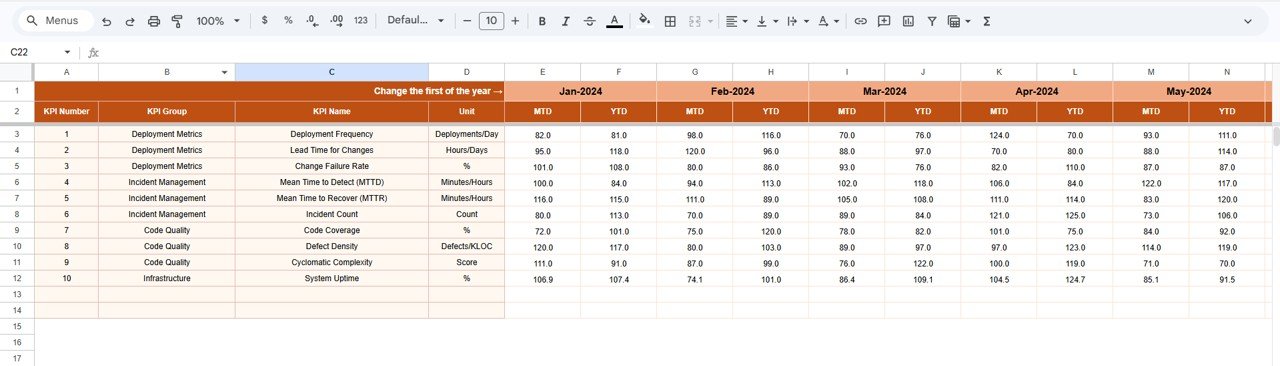
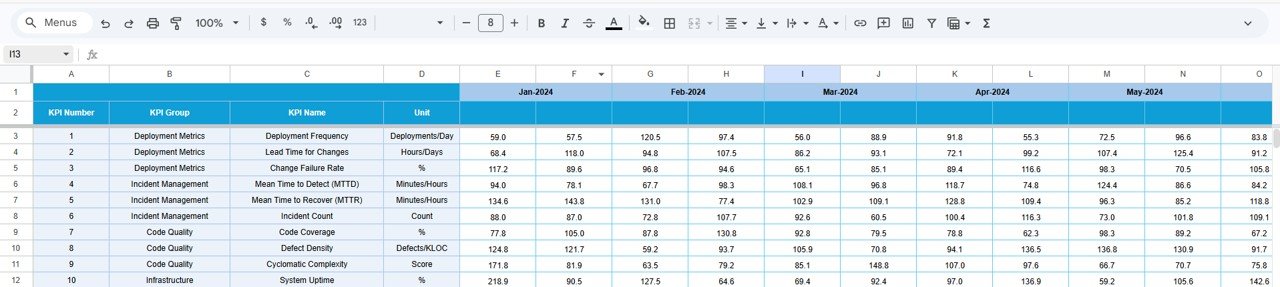
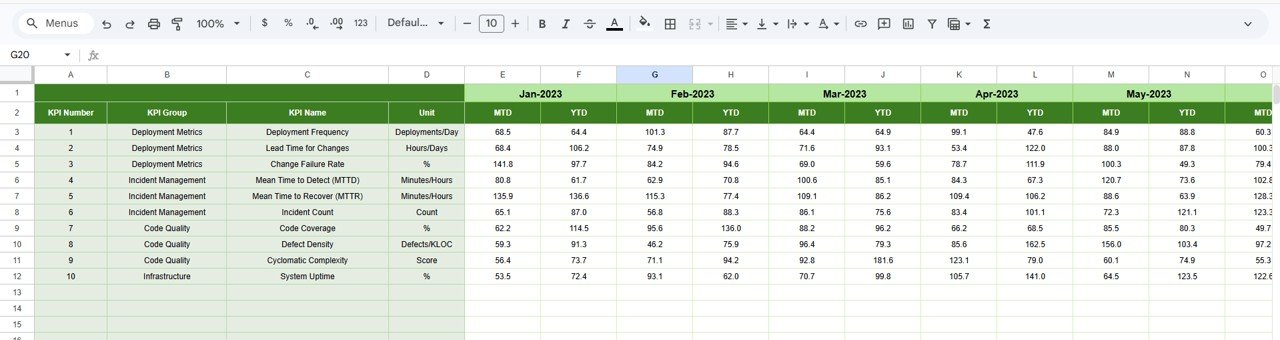
3️⃣ Actual Number Sheet – Stores real DevOps performance data.
4️⃣ Target Sheet – Contains KPI targets for performance evaluation.
5️⃣ Previous Year Sheet – Helps compare current vs historical performance.
6️⃣ KPI Definition Sheet – Includes KPI formulas, definitions, and types.

✔ Dynamic Metrics Included

  • Deployment Frequency

  • Lead Time for Changes

  • Change Failure Rate

  • Mean Time to Recovery (MTTR)

  • System Uptime

  • Incident Resolution Time

Because everything is structured and automated, you can start analyzing immediately without building anything from scratch.


⚙️ How to Use the DevOps KPI Dashboard in Google Sheets

Using this dashboard is simple and efficient.

1️⃣ Enter Data in Sheets
Add actual values, targets, and previous year data.

2️⃣ Select Month from Dropdown
Choose the reporting month from the dashboard.

3️⃣ Monitor KPI Performance
Analyze KPI cards, charts, and comparisons.

4️⃣ Review Trends
Use the KPI Trend sheet to analyze performance over time.

5️⃣ Understand KPI Logic
Refer to the KPI Definition sheet for detailed explanations.

Within minutes, you’ll have a complete view of your DevOps performance.


👥 Who Can Benefit from This DevOps KPI Dashboard in Google Sheets

👨‍💻 DevOps Teams – Track deployments, incidents, and performance metrics.
🏢 IT Managers – Monitor system performance and team productivity.
🚀 Software Development Teams – Improve delivery speed and reduce failures.
📊 Operations Teams – Ensure system uptime and operational efficiency.
💼 Organizations of All Sizes – Gain insights without expensive tools.

This dashboard is perfect for any team aiming to improve DevOps performance and efficiency.


### Click here to read the Detailed blog post

Visit our YouTube channel to learn step-by-step video tutorials
https://youtube.com/@NeotechNavigators
Compatibility and Requirements

  • Works in Google Sheets. You need a free Google account and a web browser.
  • You pick the reporting month from a dropdown on the Dashboard sheet. Google explains dropdowns in Create an in-cell dropdown list.

Frequently Asked Questions

Which sheets are included?

Six sheets: Dashboard, KPI Trend, Actual Number, Target, Previous Year and KPI Definition.

Which DevOps metrics does the dashboard track?

Deployment Frequency, Lead Time for Changes, Change Failure Rate, Mean Time to Recovery (MTTR), System Uptime and Incident Resolution Time.

How do I update the dashboard?

Enter your actual values, targets and previous year data in their sheets. Then select a month from the dropdown on the Dashboard sheet and the KPI cards and charts update.

Can I see both month-to-date and year-to-date results?

Yes. The dashboard tracks both MTD and YTD figures and compares them with targets, with up and down arrows showing whether a KPI is on track.

Is there an Excel or Power BI version?

Yes. See the DevOps KPI Dashboard in Excel and the DevOps KPI Dashboard in Power BI.

Related DevOps and IT Templates

Browse all Google Sheets KPI dashboards.

Frequently asked questions

How do I get my own copy?
After purchase you get a link to the Google Sheet. Open it while signed in to your Google account and use File > Make a copy - the copy in your Google Drive is fully yours and editable.
Do I need a paid Google account? Will it expire?
No. A free Google account is enough, and your copy lives in your own Google Drive - it never expires and there is nothing to renew.
Does it work on Mac, phone or tablet?
Yes - in any browser on Windows, Mac or Chromebook, and in the Google Sheets mobile app for viewing and quick entries.
Can I share it with my team?
Yes. Share your copy with colleagues using Google's normal sharing, with view or edit rights as you choose.
Can I change the design and formulas?
Yes, your copy is fully editable - colours, labels, logo, formulas and charts. If a range is protected, use Data > Protect sheets and ranges to remove it in your copy.
Are there macros or add-ons?
No macros or add-ons - it uses normal Google Sheets formulas and charts.
Is it a one-time payment or a subscription?
One-time payment. No subscription, no per-user fees and nothing to renew - the file is yours to keep.
How do I get the file after payment?
Instantly. The download link appears on screen after checkout, is emailed to you, and stays under My Account > Downloads on our website. If the email does not arrive within a few minutes, check your spam or promotions folder.
Is a user manual included?
Most of our newer products include a PDF user manual in the download. If yours does not have one, message us with your order number and we will send it.
Do I get free updates?
Bug fixes are always free - if something does not work as described, we fix it and send you the corrected file. New versions with new features are not included in the price, unless this product's description says otherwise.
Can you customise it for me?
Yes. Small changes to this template (your columns, categories, logo, colours, minor layout) cost the template price plus $40-80 (Rs 3,000-6,000 + GST), quoted once you send your list. A fully custom build is usually $100-200 (Rs 8,000-18,000 + GST) with two revision rounds. Email your requirements to [email protected] or message us on WhatsApp.
Can I use it for my business or my clients?
Yes, for your own personal or internal business use, for as long as you like. Reselling or redistributing the template is not allowed.
What is your refund policy?
Because these are digital downloads, they are non-refundable once delivered - except when the product does not match its description (report it within 48 hours of purchase) or there is a technical problem our team cannot fix within 72 hours. Email [email protected] with your order number.
How do I get help?
Email [email protected] (Mon-Fri, 10 AM-7 PM IST) or message us on WhatsApp +91 80770 90260 (chat only, no calls). Please include your order number.

Still have a question? Click Need help? at the bottom-left to ask our assistant, or message us on WhatsApp.

Application

Google Sheets

Template Type

KPI Dashboard

Price

Paid

Business Or Department

IT and Software Development

You may also like…

DevOps KPI Dashboard in Google SheetsDevOps KPI Dashboard in Google Sheets
Original price was: ₹1,999.00.Current price is: ₹999.00.
- +
Scroll to Top