



Customer loyalty is the backbone of sustainable business growth. 💡 The Customer Retention KPI Dashboard in Google Sheets is a ready-to-use, data-driven solution that empowers businesses to monitor, analyze, and improve their customer retention performance with ease.
By consolidating critical metrics like repeat purchase rate, customer lifetime value, and churn rate, this dashboard provides you with actionable insights to keep your customers coming back. Whether you’re a startup, eCommerce store, or established service provider, this tool helps you make data-backed decisions that boost retention and profitability.
🔑 Key Features of the Customer Retention KPI Dashboard
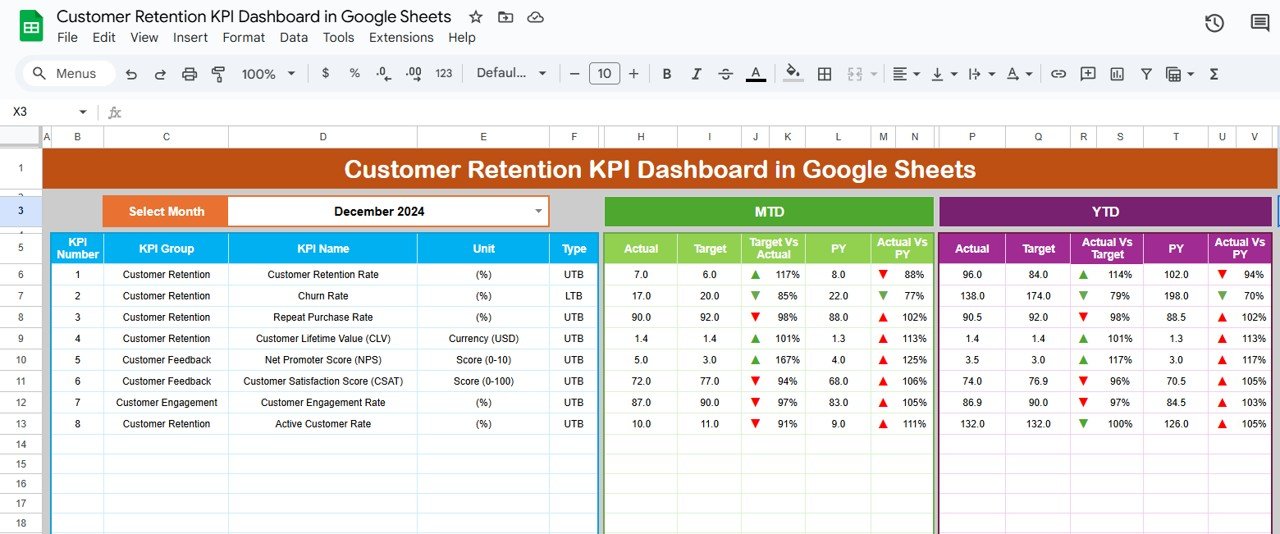
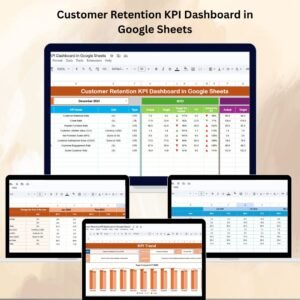
📌 Dashboard Sheet Tab – Instant Performance Snapshot
Month Selection – Choose the month from a dropdown to see all KPIs updated instantly.
MTD & YTD Data – Compare Month-to-Date and Year-to-Date performance against targets.
Previous Year Comparison – See how you’re doing versus last year’s results.
Conditional Formatting – Green arrows for hitting/exceeding targets, red for underperformance.
📈 KPI Trend Sheet Tab – Track Performance Over Time
KPI Selection – Pick a KPI from the dropdown to analyze trends.
KPI Details – Displays KPI group, unit, and whether it’s “Lower the Better” or “Upper the Better.”
Formula & Definition – Clear explanations so everyone understands the metric.
🧾 Actual Number Sheet Tab – Data Entry Made Simple
Enter MTD Actual and YTD Actual figures for each KPI.
Month selector ensures your data is entered in the right time frame.
🎯 Target Sheet Tab – Goal Setting & Tracking
Set MTD and YTD targets for each KPI.
Compare actual performance to defined goals for accountability.
📊 Previous Year Number Sheet Tab – Year-over-Year Analysis
Input last year’s MTD and YTD data for a direct performance comparison.
Identify long-term improvements or areas that need focus.
📖 KPI Definition Sheet Tab – Clarity for All Users
Lists KPI names, groups, units, formulas, and definitions.
Ensures consistent understanding across teams.
📦 What’s Inside the Customer Retention KPI Dashboard?
When you download, you get:
✅ Dashboard Tab – Summary cards, comparisons & conditional formatting
✅ KPI Trend Tab – Historical tracking & visual insights
✅ Actual Number Tab – Simple input fields for current performance data
✅ Target Tab – Set and monitor monthly & annual retention goals
✅ Previous Year Tab – Year-over-year benchmarking
✅ KPI Definition Tab – Clear metric definitions and formulas
✅ Pre-Built Formulas & Charts – No setup required
✅ Customizable Layout – Adapt it to your business needs
🧠 How to Use the Customer Retention KPI Dashboard
Open the File in Google Sheets.
Set Your KPI Targets in the Target Sheet Tab.
Input Actual Data in the Actual Number Sheet Tab.
Compare Results with targets and last year’s performance.
Use the KPI Trend Tab to analyze patterns and take action.
👥 Who Can Benefit from This Dashboard?
📦 E-commerce Stores – Monitor repeat purchases & reduce churn.
🏢 SaaS Businesses – Track subscription renewals & customer lifetime value.
📍 Retailers – Improve loyalty programs & customer satisfaction.
📊 Marketing Teams – Measure retention campaign effectiveness.
💼 Business Analysts – Generate accurate retention reports quickly.
🔗 Click here to read the Detailed blog post
🔗 Visit our YouTube channel to learn step-by-step video tutorials
Compatibility and Requirements
- Works in Google Sheets. You need a free Google account and a web browser.
- You pick the month and the KPI from dropdowns. Google explains dropdowns in Create an in-cell dropdown list.
Frequently Asked Questions
Which sheets are included?
Six sheet tabs: Dashboard, KPI Trend, Actual Number, Target, Previous Year Number and KPI Definition.
How do I update the dashboard?
Enter your MTD and YTD figures in the Actual Number sheet and your goals in the Target sheet. Then choose a month on the Dashboard sheet and every KPI updates.
Can I compare this year with last year?
Yes. Add last year’s MTD and YTD figures to the Previous Year Number sheet and the Dashboard compares them with your actuals and targets.
How do I see the trend for one KPI?
Open the KPI Trend sheet and pick the KPI from the dropdown. It shows the KPI group, the unit, whether the KPI is Lower the Better or Upper the Better, and its formula and definition.
Is there an Excel or Power BI version?
Yes. See the Customer Retention KPI Dashboard in Excel and the Customer Retention KPI Dashboard in Power BI.
Related Customer Templates
- Customer Retention KPI Dashboard in Excel: the same retention KPIs in Excel
- Customer Retention KPI Dashboard in Power BI: the Power BI edition
- Customer Retention Checklist in Google Sheets: a checklist for retention actions
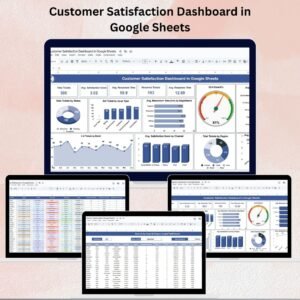
- Customer Satisfaction Dashboard in Google Sheets: a satisfaction view in the same platform
- Google Sheets Business Pack (Pro): 14 business templates in one download
Browse all Google Sheets KPI dashboards.































Reviews
There are no reviews yet.