


The Dynamic Spin Wheel in Excel is an interactive spin wheel built with Excel and VBA. It lets you randomly pick names, choose winners and make fair decisions with one click. It suits teachers, HR and office teams, event hosts and anyone running a raffle or giveaway who wants a fun, transparent draw without extra software.
Key Features of the Dynamic Spin Wheel in Excel
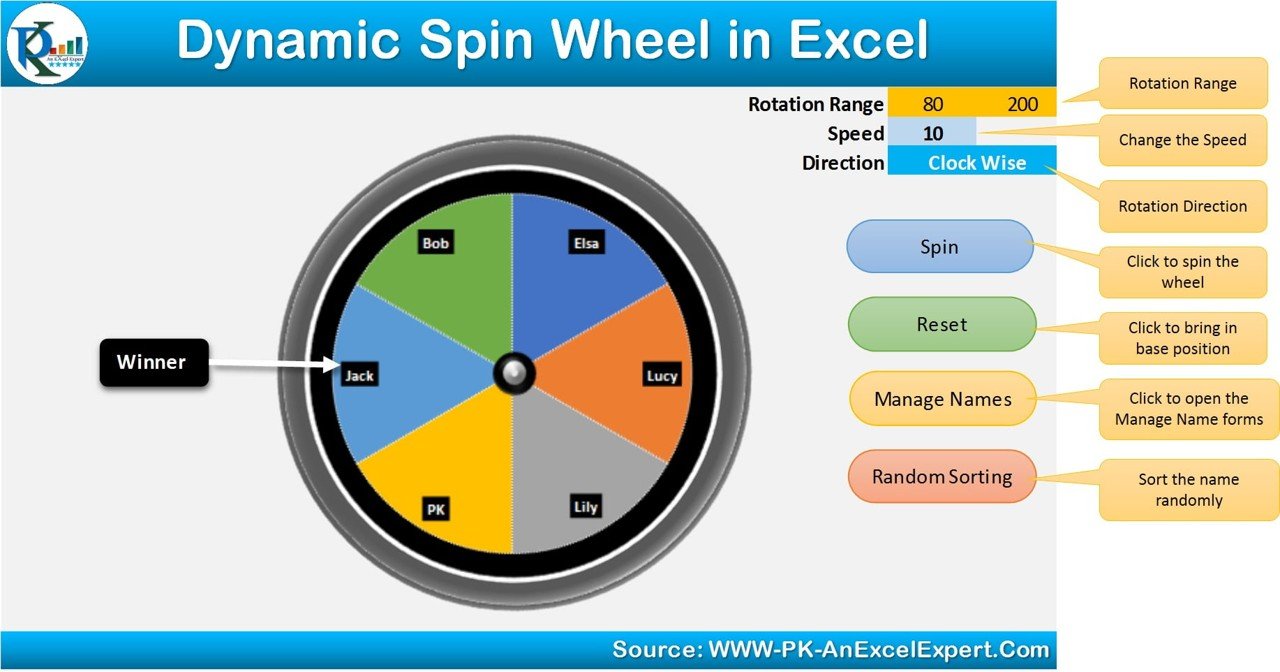
- Interactive spin functionality: Click the “Spin” button and the wheel rotates smoothly to select a winner, giving participants an exciting experience.
- Customizable rotation range and speed: Set the speed and range of the spin. Choose a fast spin for quick results or a slower spin for added suspense.
- Clockwise and counterclockwise rotation: Switch the rotation direction to keep the draw engaging.
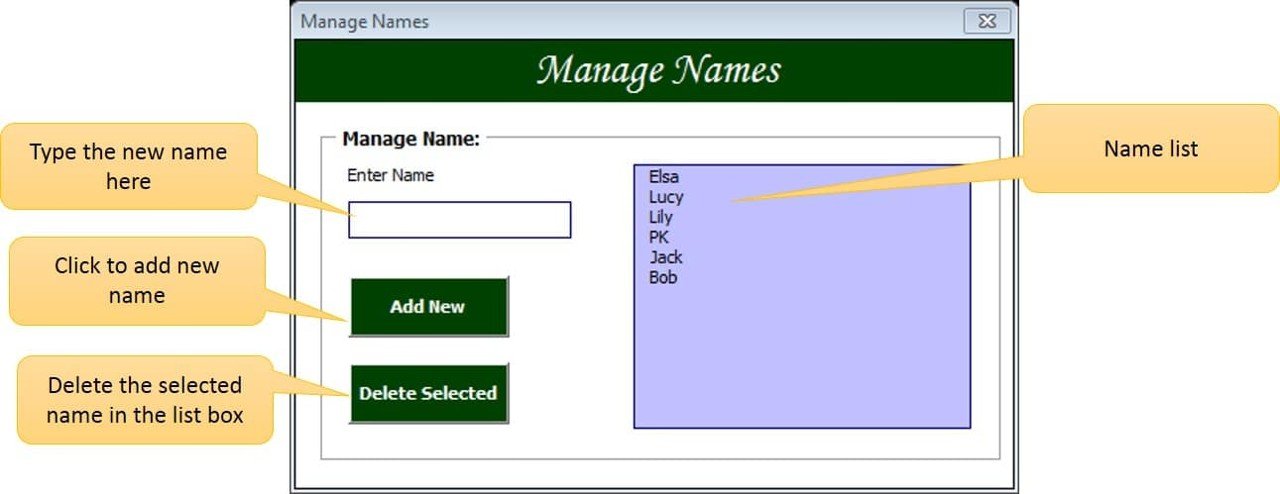
- Built-in name management: Add, delete or modify names using the name management form. Enter names in the provided list box and the wheel updates instantly.
- Random sorting option: The “Random Sorting” feature shuffles names before spinning, which supports fair decision-making.
- Reset button for quick restarts: Click “Reset” to return the wheel to its base position and run another round.
- Automated winner display: The tool automatically highlights the winning name, so results are easy to see and track.
- No additional software needed: Everything runs inside Excel with VBA. There are no third-party applications to install.
- User-friendly interface: A clean layout, clear buttons and labeled instructions make it easy even for beginners.
- Fully customizable: Change the interface, colors and settings to match your personal or business branding.
What’s Inside the Spin Wheel Tool
| Component | What it does |
|---|---|
| Spin wheel | The visual wheel showing all participant names, rotating dynamically when spun |
| Spin button | Starts the rotation and randomly picks a winner |
| Speed, range and direction settings | Control how fast and how far the wheel spins, clockwise or counterclockwise |
| Name management form | A list box for adding, editing and removing names |
| Random Sorting | Shuffles the names before a spin |
| Reset button | Brings the wheel back to its base position for the next round |
| Winner highlight | Automatically marks the selected name as the winning entry |
Why Choose This Excel VBA Spin Wheel?
- Fair and unbiased selection: Random selection removes personal bias when choosing names.
- Great for events and giveaways: Use it for a virtual event, an Excel lucky draw or a classroom game to keep participants engaged.
- Lightweight and efficient: Runs smoothly on Excel versions that support VBA, using minimal system resources.
- Instant results: No manual work. Just click, spin and get your result.
Who It’s For
This random name picker works well for anyone who needs a quick, visible and fair draw:
- Teachers and schools: pick students for questions, presentations or classroom activities.
- Offices and HR teams: run team-building games, assign tasks or choose prize winners.
- Event hosts and marketers: run raffles, online contests and giveaways.
- Individuals and groups: settle everyday decisions or simply add some fun.
How to Use the Dynamic Spin Wheel in Excel
- Enter names: Open the name management form and enter participants’ names. Remove or edit entries as needed.
- Set rotation speed and direction: Choose clockwise or counterclockwise and adjust the speed for a dramatic effect.
- Spin the wheel: Click the “Spin” button and watch the wheel rotate to randomly pick a winner.
- View the winner: The selected name is automatically highlighted as the winning entry.
- Reset and repeat: Click the “Reset” button and spin again for the next round.
Note: Because this is a VBA tool, enable macros when you open the file so the buttons and spin work.
Watch the step-by-step video tutorial:
Click here to read the detailed blog post.
Visit our YouTube channel to learn from step-by-step video tutorials: Youtube.com/@PKAnExcelExpert
Frequently Asked Questions
What is the Dynamic Spin Wheel in Excel?
It is an interactive spin wheel built with Excel and VBA that works as a random name selector. You enter names, click Spin, and the wheel picks and highlights a winner.
Do I need any extra software?
No. The tool runs entirely in Excel with VBA. It works on Excel versions that support VBA, and no third-party applications are required.
Can I change the speed and direction of the spin?
Yes. You can adjust the rotation speed and range, and you can switch between clockwise and counterclockwise rotation.
How do I add or remove names?
Use the built-in name management form. Enter, edit or delete names in the list box and the wheel updates instantly.
Is the selection fair?
The wheel picks names at random. The Random Sorting option also shuffles names before spinning, which helps keep every draw unbiased.
Can I customize the look of the wheel?
Yes. You can modify the interface, colors and settings to match your personal or business branding.
Also check our Download Attachments from Multiple Emails Automatically using VBA
Last updated: October 2026
Compatibility and Requirements
- Needs Microsoft Excel desktop on Windows with macros enabled, because the file runs on VBA.
- It does not work in Excel for the web, Google Sheets or the Excel mobile apps. Microsoft explains macro settings in Enable or disable macros in Microsoft 365 files.
- Runs on any Excel desktop version that supports VBA. No other software is needed.
Related Excel VBA Tools
- Smart Attendance Manager in Excel VBA: another VBA tool for classrooms and teams
- PK’s Utility Tool in Excel VBA: a free set of Excel VBA utilities
- 3D Gauge Chart in Excel: another visual Excel chart
- VBA Management Systems Mega Pack: 5 premium Excel VBA systems in one bundle
Browse all Excel VBA tools or the Excel chart templates.
















Reviews
There are no reviews yet.