

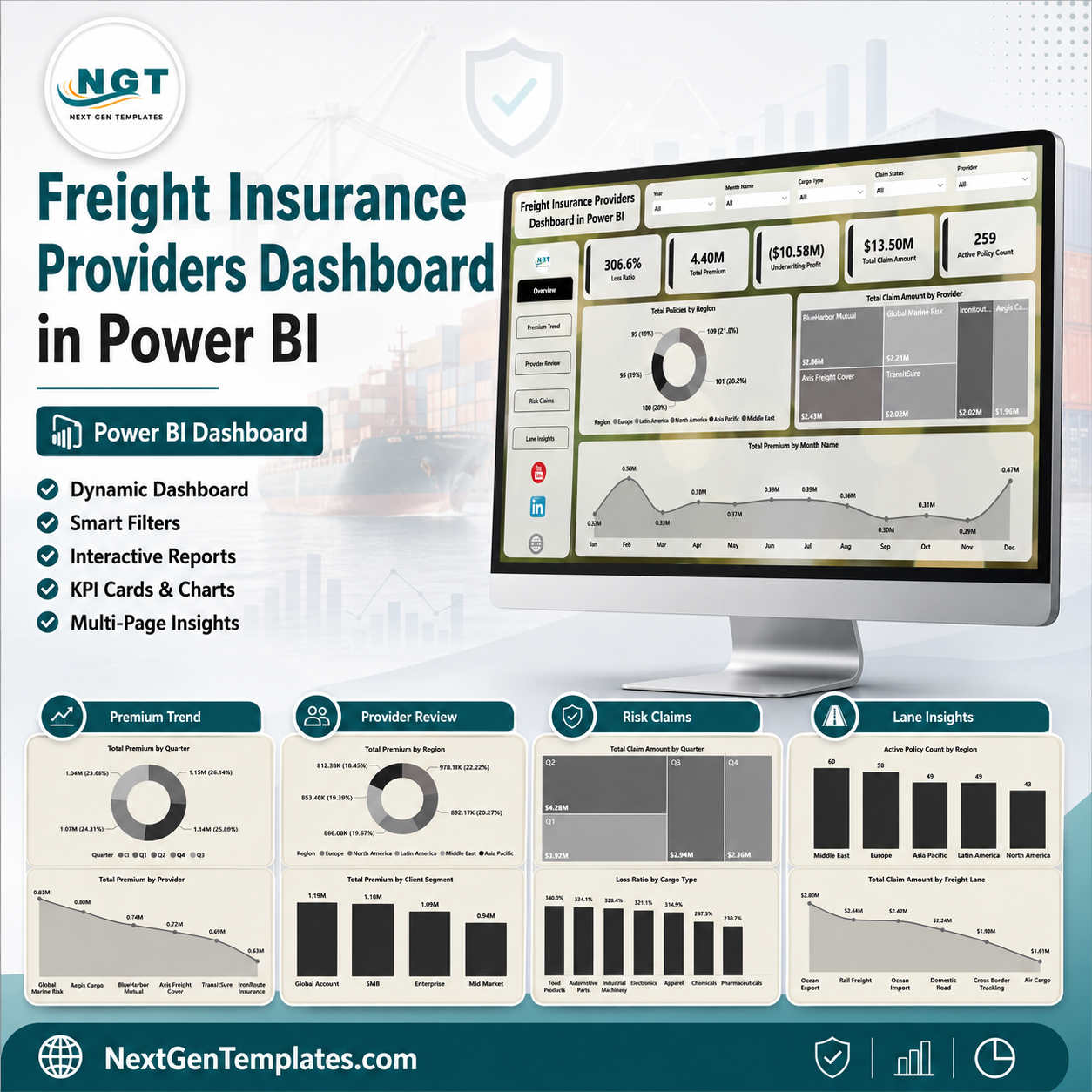
Freight Insurance Providers Dashboard in Power BI helps cargo insurance providers, freight brokers, logistics analysts, and transportation risk teams monitor premiums, claims, loss ratio, underwriting profit, active policies, regions, providers, coverage types, cargo types, and freight lanes in one editable PBIX report. It includes 5 Power BI report pages, 5 executive KPI cards, multiple slicers, and 15 focused analysis visuals. Join 8,400+ teams using NextGenTemplates for one-time-purchase business templates. Instant download, lifetime file access, and no monthly SaaS subscription.
Key Features of Freight Insurance Providers Dashboard in Power BI
- 5 Power BI pages: Overview Page, Premium Trend, Provider Review, Risk Claims, and Lane Insights.
- Executive KPI cards: Loss Ratio, Total Premium, Underwriting Profit, Total Claim Amount, and Active Policy Count.
- Interactive slicers: Filter by region, provider, coverage type, cargo type, freight lane, quarter, month, and client segment.
- Premium analytics: Review premium performance by month, quarter, coverage type, provider, region, and client segment.
- Claims and risk views: Analyze claim amount, loss ratio, active policies, cargo type risk, and freight lane exposure.
- Editable PBIX file: Customize pages, visuals, measures, fields, relationships, and branding in Power BI Desktop.
What’s Inside the Freight Insurance Providers Dashboard in Power BI
1. Overview Page
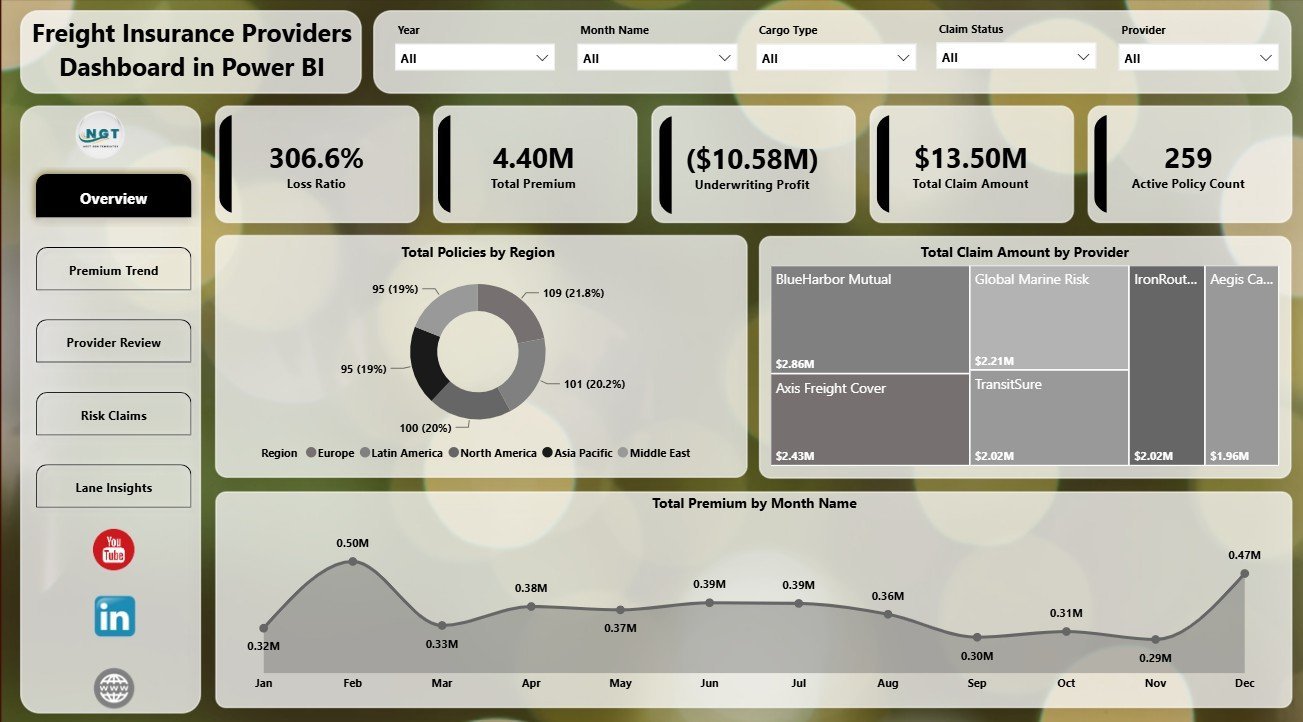
The Overview Page gives leaders a high-level view of freight insurance health. KPI cards show Loss Ratio, Total Premium, Underwriting Profit, Total Claim Amount, and Active Policy Count so users can quickly judge premium volume, claim pressure, profitability, and active policy exposure.
Total Policies by Region: This chart shows where active and historical policy records are concentrated. It helps managers compare regional coverage demand and identify markets with stronger policy activity.
Total Claim Amount by Provider: This visual compares claim value across insurance providers. It supports provider reviews, claims discussions, and early identification of providers with higher claim exposure.
Total Premium by Month Name: This chart tracks monthly premium movement. It helps teams spot seasonality, premium spikes, and months that require deeper underwriting or sales review.
2. Premium Trend
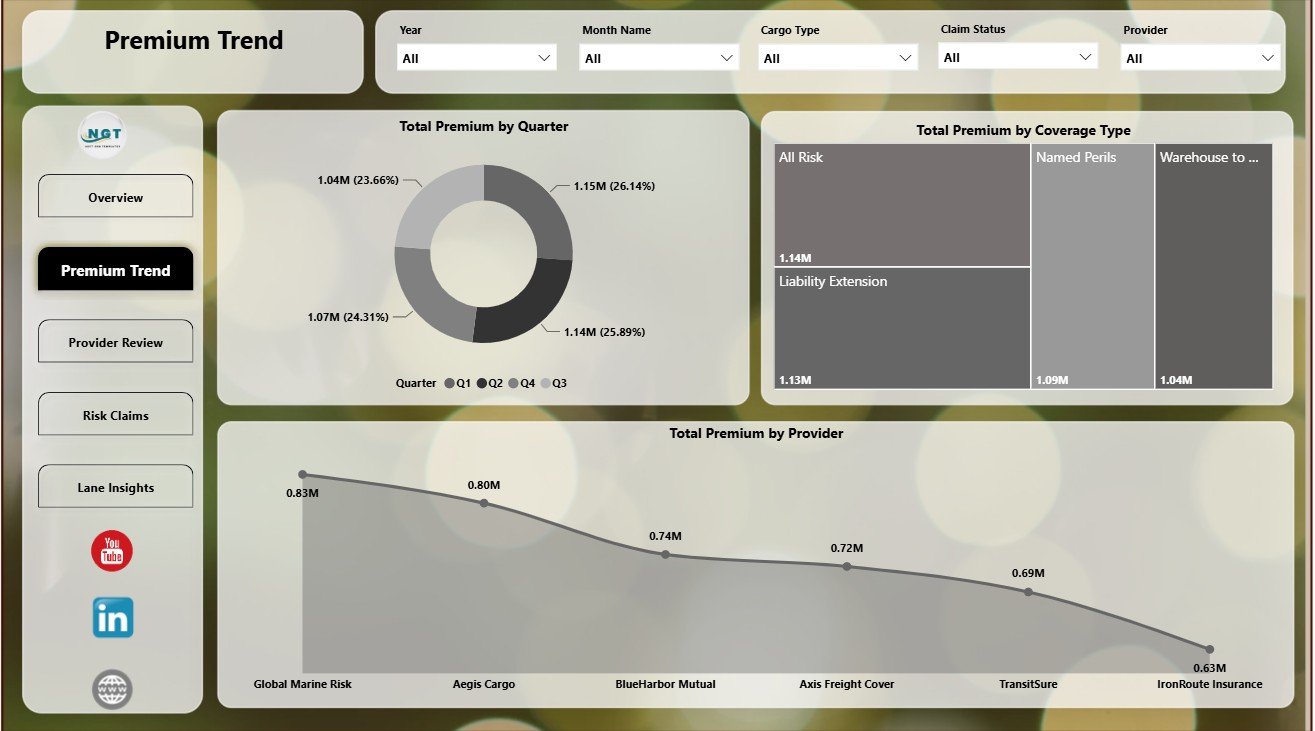
The Premium Trend page focuses on premium movement and premium mix across business dimensions. It helps finance, underwriting, and logistics insurance teams understand how premium revenue changes over time and where premium concentration sits.
Total Premium by Quarter: Review quarterly premium performance for management reporting and trend analysis. This view helps compare seasonal movements and detect changes in freight insurance demand.
Total Premium by Coverage Type: Compare premium contribution across coverage categories. It helps teams understand which coverage products drive revenue and where pricing review may be needed.
Total Premium by Provider: Rank providers by total premium volume. This supports provider negotiations, channel review, and portfolio concentration analysis.
3. Provider Review
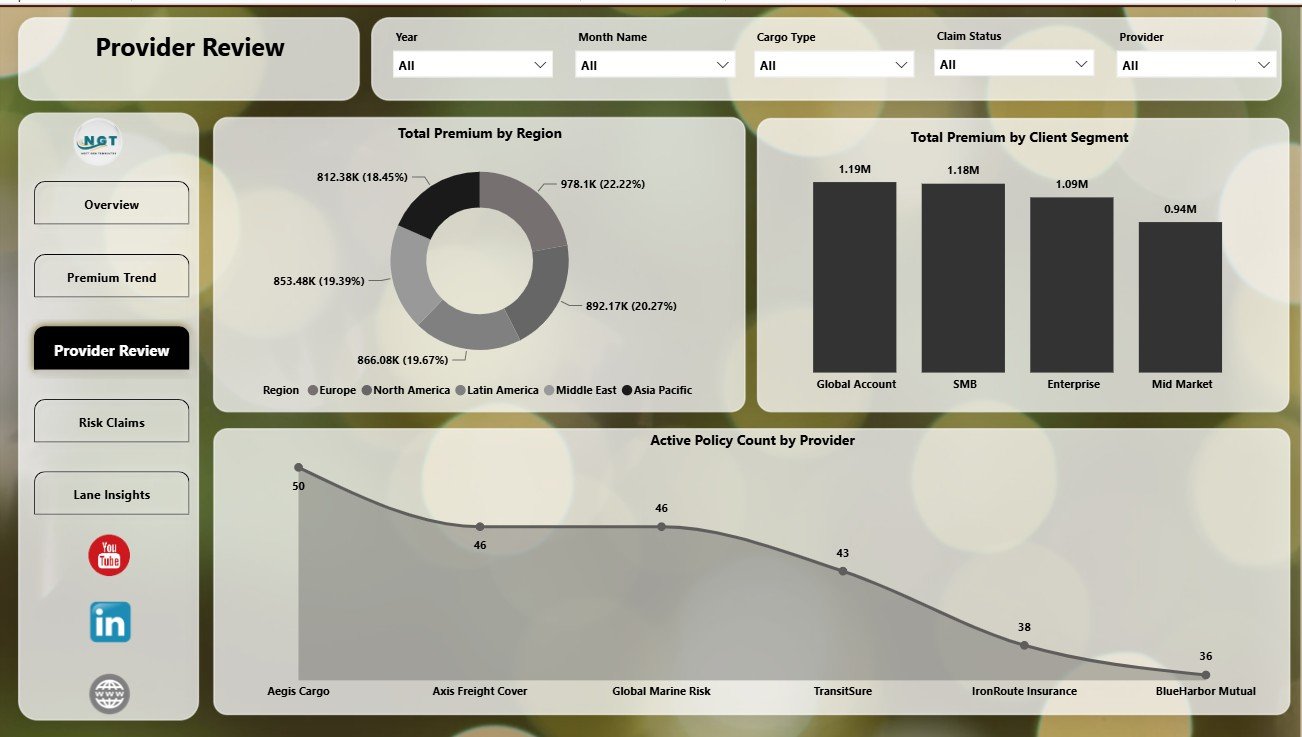
The Provider Review page compares provider, region, and client-segment performance. It is useful for vendor reviews, provider scorecards, renewal meetings, and client portfolio reporting.
Total Premium by Region: Compare premium contribution by region to see where the book of business is strongest. This helps regional managers understand market contribution and growth opportunities.
Total Premium by Client Segment: Analyze premium by customer segment, such as small business, enterprise, brokered accounts, or other available segments. It helps teams identify the customer groups generating the most premium.
Active Policy Count by Provider: Review how many active policies sit with each provider. This helps users understand provider dependency and operational workload by provider.
4. Risk Claims
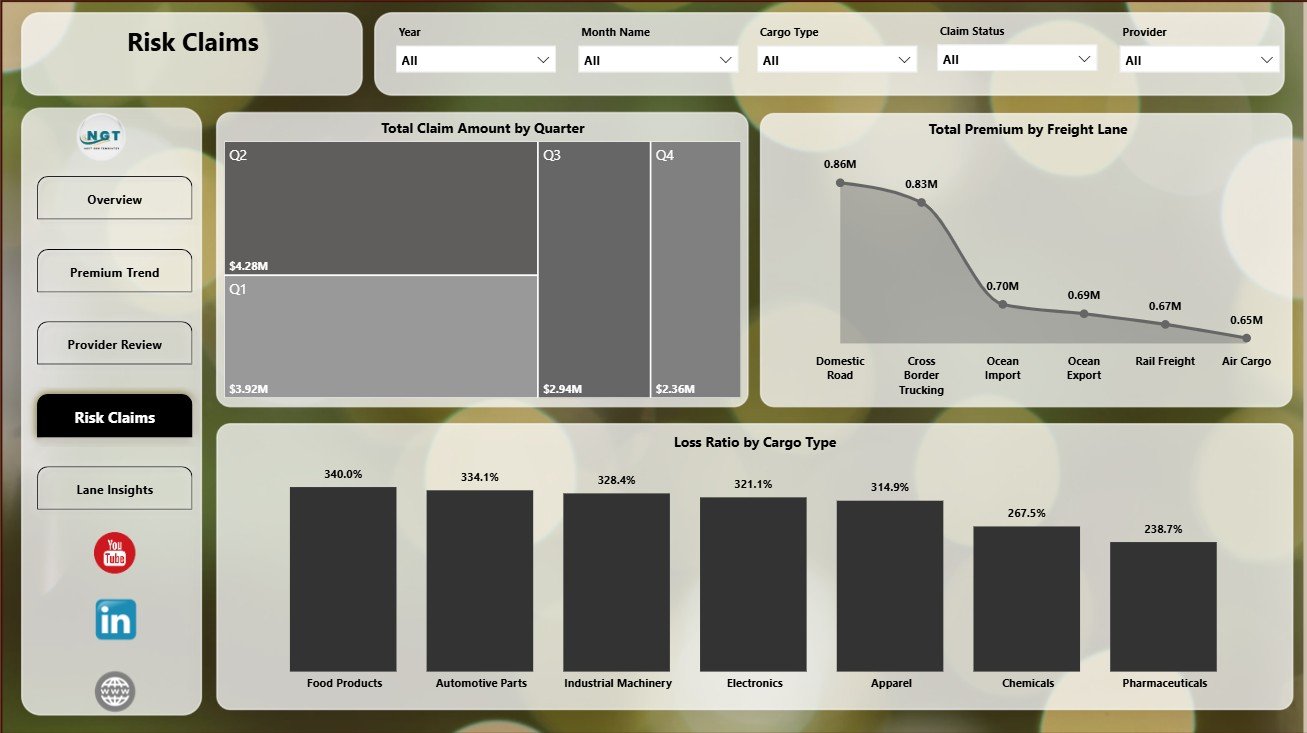
The Risk Claims page brings claim value, freight lane, cargo type, and loss ratio into one risk-focused view. It helps underwriting and claims teams identify claim-heavy areas and review risk patterns.
Total Claim Amount by Quarter: Track claim value by quarter to see whether claim costs are rising or falling. This supports quarterly risk reviews and reserve discussions.
Total Premium by Freight Lane: Compare premium generated by each freight lane. It helps teams understand which routes contribute the most revenue and where exposure is concentrated.
Loss Ratio by Cargo Type: Compare claim cost against premium by cargo category. This helps highlight cargo types that may require pricing, policy wording, or risk-control review.
5. Lane Insights
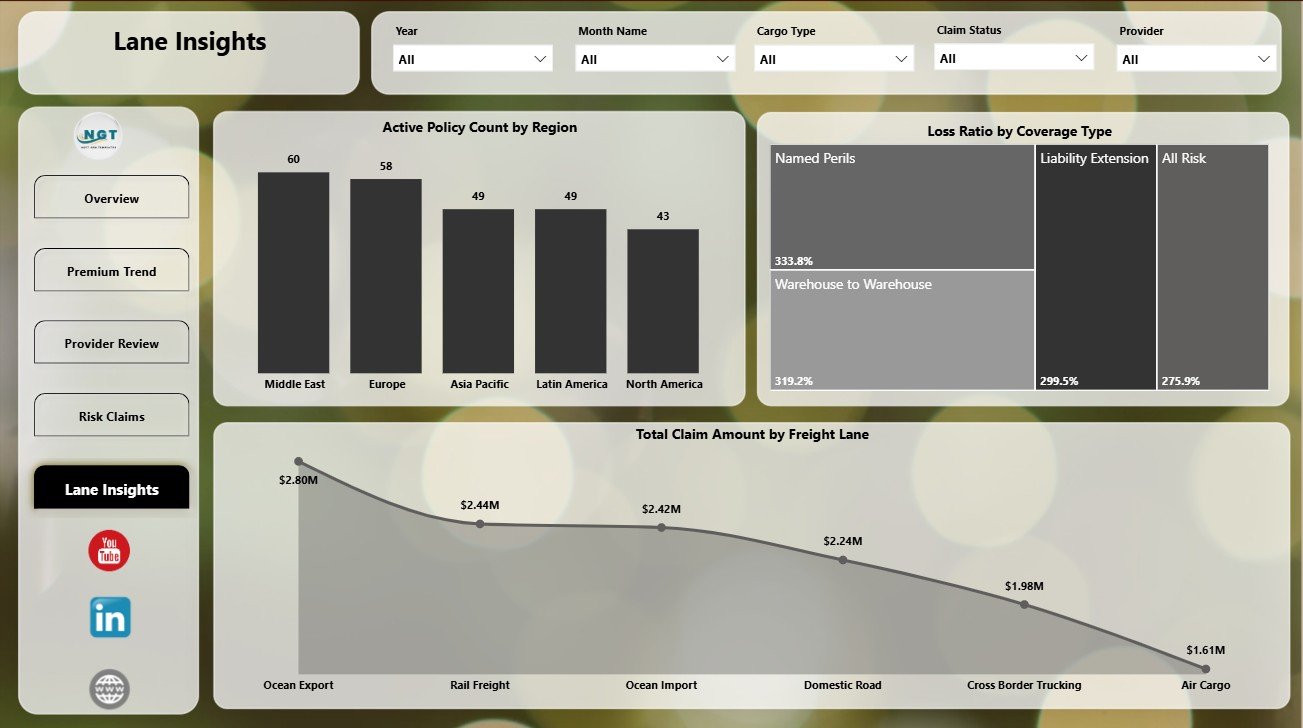
The Lane Insights page focuses on regional policy activity, coverage risk, and freight-lane claim exposure. It helps logistics insurance teams evaluate where policies and claim costs are concentrated.
Active Policy Count by Region: Review active policy distribution by geography. This helps regional teams understand coverage concentration and servicing load.
Loss Ratio by Coverage Type: Compare claim performance by coverage category. It supports pricing discussions and coverage-level risk review.
Total Claim Amount by Freight Lane: Identify freight lanes with the highest claim value. This helps teams focus risk-control actions on routes with heavier claim exposure.
Freight Insurance Providers Dashboard in Power BI vs. Tableau vs. Paid Insurance SaaS – Where This Fits
| Feature | This Power BI Dashboard | Tableau Alternative | Paid Insurance SaaS |
|---|---|---|---|
| Cost | $17.99 one-time template purchase | License plus report build time | Monthly or annual subscription |
| Platform | Power BI Desktop / Power BI Service | Tableau Desktop / Tableau Cloud | Vendor cloud platform |
| Setup time | Open PBIX, connect or replace data, refresh | Build model and visuals manually | Implementation and onboarding |
| Mobile access | Power BI mobile app after publishing | Tableau mobile app after publishing | Vendor app or browser |
| Freight insurance analytics | Premium, claims, policies, providers, cargo, coverage, region, and lane reporting | Requires custom setup | Depends on module and plan |
Who This Template Is For – and Who It’s Not For
This template is for freight insurance providers, cargo insurance teams, freight brokers, logistics finance analysts, transportation risk managers, 3PL reporting teams, and Power BI consultants who need a structured reporting layer for premiums, claims, loss ratio, underwriting profit, providers, freight lanes, cargo types, regions, and coverage types.
It is not a replacement for policy administration software, claims workflow automation, compliance filing, payment processing, or live carrier integrations. It works best when your data is already collected and you need a Power BI analytics report for management review.
How to Use the Freight Insurance Providers Dashboard in Power BI
- Download and unzip the Power BI dashboard package.
- Open the PBIX file in Power BI Desktop, which is free from Microsoft.
- Review the sample data structure and map your own freight insurance records to the same fields.
- Refresh the report after replacing or connecting the data source.
- Use slicers to filter by region, provider, coverage type, cargo type, freight lane, and period.
- Customize visuals, measures, fields, relationships, and colors if needed.
Real-World Use Cases
Neha, Cargo Insurance Manager: reviews loss ratio, claim amount, underwriting profit, and active policy count before provider review meetings.
Arjun, Logistics Finance Analyst: uses Premium Trend and Provider Review pages to explain quarterly premium movement by provider, region, and client segment.
Maria, Freight Broker Consultant: filters Risk Claims and Lane Insights to prepare client-facing recommendations by cargo type and freight lane.
Frequently Asked Questions
Does this dashboard work in Power BI Desktop?
Yes. Open the PBIX file in Power BI Desktop, then review, replace, or connect the source data.
What pages are included?
The report includes Overview Page, Premium Trend, Provider Review, Risk Claims, and Lane Insights.
Can I use my own freight insurance data?
Yes. Map your data to the same field structure and refresh the Power BI model.
Is this a full insurance management system?
No. It is an analytics dashboard, not a claims processing, policy issuance, compliance, or billing system.
Can I customize the report?
Yes. Power BI users can edit visuals, measures, fields, relationships, formatting, and report pages.
About the Author
Built by PK – Microsoft Certified Professional with 15+ years of Excel, Google Sheets, and Power BI experience. Founder of NextGenTemplates, reaching 300K+ subscribers across YouTube channels. Every template is hand-built and tested before release.
Explore Related Templates
You may also like the Freight Insurance Providers Dashboard in Excel and Logistics Dashboard in Power BI. Browse more Power BI Dashboard templates and Power BI templates.
Click here to read the detailed blog post.
Download the Freight Insurance Providers Dashboard in Power BI today and turn freight insurance premiums, claims, providers, cargo, regions, and lanes into clear Power BI insights.
Last updated: June 16, 2026.












Reviews
There are no reviews yet.