

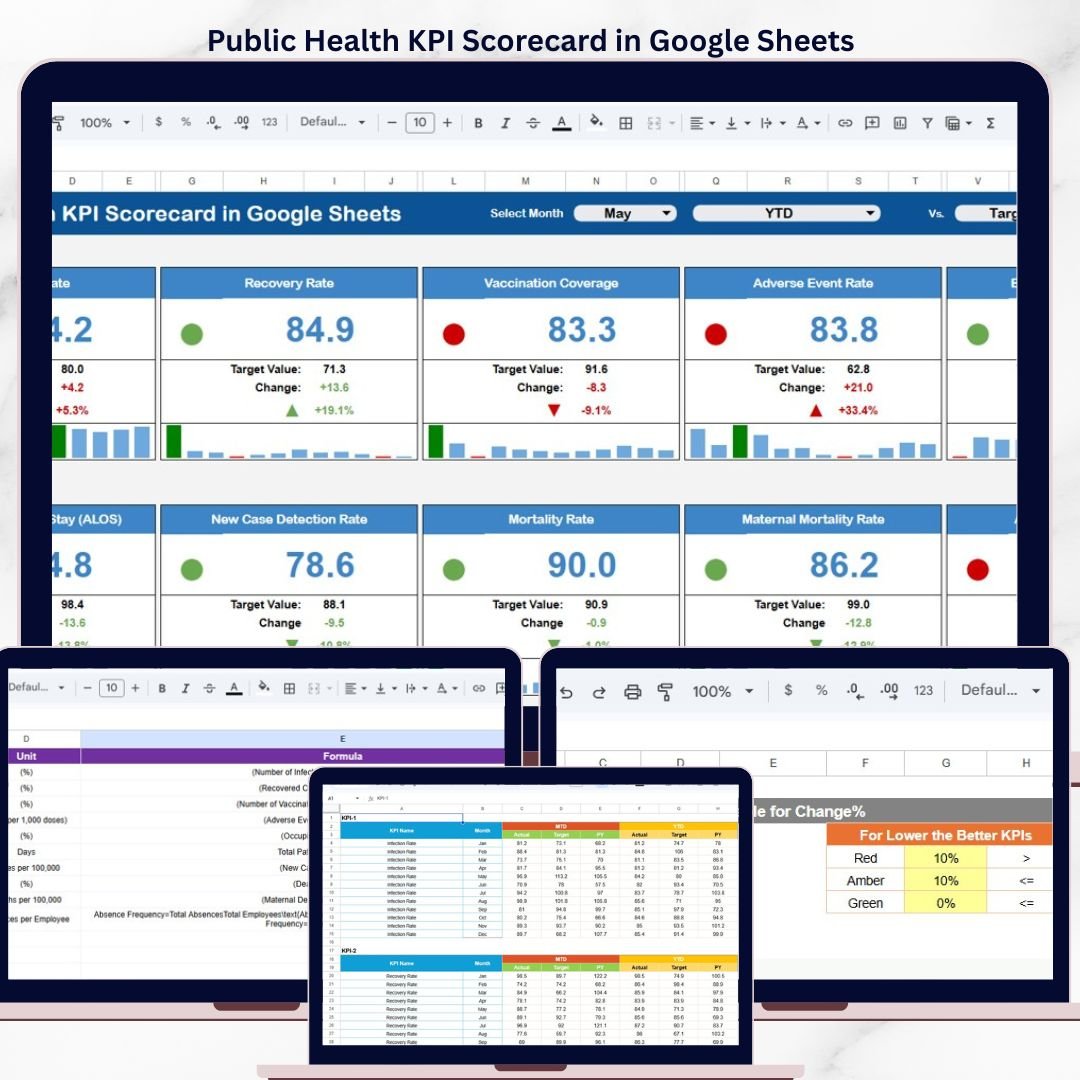

The Public Health KPI Scorecard in Google Sheets monitors 10+ public health KPIs across 4 interactive worksheets, with automated MTD and YTD calculations, traffic-light indicators, and trend analysis charts. Setup takes under 10 minutes — just enter your health metrics and the entire scorecard updates automatically.
🌍 Join 8,400+ teams in 40+ countries using NextGenTemplates to replace paid SaaS tools with one-time-purchase Excel, Google Sheets, Power BI, and HTML templates.
✅ Instant download · One-time payment · No subscription · No per-user fees · Lifetime access
🔑 Key Features of Public Health KPI Scorecard in Google Sheets
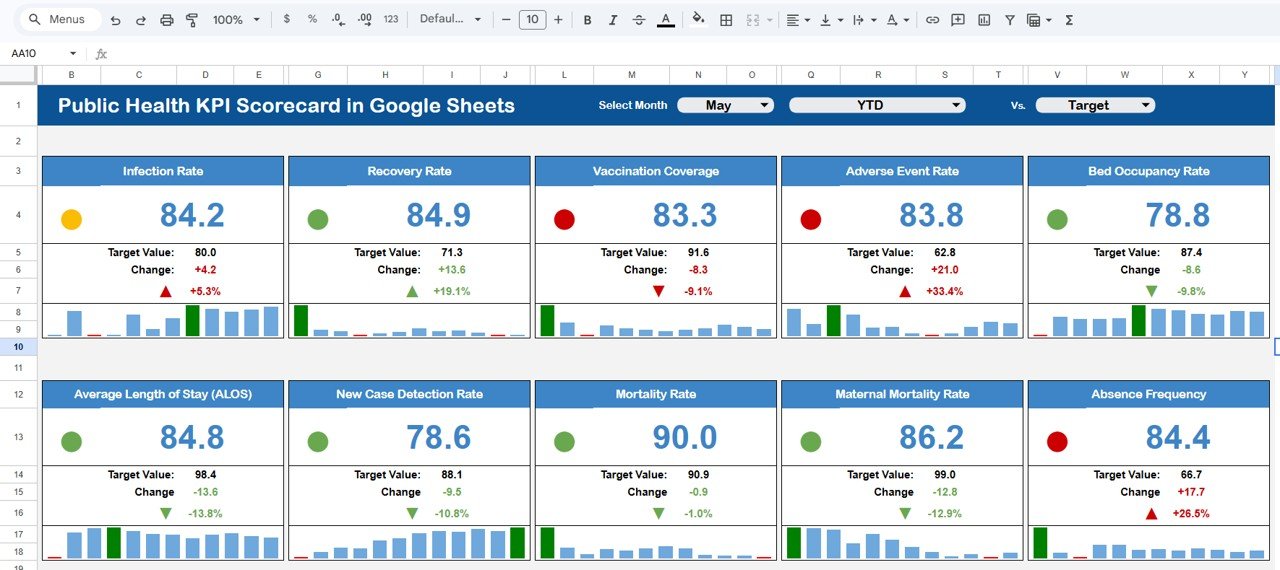
📊 Dynamic Scorecard Dashboard – The Scorecard sheet displays all public health KPIs in a single view with dropdown menus for selecting the reporting month and switching between MTD (Month-to-Date) and YTD (Year-to-Date) analysis. Each KPI shows Actual vs Target values with color-coded conditional formatting for instant status recognition.
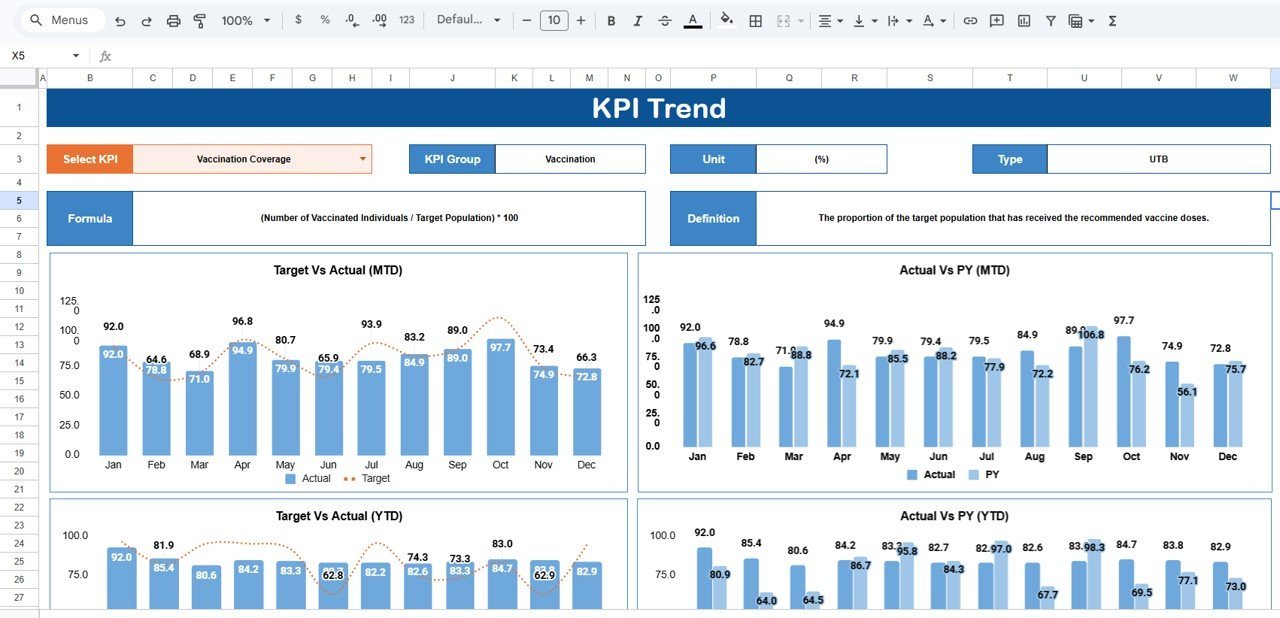
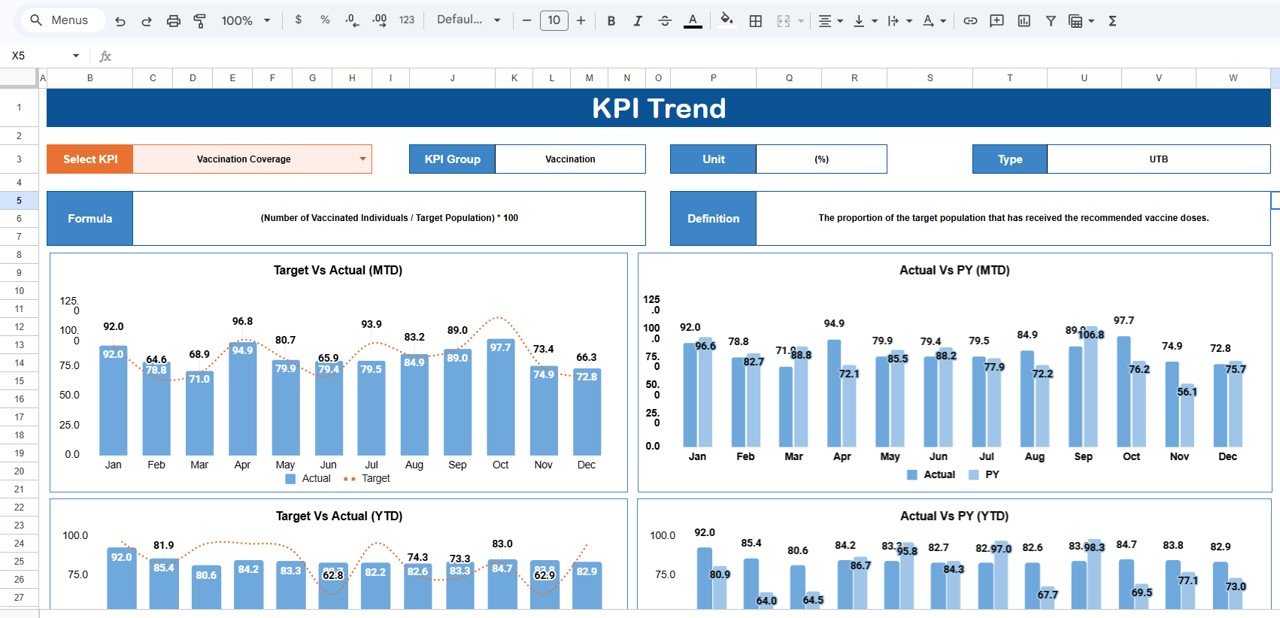
📈 Interactive KPI Trend Analysis – Select any KPI from the dropdown on cell C3 in the KPI Trend sheet to view its Group, Unit, Type (Upper the Better or Lower the Better), Formula, and Definition. MTD and YTD trend charts compare Actual, Target, and Previous Year numbers side by side.
📅 MTD and YTD Performance Tracking – Toggle between monthly snapshots and cumulative year-to-date views to identify seasonal patterns, track vaccination drives, or monitor disease outbreak responses across different timeframes.
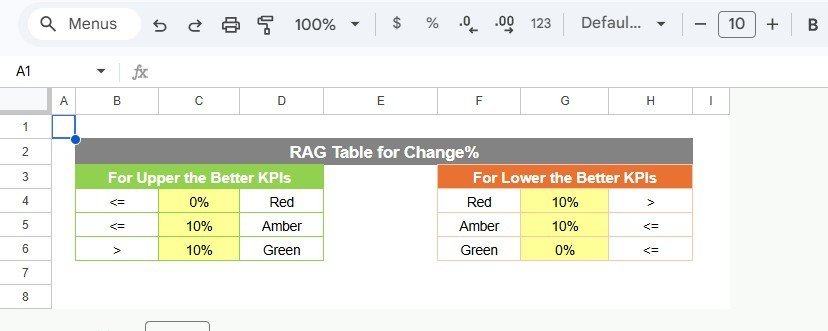
🟢🟡🔴 Traffic-Light Visual Indicators – Color-coded signals instantly highlight strong (green), average (yellow), and underperforming (red) KPIs. Up and down arrows with percentage change show performance movement at a glance.
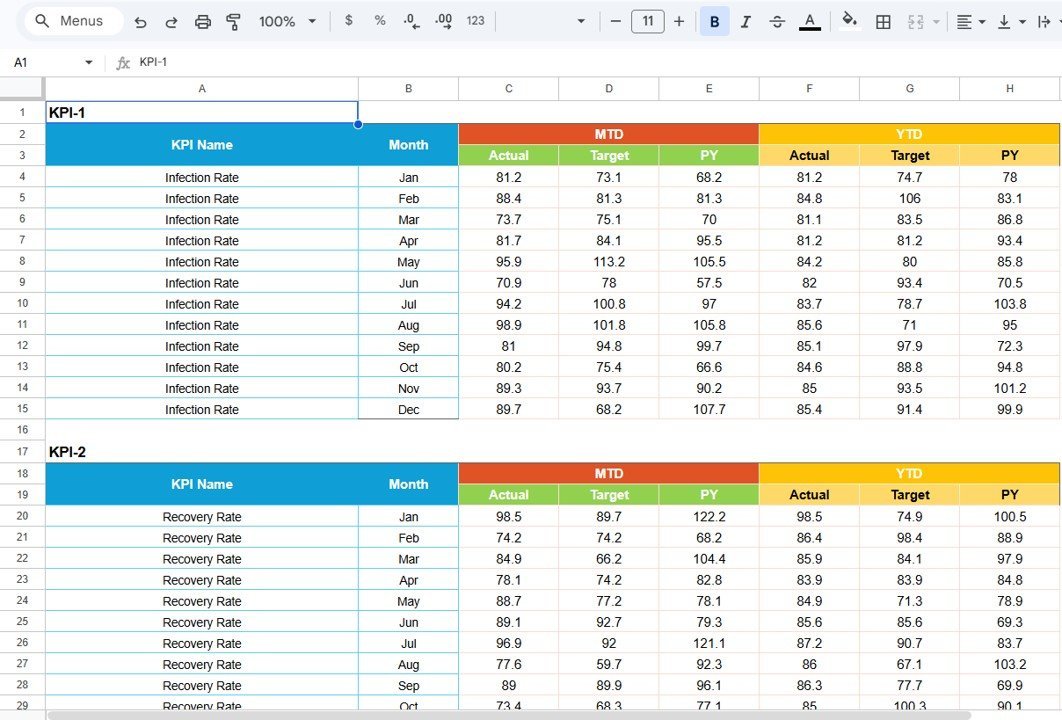
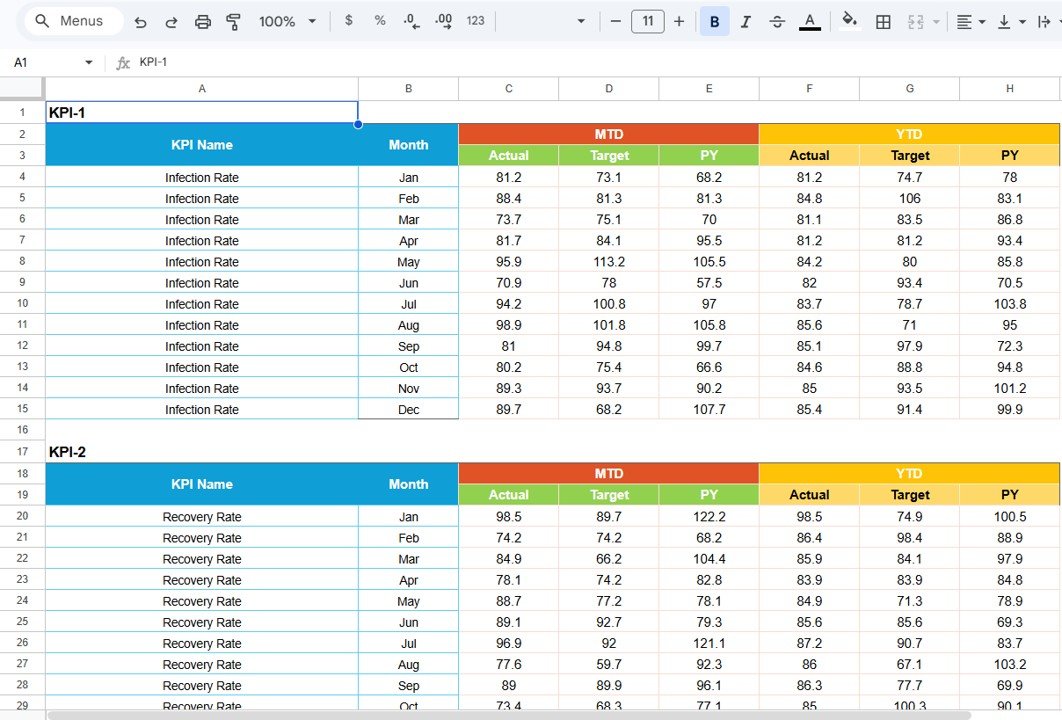
📋 Structured Input Data Sheet – Enter monthly Actual, Target, and Previous Year values for each KPI in one organized sheet. All calculations and visuals across the entire scorecard update automatically when data changes.
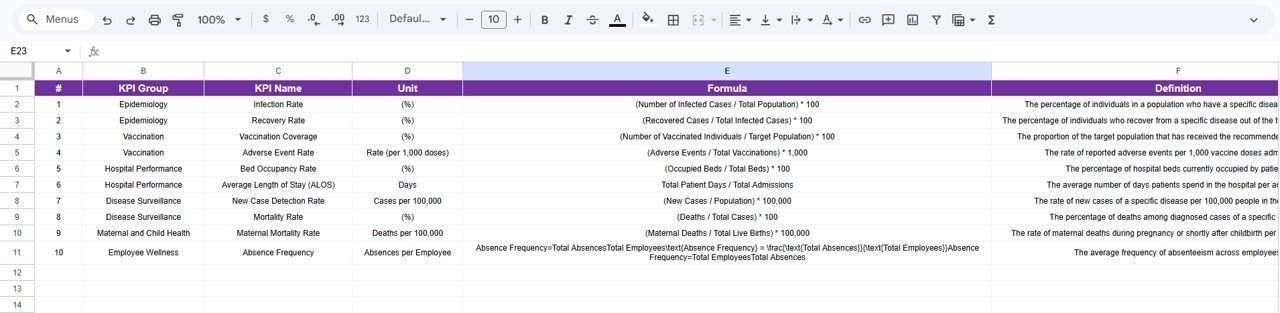
📘 KPI Definition Repository – Maintain standardized KPI definitions including Name, Group, Unit, Formula, and Definition. This ensures every team member and stakeholder interprets performance metrics consistently.
☁️ Google Sheets Cloud-Based Access – Real-time collaboration from any device. Share with team members, department heads, or external stakeholders with built-in Google Sheets sharing controls.
⚡ Zero-Code Automated Formulas – All calculations, comparisons, and visual updates are formula-driven. No Google Apps Script, no macros, no coding required.
📦 What’s Inside the Public Health KPI Scorecard in Google Sheets
This ready-to-use Google Sheets KPI Scorecard template includes 4 professionally designed worksheets:
📊 1. Scorecard Sheet (Main Dashboard)
Public Health KPI Scorecard in Google Sheets
The Scorecard sheet is the main interface where you can view KPI performance. Select the month, MTD (Month-to-Date), or YTD (Year-to-Date) from dropdown menus. Compare actual performance against targets for each KPI. Color-coded visuals and conditional formatting highlight performance status instantly. All relevant KPI information including MTD and YTD comparisons appears in one consolidated view.
📈 2. KPI Trend Sheet
KPI Trend Sheet
Select the KPI name from the dropdown on cell C3. The sheet displays KPI Group, Unit of KPI, Type of KPI (Lower the Better or Upper the Better), Formula, and Definition. MTD and YTD trend charts show Actual, Target, and Previous Year numbers for pattern identification and long-term analysis.
📋 3. Input Data Sheet
Input Data Sheet
Record actual values, targets, and other metrics for each KPI. Update data as new results become available, ensuring the scorecard remains current. The entire dashboard recalculates automatically when you modify any input.
📘 4. KPI Definition Sheet
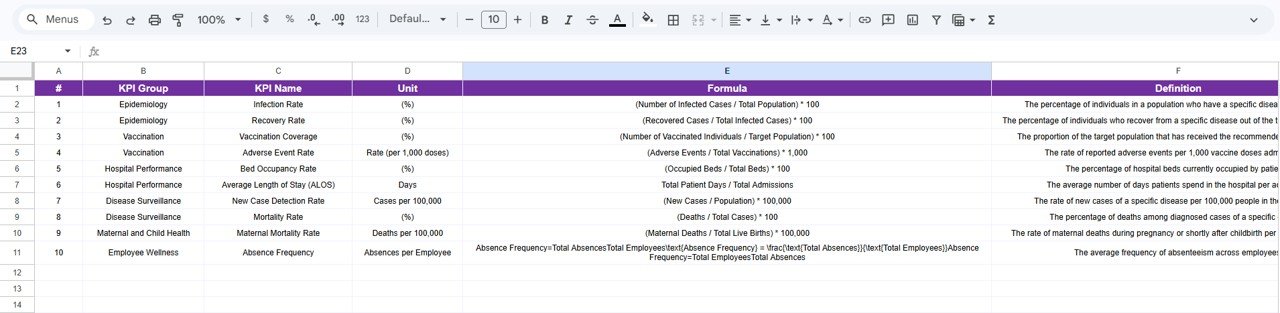
KPI Definition Sheet
Enter the KPI Name, KPI Group, Unit, Formula, and KPI definition. This reference sheet ensures all departments and stakeholders use consistent KPI interpretations.
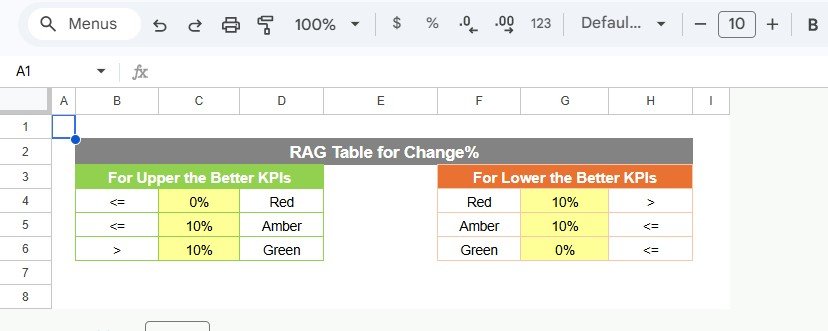
Color Settings
📊 Public Health KPI Scorecard in Google Sheets vs. Excel Scorecard vs. Paid Health SaaS — Where This Fits
| Feature | Public Health KPI Scorecard in Google Sheets | Excel KPI Scorecard | Athenahealth / Kareo |
|---|---|---|---|
| Cost | $8.99 one-time | $12.99 one-time | $25–150 / user / month |
| Platform | Google Sheets (browser) | Microsoft Excel (desktop) | Cloud SaaS |
| Setup Time | Under 10 minutes | Under 10 minutes | Days to weeks |
| Real-Time Collaboration | ✅ Built-in (Google Sheets) | Requires OneDrive/SharePoint | ✅ Yes |
| Mobile Access | ✅ Any device with browser | Requires Excel mobile app | ✅ Mobile app |
| Customizable KPIs | ✅ Fully editable | ✅ Fully editable | Limited to plan tier |
| Share with Link | ✅ One-click sharing | Requires file transfer | Requires user license |
| Year-1 Cost (5 users) | $8.99 total | $12.99 total | $1,500–$9,000+ |
For health departments that want KPI tracking without paying SaaS subscription fees, the Public Health KPI Scorecard in Google Sheets sits in the sweet spot.
👥 Who This Template Is For — and Who It’s Not For
✅ This template is built for:
- Public health officers and epidemiologists at district or state health departments
- Hospital administrators and clinic managers tracking patient care and operational KPIs
- NGOs and nonprofits monitoring vaccination coverage, disease prevention, and community health outcomes
- WHO and government health program coordinators needing standardized KPI reporting
❌ This template is NOT for:
- Enterprise health systems needing HIPAA-compliant EHR integration with real-time patient data feeds
- Organizations requiring automated data import from lab systems or IoT medical devices
⚙️ How to Use the Public Health KPI Scorecard in Google Sheets
1️⃣ Open the PDF guide included in your download and click the Google Sheets copy link to create your own editable copy in Google Drive.
2️⃣ Navigate to the KPI Definition sheet and enter your public health KPI names, groups, units, formulas, and definitions.
3️⃣ Go to the Input Data sheet and enter monthly Actual, Target, and Previous Year values for each KPI.
4️⃣ Open the Scorecard sheet, select the desired month from the dropdown, and toggle between MTD or YTD views.
5️⃣ Review color-coded indicators and use the KPI Trend sheet for deeper analysis of individual metrics over time.
💼 Real-World Use Cases
Dr. Meera manages a district health department serving 200,000 residents. She uses the Public Health KPI Scorecard in Google Sheets to track monthly vaccination coverage rates, disease incidence per 100,000 population, and maternal health indicators. Instead of compiling data from 15 sub-centers into manual reports, she shares one scorecard link with all PHC officers who update their numbers directly.
James coordinates a USAID-funded malaria prevention program across 3 African countries. He tracks bed-net distribution rates, treatment completion percentages, and community health worker visit frequency using the scorecard. The YTD trend charts help him prepare quarterly donor reports showing program trajectory against targets.
Sarah leads quality improvement at a 120-bed rural hospital. She monitors patient satisfaction scores, average length of stay, readmission rates, and infection control compliance. The traffic-light indicators help her board of directors quickly identify which departments need intervention during monthly reviews.
❓ Frequently Asked Questions
What KPIs does the Public Health KPI Scorecard in Google Sheets track?
The Public Health KPI Scorecard in Google Sheets tracks 10+ customizable health indicators including vaccination coverage rate, disease incidence rate, maternal mortality ratio, patient satisfaction score, bed occupancy rate, and more. All KPIs are fully editable to match your department’s priorities.
How long does setup take for this Google Sheets scorecard?
Setup takes under 10 minutes. Click the Google Sheets copy link from the PDF guide, enter your KPI definitions and monthly data, and the entire scorecard populates automatically with charts, indicators, and calculations.
Can I share this scorecard with my team?
Yes. Since it runs in Google Sheets, you can share it with any number of collaborators using Google’s built-in sharing controls. Multiple users can view or edit simultaneously at no additional cost.
How does this compare to paid health analytics platforms like Athenahealth?
The Public Health KPI Scorecard in Google Sheets costs $8.99 one-time compared to $25–150 per user per month for platforms like Athenahealth or Kareo. For departments that need KPI tracking without EHR integration, this scorecard delivers the same visual reporting at a fraction of the cost.
Does this scorecard work on mobile devices?
Yes. Google Sheets works on any device with a web browser, including smartphones and tablets. You can review KPI performance, update data, and share reports from anywhere.
Can I add my own custom KPIs?
Absolutely. The KPI Definition sheet lets you add, remove, or modify any KPI. Enter the name, group, unit, formula, and definition — the scorecard adapts automatically.
Is there an Excel version of this public health scorecard?
Yes. The Public Health KPI Scorecard in Excel offers the same 4-sheet structure with automated calculations for users who prefer Microsoft Excel.
👤 About the Author
Built by PK — Microsoft Certified Professional with 15+ years of Excel, Google Sheets, and Power BI experience. Founder of NextGenTemplates, reaching 300K+ subscribers across YouTube channels (@PK-AnExcelExpert, @NextGenTemplates, @NeoTechNavigators). Every template is hand-built and tested before release.
🔗 Explore Related Templates
🔹 Public Health KPI Scorecard in Excel — The same public health scorecard built for Microsoft Excel with identical 4-sheet structure and automated calculations.
🔹 Telecommunications KPI Scorecard in Google Sheets — Monitor telecom operations KPIs with the same scorecard framework in Google Sheets.
🔹 Water Supply KPI Scorecard in Excel — Track water production, quality compliance, and distribution efficiency metrics.
🔹 Browse all Google Sheets KPI Scorecards for templates across 50+ industries.
📖 Click here to read the Detailed Blog Post
🎥 Visit our YouTube channel for step-by-step video tutorials
👉 YouTube.com/@NextGenTemplates
Compatibility and Requirements
- Works in Google Sheets. You need a free Google account and a web browser.
- You pick the month, MTD or YTD, and the KPI name from dropdown lists. Google explains dropdowns in Create an in-cell dropdown list.
























Reviews
There are no reviews yet.