



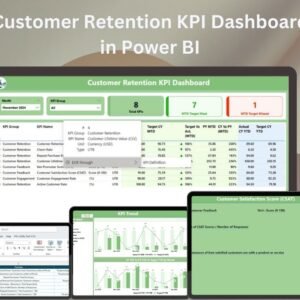
The Customer Retention KPI Dashboard in Power BI is a comprehensive tool designed to help businesses track, analyze, and improve their customer retention efforts. This dashboard leverages Power BI’s powerful data visualization capabilities to provide insightful metrics related to customer retention, churn rates, and customer lifetime value. Whether you’re a business analyst, marketing team, or customer success manager, this dashboard is an essential tool for understanding customer behavior and making data-driven decisions to enhance retention strategies.
With easy-to-understand visualizations and customizable KPIs, the Customer Retention KPI Dashboard provides a clear view of how well your business is retaining customers and where improvements can be made. It offers real-time data updates, a user-friendly interface, and insightful analytics to track and optimize your retention efforts effectively.

Key Features of the Customer Retention KPI Dashboard in Power BI
📌 Comprehensive Customer Retention Metrics
Track key customer retention metrics, including churn rate, customer lifetime value (CLV), repeat purchase rate, and more. The dashboard enables businesses to understand exactly how well they are retaining customers and where they need to focus their efforts.
🛠 Real-Time Data Updates
The Customer Retention KPI Dashboard automatically updates as new data is input, ensuring you always have access to the most current customer retention statistics. This allows for real-time analysis and decision-making based on the latest trends.
💡 Interactive Data Visualizations
The dashboard includes various interactive visualizations such as bar charts, line graphs, and pie charts to make the data easier to understand and analyze. These visuals give you an in-depth view of customer retention performance at a glance.
🔢 Customizable KPIs
You can easily customize key performance indicators (KPIs) to match your specific business objectives. Whether you’re looking to track customer loyalty, reduce churn, or increase retention, the dashboard allows you to adjust KPIs to meet your needs.
🚀 Customer Segmentation Insights
Segment your customer data by different factors such as demographics, location, or behavior patterns to gain deeper insights into specific customer groups. This segmentation allows you to tailor retention strategies to specific segments of your customer base.
📊 Easy to Use
The Customer Retention KPI Dashboard is designed to be user-friendly, even for those without advanced Power BI knowledge. With a simple interface and easy-to-navigate features, you can start tracking and analyzing customer retention in no time.
⚙ Actionable Insights
The dashboard provides actionable insights to help improve customer retention strategies. By identifying trends and areas of improvement, you can implement targeted actions to increase customer loyalty and reduce churn.
🚀 Why You’ll Love the Customer Retention KPI Dashboard in Power BI
✅ Comprehensive Metrics – Track all the key performance indicators related to customer retention. ✅ Real-Time Updates – The dashboard automatically reflects changes in your data for up-to-date insights. ✅ Customizable KPIs – Tailor the dashboard to suit your business needs. ✅ Customer Segmentation – Segment customer data to get targeted insights. ✅ User-Friendly Interface – Easy to set up and use, with no advanced Power BI skills required.
📂 What’s Inside the Customer Retention KPI Dashboard in Power BI?
- Customer Retention Metrics: Track churn rate, customer lifetime value, repeat purchases, and more.
- Interactive Visualizations: Use charts and graphs to visualize and analyze customer retention.
- Customizable KPIs: Adjust KPIs to match your business goals and focus areas.
- Customer Segmentation: Segment customer data by various factors for targeted insights.
- Step-by-Step Setup Instructions: Clear instructions to set up and use the dashboard effectively.
🔍 How to Use the Customer Retention KPI Dashboard in Power BI
1️⃣ Download the Dashboard – Instant access to the Power BI file upon purchase. 2️⃣ Import Your Data – Easily input your customer data into the dashboard for tracking. 3️⃣ Customize KPIs – Adjust the KPIs to align with your business objectives and priorities. 4️⃣ Analyze and Interpret – Use the interactive visualizations to analyze customer retention metrics. 5️⃣ Make Informed Decisions – Leverage insights to improve customer retention strategies.
🎯 Who Can Benefit from the Customer Retention KPI Dashboard in Power BI? 🔹 Business Analysts
🔹 Marketing Teams
🔹 Customer Success Managers
🔹 Sales Teams
🔹 Product Managers
🔹 Anyone looking to improve customer retention and loyalty
The Customer Retention KPI Dashboard in Power BI is the perfect tool to track, analyze, and improve customer retention. With its customizable KPIs and real-time data visualizations, it will empower you to make data-driven decisions and optimize your retention strategies for better customer loyalty.
Click here to read the Detailed blog post
https://www.pk-anexcelexpert.com/customer-retention-kpi-dashboard-in-power-bi/
Visit our YouTube channel to learn step-by-step video tutorials
Compatibility and Requirements
- Opens in Power BI Desktop, which is free from Microsoft: Get Power BI Desktop.
- Import your customer data, then adjust the KPIs to your own goals.
Frequently Asked Questions
Which retention metrics does the dashboard show?
Churn rate, customer lifetime value (CLV), repeat purchase rate and other retention KPIs.
Can I segment customers?
Yes. You can segment customer data by demographics, location or behavior to see how each group is retained.
Can I change the KPIs?
Yes. The KPIs are customizable to match your business goals.
Do I need advanced Power BI skills?
No. The dashboard is built to be easy to use and comes with step-by-step setup instructions.
Is there an Excel version?
Yes. The Customer Retention KPI Dashboard in Excel covers the same topic in Excel.
Related Customer Retention Templates
- Customer Retention KPI Dashboard in Excel: the same topic in Excel
- Customer Retention KPI Dashboard in Google Sheets: the same topic in Google Sheets
- Customer Retention KPI Scorecard in Excel: a scorecard view of retention KPIs
- Telecom Customer Retention KPI Dashboard in Power BI: retention KPIs for telecom
- Power BI Dashboard Mega Collection: 15 Power BI dashboards in one download
Browse all Power BI KPI dashboards or the Power BI dashboards.









Reviews
There are no reviews yet.