Managing contracts is a critical responsibility for every organization. Companies regularly sign contracts with vendors, partners, employees, and clients. These agreements often include important details such as expiration dates, renewal schedules, approval workflows, compliance requirements, and financial commitments. However, many organizations still rely on scattered spreadsheets or emails to manage these contracts. As a result, businesses frequently miss renewal deadlines, overlook compliance obligations, and struggle to monitor contract performance effectively.
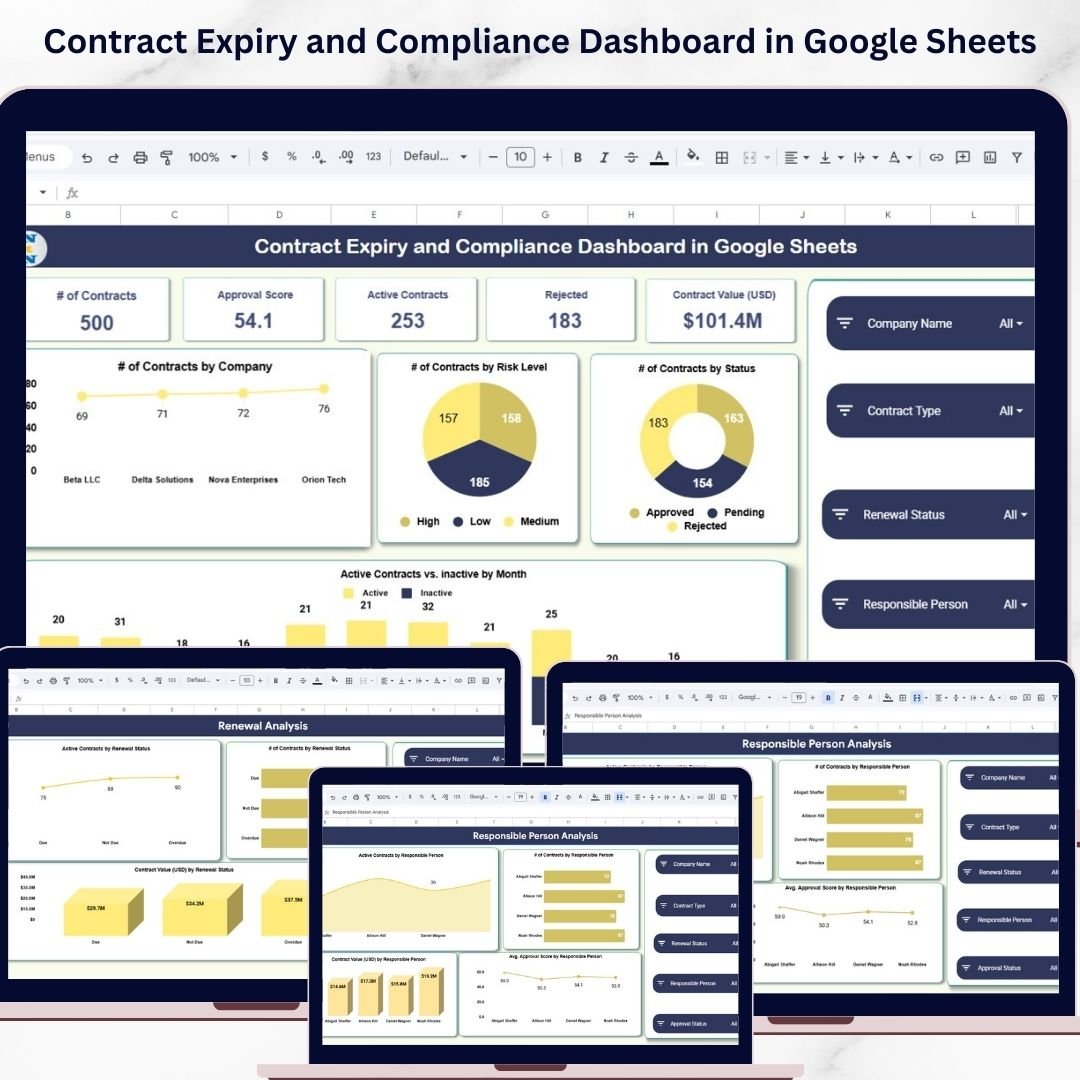
The Contract Expiry and Compliance Dashboard in Google Sheets is a powerful, ready-to-use analytics template designed to help organizations monitor contract expiration dates, approval status, risk levels, and financial values in one centralized platform. This dashboard provides complete visibility into the contract lifecycle, helping managers ensure that contracts remain compliant and are renewed on time.
Instead of manually reviewing multiple files, decision-makers can analyze contract information through interactive charts, KPI cards, and dynamic filters. Because the dashboard is built in Google Sheets, teams can collaborate in real time and access contract data from anywhere.
This smart dashboard helps organizations track critical metrics such as total contracts, active contracts, approval scores, contract values, risk levels, and renewal status. By monitoring these metrics, organizations can reduce compliance risks, improve contract management processes, and maintain better control over their contractual commitments.
Key Feature of Contract Expiry and Compliance Dashboard in Google Sheets 📊
The Contract Expiry and Compliance Dashboard in Google Sheets includes several powerful features designed to simplify contract monitoring and compliance tracking.
📊 Centralized Contract Monitoring Dashboard
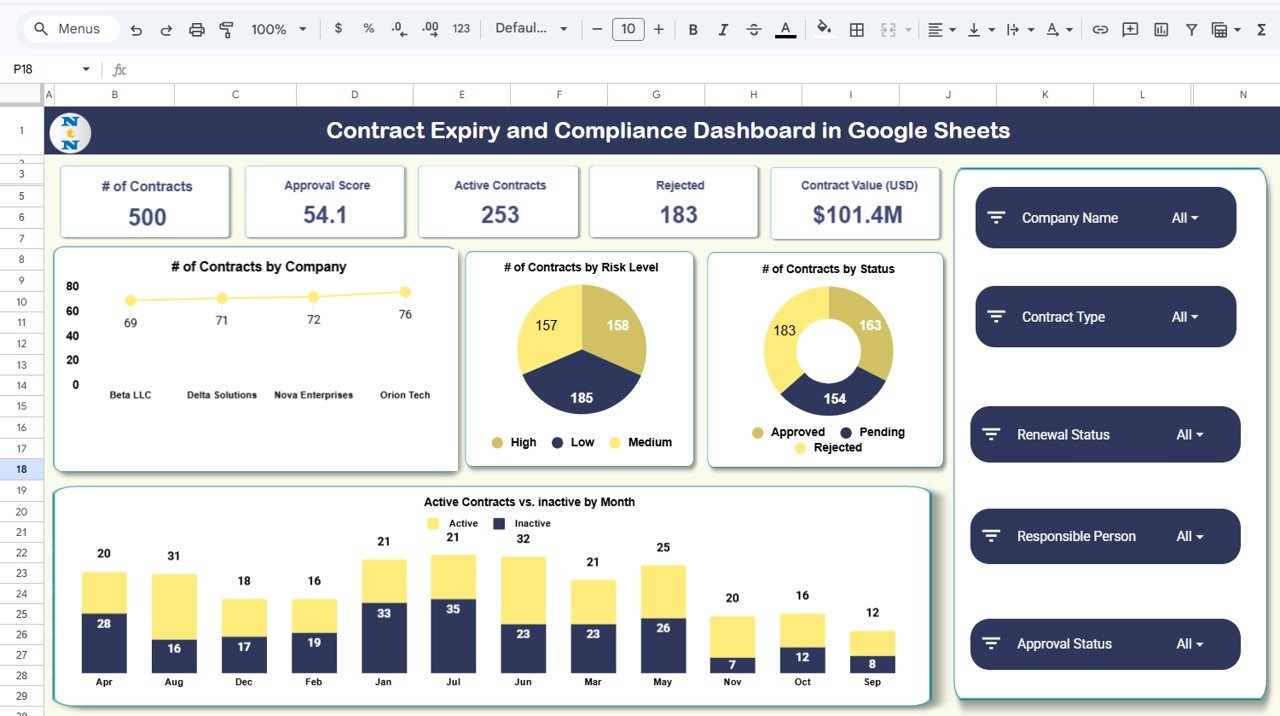
The main dashboard provides a comprehensive overview of all contract performance and compliance metrics.
📅 Contract Expiry and Renewal Tracking
Monitor contract renewal timelines and identify contracts that require immediate action.
📈 Interactive KPI Performance Indicators
Track key metrics such as Total Contracts, Active Contracts, Approval Score, Rejected Contracts, and Contract Value.
⚠️ Contract Risk Level Monitoring
Analyze contracts based on High, Medium, and Low risk categories to identify potential compliance issues.
📊 Contract Distribution Analysis
Visual charts show contract distribution by company, status, and risk level.
💰 Contract Value Analytics
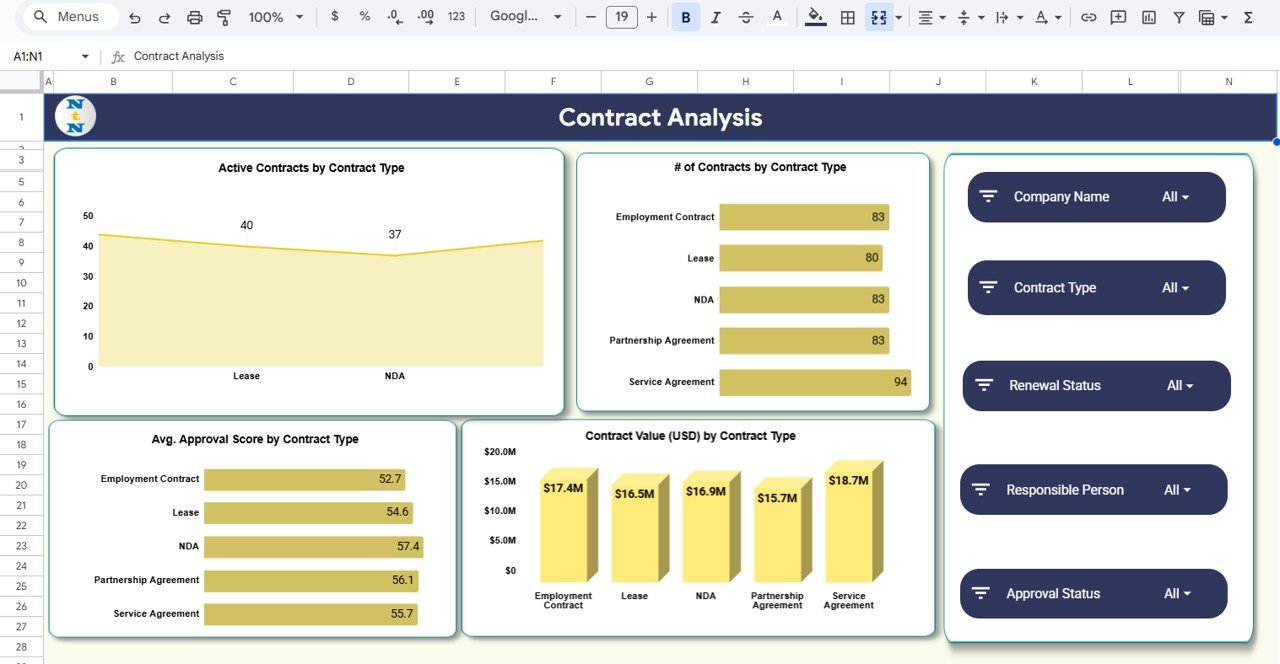
Monitor financial exposure by analyzing contract values across companies and contract types.
👥 Responsible Person Analysis
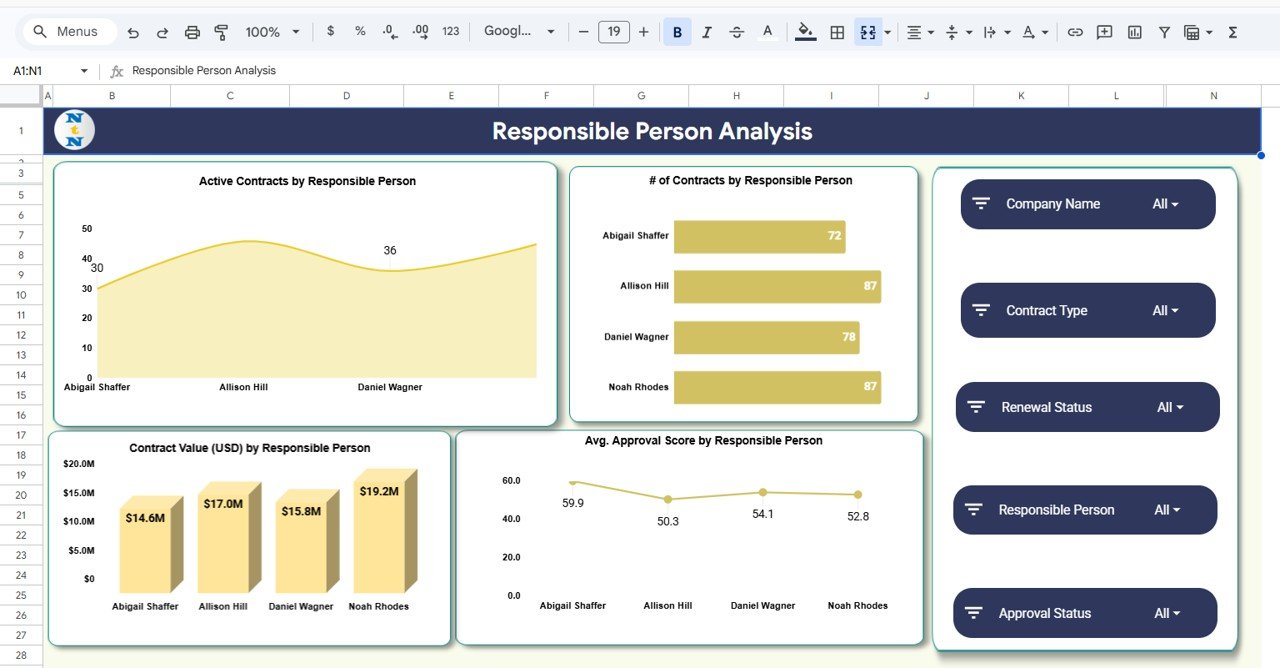
Track contract ownership and analyze the workload and performance of contract managers.
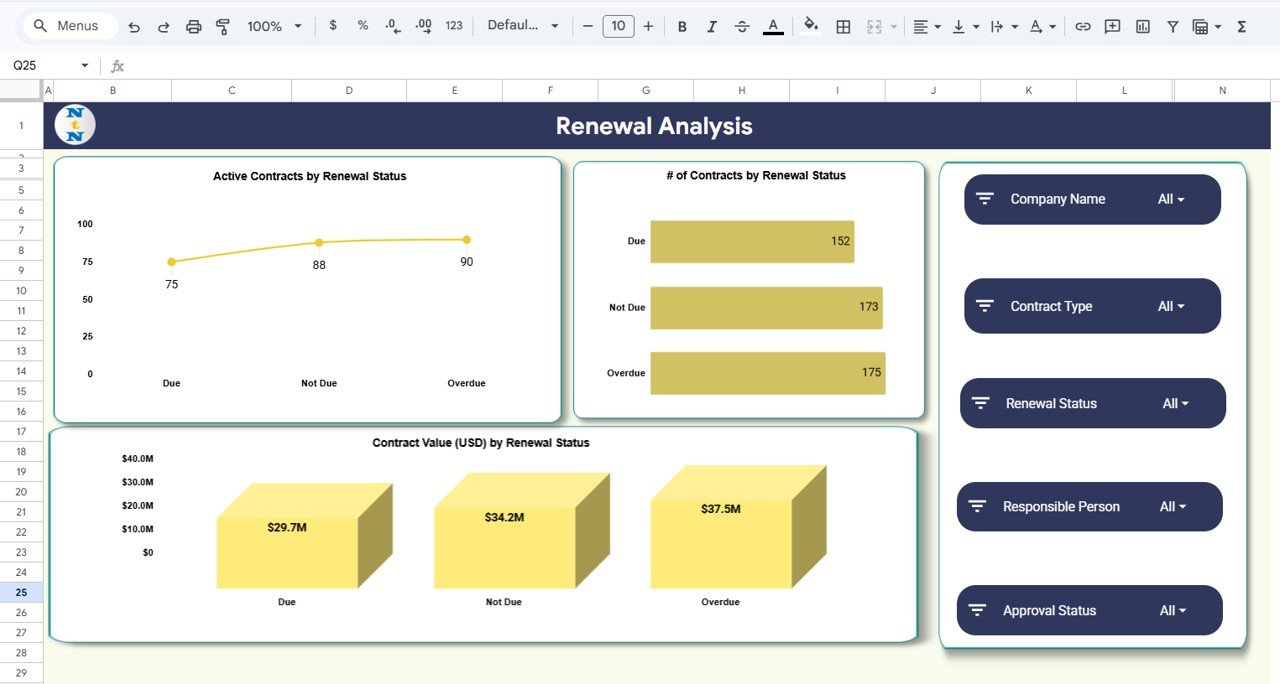
📅 Renewal Status Monitoring
Identify contracts that are due for renewal, overdue, or not yet due.
📈 Monthly Contract Trends Analysis
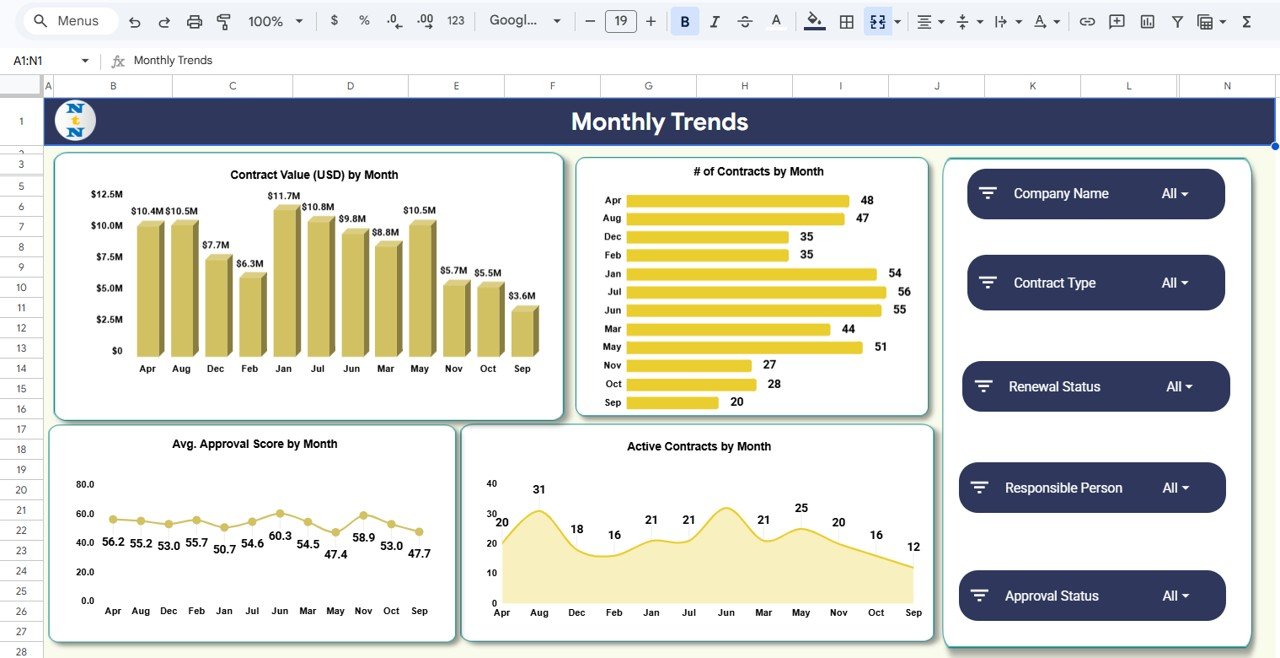
Analyze contract values, approval performance, and contract activity across months.
☁️ Cloud-Based Collaboration
Because the dashboard runs on Google Sheets, multiple users can update and analyze contract data simultaneously.
What’s Inside the Contract Expiry and Compliance Dashboard in Google Sheets 📂
This template includes several analytical sections that provide a complete view of contract management performance.
📊 Overview Dashboard
Displays key metrics such as total contracts, approval scores, contract value, and contract approval status.
📅 Renewal Analysis Page
Tracks contract renewal schedules and identifies contracts that require immediate attention.
👥 Responsible Person Analysis Page
Analyzes contract ownership and evaluates the workload distribution among contract managers.
📑 Contract Type Analysis Page
Examines contract distribution across different contract types and evaluates financial performance.
📈 Monthly Trends Analysis Page
Provides time-based insights into contract value, approval scores, and contract activity.
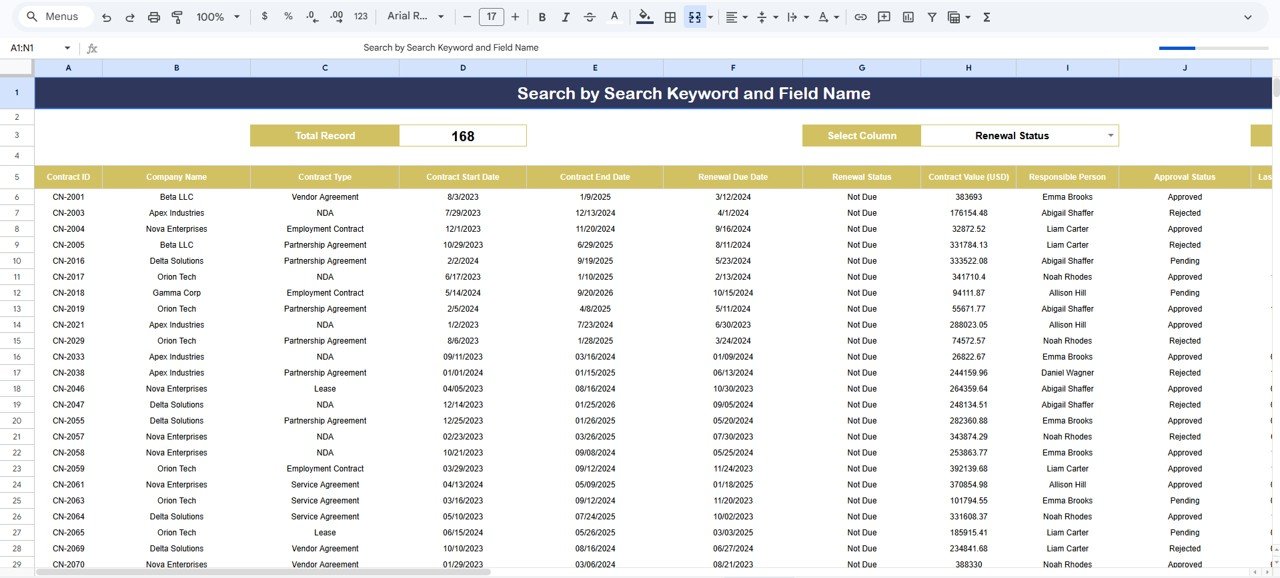
🔎 Search and Data Analysis Page
Allows users to search and filter contract records quickly using keywords and field names.
Together, these analytical sections provide a comprehensive contract management solution.
How to Use the Contract Expiry and Compliance Dashboard in Google Sheets ⚙️
Using this dashboard is simple and requires only basic Google Sheets knowledge.
1️⃣ Enter contract information into the data source sheet.
2️⃣ Include details such as company name, contract type, contract value, risk level, approval status, and renewal date.
3️⃣ Use dashboard filters to analyze contract data by company, contract type, status, or responsible person.
4️⃣ Monitor KPI cards to evaluate overall contract performance.
5️⃣ Review renewal analysis to identify contracts approaching expiration.
6️⃣ Analyze charts and trends to improve contract management decisions.
Because the dashboard updates automatically, managers can easily monitor contract performance and compliance.
Who Can Benefit from This Contract Expiry and Compliance Dashboard in Google Sheets 👥
This dashboard is ideal for organizations that manage multiple contracts and require strong compliance monitoring.
🏢 Corporate Legal Teams – Monitor contract approval status and compliance requirements.
📊 Procurement Departments – Track vendor contracts and renewal schedules.
👨💼 Contract Managers – Manage contract lifecycle, renewal timelines, and financial exposure.
🏦 Financial Teams – Monitor contract values and financial commitments.
⚖️ Compliance Officers – Identify high-risk contracts and ensure regulatory compliance.
📑 Operations Managers – Maintain visibility into contract performance across departments.
Organizations that want to improve contract governance and reduce compliance risks can greatly benefit from this dashboard.
Click hare to read the Detailed blog post
Watch the step-by-step video tutorial:
Visit our YouTube channel to learn step-by-step video tutorials
🔗 https://youtube.com/@NeotechNavigators