



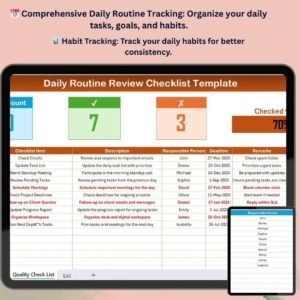
The Daily Routine Review Checklist in Excel is the perfect tool for anyone looking to stay on track with their daily tasks, goals, and habits. Whether you’re managing your personal life, work tasks, or wellness routine, this customizable checklist helps you track your daily performance, make improvements, and stay consistent with your goals.
This easy-to-use Excel template allows you to organize your daily activities, review your progress, and identify areas where you can improve. With built-in features for tracking habits, setting daily goals, and monitoring your performance, this checklist will help you stay focused and productive every day.
Key Features of the Daily Routine Review Checklist in Excel
📅 Comprehensive Daily Routine Tracking
Track a wide variety of tasks, from personal habits and work goals to wellness activities. Stay on top of your daily routines and identify areas for improvement.
⚡ Goal Setting & Progress Monitoring
Set daily goals and monitor your progress with real-time updates. Track your achievements and assess what needs more focus or improvement.
📊 Habit Tracking
Easily track and analyze your daily habits, from exercise and eating habits to productivity and self-care. Stay consistent with what’s important to you.
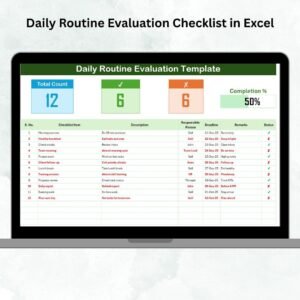
📈 Performance Dashboard
Visualize your daily progress with an interactive dashboard that shows your completed tasks, progress toward goals, and overall performance.
🔄 Customizable for Your Needs
Adapt the checklist to fit your specific daily routines, goals, and priorities. Whether you’re focused on work, wellness, or personal growth, customize the sections to meet your needs.
🖥️ User-Friendly Interface
The intuitive design makes it easy to log tasks, track progress, and review your performance, ensuring a seamless user experience.
Why You’ll Love the Daily Routine Review Checklist

✅ Stay Focused on Your Goals
Set clear goals for the day and monitor your progress, ensuring that you stay productive and on track.
✅ Track Your Habits for Better Consistency
Track your habits and identify areas where you need improvement to stay consistent with your routine and reach your long-term goals.
✅ Monitor Daily Performance
Review your performance every day and make necessary adjustments to your routine to stay focused and efficient.
✅ Customizable for Any Routine
Whether you’re managing personal habits, work tasks, or wellness activities, the checklist can be tailored to fit your needs.
✅ Visualize Your Progress
Use the performance dashboard to get an overview of your daily progress and identify trends in your habits and tasks.
What’s Inside the Daily Routine Review Checklist in Excel?
- Daily Task List: Track your daily tasks, including work, personal tasks, and wellness activities.
- Goal Setting: Set goals for the day and monitor your progress toward achieving them.
- Habit Tracker: Track and analyze your daily habits, from productivity to self-care.
- Performance Dashboard: Visualize your performance with a summary of completed tasks and goal progress.
- Customizable Sections: Modify the checklist to reflect your personal or professional routine.
How to Use the Daily Routine Review Checklist in Excel
1️⃣ Download the Template: Get instant access to your daily routine checklist.
2️⃣ Set Your Daily Goals: Add tasks and goals for the day, whether related to work, wellness, or personal growth.
3️⃣ Track Your Habits & Performance: Log your daily tasks and monitor your progress throughout the day.
4️⃣ Review and Adjust: Use the performance dashboard to review your day and adjust your routine for the next day.
Who Can Benefit from the Daily Routine Review Checklist?
🔹 Individuals Looking to Improve Their Daily Habits
🔹 Busy Professionals Managing Multiple Tasks
🔹 Students Keeping Track of Daily Assignments and Study Goals
🔹 Fitness Enthusiasts Tracking Exercise and Health Habits
🔹 Entrepreneurs and Small Business Owners Monitoring Daily Productivity
🔹 Anyone Who Wants to Stay Organized and Focused
Stay organized, track your habits, and achieve your daily goals with this easy-to-use, customizable Daily Routine Review Checklist.
Click here to read the Detailed blog post
Visit our YouTube channel to learn step-by-step video tutorials
Youtube.com/@PKAnExcelExpert
Compatibility and Requirements
- Works in Microsoft Excel desktop (Excel 2016 or later, or Microsoft 365).
- New to Excel? Microsoft has a beginner course in Excel for Windows training.
Frequently Asked Questions
What does the template include?
A daily task list, goal setting, a habit tracker, a performance dashboard and customizable sections.
Can I track habits as well as tasks?
Yes. The habit tracker covers habits such as exercise, eating, productivity and self-care.
How do I review my day?
Check the performance dashboard for completed tasks and goal progress, then adjust the next day’s routine.
Related Daily Routine Templates
- Daily Routine Monitoring Checklist in Excel: plan and monitor each day
- Daily Routine Evaluation Checklist in Excel: rate how each day went
- Daily Routine Audit Checklist in Excel: audit your routine step by step
- Habit Tracker in Google Sheets: a Google Sheets habit tracker
- Checklist & SOP Pack: 12 Excel and Google Sheets checklists in one download
Browse all Excel checklists.





















Reviews
There are no reviews yet.