



Employee engagement is one of the strongest drivers of productivity, retention, and long-term business success. When employees feel valued, involved, and motivated, organizations perform better across every metric. However, many HR teams still struggle to measure engagement effectively because data remains scattered across surveys, spreadsheets, and HR tools. As a result, leadership often lacks clear visibility into how employees truly feel.HR Engagement Performance Dashboard in Google Sheets
That is exactly why the HR Engagement Performance Dashboard in Google Sheets becomes a game-changing solution.
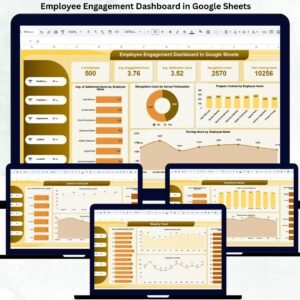
This ready-to-use dashboard provides a centralized, visual, and data-driven way to track employee engagement, satisfaction, training participation, recognition activity, and involvement trends. Instead of manually compiling reports, HR teams gain instant insights through interactive charts, KPI cards, and trend analysis—all inside Google Sheets.
Because the dashboard is built entirely in Google Sheets, it remains cloud-based, collaborative, cost-effective, and easy to customize. No expensive HR software or technical expertise is required.HR Engagement Performance Dashboard in Google Sheets

Key Features of the HR Engagement Performance Dashboard
📊 Engagement KPI Overview
Track critical engagement indicators such as satisfaction score, engagement score, recognition count, training hours, and employee participation.HR Engagement Performance Dashboard in Google Sheets
🏢 Department, Job Role & Location Analysis
Understand how engagement varies across teams, roles, and office locations to take targeted action.
📈 Monthly Engagement Trends
Monitor engagement improvements or declines over time and measure the impact of HR initiatives.
🔍 Smart Search Functionality
Find any employee record instantly using keyword-based search and field selection.
🤝 Real-Time Collaboration
HR teams, managers, and leadership can work together on one live dashboard.
## 📦 What’s Inside the HR Engagement Performance Dashboard
📌 Overview Sheet Tab
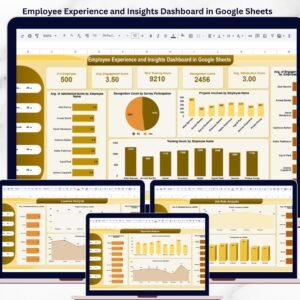
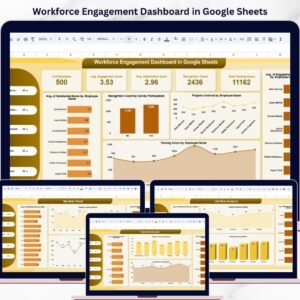
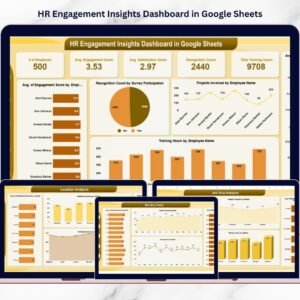
This is the main dashboard page designed for leadership and HR reviews. It displays KPI cards such as:
Number of Employees
Average Satisfaction Score
Average Engagement Score
Recognition Count
Total Training Hours
It also includes visual charts like:
Average Satisfaction Score by Employee
Recognition Count by Attrition Risk Level
Projects Involved by Employee
Training Hours by Employee
These visuals provide instant clarity on overall engagement health.
## 👤 Job Role Analysis
This section evaluates engagement across different job roles using charts such as:
Average Satisfaction Score by Job Role
Projects Involved by Job Role
Average Engagement Score by Job Role
Training Hours by Job Role
It helps HR teams design role-specific engagement and development strategies.
## 🏢 Department Analysis
This section highlights engagement patterns across departments, including:
Average Satisfaction Score by Department
Average Engagement Score by Department
Training Hours by Department
Projects Involved by Department
These insights help leadership identify high-performing teams and departments that need attention.
## 📍 Location Analysis
For organizations with multiple offices or regions, this section shows:
Average Satisfaction Score by Location
Average Engagement Score by Location
Projects Involved by Location
Training Hours by Location
It supports location-specific engagement planning.
## 📅 Monthly Trend Analysis
This section tracks engagement changes over time using charts like:
Average Satisfaction Score by Month
Average Engagement Score by Month
Training Hours by Month
Projects Involved by Month
It helps HR teams measure the effectiveness of engagement initiatives.
## 🎯 Who Can Benefit from This Dashboard
HR Teams – Track and improve engagement systematically
Managers & Team Leads – Understand team morale and involvement
Leadership Teams – Make data-driven retention decisions
Organizations of Any Size – From startups to enterprises
### Click here to read the Detailed blog post
Watch the step-by-step video tutorial:
Visit our YouTube channel to learn step-by-step video tutorials — Youtube.com/@NeotechNavigators
Compatibility and Requirements
- Works in Google Sheets. You need a free Google account and a web browser.
- The dashboard shows its results as charts. Google explains how charts work in Add and edit a chart or graph.
Frequently Asked Questions
Which sections does the dashboard have?
It has an Overview sheet, plus Job Role Analysis, Department Analysis, Location Analysis and Monthly Trend Analysis sections.
Which KPIs show on the Overview sheet?
The KPI cards show Number of Employees, Average Satisfaction Score, Average Engagement Score, Recognition Count and Total Training Hours.
Can I compare engagement across departments and locations?
Yes. The Department Analysis and Location Analysis sections show average satisfaction score, average engagement score, training hours and projects involved for each department and location.
Can I see how engagement changes over time?
Yes. The Monthly Trend Analysis section charts average satisfaction score, average engagement score, training hours and projects involved by month.
Is there an Excel version?
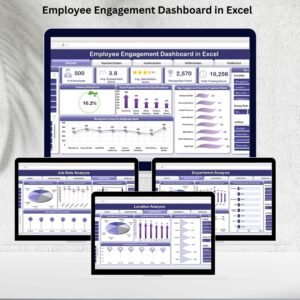
Yes. See the Employee Engagement Dashboard in Excel.
Related HR Dashboard Templates
- HR Performance Dashboard in Google Sheets: HR performance metrics in Google Sheets
- Employee Engagement Dashboard in Excel: the engagement view for Excel users
- Employee Performance Tracking Dashboard in Power BI: the Power BI option for employee performance
- Employee Performance Goal Submission Tracker in Google Sheets: a tracker for employee goals
- HR Google Sheets Pack: 10 HR templates for Google Sheets in one download
Browse all Google Sheets dashboards.

















Reviews
There are no reviews yet.