



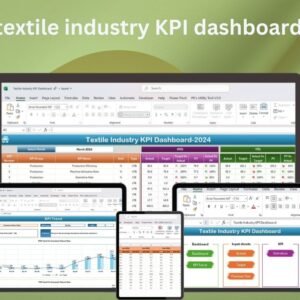
The Textile Industry KPI Dashboard in Excel is a ready-made, customizable Excel tool for textile professionals. It tracks, analyzes and visualizes key performance indicators across production, inventory and sales. With easy-to-read charts, graphs and automated data tracking, you get a real-time snapshot of your textile operations and can make data-driven decisions from one central dashboard.
Use it to oversee production efficiency, inventory levels or sales performance. It works as a production tracker, an inventory management view and a textile sales dashboard in a single Excel file, and it helps streamline your workflow and improve decision-making across your textile business.

Key Features of the Textile Industry KPI Dashboard in Excel
- Real-time data tracking: Track KPIs such as production output, sales, inventory levels and production efficiency in real time.
- Customizable dashboard: Tailor the dashboard to the specific needs of your textile business, from raw material costs to finished goods performance.
- Production performance analysis: Monitor the efficiency of production lines, track order completion rates and identify bottlenecks.
- Sales and revenue tracking: Follow sales performance, revenue and market trends to boost profitability.
- Inventory management: Visualize inventory turnover rates, stock levels and reorder points for better supply chain management.
- Dynamic and interactive features: Drill down into individual KPIs for deeper insights and track historical performance trends.
- User-friendly interface: A simple layout and intuitive design make the dashboard easy to manage for users of all levels.
Why You’ll Love This Textile KPI Dashboard
- Simplifies textile operations: Get full visibility into production, inventory and sales metrics in one central dashboard.
- Better decision-making: Make data-driven decisions from real-time insights on performance, trends and inventory.
- Higher productivity: Find areas to improve by tracking KPIs such as production efficiency and sales performance.
- Customizable and scalable: Adapt the dashboard to your textile industry needs and scale it as your business grows.
- Easy to use: You don’t need technical expertise to set up or use the dashboard.
What’s Inside the Textile Industry KPI Dashboard in Excel
| Component | What it does |
|---|---|
| Real-time KPI tracking | Monitors key metrics such as production output, sales revenue and inventory levels. |
| Customizable widgets | Lets you adjust the layout and design around the KPIs that matter most to your textile business. |
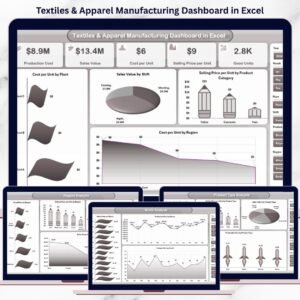
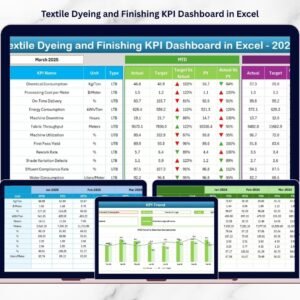
| Visual data representation | Shows production and sales data at a glance in charts, graphs and tables. |
| Time-based trends | Analyzes production performance, sales growth and inventory turnover over different time periods. |
| Interactive features | Lets you dive into specific data points for a detailed analysis of your textile operations. |
Who Is This Textile KPI Dashboard For?
- Textile manufacturers who want one view of production, inventory and sales.
- Production managers who track production efficiency, order completion and bottlenecks.
- Inventory managers who watch stock levels, turnover rates and reorder points.
- Sales teams who need a clear textile sales dashboard for revenue and trends.
- Business analysts who build reports and visual insights.
- Small and medium enterprises (SMEs) in the textile sector.
- Textile industry consultants who support clients with KPI reporting.
How to Use the Textile Industry KPI Dashboard in Excel
- Download the dashboard template: Access the Excel file instantly after purchase.
- Customize KPIs: Set up the dashboard with your own textile production, inventory and sales metrics.
- Input your data: Add your current performance data and the charts update automatically.
- Monitor performance: Use the real-time tracking features to follow production efficiency, sales and inventory levels.
- Generate reports: Create reports and visual insights for decision-making and presentations.
Optimize your textile operations, raise productivity and track performance with this easy-to-use, customizable Excel dashboard.
Click here to read the detailed blog post
Visit our YouTube channel for step-by-step video tutorials.
Frequently Asked Questions
What does the Textile Industry KPI Dashboard in Excel track?
It tracks KPIs across production, inventory and sales. These include production output, production efficiency, order completion rates, sales revenue, inventory levels, turnover rates and reorder points.
Can I customize the KPIs and layout?
Yes. The dashboard is fully customizable. You can adjust the KPIs, widgets, layout and design to match your textile business, from raw material costs to finished goods performance.
Do the charts update automatically?
Yes. Once you input your performance data, the charts and graphs update automatically, so you always see a current view of your operations.
Does it help with inventory management?
Yes. It shows stock levels, inventory turnover rates and reorder points to support better supply chain management.
Do I need advanced Excel skills?
No. The layout is simple and the design is intuitive. You don’t need technical expertise to set up or use the dashboard.
Can I analyze trends over time?
Yes. The time-based trend features let you analyze production performance, sales growth and inventory turnover over different time periods. You can also drill down into individual KPIs.
Also check our Small Business KPI Dashboard
Last updated: October 2026
Compatibility and Requirements
- Works in Microsoft Excel desktop (Excel 2016 or later, or Microsoft 365).
- The charts and KPI views are built into the workbook and update from your data. Microsoft explains Excel charts in Create a chart from start to finish.
Related Textile and Manufacturing Templates
- Textile Industry KPI Dashboard in Power BI: the same topic in Power BI
- Textile Industry KPI Dashboard in Google Sheets: the same topic in a shared online sheet
- Textile Industry KPI Scorecard in Excel: a scorecard view of textile KPIs
- Textiles and Apparel Manufacturing KPI Dashboard in Excel: KPIs for apparel production
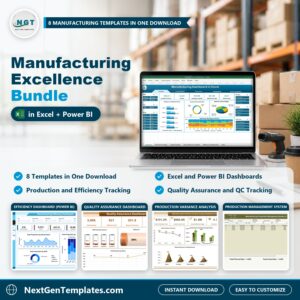
- Manufacturing Excellence Bundle: 8 manufacturing templates in one download
Browse all Excel KPI dashboards or the Excel manufacturing templates.




Reviews
There are no reviews yet.