New: NextGenTemplates Academy - video courses on Excel formulas with AI and Pivot Tables & dashboards. Early-bird: 20% off with code EARLYBIRD20 - first 20 orders only.See the courses →
₹1,999.00Original price was: ₹1,999.00.₹1,399.00Current price is: ₹1,399.00.
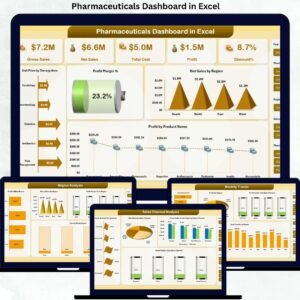
🚀 Pharmaceuticals Dashboard in Excel helps you track, analyze, and optimize pharma performance effortlessly.
📊 Complete KPI Visibility – Monitor sales, costs, profit, discounts, and margins in one place 🌍 Region-Wise Insights – Identify high-performing and underperforming markets 💊 Product & Therapy Analysis – Optimize product mix and therapy strategies 🛒 Sales Channel Performance – Understand channel-wise revenue and discount impact 📈 Monthly Trend Tracking – Detect seasonality and growth patterns ⚡ Ready-to-Use Excel File – No BI tools or setup required 🔄 Fully Customizable – Adapt KPIs and visuals to your business 🎯 Decision-Ready Analytics – Turn raw data into clear actions
Perfect for pharma teams that want faster, smarter, and data-driven decisions.
Excel Pivot Tables & Dashboards: Basic to Advanced
From your first Pivot Table to the Data Model, DAX, Power Query and a one-page KPI dashboard. 11h 51m of video by PK, with practice files, quizzes and a capstone.
Managing pharmaceutical data is complex, time-consuming, and high-risk when handled manually. You must track sales, costs, discounts, profit margins, therapy areas, regions, products, and channels—often at the same time. When this data sits in scattered Excel files, visibility drops, reporting slows down, and critical insights remain hidden.
That is exactly why the Pharmaceuticals Dashboard in Excel is a powerful, ready-to-use solution 🚀.
This professionally designed Excel dashboard converts raw pharmaceutical data into clear KPIs, interactive visuals, and actionable insights—without the need for expensive BI tools. It is built for decision-makers who want clarity, control, and confidence in pharma analytics.
⭐ Key Features of Pharmaceuticals Dashboard in Excel
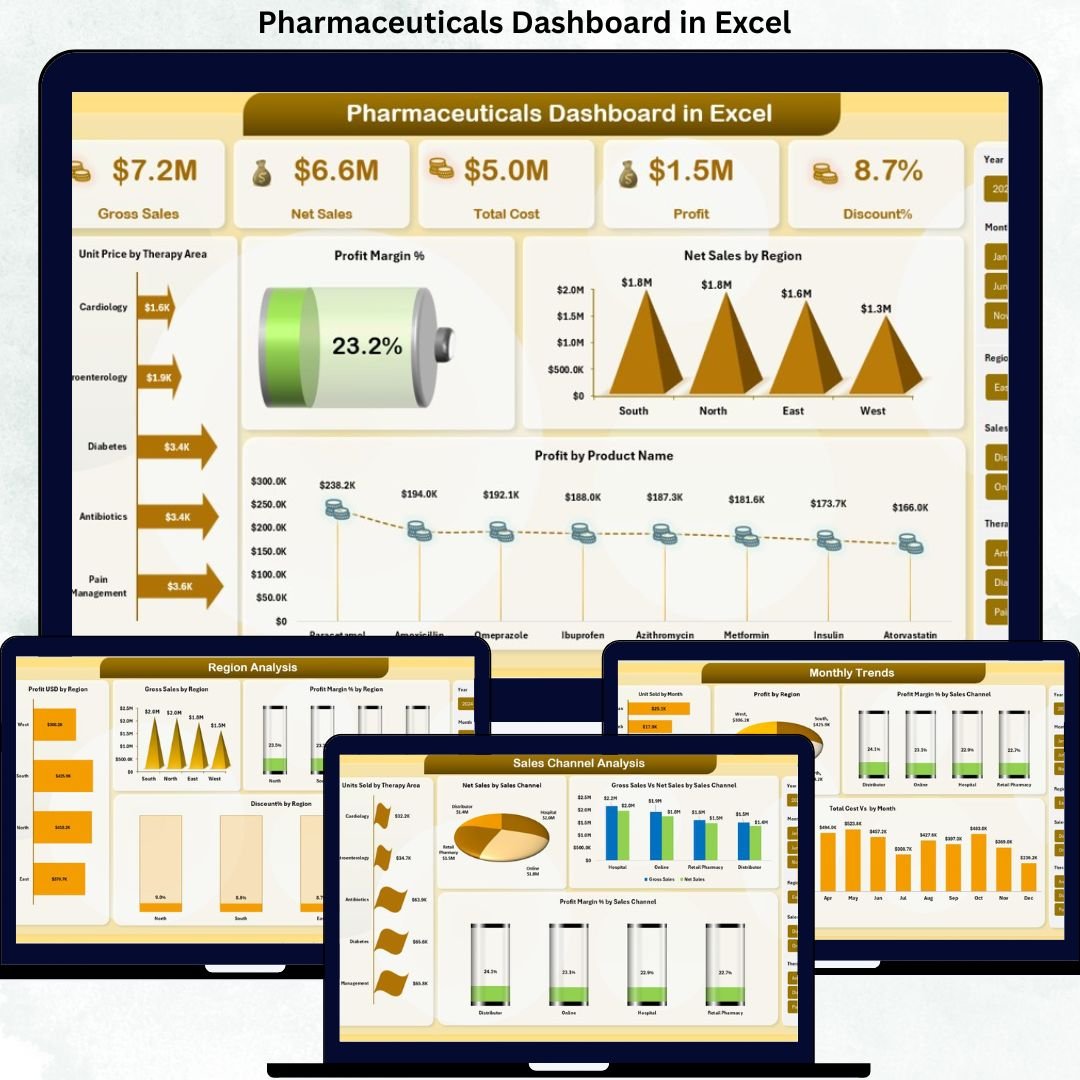
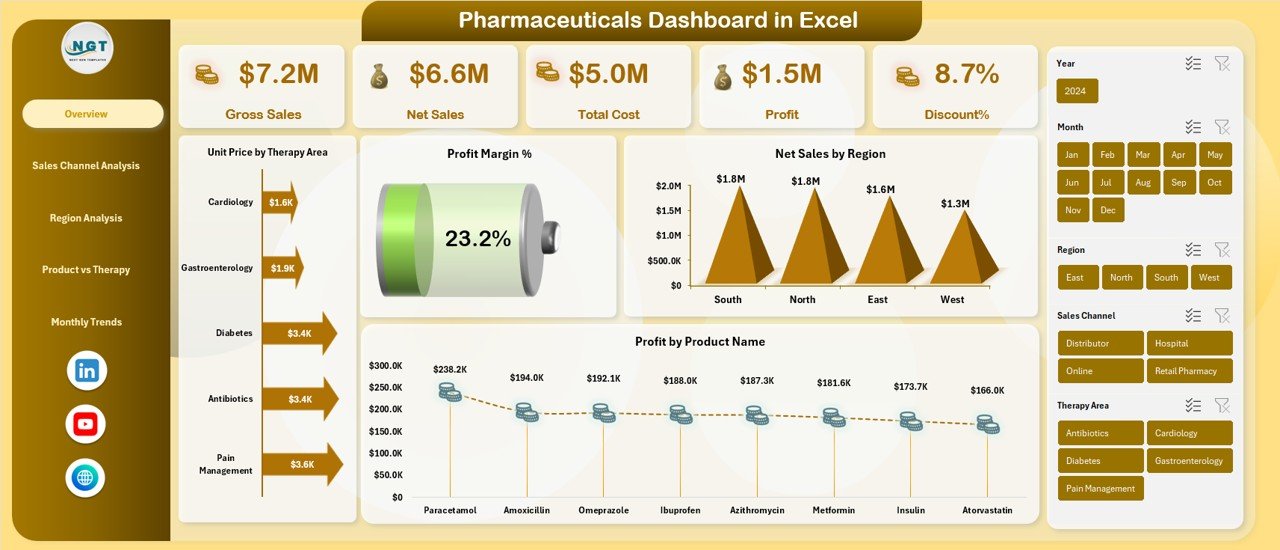
📊 Comprehensive KPI Tracking Monitor Gross Sales, Net Sales, Total Cost, Profit, Discount %, and Profit Margin % from a single dashboard.
🧠 Multi-Dimensional Analysis Analyze performance by Region, Therapy Area, Product Name, Sales Channel, and Month for deeper insights.
📈 Interactive Visuals & Charts Dynamic charts help you identify trends, gaps, and opportunities instantly.
🎯 Decision-Focused Dashboard Design Each sheet answers a specific business question, making insights easy to understand and act upon.
⚡ 100% Excel-Based Solution No Power BI or external tools required—works seamlessly within Excel.
🔄 Customizable & Scalable Easily update data, add KPIs, or modify visuals as business needs evolve.
Pharmaceuticals Dashboard in Excel
📦 What’s Inside the Pharmaceuticals Dashboard in Excel
This ready-to-use Excel file includes multiple structured dashboard pages:
🧩 Overview Sheet • Gross Sales • Net Sales • Total Cost • Profit • Discount % • Profit Margin % • Unit Price by Therapy Area • Net Sales by Region • Profit by Product Name
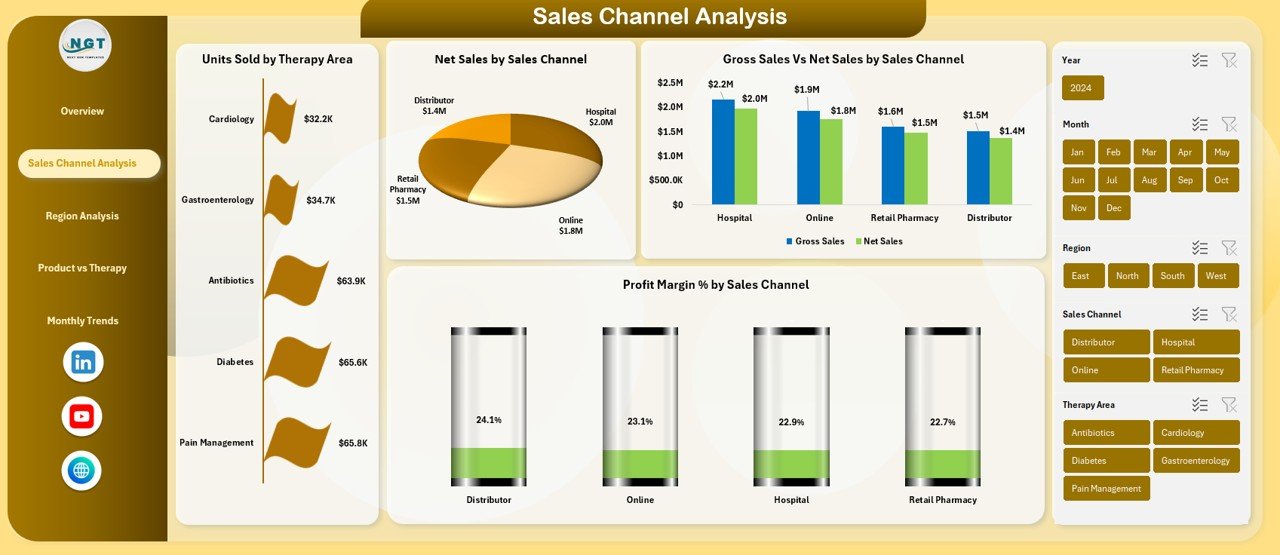
🛒 Sales Channel Analysis • Units Sold by Therapy Area • Net Sales by Sales Channel • Gross Sales vs Net Sales by Sales Channel
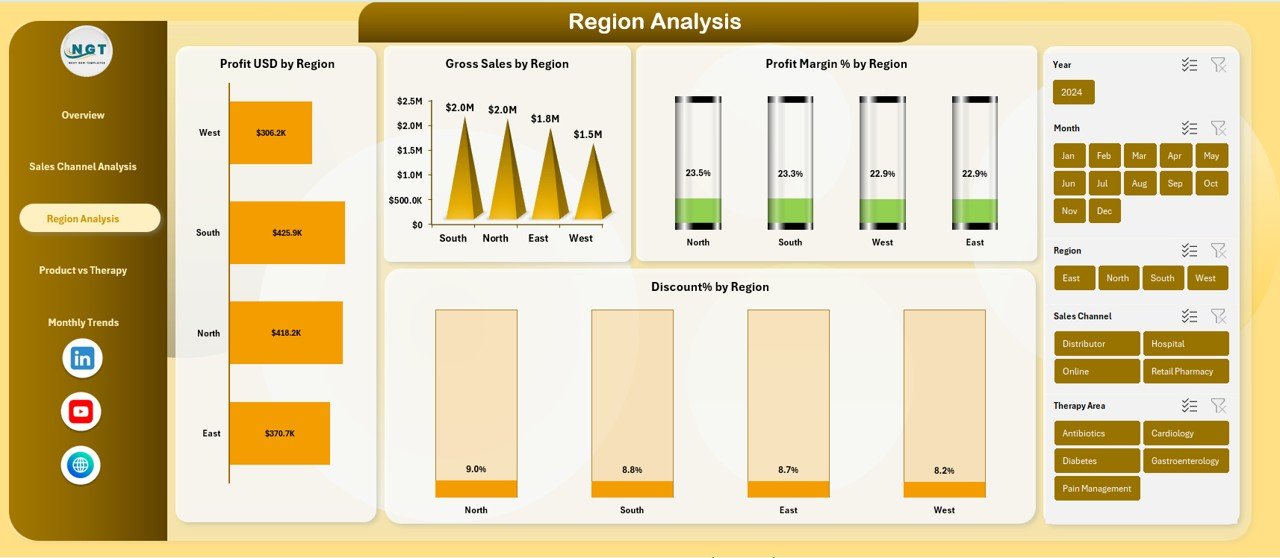
🌍 Region Analysis • Profit USD by Region • Gross Sales by Region • Profit Margin % by Region • Discount % by Region
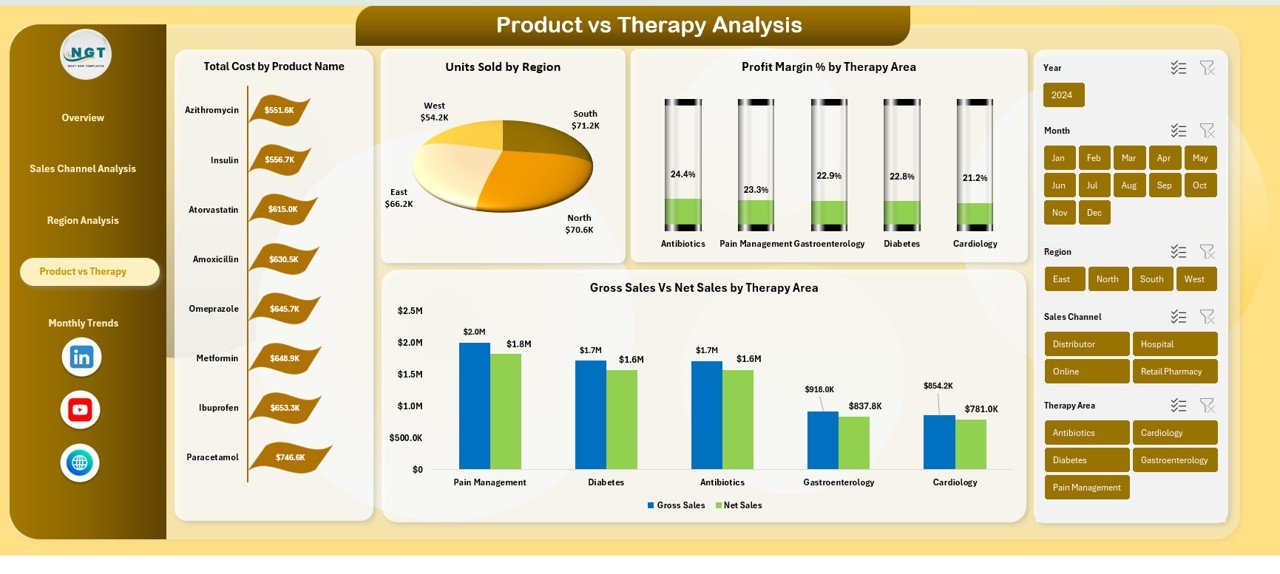
💊 Product vs Therapy Analysis • Total Cost by Product Name • Units Sold by Region • Gross Sales vs Net Sales by Therapy Area
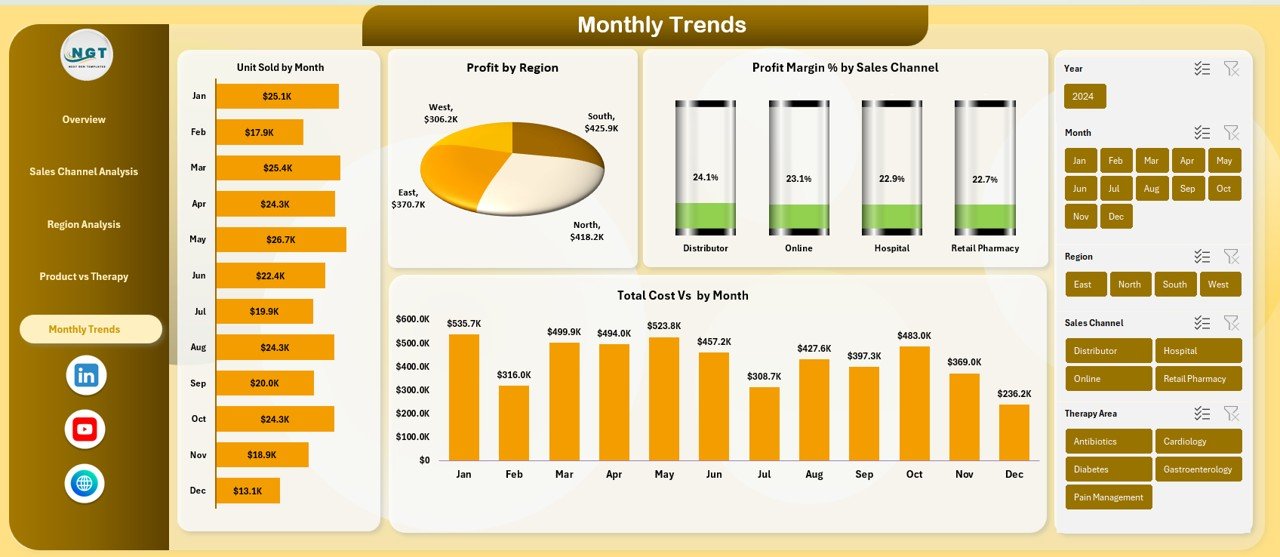
📅 Monthly Trends Analysis • Units Sold by Month • Profit by Region (Monthly) • Profit Margin % by Sales Channel • Total Cost by Month
Each page is designed to deliver clear answers, not just charts.
🧭 How to Use the Pharmaceuticals Dashboard in Excel
1️⃣ Enter or paste your pharmaceutical sales and cost data 2️⃣ Refresh pivot tables (one click) 3️⃣ Use slicers to filter by region, therapy, product, or channel 4️⃣ Review KPIs and trends instantly 5️⃣ Use insights for pricing, budgeting, and strategic decisions
No advanced Excel skills required—basic Excel knowledge is enough.
👥 Who Can Benefit from This Pharmaceuticals Dashboard in Excel
👨💼 Pharmaceutical Sales Managers 💰 Finance & Controlling Teams 📦 Product & Therapy Managers 🌐 Regional & Zonal Heads 📊 Business & Data Analysts 🏢 Senior Management & Executives
Whether you manage a small pharma business or a large pharmaceutical organization, this dashboard adapts to your needs.
Visit our YouTube channel to learn step-by-step video tutorials
Frequently asked questions
Which Excel version do I need?
Microsoft Excel 2016 or later on desktop (Microsoft 365 recommended). Many of our formula templates also open in Excel 2013 and Excel for the web - the exact requirement is listed in this product's description.
Does it work on Mac?
Yes. Formula-based Excel templates (no macros) work in Excel for Mac 2016 or later.
Does it work on mobile or Excel Online?
You can view it in the Excel mobile app and Excel for the web, but for entering data, using slicers and refreshing pivots we recommend desktop Excel.
How do I add my own data?
Replace the sample rows on the data sheet with your own (keep the column headers), then click Data > Refresh All so every chart and pivot updates.
Some sheets are protected - how do I edit them or change the logo?
A few of our trackers, data entry systems and dashboards protect sheets so formulas are not overwritten by mistake. Go to Review > Unprotect Sheet - most have no password. If Excel asks for one, message us with your order number and we will share it straight away.
How many records can it handle?
It has been tested with several thousand rows and suits normal small-business volumes. Excel itself handles over 1 million rows.
Is it a one-time payment or a subscription?
One-time payment. No subscription, no per-user fees and nothing to renew - the file is yours to keep.
How do I get the file after payment?
Instantly. The download link appears on screen after checkout, is emailed to you, and stays under My Account > Downloads on our website. If the email does not arrive within a few minutes, check your spam or promotions folder.
Is a user manual included?
Most of our newer products include a PDF user manual in the download. If yours does not have one, message us with your order number and we will send it.
Do I get free updates?
Bug fixes are always free - if something does not work as described, we fix it and send you the corrected file. New versions with new features are not included in the price, unless this product's description says otherwise.
Can you customise it for me?
Yes. Small changes to this template (your columns, categories, logo, colours, minor layout) cost the template price plus $40-80 (Rs 3,000-6,000 + GST), quoted once you send your list. A fully custom build is usually $100-200 (Rs 8,000-18,000 + GST) with two revision rounds. Email your requirements to [email protected] or message us on WhatsApp.
Can I use it for my business or my clients?
Yes, for your own personal or internal business use, for as long as you like. Reselling or redistributing the template is not allowed.
What is your refund policy?
Because these are digital downloads, they are non-refundable once delivered - except when the product does not match its description (report it within 48 hours of purchase) or there is a technical problem our team cannot fix within 72 hours. Email [email protected] with your order number.
How do I get help?
Email [email protected] (Mon-Fri, 10 AM-7 PM IST) or message us on WhatsApp +91 80770 90260 (chat only, no calls). Please include your order number.
Still have a question? Click Need help? at the bottom-left to ask our assistant, or message us on WhatsApp.
Application
MS Excel
Template Type
Dashboard
Price
Paid
Business Or Department
Healthcare and Medical Services
Reviews
There are no reviews yet.
Only logged in customers who have purchased this product may leave a review.












Reviews
There are no reviews yet.