

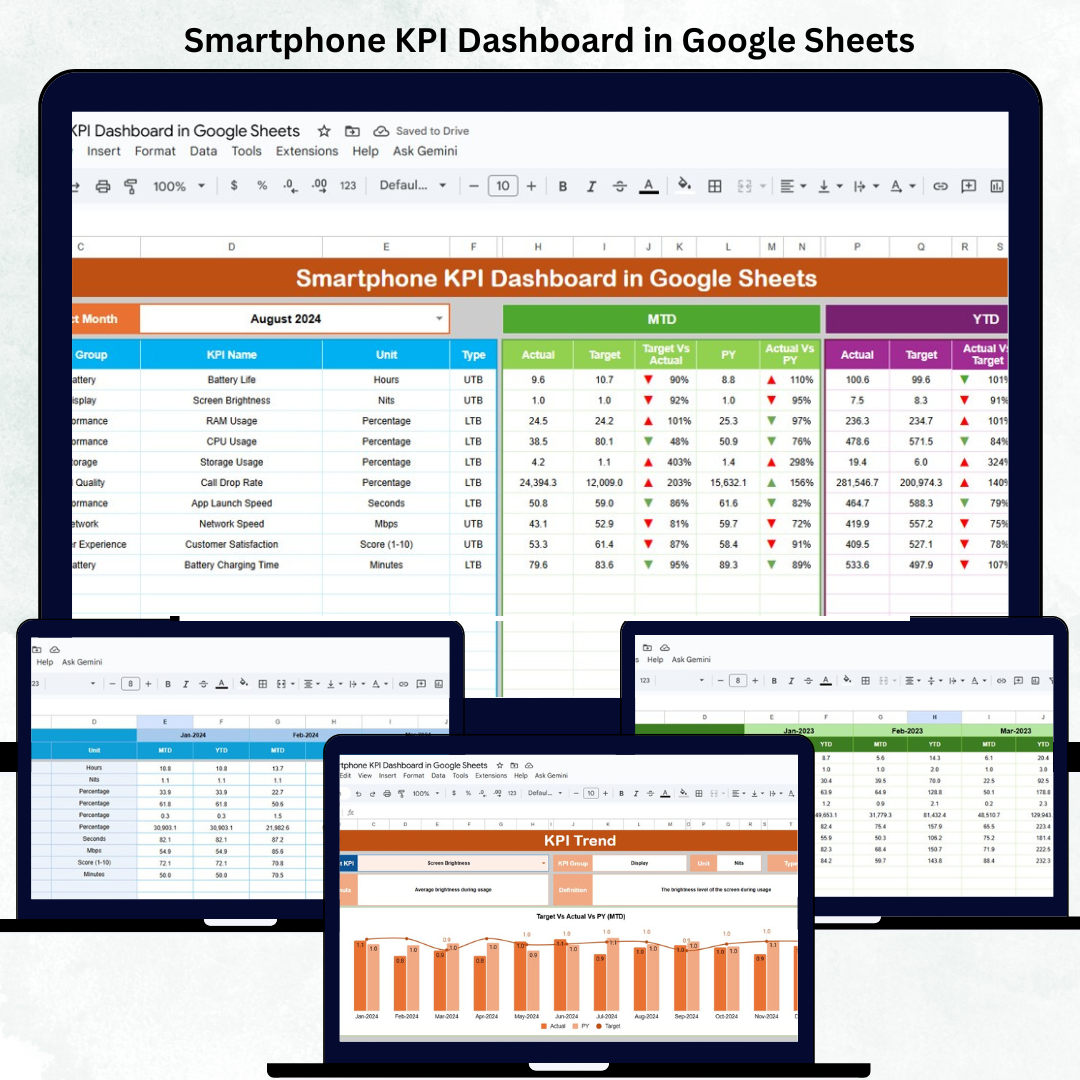


In the rapidly evolving smartphone industry, data-driven performance tracking is key to staying ahead of competitors. The Smartphone KPI Dashboard in Google Sheets empowers manufacturers, retailers, and distributors to monitor production, sales, and service performance seamlessly — all in one automated, cloud-based solution.
This ready-to-use dashboard consolidates every critical business metric into a visual and interactive interface. With real-time updates, MTD/YTD comparisons, and trend insights, it helps you make faster and smarter business decisions — without any complex software or coding required.
🔑 Key Features of the Smartphone KPI Dashboard in Google Sheets
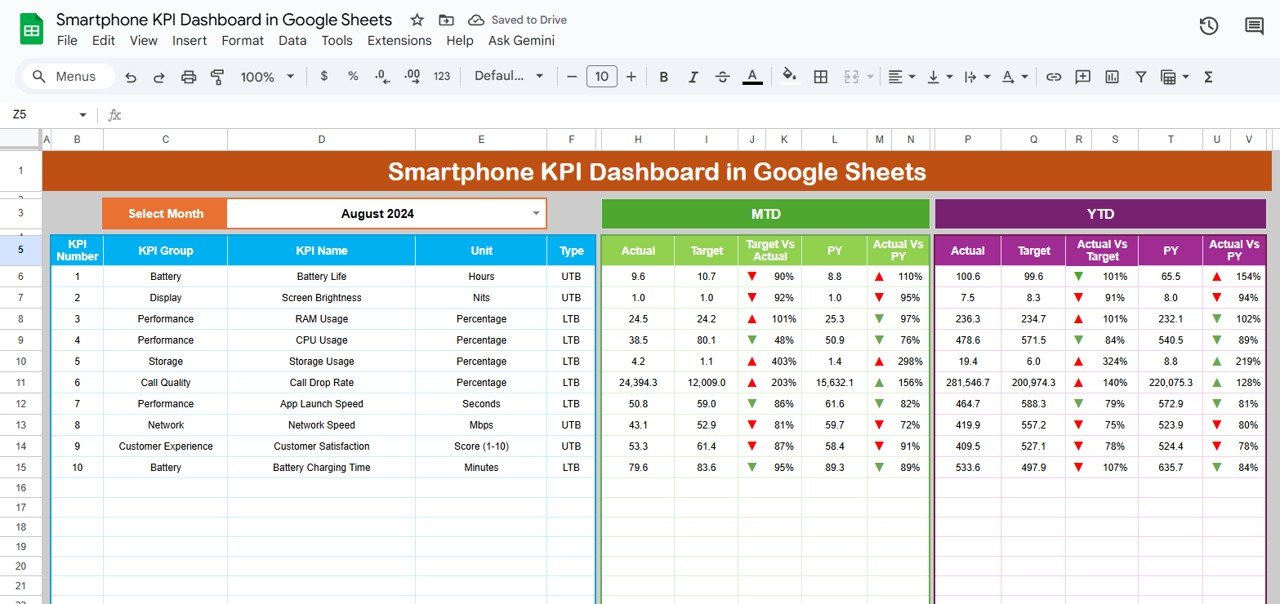
📊 Dashboard Sheet Tab (Main Dashboard)
The main analytics hub that displays all smartphone performance metrics using cards, charts, and visual indicators.
Features Include:
📅 Month Selector (Cell D3): Choose any month to automatically refresh the data view.
📈 MTD & YTD Insights: Track actual, target, and previous year performance instantly.
🟢 Conditional Formatting: View performance improvement or decline with colored arrows.
🧩 Dynamic Data Sync: Metrics adjust automatically when input data is updated.
Key KPIs Covered:
Sales Volume & Revenue
Production Efficiency
Defect Rate (%)
Warranty Claims
Customer Satisfaction Score
Product Return Rate
Average Selling Price
This tab provides an instant snapshot of your organization’s smartphone performance — ideal for executive summaries or weekly management reviews.
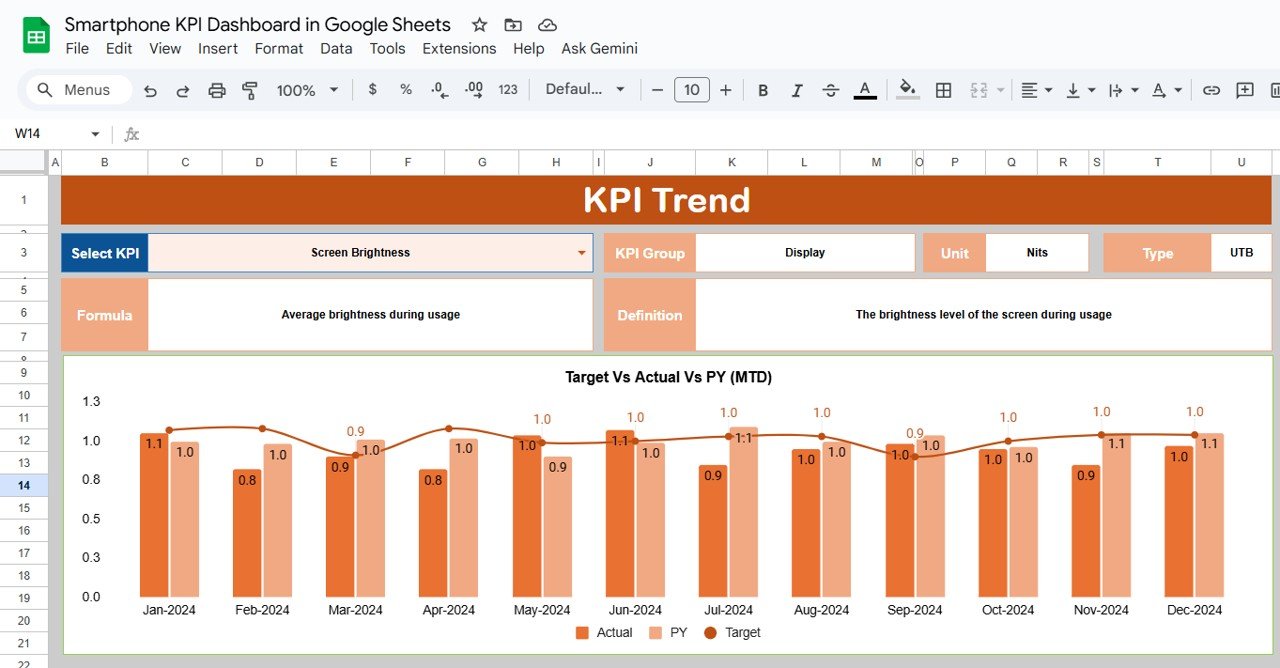
📉 KPI Trend Sheet Tab
Dive deeper into any KPI to view its performance trends over time.
Highlights:
Dropdown selector in Range C3 to choose KPI for analysis.
Displays KPI Group, Unit, Type (UTB/LTB), Formula, and Definition.
Interactive trend charts for MTD and YTD comparisons.
Use this view to spot seasonal trends, identify performance anomalies, and evaluate progress against long-term goals.
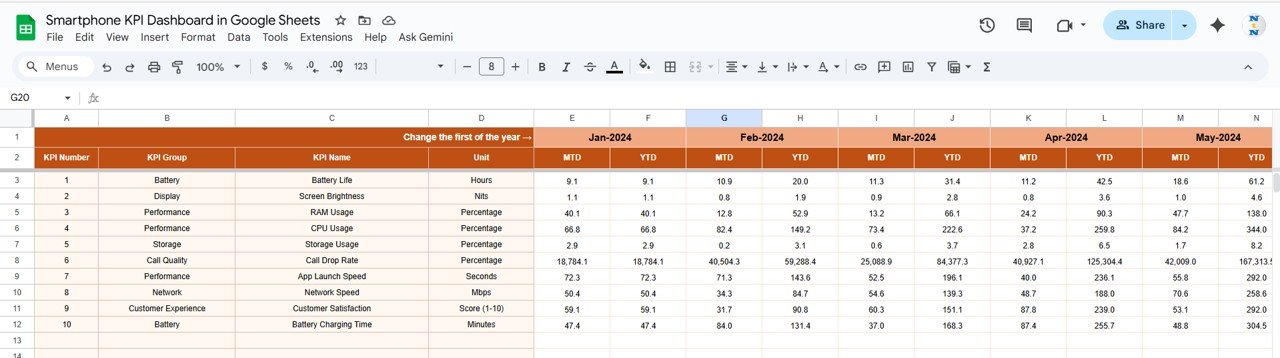
🧾 Actual Number Sheet Tab
Store and manage your performance data here.
Key Inputs:
Month
KPI Name
MTD Actual
YTD Actual
The sheet auto-updates based on the month set in Range E1, ensuring all visualizations reflect the correct reporting period.
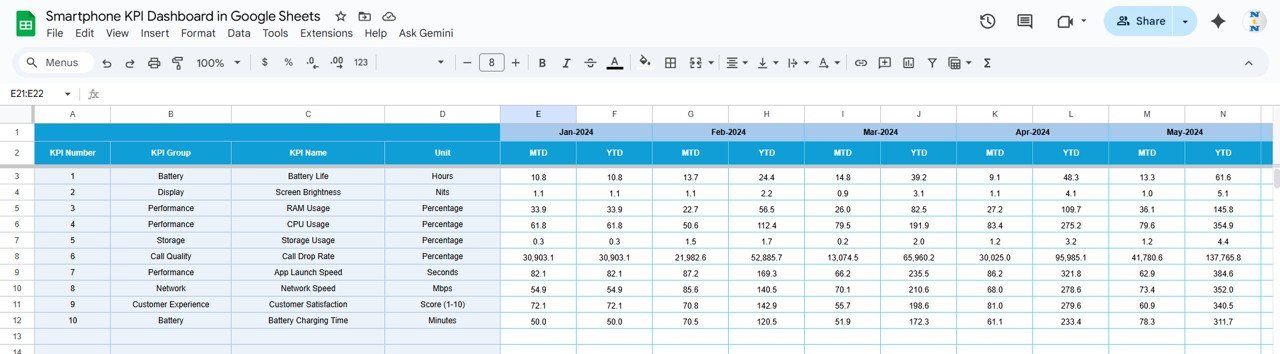
🎯 Target Sheet Tab
Input MTD and YTD target data for each KPI. The dashboard calculates performance vs. target percentages and applies automatic color coding to indicate results.
Example:
Green ↑ — Exceeding Target
Red ↓ — Below Target
This helps quickly identify underperforming metrics.
📆 Previous Year Number Sheet Tab
Enter last year’s performance data for comparative benchmarking. This enables YoY trend charts and progress tracking over time.
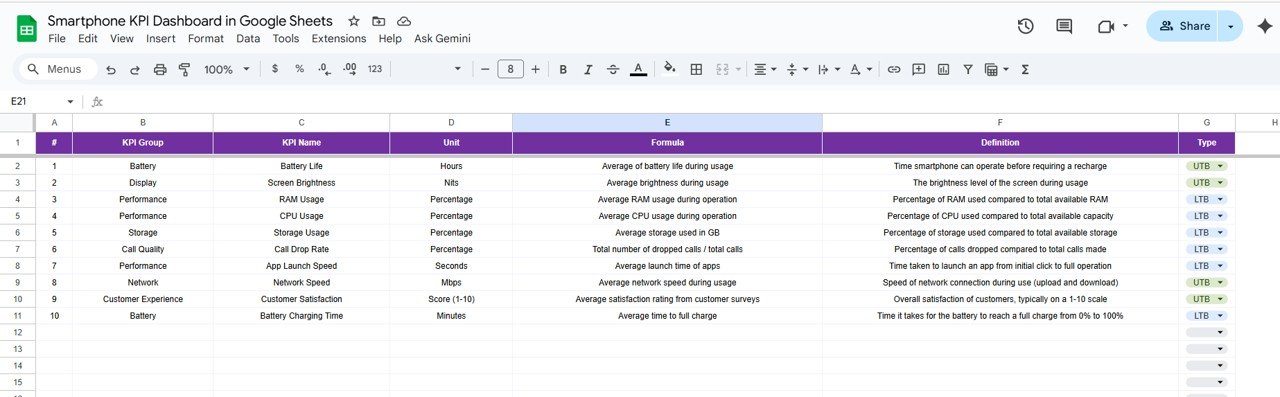
📘 KPI Definition Sheet Tab
This tab defines each KPI with the following details:
KPI Group
KPI Name
Unit of Measurement
Formula
Definition
Type (UTB – Upper the Better, LTB – Lower the Better)
This sheet serves as your KPI reference guide, ensuring everyone interprets data consistently.
📦 What’s Inside the Dashboard
✅ Interactive performance dashboard with automatic updates
✅ 6 organized tabs (Dashboard, Trend, Actual, Target, PY, Definition)
✅ Conditional formatting with up/down indicators
✅ KPI-based MTD and YTD analytics
✅ 100% editable Google Sheets file
✅ Multi-user collaboration via Google Drive
🧑💼 Who Can Use This Dashboard
📱 Smartphone Manufacturers — Track production efficiency and defect trends.
🏬 Retailers & Distributors — Monitor sales, returns, and customer ratings.
💼 Product Managers — Evaluate performance against targets and KPIs.
📊 Executives & Analysts — Review MTD/YTD summaries for strategy and planning.
It’s a complete management solution for smartphone businesses aiming to optimize performance and profitability.
⚙️ Opportunities for Improvement
Enhance your dashboard by:
📍 Adding regional sales and production breakdowns for deeper insights.
💰 Including profit margin and cost analysis KPIs.
🧾 Integrating Google Forms for automated feedback collection.
🧠 Adding forecasting models to predict future sales trends.
📤 Automating monthly summary reports using Google Apps Script.
🧠 Best Practices
✅ Regularly update Actual and Target sheets for accuracy.
✅ Use standardized KPI names to avoid mismatched data.
✅ Validate inputs such as cost and defect rates.
✅ Compare MTD vs YTD and PY monthly to spot performance shifts.
✅ Protect formula cells from editing to preserve dashboard integrity.
🌟 Why Choose the Smartphone KPI Dashboard in Google Sheets
📊 Holistic tracking for all smartphone business KPIs.
⚙️ Fully automated calculations and charts.
📈 Target vs Actual vs PY performance in one view.
☁️ Google Sheets-based for easy access & sharing.
🧩 Fully customizable to suit your reporting needs.
The Smartphone KPI Dashboard in Google Sheets is your go-to analytics system for transforming complex performance data into actionable insights — helping you make informed, data-backed decisions that drive growth and innovation.
🔗 Read the detailed blog post
Watch the step-by-step video Demo:
🔗 Visit our YouTube channel for video tutorials
Compatibility and Requirements
- Works in Google Sheets. You need a free Google account and a web browser.
- You choose the month from a dropdown on the Dashboard sheet, and pick a KPI from a dropdown on the KPI Trend sheet. Google explains dropdowns in Create an in-cell dropdown list.
Frequently Asked Questions
Which sheets are included?
Six sheets: Dashboard, KPI Trend, Actual Number, Target, Previous Year Number and KPI Definition.
How do I update the dashboard?
Enter your MTD and YTD actuals in the Actual Number sheet and your MTD and YTD targets in the Target sheet. Then pick a month on the Dashboard sheet and the figures refresh.
Can I compare results with last year?
Yes. Add last year’s figures to the Previous Year Number sheet. The dashboard shows them next to your actuals and targets, and the trend charts use them for year-over-year comparison.
How do I see the trend for one KPI?
Open the KPI Trend sheet and choose the KPI from the dropdown in cell C3. It shows the KPI group, unit, type (UTB or LTB), formula and definition, plus MTD and YTD trend charts.
Is there an Excel version?
Yes. See the Smartphone KPI Dashboard in Excel.
Related KPI Dashboard Templates
- Smartphone KPI Dashboard in Excel: the same smartphone KPIs in Excel
- Sales KPI Dashboard in Google Sheets: a sales-focused view of your metrics
- CRM KPI Dashboard in Google Sheets: customer relationship metrics in the same layout
- Google Sheets Business Pack (Pro): 14 business templates in one download
Browse all Google Sheets KPI dashboards.












Reviews
There are no reviews yet.