



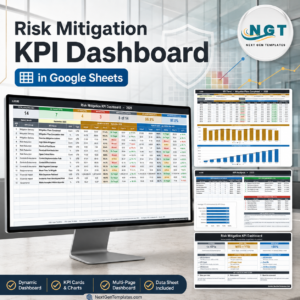
The Risk Management KPI Dashboard in Google Sheets is a powerful tool designed to help organizations monitor and analyze key performance indicators (KPIs) related to their risk management activities. This dashboard provides a centralized platform for assessing potential risks, their impact, and the effectiveness of mitigation strategies, enabling businesses to make informed decisions and improve risk management practices.
By tracking critical risk metrics in real-time and visualizing them with customizable charts, this dashboard empowers organizations to stay proactive in managing risks and ensure their compliance with internal policies and external regulations.

Key Features of the Risk Management KPI Dashboard in Google Sheets
📊 Comprehensive Risk Tracking
Customizable Risk Categories: Tailor the dashboard to track various risk categories relevant to your business, such as financial, operational, strategic, and compliance risks.
Risk Assessment Metrics: Evaluate risks based on likelihood, impact, and priority, allowing for effective decision-making and risk mitigation strategies.
📈 Interactive Data Visualization
Dynamic Charts and Graphs: Use a variety of chart types, including bar charts, line graphs, and heat maps, to visually represent risk data, making it easier to identify trends, outliers, and areas needing attention.
Real-Time Updates: Experience automatic updates as new data is entered, ensuring your dashboard provides the most up-to-date risk information.
🖥 User-Friendly Interface
Intuitive Design: The dashboard is designed to be easy to navigate, with a clean and organized layout that simplifies complex risk data.
Collaborative Features: Share the dashboard with your team and stakeholders, promoting transparency and encouraging collaborative risk management efforts.
🔒 Data Integrity and Security
Access Controls: Set permissions to restrict access to sensitive risk data, ensuring only authorized personnel can view or edit specific information.
Audit Trails: Track changes to the dashboard, providing accountability and traceability for all risk management activities.
Benefits of Implementing the Risk Management KPI Dashboard
✅ Enhanced Risk Visibility
Gain a comprehensive view of all identified risks, their potential impact, and the effectiveness of mitigation efforts, allowing you to stay ahead of potential threats.
✅ Improved Decision-Making
Leverage real-time data and visualizations to make informed decisions regarding risk mitigation strategies and resource allocation.
✅ Increased Collaboration
Foster a collaborative approach to risk management by sharing insights and strategies with team members and stakeholders, ensuring alignment and effective execution.
✅ Efficient Reporting
Simplify the process of generating and distributing risk reports, reducing the time and effort required for manual reporting and ensuring timely communication.
Getting Started with the Risk Management KPI Dashboard in Google Sheets
Identify Risk Categories: Determine the key risk categories that are most relevant to your organization’s operations and strategic goals.
Define Assessment Metrics: Set up criteria for evaluating the likelihood, impact, and severity of risks to prioritize them effectively.
Customize the Dashboard: Tailor the layout, charts, and metrics of the dashboard to fit your organization’s specific risk landscape and needs.
Integrate Data Sources: Connect the dashboard to your existing data sources, ensuring seamless data flow and automatic updates.
Set Up Access Controls: Define user roles and permissions to protect sensitive risk data and ensure that only authorized users have access to critical information.
Monitor and Review: Regularly review the dashboard to assess risk levels, identify trends, and implement mitigation strategies as necessary.
By adopting the Risk Management KPI Dashboard in Google Sheets, organizations can streamline their risk management processes, enhance decision-making, and ensure that they are well-prepared to handle potential risks.
Click here to read the Detailed blog post
Risk Management KPI Dashboard in Google Sheets
Visit our YouTube channel to learn step-by-step video tutorials
YouTube.com/@PKAnExcelExpert
Watch the step-by-step video Demo:
Compatibility and Requirements
- Works in Google Sheets. You need a free Google account and a web browser.
- Charts include bar charts, line graphs and heat maps. Google explains charts in Add & edit a chart or graph.
Who Is This Dashboard For?
Risk managers, compliance officers, finance and operations leads, and management teams that review financial, operational, strategic and compliance risks.
Frequently Asked Questions
Which risk categories can I track?
Financial, operational, strategic and compliance risks. You can tailor the categories to your business.
How are risks assessed?
Each risk is evaluated by likelihood, impact and priority.
Can I control who sees the data?
Yes. Set permissions so only authorized people can view or edit sensitive risk data.
Is there an Excel or Power BI version?
Yes. See the Risk Management KPI Dashboard in Excel and the Risk Management KPI Dashboard in Power BI.
Related Risk and Compliance Templates
- Risk Management KPI Dashboard in Excel: the Excel edition
- Risk Management KPI Dashboard in Power BI: the Power BI edition
- Risk Management Dashboard In Google Sheets: a full risk management dashboard
- Audit Findings and Risk Analysis Dashboard in Google Sheets: link audit findings to risk
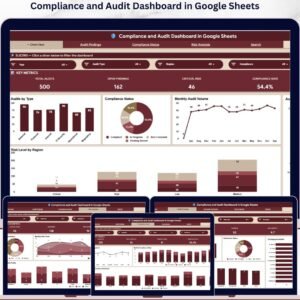
- Compliance and Audit Dashboard in Google Sheets: track compliance and audits
Browse all Google Sheets KPI dashboards.











Reviews
There are no reviews yet.