



The Expense Reimbursement Tracker in Excel is a powerful tool designed for businesses, HR departments, and finance teams to track employee expenses and streamline the reimbursement process. Whether you are managing a small team or a large organization, this Excel-based tracker simplifies the process of submitting, reviewing, and reimbursing employee expenses, ensuring timely and accurate financial management.
With easy-to-use features, this tracker provides an efficient way to manage and monitor all types of employee expenses, from travel and meals to office supplies and client entertainment, helping to maintain accurate records and avoid errors.

Key Features of the Expense Reimbursement Tracker in Excel:
💼 Expense Submission and Tracking
Allow employees to submit their expenses by entering details like expense type, amount, date, and receipt status, ensuring full transparency and traceability.
💰 Approval Process Management
Track the approval status of each expense request, with options to mark items as pending, approved, or rejected, streamlining the review and approval process.
📊 Real-Time Expense Monitoring
Monitor total expenses per employee, department, or category, and compare them against budgets or predefined limits to control costs effectively.
📅 Date and Receipt Management
Track dates for each expense and the status of receipts to ensure proper documentation is in place and timely reimbursements are made.
⚡ Customizable Categories
Customize the expense categories according to your organization’s needs, whether for business travel, meals, supplies, or other company-related expenses.
🚀 Why You’ll Love the Expense Reimbursement Tracker in Excel:
✅ Track Expenses Easily – Employees can submit their expenses with clear details on the type, amount, and receipts, streamlining the entire process.
✅ Simplify the Approval Process – Track the approval status for each submission and ensure timely approvals or rejections.
✅ Control Expenses – Monitor total expenses and compare them with budgeted amounts to avoid overspending.
✅ Ensure Compliance – Maintain clear records of receipts and other supporting documents for each expense, ensuring compliance with company policies.
✅ Save Time and Resources – Automate and simplify the reimbursement process, saving your HR and finance teams time and effort.
✅ Fully Customizable and Interactive – Customize the tracker to meet the specific needs of your organization with interactive features for real-time monitoring.
What’s Inside the Expense Reimbursement Tracker in Excel:
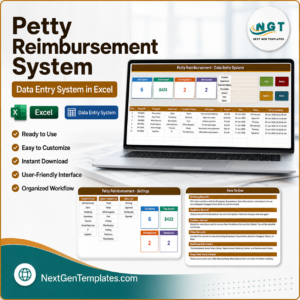
Expense Submission Sheet: Employees can submit their expenses with categories, amounts, dates, and receipt status, ensuring complete transparency.
Approval Tracking: Manage the approval process by tracking each expense’s status, from submission to approval or rejection.
Expense Summary: Get a high-level overview of total expenses per employee, department, or category to monitor costs effectively.
Date and Receipt Management: Track dates and ensure receipts are provided for all expenses, maintaining compliance with company policies.
Custom Expense Categories: Tailor the expense categories to suit your company’s needs, from business travel to client meals.
Reports and Analytics: Generate detailed reports summarizing total expenses, approvals, and rejections for better decision-making and analysis.
How to Use the Expense Reimbursement Tracker in Excel:
1️⃣ Download the Template – Instantly access your Excel file upon purchase.
2️⃣ Set Up Categories and Limits – Customize the expense categories and set limits for each type of expense based on your company’s policies.
3️⃣ Input Expense Data – Employees enter their expense details, including type, amount, and receipt status, for tracking and approval.
4️⃣ Track Approvals and Rejections – Monitor the approval process and ensure that each expense is reviewed in a timely manner.
5️⃣ Generate Reports – Create custom reports summarizing expenses by employee, department, or category for analysis and decision-making.
Who Can Benefit from the Expense Reimbursement Tracker in Excel:
HR Departments
Finance Teams
Small and Medium Businesses
Large Enterprises
Accounting Professionals
Business Owners
Administrative Assistants
Employee Expense Managers
The Expense Reimbursement Tracker in Excel is the ideal tool for managing employee expenses and simplifying the reimbursement process. Whether for travel, supplies, or client entertainment, this tracker ensures that you stay organized and efficient while maintaining complete control over company expenses.
Click here to read the Detailed blog post
https://www.pk-anexcelexpert.com/expense-reimbursement-tracker-in-excel/
Visit our YouTube channel to learn step-by-step video tutorials
Youtube.com/@PKAnExcelExpert
Frequently Asked Questions
What details does each expense record hold?
Expense type, amount, date and receipt status, along with the employee and the approval status.
Which approval statuses can I use?
Each expense can be marked as pending, approved or rejected, so you can see what still needs review.
Can I set my own expense categories and limits?
Yes. You can customize the categories, such as travel, meals and supplies, and set limits for each type based on your company policy.
Can I see totals by employee or department?
Yes. The expense summary shows total expenses per employee, department or category.
Compatibility and Requirements
- Works in Microsoft Excel desktop (Excel 2016 or later, or Microsoft 365).
- To add or change the status values, Microsoft explains drop-down lists in Create a drop-down list.
Related Expense Templates
- Expense Reimbursement Tracker in Google Sheets: the Google Sheets version
- Employee Reimbursement Form Template in MS Word and Google Docs: a free claim form for employees
- Travel Expense Report Tracker in Excel: for trip-by-trip travel claims
- Expense Tracking Dashboard in Power BI: chart company expenses in Power BI
- Finance & Accounting Command Center: 8 Excel, Power BI and Google Sheets finance templates
Browse all Excel financial templates or the Excel trackers.














Reviews
There are no reviews yet.