


The best cybersecurity dashboard template for most security teams in 2026 is the Cybersecurity Dashboard ($17.99 in Excel or Power BI, $9.99 in Google Sheets). It turns an incident log into resolved %, risk score, financial impact and days to resolve by department, region and category. SOC teams should add the Cybersecurity Operations Center Dashboard.
Last updated: October 2026
Key takeaways
- Our top pick is the Cybersecurity Dashboard: five analysis pages in Excel and Power BI, and seven tabs covering incidents, vulnerabilities, training, assets and endpoints in Google Sheets.
- SOC managers get detection minutes, containment minutes, threat score and analyst workload by shift from the Cybersecurity Operations Center Dashboard.
- CISOs who report to the board can turn a 24-column risk register into five pages of loss exposure, residual risk and framework status with the Cyber Risk Management Dashboard.
- The KPI dashboards for security, incident response and awareness track monthly actuals against target and last year from $11.99.
- Every pick is a one-time purchase, and the IT and Cybersecurity Operations Bundle packs 8 templates for $69.99 instead of $117.92.
 Launch offer
From your first Pivot Table to the Data Model, DAX, Power Query and a one-page KPI dashboard. 11h 51m of video by PK, with practice files, quizzes and a capstone.
Cybersecurity dashboard templates compared
| Template | Format | Best For | Price |
|---|---|---|---|
| Cybersecurity Dashboard (Best overall) | Excel, Power BI, Google Sheets | Incidents, risk score and financial impact by team and region | $9.99 to $17.99 |
| Cybersecurity Operations Center Dashboard | Excel, Power BI | SOC detection, containment and analyst workload | $17.99 |
| Cyber Risk Management Dashboard | Excel, Power BI | Risk register, loss exposure and framework status | $17.99 |
| Cybersecurity KPI Dashboard | Excel, Power BI, Google Sheets | Monthly security KPIs against target and last year | $11.99 to $12.99 |
| Cyber Incident Response KPI Dashboard | Excel, Google Sheets, Power BI | Response and resolution KPIs, MTD and YTD | $11.99 to $14.99 |
| Cybersecurity Awareness KPI Dashboard | Excel, Power BI, Google Sheets | Training completion and phishing simulation results | $8.99 to $12.99 |
| Cybersecurity Service Management System | Web app (Google Sheets + Apps Script) | Security service firms and MSSPs | $39.99 |
| IT and Cybersecurity Operations Bundle (Best value) | Excel, Power BI | IT support, assets, SLAs and security KPIs in one pack | $69.99 |
Security teams are not short of data. The SIEM has alerts, the ticketing tool has incidents, the scanner has vulnerabilities and the training platform has phishing results. What they are short of is one view that a CISO, an auditor or a board can read in five minutes. So every month someone exports four files, copies them into a slide deck and rebuilds the same charts by hand.
The usual fix is another platform. GRC suites and security analytics add-ons do solve it, but they are sold per user or per data volume, take weeks to roll out, and still need someone to shape the output for leadership. A cybersecurity dashboard template sits on top of the exports you already have. You paste the data in, refresh, and the same pages come out every week for a one-time price.
How we picked these cybersecurity templates
We searched the NextGenTemplates catalog for files built for security operations, incident response, cyber risk, security awareness and security service providers. We read each product page for the fields it actually tracks, such as severity, status, detection and containment time, risk score, loss exposure, framework and training status, and left out files built for physical security. Those are covered in our security guard and private security templates guide.
Where one tool comes in several formats, we list it once with every price. We ranked on three things: how much of a security team’s weekly and monthly reporting a file covers, how fast a small team can load its own export, and price. This post is about choosing the template. If you want the metric definitions and benchmarks first, read our 12 cybersecurity KPIs to track guide and come back here.
The 8 best cybersecurity dashboard templates for 2026
1. Cybersecurity Dashboard: best overall
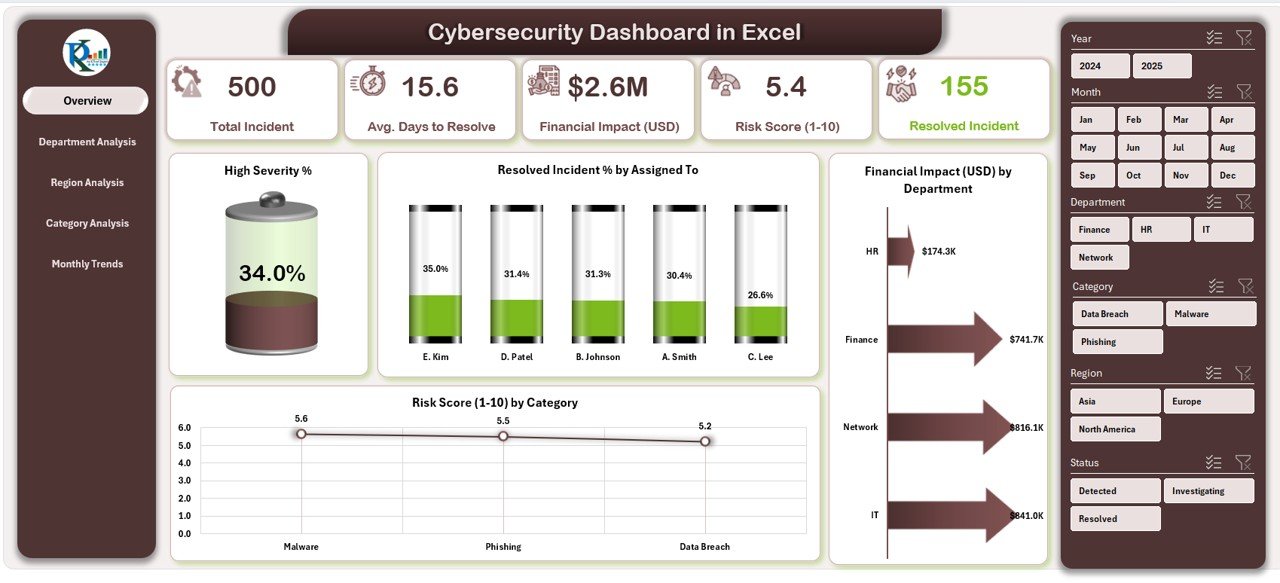
This is the file we would hand to a new IT security manager on day one. It reads a plain incident log and answers the questions every security review starts with: how many incidents, how many are resolved, which categories carry the most risk, which departments lose the most money, and how long fixes take.
Who it is for: IT security managers, CISOs at small and mid-sized firms, and analysts who report incidents to leadership every month.
What is inside the Excel edition:
- 5 pages: Overview, Department Analysis, Region Analysis, Category Analysis and Monthly Trends
- KPI cards for total incidents, resolved %, financial losses, average resolution time and risk score
- High severity %, resolved incident % by assigned analyst, financial impact (USD) by department and risk score (1 to 10) by category
- Slicers for department, category and time period, built on standard Excel charts and slicers
The Power BI edition ($17.99) keeps the same five pages and adds average days to resolve by department and region. The Google Sheets edition ($9.99) is a wider build: seven tabs with cards for total security events, critical alerts, average response hours and risk mitigated, separate pages for incidents, vulnerabilities, compliance training, assets and endpoints, an Event ID lookup, and slicers for severity, source, status, asset type, detection tool and framework. It is the cheapest way to share one live cyber security dashboard with the whole team.
Price: $17.99 in Excel, $17.99 in Power BI, $9.99 in Google Sheets. Verdict: the best single file if you want one cybersecurity dashboard that covers incidents, risk and cost.
2. Cybersecurity Operations Center Dashboard: best for SOC teams
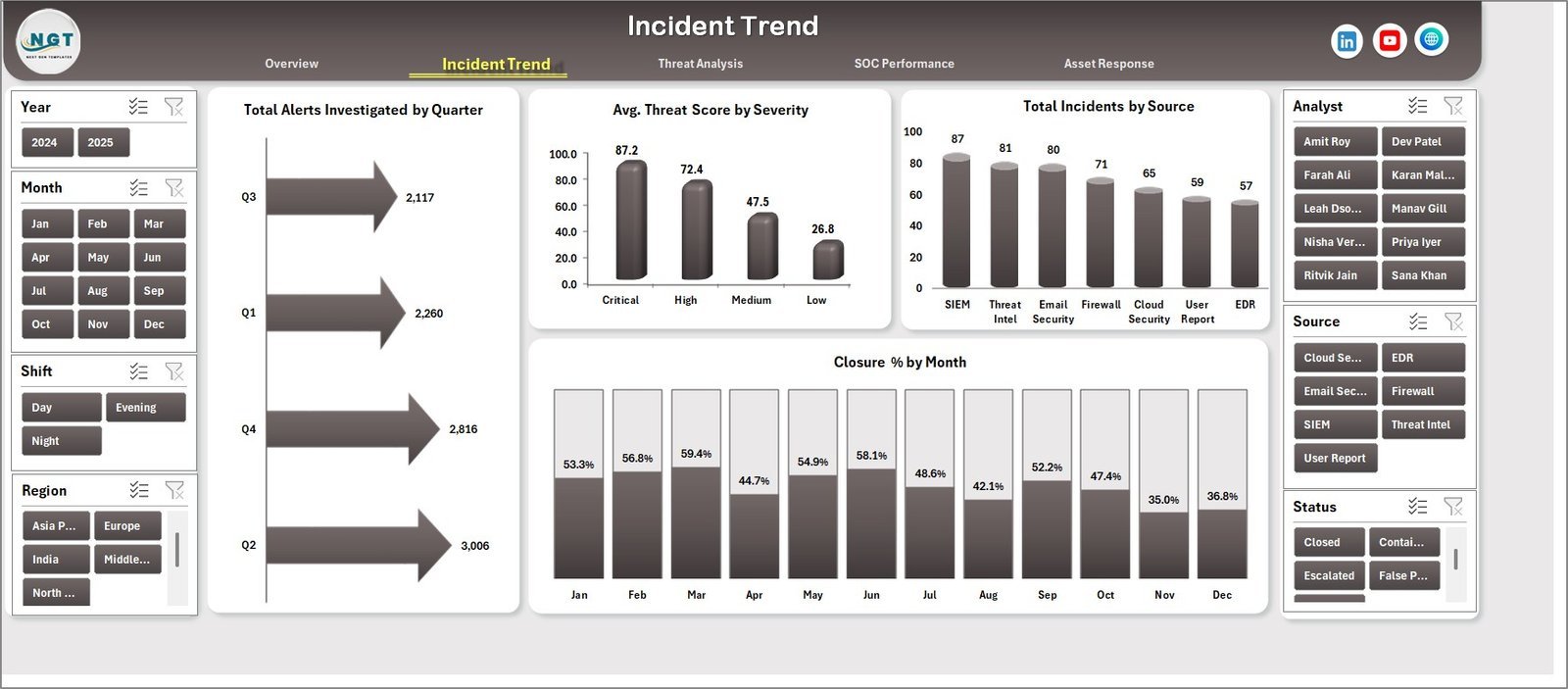
A security operations center is judged on speed: how fast alerts are detected, how fast incidents are contained and how quickly systems recover. This dashboard is built around those numbers and around the analysts and shifts that produce them.
Who it is for: SOC managers, incident response leads and MSSP delivery heads who run analysts in shifts.
- 5 executive cards: total incidents, total alerts investigated, total estimated loss, average threat score and average detection minutes
- 5 analysis pages: Overview, Incident Trend, Threat Analysis, SOC Performance and Asset Response
- 18+ chart views by year, severity, status, month, quarter, source, incident type, asset type, priority, analyst, shift, region and business unit
- A structured data sheet for your own SOC records and a support sheet of pivot tables that can be hidden after setup
The Power BI edition tracks average detection minutes by priority and region and average containment minutes by severity and shift, so you can see whether the night shift is slower than the day shift. Both editions cost $17.99.
Price: $17.99. Verdict: the right pick when the people you manage are analysts and the numbers you report are minutes.
3. Cyber Risk Management Dashboard: best for board reporting
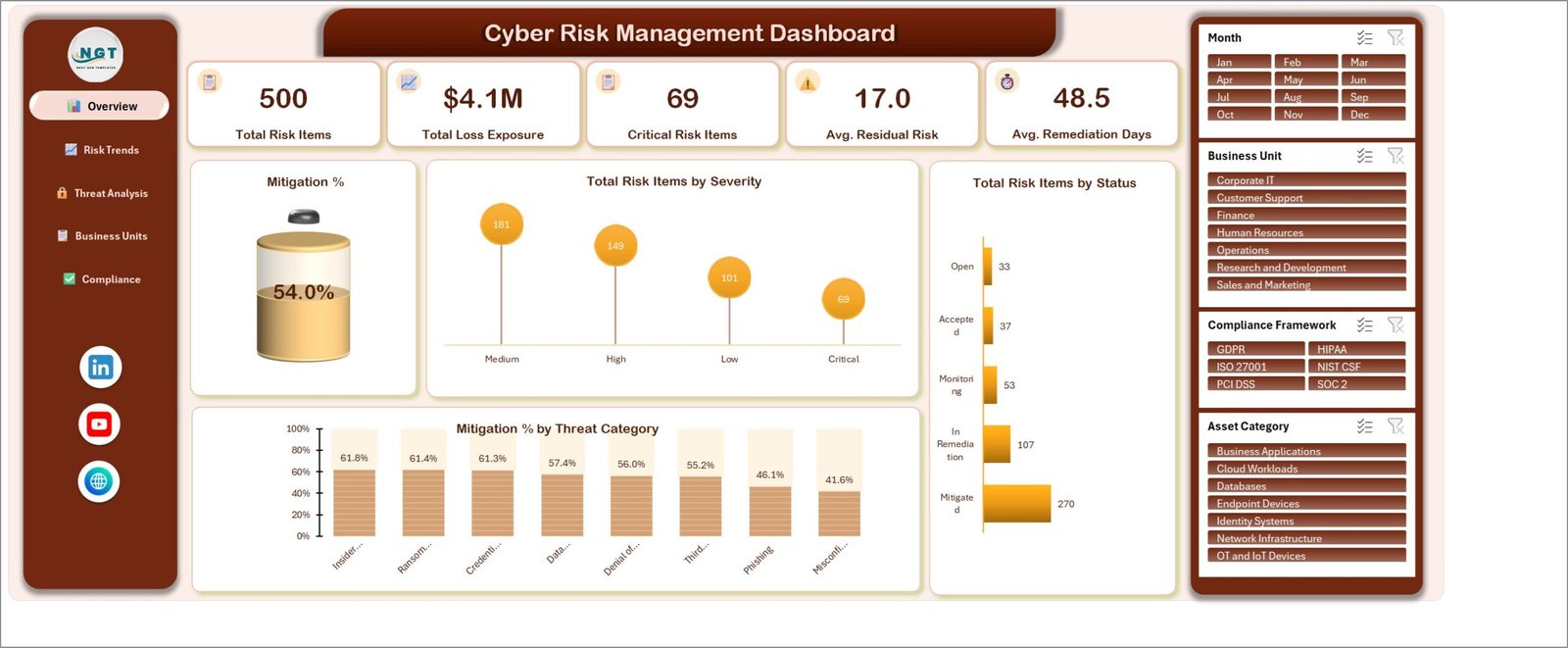
Boards do not ask how many alerts fired. They ask where the money is at risk and whether that is getting better. This dashboard starts from a risk register rather than an incident log, which makes it the closest thing in the catalog to a cybersecurity risk assessment template with charts on top.
Who it is for: CISOs, GRC analysts, internal auditors and risk committees.
- 5 pages: Overview, Risk Trends, Threat Analysis, Business Units and Compliance
- KPI cards for total risk items, total loss exposure, critical risk items, average residual risk and average remediation days
- A mitigation gauge and 16 charts, including risk items by severity and status, and mitigation % by threat category
- A 24-column risk register with likelihood and impact scores, inherent and residual risk, loss exposure, remediation cost, controls tested and passed, and vulnerabilities found and closed
- 500 sample risks across 7 business units and 6 frameworks: GDPR, HIPAA, ISO 27001, NIST CSF, PCI DSS and SOC 2
The Power BI edition ($17.99) adds 16 KPI cards with month-on-month badges and sparklines, three scorecard tables by threat category, business unit and framework, and a details drillthrough page. If you only need monthly risk KPIs against targets, the Cyber Risk Management KPI Dashboard costs $12.99 in Excel and $11.99 in Power BI.
Price: $17.99. Verdict: the file to take into a board or audit committee meeting.
Not sure yet? Most teams start with the Cybersecurity Dashboard at $17.99, or $9.99 in Google Sheets, and add a KPI file later. If you need IT support and asset reporting too, the IT and Cybersecurity Operations Bundle gives you 8 templates for $69.99.
4. Cybersecurity KPI Dashboard: best for monthly targets

A cybersecurity KPI dashboard works differently from the three files above. Instead of hundreds of incident rows, you enter one actual and one target per KPI per month. The file then shows month-to-date and year-to-date results, the gap to target and the change from last year, with green and red arrows.
Who it is for: security leads who send a monthly KPI pack to the CIO or the risk committee.
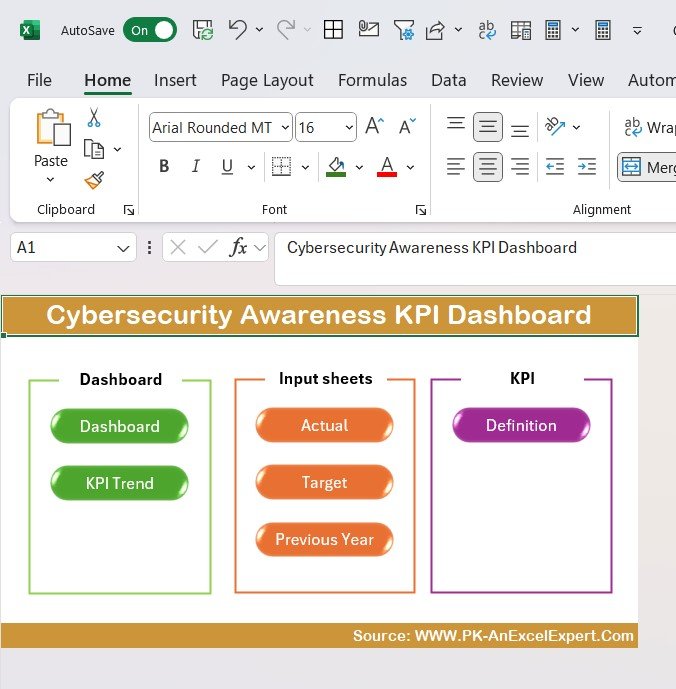
- Home sheet with navigation buttons
- Dashboard sheet with MTD and YTD values for each KPI, conditional formatting and actual against target
- KPI Trend sheet with charts for any KPI you pick
- Actual, Target and Previous Year input sheets, and a KPI Definition sheet with each formula and unit
The Power BI edition costs $11.99 and the Google Sheets edition costs $12.99. Prefer a red, amber and green grid over charts? The Cybersecurity KPI Scorecard costs $12.99 in Excel and $9.99 in Google Sheets.
Price: $12.99. Verdict: the best cybersecurity KPI dashboard for a team that reports against targets.
5. Cyber Incident Response KPI Dashboard: best for response teams
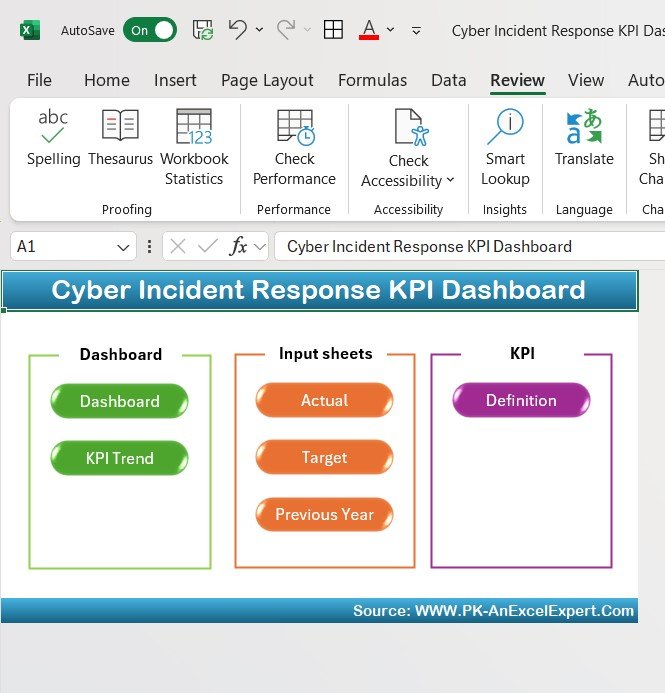
Incident response teams are measured on a narrower set of numbers: time to detect, time to first response, time to resolve, incidents closed within SLA and repeat incidents. This file keeps those KPIs together so you can see whether the playbook is getting faster month by month.
Who it is for: incident response managers, CSIRT leads and IT teams that own the response process.
- Monthly selector that updates the whole dashboard
- MTD and YTD cards for each KPI, target against actual, and up and down arrows against last year
- KPI Trend sheet, Actual, Target and Previous Year sheets, and a KPI Definition glossary
- Lower is better and upper is better logic, so a fall in response time shows as an improvement
It comes in Google Sheets ($12.99) and Power BI ($11.99), where the summary page counts KPIs that met and missed their monthly target. The Cyber Incident Response KPI Scorecard ($14.99) gives the same KPIs as a scorecard. For incident counts by category instead of KPIs, see the Cybersecurity Incident KPI Dashboard ($9.99 in Google Sheets).
Price: $12.99. Verdict: pick it when response speed is the number you are asked about most.
6. Cybersecurity Awareness KPI Dashboard: best for training programs
Many breaches still start with a person clicking a link. Awareness programs are how security teams answer that, and they need their own numbers: who finished training, who clicked the phishing test, who reported it and how policy compliance is moving.
Who it is for: security awareness owners, HR and compliance teams that run training and phishing simulations.
- KPIs for training participation and completion, phishing test results, policy compliance and incident response times
- MTD and YTD results against target and last year, with a trend view per KPI
- Editable KPI list and definitions, so you can add the metrics your program uses
The Power BI edition costs $11.99. For a single-screen view, the Cybersecurity Awareness KPI Scorecard in Google Sheets ($8.99) tracks ten awareness KPIs with red, amber and green rules you can edit, and there is an Excel scorecard at $12.99.
Price: $12.99. Verdict: the right file when your program is measured on people, not systems.
7. Cybersecurity Service Management System Web App: best for MSSPs
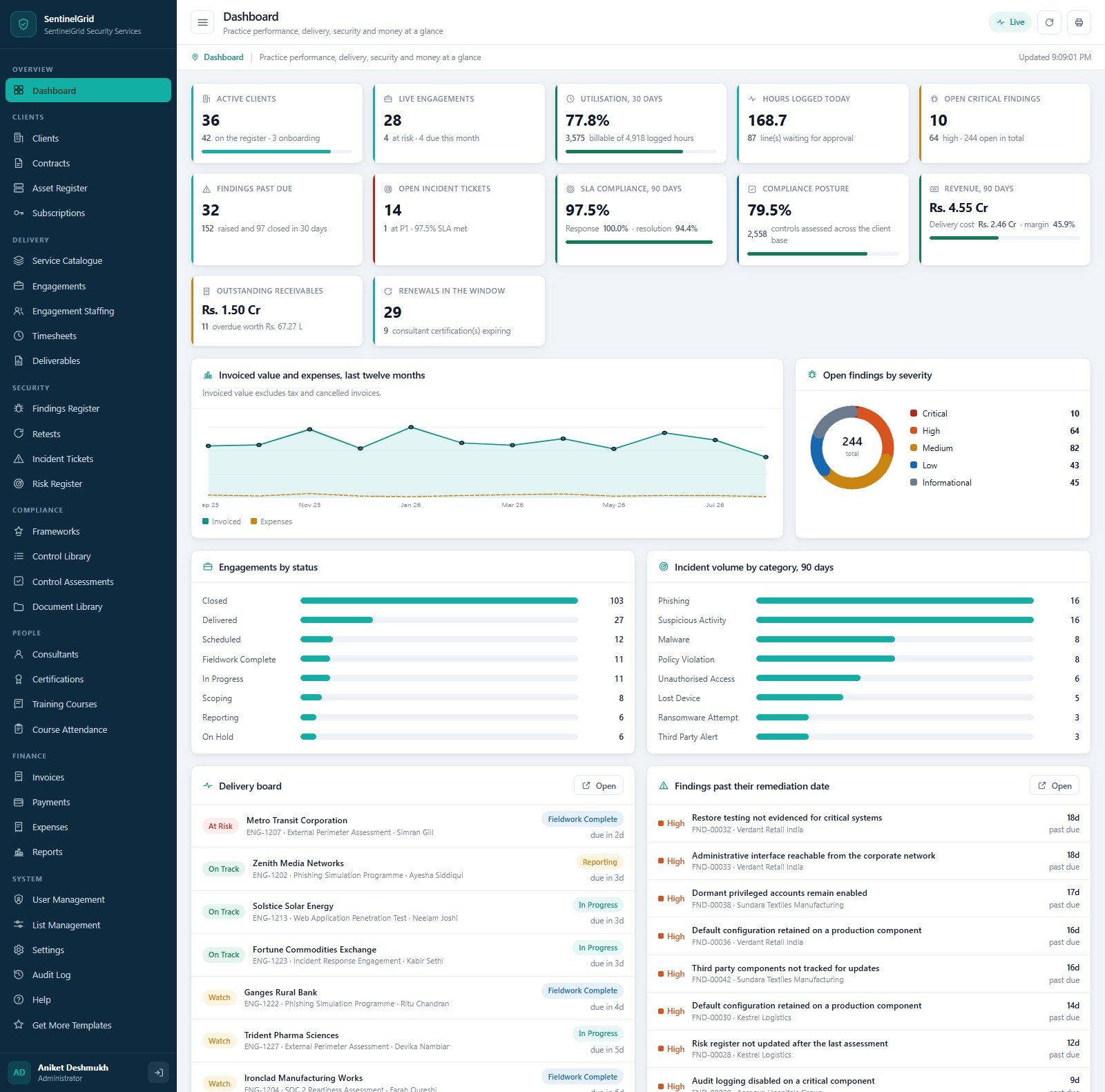
Security consultancies and managed security service providers have a different problem. They report on many clients, and they also have to run the business: contracts, engagements, consultant time, findings, retests and invoices. A dashboard alone does not cover that.
Who it is for: penetration testing firms, security consultancies and MSSPs with a small back office.
- Client register, contracts and retainers, and the in-scope asset estate per client
- Engagement pipeline and staffing, timesheets and deliverables
- Findings register with CVSS scores and remediation dates, retests, and incident tickets with live SLA clocks
- Risk register and compliance programmes against six frameworks, plus consultant certifications and training
- Invoices, payments and expenses; 32 screens, 7 user roles and 26 printable reports
It runs on Google Apps Script in your own Google account and builds its own Google Sheets database, so there is no server to rent and no seat licence. The product page has a live demo with sample data for each role.
Price: $39.99. Verdict: the only pick here that runs the firm, not just the report.
8. IT and Cybersecurity Operations Bundle: best value

In smaller companies the security team is the IT team. This bundle covers both jobs: help desk tickets, IT assets, SLAs, data center performance, IT operations KPIs, a compliance audit tracker and the Cybersecurity KPI Dashboard.
Who it is for: lean IT departments and managed service providers that handle support and security together.
- IT Support Ticket dashboards in Excel and Power BI for volume, resolution time, SLAs and technician performance
- Cybersecurity KPI tracking for MTTD, MTTR, phishing click rate, compliance score and unauthorized access attempts
- IT Asset Management in Power BI, IT Services SLA analytics, Data Center performance and IT Operations KPIs
- A VBA Compliance Audit Tracker with login, entry forms and a live dashboard
Price: $69.99 for all eight, against $117.92 if bought one by one, a saving of $47.93. For the IT side in more depth, see our IT KPIs guide covering MTTR, SLA and uptime. If your team also runs the server room, see our data center dashboard templates for uptime, PUE and cloud cost reporting.
Which metrics should a cybersecurity dashboard track?
Every template above is built around some mix of these ten metrics. The last column gives common starting points, not rules. Set your own targets from your risk appetite, your contracts and your last six months of data.
| Metric | Formula | Common starting target |
|---|---|---|
| Mean time to detect (MTTD) | Sum of (detection time minus start time) / Incidents detected | Trend it down month on month |
| Mean time to respond or resolve (MTTR) | Sum of (resolution time minus detection time) / Incidents resolved | Set by severity, then trend it |
| Mean time to contain | Sum of (containment time minus detection time) / Incidents contained | Hours, not days, for critical incidents |
| Incident resolution rate | Incidents resolved / Incidents raised x 100 | 90% or higher within the period |
| High severity share | High and critical incidents / Total incidents x 100 | Track the trend, not a fixed number |
| Phishing click rate | Users who clicked / Users tested x 100 | Under 5% after a year of training |
| Training completion | Staff who completed training / Staff assigned x 100 | 95% or higher |
| Critical patch compliance | Critical patches applied within SLA / Critical patches due x 100 | 95% or higher |
| Residual risk score | Likelihood x Impact after controls, averaged across open risks | Falling quarter on quarter |
| Control pass rate | Controls passed / Controls tested x 100 | 90% or higher |
Two of these are easy to game. A team can push MTTR down by closing tickets early and reopening them later, so track reopened incidents beside it. A falling phishing click rate means little if the reporting rate does not rise too, because the goal is staff who spot and report the email, not staff who ignore it. The fuller list, with benchmarks, is in our cybersecurity KPIs guide.
If you are building the KPI list from scratch, the NIST Cybersecurity Framework is a practical place to start. Its six functions (Govern, Identify, Protect, Detect, Respond and Recover) map well to dashboard pages, and most auditors recognise them.
How do you choose the right cybersecurity dashboard template?
| If you are… | Start with |
|---|---|
| An IT security manager who wants one view of incidents, risk and cost | Cybersecurity Dashboard |
| A SOC manager reporting detection and containment by shift and analyst | Cybersecurity Operations Center Dashboard |
| A CISO or GRC lead reporting loss exposure and framework status to the board | Cyber Risk Management Dashboard |
| A security lead sending a monthly KPI pack against targets | Cybersecurity KPI Dashboard |
| An incident response manager tracking response and resolution speed | Cyber Incident Response KPI Dashboard |
| An awareness or HR lead running training and phishing tests | Cybersecurity Awareness KPI Dashboard |
| A security consultancy or MSSP running clients, findings and invoices | Cybersecurity Service Management System |
| A small IT team that handles support and security together | IT and Cybersecurity Operations Bundle |
A common setup is one analysis file and one target file: the Cybersecurity Dashboard or the SOC dashboard for the weekly review, and a KPI dashboard or scorecard for the monthly leadership pack. Add the Cyber Risk Management Dashboard once a quarter for the board. Teams that also run a service desk should look at our call center and helpdesk dashboard templates, and telecom operators should see our telecom KPI dashboard templates.
When a template is NOT the right answer
- You need real-time alerting. These files refresh when you load new data. Detecting an attack as it happens needs a SIEM, EDR or managed detection service.
- You need log collection and correlation. None of these templates ingests raw logs. They report on the incidents, alerts and risks your tools have already produced.
- You need audit evidence management. A GRC platform stores evidence, assigns control owners and tracks audits. The risk dashboard reports status; it does not hold the evidence.
- Nobody owns the export. A dashboard is only as fresh as its last data load. If no one will load the monthly export, the numbers go stale fast.
For most small and mid-sized security teams, a cybersecurity dashboard template is the quickest way to get a clean weekly and monthly report without buying more seats. Want to try a free file first? See our free Excel dashboard templates, free Power BI dashboard templates and free Google Sheets dashboard templates. Every paid file here is fully editable, which matters more than it sounds; our guide to editable vs locked templates explains why.
Frequently asked questions
What is a cybersecurity dashboard?
A cybersecurity dashboard is one screen that turns security records into numbers a manager can act on: incident counts, severity mix, time to detect and resolve, risk scores, financial impact and training results. The templates here do that in Excel, Google Sheets or Power BI from a log or export you already keep, with slicers to cut it by team, region or month.
Which cybersecurity dashboard template should I buy first?
Start with the Cybersecurity Dashboard. It costs $17.99 in Excel or Power BI and $9.99 in Google Sheets, and it reads a plain incident log by department, region, category and month. Add a KPI dashboard at $11.99 to $12.99 when you also need to report monthly figures against targets and last year.
What is the difference between a cybersecurity dashboard and a cybersecurity KPI dashboard?
A cybersecurity dashboard analyses records, such as 500 incidents, and slices them by team, category or region. A cybersecurity KPI dashboard works on monthly totals: you type each KPI's actual and target, and it shows month-to-date and year-to-date results with up and down arrows. Many teams use one of each.
Can a spreadsheet replace a SIEM or SOC platform?
No. A SIEM collects and correlates logs in real time and raises alerts, and these templates do neither. What they replace is the manual weekly and monthly report: you export incidents, alerts or risk items from your tools, paste them in and refresh. That is usually the part a SOC manager builds by hand.
Do these templates connect to Splunk, Sentinel or other security tools?
Not directly. They are reporting files. Export a CSV from your SIEM, ticketing or GRC tool, match the columns on the data sheet and refresh. The Power BI editions can be pointed at an Excel or CSV export, so a scheduled export to a shared folder keeps them fairly current.
Is there a cybersecurity dashboard in Google Sheets?
Yes. The Cybersecurity Dashboard in Google Sheets costs $9.99 and has seven tabs, with cards for security events, critical alerts, average response hours and risk mitigated, plus pages for incidents, vulnerabilities, compliance training, assets and endpoints. The Cybersecurity KPI Dashboard, the Incident Response KPI Dashboard and the Awareness KPI Scorecard also come in Google Sheets.
Which template suits a managed security service provider?
The Cybersecurity Service Management System Web App ($39.99). It runs a security services firm end to end: clients, contracts, engagements, findings with CVSS scores, retests, incident tickets with SLA clocks, compliance programmes, consultants and invoices, across 32 screens and seven user roles. It runs in your own Google account.
Which frameworks do these templates cover?
The Cyber Risk Management Dashboard ships with sample risks mapped to GDPR, HIPAA, ISO 27001, NIST CSF, PCI DSS and SOC 2, and you can rename them. The other templates are framework neutral. None of them is a compliance certification tool; they report the status your team records.
Are these cybersecurity templates a one-time purchase?
Yes. Single templates cost $8.99 to $39.99 and the eight-template IT and Cybersecurity Operations Bundle costs $69.99, paid once. There is no monthly fee, no per-analyst seat and no charge per log volume. You download the file, edit it and keep it.
Is it safe to keep security data in Excel or Google Sheets?
Keep the file where your other sensitive reports live, with access limited to the security team. Excel and Power BI files stay on your own machine or server, and the Google Sheets files and the web app sit in your own Google account. Leave out passwords, keys and raw personal data; the dashboards need counts, scores and dates, not secrets.
Get your cybersecurity dashboard templates
Start with the Cybersecurity Dashboard ($17.99, or $9.99 in Google Sheets) to see incidents, resolution, risk score and financial impact by team in one file. If you look after IT support and assets as well, the IT and Cybersecurity Operations Bundle gives you 8 templates for $69.99. Each one is a one-time purchase that you can edit and keep.
Want to see the dashboards working first? Watch the walkthroughs on our NextGenTemplates YouTube channel.