


The best facility management templates for most teams in 2026 start with the Facilities Management Dashboard ($17.99 in Excel or Power BI, $9.99 in Google Sheets). It tracks requests by department, issue and location across five pages. Property managers should pair it with the Property Management Dashboard ($17.99) for rent, occupancy and leases.
Last updated: October 2026
Key takeaways
- Our top pick is the Facilities Management Dashboard: five pages covering requests, departments, issue types, locations and monthly trends, in Excel, Power BI and Google Sheets.
- For landlords and managing agents, the Property Management Dashboard ($9.99 to $17.99) reports rent, rent collected, maintenance cost, occupancy and leases.
- The closest thing to a CMMS here is the Equipment Maintenance Management System web app ($24.99), with 21 screens, 12 live KPIs and automatic preventive maintenance work orders.
- The best value is the Work Order Request Tracker at $6.99, a single shared log with charts by priority, status, assignee and department.
- Every pick is a one-time purchase from $6.99 to $24.99, with no monthly fee and no per-user licence.
 Launch offer
SUMIFS, XLOOKUP, FILTER, LAMBDA and checking AI-written formulas, with real business projects. 11h 47m of video by PK, with practice files, quizzes and a capstone.
Facility management templates compared
| Template | Format | Best For | Price |
|---|---|---|---|
| Facilities Management Dashboard (Best overall) | Excel, Power BI, Google Sheets | Requests by department, issue type and location | $9.99 to $17.99 |
| Property Management Dashboard | Excel, Power BI, Google Sheets, HTML | Rent, occupancy, maintenance cost and leases | $9.99 to $17.99 |
| Equipment Maintenance Management System | Web app (Google Sheets + Apps Script) | Preventive maintenance, breakdowns and spare parts | $24.99 |
| Facility Services Dashboard | Excel, Power BI, Google Sheets | SLA delays, completion hours and service cost | $9.99 to $17.99 |
| Work Order Request Tracker (Best value) | Google Sheets, Excel | Logging and assigning every maintenance request | $6.99 |
| Lease Management Dashboard | Excel, Power BI, Google Sheets | Lease portfolio, rent, deposits and escalations | $6.99 to $17.99 |
| Facilities Management KPI Dashboard | Excel, Power BI | Monthly targets, MTD and YTD reviews | $11.99 to $14.99 |
| Facility Maintenance & Renovation Tracker | Google Sheets | Renovation requests and estimated cost by department | $6.99 |
Facility teams carry a strange load. Requests arrive by email, phone, a paper form at reception and a word in the corridor. Contractors send their own reports. Finance wants the maintenance spend by building, and the owner wants to know why the same air handler failed three times this year. Without one shared record, the monthly report takes a day to build and is out of date by the time it is read.
The usual answer is a CMMS or property management platform on a monthly plan, often charged per user, per unit or per building. Large portfolios need that depth. A single site, a small portfolio or an in-house team at a school, clinic or office often pays for far more than it uses. A good set of facility management templates gives that team a request log, a clear dashboard and a monthly KPI review for a one-time price.
How we picked these facility management templates
We searched the NextGenTemplates catalog for files built for facilities, facility services, property management, leases, work orders and maintenance. That returned more than 60 paid files across Excel, Google Sheets, Power BI, HTML and web apps. We kept the ones that serve the daily work of a facility or property team: logging requests, running maintenance, watching service levels and cost, and reporting occupancy and leases to an owner.
We left out maintenance files built for one asset class, such as the bridge, aviation, elevator and electric utility maintenance dashboards, and IT asset tools that belong in our IT helpdesk and incident management templates guide. Where one tool comes in several formats we list it once with every price. We ranked on how many facility questions a file answers, how quickly a small team can start with it, and the price.
The 8 best facility management templates for 2026
1. Facilities Management Dashboard: best overall
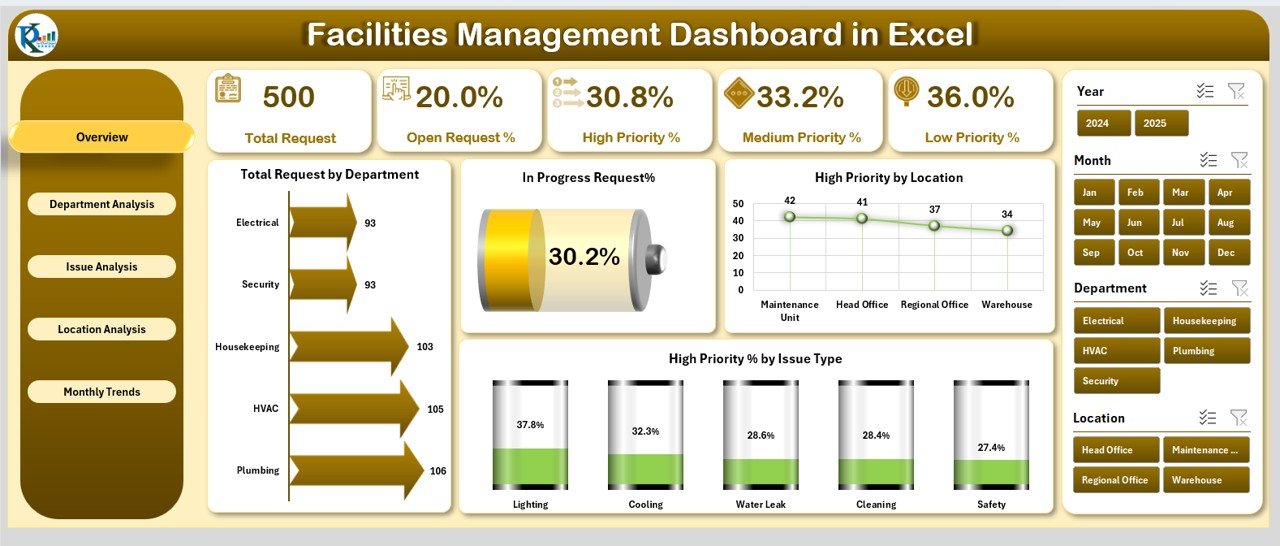
This is the file we would hand a facility manager who has a request log and no clear view of it. It is built around requests, so the first questions it answers are the ones a manager hears every week: how many jobs are open, which department is overloaded, which issues keep coming back and which site needs attention.
Who it is for: in-house facility managers, office and campus administrators, and operations leads for schools, clinics, warehouses and offices.
What is inside the Excel edition:
- Five pages: Overview, Department Analysis, Issue Analysis, Location Analysis and Monthly Trends
- KPI cards for total requests, open request share, high-priority share and escalated share
- In-progress and high-priority load by department, so bottlenecks show up straight away
- Requests and issues by region, branch or facility, plus monthly trend charts for seasonal workload
- Slicers and navigation buttons, with a support sheet that keeps the lists consistent
The Power BI edition gives the same view with filters that managers can use themselves, and the Google Sheets Facilities Management Analysis Dashboard keeps everything in a shared browser file. If you only need a printable monthly summary, the Facilities Management Report in Excel ($7.99) is a lighter option.
Price: $17.99 in Excel, $17.99 in Power BI and $9.99 in Google Sheets.
Best for: a weekly operations meeting where every department and site sits on one screen.
2. Property Management Dashboard: best for landlords and managing agents
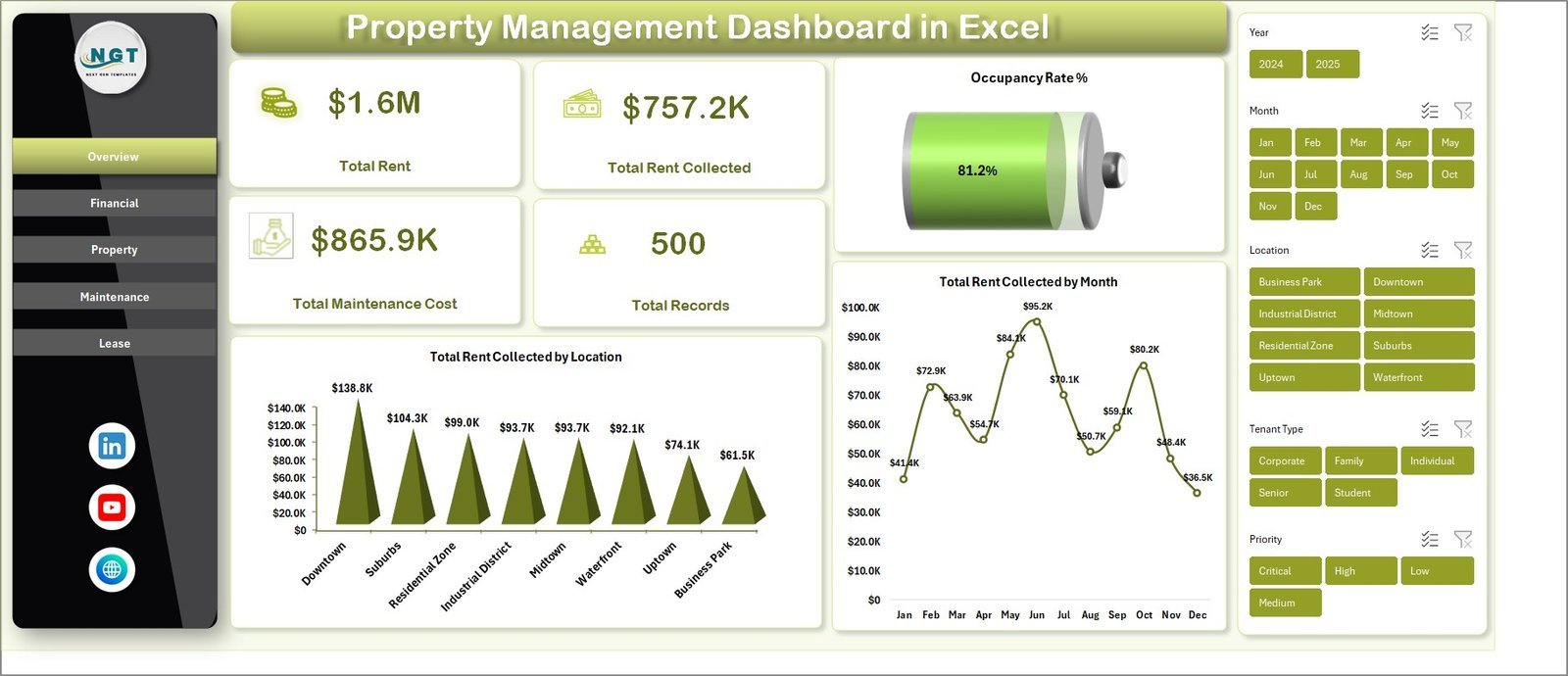
Where pick #1 follows the work, this dashboard follows the money and the tenants. It is a pivot-powered file for people who manage buildings on behalf of an owner, or who own a portfolio and run it themselves.
Who it is for: property managers, landlords, managing agents and facilities teams that also report rent and occupancy.
What is inside the Excel edition:
- Five pages: Overview, Financial, Property, Maintenance and Lease
- KPI cards for total rent, total rent collected, total maintenance cost and total records
- Rent collected by location, maintenance cost views and lease performance in one file
- A data sheet and a support sheet: paste your records, click Refresh All, and every chart and slicer updates
It comes in four formats, so a managing agent can keep the Excel file in the office and share the HTML edition with an owner who has no Excel. Teams that work in Google Drive can also look at the Tenant and Property Management Dashboard ($9.99).
Price: $17.99 in Excel, $17.99 in Power BI, $9.99 in Google Sheets and $12.99 in HTML.
Best for: a monthly owner report that shows rent, collections, occupancy and maintenance spend together.
Not sure where to start? Most in-house teams begin with the Facilities Management Dashboard ($17.99), and teams that manage rented space add the Property Management Dashboard ($17.99). Together they cost $35.98 once.
3. Equipment Maintenance Management System: best CMMS-style tool
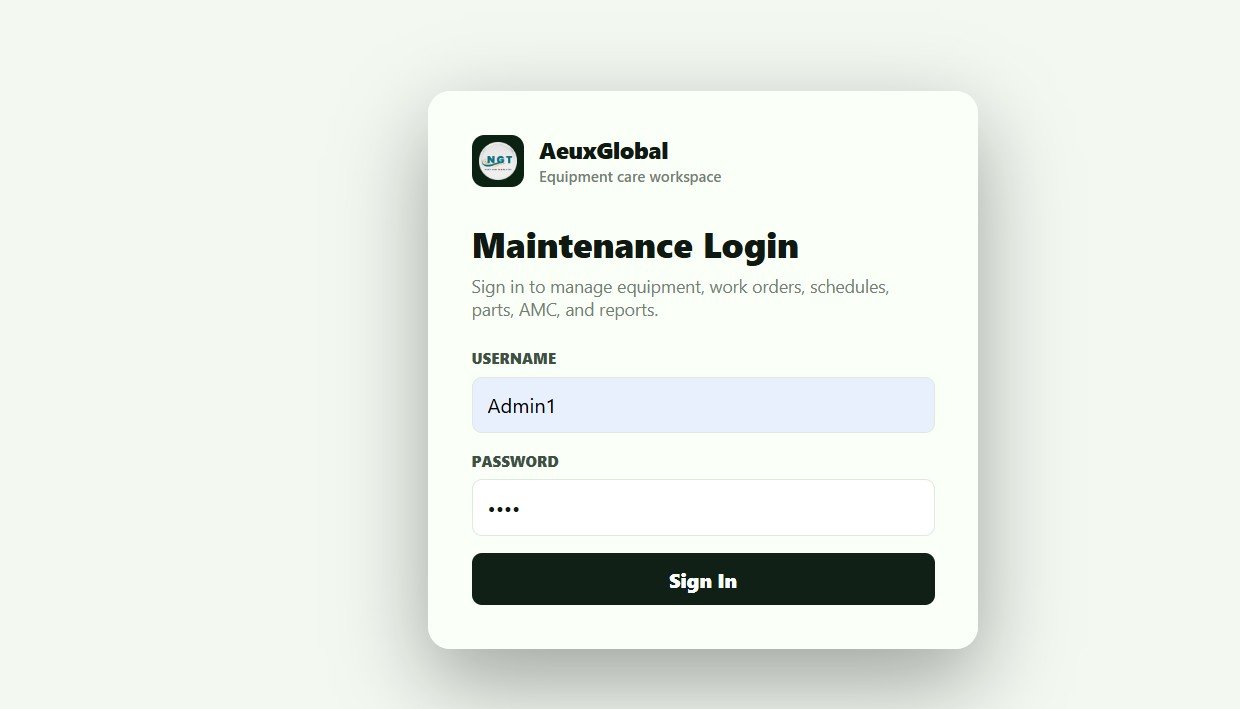
Dashboards report on work that already happened. This web app runs the work itself. It packs the core of a CMMS into a Google Sheets web app that your team copies into its own Google account and deploys in under 15 minutes.
Who it is for: maintenance supervisors and facility teams that look after plant and equipment, such as HVAC units, pumps, generators and kitchen or lab equipment.
What is inside:
- 21 connected screens behind a secure sign-in, with Admin and User roles
- A live dashboard with 12 KPIs: total and active equipment, items under maintenance, open and overdue work orders, PM due today and overdue, breakdown requests, downtime hours, average MTTR, average MTBF and low-stock parts
- Preventive maintenance schedules that create due work orders on a daily trigger
- A mobile task view where technicians start a job, hold it for parts or complete it from their phone
- Spare-part issues linked to each work order, so maintenance cost per asset stays accurate
Price: $24.99 one time.
Best for: teams whose biggest risk is a missed service or an unplanned breakdown.
4. Facility Services Dashboard: best for SLAs and service cost
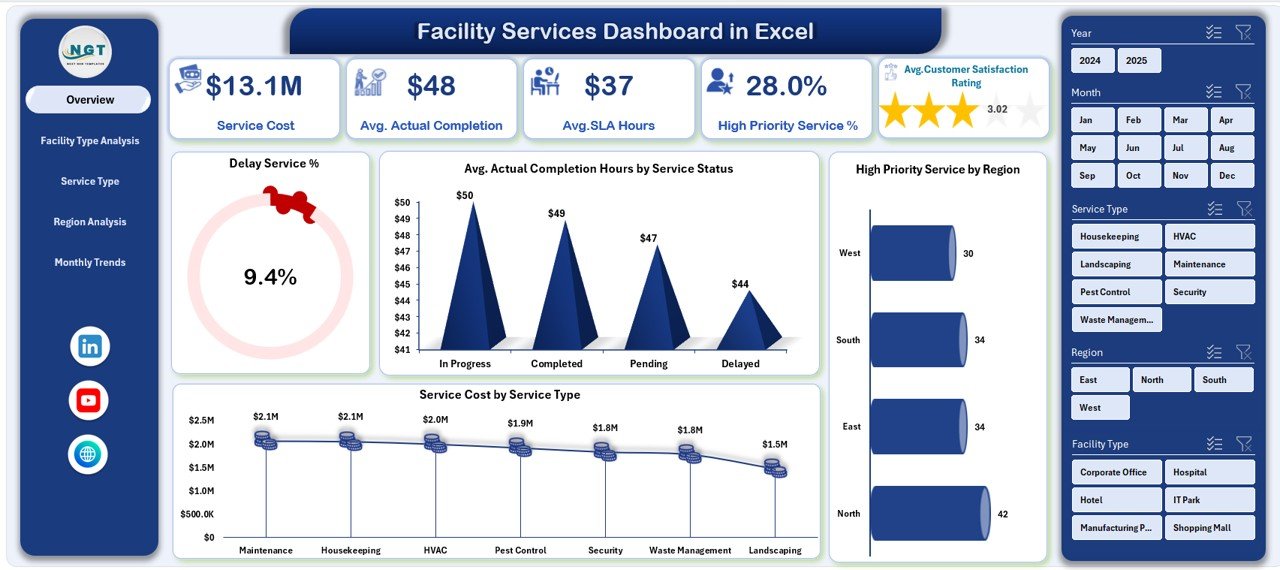
Outsourced cleaning, security, landscaping and maintenance contracts live or die on service levels. This dashboard turns a service log into a clear view of delays, completion hours and cost, so you can hold a contractor, or your own team, to the agreed standard.
Who it is for: facility managers who run service contracts, and facility service providers who report to clients.
What is inside the Excel edition:
- An Overview page with delay %, average completion hours, SLA hours, service cost and high-priority share
- Analysis pages for facility type, service type, region and month
- SLA and delay tracking that shows which services and regions breach most often
- Interactive slicers and a page navigator for management reviews
The Facility Services KPI Dashboard ($12.99 in Excel, $11.99 in Power BI) is the target-based version, if your contract has monthly KPI targets rather than a raw service log.
Price: $13.99 in Excel, $17.99 in Power BI and $9.99 in Google Sheets.
Best for: a monthly contract review where delays and cost by service type are on the table.
5. Work Order Request Tracker: best value
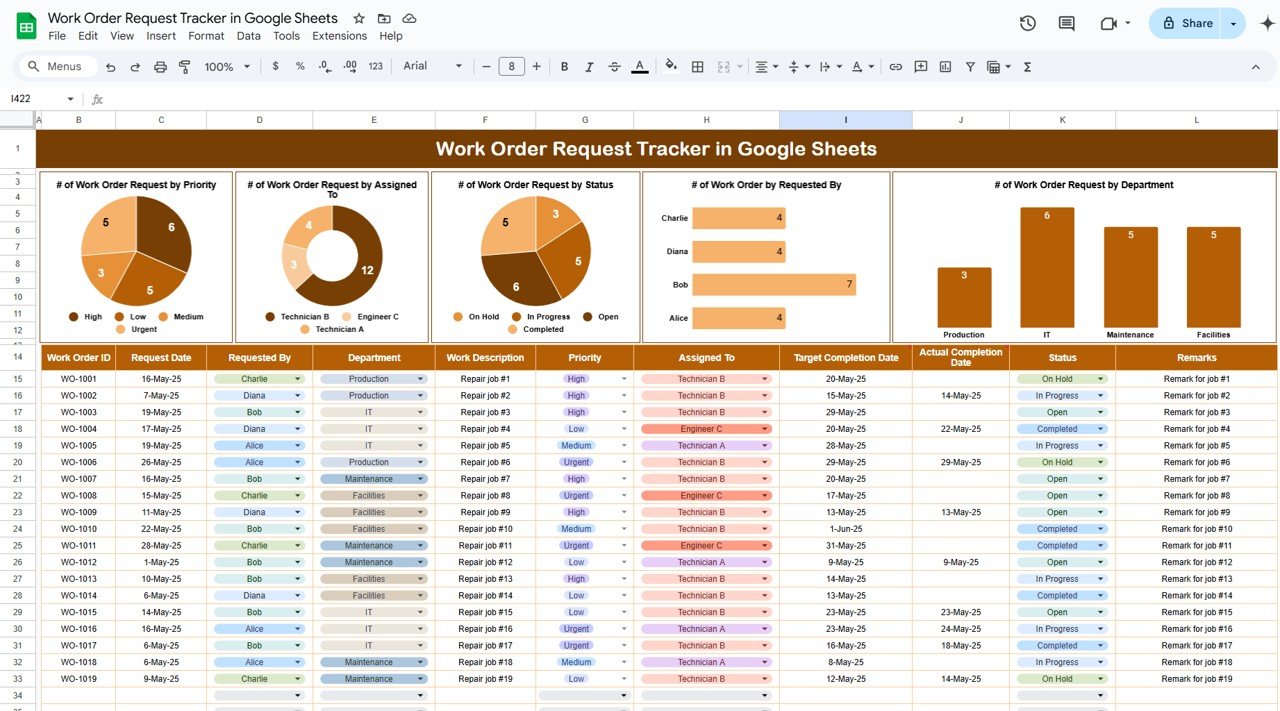
Every facility system starts with one thing: a request log that people actually use. This tracker is that log. It is a single shared sheet where each job gets an ID, a priority, an owner and a status, and the charts update the moment the status changes.
Who it is for: small facility teams, school and office administrators, and anyone moving off paper request slips or email threads.
What is inside:
- Fields for work order ID, request date, requested by, department, priority, assigned to, description, status, target date and actual completion date
- Charts for work orders by priority, assignee, status, requester and department
- Dropdowns for priority and status, so entries stay clean
- Fully editable, so you can add location, category or notes columns
For reporting on a larger work order history, the Work Order Dashboard ($17.99 in Excel or Power BI, $6.99 in Google Sheets) analyses work order cost and cost % by cost center, priority, main work center and order type.
Price: $6.99 in Google Sheets and $6.99 in Excel.
Best for: getting every request into one place this week, for the price of a lunch.
6. Lease Management Dashboard: best for lease portfolios
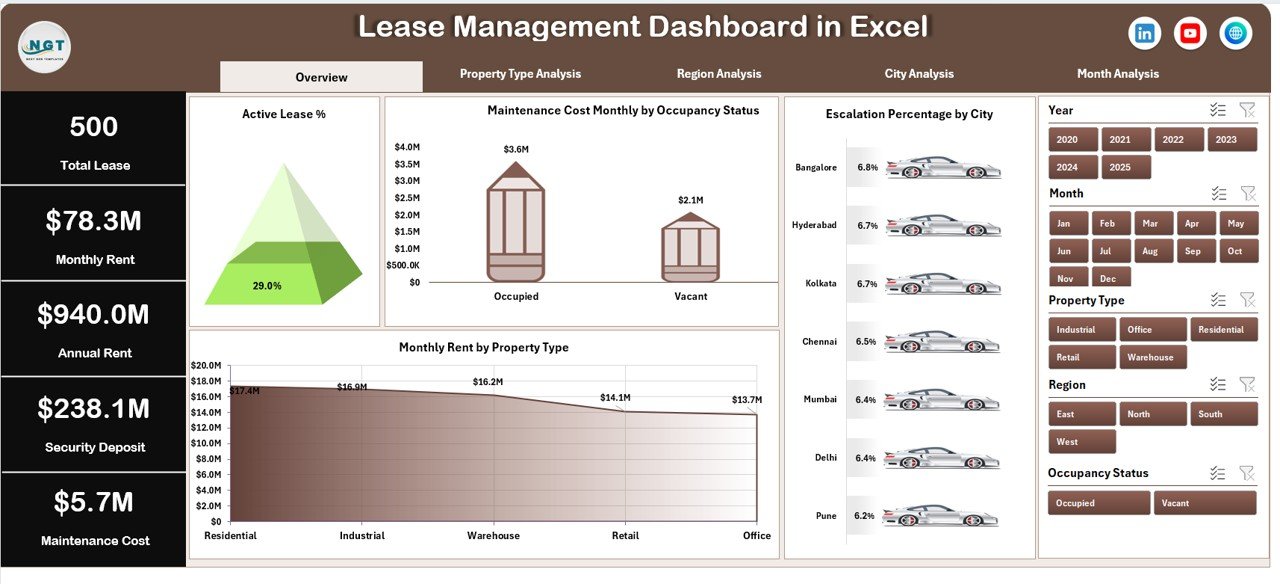
Leases are where property cost hides. Rent, deposits, escalation clauses and maintenance costs often sit in separate files. This dashboard brings them into one pivot-based report for teams that lease space in, or lease it out.
Who it is for: property managers, corporate real estate and finance teams, and facility managers who look after leased offices or stores.
What is inside the Excel edition:
- Five pages: Overview, Property Type Analysis, Region Analysis, City Analysis and Month Analysis
- Four KPI cards and pivot charts covering active leases, monthly and annual rent, security deposits and maintenance cost
- Escalation monitoring and occupancy insights by property type
- A left-side page navigator and right-side slicers
For office-only portfolios there is the Office Lease Management Dashboard in Google Sheets ($6.99).
Price: $13.99 in Excel and $17.99 in Power BI.
Best for: seeing rent, deposits and escalations across every lease before renewals come round.
7. Facilities Management KPI Dashboard: best for monthly targets
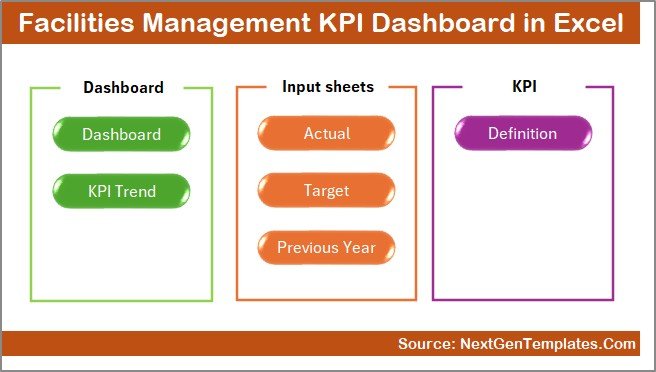
Picks #1 and #4 analyse raw records. This one works from a fixed list of KPIs with targets, which is how most facility teams report to a director or a board. Pick a month and the file shows actual against target, this year against last year, and the trend for each KPI.
Who it is for: facility heads who report monthly against agreed targets for maintenance, utilities, safety, assets and service quality.
What is inside:
- Seven worksheets, starting with a summary page with navigation buttons
- A month selector with MTD and YTD views
- Target against actual and previous-year comparisons with up and down arrows
- A KPI trend view and a sheet of KPI definitions, so everyone measures the same way
Property teams can use the matching Property Management KPI Dashboard ($12.99 in Excel, $11.99 in Power BI, $9.99 in Google Sheets).
Price: $14.99 in Excel and $11.99 in Power BI.
Best for: a monthly KPI pack for leadership with targets already built in.
8. Facility Maintenance & Renovation Tracker: best for renovation budgets

Small renovations, such as a new partition, a repainted floor or rewired lighting, rarely get a project plan, yet they eat a large share of the facility budget. This tracker records each request with its type, priority, department, estimated cost and status, and charts the spend.
Who it is for: admin and operations teams at offices, schools, hospitals, warehouses and stores that plan many small works each year.
What is inside:
- A central tracker sheet for maintenance and renovation requests
- Charts that update as you enter data, including priority level and department-wise cost
- Renovation type analysis, for example electrical, plumbing and furniture
- A search tool for finding any request quickly
Price: $6.99 in Google Sheets.
Best for: keeping small works and their estimated cost visible before the budget review.
Managing rented homes or apartments as well? The Real Estate & Property Bundle puts seven property templates in Excel, Power BI and Google Sheets into one $39.99 purchase, covering rent and collections, occupancy, maintenance cost and investor cash flow.
Which KPIs should facility and property managers track?
Pick five or six of these and track them every month. Each of the dashboards above covers several of them out of the box, and you can add the rest to the data sheet.
| KPI | Formula | What it tells you |
|---|---|---|
| Work order completion rate | Completed work orders / Work orders raised x 100 | Whether the team keeps up with demand |
| Average time to complete | Total hours from request to close / Completed work orders | How long people wait for a fix |
| SLA compliance | Jobs closed within SLA / Jobs closed x 100 | Whether contractors and staff meet the agreed standard |
| Preventive maintenance compliance | PM tasks done on time / PM tasks scheduled x 100 | Whether planned work is crowding out breakdowns |
| Mean time to repair (MTTR) | Total repair time / Number of repairs | How quickly failed equipment is back in service |
| Mean time between failures (MTBF) | Total operating time / Number of failures | Which assets fail too often and need replacing |
| Maintenance cost per square foot | Maintenance spend / Gross floor area | How costs compare across buildings of different sizes |
| Escalation rate | Requests escalated / Requests raised x 100 | How often jobs need a manager to step in |
| Occupancy rate | Occupied units or area / Total units or area x 100 | How much of the portfolio earns rent |
| Rent collection rate | Rent collected / Rent due x 100 | Cash flow health and arrears risk |
For professional standards and benchmarking in the field, the International Facility Management Association (IFMA) publishes research and training for facility managers. If sustainability targets are part of your brief, our ESG KPIs guide covers energy, water and waste measures, and our waste management and recycling templates handle the waste side in detail.
How do you choose the right facility management template?
Start with the job that hurts most today, not the one that looks best in a demo.
| If you are… | Start with |
|---|---|
| A facility manager who needs one view of all requests | Facilities Management Dashboard |
| A landlord or managing agent reporting to owners | Property Management Dashboard |
| A maintenance lead worried about missed services | Equipment Maintenance Management System |
| A manager of outsourced service contracts | Facility Services Dashboard |
| A small team still using paper or email for requests | Work Order Request Tracker |
| Responsible for leased offices or stores | Lease Management Dashboard |
| Reporting monthly KPIs to a director | Facilities Management KPI Dashboard |
Then pick the format. Choose Excel if one person owns the numbers and the file stays on the office PC. Choose Google Sheets or the web app if technicians, reception and the manager all need the same data from different places. Choose Power BI if your organisation already pays for it and managers want to filter reports themselves. Power BI Desktop is free, but sharing online needs a licence; see Microsoft’s Power BI pricing.
A common pairing is one operating tool and one report: the work order tracker or the maintenance web app during the month, and the facilities dashboard for the review at the end of it. If you run projects alongside maintenance, our project management dashboard templates cover fit-outs and moves, and our inventory management templates help with spare parts and stores.
When a template is NOT the right answer
A template is a reporting tool or a light operating system. It is the wrong buy in a few cases, and it is better to know that before you pay.
- You need IoT or building automation data. None of these files reads live sensor, BMS or meter feeds. Sites that run on that data need integrated software, and can still use a template for the monthly summary.
- You hold tenant money in trust. Deposits and client accounts have strict rules in many places. Use accounting software your regulator accepts, and use a dashboard only to report on the results.
- You run a large multi-site portfolio. Hundreds of buildings, contractor portals and automatic dispatch are what full CMMS and property platforms are built for.
- Nobody owns the data. A dashboard is only as fresh as its last update. If no one will spend a few minutes a day on it, it will go stale.
For everyone else, which is most single-site teams and small portfolios, facility management templates are the fastest way to a clear view of the work. Managing a clinic or hospital site? See our healthcare and hospital management templates. Renting out homes? Our real estate and rental property templates guide is the better fit. If your team also runs guarding, gatehouse or reception security, see our security guard templates guide. Want to try a basic layout first? See our free Excel dashboard templates.
Frequently asked questions
What are facility management templates?
Facility management templates are ready-made spreadsheets, dashboards and small apps for running buildings. They log maintenance requests and work orders, track service costs and SLAs, and report on occupancy, leases and rent. You enter or paste your own records and the charts and KPI cards update from that data.
Which facility management template should I buy first?
Start with the Facilities Management Dashboard ($17.99 in Excel or Power BI, $9.99 in Google Sheets). It shows requests by department, issue type and location, plus open, escalated and high-priority shares. If the real problem is logging the jobs in the first place, start with the $6.99 Work Order Request Tracker instead.
What is the difference between facility management and property management?
Facility management keeps a building working for the people inside it: maintenance, cleaning, security, utilities and space. Property management looks after the asset for its owner: tenants, leases, rent collection and occupancy. Many teams do both, which is why this list mixes facility dashboards with property and lease dashboards.
Can Excel replace a CMMS for a small facility team?
For a single site or a small portfolio, often yes. A work order tracker plus a facilities dashboard covers requests, priorities, costs and trends. Excel will not send technicians push alerts or generate preventive maintenance jobs on its own. The Equipment Maintenance Management System web app ($24.99) adds those CMMS-style features in Google Sheets.
Is there a facility management template in Google Sheets?
Yes. The Facilities Management Analysis Dashboard ($9.99), the Facility Services Dashboard ($9.99), the Work Order Request Tracker ($6.99) and the Facility Maintenance and Renovation Tracker ($6.99) all run in Google Sheets. The Equipment Maintenance Management System is a Google Sheets web app with role-based sign-in.
Which KPIs should a facility manager track?
Track work order completion rate, average time to complete a request, preventive maintenance compliance, SLA compliance, maintenance cost per square foot and the share of requests escalated. Property teams add occupancy rate, rent collection rate and lease renewal rate. The KPI table in this post gives a formula for each one.
Do I need Power BI to use these files?
No. Every pick has an Excel or Google Sheets edition, and the property dashboard also comes as an HTML file that runs in a browser. The Power BI editions open in the free Power BI Desktop. Sharing reports online with other people needs a paid Power BI licence.
Are these templates a one-time purchase?
Yes. Prices run from $6.99 for a tracker to $24.99 for the maintenance web app, paid once. You download the file or copy the app into your own Google account and keep it. There is no monthly fee and no per-user or per-building fee.
Can I use these templates for several buildings or sites?
Yes. The facilities, facility services and lease dashboards all have location, region or city analysis, and the property dashboard reports by property and location. Add a column for the site or building in the data sheet and use the slicers to filter one site or compare them all.
Is my building and tenant data safe in these files?
Excel files stay on your own computer, and the Google Sheets files and the web app live in your own Google account, not on our servers. You decide who can open them, so share carefully and follow your local privacy rules for tenant and staff records.
Get your facility management templates
Start with the Facilities Management Dashboard ($17.99, or $9.99 in Google Sheets) to see every request by department, issue and site, or the Work Order Request Tracker ($6.99) to get every job logged first. Each one is a one-time purchase that you can edit and keep.
Want to see how these files work before you buy? Watch the walkthroughs on the NextGenTemplates YouTube channel.