



Managing office leases across multiple properties can quickly become overwhelming, especially when details like monthly rent, deposits, maintenance charges, lease start–end dates, floor area, and renewal options are stored in different files. The Office Lease Management Dashboard in Google Sheets solves this challenge instantly by bringing every lease detail into a single, organized, and interactive dashboard. Whether your organization manages 5 leases or 500, this dashboard gives you complete visibility, helping you avoid missed renewals, overspending, and inefficient space usage. 🏢📊
Designed for real estate teams, admin managers, finance departments, and corporate facility teams, this dashboard gives a crystal-clear view of your entire lease portfolio. With automated visuals, smart KPIs, lease expiry tracking, tenant analytics, and financial comparisons, you can make informed decisions in seconds. Since everything is built directly inside Google Sheets, the dashboard is fast, cloud-based, fully collaborative, and simple for anyone to use — with no coding or technical setup required.

✨ Key Features of Office Lease Management Dashboard in Google Sheets
This dashboard is packed with powerful features to help organizations stay in full control of their office leases.
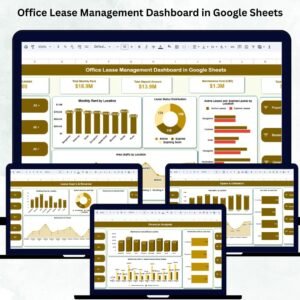
🔹 Real-Time Lease Portfolio Summary
Get instant visibility into:
Total Leases
Total Monthly Rent
Total Deposit Amount
Maintenance Cost
Total Active Leases
These cards give a high-level snapshot of your property portfolio at any moment.
🔹 Interactive Charts for Better Decision-Making
The dashboard includes essential visuals such as:
Monthly Rent by Location
Lease Status Distribution
Active vs Expired Leases by Location
Area (SqFt) by Property or Location
These visuals help you identify high-rent locations, spot inactive leases, and improve space allocation.
🔹 Lease Expiry & Renewal Tracking
Never miss a renewal again! Track:
Expiring Soon by Location
Expired Leases by Lease Type
Expiring Soon by Property
Expiring Soon by Renewal Option
This section helps companies renew leases on time, negotiate better deals, and avoid last-minute panic.
🔹 Financial Analysis for Better Cost Control
Monitor how much your organization spends across properties with:
Maintenance Cost by Location
Monthly Rent by Lease Type
Rent vs Deposit Comparison
These insights help finance teams manage cash flow and evaluate property-level performance.
🔹 Space & Utilization Insights
Track total space usage with charts showing:
Area (SqFt) by Location
Area (SqFt) by Lease Type
Area (SqFt) by Property
Perfect for workplace planning, real-estate optimization, and facility expansion decisions.
🔹 Tenant-Level Insights
Evaluate tenant-wise rent and deposits to understand tenant impact on overall portfolio performance.
🔹 Fully Customizable & Cloud-Based
Since the dashboard is built in Google Sheets, teams can collaborate, update values in real time, and customize any field based on business needs.
📦 What’s Inside the Office Lease Management Dashboard
Your download includes everything you need to manage leases effortlessly:
Overview Sheet with KPIs and summary charts
Lease Expiry & Renewal Analysis Sheet
Financial Analysis Sheet
Space & Utilization Analysis Sheet
Tenant Analysis Sheet
Search Sheet for filtering any lease record
Data Sheet with all raw records
The Data Sheet includes fields like:
✔ Property Name
✔ Location
✔ Lease Type
✔ Monthly Rent
✔ Deposit Amount
✔ Area (SqFt)
✔ Maintenance Cost
✔ Tenant Name
✔ Start & End Dates
✔ Status
✔ Renewal Option
✔ Property Owner
✔ Notes
Update the Data Sheet — and the entire dashboard refreshes automatically. 🔄📊
🛠️ How to Use the Office Lease Management Dashboard
Using this dashboard is extremely easy:
🔸 Step 1: Update the Data Sheet
Enter or upload lease information into the main Data Sheet.
🔸 Step 2: Review High-Level KPIs
Instantly check rent, deposits, active leases, and maintenance costs.
🔸 Step 3: Explore Dashboard Sections
Use the charts to analyze rent distribution, lease status, space utilization, and property-wise financials.
🔸 Step 4: Track Renewals
Check the Expiry & Renewal section to see upcoming renewals and take action early.
🔸 Step 5: Analyze Tenants & Properties
Use tenant-level and property-level visualizations for deeper insights.
🔸 Step 6: Use the Search Tab
Quickly find any lease, tenant, or property details in seconds.
👥 Who Can Benefit from This Dashboard?
This dashboard is ideal for:
Real Estate & Facility Management Teams
Manage multi-location leases effortlessly.Admin Teams
Track rent, deposits, renewal schedules, and lease terms.Finance & Accounting Teams
Analyze costs, compare rent values, and plan budgets.Corporate Offices & Co-Working Providers
Monitor tenant performance and space usage.Property Managers
Handle tenant insights and financial planning from a single dashboard.
Whether your company manages local offices or global branches, this dashboard brings clarity and control to your lease operations. 🏢✨
Click here to read the Detailed Blog Post
Visit our YouTube channel to learn step-by-step video tutorials —
YouTube.com/@NeotechNavigators
Watch the step-by-step video Demo:
Compatibility and Requirements
- Works in Google Sheets. You need a free Google account and a web browser.
- The dashboard reads from the Data Sheet, so you update lease records in one place. Google explains how charts work in Add and edit a chart or graph.
Frequently Asked Questions
Which sheets are included?
The Overview sheet, the Lease Expiry and Renewal Analysis sheet, the Financial Analysis sheet, the Space and Utilization Analysis sheet, the Tenant Analysis sheet, the Search sheet and the Data sheet.
How do I update the dashboard?
Enter or paste your lease records into the Data sheet. The KPIs and charts refresh from that data.
What fields does the Data sheet hold?
Property Name, Location, Lease Type, Monthly Rent, Deposit Amount, Area (SqFt), Maintenance Cost, Tenant Name, Start and End Dates, Status, Renewal Option, Property Owner and Notes.
Can I see which leases are expiring soon?
Yes. The Lease Expiry and Renewal Analysis sheet shows leases expiring soon by location, by property and by renewal option, and expired leases by lease type.
Is there an Excel or Power BI version?
Yes. See the Office Lease Management Dashboard in Excel and the Office Lease Management Dashboard in Power BI.
Related Office and Lease Templates
- Office Lease Management Dashboard in Excel: the same lease dashboard in Excel
- Office Lease Management Dashboard in Power BI: the Power BI edition
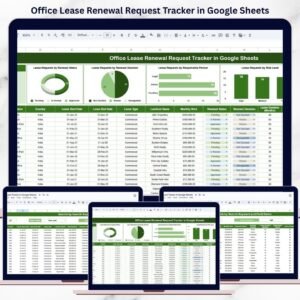
- Office Lease Renewal Request Tracker in Google Sheets: track renewal requests in Google Sheets
- Office Task Management Performance Dashboard in Google Sheets: another office dashboard in Google Sheets
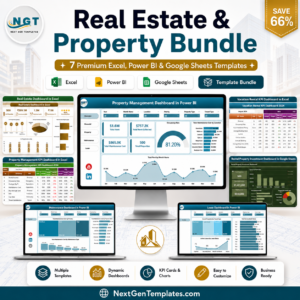
- Real Estate & Property Bundle: 7 real estate templates in one download
Browse all Google Sheets dashboards.


















Reviews
There are no reviews yet.