


The best real estate dashboard for most brokerages in 2026 is the Real Estate Agent Dashboard ($17.99 in Excel or Power BI, $9.99 in Google Sheets). It ranks agents by commission, sales and days on market across five pages. Brokerages losing leads should add the CRM and Sales Pipeline Management System ($39.99).
Last updated: October 2026
Key takeaways
- Our top pick is the Real Estate Agent Dashboard: five analysis pages, commission and sales by agent, and slicers for region, property type and transaction type. It comes in Excel, Power BI, Google Sheets and HTML.
- The best tool for leads and deals is the CRM and Sales Pipeline Management System ($39.99): 28 screens, a pipeline board, 16 reports and a change log on every record.
- The best value is the Real Estate Sales Performance Dashboard in Google Sheets at $6.99, with property, region, client type and lead source charts.
- Commission payouts get their own file: the Sales Commission Template with Bonus Amount ($6.99) works out commission and bonus per person from your own rates.
- Every pick is a one-time purchase from $4.99 to $39.99, with no monthly fee and no per-agent licence.
 Launch offer
From your first Pivot Table to the Data Model, DAX, Power Query and a one-page KPI dashboard. 11h 51m of video by PK, with practice files, quizzes and a capstone.
Real estate dashboard templates for brokerages compared
| Template | Format | Best For | Price |
|---|---|---|---|
| Real Estate Agent Dashboard (Best overall) | Excel, Power BI, Google Sheets, HTML | Commission, sales and days on market by agent | $9.99 to $17.99 |
| CRM and Sales Pipeline Management System | Web app (Google Sheets + Apps Script) | Leads, contacts, deals and follow-ups for the whole team | $39.99 |
| Real Estate Dashboard | Excel, Power BI, Google Sheets, HTML | Listing inventory, price per sqft, regions and client types | $9.99 to $17.99 |
| Sales Commission Template with Bonus Amount | Google Sheets | Working out agent commission and bonus each month | $6.99 |
| Real Estate Sales Performance Dashboard (Best value) | Google Sheets | A low-cost sales view by status, region and lead source | $6.99 |
| Real Estate Listing Calendar and Open House Calendar | Excel, Google Sheets | Listing dates, showings and open houses | $4.99 each |
| Real Estate KPI Dashboard and KPI Scorecard | Excel, Power BI, Google Sheets | Monthly targets for firms that also manage rentals | $9.99 to $14.99 |
| Real Estate & Property Bundle | Excel, Power BI, Google Sheets | Brokerages with a property management desk | $39.99 for 7 files |
A brokerage lives on a few numbers that are hard to see in one place. Listings come from one system, leads from a website form and a few portals, closed deals from the transaction file, and commission splits from whoever does the books. By the time the monthly sales meeting comes round, someone has spent a day copying rows into a spreadsheet just to answer who closed what.
The usual fix is brokerage software on a monthly plan, often billed per agent. Big offices need it for trust accounting, e-signatures and compliance review. Many small and mid-sized brokerages pay for far more than they use and still export to Excel to see their own figures. A good real estate dashboard gives the broker that view, and a light CRM keeps leads moving, for a one-time price.
How we picked these
We searched the NextGenTemplates catalog for products built for real estate agents, brokers, listings, sales commission and sales pipelines. That returned more than 40 paid files across Excel, Google Sheets, Power BI, HTML and web apps. We kept the ones that serve the daily work of a brokerage: agent results, commission, listing inventory, leads and pipeline, scheduling, and a monthly target review.
We left out files aimed at landlords, REIT investors and developers, such as the rental property investment and REIT dashboards. Those have their own home in our real estate and rental property templates guide. Where one tool comes in several formats we list it once with every price. We ranked on how many brokerage questions a file answers, how much setup it needs, and price.
The 8 best real estate brokerage templates for 2026
1. Real Estate Agent Dashboard: best overall
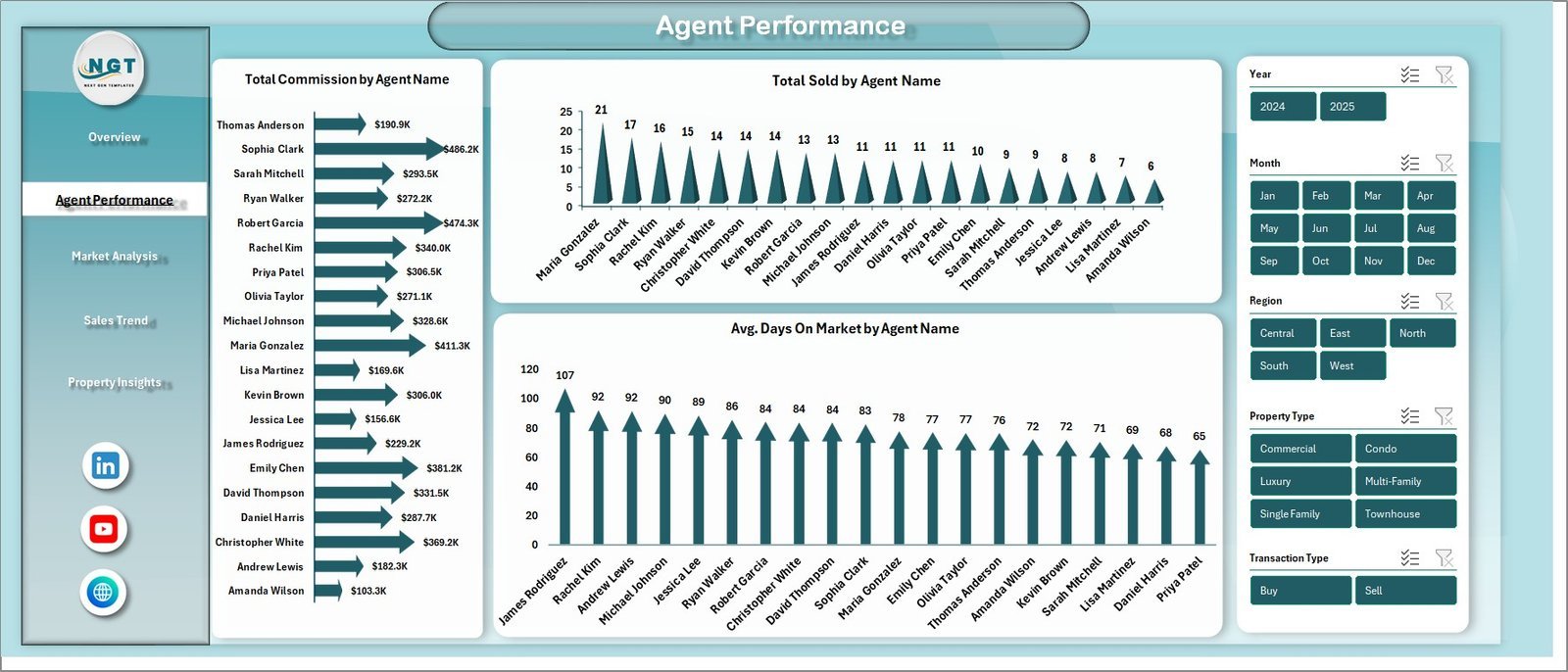
This is the file we would hand a broker who wants to run a sales meeting from one screen. It is built around agents, not properties, so the first questions it answers are the ones a broker owner asks: who closed the most, who earned the most commission, and whose listings sit longest.
Who it is for: brokerage owners, team leads, sales managers and solo agents who want to see their own numbers.
What is inside the Excel edition:
- Five pages: Overview, Agent Performance, Market Analysis, Sales Trend and Property Insights
- Five KPI cards: total sales value, total commission, total records, average days on market and average client satisfaction
- Total commission, total sold and average days on market by agent name
- Market charts for sales and listing values by neighborhood, days on market by property type, and records by lead source
- Sales trend views for yearly commission, monthly patterns, transaction type and listing status
- Slicers for region, property type, agent name, transaction type and listing status
The Power BI edition swaps the satisfaction card for a sale conversion rate card and adds neighborhood and city slicers. The Google Sheets edition has six tabs, including a Listings page, a Financial page with sale-to-list ratios and cumulative revenue, and a Search page that pulls up any listing by ID. The HTML edition runs in a browser with six KPIs and a data table you can search and export.
Price: $17.99 in Excel, $17.99 in Power BI, $9.99 in Google Sheets and $12.99 in HTML.
Best for: a weekly or monthly sales meeting where every agent’s numbers sit side by side.
2. CRM and Sales Pipeline Management System: best for leads and deals
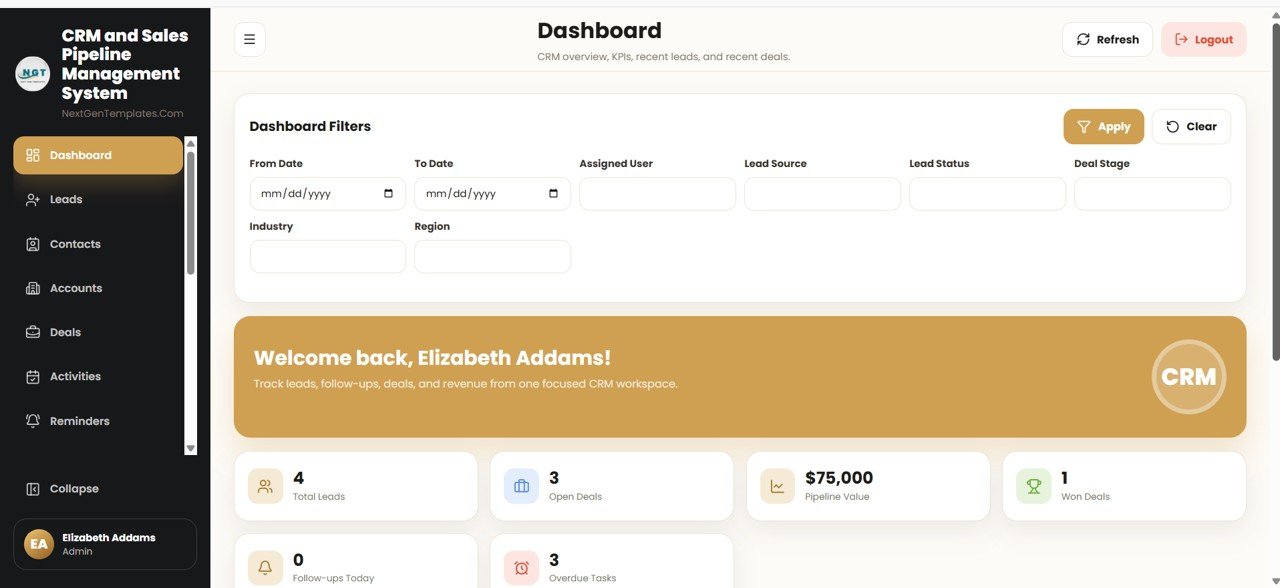
Pick #1 reports on deals that already happened. This one keeps new ones from going cold. It is a multi-user CRM built on Google Sheets and Apps Script, with 28 connected screens, and the whole database stays in your own Google Drive.
Who it is for: brokerages and teams that track buyer and seller leads in inboxes, notebooks or a shared sheet that nobody trusts.
What is inside:
- Leads, Contacts, Accounts and Deals, with stage, value, probability and expected close date on every deal
- A pipeline board, activities, a shared calendar and reminders for follow-ups
- A Deal History flow chart that shows how many days a deal sat in each stage and every call, note and email linked to it
- Google Calendar sync, email from your own account, and a button that opens a pre-filled WhatsApp chat (it never sends on its own)
- Role-based sign-in with a permission map, so a sales executive sees only what the broker allows
- A dashboard with 12 live KPI tiles, 16 reports with Excel, CSV and print output, and a change log on every record
It is a general sales CRM rather than a real estate one, so rename the deal stages to match your process, for example New Lead, Showing, Offer, Under Contract and Closed. It ships with about 13,500 rows of sample data, so you can learn every screen before you load your own.
Price: $39.99 one time. If your team prefers Excel, there is also a CRM and Sales Pipeline Management System in Excel VBA ($29.00).
Best for: brokerages where leads and follow-ups, not reporting, are the weak spot.
Not sure where to start? Most brokerages begin with the Real Estate Agent Dashboard ($17.99) to see agent results, then add the CRM web app ($39.99) once they want every lead in one place.
3. Real Estate Dashboard: best for listing inventory and pricing
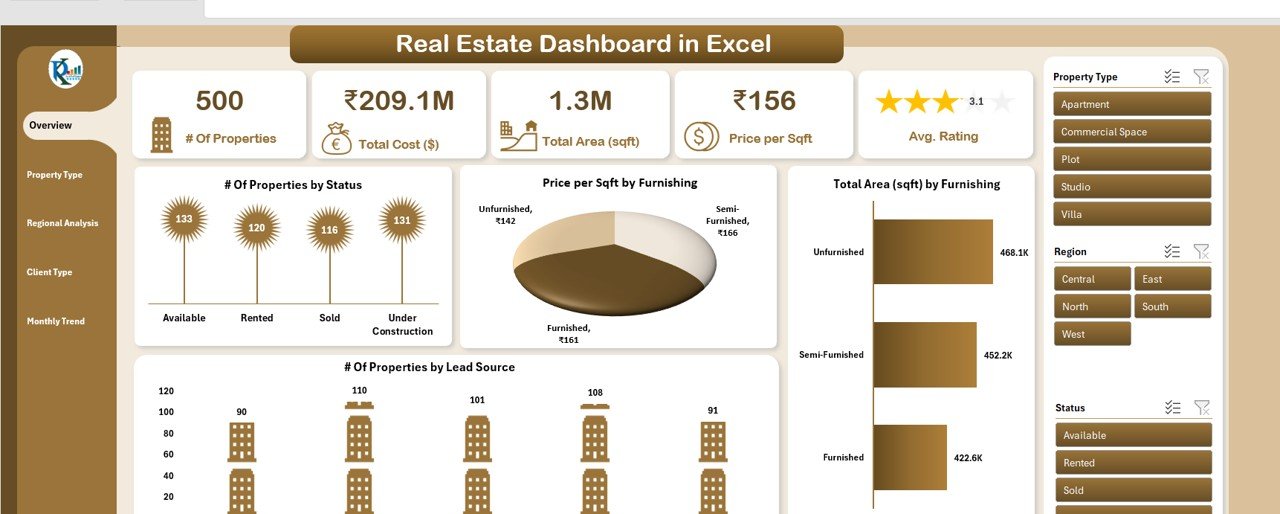
Where pick #1 looks at agents, this real estate dashboard looks at the properties themselves. It answers stock questions: how many listings are available, sold, rented or under construction, what they are worth, and how price per square foot changes by region and furnishing.
Who it is for: listing managers, brokers who also handle new projects, and agents who advise sellers on price.
What is inside the Excel edition:
- Six tabs: Overview, Property Type Analysis, Regional Analysis, Client Type Analysis, Monthly Trend and Data
- Summary cards for number of properties, total cost, total area, price per sqft and average rating
- Properties by status and by lead source, plus price per sqft and area by furnishing status
- Client type views that split buyers into individuals, investors and companies
- Clickable slicers for property type, region and status
The Power BI edition adds a funding type slicer and tracks Available, Sold, Booked and Under Construction stock. The HTML edition adds an agent and lead tracking page and a data explorer with export. The Google Sheets edition keeps it simple with a dashboard, a data tab and a support tab for dropdown lists.
Price: $17.99 in Excel, $17.99 in Power BI, $9.99 in Google Sheets and $14.99 in HTML.
Best for: brokers who need to see the whole listing book by region, type and price.
4. Sales Commission Template with Bonus Amount: best for commission payouts

Commission splits cause more arguments in a brokerage than almost anything else. This Google Sheets file takes each person’s sales, applies the commission rate and bonus rules you set, and shows the result with charts. It is a general sales commission tool, so it fits brokerages that pay a flat or tiered rate on closed volume.
Who it is for: broker owners, office managers and bookkeepers who work out monthly payouts.
What is inside:
- Sales, sales target and commission earned for each person
- Automatic commission and bonus calculation from rates, tiers and bonus criteria that you can edit
- Charts for sales performance, commission growth and bonuses earned
- Figures that update as soon as a new sale is entered
Keep your split rules simple and written down before you load them. If one agent is on 70/30 and another on a cap, set up a separate rate for each so the sheet and the agreement say the same thing.
Price: $6.99 in Google Sheets.
Best for: a clear, shared record of what each agent earned and why.
5. Real Estate Sales Performance Dashboard: best value
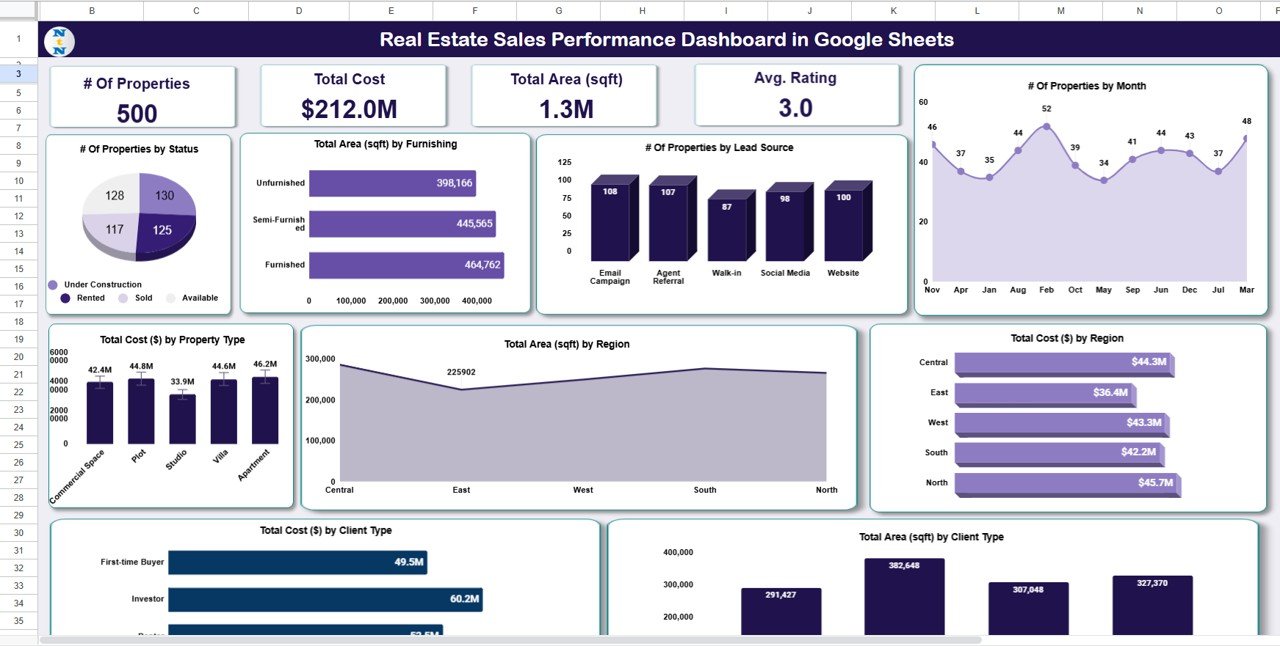
This is the cheapest full dashboard in the roundup. It runs in a browser, needs no Excel licence, and gives a broker a quick view of sales by status, region, property type, client type and lead source.
Who it is for: small agencies, new brokerages and agents on a tight budget who work in Google Drive.
What is inside:
- Four cards: number of properties, total cost, total area and average rating
- Properties by status (sold, under construction, available) and by lead source
- Cost and area by property type, region and client type, plus properties by month
- A data tab that feeds every chart, so new rows update the dashboard straight away
The lead source chart is the part brokers use most. It shows whether walk-ins, websites, agent referrals or portals actually bring in the deals, which helps decide where next month’s marketing money goes.
Price: $6.99 in Google Sheets.
Best for: a low-cost first dashboard before you move to pick #1 or #3.
6. Real Estate Listing Calendar and Open House Calendar: best for scheduling
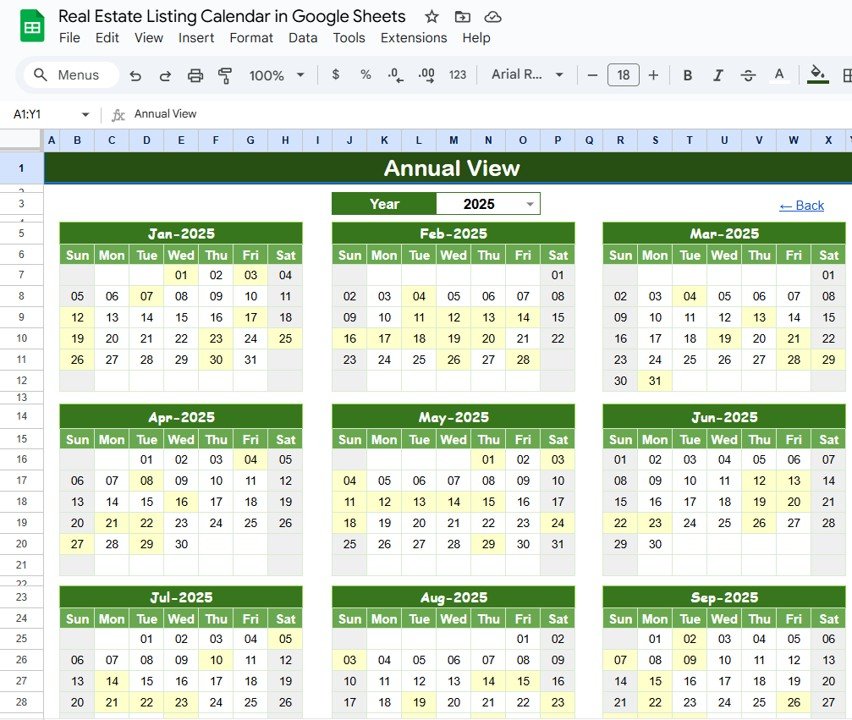
Missed showings and clashing open houses cost listings. These two small calendars keep the dates for every listing in one shared file, so the front desk, the agents and the broker see the same week.
Who it is for: office administrators, listing coordinators and agents who run several open houses a month.
What is inside:
- Real Estate Listing Calendar: a home sheet with buttons, annual, monthly and daily views, and one events sheet with location, date, time and description. The Excel edition is set up for listing dates, open houses, and contract dates such as offer, inspection and closing deadlines.
- Real Estate Open House Calendar: five Google Sheets tabs (Home, Annual View, Monthly View, Daily View and Events) for open houses, viewings, property tours, auctions and investor meetings.
Price: $4.99 in Excel, $4.99 in Google Sheets, and the Open House Calendar for $4.99.
Best for: one shared schedule for listings and open houses without a paid calendar tool.
7. Real Estate KPI Dashboard and KPI Scorecard: best for firms that also manage rentals
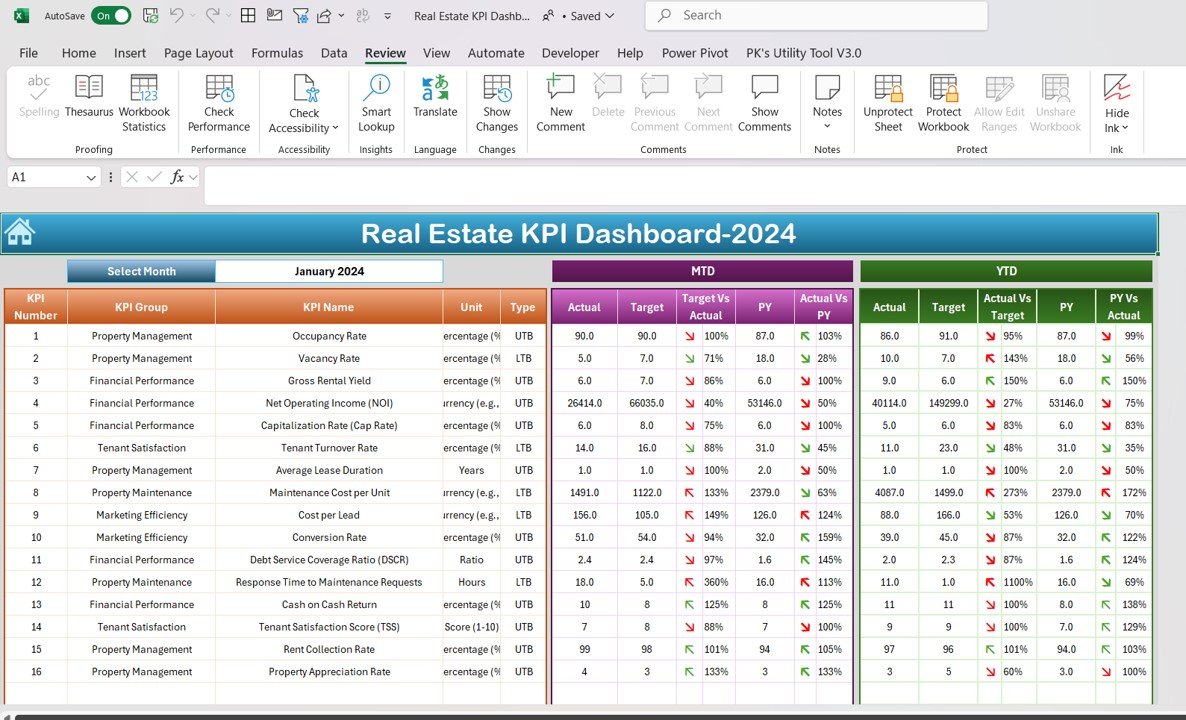
Many brokerages also lease and manage property. For them, a fixed KPI list with targets is the easiest way to run a monthly review across both sides of the business. Be aware that most of these KPIs are about rentals and property, so a pure sales brokerage will get more from picks #1 to #5.
Who it is for: brokerages with a leasing or property management desk, and managers who report to owners or investors.
What is inside the KPI Dashboard (Excel):
- 16 KPIs, including occupancy rate, vacancy rate, gross rental yield, NOI, cap rate, cost per lead, conversion rate, cash-on-cash return and rent collection rate
- A month selector with MTD and YTD actual, target and previous year, with up and down arrows
- Input sheets for actuals, targets and previous year, a KPI trend sheet and a definition sheet
The KPI Scorecard covers ten of these KPIs as colour-coded tiles with traffic lights, which suits a one-page monthly report.
Price: KPI Dashboard $14.99 in Excel, $11.99 in Power BI and $12.99 in Google Sheets. KPI Scorecard $14.99 in Excel and $9.99 in Google Sheets.
Best for: a monthly target review that covers sales and rentals together.
8. Real Estate & Property Bundle: best value for a property management desk
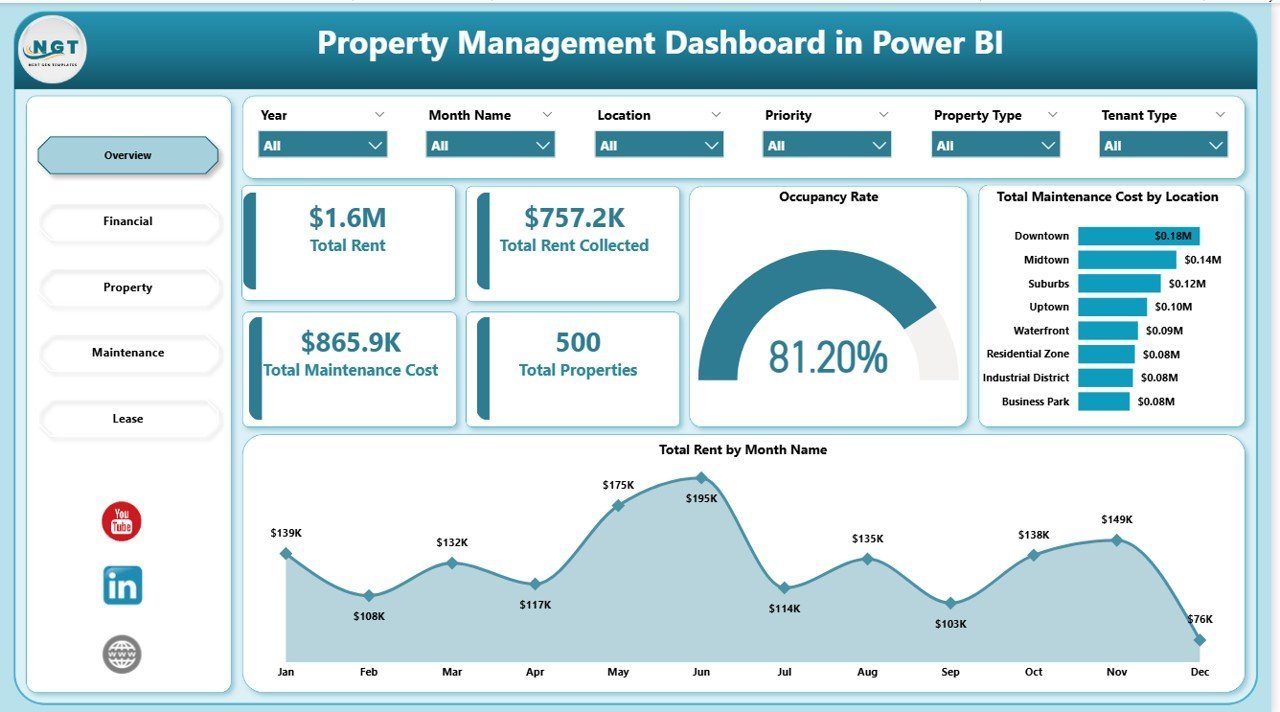
If your brokerage also manages rentals, this bundle covers that side in one purchase. It holds seven files across Excel, Power BI and Google Sheets for $39.99, against $118.93 when bought one by one.
Who it is for: brokerages that sell and also manage rentals, short-term lets or investor portfolios.
What is inside:
- Real Estate Dashboard in Excel (the same file as pick #3)
- Property Management Dashboard in Power BI, with rent, occupancy, maintenance and lease pages
- Property Management KPI Dashboard in Excel and Vacation Rental KPI Dashboard in Excel
- Rental Property Investment Dashboard in Google Sheets
- Rent Payment Checklist and Press Release Checklist in Excel
The bundle does not include the agent dashboard or the CRM. For a sales-only brokerage, picks #1 and #2 are the better spend.
Price: $39.99 for all seven files.
Best for: brokerages that run a property management desk next to sales.
Low-cost add-ons for agents
Two more files fill small gaps that the eight picks leave. Neither is a full system, but each does one job well.
- Real Estate Property Tracker ($6.99 in Google Sheets): seven pages for properties, income and expenses, maintenance, tenants and a search page, plus an investment calculator for purchase price, mortgage rate and rent. Handy for agents who advise investor clients.
- Real Estate Agent Dashboard in HTML ($12.99): the browser version of pick #1, useful for showing agent results on an office screen without opening Excel.
Which KPIs should a real estate brokerage track?
The dashboards above let you edit their fields, so agree on definitions before you load data. These are the formulas most brokerages use. Set targets from your own last 12 months, because a luxury office and a high-volume starter-home team will never share the same numbers.
| KPI | Formula | Why it matters |
|---|---|---|
| Gross commission income (GCI) | Sum of commission earned on closed deals | The top line of every brokerage |
| Company dollar | GCI – Agent commission splits | What the brokerage keeps to pay its costs |
| Closed transactions per agent | Closed deals / Active agents | Shows who is productive and who needs coaching |
| Average days on market | Sum of days from list to contract / Listings sold | Long times point to pricing or marketing problems |
| List-to-sale price ratio | Sale price / Final list price x 100 | Tests how well agents price listings |
| Lead-to-close conversion rate | Closed deals / Leads received x 100 | Shows whether follow-up is working |
| Cost per lead | Marketing spend / Leads received | Tells you which sources are worth paying for |
| Agent retention rate | Agents at year end who were there at the start / Agents at the start x 100 | Recruiting a new agent costs time and lost listings |
For market context such as median prices and sales volume, check the National Association of REALTORS quick real estate statistics. For property-side metrics like NOI and cap rate, see our 12 real estate KPIs guide, and for general sales measures, our 15 sales KPIs and sales pipeline metrics lists.
How to choose a real estate dashboard for your brokerage
| If you are… | Start with |
|---|---|
| A broker who wants agent results in one meeting | Real Estate Agent Dashboard |
| A team losing track of leads and follow-ups | CRM and Sales Pipeline Management System |
| A listing manager watching stock and price per sqft | Real Estate Dashboard |
| An office manager who works out commission | Sales Commission Template with Bonus Amount |
| A new agency on a small budget | Real Estate Sales Performance Dashboard |
| A front desk juggling showings and open houses | Real Estate Open House Calendar |
| A brokerage that also manages rentals | Real Estate & Property Bundle |
Then pick the format. Choose Excel if one person owns the numbers and the file stays on the office PC. Choose Google Sheets or the web app if agents, the front desk and the bookkeeper all need the same data from different places. Choose Power BI if your firm already pays for it and managers want to filter reports themselves. Power BI Desktop is free, but sharing online needs a licence; see Microsoft’s Power BI pricing.
A common pairing is one operating tool and one report: the CRM for leads and deals during the month, and the agent dashboard for the sales meeting at the end of it. Together they cost $57.98 once. If you are comparing CRMs, our Pipedrive alternatives and Salesforce alternatives roundups go deeper, and the lead tracker to pipeline dashboard stack shows a cheaper starting point.
When a template is NOT the right answer
A template is a reporting tool or a light operating system. It is the wrong buy in a few cases, and it is better to know that before you pay.
- You hold client money in trust. Escrow and trust accounting have strict rules in most states and countries. Use accounting software your regulator accepts, and use a template only to report on the results.
- You need MLS feeds and e-signatures. None of these files pulls listings from an MLS or sends documents for signature. Brokerages that live inside those workflows need dedicated transaction software.
- You pay agents through complex plans. Caps, team splits, referral fees and revenue share can be modelled in a sheet, but if you have dozens of agents on different plans, back-office software with automatic payouts saves real time.
- Nobody owns the data. A dashboard is only as fresh as its last update. If no one will spend a few minutes a day on it, it will go stale.
For everyone else, which is most small and mid-sized brokerages, a template is the fastest way to a clear view of the business. Want to try a basic layout first? See our free Excel dashboard templates and free Google Sheets dashboard templates.
Frequently asked questions
What is a real estate dashboard?
A real estate dashboard is a report that turns your listing and transaction rows into charts and KPI cards. For a brokerage it usually shows sales volume, commission, days on market, listings by status and results per agent. You type or paste the data, and the cards and charts update on their own.
Which template should a small brokerage buy first?
Start with the Real Estate Agent Dashboard ($17.99 in Excel or Power BI, $9.99 in Google Sheets). It answers the questions a broker asks every week: who closed what, how much commission came in, and how long listings sit. Add the CRM web app later if leads are slipping through.
Can Excel track real estate agent commissions?
Yes. The Real Estate Agent Dashboard charts total commission by agent, month and year, and the Sales Commission Template with Bonus Amount ($6.99) works out each person's commission and bonus from your own rates and targets. Neither file pays agents for you; they show the figures you pay from.
Is there a real estate dashboard in Google Sheets?
Yes. The Real Estate Agent Dashboard ($9.99), the Real Estate Dashboard ($9.99) and the Real Estate Sales Performance Dashboard ($6.99) all come in Google Sheets. The CRM web app also runs on Google Sheets and Apps Script, so every file stays in your own Google account.
Can these templates replace brokerage management software?
For a small office they cover reporting, pipeline tracking, commission maths and scheduling. They do not run trust accounting, e-signatures, MLS feeds, compliance file review or automated agent payouts. Larger brokerages that need those usually keep their back-office software and use a template for clear reports.
Which KPIs should a real estate brokerage track?
Track gross commission income, company dollar, closed transactions per agent, average days on market, list-to-sale price ratio and lead-to-close conversion rate. Add cost per lead and agent retention once the basics are steady. The KPI table in this post gives a formula for each.
Do I need Power BI to use these files?
No. Every pick except the Power BI editions runs in Excel, Google Sheets, a web browser or a Google Apps Script web app. The Power BI files open in the free Power BI Desktop. Sharing reports online with other people needs a paid Power BI licence.
Are these templates a one-time purchase?
Yes. Prices run from $4.99 for a calendar to $39.99 for the CRM web app or the seven-file bundle, paid once. You download the file or copy the app into your own account and keep it. There is no monthly fee and no per-agent fee.
Can a brokerage with several offices use these templates?
Yes. The agent dashboard filters by region, the Real Estate Dashboard has a regional analysis page, and the CRM web app supports many users with separate roles. Give each office a column in the data, such as region or branch, and the filters do the rest.
Is client data safe in these files?
Excel files stay on your own computer, and the Google Sheets files and the CRM web app live in your own Google account, not on our servers. You still control who gets access, so share carefully and follow your local privacy rules for client records.
Get your real estate dashboard
Start with the Real Estate Agent Dashboard ($17.99, or $9.99 in Google Sheets) to see every agent’s commission, sales and days on market, or the CRM and Sales Pipeline Management System ($39.99) to keep every lead and deal in one place. Each one is a one-time purchase that you can edit and keep.
Want to see how these files work before you buy? Watch the walkthroughs on the NextGenTemplates YouTube channel.