

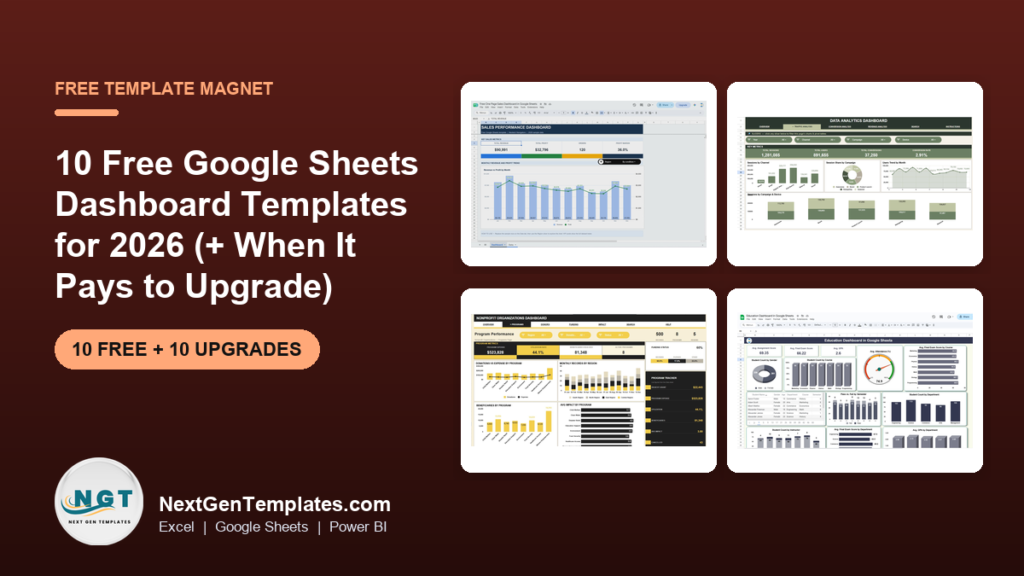
The best free Google Sheets dashboard templates for 2026 come from three sources we checked by hand: NextGenTemplates’ own free Sheets files, Smartsheet’s free Google Sheets dashboard pack, and Coefficient’s free dashboard library. Our top free pick is the One Page Sales Dashboard in Google Sheets: 4 KPI cards, a Revenue vs Profit chart, a Region slicer and 120 sample orders.
Last updated: October 2026
Working in Excel instead? See our companion list of free Excel dashboard templates for 2026.
Key takeaways
- All 10 templates in the free list below cost nothing; we opened every source page in October 2026 to confirm the files are still offered.
- Best overall free pick: the One Page Sales Dashboard from NextGenTemplates, which also includes a Practice Dashboard tab and a video showing how it is built.
- Google’s own template gallery is built around budgets, schedules and trackers, so most ready-made Sheets dashboards come from third parties.
- Free Sheets dashboards are usually one page with one or two filters. They stop paying off when you need several analysis pages, month-to-date and year-to-date logic, targets or a record search sheet.
- The paid Google Sheets upgrades in this guide cost $6.99 to $12.99 each, paid once, with no per-user fee for the people you share them with.
Free Google Sheets dashboard templates compared
Every free file in this guide, side by side. One row is flagged best overall. Price is “Free” for all ten because all ten are free.
| # | Template | Source | Format | Best For | Price |
|---|---|---|---|---|---|
| 1 | One Page Sales Dashboard (Best overall) | NextGenTemplates | Google Sheets | Revenue, profit, orders and margin by region | Free |
| 2 | Home Renovation Budget Tracker | NextGenTemplates | Google Sheets | Estimated vs actual spend by room | Free |
| 3 | To Do List Template | NextGenTemplates | Google Sheets | Personal task list with 6 live KPI cards | Free |
| 4 | Basic Dashboard Template | Smartsheet | Google Sheets | Task status, priority and budget at a glance | Free |
| 5 | Project Dashboard Template | Smartsheet | Google Sheets | Milestones, owners and overall task status | Free |
| 6 | Sales Dashboard Template | Smartsheet | Google Sheets | Salesperson ranking, regional and team sales | Free |
| 7 | KPI Dashboard Template | Smartsheet | Google Sheets | Budget, revenue, profit margin, debt-to-equity | Free |
| 8 | Marketing Performance Dashboard Template | Smartsheet | Google Sheets | Impressions, CTR, cost per acquisition, ROI | Free |
| 9 | Shopify Sales Dashboard | Coefficient | Google Sheets | Store revenue and orders by month, product, country | Free (email form) |
| 10 | Google Analytics Website Performance | Coefficient | Google Sheets | GA4 sessions, conversions and engagement | Free (GA4 connection) |
And the paid Google Sheets upgrades we recommend once a free file runs out of road. One row is best overall, one is best value.
| Upgrade | Format | Best For | Price |
|---|---|---|---|
| Data Analytics Dashboard in Google Sheets (Best overall) | Google Sheets | Traffic, conversion and revenue analysis | $9.99 |
| Business Development Dashboard in Google Sheets (Best value) | Google Sheets | Revenue, COGS, profit and marketing spend | $6.99 |
| Marketing KPI Dashboard in Google Sheets | Google Sheets | Monthly marketing KPIs with MTD, YTD and targets | $12.99 |
| Multiple Project Management Dashboard in Google Sheets | Google Sheets | Portfolios: budget vs actual by manager | $9.99 |
| Nonprofit Organizations Dashboard in Google Sheets | Google Sheets | Donations, programs and fund accountability | $9.99 |
| Personal Finance Dashboard in Google Sheets | Google Sheets | Income, spending, budgets and investments | $9.99 |
| Customer Service Dashboard in Google Sheets | Google Sheets | Tickets, satisfaction and resolution time | $9.99 |
| IT Services Dashboard in Google Sheets | Google Sheets | Requests, SLA breaches and technician workload | $9.99 |
| Education Dashboard in Google Sheets | Google Sheets | Scores, GPA, attendance and pass rates | $9.99 |
| Real Estate KPI Dashboard in Google Sheets | Google Sheets | Occupancy, NOI and cap rate with MTD and YTD | $12.99 |
How we picked these free Google Sheets dashboard templates
We started where people actually look: Google’s built-in template gallery, the “free Google Sheets dashboard” roundups that rank in search, and the free files on NextGenTemplates. Every source page was opened in October 2026 and every link in this post was checked.
Google’s own gallery (File, New, From template gallery) is useful, but its templates are budgets, schedules, Gantt timelines and trackers rather than dashboards, so we did not count any of them. We also dropped several roundup posts whose “templates” were only screenshots pointing back to the same gallery with no copy link, and a cluster of keyword-stuffed pages on unrelated university domains that we would not download anything from.
A template made the list only if it is a genuine dashboard or carries live KPI cards on a summary page, is free to copy with no trial clock, and runs in a normal Google account. Two Coefficient templates ask for an email or a data connection; we say so in each entry. The paid upgrades come from NextGenTemplates’ catalogue of more than 7,000 templates and were chosen to match the jobs the free files cover, so each one is a direct next step rather than a random upsell.
The 10 best free Google Sheets dashboard templates for 2026
1. One Page Sales Dashboard (NextGenTemplates) – best overall free
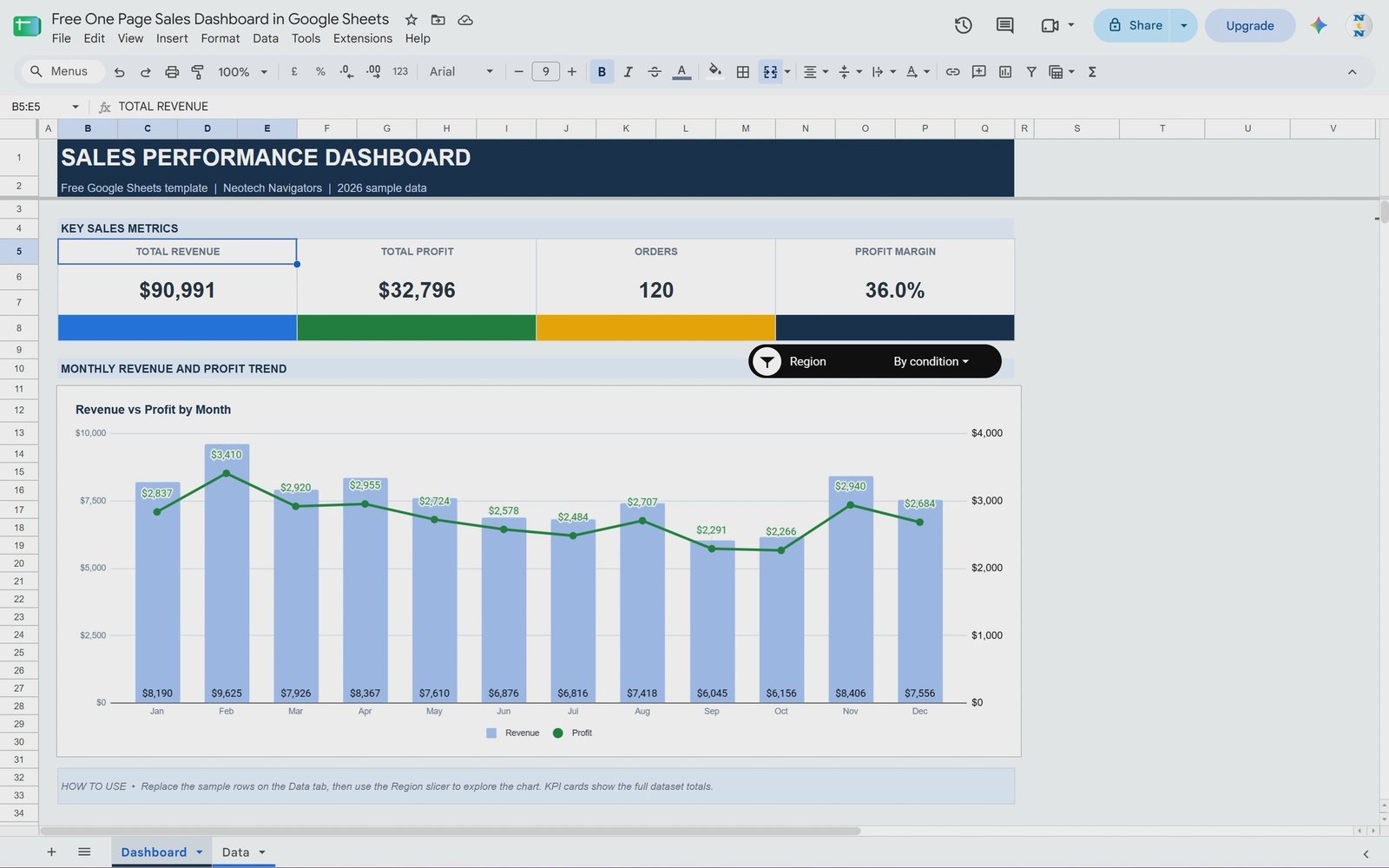
This is the free file we would hand to anyone building their first Sheets dashboard. It puts your sales on one screen: four KPI cards (Total Revenue, Total Profit, Orders and Profit Margin), a monthly Revenue vs Profit combo chart with profit on the right axis, and a styled Region slicer that filters the chart for one or several regions.
What is inside:
- A Dashboard tab with no gridlines and colour-coded KPI cards
- A Data tab with 120 sample orders (date, region, salesperson, product, units, revenue, cost, profit)
- A Practice Dashboard tab, the version built step by step in the companion video tutorial
- Plain formulas you can read, such as
=SUM(Data!G:G)for revenue and anIFERRORmargin formula
Replace the sample rows with your own orders under the same headers and every card and the chart update. There are no scripts or add-ons to authorise.
Best for: a first sales dashboard, or small teams that share files in Google Drive. Free – get the free one page sales dashboard.
2. Home Renovation Budget Tracker (NextGenTemplates)
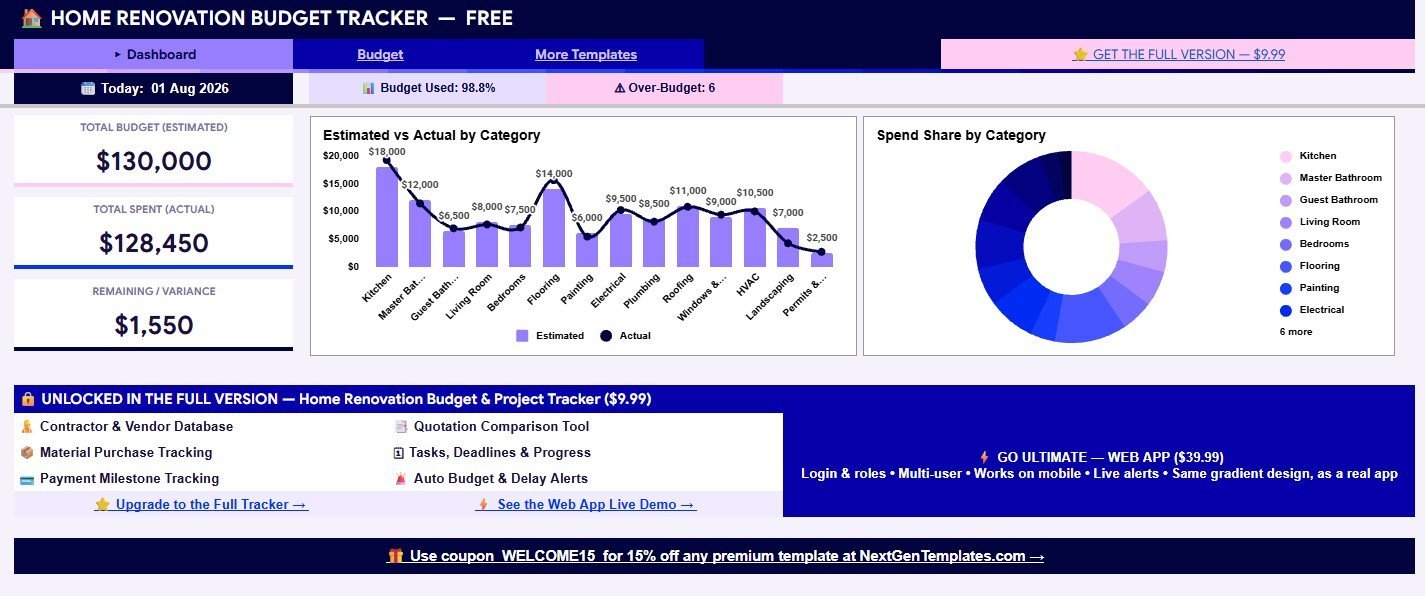
A budget dashboard rather than a sales one. The summary page shows total estimated budget, actual spend, remaining variance, budget used % and the number of over-budget categories, with an estimated-vs-actual chart by room and a spend-share donut. The sample is a $130,000 renovation at 98.8% of budget, with 6 categories flagged over budget.
Status labels (Over Budget, At Risk, On Track), progress bars and a notes column make it easy to adapt for any project with a fixed budget, such as an office fit-out or an event.
Best for: homeowners and small project budgets. Free – get the free renovation budget tracker.
3. To Do List Template (NextGenTemplates)
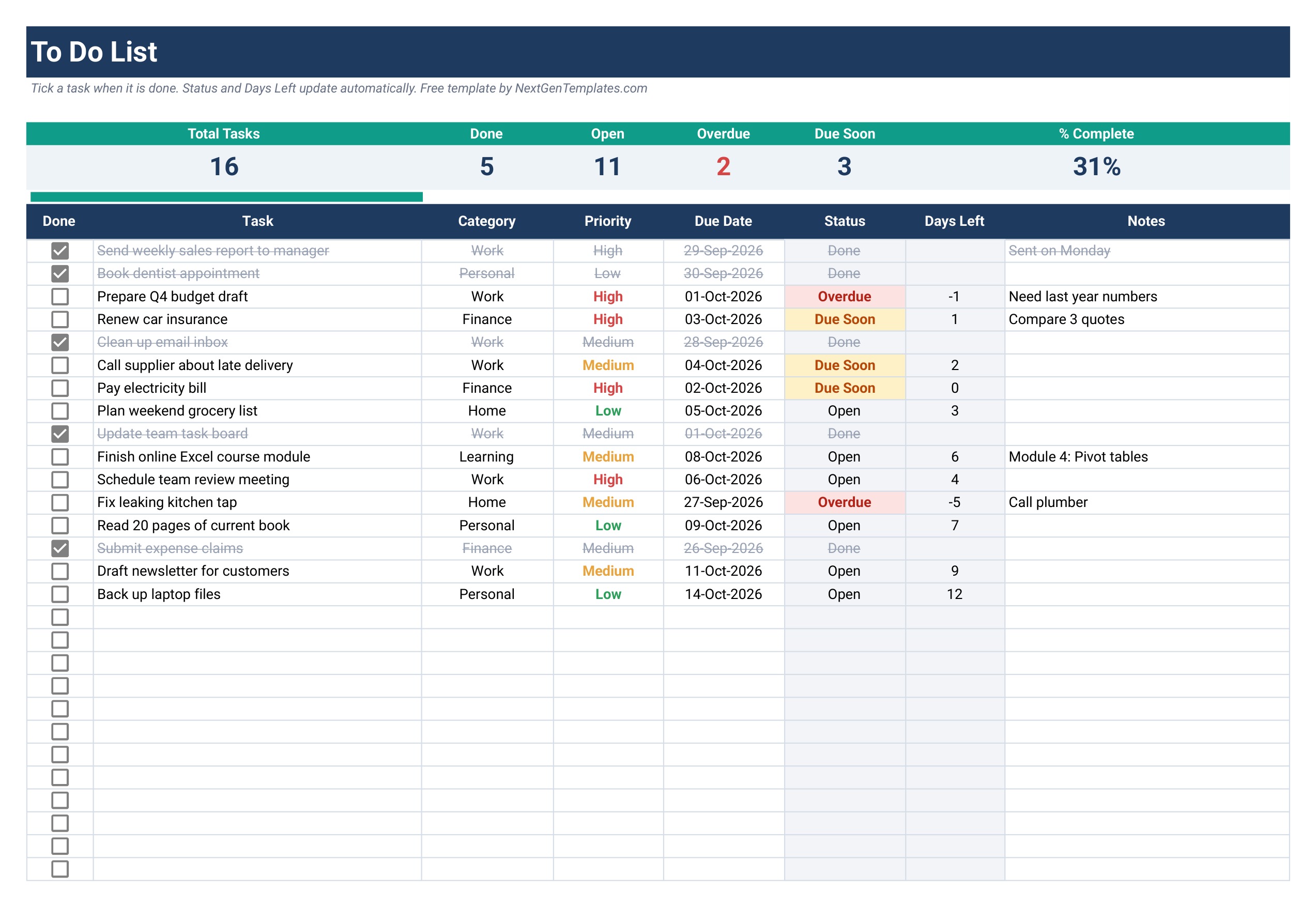
Strictly a task list, but it earns a place because the top of the sheet works as a small dashboard: 6 live KPI cards (total tasks, done, open, overdue, due soon and % complete) with a progress bar. Each of the 100 task rows has a checkbox, a category, a priority and a due date, and a TODAY-based formula moves the status between Done, Overdue, Due Soon and Open on its own.
Best for: one person who wants a daily progress view. Free – get the free to do list template.
4. Basic Dashboard Template (Smartsheet)
Smartsheet’s free Google Sheets dashboard templates page is the strongest third-party source we found, with six Sheets dashboards. The Basic Dashboard combines a Gantt-style task timeline, pie charts for task status and priority, and bar charts comparing planned and actual budget and pending items. It is the only one on the page offered in both a sample and a blank version.
The page itself was last updated in May 2023, so expect a plain design rather than a modern card layout.
Best for: a quick status page for a small team. Free.
5. Project Dashboard Template (Smartsheet)
Lists milestones and tasks with priorities and assignees, and summarises them in an “Overall Task Status” pie chart split into overdue, not started, in progress and completed. It is a solid free answer for one project’s weekly meeting.
It does not compare budget against actual cost per project or report by manager, which is where paid upgrade #4 below takes over.
Best for: one project with a handful of owners. Free.
6. Sales Dashboard Template (Smartsheet)
A Data tab for sales entries feeds a dashboard with a line graph ranking salespeople, plus bar and column charts for regional and team sales. It answers “who sold what, where” well.
There are no targets or month-to-date logic, so it shows results rather than progress against plan. For more sales options see the best sales dashboard templates for 2026.
Best for: small sales teams reviewing a quarter. Free.
7. KPI Dashboard Template (Smartsheet)
A finance-flavoured KPI page: horizontal bar charts for budget and revenue, a profit margin line chart and a debt-to-equity ratio column chart. It is one of the few free Sheets files that tracks a balance-sheet ratio at all.
Best for: owners who want four financial health charts on one page. Free.
8. Marketing Performance Dashboard Template (Smartsheet)
Tracks impressions, acquisitions, cost per acquisition, click-through rate and ROI. It covers the basic paid-media funnel in one sheet and is easy to extend with your own channels.
Best for: small marketing teams reporting monthly results. Free.
9. Shopify Sales Dashboard (Coefficient)
Coefficient’s free Google Sheets dashboard library says every template is free to use as a static dashboard. The Shopify Sales Dashboard shows revenue and order count by month, product and country, with charts for monthly sales volume and units sold by product.
Honest caveat: you submit a work email to get the copy. You can type data in by hand; automatic Shopify refresh needs a Coefficient connection.
Best for: small Shopify stores. Free (email form).
10. Google Analytics Website Performance (Coefficient)
The website performance template tracks GA4 conversions, conversion rate, sessions, stickiness, average session duration, engagement rate and bounce rate, with breakdowns by traffic medium, device and country.
It is the only free entry built for live data, and that is also its catch: to fill it you connect GA4 through Coefficient, so check their current plan limits before you rely on it.
Best for: site owners who already use GA4. Free (GA4 connection).
Want the free sales dashboard by email?
Enter your email and we will send you the free One Page Sales Dashboard in Google Sheets (template #1 above). No payment and no card. You can unsubscribe at any time.
When does it pay to upgrade from free Google Sheets dashboard templates?
Free Sheets dashboards are excellent at one thing: showing one topic on one page with sample data. The same five gaps push people to a paid file, usually within the first month of real use:
- One page is not enough. You need separate pages for overview, trends and detail, plus a data tab, with navigation between them.
- No time logic. Free files rarely have a month selector with month-to-date, year-to-date and prior-year columns, so you rebuild the same pivot tables every month.
- No targets. Without target-vs-actual columns you can see results but not the gap to plan.
- No way to find one record. Once a data tab passes a few hundred rows, a search sheet that returns a full record by ID saves real time.
- Generic KPIs. Nonprofits, help desks, schools and property managers each measure different things, and a generic sales file needs heavy rework.
If two or more of these apply, the hours spent patching a free file cost more than a one-time template. The ten upgrades below map onto those gaps, and because they are Google Sheets files you can share them with your whole team without per-user licences.
10 paid Google Sheets dashboard upgrades for when free stops working
1. Data Analytics Dashboard in Google Sheets – best overall upgrade
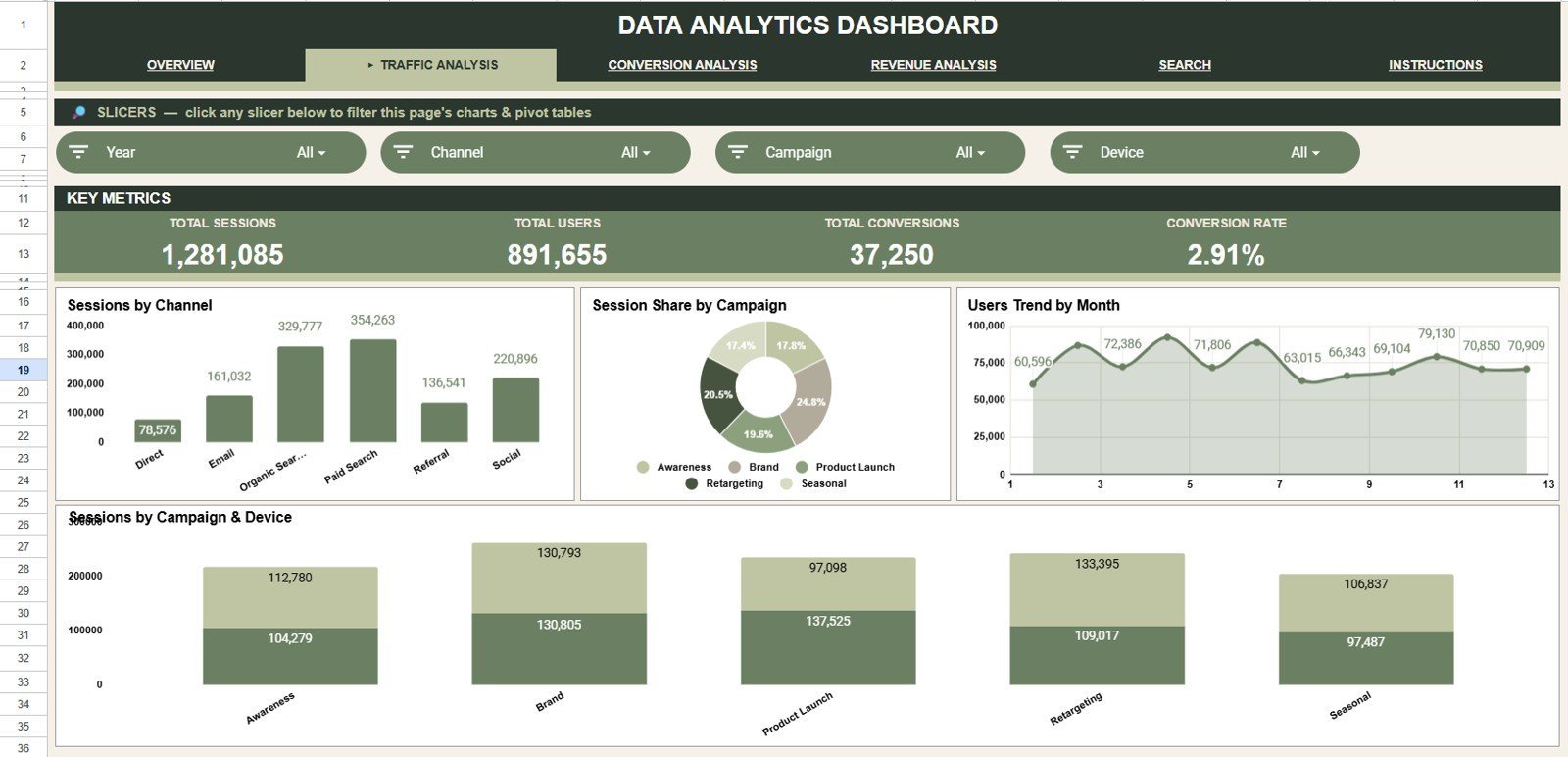
The direct step up from free templates #1, #8 and #10. It has 6 tabs (Overview, Traffic Analysis, Conversion Analysis, Revenue Analysis, a Search sheet and a Data sheet), 4 KPI cards (Total Sessions, Total Users, Total Conversions, Total Revenue) and 16 pre-built charts covering channels, campaigns, devices, regions, categories, cost and monthly trends.
What it adds over free: slicers across several analysis pages and a Record ID lookup that returns the full row instantly.
Best for: marketers and analysts who report on traffic and revenue together. $9.99 – view the data analytics dashboard.
2. Business Development Dashboard in Google Sheets – best value
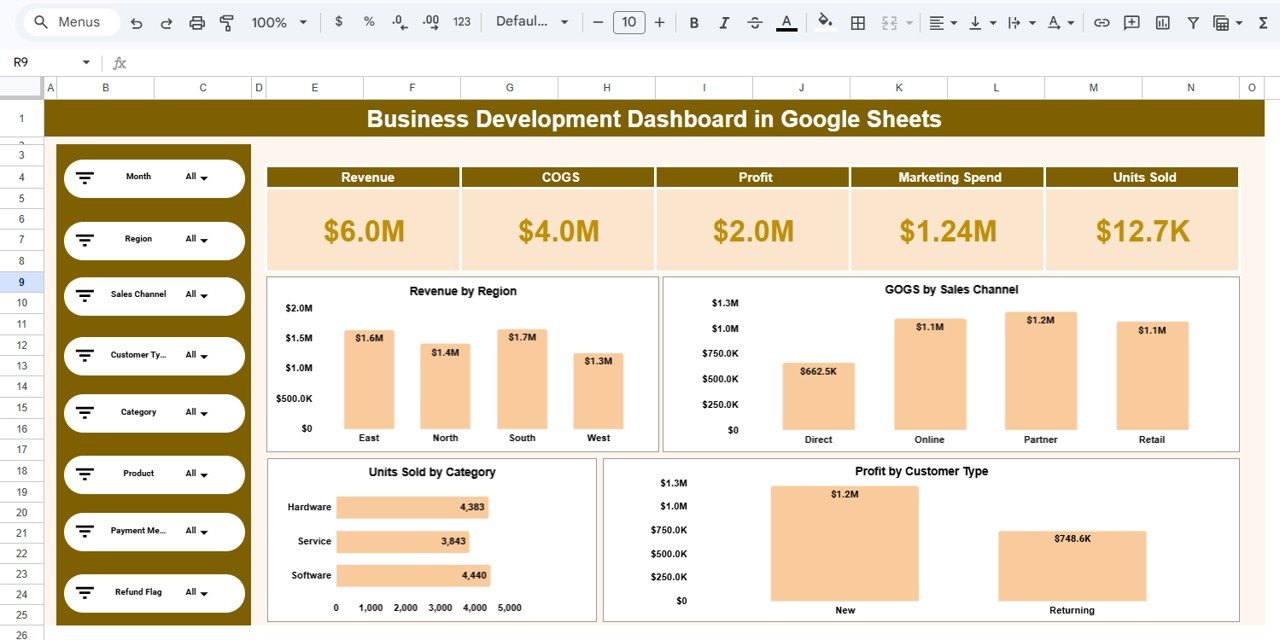
The cheapest multi-page dashboard in this guide. KPI cards show Revenue, Cost of Goods Sold, Profit, Marketing Spend and Units Sold, and the analysis pages break them down by region, sales channel, product category and customer type, with interactive filters down the left side.
What it adds over free: profit and COGS alongside revenue, which the free sales files (#1, #6) do not split out.
Best for: owners and sales leads who want the whole P&L picture on one link. $6.99 – view the business development dashboard.
3. Marketing KPI Dashboard in Google Sheets

This is the fix for the “no time logic” gap. Pick a month from the drop-down and every KPI shows MTD and YTD actuals against target and against the prior year, with up and down arrows. KPIs include customer acquisition cost, ROMI, lead conversion rate, customer lifetime value, MQLs, click-through rate, cost per click and bounce rate, each tagged as upper-the-better or lower-the-better.
What it adds over free: targets and prior-year comparison, which the free Smartsheet marketing dashboard (#8) lacks. Prefer charts over a KPI table? The Marketing Dashboard in Google Sheets ($9.99) is the chart-led alternative.
Best for: marketing managers reporting monthly to leadership. $12.99 – view the marketing KPI dashboard.
4. Multiple Project Management Dashboard in Google Sheets
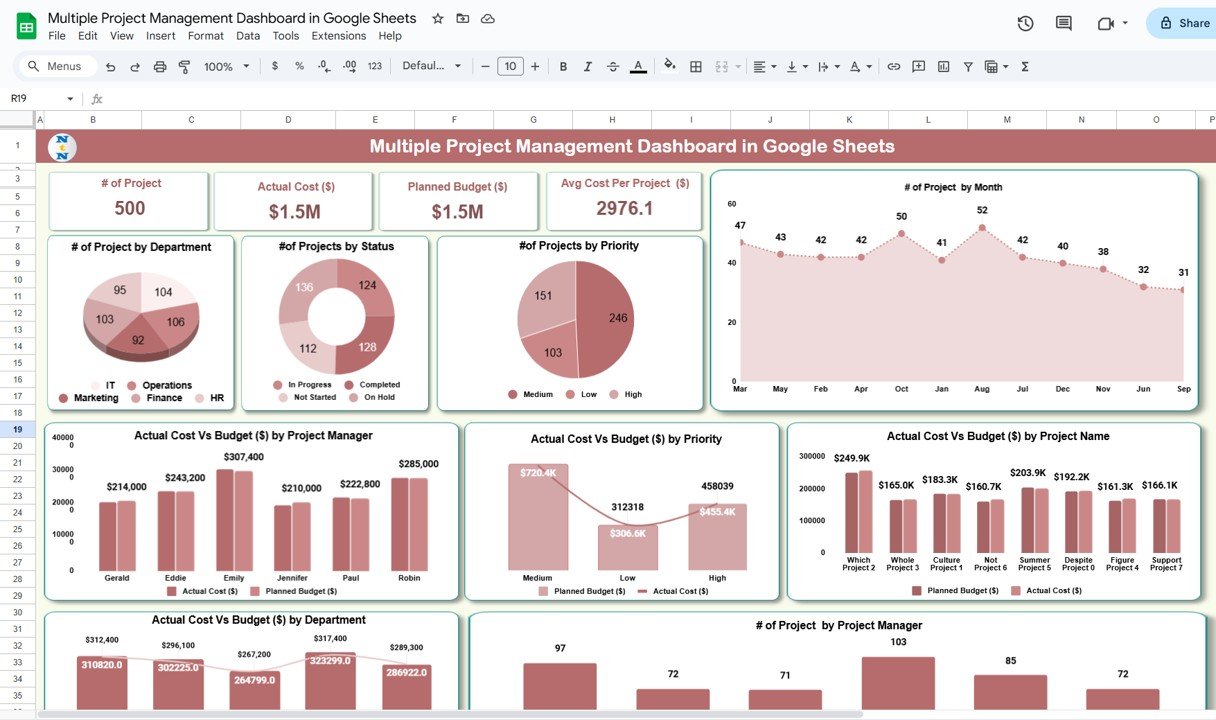
When one project becomes ten. KPI cards show Total Projects, Planned Budget, Actual Cost and Average Cost per Project, and 9 auto-updating charts count projects by department, status, priority, project manager and month, with budget variance by every one of those groups.
What it adds over free: portfolio-level budget vs actual by manager and department, which the Smartsheet project files (#4, #5) do not track. Compare more options in our guide to project management dashboard templates in Excel and Google Sheets.
Best for: PMOs, agencies and department heads. $9.99 – view the multiple project dashboard.
5. Nonprofit Organizations Dashboard in Google Sheets
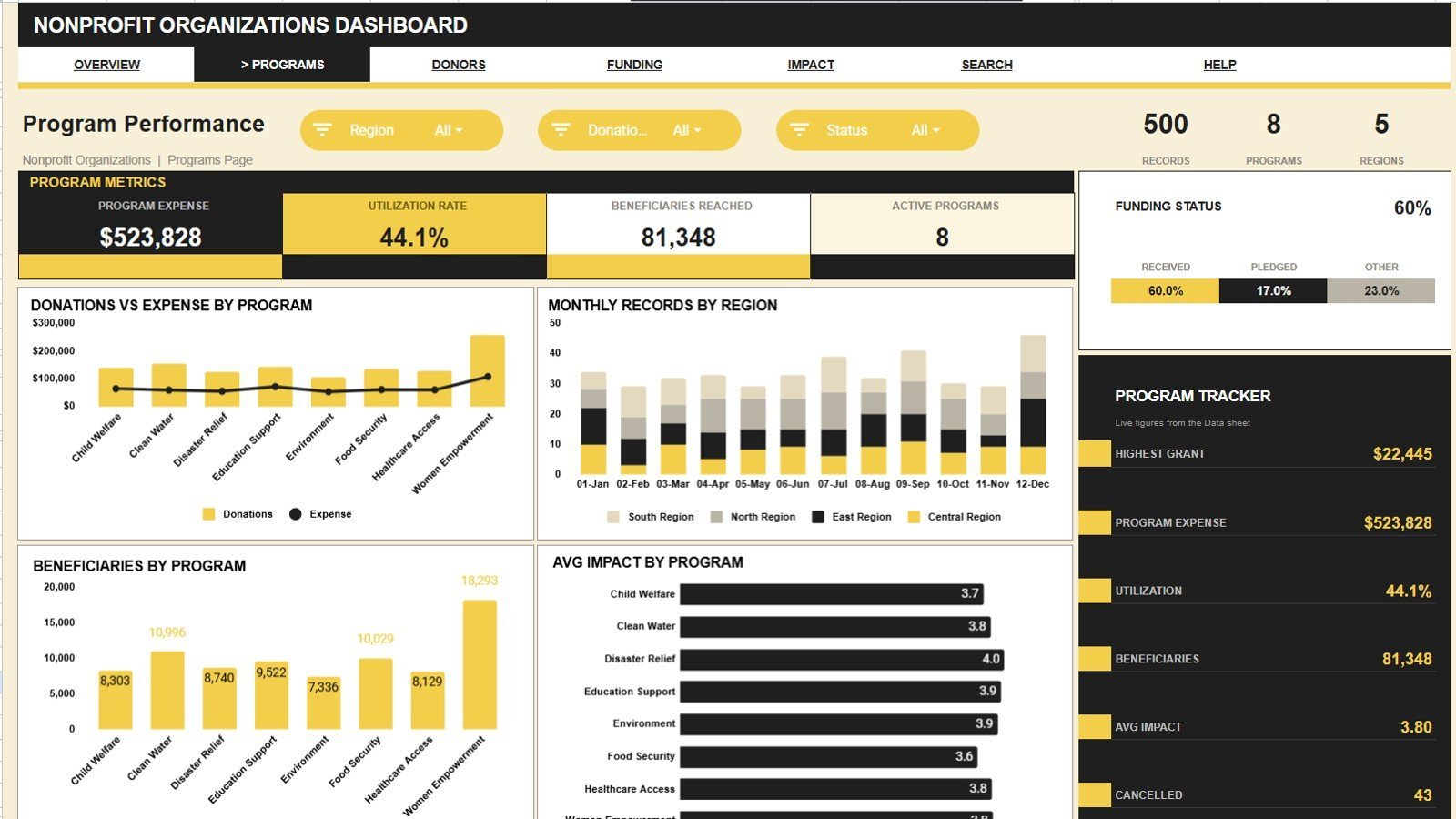
The most detailed file in this guide: 13 KPI cards and 20 pre-built charts across five analysis pages, a search sheet and a data sheet. Cards include Total Donations, Beneficiaries Reached, Funds Received, Pending Pledges, Program Expense and Net Available, so money in and money spent reconcile automatically.
What it adds over free: slicers on every page by program, region, status, donor type, channel and coordinator, and a board-ready fund accountability view no free template offers.
Best for: charities and NGOs reporting to a board. $9.99 – view the nonprofit dashboard.
6. Personal Finance Dashboard in Google Sheets
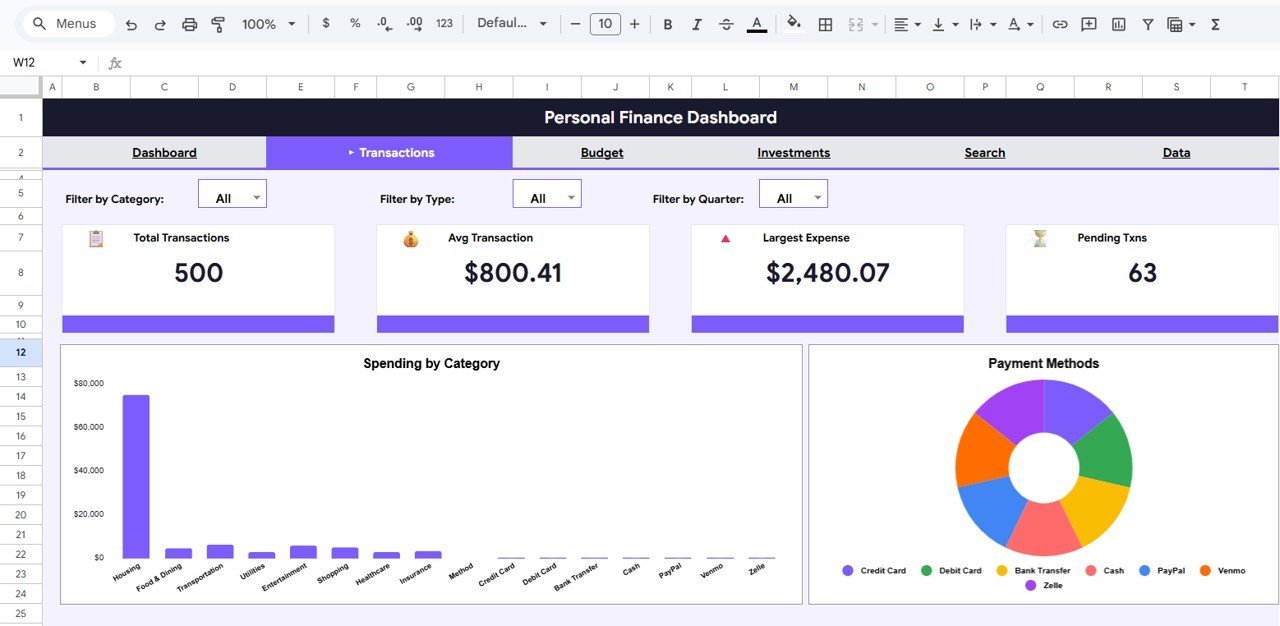
The natural next step after the free renovation budget (#2). Six pages cover an Overview, Transactions, Budget, Investments, a Search Transactions page and a Data sheet. KPI cards show this month’s income, total expenses, net savings and investments, and charts cover spending by category, budget spent by category, income vs expenses by month and portfolio allocation by asset class.
What it adds over free: budget vs actual by category and by quarter, plus investment tracking in the same file.
Best for: households, freelancers and salaried professionals. $9.99 – view the personal finance dashboard.
7. Customer Service Dashboard in Google Sheets
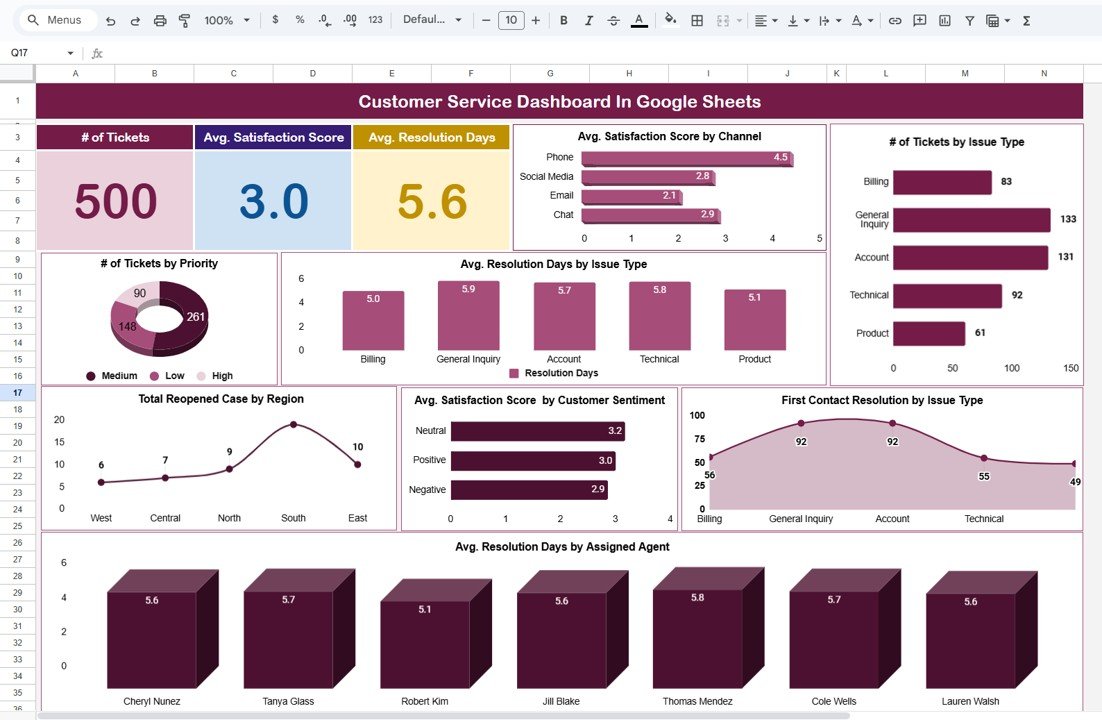
No free list covers support teams, so this is the service pick. The dashboard leads with number of tickets, average satisfaction score and average resolution days, then breaks them down by channel, issue type, priority, region, customer sentiment and assigned agent.
What it adds over free: agent-level resolution and satisfaction, the numbers a support lead actually manages to.
Best for: small help desks and customer success teams. $9.99 – view the customer service dashboard.
8. IT Services Dashboard in Google Sheets
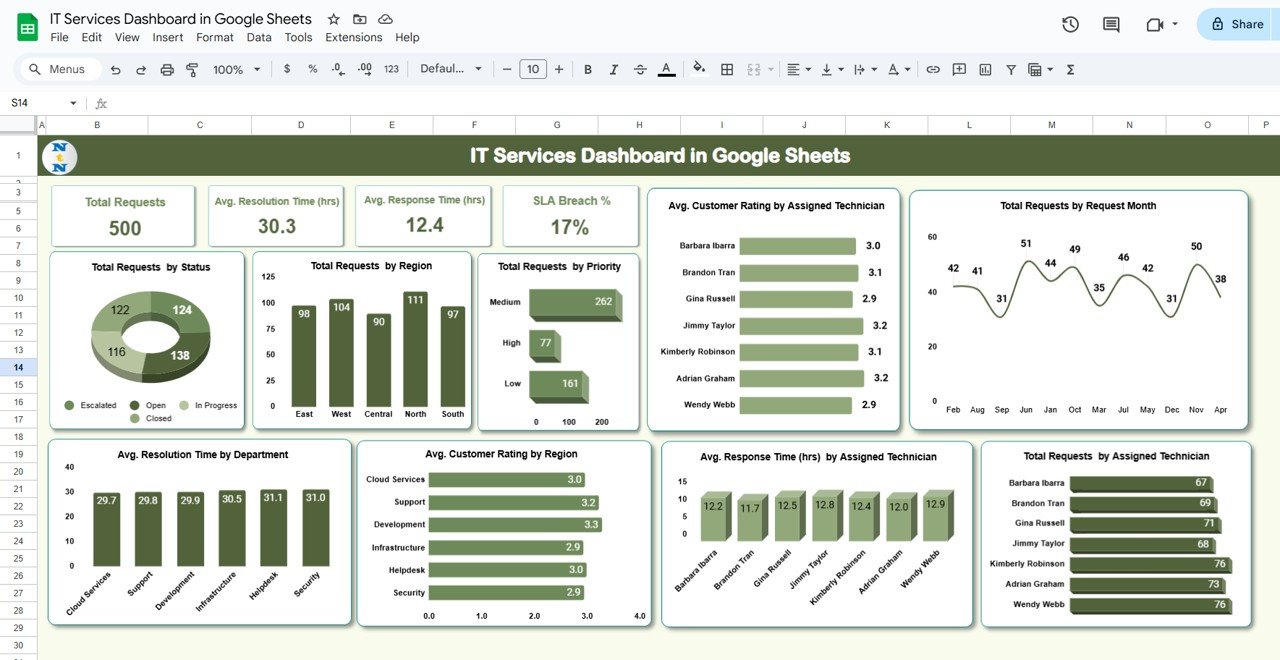
Built around service levels. Cards show Total Requests, average resolution and response time in hours, SLA breach count and SLA breach %, and 10+ charts cover requests by status, priority and region, technician ratings and workload, and breach trends. A Search sheet filters by status, priority or technician.
What it adds over free: SLA tracking, which no free Sheets dashboard we found includes.
Best for: internal IT teams and managed service providers. $9.99 – view the IT services dashboard.
9. Education Dashboard in Google Sheets

Summary cards show average assignment score, average final exam score and average GPA, with an attendance gauge, student counts by course, department, gender and instructor, average GPA by department and pass vs fail by semester.
What it adds over free: an academic data model ready to fill, instead of bending a sales template into a gradebook.
Best for: school administrators, teachers and tutoring centres. $9.99 – view the education dashboard.
10. Real Estate KPI Dashboard in Google Sheets

The same month selector and MTD/YTD layout as the marketing KPI file, applied to property: occupancy rate, vacancy rate, gross rental yield, net operating income, cap rate, tenant turnover, average lease duration and maintenance cost per unit, each against target and prior year.
What it adds over free: property-specific KPIs with time logic, so a monthly owner report takes minutes instead of an afternoon.
Best for: landlords, property managers and small real estate firms. $12.99 – view the real estate KPI dashboard.
Not in your industry? Browse all Google Sheets dashboard templates or the full range of Google Sheets KPI dashboard templates.
How to choose between free and paid
| Your situation | Start with |
|---|---|
| Learning how a Sheets dashboard is built | Free: One Page Sales Dashboard (#1), with its Practice tab |
| One project, weekly status only | Free: Smartsheet Project Dashboard (#5) |
| Several projects, budget vs actual by manager | Paid: Multiple Project Management Dashboard, $9.99 |
| Monthly KPI report with MTD, YTD and targets | Paid: Marketing KPI or Real Estate KPI Dashboard, $12.99 |
| Revenue, cost and profit for a small business | Paid: Business Development Dashboard, $6.99 |
| Live data from Shopify or GA4 | Free: Coefficient templates (#9, #10), with their connector |
| A board pack for a charity | Paid: Nonprofit Organizations Dashboard, $9.99 |
Rule of thumb: if you can describe what you need in one sentence and one page, stay free. If you need the words “every month”, “by department” or “against target”, buy the template once and stop rebuilding. Running a whole back office in Sheets and Excel? The Small Business Owner Essentials bundle packs 12 templates, including an Income and Expense Dashboard in Google Sheets, for $59.99.
When a Google Sheets dashboard is NOT the right answer
- Very large data. A Google Sheets file holds up to 10 million cells across all its tabs (see Google’s file size limits), and charts slow down well before that. For hundreds of thousands of rows, use Power BI or a database.
- Offline or locked-down work. If your team cannot use Google accounts, or works offline most of the day, an Excel dashboard is the better fit; see our Excel vs Google Sheets vs Power BI comparison.
- Complex models. Power Pivot style data models, DAX measures and row-level security belong in Excel or Power BI, not Sheets.
- Audit-grade controls. Regulated finance or clinical reporting needs validated systems with audit trails that no spreadsheet template provides.
For everyone else, a shareable Sheets dashboard is still the fastest, cheapest way to put numbers in front of a team. Google’s own guide to filtering charts and tables with slicers covers the one feature every dashboard here relies on. If you also work in Excel and want to master dashboards step by step, our Excel Pivot Tables & Dashboards course teaches the method from scratch.
Frequently asked questions
Does Google Sheets have built-in dashboard templates?
Google Sheets has a template gallery under File, New, From template gallery, but its templates are budgets, schedules, timelines and trackers rather than ready-made dashboards. For a dashboard you can use straight away, free sources such as NextGenTemplates, Smartsheet and Coefficient are quicker.
Where can I find free Google Sheets dashboard templates?
Reliable free sources in 2026 are NextGenTemplates’ free Google Sheets products, Smartsheet’s free Google Sheets dashboard templates page and Coefficient’s free dashboard library. All three give you a real copy in your own Drive. Some Coefficient templates ask for an email address or a data connection first.
What is the best free Google Sheets dashboard template for beginners?
The One Page Sales Dashboard from NextGenTemplates. It has four KPI cards, one combo chart and one slicer built from simple SUM formulas, 120 sample orders, and a Practice Dashboard tab with a video tutorial, so a beginner can use it and learn how it was built.
How do I copy a Google Sheets dashboard template into my own Drive?
Open the template link while signed in to Google and choose File, Make a copy, or use the “Use template” button if the link offers one. The copy is yours to edit. Replace the sample rows on the data tab under the same headers and the cards and charts update.
Are free Google Sheets dashboard templates safe?
Files from established sites are generally safe. Be careful with any template that asks you to authorise an Apps Script or add-on: read the permission screen before accepting. None of the NextGenTemplates free files in this list need a script or add-on to work.
Can several people edit a Google Sheets dashboard at once?
Yes. That is the main reason to choose Sheets over a desktop file. Share the file with editors for the data tab and viewers for everyone else. Protect the dashboard tab with Data, Protect sheets and ranges so nobody overwrites a formula by accident.
When should I pay for a Google Sheets dashboard template?
Pay when you need several analysis pages, a month selector with MTD and YTD figures, targets, a record search sheet or industry-specific KPIs. Free templates almost never include those, and building them yourself takes longer than a one-time purchase.
How much do paid Google Sheets dashboard templates cost?
On NextGenTemplates the Google Sheets dashboards in this guide cost $6.99 to $12.99, paid once with no subscription and no per-user fee. The Business Development Dashboard is the lowest at $6.99; the KPI dashboards with MTD and YTD logic are $12.99.
Can I turn a Google Sheets dashboard into Excel?
Yes. Choose File, Download, Microsoft Excel (.xlsx). Formulas, formatting and most charts carry over, but Sheets slicers and some Sheets-only functions usually need rebuilding in Excel. If Excel is your main tool, start from an Excel template instead.
Is Google Sheets good enough for a business dashboard?
For small and mid-sized teams with up to tens of thousands of rows, yes. Sheets is free, shareable and updates for everyone at once. Move to Power BI when data runs into hundreds of thousands of rows or must refresh from several systems on a schedule.
Get more Google Sheets dashboard templates
Start free with the One Page Sales Dashboard in Google Sheets. When you need several pages, slicers and a record search, the Data Analytics Dashboard in Google Sheets is $9.99, and the Business Development Dashboard is the best value at $6.99. Sharing files across a team? See our Google Sheets templates for teams, and if you need the same dashboard in more than one format, read when to buy Excel, Google Sheets and Power BI together.
Prefer to see dashboards in action first? Watch walk-throughs and tutorials on our YouTube channel: youtube.com/@NextGenTemplates.