


The best safety inspection checklist for most EHS and site managers is the Office Safety Inspection Tracker in Excel ($6.99). It logs each inspection through a VBA form, scores risk, and feeds a dashboard with 4 slicers and 5 charts. For simple task lists, the Health and Safety Planner Checklist in Excel costs $3.49.
Last updated: November 2026
Key takeaways
- The Office Safety Inspection Tracker in Excel ($6.99) is the best overall pick: login, VBA entry form, 4 slicers and 5 charts in one workbook.
- Five of the eight tools cost $3.49 each, so a full set of simple checklists costs less than one month of most inspection apps.
- The Safety and Compliance Dashboard in Power BI ($17.99) is the only option here built for incident trends across departments, not for ticking items off.
- Pick Google Sheets (Office Safety Inspection Tracker, $6.99) when several inspectors need to edit the same file at once.
- A checklist records inspections but does not fix findings, so every tool in this list needs a named owner and a due date to be worth using.
 Launch offer
SUMIFS, XLOOKUP, FILTER, LAMBDA and checking AI-written formulas, with real business projects. 11h 47m of video by PK, with practice files, quizzes and a capstone.
Safety inspection checklist templates compared
| Template | Format | Best For | Price |
|---|---|---|---|
| Office Safety Inspection Tracker in Excel (Best overall) | Excel (VBA) | Logging and scoring inspections with a dashboard | $6.99 |
| Safety and Compliance Dashboard in Power BI | Power BI | Incident and compliance trends across departments | $17.99 |
| Office Safety Inspection Tracker in Google Sheets | Google Sheets | Multi-location teams editing together | $6.99 |
| Health and Safety Planner Checklist in Excel (Best value) | Excel | Assigning safety tasks with deadlines | $3.49 |
| Fire Safety Equipment Checklist in Excel | Excel | Extinguishers, alarms and sprinklers | $3.49 |
| Workplace Safety Checklist in Google Sheets | Google Sheets | Hazard identification and corrective action logs | $3.49 |
| Health and Safety Checklist in Google Sheets | Google Sheets | Customizable categories with charts | $3.49 |
| Health and Safety To-Do List Checklist in Excel | Excel | Small teams that need a simple tracked task list | $3.49 |
How we picked these
We searched the Next Gen Templates catalog for paid checklists, trackers and dashboards built around workplace safety, inspections and compliance. We kept tools that give an inspector something to fill in and a manager something to review, and we covered Excel, Google Sheets, VBA and Power BI so you can match the file to your team.
We left out free templates, generic to-do lists and anything that was only loosely about safety. If you want to compare against free options first, read our guide to free safety inspection checklist templates.
Ranking weighs three things: how much of the inspection loop the file covers (record, score, assign, review), how well it works with several people, and the price against that coverage.
What does a missed safety inspection actually cost?
The direct cost is regulatory exposure. OSHA publishes its current penalty amounts and its inspection process on osha.gov, and a missing inspection record is an easy thing for a compliance officer to cite. The indirect cost is harder to see: a blocked fire exit or an overdue extinguisher check that nobody caught for a quarter.
Here is a simple worked example. A site manager runs a weekly walk-round of 40 items across 6 areas. That is 240 checks a week and roughly 12,480 a year. If even 2% are skipped or never recorded, that is about 250 gaps a year with no evidence either way. A checklist with a status column and a progress bar shows those gaps the same day, not at audit time.
Tools like SafetyCulture (formerly iAuditor) and Intelex do this with a monthly subscription. Check their pricing pages for current figures. The templates below are one-time purchases, which suits small and mid-size sites that do not need a full EHS platform.
The 8 best safety inspection checklist templates for 2026
1. Office Safety Inspection Tracker in Excel: best overall
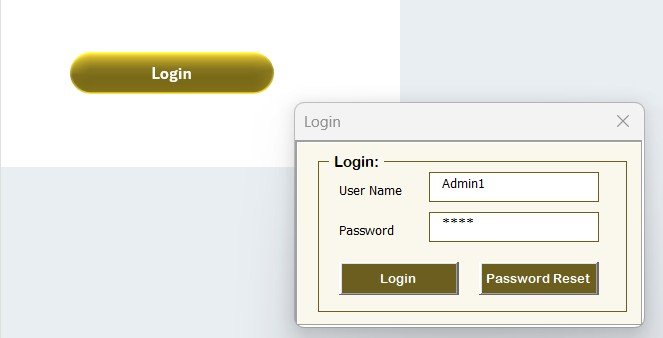
This is a VBA-powered workbook, so it behaves more like a small inspection app than a spreadsheet. It ranks first because it covers the whole loop: login, data entry, scoring, filtering and a dashboard, all in one file.
Who it is for: safety officers and facility managers who want audit-ready records without buying software.
- 8 integrated worksheets: Login, Home, Dashboard, Data, List, Support, Settings and User Management
- VBA form to add, update or delete an inspection, with the dashboard refreshing after each change
- Login with usernames, passwords and roles
- Dashboard with 4 slicers (Inspection Area, Risk Level, Department, Inspector) and 5 charts
- List sheet feeds the dropdowns on the form, and setup takes under 10 minutes
Use cases: filter to High risk in one department before a Monday meeting; pull every inspection by one inspector ahead of an audit; compare location-wise inspection counts across floors; delete a duplicate entry without breaking the charts.
Price: $6.99. Get the Office Safety Inspection Tracker in Excel.
Best for: teams that want one controlled, password-protected inspection log with a live dashboard.
2. Safety and Compliance Dashboard in Power BI

This one sits above the checklist level. It takes incident and compliance data and shows what is open, resolved or pending, and how long resolution takes. It is not a tick-box form, so pair it with one of the checklists below.
Who it is for: EHS leads, compliance managers and operations heads reporting across departments or sites.
- Overview page with cards and charts for incidents, resolution times and pending cases
- Incident analysis by type, severity and resolution status
- Compliance monitoring by department and compliance type
- Personnel analysis for staff handling high-severity cases
- Slicers, drill-down and a detailed page for audits; connects to your own data sources
Use cases: report average days to resolve at a monthly safety committee; see which department has the most pending cases; check which incident types recur; hand auditors a detailed log. For the metrics behind this, see our guide to safety KPIs such as TRIR and LTIFR.
Price: $17.99. See the Safety and Compliance Dashboard in Power BI.
Best for: managers who need trends and reporting, not just a record of walk-rounds.
3. Office Safety Inspection Tracker in Google Sheets

The Google Sheets version of the tracker is the better pick when inspectors work from different sites and phones. It runs without VBA, so there is nothing to enable or trust, and everyone sees the same live file.
Who it is for: safety officers, facility managers and admin teams covering one office or dozens.
- KPI cards: Total Inspections, Compliant, Non-Compliant, Pending Actions and Average Risk Score
- Location-wise tracking to spot high-risk office locations
- Category breakdown covering fire, electrical, workspace, equipment and more
- Pending action tracking with assigned responsibility and target dates
- Search tab to find any record, with a dashboard that updates as data changes
Use cases: compare average risk score by location; list every pending action due this month; check compliant against non-compliant counts per category; share one link with a regional manager.
Price: $6.99. Get the Office Safety Inspection Tracker in Google Sheets.
Best for: distributed teams that want cloud editing and a risk dashboard.
4. Health and Safety Planner Checklist in Excel: best value
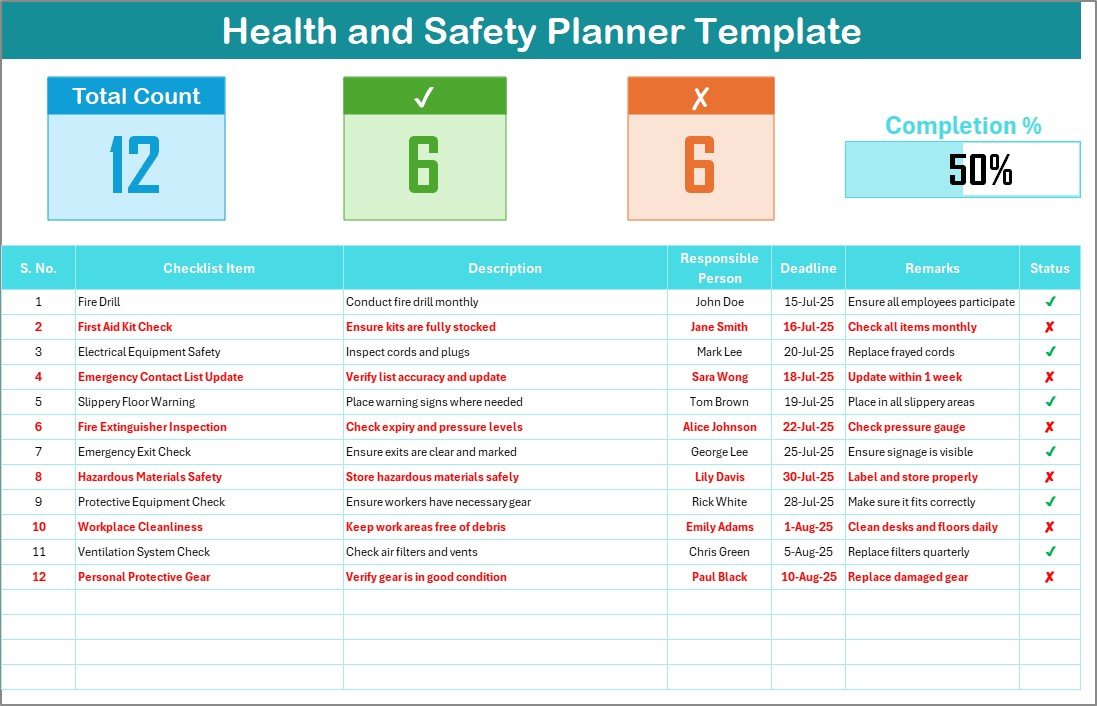
At $3.49 this is the cheapest way to turn a safety plan into assigned tasks with deadlines. It has no scoring or slicers, which keeps it quick to set up.
Who it is for: small business owners and health and safety officers who need accountability on a short list of tasks.
- Checklist sheet with total tasks, checked tasks, crossed-off tasks and a completion progress bar
- Fields for serial number, item, description, responsible person, deadline, remarks and status (tick or cross)
- Responsible person dropdown fed by a List sheet
- Fully customizable, with columns you can add or remove
Use cases: assign 25 pre-inspection tasks to five people and watch the progress bar; filter overdue deadlines before a visit; keep remarks as evidence of why an item stayed open; keep names consistent through the List sheet.
Price: $3.49. Get the Health and Safety Planner Checklist in Excel.
Best for: the lowest-cost way to assign and track safety tasks.
5. Fire Safety Equipment Checklist in Excel

Fire equipment is the part of a safety inspection that most often has a fixed schedule, and this checklist is built around it. It tracks status, maintenance and inspection dates per item.
Who it is for: facility managers and safety officers responsible for extinguishers, alarms and sprinklers.
- Equipment status: functional, needs maintenance or due for inspection
- Inspection and maintenance scheduling with reminders
- Compliance tracking against fire safety regulations
- Detailed records including purchase date, service history, inspection dates and maintenance logs
- Reports to visualize performance and maintenance trends
Use cases: list every extinguisher with its last service date; flag items due for inspection this quarter; keep a service history for a fire marshal visit; separate equipment that works from equipment that needs repair.
Price: $3.49. Get the Fire Safety Equipment Checklist in Excel.
Best for: a dedicated register for fire safety equipment.
6. Workplace Safety Checklist in Google Sheets

This is the one to choose when the output you care about is a log of findings and corrective actions. It has sections for the main areas of a general workplace inspection.
Who it is for: teams in manufacturing, offices or other settings that need to adapt a general checklist to their own site.
- Sections for emergency procedures, equipment safety checks, hazard identification and regulatory compliance
- Hazard identification to assess risks by area
- Customizable to specific workplace requirements and changing regulations
- Real-time collaboration in the cloud
- Audit-ready log of inspections, findings and corrective actions
Use cases: record a hazard, the fix and the date in one row; let two supervisors update different areas on the same day; revise the checklist when a regulation changes; show an auditor the corrective action trail. Our OSHA compliance templates for US employers cover the incident side.
Price: $3.49. Get the Workplace Safety Checklist in Google Sheets.
Best for: a general workplace inspection with a corrective action trail.
7. Health and Safety Checklist in Google Sheets
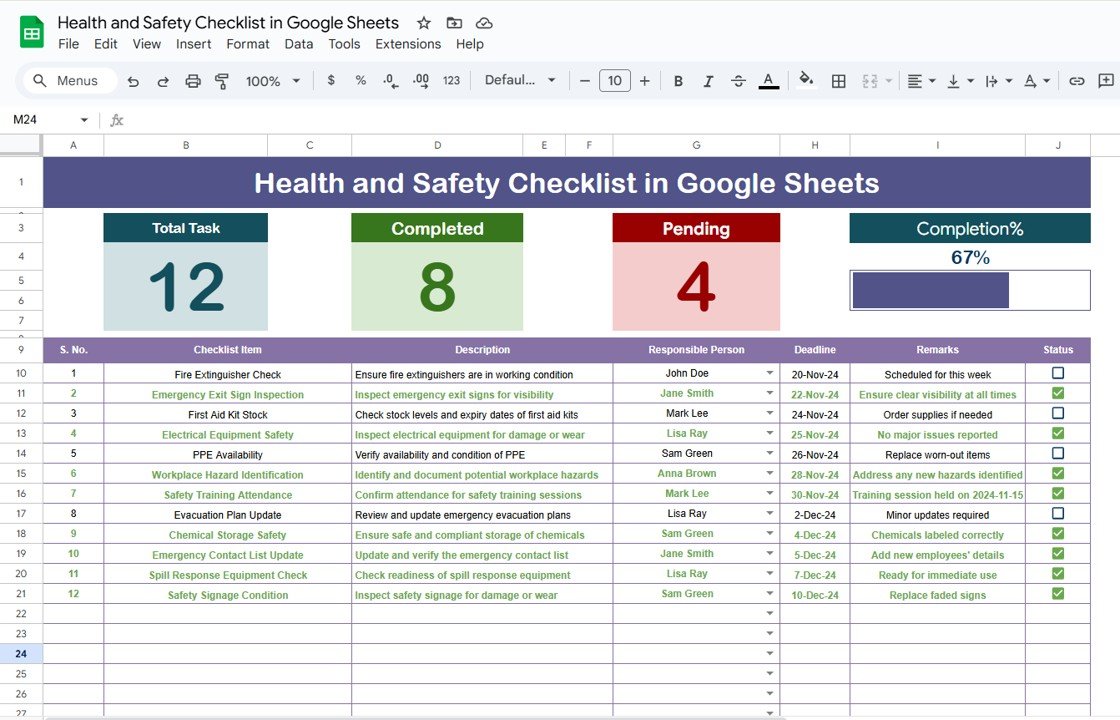
Similar in purpose to the workplace version, this one puts more weight on charts and trend spotting. Conditional formatting shows pending and completed items at a glance.
Who it is for: organizations that want to monitor safety standards and see compliance trends without extra tools.
- Customizable categories such as emergency procedures, equipment maintenance and risk assessments
- Conditional formatting to show completed and pending items
- Bar, pie and line charts for compliance trends
- Multi-user real-time editing and cloud access
- Built-in formulas for automated calculations
Use cases: chart completion by category each month; let each supervisor update their own section; see pending items in red or green without sorting; adapt categories when a new process starts.
Price: $3.49. Get the Health and Safety Checklist in Google Sheets.
Best for: a visual, collaborative checklist with built-in charts.
8. Health and Safety To-Do List Checklist in Excel

This is the simplest tool here: two worksheets, a task table and a list of owners. It overlaps with the Planner in item 4, so the choice comes down to how you like to read status.
Who it is for: small teams that need a tracked to-do list for safety obligations and nothing more.
- Summary of total, completed and incomplete tasks with a progress bar
- Fields for item, description, responsible person, deadline, remarks and status
- Conditional formatting: complete items turn green, incomplete turn red
- Separate List sheet that feeds the owner dropdown
- 2 Excel worksheets, editable with custom columns or KPIs
Use cases: track a monthly safety to-do list; spot red items before a toolbox talk; add a custom column for a site code; stop misspelled owner names with the dropdown.
Price: $3.49. Get the Health and Safety To-Do List Checklist in Excel.
Best for: a minimal, colour-coded safety task list.
Which safety inspection checklist should you choose?
| If you need… | Choose | Price |
|---|---|---|
| One secure inspection log with a dashboard | Office Safety Inspection Tracker in Excel | $6.99 |
| Several inspectors editing live | Office Safety Inspection Tracker in Google Sheets | $6.99 |
| Incident and compliance trends | Safety and Compliance Dashboard in Power BI | $17.99 |
| Fire equipment records | Fire Safety Equipment Checklist in Excel | $3.49 |
| Assigned tasks with deadlines | Health and Safety Planner Checklist in Excel | $3.49 |
| Corrective action log in the cloud | Workplace Safety Checklist in Google Sheets | $3.49 |
A quick rule: if you have a single site and one safety lead, start with Excel. If more than three people need to edit at once, go to Google Sheets. If leadership asks for trends by department, add the Power BI dashboard on top. For inspections in a factory setting, see our quality inspection checklist templates as well.
When a spreadsheet is NOT the right answer
Templates have limits, and it is better to know them before you buy. Buy dedicated EHS software such as SafetyCulture or Intelex if any of these apply:
- Inspectors need offline mobile forms with photo capture and GPS stamps on every finding.
- You run hundreds of sites and need automatic escalation and email alerts when an item fails.
- A regulator or client requires a certified electronic audit trail that a spreadsheet cannot give you.
- More people than you can manage need different permission levels inside one live system.
The Excel VBA tracker has login roles, but it is still a file on a drive. Also, none of these templates replaces the legal checklist for your industry. Use them to record and manage the inspection, and take the content of what to inspect from your regulator and your own risk assessment. For broader audit paperwork, see our compliance checklist templates.
Frequently asked questions
What should a safety inspection checklist include?
A safety inspection checklist should list the items to check, the area, the inspector, the date, a pass or fail status, a risk level and a corrective action with an owner and due date. Without the last two fields, a checklist records problems but does not close them.
How often should you carry out a workplace safety inspection?
Frequency depends on the hazard, the site and your regulator. Many sites do a weekly walk-round, monthly equipment checks and an annual formal review. Fire equipment usually follows its own schedule. Set the cadence from your risk assessment and record each inspection date in your checklist.
Is an Excel safety inspection checklist good enough for OSHA?
OSHA does not mandate a file format. What matters is that you can show hazards were identified, inspected and corrected. A dated Excel log with owners and corrective actions can support that, but you remain responsible for the content. Check osha.gov for requirements that apply to your industry.
What is the best safety inspection checklist for a small business?
For a small business the Health and Safety Planner Checklist in Excel ($3.49) is the cheapest start, with owners, deadlines and a progress bar. If you want risk scoring and a dashboard, the Office Safety Inspection Tracker in Excel ($6.99) is the next step up.
Should I use Excel or Google Sheets for safety inspections?
Use Excel when one safety lead controls the file and you want VBA forms and login protection. Use Google Sheets when several inspectors or sites edit the same checklist at once. Both formats are available here, with the Office Safety Inspection Tracker at $6.99 in each.
Can I track safety incidents as well as inspections?
Yes, but with a different tool. The Safety and Compliance Dashboard in Power BI ($17.99) tracks open, resolved and pending incidents, average days to resolve, and compliance by department. Use it alongside an inspection checklist so findings and incidents sit in one reporting view.
How do I track fire extinguisher and alarm inspections?
Keep a register with one row per item, its status, last inspection date, next due date and service history. The Fire Safety Equipment Checklist in Excel ($3.49) is built for this and covers extinguishers, alarms and sprinklers with maintenance logs and scheduling reminders.
Do these templates work for more than one location?
Yes. The Office Safety Inspection Tracker in Google Sheets ($6.99) has location-wise tracking and the Excel version slices by department, inspection area, risk level and inspector. For many sites with detailed reporting, the Power BI dashboard ($17.99) scales to multiple locations.
Can I customize the checklist items?
Yes. The Excel planner and to-do list let you add or remove columns, and the Google Sheets checklists let you change categories to match your site. In the VBA tracker, the List sheet feeds the form dropdowns, so you can update the choices there.
Get more safety inspection checklist templates
Start with the Office Safety Inspection Tracker in Excel for $6.99, or the Health and Safety Planner Checklist in Excel at $3.49 if you only need assigned tasks. For incident reporting, the Safety and Compliance Dashboard in Power BI is $17.99. Pick one, replace the sample data and run your next walk-round on it.
Get the Office Safety Inspection Tracker in Excel ($6.99)
You can also see our business checklist templates and watch walkthroughs on the NextGenTemplates YouTube channel.