


The best free safety checklist template depends on your setup: Microsoft Create and Vertex42 give you editable spreadsheet files, OSHA and HSE give you regulator-backed content, and SafetyCulture gives you a mobile inspection app. Free stops working when you need risk scoring and action tracking. Paid upgrades here start at $3.49.
Last updated: November 2026
Key takeaways
- Eight free sources are listed below, from Microsoft Create and Vertex42 to OSHA, HSE and CCOHS, so you can start a free safety checklist template today without paying.
- A free checklist records that you looked. It does not score risk, chase overdue actions or show compliance by location.
- The Health and Safety Checklist Template in Excel costs $3.49 and adds a progress bar, dropdown owners and deadlines to a plain list.
- The Office Safety Inspection Tracker in Excel costs $6.99 and has a VBA entry form, a login, 4 slicers and 5 charts.
- No template makes you compliant. Your regulator’s standards decide what goes on the list, and the template only keeps the record.
 Launch offer
SUMIFS, XLOOKUP, FILTER, LAMBDA and checking AI-written formulas, with real business projects. 11h 47m of video by PK, with practice files, quizzes and a capstone.
Free safety checklist templates compared
The first table covers the eight free sources. The second covers the eight paid NGT templates that sit above them when free stops being enough.
For a wider set of inspection tools built for EHS teams, see our guide to safety inspection checklist templates in Excel, Sheets and Power BI.
| Free source | Format | Best for | Price |
|---|---|---|---|
| Microsoft Create (best overall free) | Excel, Word | Editable office and workplace checklists | Free |
| Vertex42 | Excel, Google Sheets | Simple spreadsheet checklists | Free |
| OSHA | Web guidance, PDF | Deciding what belongs on the list (US) | Free |
| SafetyCulture public library | Mobile app, PDF | Inspections done on a phone | Free tier |
| Smartsheet free templates | Excel, Sheets | Teams already using project grids | Free |
| Google Sheets template gallery | Google Sheets | Shared editing with no install | Free |
| HSE (UK) | PDF, Word | Risk assessment structure (UK) | Free |
| CCOHS | PDF, web | Canadian workplace checklists | Free |
| Paid NGT template | Format | Best for | Price |
|---|---|---|---|
| Office Safety Inspection Tracker in Excel (Best overall) | Excel (VBA) | Multi-user inspection logging with dashboard | $6.99 |
| Office Safety Inspection Tracker in Google Sheets | Google Sheets | Cloud teams tracking risk by location | $6.99 |
| Health and Safety Checklist Template in Excel (Best value) | Excel, Google Sheets compatible | A first structured safety checklist | $3.49 |
| Workplace Safety Checklist Template in Excel | Excel | Inspection scheduling with a compliance dashboard | $3.49 |
| Internal Audit Checklist in Excel | Excel | Audit tasks with owners and deadlines | $3.49 |
| Inventory Audit Checklist in Excel | Excel | Stock counts and storage condition checks | $3.49 |
| Inventory Audit Checklist in Google Sheets | Google Sheets | Shared stock audits across devices | $3.49 |
| Workplace Safety KPI Dashboard in Power BI | Power BI | Leadership reporting on safety KPIs | $11.99 |
How we picked these
For the free list we looked for sources a safety lead can open today without an account wall, and we favoured regulators and established template publishers over anonymous download sites. We did not list any NGT free download, because none was verified for this post.
For the paid list we searched the NGT catalog for safety, inspection and audit templates and kept eight that match the topic, covering Excel, Google Sheets and Power BI. We left out anything only loosely related to workplace safety. Free sources change their libraries often, so check each site for what it currently offers.
What are the best free safety checklist templates in 2026?
The list is ranked by how quickly an office or small site can go from download to a finished inspection. Number 1 wins because it gives you an editable file, needs no sign-up for the basics and works in the software most teams already own.
1. Microsoft Create: best overall free
Microsoft Create is the template library from Microsoft, and it carries editable checklist and inspection layouts for Excel and Word. You open the file, rename the rows and print it or fill it on screen.
Who it is for: small offices and shops that already use Microsoft 365 and want a checklist this afternoon.
Where it falls short: a file is a blank form. There is no history of past inspections, no roll-up across locations and no reminder when an action is overdue.
Best for: a single-site team running a first monthly walk-through. Source: Microsoft Create.
2. Vertex42: best free spreadsheet layouts
Vertex42 is a long-running publisher of spreadsheet templates, and its checklist designs are built around Excel formulas and printable pages. If you want to see how a checklist can calculate its own completion percentage, the files are good to study.
Who it is for: anyone who plans to adapt the file and wants clean layout and formulas to start from.
Best for: people who will customise the sheet themselves. Source: Vertex42.
3. OSHA: best for deciding what goes on the list
The US Occupational Safety and Health Administration publishes free guidance, including hazard identification material and small business resources. It is the right place to find out what a US employer is expected to check.
Use it as the content source, then copy the items into a spreadsheet you control. A checklist that mirrors the standards you are actually audited against is worth more than a prettier one that does not.
Best for: US employers building the item list. Source: OSHA. Our guide to OSHA compliance Excel safety and incident templates covers the record-keeping side.
4. SafetyCulture public library: best for phone-based inspections
SafetyCulture (the company behind iAuditor) runs a public library of inspection templates that you can use in its mobile app. Inspectors tick items on a phone and attach photos on site.
Who it is for: teams that walk around a building and do not want to carry paper or a laptop.
Where it falls short: the free tier has limits, and heavier use moves to paid plans. Check the current terms on SafetyCulture before you build a process on it.
Best for: mobile-first inspections with photos.
5. Smartsheet free templates: best for grid-based teams
Smartsheet publishes free checklist and inspection templates in spreadsheet-style formats. Teams that already assign work in a shared grid can drop a safety checklist into the same habit.
Best for: teams that already manage tasks in Smartsheet or similar tools. Source: Smartsheet.
6. Google Sheets template gallery: best for shared editing at no cost
Google Sheets has its own template gallery, and a plain checklist there takes seconds to share with a whole team. Several people can tick items at once, and version history shows who changed what.
The trade-off is that the starter layouts are general. You will add columns for location, inspector, risk level and due date yourself.
Best for: small teams who want zero setup and live editing.
7. HSE (UK): best free structure for risk assessment
The UK Health and Safety Executive publishes free risk assessment guidance and templates. Its five-step approach (identify hazards, decide who might be harmed, evaluate controls, record findings, review) is a sound frame for any workplace, not only UK ones.
Best for: UK employers, and anyone who wants a clear risk assessment method. Source: HSE.
8. CCOHS: best free reference for Canadian workplaces
The Canadian Centre for Occupational Health and Safety publishes free fact sheets and checklists on common workplace hazards. They are written for plain-language use rather than for software.
Best for: Canadian employers who need hazard-specific checklist content. Source: CCOHS.
Get new checklist templates by email
Join the NextGenTemplates email list to hear when new safety, audit and checklist templates are published.
When does a free safety checklist stop working?
A free checklist handles one person, one site and one inspection. It starts to creak in four situations.
- You inspect more than one location and want to see which one has the most failed items.
- Findings need an owner and a target date, and someone has to chase them.
- An auditor asks for twelve months of inspections and you have twelve separate files.
- Leadership wants one number: compliance rate, average risk score or incidents against target.
Here is a quick worked example. An office team runs 40 inspections in a quarter and 34 pass. The compliance rate is 34 / 40 = 85%. If the 6 failures sit in two buildings, you want to know that without opening 40 files. That roll-up is what the paid templates below do.
The eight NGT templates below are paid upgrades, not free downloads. Prices are one per template in USD as listed on each product page.
The 8 paid safety checklist and tracker upgrades from NextGenTemplates
These are ordered by how much of the inspection workflow each one covers, from full tracker to single-purpose checklist.
1. Office Safety Inspection Tracker in Excel: best overall upgrade
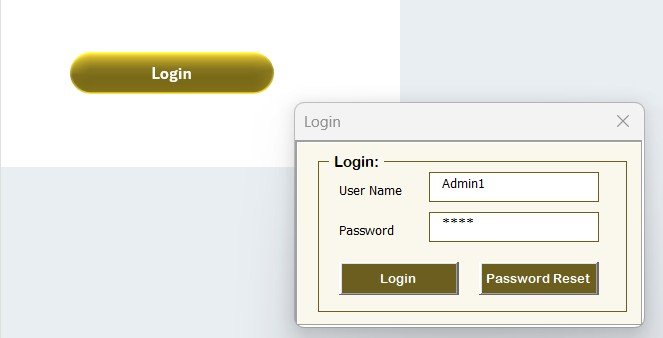
This is a VBA-powered workbook with 8 integrated worksheets: login, home, dashboard, data, list, support, settings and user management. An Add, Update and Delete form handles records, and the dashboard has 4 slicers and 5 charts that refresh as you submit.
Who it is for: safety officers and facility teams where several inspectors share one workbook.
- Login with usernames, passwords and roles
- Slicers for department, inspection area, risk level and inspector
- Dropdown-driven entry fed by a list sheet
- Setup in under 10 minutes by replacing the sample data
Use cases: filter by risk level before a monthly review, filter by inspector to check workload, or pull one department’s records for an audit.
Price: $6.99. Get the Office Safety Inspection Tracker in Excel.
Best for: multi-user inspection logging with audit-ready filters.
2. Office Safety Inspection Tracker in Google Sheets

The same job in the cloud. The dashboard has KPI cards for total inspections, compliant, non-compliant, pending actions and average risk score, plus location-wise tracking and a category breakdown covering fire, electrical, workspace and equipment.
Who it is for: safety officers, facility managers and admin teams managing one or many offices.
- Pending action tracking with responsibility and target dates
- A Search tab to find any record
- Dashboard that refreshes when data changes
- Cloud collaboration with no install
Use cases: spot the highest-risk office location, compare average risk across categories, and list every pending action by owner before a review meeting.
Price: $6.99. Get the Office Safety Inspection Tracker in Google Sheets.
Best for: Google Workspace teams that need location-wise risk visibility.
3. Health and Safety Checklist Template in Excel: best value

A structured checklist covering fire safety, PPE and emergency planning. It calculates a completion percentage, has total, completed and pending counts, and a progress bar. Responsible persons come from a dropdown, and the product page lists compatibility with Excel and Google Sheets.
Who it is for: a business moving from a Word list to something that tracks itself.
Use cases: assign each safety item to a named person, set a deadline, and read the completion percentage at a glance. If 18 of 24 items are done, the sheet shows 75%.
Price: $3.49. Get the Health and Safety Checklist Template in Excel.
Best for: the cheapest step up from a free file.
4. Workplace Safety Checklist Template in Excel
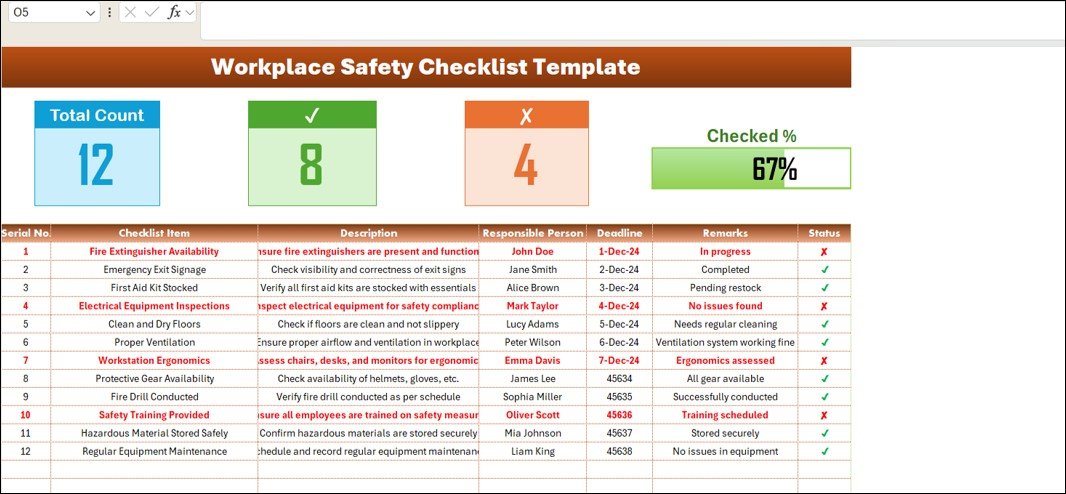
This one leans toward scheduling. You set deadlines, see complete, pending and overdue tasks, and view a compliance dashboard that shows safety performance trends.
Who it is for: safety officers, HR managers and owners who want inspections tied to dates.
Use cases: schedule recurring checks from fire safety to equipment, then use the dashboard to see which areas keep slipping.
Price: $3.49. Get the Workplace Safety Checklist Template in Excel.
Best for: inspection scheduling with a simple compliance view.
5. Internal Audit Checklist in Excel
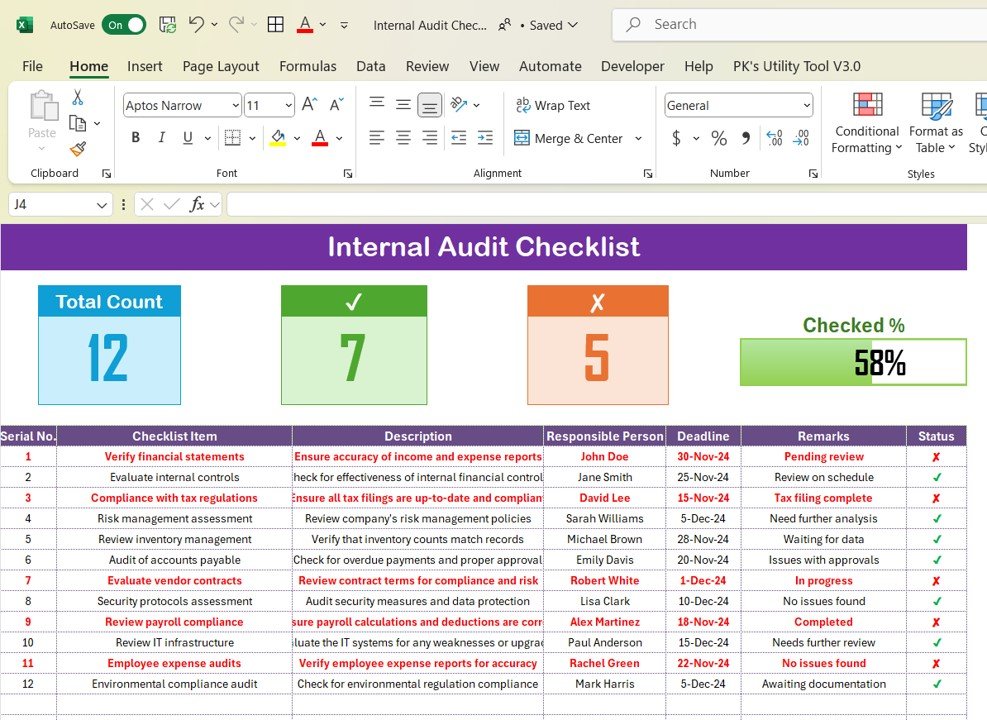
Built for audit tasks across financial, operational and compliance areas. Two sheets: the checklist with total, checked and crossed counts and a progress bar, and a list sheet that feeds the responsible-person dropdown.
Who it is for: auditors, compliance officers and managers who check that safety controls are actually in place.
Use cases: run a quarterly internal audit of your safety program, assign each step, and track deadline compliance.
Price: $3.49. Get the Internal Audit Checklist in Excel.
Best for: auditing the safety process, not only the building.
6. Inventory Audit Checklist in Excel
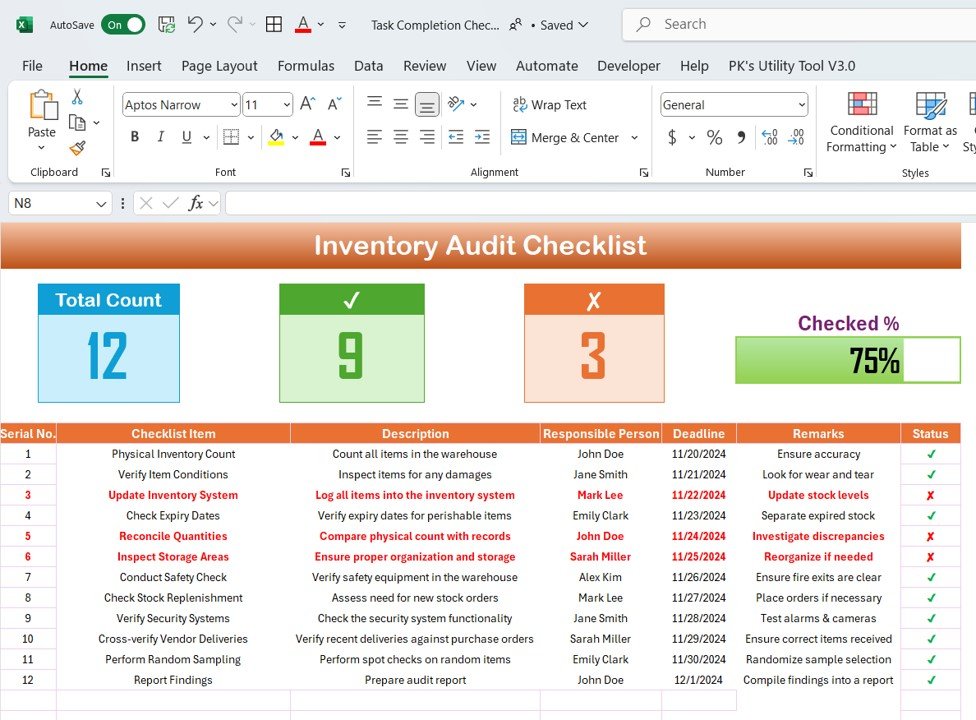
This is the right pick when your safety checks are about stock: verifying physical counts against records, flagging missing or excess items and checking that items are stored properly. Columns include checklist item, description, responsible person, deadline, remarks and status.
Who it is for: warehouse managers and inventory specialists.
Use cases: confirm storage conditions during a warehouse walk, log discrepancies, and show completed versus pending tasks.
Price: $3.49. Get the Inventory Audit Checklist in Excel.
Best for: warehouse audits that combine counts and storage checks.
7. Inventory Audit Checklist in Google Sheets
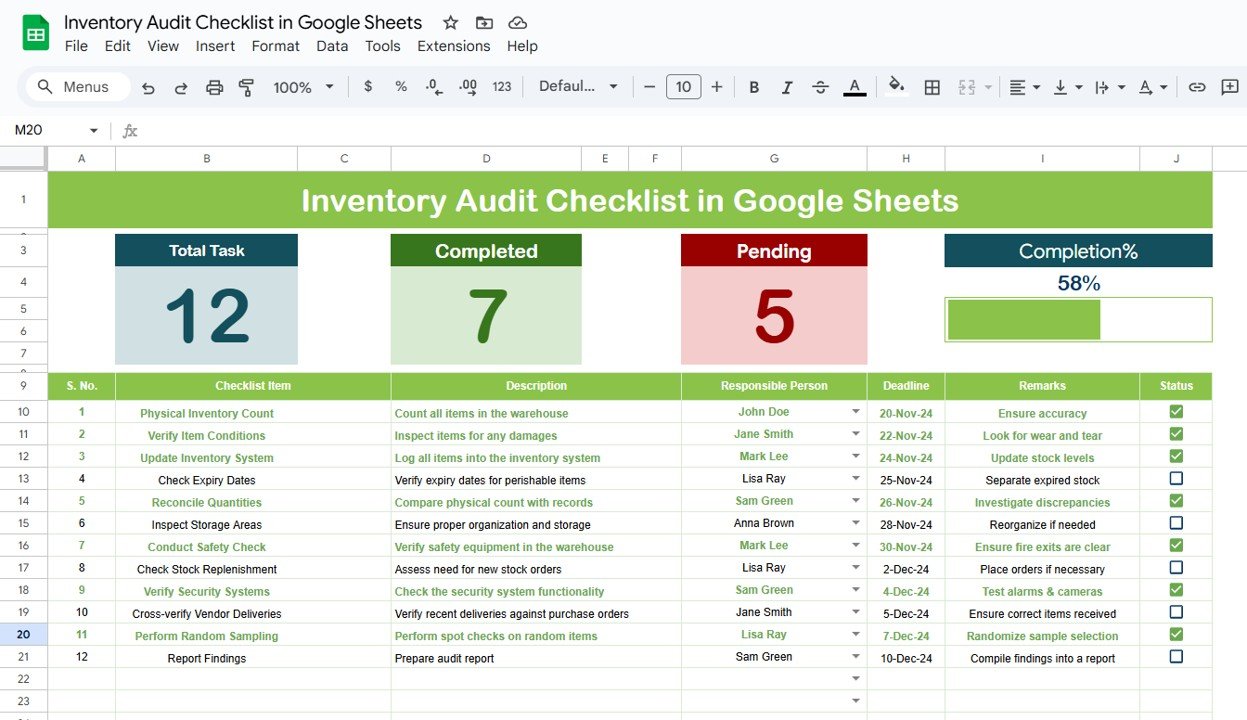
The Google Sheets version adds real-time collaboration, version history for an audit trail, scheduled reminders and automated stock variance and reorder level calculations. Fields for item details, SKUs, quantities and locations are customizable.
Who it is for: business owners and auditors who share a count across devices.
Use cases: several people counting different aisles in the same sheet, then reviewing variance together.
Price: $3.49. Get the Inventory Audit Checklist in Google Sheets.
Best for: shared stock audits with a change history.
8. Workplace Safety KPI Dashboard in Power BI

When inspection data needs to reach leadership, this report shows MTD and YTD performance, target status arrows (met or missed), a detailed KPI table with actuals, targets and previous year, and drill-through KPI definitions for audits. Data entry is through Excel.
Who it is for: safety leads reporting to management on compliance and trends.
Use cases: compare this year against last year, filter by month and KPI group, and open a KPI’s definition when an auditor asks how it is calculated. Our guide to safety KPIs such as TRIR and LTIFR explains which numbers to feed it.
Price: $11.99. Get the Workplace Safety KPI Dashboard in Power BI.
Best for: turning checklist results into leadership reporting.
How do I choose between a free and a paid safety checklist?
| Your situation | Choose |
|---|---|
| One site, one inspector, monthly walk-through | Free: Microsoft Create or Vertex42 |
| Need to know what the regulator expects | Free: OSHA, HSE or CCOHS |
| Inspections done on a phone with photos | Free tier of SafetyCulture, or upgrade the app plan |
| Want progress counts, owners and deadlines for $3.49 | Health and Safety Checklist Template in Excel |
| Several inspectors and slicers by department | Office Safety Inspection Tracker in Excel |
| Team works in Google Workspace, many locations | Office Safety Inspection Tracker in Google Sheets |
| Management wants MTD and YTD safety KPIs | Workplace Safety KPI Dashboard in Power BI |
If you are unsure, start free. When you catch yourself retyping findings into a second file to chase actions, that is the moment to upgrade. If you are building onboarding processes alongside this, the free employee onboarding checklist templates post follows the same free-then-upgrade logic.
When is a template NOT the right answer?
Be honest about the limits. A template is the wrong tool in these cases.
- Regulated high-hazard sites. Construction, chemicals and heavy industry often need controlled documents, sign-offs and incident workflows. Dedicated EHS software is built for that.
- Offline field inspections with photo evidence. A spreadsheet is awkward on a phone in a plant room. A mobile inspection app is better.
- Hundreds of inspectors. Spreadsheets have no real permission model beyond what the template adds, and file sharing gets messy at scale.
- Legal certainty. No checklist, free or paid, confirms you meet a standard. Your regulator and, where needed, a qualified safety adviser decide that.
For a small or mid-sized team, a one-time spreadsheet is usually enough. Past that, software is worth its subscription.
Frequently asked questions
What is the best free safety checklist template?
The best free safety checklist template is the one your team will actually fill in. For most small offices that is an editable Excel file from Microsoft Create or Vertex42. For regulator-backed content, start from OSHA or HSE guidance and copy the items into a spreadsheet you control.
Are free safety inspection checklists OSHA compliant?
No template makes you compliant by itself. OSHA sets the standards, and a checklist only records that you checked them. Use OSHA’s published guidance to decide which items belong on your list, then document findings, dates and corrective actions. Check your state plan, since some states add requirements.
Can I make a safety checklist in Excel for free?
Yes. Create columns for item, location, responsible person, due date, status and remarks, add a dropdown for status and a COUNTIF formula for completion percentage. That takes under an hour. It works for one site, but multiple inspectors and inspection history are where a purpose-built template saves time.
How often should safety inspections be done?
Frequency depends on the hazard and your regulator. Many offices run a monthly walk-through and check fire equipment and exits on the schedule local fire rules set. High-risk sites inspect daily or per shift. Set the schedule from your risk assessment, then record it in the checklist.
What should a workplace safety checklist include?
At minimum: fire safety and exits, electrical panels and cords, first aid supplies, PPE, housekeeping and slip hazards, equipment condition and emergency plans. Each item needs a responsible person, a due date, a status and a remarks field so findings turn into tracked actions.
Is there a free safety checklist template for Google Sheets?
Yes. The Google Sheets template gallery and Vertex42 both offer spreadsheet checklists you can use in Sheets. For a paid step up, the Office Safety Inspection Tracker in Google Sheets costs $6.99 and adds KPI cards, location-wise tracking and pending action tracking.
How much do paid safety checklist templates cost?
The NextGenTemplates safety checklists in this post cost $3.49 each. The Office Safety Inspection Trackers in Excel and Google Sheets cost $6.99 each. The Workplace Safety KPI Dashboard in Power BI costs $11.99. Prices are in USD as listed on each product page.
What is the difference between a safety checklist and an inspection tracker?
A checklist lists items to verify and marks them done. An inspection tracker stores every inspection as a record, then reports compliance, risk score and pending actions by location or category. Use a checklist for the walk-through and a tracker when you need history and reporting.
How do I calculate TRIR from my safety data?
TRIR is total recordable incidents multiplied by 200,000, divided by total hours worked by all employees. The 200,000 figure represents 100 full-time employees working a year. For example, 3 recordable incidents over 400,000 hours gives a TRIR of 1.5.
Get more safety checklist templates
If you want one tracker rather than a loose checklist, the Office Safety Inspection Tracker in Excel is $6.99 and the Health and Safety Checklist Template in Excel is $3.49. Watch tutorials and walkthroughs on the NextGenTemplates YouTube channel.