


The best business checklist template in Excel is the Checklist & SOP Pack ($12.99), which bundles 12 checklists for onboarding, audits, maintenance, events and safety, in Excel and Google Sheets. If you need one specific job covered, nine single-purpose checklists cost $3.49 each, from legal and GDPR compliance to inventory audits.
Last updated: November 2026
A missed filing date, an unsigned safety sign-off or an audit item nobody owned rarely feels expensive on the day it slips. It becomes expensive later: a penalty notice, a failed audit, a customer who leaves, or a week spent reconstructing what was done and by whom. A checklist cannot prevent every mistake, but it makes the missing step visible while there is still time to fix it. Below are 10 ready-made checklists we sell, ranked, with prices and honest limits.
Key takeaways
- The Checklist & SOP Pack costs $12.99 for 12 templates, against $23.88 if bought one by one, a saving of $10.89 (46%).
- Nine single-purpose checklists cost $3.49 each, and every one has a progress bar, dropdown owners and a status column.
- Only the Checklist & SOP Pack, the Legal Compliance Checklist in Google Sheets and the GDPR Compliance Checklist in Google Sheets cover Google Sheets; the other seven are Excel files.
- A checklist records that work was done. It does not replace legal advice, certified audit software or a regulator-approved process.
- Buy the bundle if you run more than two types of recurring checks, and a single $3.49 checklist if you have one clear job.
 Launch offer
SUMIFS, XLOOKUP, FILTER, LAMBDA and checking AI-written formulas, with real business projects. 11h 47m of video by PK, with practice files, quizzes and a capstone.
Business checklist templates compared
| Template | Format | Best For | Price |
|---|---|---|---|
| Checklist & SOP Pack (12 templates) | Excel + Google Sheets | Teams running onboarding, audits, maintenance and safety (Best overall / Best value) | $12.99 |
| Internal Audit Compliance Checklist | Excel | Finance, HR, IT and compliance audit prep | $3.49 |
| Legal Compliance Checklist Template | Excel | Tax filings, contract renewals, legal tasks | $3.49 |
| Legal Compliance Audit Checklist | Excel | Compliant / non-compliant audit logging | $3.49 |
| Financial Compliance Checklist | Excel | Finance teams with regulatory deadlines | $3.49 |
| Legal Compliance Checklist in Google Sheets | Google Sheets | Remote teams sharing one compliance list | $3.49 |
| GDPR Compliance Checklist in Google Sheets | Google Sheets | Businesses handling EU personal data | $3.49 |
| Environmental Compliance Checklist | Excel | Waste, pollution and energy obligations | $3.49 |
| Inventory Audit Documentation Checklist | Excel | Stock audit paperwork | $3.49 |
| Manufacturing Planning Checklist | Excel | Production planning steps | $3.49 |
How we picked these checklist templates
We searched the NextGenTemplates catalog, which has roughly 685 checklists, for paid products that suit a general business rather than one narrow trade. We kept templates with an owner column, a deadline column and a visible completion count, because a checklist without owners is only a to-do list. We included every format available for the same job, which is why two Google Sheets versions appear.
We left out free files, calendars and dashboards that only look like checklists. We also excluded anything whose product page did not make clear what the sheet contains. Descriptions on this page come from the product listings, not from guesses about extra features.
What are the best business checklist templates in Excel for 2026?
1. Checklist & SOP Pack: best overall and best value
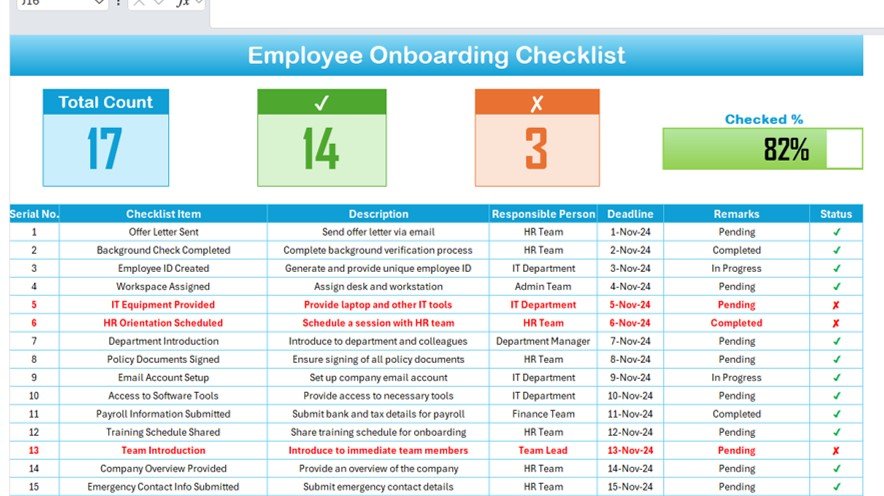
This is the one to start with. The Checklist & SOP Pack holds 12 checklists and standard operating procedures covering onboarding, audits, maintenance, events and safety. It ranks first because it is the only listing here that handles several recurring jobs for $12.99, which works out at about $1.08 per template, and because it comes in both Excel and Google Sheets.
Who it is for: operations managers, HR leads and QA staff who run more than one kind of recurring check.
- Progress bars with total, checked and crossed counts at the top of each sheet
- Dropdown assignment from a linked List sheet
- Tick/cross status and deadline columns
- Editable items, columns and roles
Use cases: a new-hire onboarding list for each starter; a quarterly internal audit; a monthly facility maintenance round; an event setup list. Bought separately, the 12 would cost $23.88, so the bundle saves $10.89 (46%).
Price: $12.99. Get the Checklist & SOP Pack.
Best for: any team that wants a full set of reusable checklists for the price of three single templates.
2. Internal Audit Compliance Checklist in Excel
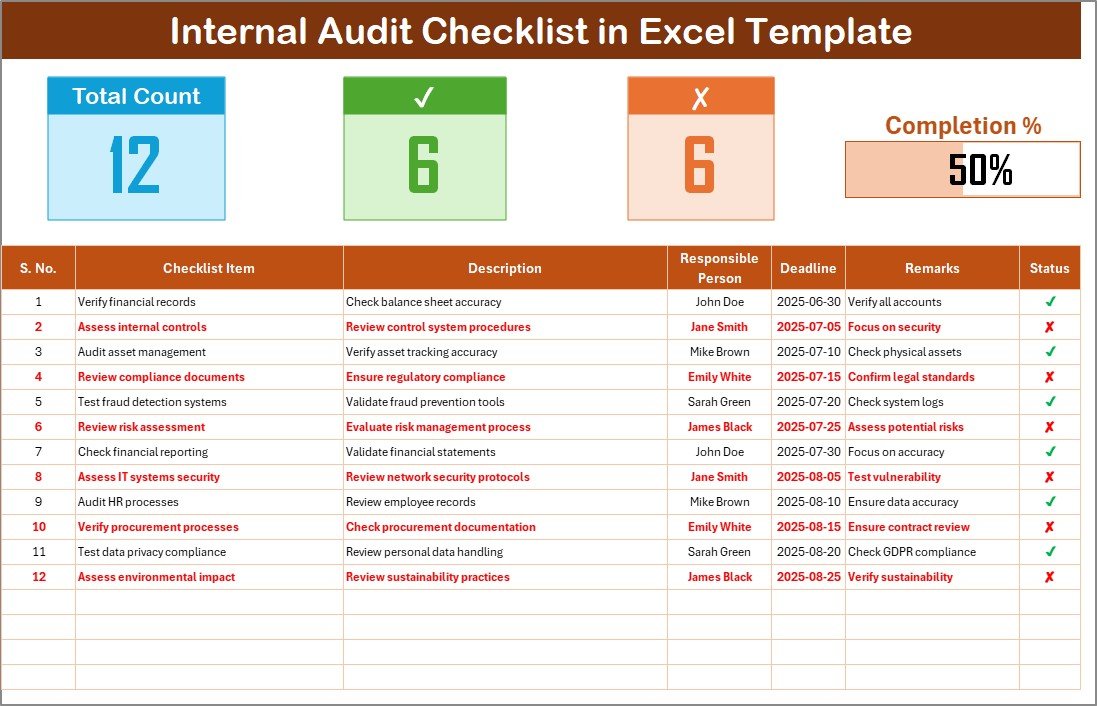
The Internal Audit Compliance Checklist in Excel is a dashboard plus a task table. The dashboard shows total items, completed items and incomplete items with a progress bar. The table has serial number, checklist item, description, responsible person, deadline, remarks and status.
Who it is for: compliance officers, department heads and small business owners who run audits without dedicated audit software.
- Preloaded dropdown of responsible persons on a List sheet
- One-click complete or incomplete marking
- Password protection for sharing with a team
- Works offline
Use cases: a finance close review, an HR file audit, an IT access review. As an example, a 40-item audit with 28 items ticked shows 70% on the bar, and the 12 crossed items are your follow-up list.
Price: $3.49. See the internal audit checklist.
Best for: anyone preparing for an audit who needs owners and deadlines on every line.
3. Legal Compliance Checklist Template in Excel

The Legal Compliance Checklist Template in Excel has two worksheets: the checklist tab and a List tab that feeds the owner dropdown. Three summary cards (Total, Checked, Crossed) and a progress bar sit above the table.
Who it is for: entrepreneurs, HR professionals and compliance officers who track tax filings, contract renewals and audits in one place.
- Auto-numbered tasks
- Description, owner, deadline and remarks columns
- Tick and cross status that updates the counts
- Items you can add, edit or remove
Use cases: a list of annual filings with a named owner each; contract renewal dates for suppliers; a standing list of licences to renew. The deadline column is what stops a renewal sitting unnoticed.
Price: $3.49. Download the legal compliance checklist.
Best for: a general-purpose legal task list for a small business.
4. Legal Compliance Audit Checklist in Excel
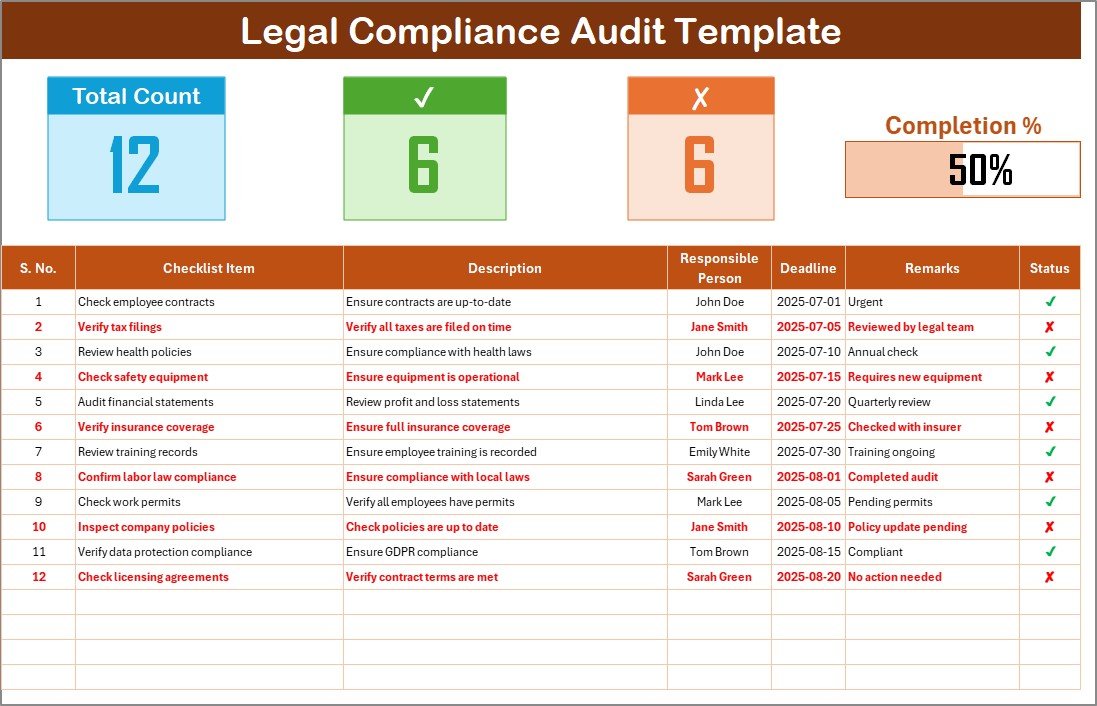
This one is built around the audit result rather than the task. In the Legal Compliance Audit Checklist in Excel, each line is marked compliant (tick) or non-compliant (cross), and the top section counts both.
Who it is for: businesses in any industry that need to show an audit trail of what was checked and what failed.
- Serial number, checklist item, detailed description
- Responsible person dropdown, deadline and remarks
- Total, checked and crossed counts
- Progress bar that updates as you mark items
Use cases: an annual self-audit; a pre-inspection walk-through; a supplier compliance review. Choose this over the template in section 3 when you want a pass/fail record, and the section 3 version when you are tracking work still to be done.
Price: $3.49. Get the legal compliance audit checklist.
Best for: recording compliant and non-compliant findings for a file you can hand to a reviewer.
5. Financial Compliance Checklist in Excel
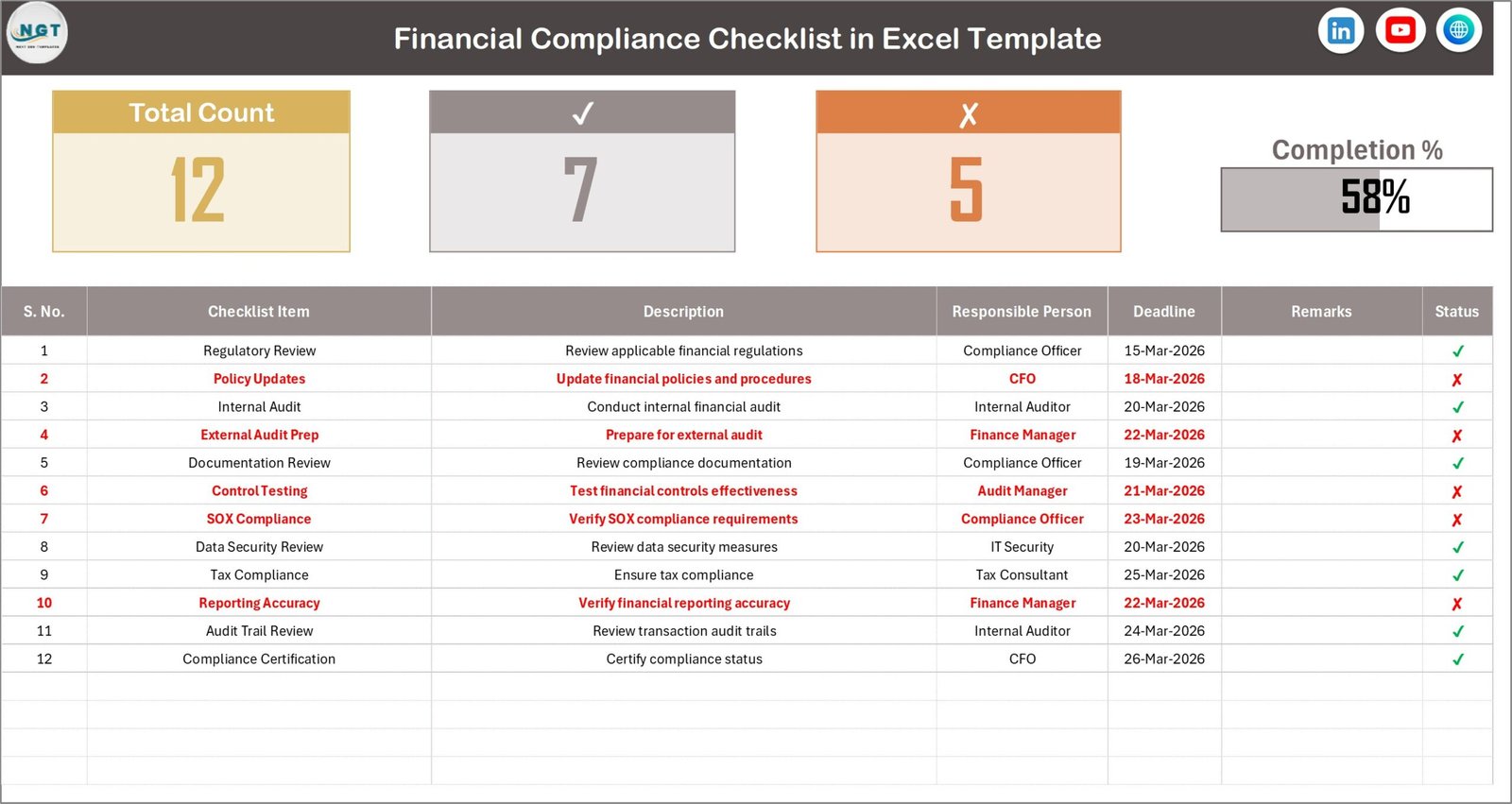
The Financial Compliance Checklist in Excel centralises regulatory, tax, audit and internal policy tasks that otherwise sit in emails and scattered files. It shows total, completed and pending tasks, and overall completion.
Who it is for: finance teams and owners who handle their own reporting and tax paperwork.
- Deadline tracking for each compliance activity
- Responsible person assignment
- Completed or pending status indicators
- Automated progress dashboard
Use cases: a month-end close list; tax calendar items with owners; documentation needed before an external review. If you also keep books in Excel, pair it with a small business bookkeeping template in Excel and Google Sheets.
Price: $3.49. Get the financial compliance checklist.
Best for: finance staff who keep missing dates because tasks live in too many places.
6. Legal Compliance Checklist in Google Sheets
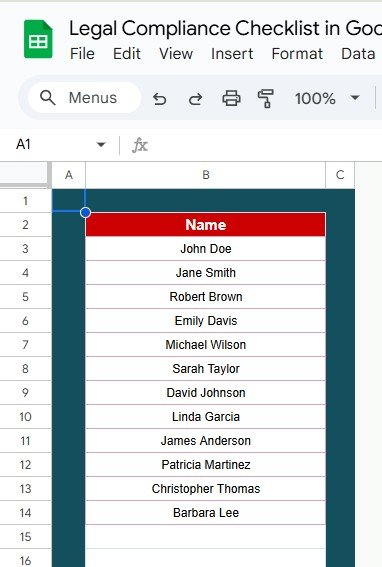
The Legal Compliance Checklist in Google Sheets is the cloud option for the same job as section 3. Several people can edit at once from any device, and tasks can be grouped by category such as data privacy, health and safety, environmental rules and employment law.
Who it is for: remote or split-site teams where one person cannot own the file.
- Customizable compliance categories
- Adjustable priority levels, so high-risk items are handled first
- Checkboxes and conditional formatting for completion status
- Email or notification reminders for upcoming and overdue items
Use cases: a shared list where HR updates employment items while operations updates safety ones; a priority view for the week before an inspection.
Price: $3.49. Open the Google Sheets legal checklist.
Best for: teams that live in Google Workspace and want live co-editing.
7. GDPR Compliance Checklist in Google Sheets

The GDPR Compliance Checklist in Google Sheets covers items such as consent management, data processing, data subject rights and data protection impact assessments. It adds charts and formulas so you can see where compliance work is lagging.
Who it is for: online sellers, agencies and service firms that hold personal data of people in the EU.
- Customizable data protection categories
- Conditional formatting for completed and pending tasks
- Charts and graphs of compliance trends
- Multi-user, real-time editing
Use cases: a first pass through your data handling; a standing review each quarter; a record that shows who owns each requirement. The regulation itself is published on EUR-Lex, and its penalties can reach EUR 20 million or 4% of worldwide annual turnover, whichever is higher.
Price: $3.49. Get the GDPR checklist.
Best for: keeping a working record of GDPR tasks, not interpreting the law.
8. Environmental Compliance Checklist in Excel

The Environmental Compliance Checklist in Excel comes pre-built for waste management, pollution control, energy conservation and related duties. Like the others, it has a checklist tab, a List tab for owners, and summary cards with a progress bar.
Who it is for: safety managers, compliance officers and business owners with site-based obligations.
- Pre-built environmental task list
- Dropdown assignment from a responsible person list
- Real-time progress bar and status indicators
- Plain Excel, no extra software
Use cases: a monthly waste-handling review; an energy-saving action list with owners; evidence of regular checks before a site visit. For physical inspection rounds, see our guide to free safety inspection checklist templates.
Price: $3.49. Get the environmental compliance checklist.
Best for: sites with recurring environmental duties that need named owners.
9. Inventory Audit Documentation Checklist in Excel
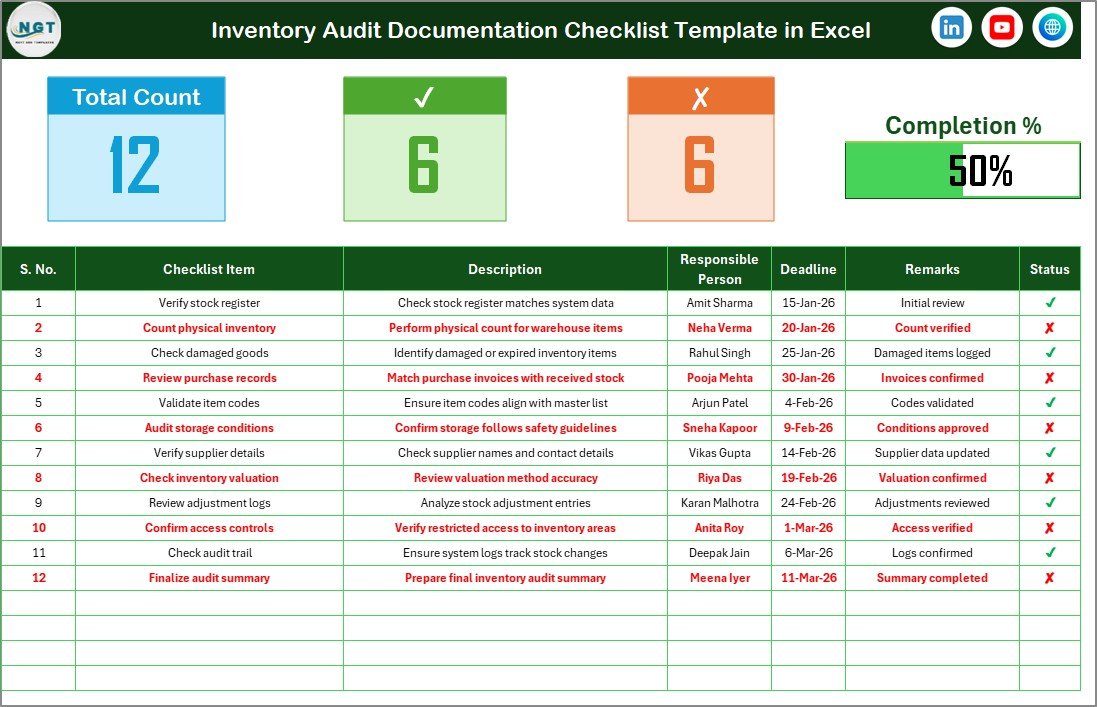
The Inventory Audit Documentation Checklist in Excel targets the paperwork around a stock audit: what has been gathered, who is chasing what, and what is still open. It has two sheets, an automatic progress dashboard and tick/cross status.
Who it is for: warehouse, retail and finance staff preparing for internal audits, external audits or compliance reviews.
- Centralised documentation tracking
- Responsible person dropdowns
- Deadline tracking for each audit task
- Visual progress bar for audit readiness
Use cases: listing the count sheets, supplier statements and adjustment approvals needed before an audit date; showing a manager the readiness percentage without a meeting.
Price: $3.49. Get the inventory audit checklist.
Best for: gathering documents for a stock audit, not counting the stock itself.
10. Manufacturing Planning Checklist in Excel
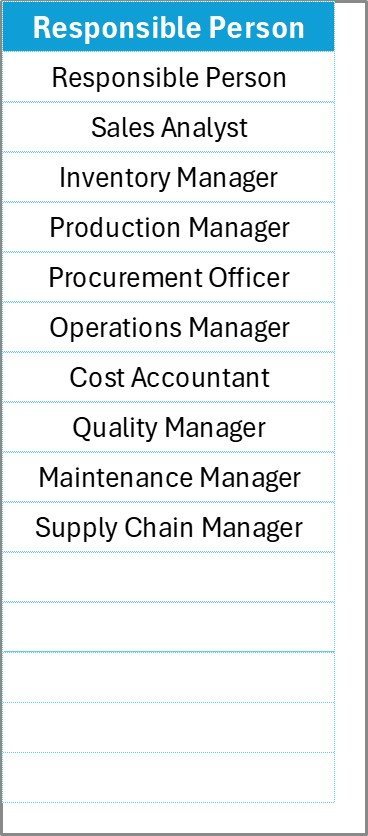
The Manufacturing Planning Checklist in Excel opens with a KPI tracking planner showing total, checked and crossed tasks and a progress bar. The table beneath has serial number, item, description, owner, deadline, remarks and status.
Who it is for: production planners and small manufacturers who plan jobs from a checklist rather than from memory.
- Live progress bar for planning completion
- Pre-filled responsible person dropdown
- Simple tick/cross status updates
- Separate tabs for checklist and personnel
Use cases: a pre-run list for a new job; a changeover checklist with an owner per step; a weekly planning review where the crossed count shows what is blocking production.
Price: $3.49. Get the manufacturing planning checklist.
Best for: small production teams that need a planning list with accountability.
Which checklist template should you choose?
| Your situation | Pick | Price |
|---|---|---|
| Several recurring checks across HR, operations and safety | Checklist & SOP Pack | $12.99 |
| One audit coming up, finance or IT | Internal Audit Compliance Checklist | $3.49 |
| Need a pass/fail record | Legal Compliance Audit Checklist | $3.49 |
| Need a running task list with deadlines | Legal Compliance Checklist Template | $3.49 |
| Team edits together online | Google Sheets legal or GDPR checklist | $3.49 |
| Tax and reporting dates | Financial Compliance Checklist | $3.49 |
| Site obligations or production | Environmental or Manufacturing checklist | $3.49 |
Bundle versus single maths: the nine single checklists in this list cost $31.41 together. The Checklist & SOP Pack costs $12.99 for 12 different templates. If you need three or more types of check, start with the pack. If you need one very specific topic, such as GDPR, buy that single file.
If you are building out a wider toolkit for a small company, see our small business owner template stack and the small business template bundle. For a view of what to template and what to buy as software, read the 2026 small business software stack.
When is a checklist template not the right answer?
A spreadsheet checklist is a record you maintain by hand. It will not remind a person who never opens the file, and it cannot check that a task was done well, only that someone marked it done.
Buy or build something else in these cases:
- Regulated audits with sign-off rules. If an auditor or regulator demands tamper-proof logs, user-level permissions or time-stamped history, you need dedicated software such as Process Street, SafetyCulture or a full GRC platform.
- Legal advice. A legal or GDPR checklist lists tasks. It does not tell you which laws apply to you or how to interpret them. Ask a qualified adviser.
- Large teams with workflow dependencies. If step B cannot start until step A is approved, project tools like Asana, Smartsheet or ClickUp handle that better than a flat sheet.
- Photo evidence from the field. Mobile inspection apps capture photos, signatures and GPS. Excel checklists do not.
- Nobody owns the process. A template with no accountable person becomes a stale file. Fix ownership first.
For work that outgrows a sheet but still needs dates tracked, a compliance tracking dashboard in Power BI is a middle step.
Frequently asked questions
What is the best business checklist template in Excel?
For most businesses it is the Checklist & SOP Pack at $12.99. It includes 12 checklists covering onboarding, audits, maintenance, events and safety, with progress bars, dropdown assignments and status tracking. If you only need one topic, a single $3.49 checklist such as the internal audit one is cheaper.
Is there a business checklist template for Google Sheets?
Yes. The Checklist & SOP Pack works in both Excel and Google Sheets for $12.99. There are also two single Google Sheets files at $3.49 each: the Legal Compliance Checklist and the GDPR Compliance Checklist. Both support real-time editing by several team members from any device.
How do I make a checklist in Excel with a progress bar?
Count ticked rows with a COUNTIF formula, divide by total rows, then show the result as a data bar or a formatted cell. Our templates do this already: each has total, checked and crossed counts and a progress bar that updates when you change a status.
How much do business checklist templates cost?
The single-purpose checklists in this list cost $3.49 each. The Checklist & SOP Pack costs $12.99 for 12 templates, compared with $23.88 if bought separately, a saving of $10.89 or 46%. All are one-off purchases rather than subscriptions.
Can I customize the checklist items?
Yes. In these templates you can add, edit or remove checklist items, and adjust columns and roles to match your workflow. The responsible person dropdown reads from a separate List sheet, so you update names in one place and the dropdown follows.
What is the difference between a legal compliance checklist and a legal compliance audit checklist?
The legal compliance checklist tracks tasks to complete, such as filings and renewals. The legal compliance audit checklist records audit results, marking each item compliant or non-compliant with counts for both. Use the first to plan work and the second to document a review. Each costs $3.49.
Do these checklists work offline?
The Excel versions work offline, since they are standard workbooks. The Google Sheets versions need an internet connection for live collaboration. The Checklist & SOP Pack includes both formats, so you can use Excel when offline and Google Sheets when you want to share with a team.
Is a spreadsheet checklist enough for a GDPR audit?
A spreadsheet helps you organise and evidence tasks, such as consent management and data subject rights. It does not decide what the law requires of your business. For high-risk processing or a regulator inquiry, get advice from a qualified data protection professional.
Who should own the checklist in a small business?
Name one person responsible for keeping each checklist current, even if many people tick items. Each task also needs its own owner and deadline, which the dropdown and deadline columns provide. Without a named owner, checklists tend to go stale within a few cycles.
Can I use these checklists for SOPs?
The Checklist & SOP Pack is built for this, with 12 checklists and standard operating procedures across HR, operations, facilities, QA and events. You can edit items to match your own steps, then reuse the file across departments, projects and audit cycles.
Get more business checklist templates
Best value: the Checklist & SOP Pack gives you 12 Excel and Google Sheets templates for $12.99, instead of $23.88 bought separately. Prefer one job only? Pick any single checklist above at $3.49.
See how the templates work on the NextGenTemplates YouTube channel. For more ideas, browse the 25 best-selling business templates, the small business bookkeeping and invoicing toolkit and the payroll Excel template toolkit.