


The best compliance checklist template for most teams is the Internal Audit Compliance Checklist in Excel ($3.49). It has a progress dashboard, owner dropdowns and deadline columns. For one regulation, pick a specialist version instead: GDPR, financial, legal, environmental, regulatory reporting or risk. All eight below cost $3.49 each.
Last updated: November 2026
Key takeaways
- Every compliance checklist template in this list costs $3.49, so the choice depends on the regulation you track, not the budget.
- The Internal Audit Compliance Checklist in Excel is the best overall pick because it fits finance, HR, IT and compliance work.
- The Legal Compliance Checklist Template in Excel is the best value, since one file covers tax filings, contract renewals and audits.
- Two GDPR options exist, one in Excel and one in Google Sheets, so you can pick the format your team already uses.
- A spreadsheet checklist records evidence of tasks, owners and deadlines. It does not replace compliance software that monitors systems automatically.
 Launch offer
SUMIFS, XLOOKUP, FILTER, LAMBDA and checking AI-written formulas, with real business projects. 11h 47m of video by PK, with practice files, quizzes and a capstone.
Compliance checklist templates compared
| Template | Format | Best For | Price |
|---|---|---|---|
| Internal Audit Compliance Checklist in Excel (Best overall) | Excel | Finance, HR, IT and compliance teams running internal audits | $3.49 |
| Regulatory Reporting Audit Checklist in Excel | Excel | Teams with recurring regulatory submissions and reporting dates | $3.49 |
| Financial Compliance Checklist in Excel | Excel | Finance teams covering tax, audit standards and internal policies | $3.49 |
| Legal Compliance Checklist Template in Excel (Best value) | Excel | Entrepreneurs, HR and compliance officers tracking legal duties | $3.49 |
| GDPR Compliance Checklist Template in Excel | Excel | Data protection officers and compliance managers | $3.49 |
| GDPR Compliance Checklist in Google Sheets | Google Sheets | Distributed teams that edit the checklist together | $3.49 |
| Environmental Compliance Checklist in Google Sheets | Google Sheets | Sustainability and operations teams | $3.49 |
| Risk Management Audit Checklist in Excel | Excel | Risk owners who want to link results to Power BI or SharePoint | $3.49 |
How we picked these compliance checklist templates
We searched the NextGenTemplates catalog of roughly 6,900 products, focusing on the Checklist category. We kept paid templates where the name and description point to a compliance or audit use case, and where the template assigns owners, tracks deadlines and shows progress.
We left out general to-do lists and anything only loosely related to audits. We also made sure both Excel and Google Sheets are covered where a GDPR version exists in both. Every price and link comes from the live product page.
What are the best compliance checklist templates for 2026?
The eight below are ranked by how widely they apply. The first suits almost any department. The later ones suit a single regulation or topic, so they rank lower only because fewer readers need them.
1. Internal Audit Compliance Checklist in Excel: best overall
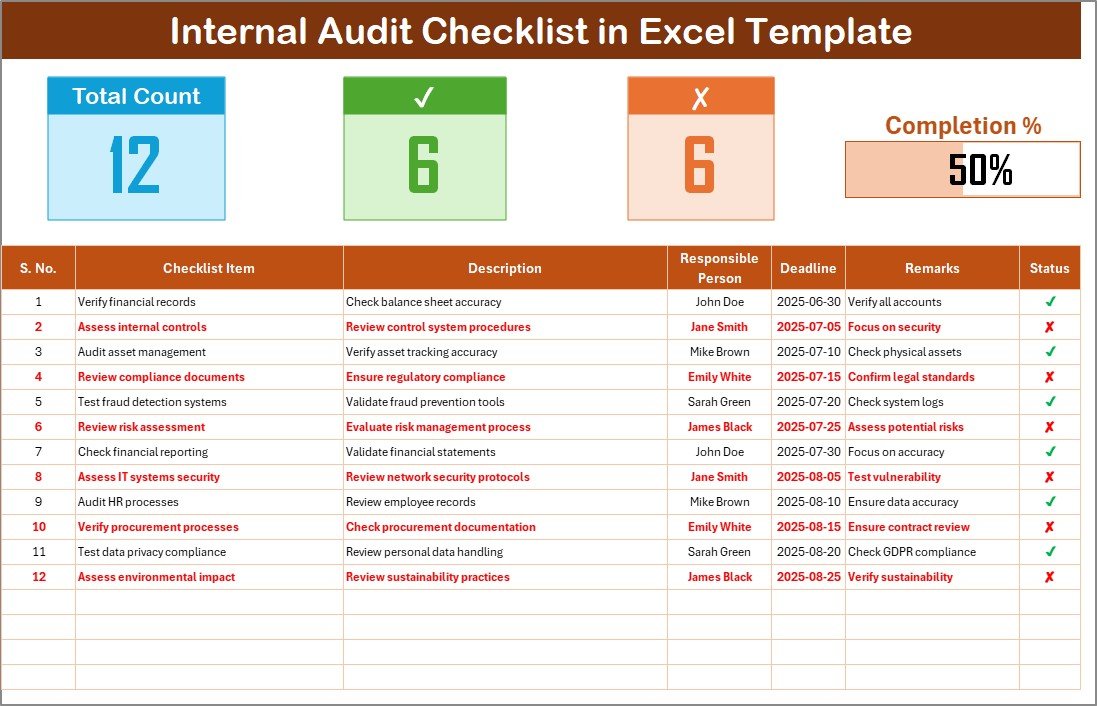
This is the most flexible compliance checklist template here. It is a spreadsheet for planning, tracking and managing internal audit tasks, and it works offline because it is a plain Excel file.
Who it is for: compliance officers, business owners, department heads and internal auditors in finance, HR and IT.
- Dashboard with total items, completed items and incomplete items
- Visual progress bar
- Columns for Serial No., Checklist Item, Description, Responsible Person, Deadline, Remarks and Status
- List sheet with a preloaded dropdown of responsible persons
- Password protection so you can share it with your team
Use cases: a quarterly finance audit with 40 items, where 28 ticked items show 70% on the bar; an HR file review split between three owners; an IT access review with a deadline per row; a year-round readiness log that auditors can open at any time.
Price: $3.49. Get the Internal Audit Compliance Checklist in Excel.
Best for: teams that want one general-purpose audit checklist.
2. Regulatory Reporting Audit Checklist in Excel
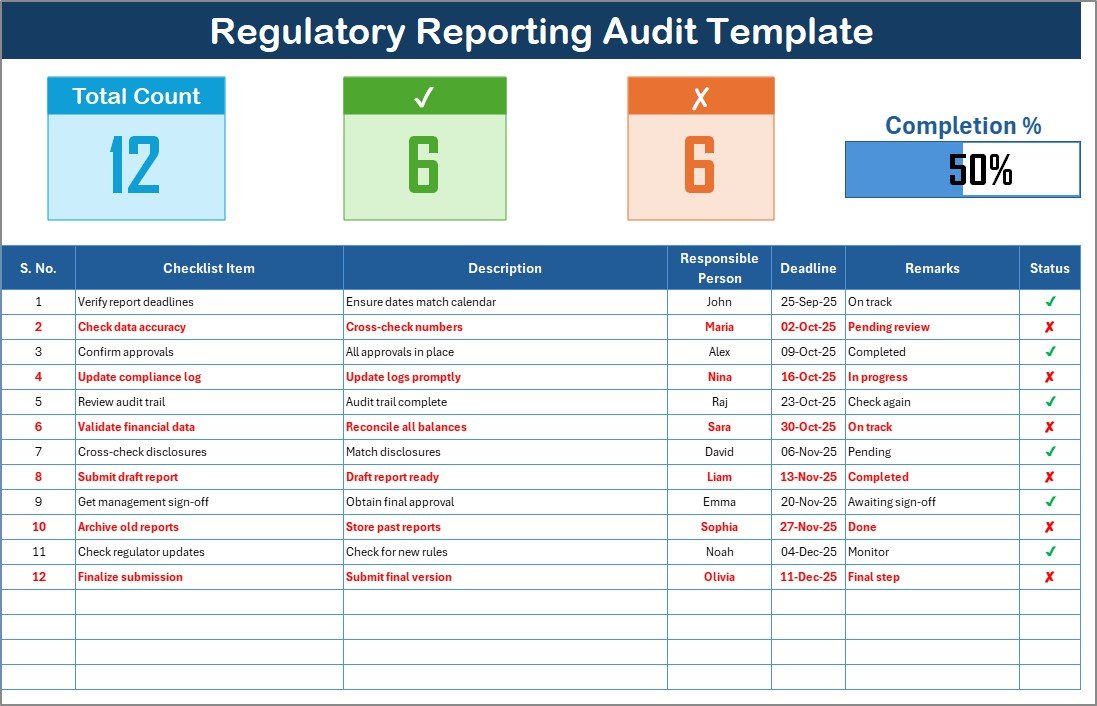
A missed submission can bring penalties, so this template puts reporting dates and owners in one place. It is aimed at all industries, including finance, healthcare, education and IT.
Who it is for: managers responsible for recurring filings and regulatory submissions.
- Two worksheets: the checklist sheet and a list sheet of responsible persons
- Top section with Total Count, Checked Count, Crossed Count and a progress bar
- Checklist table with owner, deadline, remarks and a tick or cross status
- Dropdowns to assign owners quickly
- No setup needed, ready to use
Use cases: a monthly filing calendar with 12 submissions, each with an owner; a remarks column recording why a filing slipped; a progress bar shared in a weekly meeting.
Price: $3.49. See the Regulatory Reporting Audit Checklist in Excel.
Best for: deadline-heavy regulatory reporting.
3. Financial Compliance Checklist in Excel
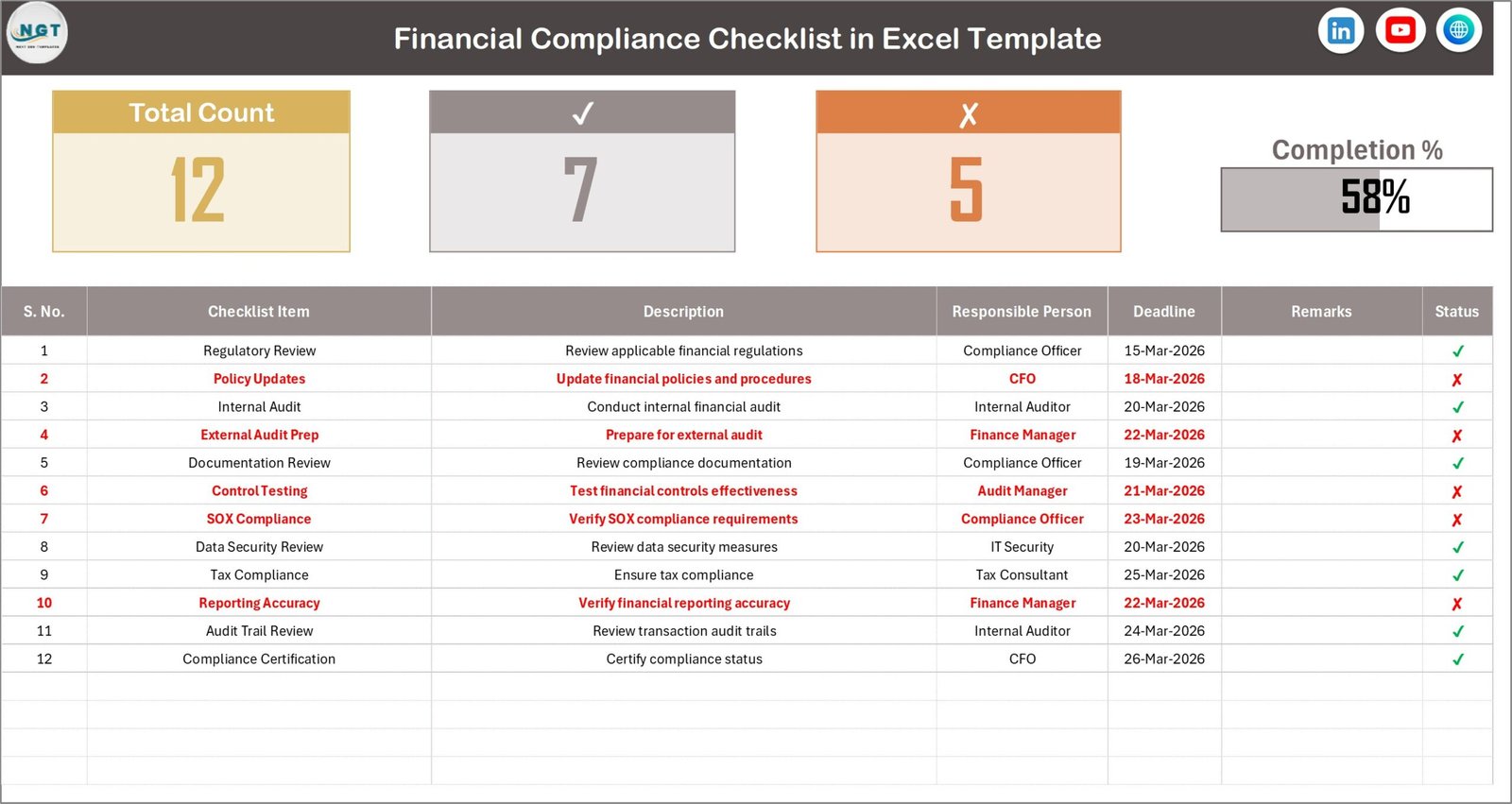
This one is for finance teams that handle financial regulations, tax requirements, audit standards and internal policies. It replaces scattered spreadsheets, emails and manual reminders with one checklist.
Who it is for: finance teams and controllers.
- Centralized compliance tracking in one Excel sheet
- Automated progress dashboard showing total, completed and pending tasks
- Deadline column for each compliance activity
- Responsible person assignment for accountability
- Completed or pending status indicators
Use cases: a tax compliance list with one owner per filing; an internal audit prep list before year end; a regulatory documentation tracker where pending items are visible at a glance.
Price: $3.49. Open the Financial Compliance Checklist in Excel.
Best for: finance departments with tax and audit obligations.
4. Legal Compliance Checklist Template in Excel: best value

This template tracks tax filings, contract renewals and audits in the same file. That breadth makes it the best value of the eight, since one $3.49 purchase covers several legal duties.
Who it is for: entrepreneurs, HR professionals and compliance officers.
- Two worksheets: the main checklist and a list sheet of responsible individuals
- Three summary cards: Total Count, Checked Count and Crossed Count
- Progress bar that updates as you mark tasks complete
- Auto-numbered rows with a checklist item and description
- Editable: add, remove or change tasks
Use cases: a small business tracking contract renewal dates; an HR owner logging employment-law tasks; a founder keeping annual filings in one list.
Price: $3.49. Buy the Legal Compliance Checklist Template in Excel.
Best for: small organizations that need one legal compliance checklist template.
5. GDPR Compliance Checklist Template in Excel

This template tracks work against the General Data Protection Regulation. It organizes tasks, responsibilities, deadlines and progress in one place, with a visual dashboard on top.
Who it is for: data protection officers, compliance managers and business owners.
- GDPR Compliance Checklist tab for tasks, owners, due dates and status
- List sheet tab for dropdown task assignment
- Dashboard with total count, completed tasks, pending tasks and progress bar
- Checklist table with an item and description per task
Use cases: a DPO tracking a records review; a marketing lead listing consent tasks; a pre-audit sweep where pending items drive the meeting agenda. GDPR fines can reach EUR 20 million or 4% of global annual turnover, whichever is higher, so evidence of structured work matters. See the official GDPR text on EUR-Lex for the requirements themselves.
Price: $3.49. Get the GDPR Compliance Checklist Template in Excel.
Best for: GDPR tracking in Excel.
6. GDPR Compliance Checklist in Google Sheets

The same subject as number 5, built for Google Sheets. Choose it when several people edit the checklist at the same time.
Who it is for: privacy and compliance teams working across locations.
- Customizable categories such as consent management, data processing, data subject rights and data protection impact assessments
- Conditional formatting to show completed and pending tasks
- Charts and graphs for compliance trends
- Multi-user collaboration with automated calculations
Use cases: a legal reviewer and an IT lead updating the same sheet; a chart showing which category has the most open items; a shared link instead of emailed attachments.
Price: $3.49. Try the GDPR Compliance Checklist in Google Sheets.
Best for: collaborative GDPR work in the cloud.
7. Environmental Compliance Checklist in Google Sheets

This checklist tracks tasks tied to sustainability, waste management and emission control. You edit the categories to match the rules that apply to your site.
Who it is for: sustainability managers and operations teams.
- Customizable categories such as waste disposal, energy efficiency, air and water quality and hazardous materials management
- Easy addition of new items as regulations change
- Conditional formatting and bar or pie charts
- Real-time collaboration and automated calculations
Use cases: a monthly waste disposal log; a list of energy efficiency actions with owners; a chart for a sustainability review. Safety-related duties sit better in an OSHA compliance Excel template set.
Price: $3.49. Use the Environmental Compliance Checklist in Google Sheets.
Best for: environmental duties tracked by a shared team.
8. Risk Management Audit Checklist in Excel
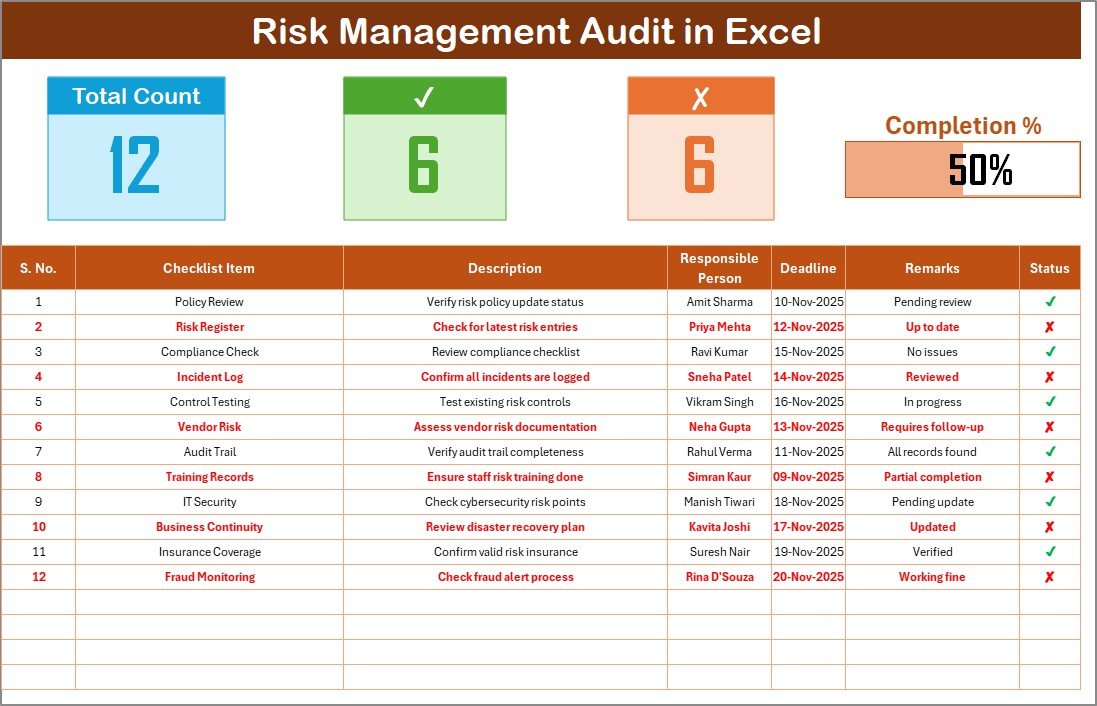
This is an audit tracker for risk items across financial compliance, operational safety and data governance. It highlights overdue items automatically through conditional formatting.
Who it is for: risk owners and audit leads who want analytics later.
- Dashboard with total, completed and pending items plus a progress bar
- Tick or cross status that updates progress percentages
- Dropdown list of responsible persons
- Add departments, KPIs or checklist items at any time
- Link to Power BI, SharePoint or Google Sheets for extended reporting
Use cases: a departmental risk review; overdue items flagged in a weekly check; checklist data used as a source for a compliance tracking dashboard in Power BI.
Price: $3.49. Download the Risk Management Audit Checklist in Excel.
Best for: risk audits that feed into analytics.
Which compliance checklist template should you choose?
| Your situation | Pick |
|---|---|
| General internal audit across departments | Internal Audit Compliance Checklist in Excel |
| Recurring regulatory submissions | Regulatory Reporting Audit Checklist in Excel |
| Tax, audit standards, finance policies | Financial Compliance Checklist in Excel |
| Contracts, filings and legal duties | Legal Compliance Checklist Template in Excel |
| GDPR, desktop use | GDPR Compliance Checklist Template in Excel |
| GDPR, team editing online | GDPR Compliance Checklist in Google Sheets |
| Environmental rules | Environmental Compliance Checklist in Google Sheets |
| Risk audits linked to Power BI | Risk Management Audit Checklist in Excel |
A simple rule: choose by the regulation first, then by the format. If your team lives in Excel, use the Excel version. If several people edit at once, use Google Sheets. At $3.49 each, buying two templates for two regulations costs $6.98 and keeps each audit trail separate.
The progress maths is the same in all of them: completion % = checked items / total items x 100. With 50 items and 35 checked, you are at 70%. Set a target before an audit, for example 100% of high-risk items checked two weeks ahead, and use the deadline column to hold people to it.
If you need a checklist for people processes, the employee onboarding checklist templates and the safety inspection checklist templates cover those areas.
When is a compliance checklist template NOT the right answer?
A spreadsheet records what people say they did. It does not watch your systems. If an auditor expects continuous monitoring, automated evidence collection or direct integrations with cloud accounts, look at compliance platforms such as Vanta, Drata or OneTrust, and check their current pricing pages before you decide.
A template is also the wrong tool if hundreds of people must tick items with role-based permissions and an enforced approval workflow. Excel and Google Sheets are not built for that.
Finally, no checklist replaces legal advice. The templates give structure, but you decide which obligations apply to you. For heavier reporting needs, see these legal compliance dashboards for Excel, Power BI and Google Sheets and these corporate compliance dashboards.
Frequently asked questions
What is a compliance checklist template?
A compliance checklist template is a ready-made list of requirements with columns for owner, deadline, status and remarks. You fill it in to show which obligations are done and which are open. The Internal Audit Compliance Checklist in Excel costs $3.49 and adds a progress bar.
What should an audit checklist template in Excel include?
An audit checklist template in Excel should include a serial number, checklist item, description, responsible person, deadline, remarks and status. A summary showing total, completed and pending items helps too. The Regulatory Reporting Audit Checklist in Excel ($3.49) has all of these plus a progress bar.
Is a spreadsheet good enough for audit-ready documentation?
For small and mid-sized teams, yes. A spreadsheet shows who owns each task, when it is due and whether it is done, which is what most auditors ask to see. It is weaker where you need automated evidence capture or strict access controls on large user groups.
Which compliance checklist template is best for GDPR?
Use the GDPR Compliance Checklist Template in Excel if you work on a desktop, or the GDPR Compliance Checklist in Google Sheets if several people edit together. Each costs $3.49. Both track tasks, owners and progress against the General Data Protection Regulation.
Can I use Google Sheets instead of Excel for a compliance checklist?
Yes. The GDPR and Environmental checklists here come in Google Sheets, with conditional formatting, charts, real-time collaboration and automated calculations. Each is $3.49. Choose Sheets when multiple people update the file at once, and Excel when you want offline access.
How do I calculate compliance progress in a checklist?
Divide the number of completed items by the total and multiply by 100. If 28 of 40 items are ticked, progress is 70%. The Excel checklists here calculate this automatically and show it as a progress bar, so you do not need to count by hand.
How much does a compliance checklist template cost?
Every template in this list costs $3.49. That covers the Internal Audit, Regulatory Reporting, Financial, Legal, two GDPR versions, Environmental and Risk Management checklists. Compliance software platforms usually price by subscription, so compare their current pricing pages if you need continuous monitoring.
Can I assign tasks to different people in these checklists?
Yes. Each template has a Responsible Person column. In the Excel versions, a list sheet feeds a dropdown, so names stay consistent and entry errors drop. You add your own team members to the list sheet, then pick owners from the dropdown on each row.
Can I customize a compliance checklist template for my industry?
Yes. You can add, remove or rename checklist items, columns and categories. The Regulatory Reporting Audit Checklist is described as suitable for finance, healthcare, education and IT, and the Risk Management Audit Checklist lets you add departments and KPIs at any time.
Get more compliance checklist templates
Start with the Internal Audit Compliance Checklist in Excel for $3.49. If your main duty is one regulation, pair it with the matching specialist checklist, since each costs the same. Get the Internal Audit Compliance Checklist in Excel.
Want to see these templates in use? Watch walkthroughs on the NextGenTemplates YouTube channel.