

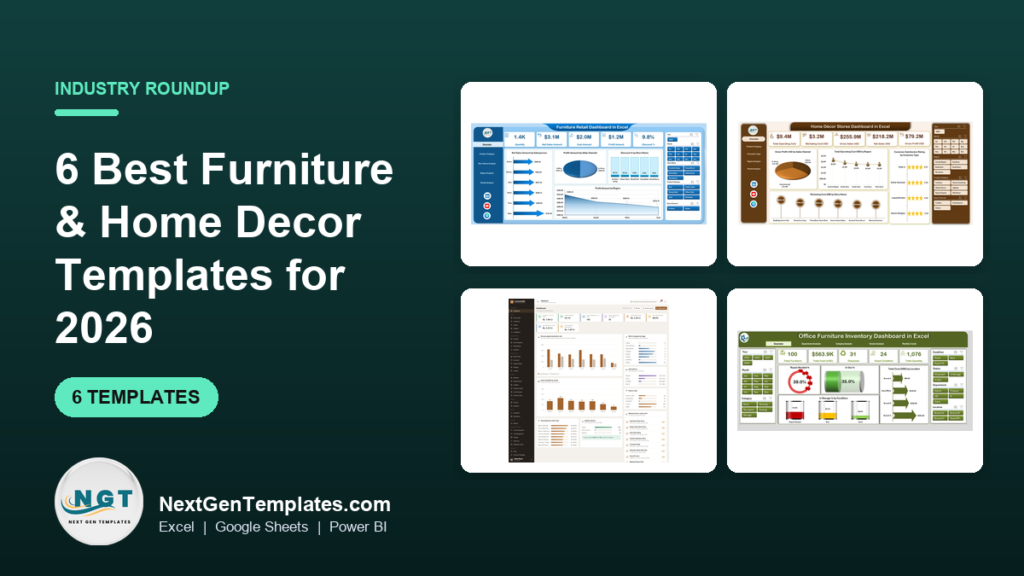
The best furniture business dashboard template for most retailers is the Furniture Retail Dashboard in Excel ($13.99), which tracks sales, profit, cost, quantity and discounts by store, region and month. Factories should pick the Wood and Furniture Manufacturing Dashboard in Power BI ($17.99). Prices across the six picks run from $9.99 to $39.99.
Last updated: October 2026
Key takeaways
- The Furniture Retail Dashboard in Excel costs $13.99 and filters sales, profit, cost and discounts by store, region, category, month or salesperson.
- The Wood and Furniture Manufacturing Dashboard in Power BI costs $17.99 and has 5 report pages, including wood type profit and production line views.
- The Furniture Manufacturing Management System Web App costs $39.99 and covers 33 pages, 15 reports and 6 roles in a Google Sheets database you own.
- The Interior Design KPI Dashboard in Google Sheets is the cheapest pick at $9.99 and compares month-to-date, year-to-date and previous-year figures.
- A dashboard reports on data you already collect. If you need live stock control or accounting, buy software for that job instead.
 Launch offer
SUMIFS, XLOOKUP, FILTER, LAMBDA and checking AI-written formulas, with real business projects. 11h 47m of video by PK, with practice files, quizzes and a capstone.
Furniture and home decor dashboard templates compared
| Template | Format | Best For | Price |
|---|---|---|---|
| Furniture Retail Dashboard in Excel (Best overall) | Excel | Showrooms and multi-store furniture retailers | $13.99 |
| Home Décor Stores Dashboard in Excel | Excel | Decor shops tracking promotions and satisfaction | $13.99 |
| Wood and Furniture Manufacturing Dashboard in Power BI | Power BI | Furniture factories and wood processing units | $17.99 |
| Office Furniture Inventory Dashboard in Excel | Excel | Facilities teams managing desks, chairs and storage | $17.99 |
| Furniture Manufacturing Management System Web App (Best value) | Google Apps Script web app on Google Sheets | Make-to-order furniture works that need the whole job in one system | $39.99 |
| Interior Design KPI Dashboard in Google Sheets (Budget pick) | Google Sheets | Design studios that share one live file | $9.99 |
How we picked these furniture business dashboard templates
We searched the NextGenTemplates catalog for furniture, home decor, wood and interior design products and kept only paid, complete tools. The four exact-match dashboards come first because they are built for furniture and decor businesses by name. The KPI-only file sits last, and the web app is included because it covers a job a dashboard cannot.
We judged each one on who it serves, what data it expects, the screens it includes and the real price. Free files and loosely related general dashboards were excluded. We have not published benchmark claims we cannot source, so the worked examples below use hypothetical numbers and say so.
What are the best furniture business dashboard templates for 2026?
Six are worth buying. They split into three groups: retail (furniture and decor stores), operations (factory and office stock) and project work (interior design). Match your business to the group first, then pick the format you already use.
1. Furniture Retail Dashboard in Excel: best overall
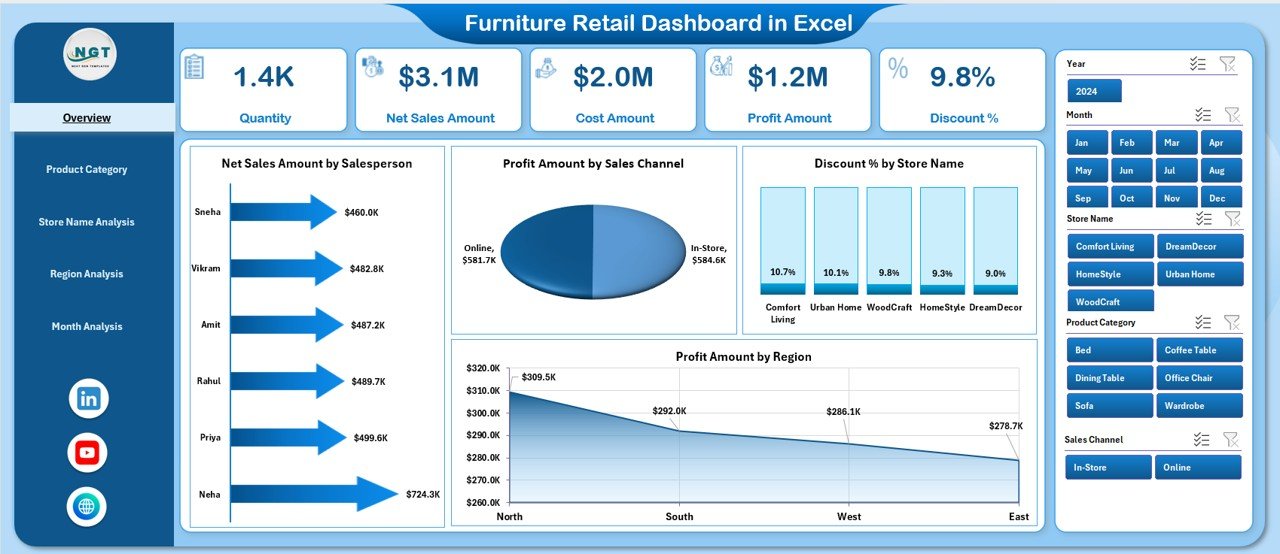
This is the most direct fit for a showroom owner. It turns raw retail data into KPI cards, charts and slicers, so you stop compiling reports by hand. We rank it first because it matches the widest group of buyers (single showrooms and multi-store chains) at $13.99 and uses Excel, which most retail teams already have.
Who it is for: furniture retailers, store managers and owners who sell sofas, beds and dining tables across one or several locations.
- Sales, profit, cost and quantity in one view
- Right-side slicers for month, store, region, product category and salesperson
- Executive KPI cards for a quick snapshot
- Discount and cost analysis to spot over-discounted stores or categories
- Store-wise and region-wise comparison, plus monthly trend tracking
Use cases:
- Compare profit by store. If Store A sells 400 units at a 22% margin and Store B sells 300 units at 31%, the dashboard shows which one is giving margin away.
- Find discount leakage. Filter by category and see where discounts rise but quantity does not.
- Review a salesperson’s results by month before a bonus round.
- Check seasonality before ordering stock for the next quarter.
Margin here means profit divided by sales. A sofa range that sells $50,000 with $11,000 profit has a 22% margin (hypothetical figures).
Price: $13.99. Get the Furniture Retail Dashboard in Excel.
Best for: retailers who want one clean sales and profit view across stores.
2. Home Décor Stores Dashboard in Excel
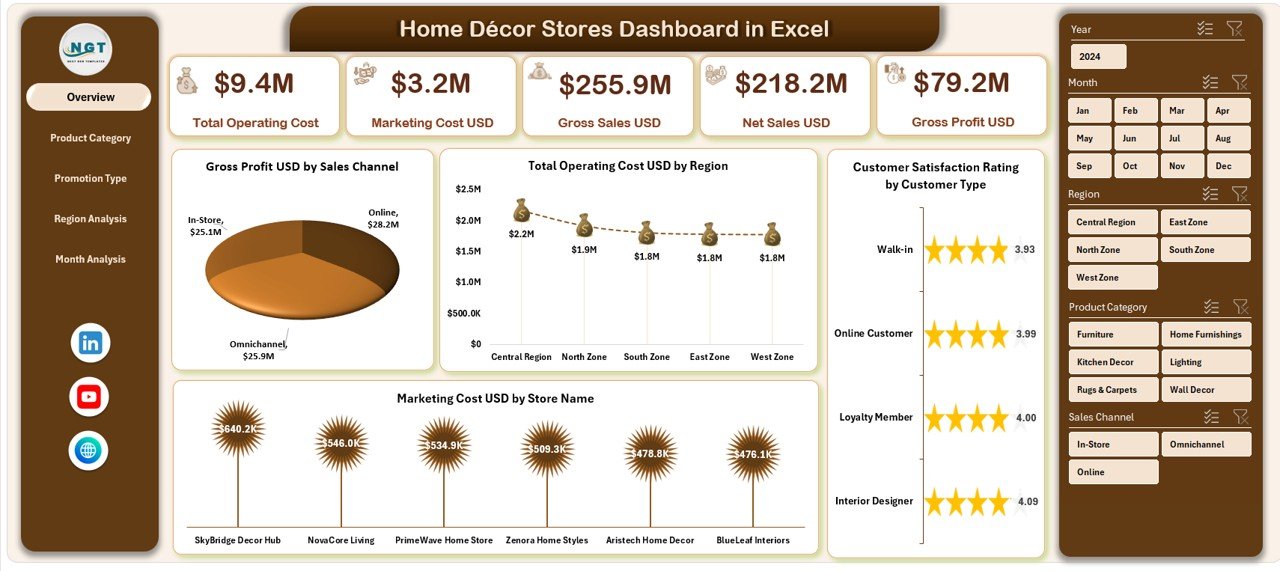
Decor retail is trend-driven, so promotions and customer satisfaction matter as much as sales. This dashboard adds both to the usual sales, profit and cost view. It costs the same as the furniture retail file ($13.99) and suits shops that run frequent promotions.
Who it is for: home décor store owners and regional managers who want to see which products and promotions earn their keep.
- Sales, profit, costs and satisfaction on one Excel dashboard
- Product category profitability analysis to find high-margin décor lines
- Promotion effectiveness tracking by promotion type
- Region-wise comparison of sales, costs and satisfaction
- Seasonal trend monitoring by month, with right-side slicers
Use cases:
- Compare two promotion types. If a 15% discount lifts profit and a bundle offer does not, shift next month’s budget.
- Rank categories by profit, not by sales. Cushions may outsell lamps and still earn less (hypothetical).
- Spot a region where satisfaction is low although sales look healthy.
- Plan stock for the seasonal months the trend chart shows as peaks.
Price: $13.99. Buy the Home Décor Stores Dashboard in Excel.
Best for: decor shops that need to prove which promotions pay back.
3. Wood and Furniture Manufacturing Dashboard in Power BI
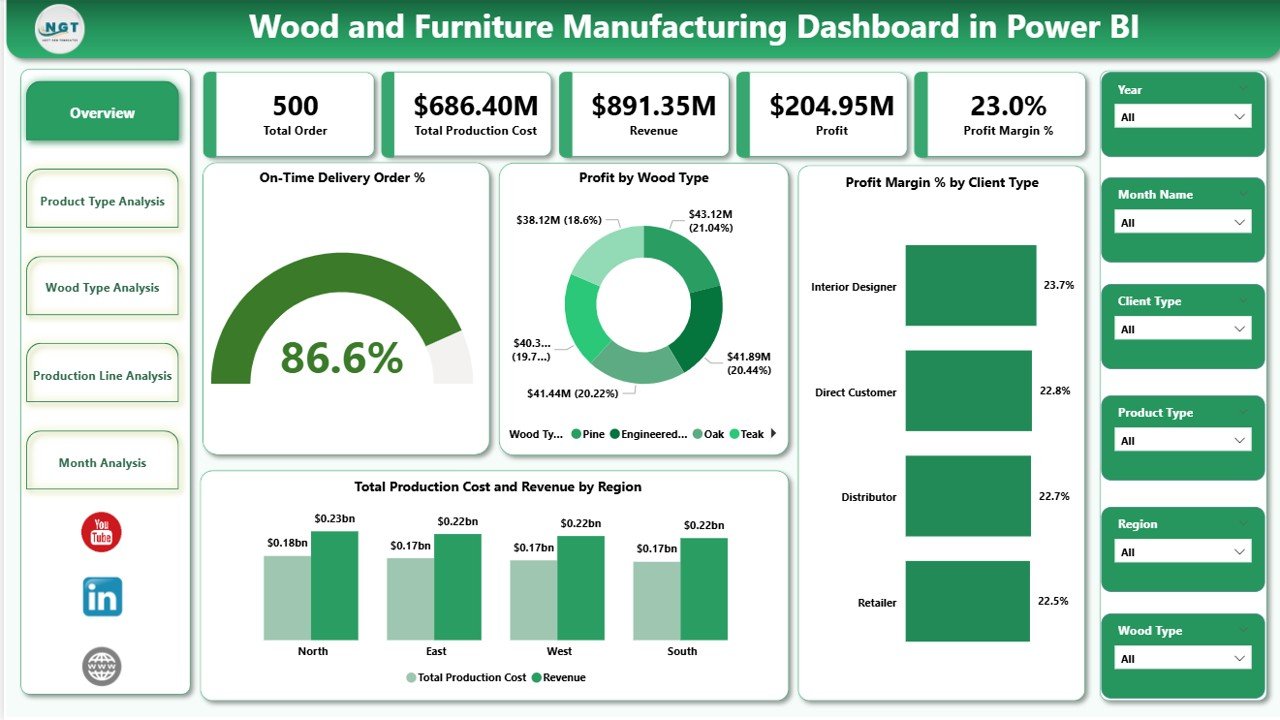
Factories lose margin through slow lines, wasteful material choices and late deliveries. This Power BI file puts profit, cost, revenue and delivery performance on five interactive pages. It is the pick for a plant that already uses Power BI or wants drill-down and slicers.
Who it is for: furniture factories, wood processing units and operations managers who report on production performance.
- 5 pages: Overview, Product Type, Wood Type, Production Line and Month Analysis
- KPI cards for On-Time Delivery %, Profit, Profit Margin %, Production Cost and Revenue
- Cost versus revenue comparison to detect margin problems early
- Slicers for Month, Region, Product Type, Wood Type, Production Line and Client Type
- Monthly trend analysis for seasonal demand
Use cases:
- Compare wood types by profit. If one timber category carries a 12% margin and another 26% (hypothetical), you know where to push quotes.
- Find the production line with the highest cost per unit and look at it first.
- Track on-time delivery % by client type to see who is being let down.
- Use monthly trends to plan budgets ahead of busy periods.
On-time delivery % is orders delivered on or before the promised date divided by total orders. Nine of ten orders on time gives 90%.
Price: $17.99. Get the Wood and Furniture Manufacturing Dashboard in Power BI.
Best for: manufacturers who want margin and delivery results by line and by material.
4. Office Furniture Inventory Dashboard in Excel
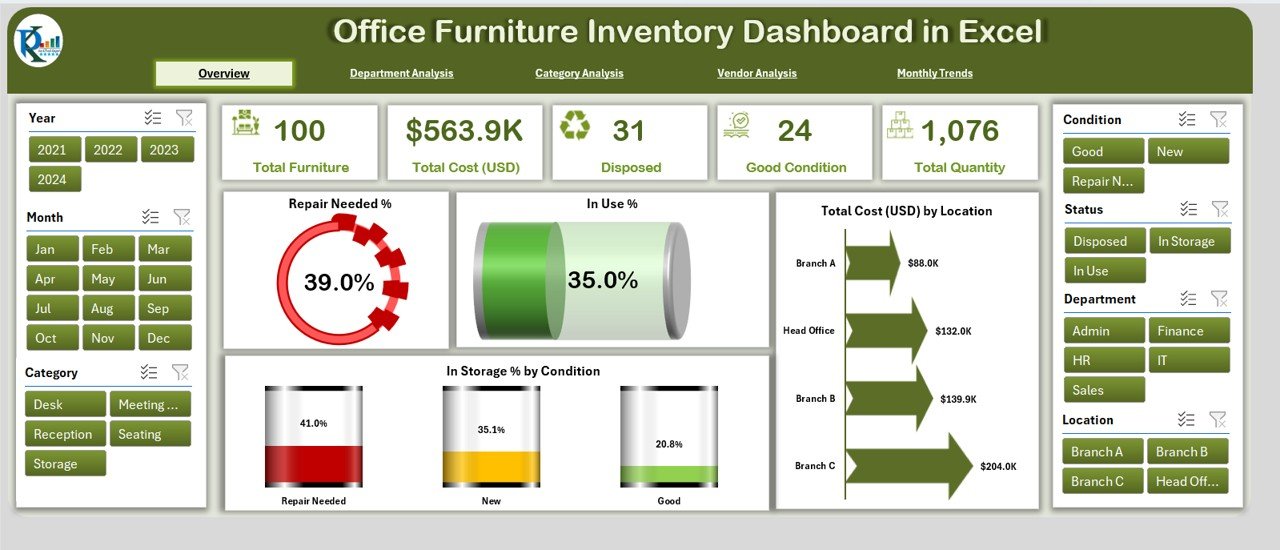
This one is for the company that owns furniture, not the company that sells it. It tracks usage, condition, budgets, vendors and department allocation, which helps avoid duplicate purchases and late repairs.
Who it is for: facilities managers, office administrators and procurement teams in small offices and large organizations.
- Left-hand page navigator across Overview, Department, Category, Vendor and Monthly Trends
- KPI cards for Completed %, Delayed %, Repair Needed %, In Use %, In Storage % and Total Cost
- Budget Allocation versus Budget Used and Cost by Location charts
- Department analysis of allocation and repair needs
- Vendor analysis of quality and durability
Use cases:
- Check what share of furniture sits in storage before buying new desks.
- See which department has the highest Repair Needed % and plan maintenance.
- Compare vendors on durability before the next purchase order.
- Review budget used against allocated budget by location each month.
Price: $17.99. Buy the Office Furniture Inventory Dashboard in Excel.
Best for: organizations that want to stop buying furniture they already own.
5. Furniture Manufacturing Management System Web App: best value

At $39.99 this is the most expensive pick, and it is also the one that does the most. It is a ready-to-run Google Apps Script web app that carries a job from enquiry to money in the bank. We call it best value because it replaces several separate sheets and reports with one system.
Who it is for: furniture works that make to order as well as to catalogue and want one system instead of linked workbooks.
- Catalogue and bills of material, raw material stores and purchasing
- Sales orders and dealers, with work orders routed through eight workstations
- Stage quality and rework, dispatch, installation, job costing and collections
- 33 pages, 15 reports and 6 roles over 59 permissions
- Installs into your own Google account in an afternoon, with a Google Sheets database you own
Use cases:
- Route a work order through all eight workstations and see where it stalls.
- Control raw material purchasing against bills of material.
- Cost each job and follow collections until it is paid.
- Give a store keeper, a production manager and a sales executive different access.
The product page links a live demo with sign-in details for each role, so you can click through seeded data before you buy.
Price: $39.99. Get the Furniture Manufacturing Management System Web App.
Best for: workshops that want production, stores and costing in one tool they own.
6. Interior Design KPI Dashboard in Google Sheets: budget pick
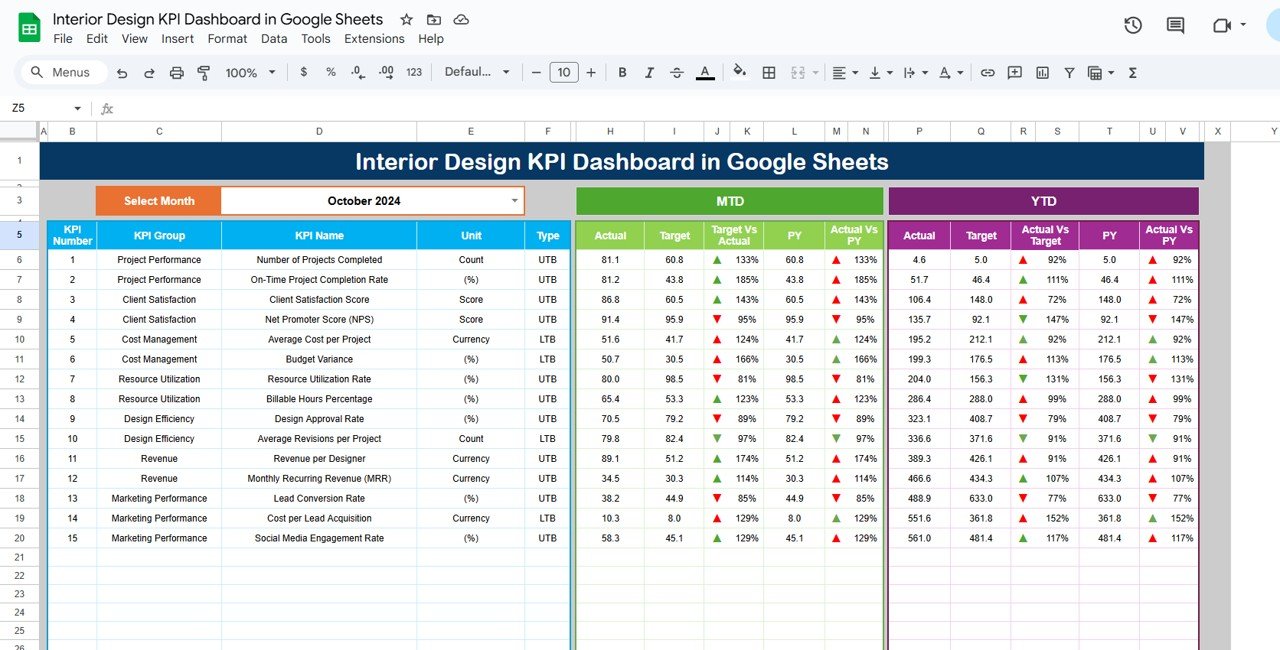
This is the lowest-priced file here and the only one built for shared, browser-based work. It tracks project KPIs rather than store sales, so it fits studios better than showrooms.
Who it is for: small design firms and large studios that run several projects and want the team to see the same numbers.
- Six worksheets covering different aspects of project tracking
- Month-to-date, year-to-date and previous-year comparisons
- Budget, project completion and client feedback metrics
- Customizable KPIs for your own project needs
- Real-time updates and sharing in Google Sheets
Use cases:
- Compare this year’s completed projects to last year’s at the same point.
- Watch budget against progress on a single project.
- Log client feedback and adjust before the next handover.
- Share one live file with designers and a project manager.
Price: $9.99. Buy the Interior Design KPI Dashboard in Google Sheets.
Best for: design studios that want a cheap, collaborative KPI view.
Which furniture business dashboard template should you choose?
| If you… | Choose | Price |
|---|---|---|
| Sell furniture from one or more showrooms | Furniture Retail Dashboard in Excel | $13.99 |
| Run a decor shop with regular promotions | Home Décor Stores Dashboard in Excel | $13.99 |
| Make furniture and report in Power BI | Wood and Furniture Manufacturing Dashboard in Power BI | $17.99 |
| Manage furniture owned by your company | Office Furniture Inventory Dashboard in Excel | $17.99 |
| Need orders, stores and costing in one system | Furniture Manufacturing Management System Web App | $39.99 |
| Run design projects in a shared file | Interior Design KPI Dashboard in Google Sheets | $9.99 |
Two quick rules. If your data lives in Excel, choose Excel. If you are a manufacturer with no system at all, compare the Power BI dashboard (reporting only) with the web app (running the work) before you buy.
What KPIs should a furniture business track?
Retailers need sales, profit, margin and discount rate. Factories need production cost, profit margin and on-time delivery. Offices need repair and storage shares. Three formulas cover most of it:
- Profit margin % = profit divided by revenue, times 100.
- Discount rate % = discount value divided by gross sales, times 100.
- On-time delivery % = orders delivered on time divided by total orders, times 100.
For a hypothetical worked example, a factory with $200,000 revenue and $46,000 profit has a 23% margin. If 180 of 200 orders arrive on time, delivery is 90%. These are not industry benchmarks, so set your own targets from your past months. For wider metric lists, see our guides to sales KPIs to track, finance KPIs and cash flow KPIs.
Budget tracking matters in every group. Our post on budget variance metrics explains how to compare planned and actual spend. If you promote products, the marketing KPIs guide helps judge campaign results. Factories with large teams may also want the HR KPIs guide and the training KPIs guide.
When is a dashboard template NOT the right answer?
A dashboard shows results. It does not record transactions, so it will not replace the system that does. Be honest about these cases:
- You need live stock levels across warehouses with barcode scanning. Buy inventory software such as Zoho Inventory or Fishbowl, and use a dashboard on top of its export.
- You need accounting, tax and payroll. A dashboard is not a ledger.
- You run an online store that needs a checkout and live product feed. Use a store platform and report from its exports.
- Nobody in your business keeps clean data. A dashboard on messy sales records only draws messy charts.
- You have hundreds of staff on one ERP. A full system such as NetSuite will fit better than a spreadsheet file.
If you want to keep your data in a Google Sheets database you own rather than in a SaaS contract, the web app’s Google Apps Script platform is the technology it runs on.
Frequently asked questions
What is the best furniture business dashboard template?
For most furniture retailers the best pick is the Furniture Retail Dashboard in Excel at $13.99. It tracks sales, profit, cost, quantity and discounts, and filters by store, region, category, month or salesperson. Manufacturers should look at the $17.99 Power BI dashboard instead.
Is there a dashboard template for a furniture factory?
Yes. The Wood and Furniture Manufacturing Dashboard in Power BI costs $17.99 and has five pages covering product type, wood type, production line and month. It includes KPI cards for on-time delivery, profit, profit margin, production cost and revenue.
Can I run a furniture workshop on a spreadsheet?
You can, and the Furniture Manufacturing Management System Web App ($39.99) does it on Google Sheets. It covers bills of material, stores, purchasing, work orders across eight workstations, quality, dispatch, installation, job costing and collections, with a database you own.
Which dashboard works for a home decor store?
The Home Décor Stores Dashboard in Excel at $13.99. It tracks sales, profit, costs and customer satisfaction, and measures promotion effectiveness by promotion type. You can also compare product categories and regions with slicers and review month-by-month seasonal patterns.
Do these dashboards need Power BI or only Excel?
Only the Wood and Furniture Manufacturing Dashboard needs Power BI. The Furniture Retail, Home Décor Stores and Office Furniture Inventory dashboards are built in Excel. The Interior Design KPI Dashboard runs in Google Sheets, and the web app runs in your Google account.
What is the cheapest furniture or interior design dashboard?
The Interior Design KPI Dashboard in Google Sheets is the cheapest at $9.99. It has six worksheets and compares month-to-date, year-to-date and previous-year figures, with budget, project completion and client feedback metrics. It suits design studios more than retail showrooms.
How do I track office furniture inventory in Excel?
Use the Office Furniture Inventory Dashboard in Excel ($17.99). It reports Completed %, Delayed %, Repair Needed %, In Use %, In Storage % and Total Cost, with pages for department, category, vendor and monthly trends, plus budget allocation versus budget used.
Can several people use the same furniture dashboard?
Yes. The Interior Design KPI Dashboard shares live in Google Sheets. The Furniture Manufacturing Management System Web App has 6 roles over 59 permissions, so a store keeper, production manager and sales executive each see the screens they need.
Get more furniture and dashboard templates
Best-value pick: the Furniture Manufacturing Management System Web App at $39.99 runs the whole job from enquiry to collections. If you only need reporting, start with the Furniture Retail Dashboard in Excel at $13.99. Watch walkthroughs on the NextGenTemplates YouTube channel.