



Volunteer programs are driven by purpose, people, and impact. However, without proper tracking and performance measurement, even the most well-intended volunteer initiatives struggle with low engagement, unclear utilization, weak retention, and poor reporting. Many NGOs, non-profits, CSR teams, and community organizations still rely on manual spreadsheets or fragmented records, which makes decision-making slow and ineffective.
The Volunteer Program KPI Dashboard in Google Sheets is built to solve this challenge. It provides a centralized, ready-to-use performance tracking system that helps organizations measure volunteer participation, engagement, efficiency, retention, satisfaction, and overall program impact—clearly and consistently.
Because this dashboard runs entirely in Google Sheets, it is cloud-based, easy to use, and collaborative. Program managers, coordinators, and leadership teams can update data in real time, review performance together, and generate professional reports without using expensive software or technical tools.

🚀 Key Features of the Volunteer Program KPI Dashboard
📊 MTD & YTD Volunteer Performance Tracking
Monitor Month-to-Date and Year-to-Date performance for all volunteer KPIs.
🎯 Target vs Actual Comparison
Track how volunteer engagement and impact compare against defined goals.
📅 Previous Year Benchmarking
Measure improvement by comparing current performance with last year’s results.
📈 KPI Trend Analysis
Identify long-term engagement trends, participation patterns, and improvement areas.
🧮 Automated Calculations
Built-in formulas automatically calculate variances, percentages, and totals.
📚 Centralized KPI Definitions
Maintain consistent KPI formulas and definitions across the organization.
📦 What’s Inside the Volunteer Program KPI Dashboard
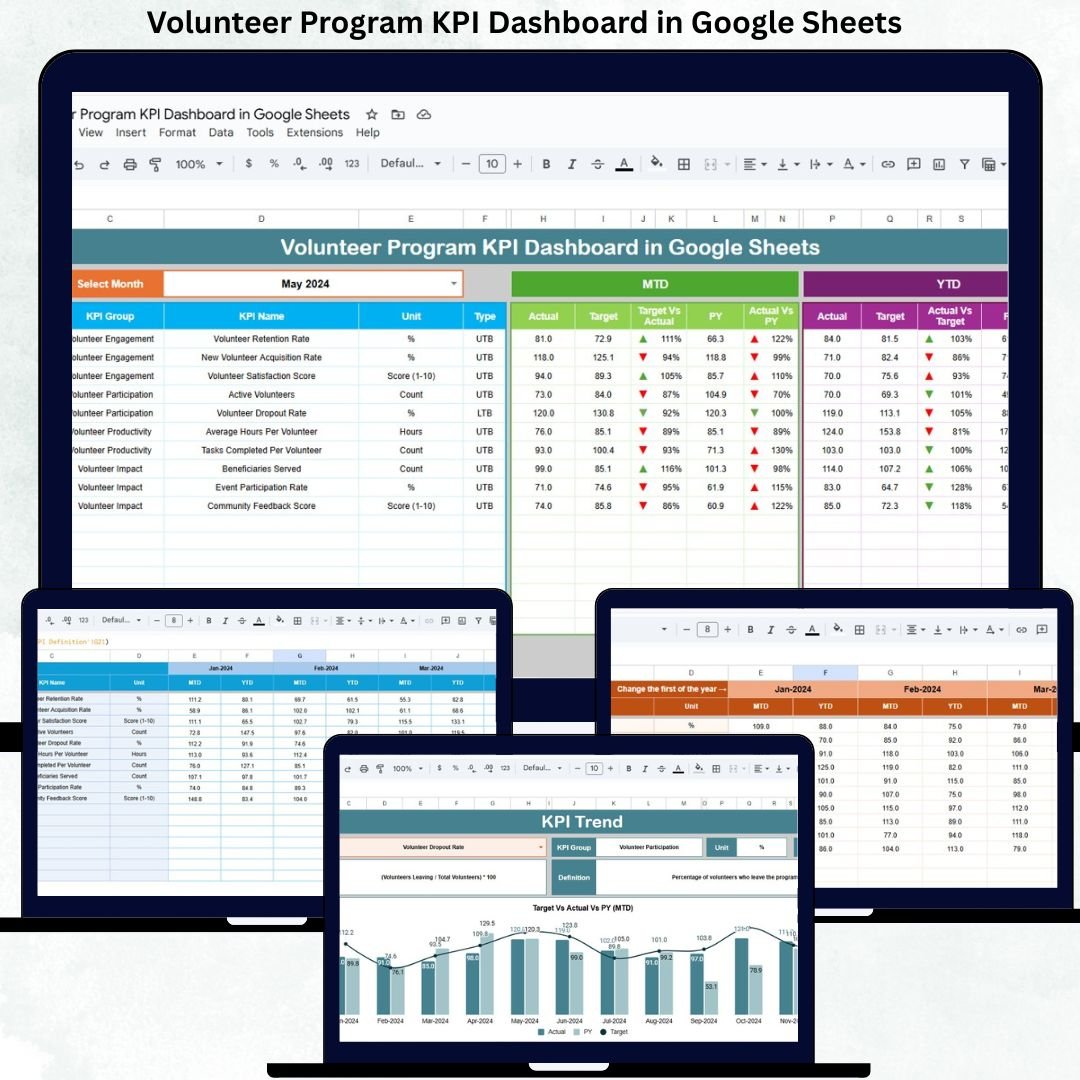
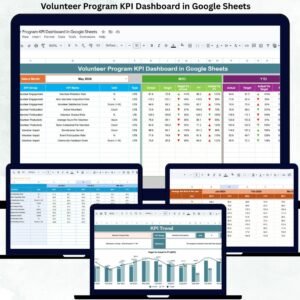
🖥️ Dashboard Sheet – Executive Performance Snapshot
This is the main summary page designed for leadership reviews.
How It Works
Select the reporting month from a dropdown (Cell D3)
All KPIs update automatically
KPIs Displayed
MTD Actual, Target & Previous Year
MTD Target vs Actual
MTD PY vs Actual
YTD Actual, Target & Previous Year
YTD Target vs Actual
YTD PY vs Actual
Conditional formatting highlights performance clearly:
🟢 Green Arrow – Performance improved
🔴 Red Arrow – Performance declined
This page gives instant clarity on volunteer program health.
📈 KPI Trend Sheet – Detailed KPI Analysis
This sheet helps users analyze individual KPIs deeply.
Features
Select a KPI from a dropdown (Cell C3)
View KPI Group, Unit, Type (LTB / UTB)
Review KPI Formula and Definition
Analyze month-wise trends visually
It helps identify declining engagement, strong retention, or efficiency gaps.
🧾 Actual Number Sheet
This sheet captures actual volunteer performance data.
Key Functions
Enter MTD and YTD actual values
Select the first month of the year (Cell E1)
Automatic alignment across all months
This sheet acts as the primary data input layer.
🎯 Target Sheet
This sheet stores monthly and annual targets for each KPI.
Purpose
Define expected participation and impact levels
Measure program effectiveness objectively
Support planning and accountability
📅 Previous Year Number Sheet
This sheet stores last year’s KPI values.
Benefits
Year-on-year comparison
Impact measurement
Long-term program evaluation
📚 KPI Definition Sheet
This is the control center of the dashboard.
It includes:
KPI Name
KPI Group
Unit
Formula
Definition
KPI Type (LTB / UTB)
This ensures clarity, transparency, and reporting consistency.
🛠️ How to Use the Volunteer Program KPI Dashboard
1️⃣ Enter monthly volunteer data
2️⃣ Set clear targets for engagement and impact
3️⃣ Select the reporting month
4️⃣ Review MTD, YTD, and YoY comparisons
5️⃣ Use trends to improve volunteer programs
👥 Who Can Benefit from This Dashboard
🤝 NGOs & Non-Profit Organizations
🌱 CSR & ESG Teams
🎓 Educational Institutions
🏥 Community & Social Programs
👨💼 Program Managers & Leadership
### Click here to read the Detailed blog post
Watch the step-by-step video tutorial:
















Reviews
There are no reviews yet.