



The Task Management Checklist in Excel is a comprehensive tool designed to help individuals, teams, and businesses manage tasks and projects efficiently. With this customizable checklist, you can easily organize tasks, set priorities, track progress, and ensure that deadlines are met. Whether you’re managing personal tasks, coordinating a team project, or overseeing business operations, this tool simplifies the task management process.
This Excel-based checklist allows you to break down projects into manageable steps, assign responsibilities, and monitor progress. With clear visualizations and automatic updates, you’ll stay on top of your tasks and improve overall productivity, ensuring everything is completed on time.
Key Features of the Task Management Checklist in Excel
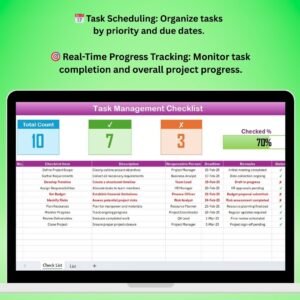
📅 Task Scheduling & Prioritization
Organize tasks by due dates, priority levels, and responsible team members. Set deadlines, categorize tasks, and ensure that the most important tasks are completed first.
🎯 Progress Tracking & Reporting
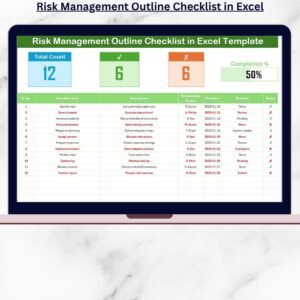
Monitor task completion and overall project progress in real time. Use visual indicators like checkboxes and color codes to stay updated on the status of each task.
📝 Task Categorization & Assignment
Categorize tasks into different sections (e.g., urgent, ongoing, completed) and assign specific responsibilities to individuals or teams. Ensure that everyone knows their role and responsibilities.
📈 Time-Based Performance Analysis
Track task completion over time, whether daily, weekly, or monthly. Analyze trends and performance patterns to evaluate productivity and identify areas for improvement.
⚙️ Customizable Fields & Metrics
Customize the checklist to suit your needs. Add fields for task description, deadlines, status updates, responsible persons, and any other metrics important for your project or organization.
🔄 Real-Time Updates & Notifications
As you enter data, the checklist updates automatically. Track the progress of each task and ensure that no deadline is missed.
Why You’ll Love the Task Management Checklist in Excel

✅ Efficient Task Tracking & Organization
Easily track all your tasks in one centralized place. Stay organized, assign responsibilities, and manage project timelines effectively.
✅ Streamlined Team Collaboration
Collaborate with your team by assigning tasks, setting deadlines, and tracking progress. Ensure that everyone is aligned and accountable for their part in the project.
✅ Monitor Task Completion in Real-Time
Stay up-to-date with automatic updates and real-time tracking of task statuses. Get a quick overview of completed, pending, and overdue tasks.
✅ Improve Team Productivity
With clear prioritization and progress tracking, your team will be more productive and efficient, reducing delays and improving overall performance.
✅ Fully Customizable for Your Needs
Adjust the checklist to fit your specific needs. Customize fields, categories, and task management metrics to reflect the priorities of your business or personal projects.
What’s Inside the Task Management Checklist in Excel?
- Task Scheduling & Prioritization: Organize and prioritize tasks by due date and importance.
- Progress Monitoring: Track task completion and overall progress in real-time.
- Task Categorization & Assignment: Assign tasks and responsibilities to team members.
- Time-Based Analysis: Monitor task performance over time to identify trends and areas for improvement.
- Customizable Fields & Metrics: Customize the checklist with your own categories and fields.
- Real-Time Updates: Automatically track the progress of each task and ensure deadlines are met.
How to Use the Task Management Checklist in Excel
1️⃣ Download the Template: Instantly access the Task Management Checklist in Excel.
2️⃣ Set Up Tasks & Deadlines: Input your tasks, assign deadlines, and categorize them by priority.
3️⃣ Assign Responsibilities: Assign specific tasks to team members and track who is responsible for what.
4️⃣ Monitor Progress & Performance: Use progress tracking features to stay updated on task completion.
5️⃣ Evaluate & Optimize: Use time-based performance analysis to evaluate task efficiency and adjust workflows for improved results.
Who Can Benefit from the Task Management Checklist in Excel?
🔹 Project Managers & Coordinators
🔹 Teams & Departments
🔹 Small & Medium Enterprises (SMEs)
🔹 Freelancers & Consultants
🔹 Personal Task Management
🔹 Nonprofit Organizations & Volunteers
🔹 Operations & Process Managers
Ensure your tasks and projects are managed effectively and efficiently with the Task Management Checklist in Excel. Stay organized, prioritize important tasks, and track your progress toward successful project completion.
Click here to read the Detailed blog post
Visit our YouTube channel to learn step-by-step video tutorials
Youtube.com/@PKAnExcelExpert
Compatibility and Requirements
- Works in Microsoft Excel desktop (Excel 2016 or later, or Microsoft 365).
- Checkboxes and color codes show the status of each task as you update it.
- Want to change the status colors? See Microsoft’s guide to conditional formatting.
Frequently Asked Questions
Can I assign tasks to team members?
Yes. Each task can have a responsible person, a due date and a priority level, so everyone knows their part.
How are tasks grouped?
You can sort tasks into sections such as urgent, ongoing and completed, and categorize them by priority.
Can I see progress over time?
Yes. Task completion can be reviewed daily, weekly or monthly to spot trends and slow areas.
Can I add my own fields?
Yes. You can add fields for task descriptions, deadlines, status updates, responsible persons or any other metric you need.
Related Task Management Templates
- Task Management Tracker in Google Sheets: a shared online task tracker
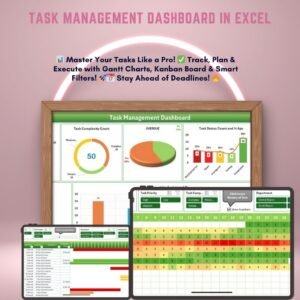
- Task Management Dashboard in Excel: charts for task status and workload
- Task Management Schedule Checklist in Excel: plan tasks against dates
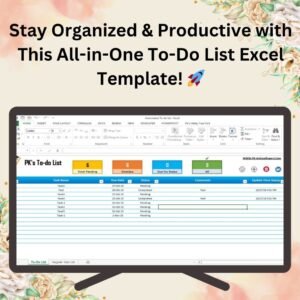
- Task Management To-Do List Checklist in Excel: a simple daily to-do list
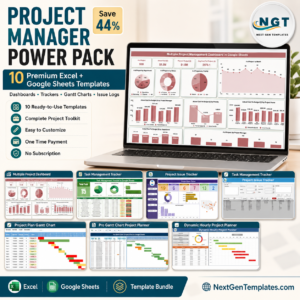
- Project Manager Power Pack: 10 project templates in one download
Browse all Excel checklists or the Excel project management templates.



























Reviews
There are no reviews yet.