



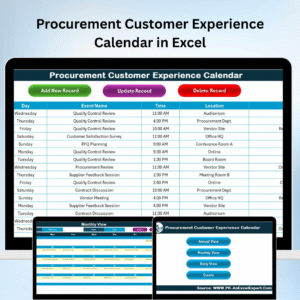
The Procurement Customer Experience Calendar in Excel is a comprehensive tool designed to help procurement teams and customer service managers efficiently track and manage customer interactions throughout the procurement process. This Excel-based calendar allows you to schedule, monitor, and track key milestones in your procurement cycle while ensuring a smooth and seamless experience for your customers.
From the initial inquiry to product delivery, this calendar provides a centralized location to manage customer touchpoints, including order status updates, delivery schedules, and post-purchase feedback. By maintaining this level of organization, you can enhance communication with customers, reduce errors, and improve overall satisfaction with your procurement process.
Key Features of the Procurement Customer Experience Calendar in Excel
📅 Customer Interaction Tracking
Track all customer interactions throughout the procurement process, including inquiries, order confirmations, delivery status updates, and post-purchase feedback.
📝 Order Status & Delivery Schedule Management
Manage and update the status of orders, ensuring timely deliveries. Set up reminders and notifications for important delivery dates to maintain smooth customer communication.
📈 Customer Feedback & Satisfaction Monitoring
Document customer feedback on products or services received. Monitor customer satisfaction levels and identify areas for improvement in your procurement process.
⚙️ Time-Based Performance Monitoring
Analyze your procurement process performance over time, tracking customer interactions and feedback to identify areas for improvement and optimization.
🔄 Customizable Calendar Layout
Tailor the calendar to suit your business and procurement needs. Add custom fields for specific procurement steps or customer interaction details.
💼 Procurement Process Optimization
Use the insights gained from the calendar to streamline your procurement process, improve customer communication, and ensure high levels of satisfaction.
Why You’ll Love the Procurement Customer Experience Calendar in Excel

✅ Centralized Management of Customer Interactions
Manage all customer interactions and milestones in one easy-to-use calendar, ensuring you never miss an important communication step in the procurement process.
✅ Timely Deliveries & Updates
Track and manage delivery schedules and order status to ensure timely and accurate deliveries, keeping customers informed throughout the process.
✅ Enhance Customer Satisfaction
Monitor customer feedback and satisfaction levels, using the data to continuously improve your procurement processes and customer service.
✅ Data-Driven Insights
Use the calendar’s performance tracking capabilities to identify trends, improve processes, and optimize the customer experience from the initial inquiry to product delivery.
✅ Customizable to Fit Your Needs
Customize the calendar to reflect your company’s procurement processes and specific customer interaction requirements.
What’s Inside the Procurement Customer Experience Calendar in Excel?
Customer Interaction Tracking: Track key customer interactions and communications.
Order Status & Delivery Management: Monitor order statuses and manage delivery schedules.
Customer Feedback & Satisfaction: Track feedback and monitor customer satisfaction.
Time-Based Performance Monitoring: Analyze trends and performance over different periods.
Customizable Layout: Modify the calendar to suit your business needs and workflow.
Process Optimization: Streamline your procurement process based on the insights gained.
How to Use the Procurement Customer Experience Calendar in Excel
1️⃣ Download the Template: Instantly access the Procurement Customer Experience Calendar in Excel.
2️⃣ Input Customer Data: Add customer information, order details, and key interaction dates.
3️⃣ Track Orders & Delivery Status: Monitor the progress of customer orders, from confirmation to delivery.
4️⃣ Collect & Monitor Feedback: Track customer feedback and satisfaction levels at various stages of the procurement process.
5️⃣ Optimize the Process: Use insights from the calendar to refine your procurement process and improve customer service.
Who Can Benefit from the Procurement Customer Experience Calendar in Excel?
🔹 Procurement Teams & Managers
🔹 Customer Service & Support Teams
🔹 Supply Chain Managers
🔹 E-commerce Platforms & Retailers
🔹 Business Owners & Operations Managers
🔹 Small & Medium Enterprises (SMBs)
🔹 Large Enterprises with Complex Procurement Needs
Optimize your procurement process and enhance customer satisfaction with the Procurement Customer Experience Calendar in Excel. Stay organized, track customer interactions, and improve your overall procurement strategy.
Click here to read the Detailed blog post
Visit our YouTube channel to learn step-by-step video tutorials
Youtube.com/@PKAnExcelExpert
Watch the step-by-step video Demo:
Compatibility and Requirements
- Works in Microsoft Excel desktop (Excel 2016 or later, or Microsoft 365).
- Customer, order and interaction details are entered and kept in the workbook.
- Microsoft explains how to keep entries consistent in Apply data validation to cells.
Frequently Asked Questions
What can I track with this calendar?
Customer interactions through the procurement process, such as inquiries, order confirmations, delivery status updates and post-purchase feedback.
Can it remind me of delivery dates?
Yes. The template describes reminders and notifications for important delivery dates.
Can I add my own fields?
Yes. You can add custom fields for specific procurement steps or customer interaction details.
What data do I enter first?
Customer information, order details and key interaction dates.
Related Procurement Templates
- Procurement Dashboard in Excel: procurement KPIs on one dashboard
- Procurement Tracking Checklist in Excel: check off procurement tasks
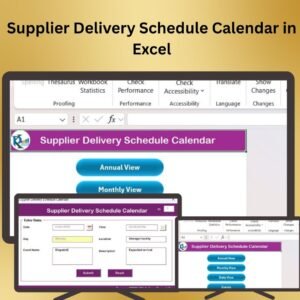
- Supplier Delivery Schedule Calendar in Excel: plan supplier deliveries by date
- Procurement and Vendor Management Kit: 7 procurement templates in one bundle
- Calendar & Planner Pack: 12 calendar and planner templates
Browse all Excel calendars or the Excel operations templates.






























Reviews
There are no reviews yet.