

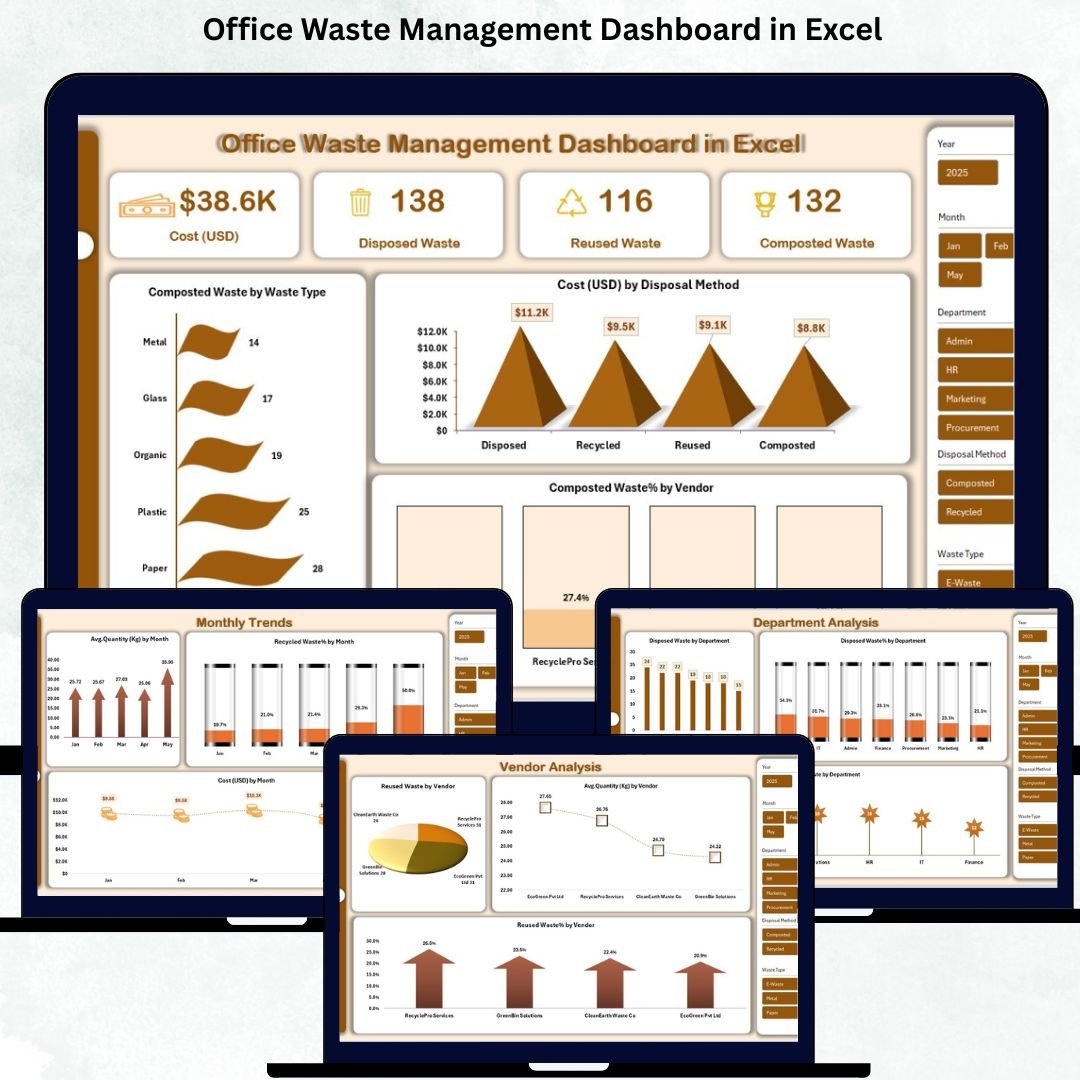

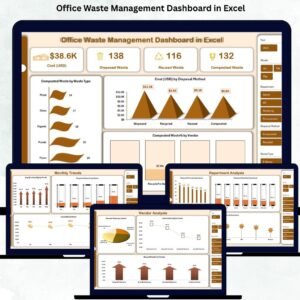
help organizations track, analyze, and reduce office waste with accuracy. When multiple departments, vendors, and waste categories generate different types of waste every day, manual tracking becomes confusing. Data gets scattered, sheets become messy, and reports take too long to prepare. This ready-to-use Excel dashboard solves all those problems instantly by bringing every waste indicator into one clean, automated, and visually powerful system.Office Waste Management Office Waste Management Dashboard in ExcelDashboard in Excel
With this dashboard, teams can track disposal cost, reused waste, composted waste, recycled waste percentage, vendor performance, departmental contribution, and monthly trends — all in one place. Whether you are a sustainability manager, facility officer, or operations head, this dashboard gives you fast, reliable insights that support smarter decision-making and better waste reduction strategies.
⚡ Key Features of the Office Waste Management Dashboard in Excel
This dashboard is packed with advanced yet easy-to-use features that simplify waste tracking for every team.
✨ All-in-one Waste Performance View – Quickly monitor cost, total waste, recycled %, reused waste, composted waste, and more.
✨ Multiple Analysis Pages – Includes Overview, Waste Analysis, Department Analysis, Vendor Analysis, and Monthly Trends tabs.
✨ Automated Calculations – No formulas needed. Just enter the data and the dashboard updates automatically.
✨ Department-wise & Vendor-wise Insights – Understand where waste is coming from and which vendors perform best.
✨ Interactive Charts & Visuals – Pivot charts and indicators allow smooth analysis without complex steps.
✨ Excel-Based, No Coding Required – Works fully inside Excel; no Power BI or special software needed.
✨ Recycling & Compost Tracking – See which waste categories contribute most to environmental goals.
✨ Easy Customization – Modify waste types, vendors, colors, and departments anytime.
This feature-rich layout makes waste management simple, fast, and highly actionable.Office Waste Management Dashboard in Excel
📦 What’s Inside the Office Waste Management Dashboard
Inside the Excel file, you will find professionally organized pages that convert raw data into meaningful insights:
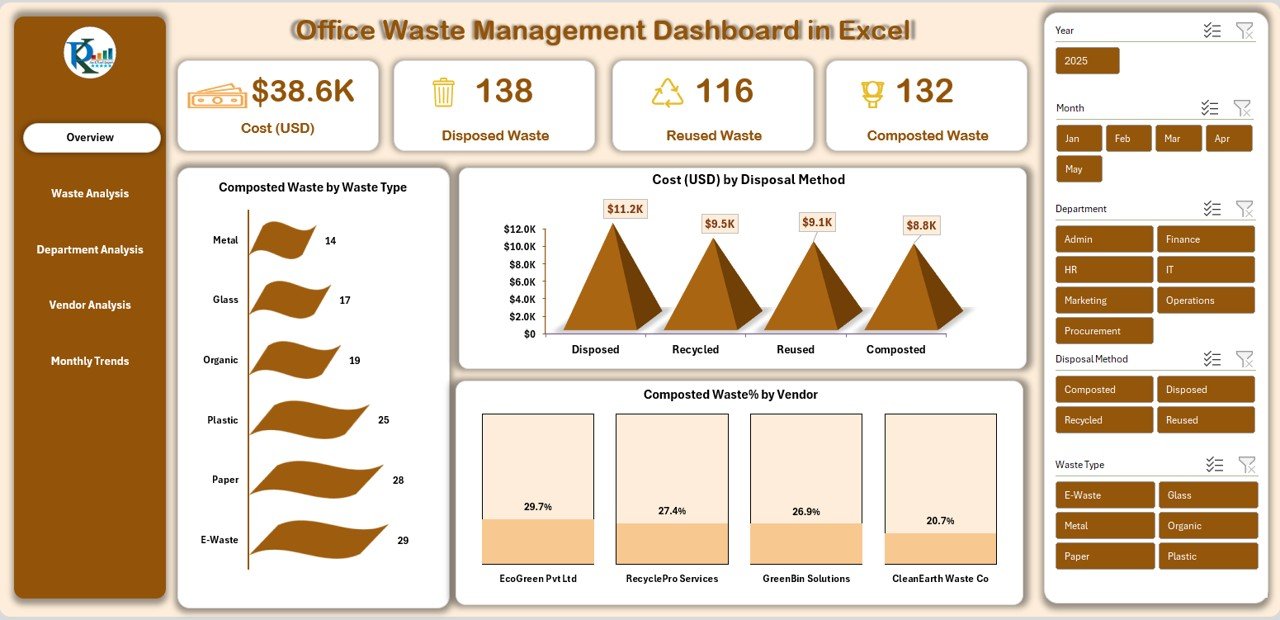
📘 Overview Page – Shows total cost, disposed waste, reused waste, composted waste, cost by disposal method, and compost % by vendor.
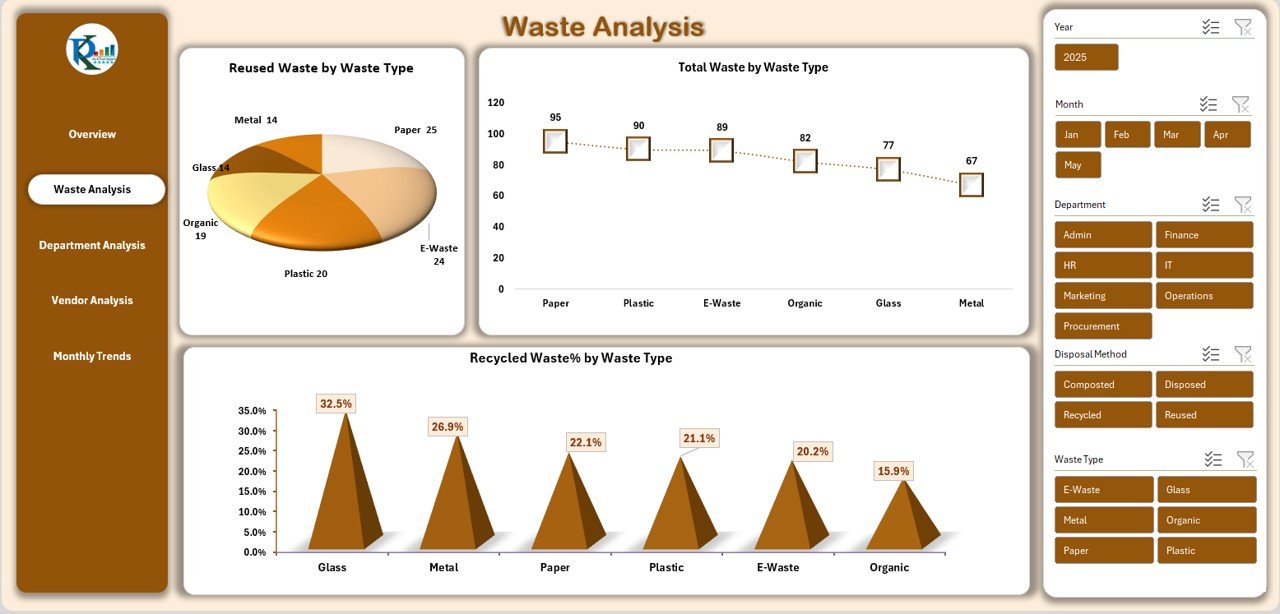
📘 Waste Analysis Page – Compare various waste types such as paper, plastic, organic waste, and packaging waste.
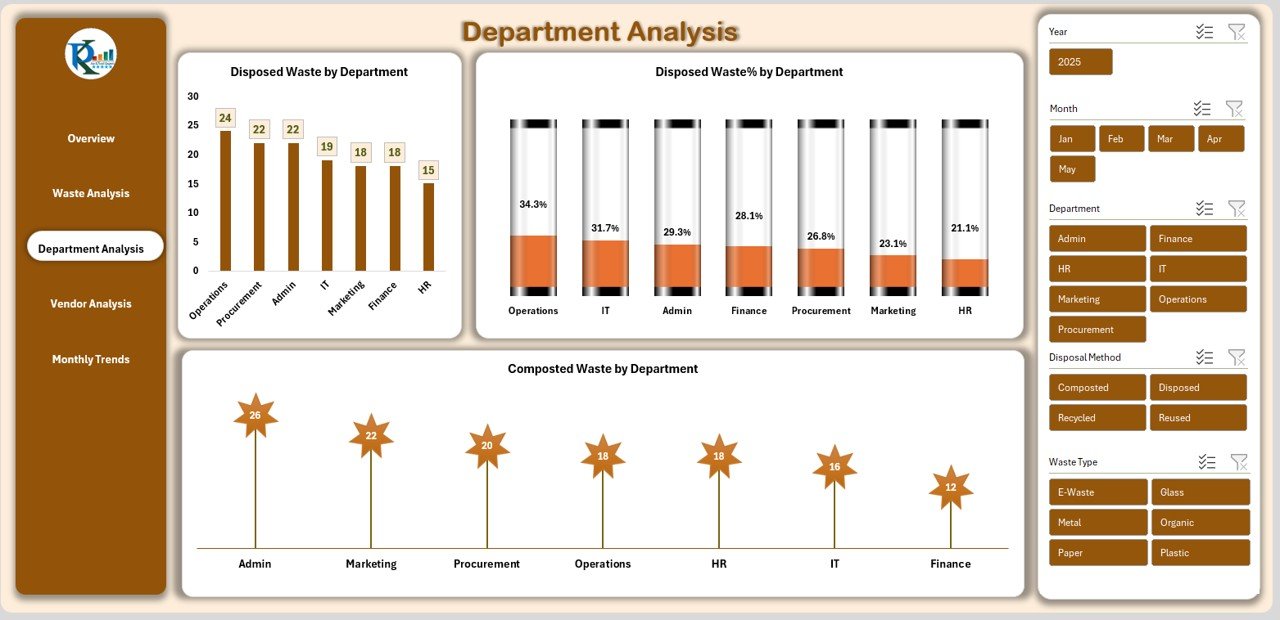
📘 Department Analysis Page – Identify which department generates the most waste and track composted waste by department.
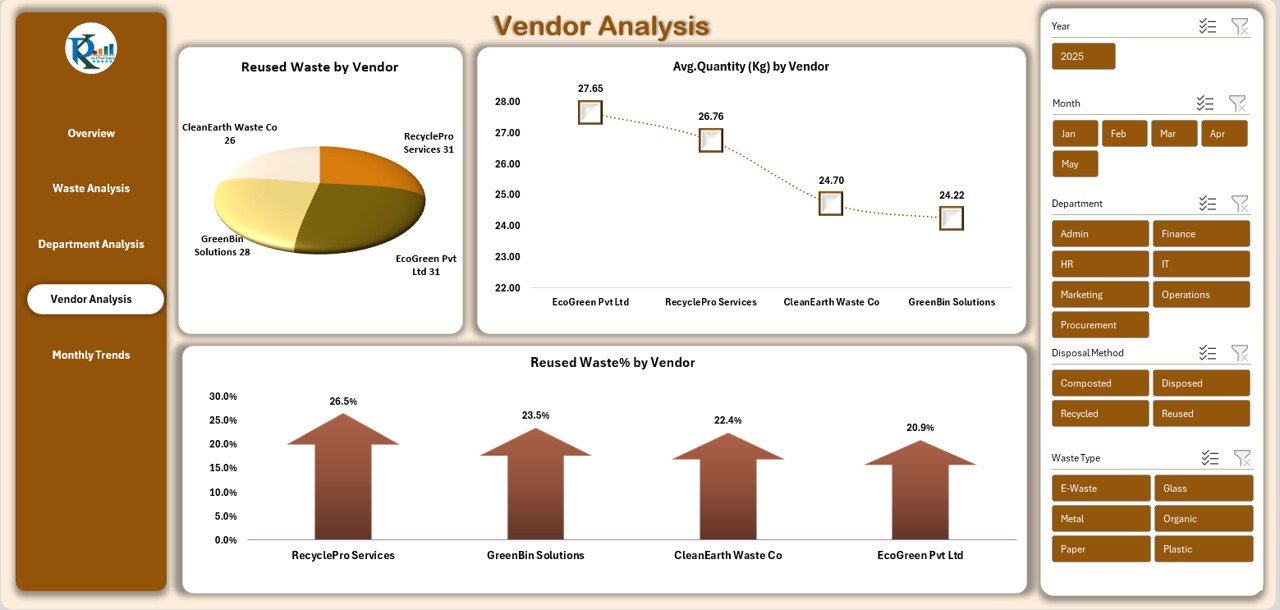
📘 Vendor Analysis Page – Review reused waste %, vendor efficiency, and average waste handled by each vendor.
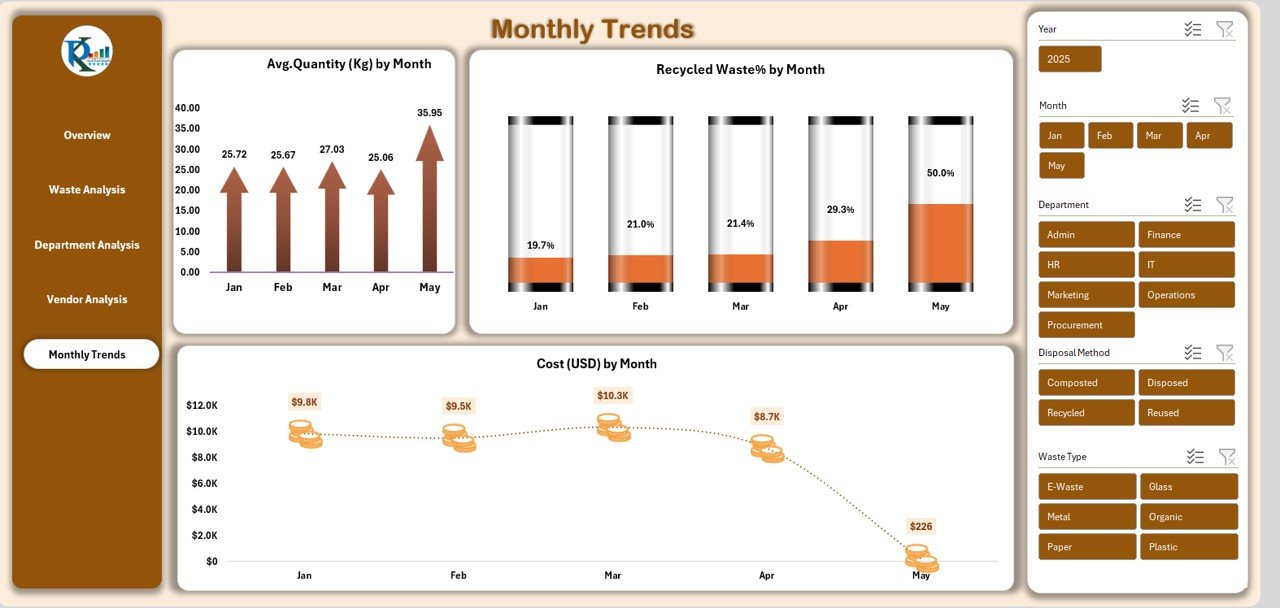
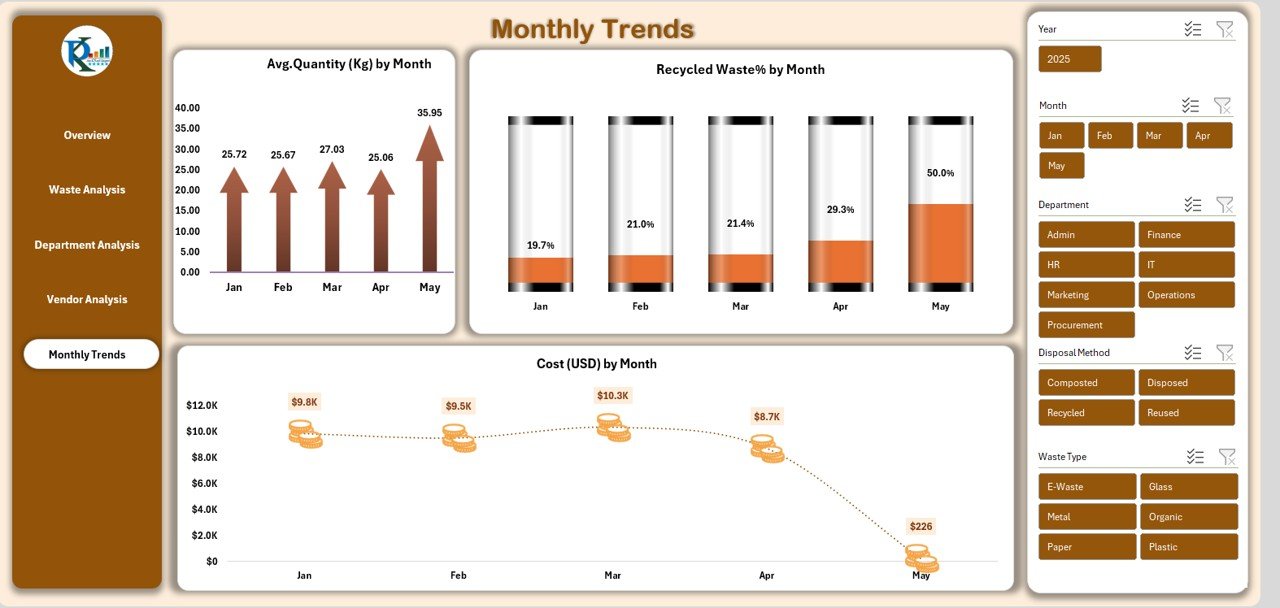
📘 Monthly Trends Page – Understand waste patterns month-by-month, review seasonality, and monitor cost fluctuations.
All pages are easy to navigate and refresh automatically when new data is added.
🛠️ How to Use the Office Waste Management Dashboard
Getting started is extremely simple — even for non-Excel users.
1️⃣ Enter your daily or weekly data (waste type, cost, vendor, department, kg, month).
2️⃣ Refresh the dashboard, and all charts update instantly.Office Waste Management Dashboard in Excel
3️⃣ Review the Overview page for a quick performance summary.
4️⃣ Analyze waste patterns on the Waste Analysis and Monthly Trends pages.
5️⃣ Compare departments & vendors to identify improvement opportunities.
6️⃣ Use insights to set recycling targets, negotiate vendor contracts, or start awareness programs.
The dashboard automates calculations and visuals entirely, so you only focus on decision-making.
👥 Who Can Benefit from This Dashboard
This dashboard is perfect for:
🏢 Corporates & Offices managing waste across multiple departments
🌿 Sustainability & ESG Teams tracking recycling and composting goals
🏭 Facility & Operations Managers monitoring daily waste performance
🔍 Compliance & Audit Teams verifying vendor output and waste records
📊 Management Teams reviewing waste KPIs in monthly meetings
🚛 Waste Vendors & Service Providers analyzing their performance
💼 Consultants designing waste reduction strategies for clientsOffice Waste Management Dashboard in Excel
If your organization wants a smarter, faster, and more transparent waste monitoring system—this dashboard is the ideal solution.
### Click here to read the Detailed blog post
Watch the step-by-step video tutorial:
Visit our YouTube channel to learn step-by-step video tutorials → Youtube.com/@PKAnExcelExpert
Compatibility and Requirements
- Works in Microsoft Excel desktop (Excel 2016 or later, or Microsoft 365).
- The charts are pivot charts, so you can filter them directly in the workbook. Microsoft explains how to create a PivotTable to analyze worksheet data.
- No Power BI or other software is needed.
Frequently Asked Questions
Which pages does the dashboard have?
Five pages: Overview, Waste Analysis, Department Analysis, Vendor Analysis and Monthly Trends.
What data do I enter?
Enter waste type, cost, vendor, department, kg and month. After you refresh the dashboard, the charts update from that data.
Can I track recycling and composting?
Yes. The dashboard shows reused waste, composted waste and compost percentage by vendor, plus the cost by disposal method.
Can I change the waste types, vendors and departments?
Yes. You can edit waste types, vendors, departments and colors to match your office.
Is there a Google Sheets or Power BI version?
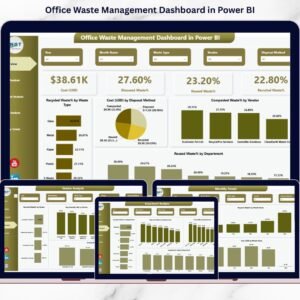
Yes. See the Office Waste Management Dashboard in Google Sheets and the Office Waste Management Dashboard in Power BI.
Related Office Dashboard Templates
- Office Waste Management Dashboard in Google Sheets: the same waste dashboard in Google Sheets
- Office Waste Management Dashboard in Power BI: the Power BI edition
- Office Energy Consumption Dashboard in Excel: track office energy use alongside waste
- Office Utilization Dashboard in Excel: see how office space is used
- Office Maintenance Dashboard in Excel: follow office maintenance work
Browse all Excel dashboards.







Reviews
There are no reviews yet.