
Knowledge Management Dashboard in Excel

MS Excel - instant download

Original price was: ₹1,999.00.Current price is: ₹1,399.00.
Details, requirements and demo below
Sale!

Knowledge Management Dashboard in Excel

Original price was: ₹1,999.00.Current price is: ₹1,399.00.

🚀 Turn scattered information into measurable business value with this Excel-based Knowledge Management Dashboard.

🧠 Centralized Knowledge Tracking – Monitor usage, reuse, and impact
💰 Cost Savings Insights – Measure real financial benefits
⏱️ Time Saved Analysis – Track productivity gains in hours
📋 Compliance Visibility – Support audits and governance
🏢 Department & Owner Analysis – Identify top contributors
📈 Monthly Trend Tracking – Measure improvement over time
🧭 Easy Navigation – Leadership-ready dashboards
📊 Excel-Based & Flexible – No complex tools required

- +

💡 Buy any 2 templates and save 20% automatically at checkout.

Pricing country
Prices follow your selected country; checkout uses your billing country.
Excel Pivot Tables & Dashboards: Basic to Advanced courseLaunch offer
🎓 NEXTGENTEMPLATES ACADEMY
Like this dashboard? Learn to build your own.
Excel Pivot Tables & Dashboards: Basic to Advanced

From your first Pivot Table to the Data Model, DAX, Power Query and a one-page KPI dashboard. 11h 51m of video by PK, with practice files, quizzes and a capstone.

In today’s competitive business environment, organizations generate massive amounts of knowledge every day—documents, SOPs, training materials, guidelines, best practices, and insights. Knowledge Management Dashboard in Excel However, when this knowledge remains scattered across folders, emails, and systems, its true value gets lost. Teams waste time searching, duplicate work increases, and critical insights go unused.

Knowledge Management Dashboard in Excel That is exactly why the Knowledge Management Dashboard in Excel becomes a powerful, business-changing solution 📊🚀.

This ready-to-use Excel dashboard transforms raw knowledge data into clear, visual, and actionable insights. Instead of guessing whether knowledge initiatives actually deliver value, leaders can now measure cost savings, time efficiency, reuse, compliance, and overall impact from one centralized dashboard. Because the solution is built entirely in Microsoft Excel, it remains flexible, affordable, and extremely easy to adopt—without complex tools or technical dependencies.

Designed for modern organizations, this dashboard helps teams move from information overload to strategic knowledge utilization.


⭐ Key Features of Knowledge Management Dashboard in Excel

📊 Centralized Knowledge Performance Tracking
Monitor how knowledge is created, accessed, reused, and validated across the organization.

💰 Cost Savings Measurement
Track real cost savings generated through knowledge reuse and standardization.

⏱️ Time Efficiency Analysis
Measure average time saved (in hours) using validated and reusable knowledge.

📋 Compliance & Governance Visibility
Monitor compliance validation status to reduce risk and support audits.

📈 Department, Owner & Knowledge-Type Insights
Analyze which teams, contributors, and knowledge formats deliver the highest value.

🧭 User-Friendly Navigation
Quick page navigation makes leadership reviews and presentations effortless.


📦 What’s Inside the Knowledge Management Dashboard in Excel

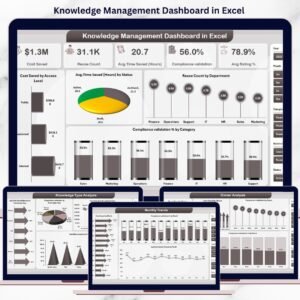
This professionally designed Excel dashboard includes five powerful analytical pages plus a structured data sheet:

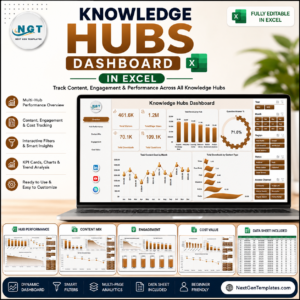
📊 Overview Page
The command center showing:

Knowledge Management Dashboard in Excel
  • KPI cards for Cost Saved, Reuse Count, Average Time Saved, Compliance Validation, and Average Rating

  • Charts for Cost Saved by Access Level, Reuse by Department, Time Saved by Status, and Compliance by Category

📂 Knowledge Type Analysis Page
Analyze value by knowledge format with charts for:

  • Average Time Saved by Knowledge Type

  • Compliance Validation by Knowledge Type

  • Cost Saved by Knowledge Type

  • Total Downloads by Knowledge Type

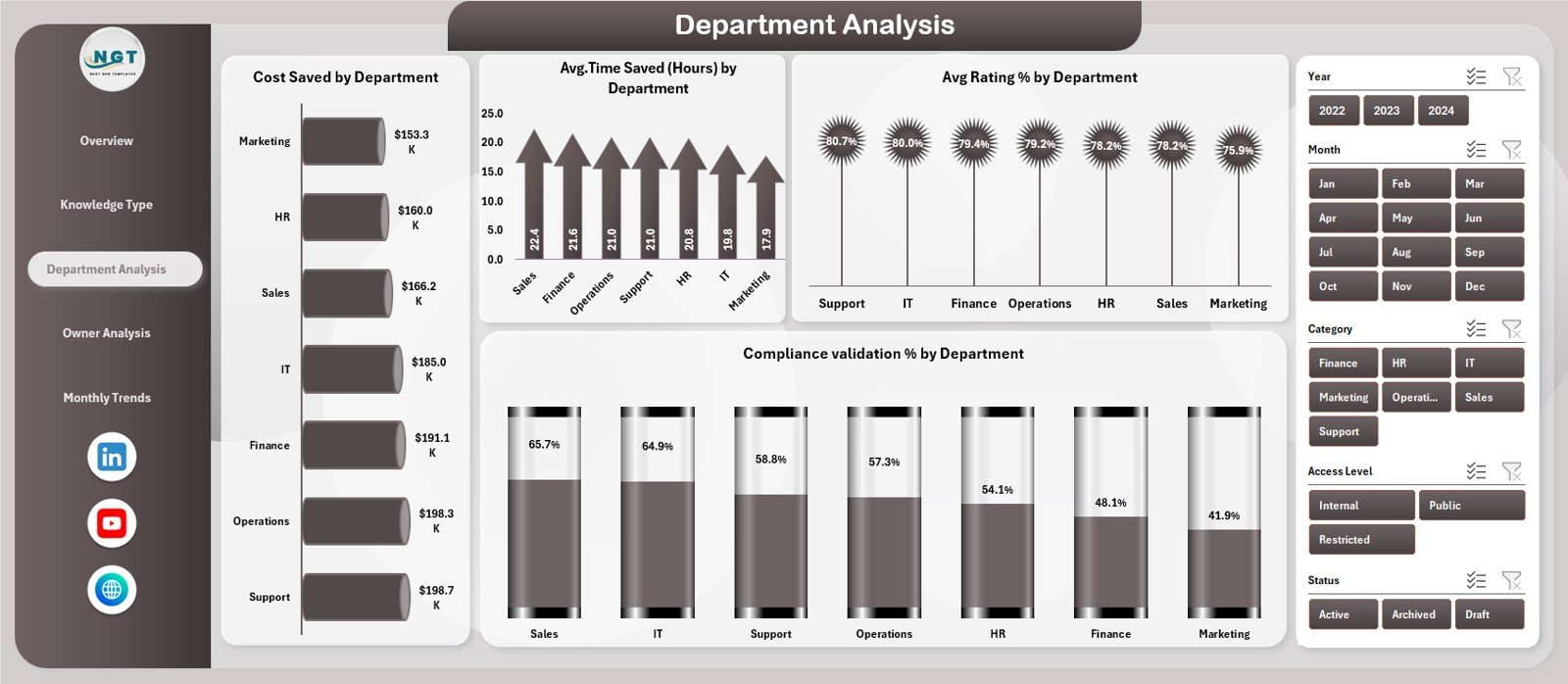
🏢 Department Analysis Page
Understand team-wise adoption using:

  • Cost Saved by Department

  • Time Saved by Department

  • Average Rating by Department

  • Compliance Validation by Department

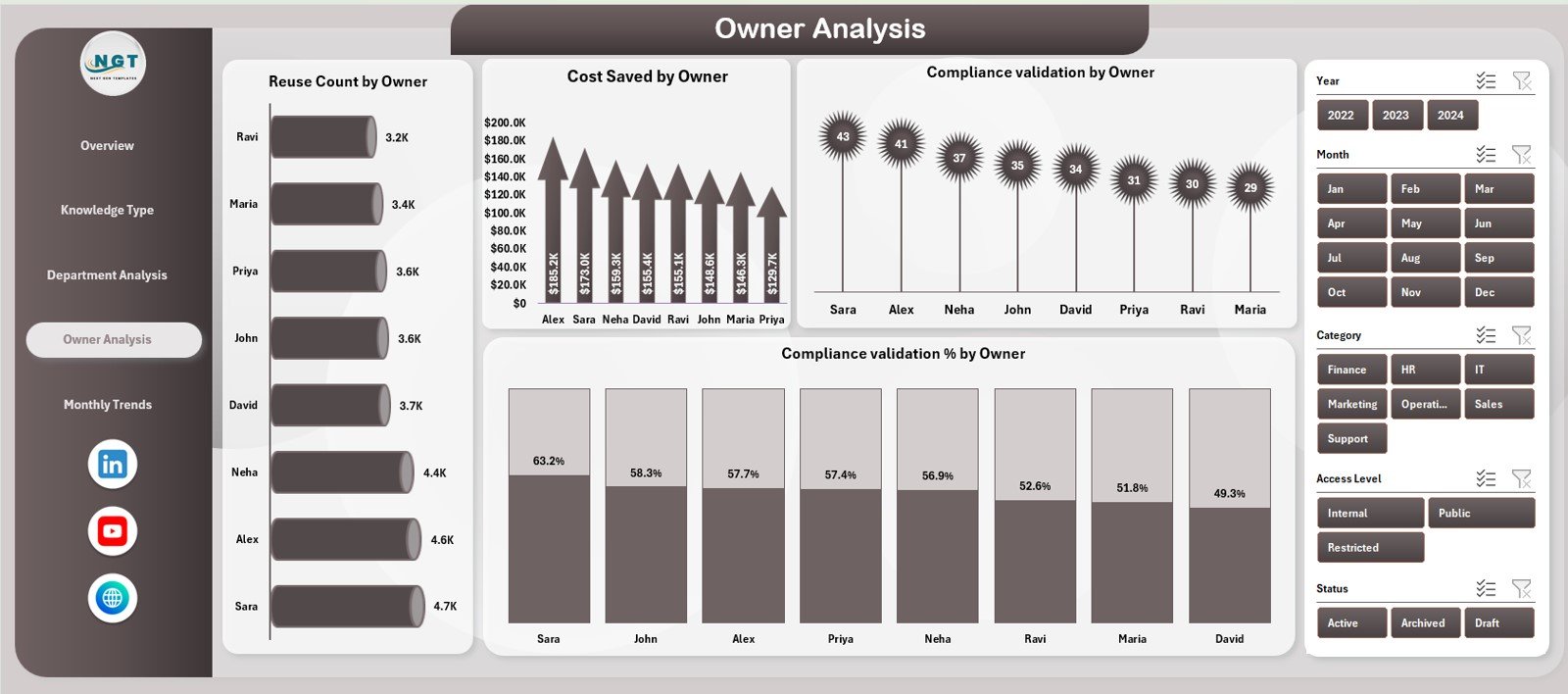
👤 Owner Analysis Page
Track contributor impact with:

  • Reuse Count by Owner

  • Cost Saved by Owner

  • Compliance Validation by Owner

  • Compliance Validation % by Owner

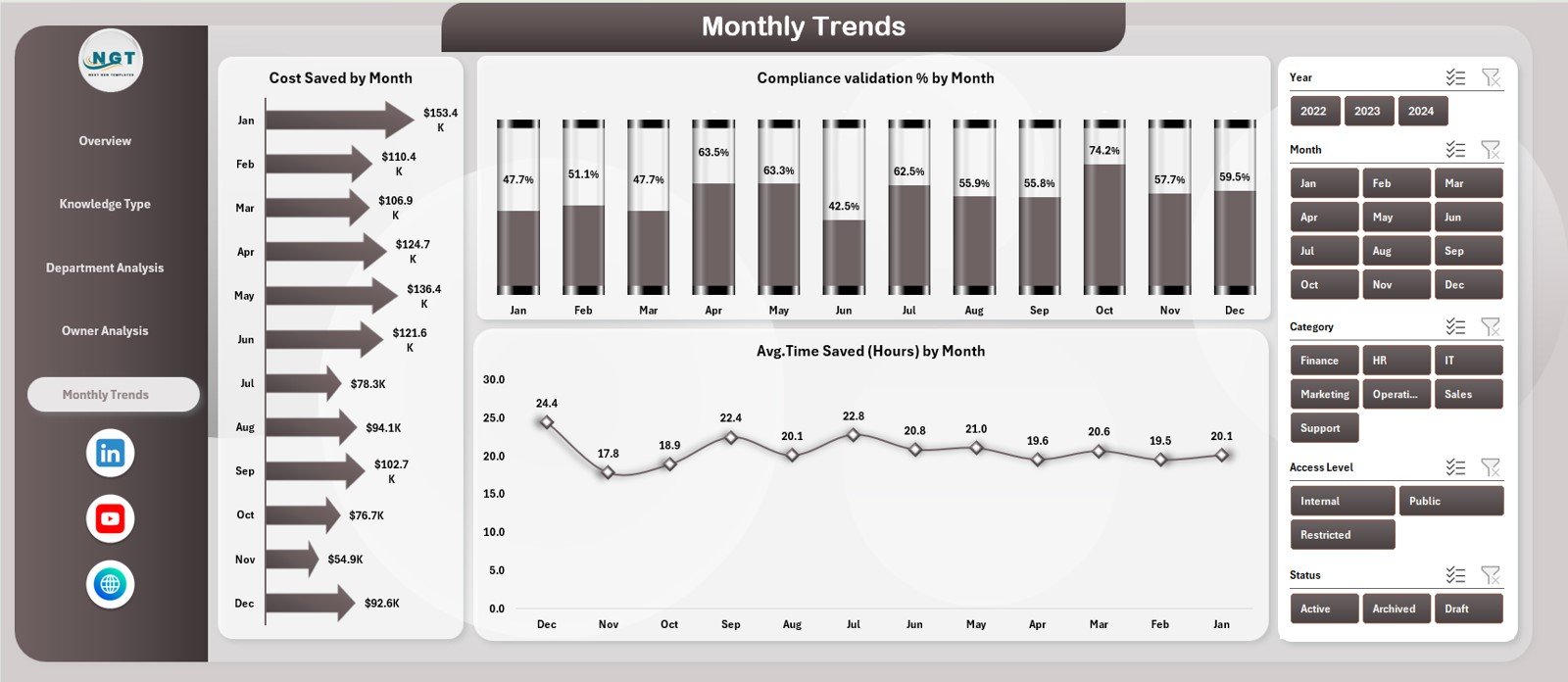
📈 Monthly Trends Page
Measure consistency and improvement using:

  • Cost Saved by Month

  • Compliance Validation % by Month

  • Average Time Saved by Month

🗂️ Data Sheet
The centralized data entry sheet capturing:

  • Knowledge type, department, owner

  • Access level, cost saved, time saved

  • Compliance status, ratings, downloads

Once data is updated, all visuals refresh automatically.


🛠️ How to Use the Knowledge Management Dashboard in Excel

Using the dashboard is simple and efficient:

1️⃣ Enter or update knowledge records in the Data Sheet
2️⃣ Review high-level KPIs on the Overview Page
3️⃣ Drill down by Knowledge Type, Department, or Owner
4️⃣ Analyze Monthly Trends for improvement tracking
5️⃣ Use insights to optimize knowledge strategy

Because everything updates automatically, teams save time and eliminate manual reporting.


👥 Who Can Benefit from This Knowledge Management Dashboard in Excel

This dashboard is ideal for:

🧠 Knowledge Managers
📚 HR & Learning Teams
⚙️ Process Excellence Teams
💻 IT Documentation Teams
📋 Compliance & Audit Teams
🏢 Department Heads
📊 Senior Leadership

Any organization that values structured, reusable knowledge will benefit instantly.

📖 Click here to read the Detailed blog post

▶️ Visit our YouTube channel to learn step-by-step video tutorials

Youtube.com/@PKAnExcelExpert

Watch the step-by-step video tutorial:

Frequently asked questions

Which Excel version do I need?
Microsoft Excel 2016 or later on desktop (Microsoft 365 recommended). Many of our formula templates also open in Excel 2013 and Excel for the web - the exact requirement is listed in this product's description.
Does it work on Mac?
Yes. Formula-based Excel templates (no macros) work in Excel for Mac 2016 or later.
Does it work on mobile or Excel Online?
You can view it in the Excel mobile app and Excel for the web, but for entering data, using slicers and refreshing pivots we recommend desktop Excel.
How do I add my own data?
Replace the sample rows on the data sheet with your own (keep the column headers), then click Data > Refresh All so every chart and pivot updates.
Some sheets are protected - how do I edit them or change the logo?
A few of our trackers, data entry systems and dashboards protect sheets so formulas are not overwritten by mistake. Go to Review > Unprotect Sheet - most have no password. If Excel asks for one, message us with your order number and we will share it straight away.
How many records can it handle?
It has been tested with several thousand rows and suits normal small-business volumes. Excel itself handles over 1 million rows.
Is it a one-time payment or a subscription?
One-time payment. No subscription, no per-user fees and nothing to renew - the file is yours to keep.
How do I get the file after payment?
Instantly. The download link appears on screen after checkout, is emailed to you, and stays under My Account > Downloads on our website. If the email does not arrive within a few minutes, check your spam or promotions folder.
Is a user manual included?
Most of our newer products include a PDF user manual in the download. If yours does not have one, message us with your order number and we will send it.
Do I get free updates?
Bug fixes are always free - if something does not work as described, we fix it and send you the corrected file. New versions with new features are not included in the price, unless this product's description says otherwise.
Can you customise it for me?
Yes. Small changes to this template (your columns, categories, logo, colours, minor layout) cost the template price plus $40-80 (Rs 3,000-6,000 + GST), quoted once you send your list. A fully custom build is usually $100-200 (Rs 8,000-18,000 + GST) with two revision rounds. Email your requirements to [email protected] or message us on WhatsApp.
Can I use it for my business or my clients?
Yes, for your own personal or internal business use, for as long as you like. Reselling or redistributing the template is not allowed.
What is your refund policy?
Because these are digital downloads, they are non-refundable once delivered - except when the product does not match its description (report it within 48 hours of purchase) or there is a technical problem our team cannot fix within 72 hours. Email [email protected] with your order number.
How do I get help?
Email [email protected] (Mon-Fri, 10 AM-7 PM IST) or message us on WhatsApp +91 80770 90260 (chat only, no calls). Please include your order number.

Still have a question? Click Need help? at the bottom-left to ask our assistant, or message us on WhatsApp.

Application

MS Excel

Template Type

Dashboard

Price

Paid

Business Or Department

Operations Management

Reviews

There are no reviews yet.

Only logged in customers who have purchased this product may leave a review.

Knowledge Management Dashboard in ExcelKnowledge Management Dashboard in Excel
Original price was: ₹1,999.00.Current price is: ₹1,399.00.
- +
Scroll to Top