


Running a successful interior design business requires much more than creativity and great aesthetics. You must manage timelines, budgets, team productivity, client satisfaction, and profitability — all at the same time. Interior Design KPI Scorecard in Excel However, many interior design firms still rely on scattered Excel sheets, manual reports, or gut feeling to measure performance. As a result, decisions become slow, unclear, and reactive.
Interior Design KPI Scorecard in Excel That is exactly where the Interior Design KPI Scorecard in Excel creates real value.
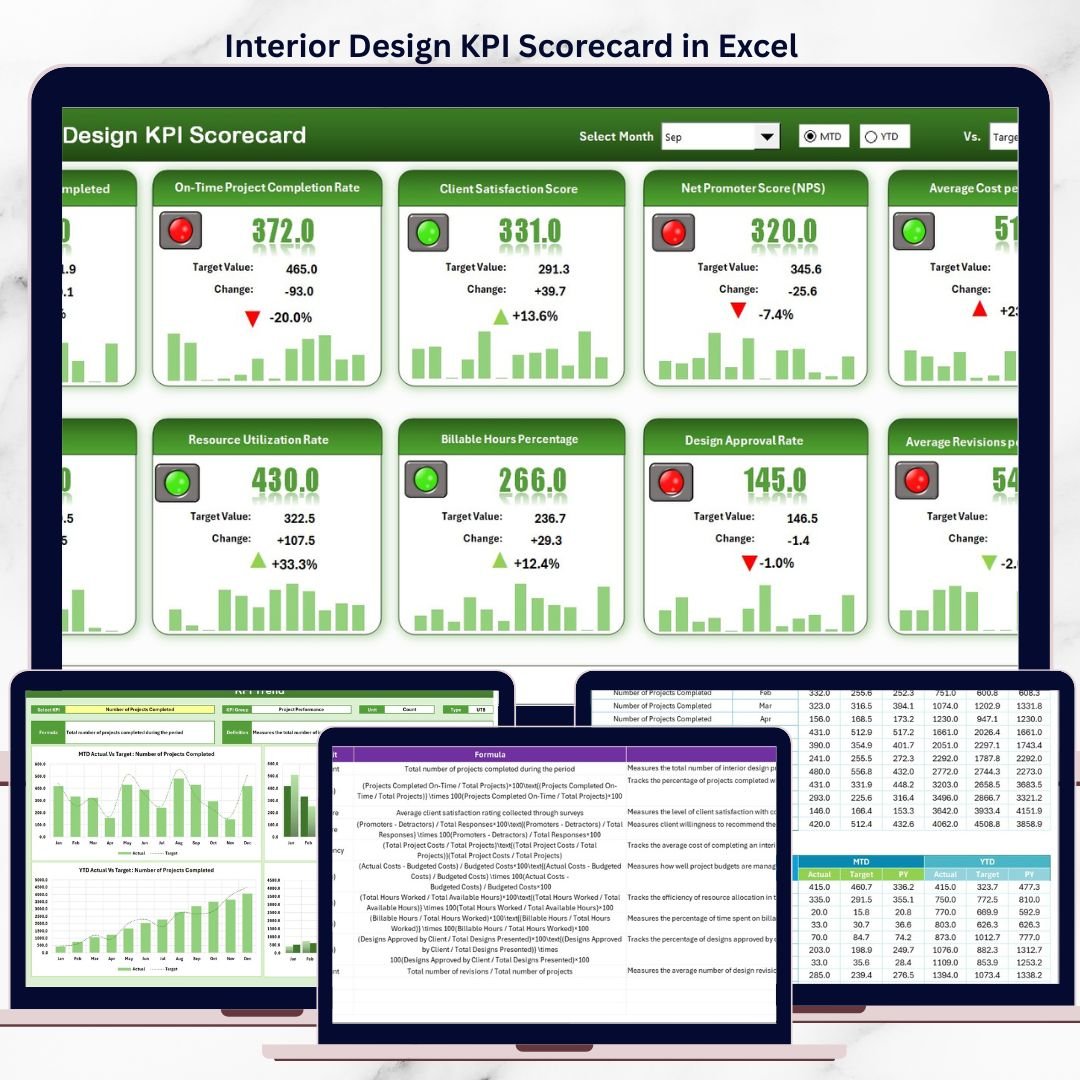
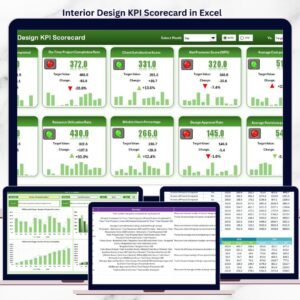
Interior Design KPI Scorecard in Excel This ready-to-use Excel KPI scorecard helps interior designers track key performance indicators across projects, finances, operations, and client experience from a single, structured dashboard. Instead of guessing what is working and what is not, you gain instant visibility into performance gaps, trends, and improvement opportunities.
Designed for simplicity, clarity, and flexibility, this Excel scorecard enables interior design firms to balance creativity with performance — without expensive software or complex systems.
✅ Key Features of Interior Design KPI Scorecard in Excel
📊 Centralized KPI Tracking – Monitor all project, financial, and productivity KPIs in one Excel file
🎯 Actual vs Target Comparison – Instantly identify underperformance or overachievement
📅 MTD & YTD Performance Analysis – Track short-term and long-term performance trends
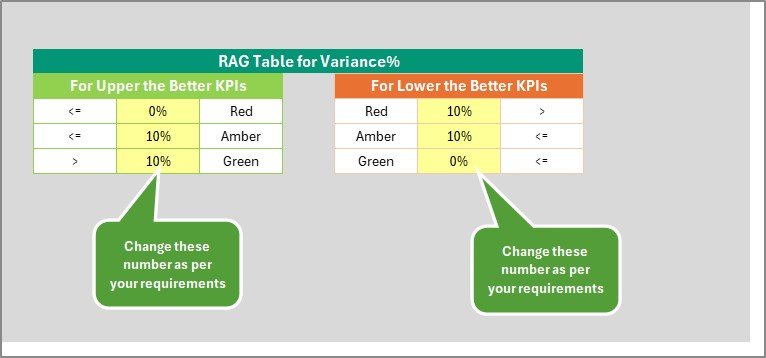
🎨 Visual Performance Indicators – Colors, icons, and charts highlight issues instantly
🔽 Dynamic KPI Selection – Analyze individual KPIs using dropdowns
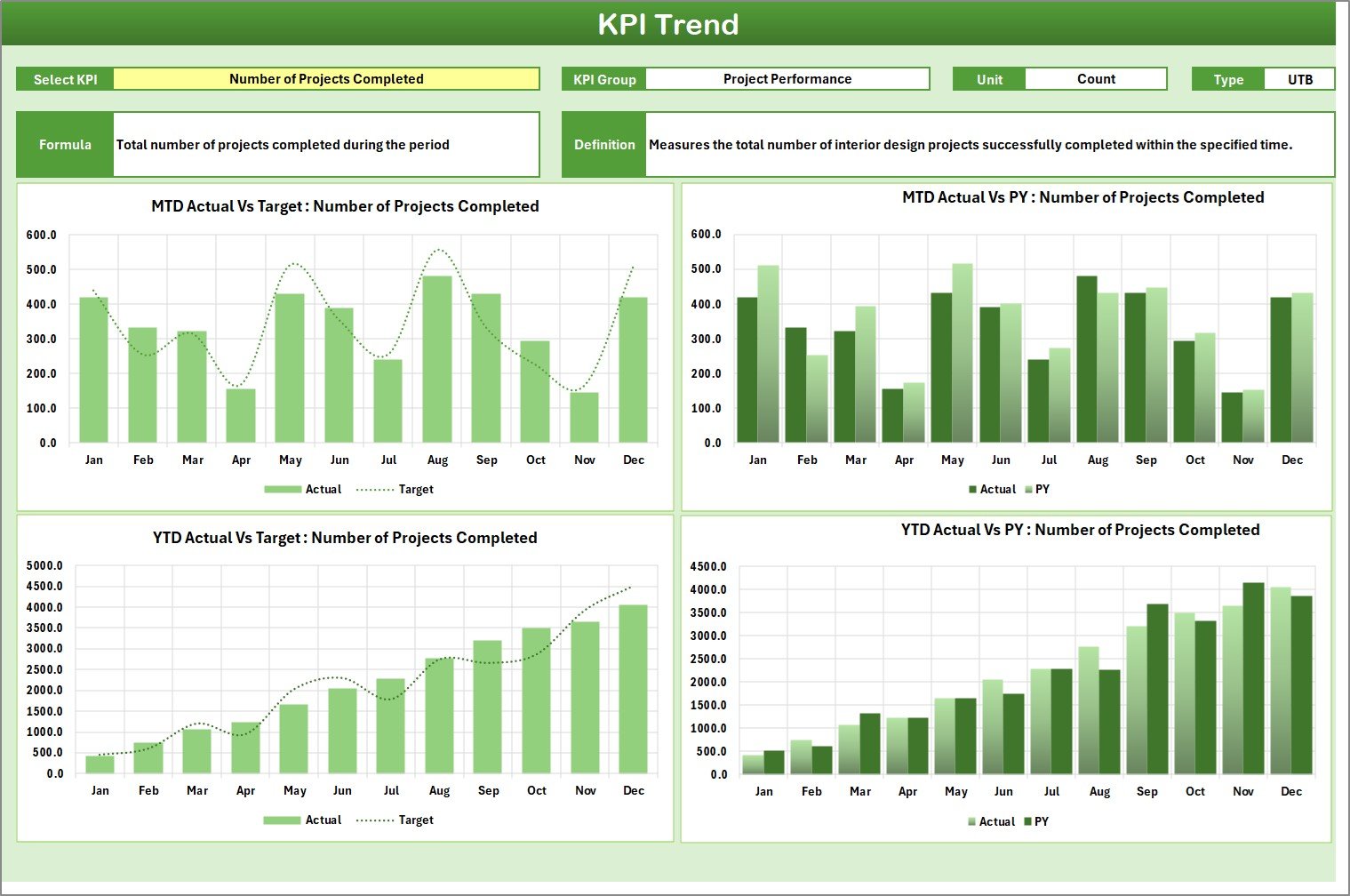
📈 Trend Charts for Better Planning – Compare Actual, Target, and Previous Year values
💼 Professional & Client-Ready Layout – Ideal for management reviews and team meetings
📦 What’s Inside the Interior Design KPI Scorecard in Excel
This ready-to-use scorecard includes four well-structured worksheets; each designed for a specific purpose:
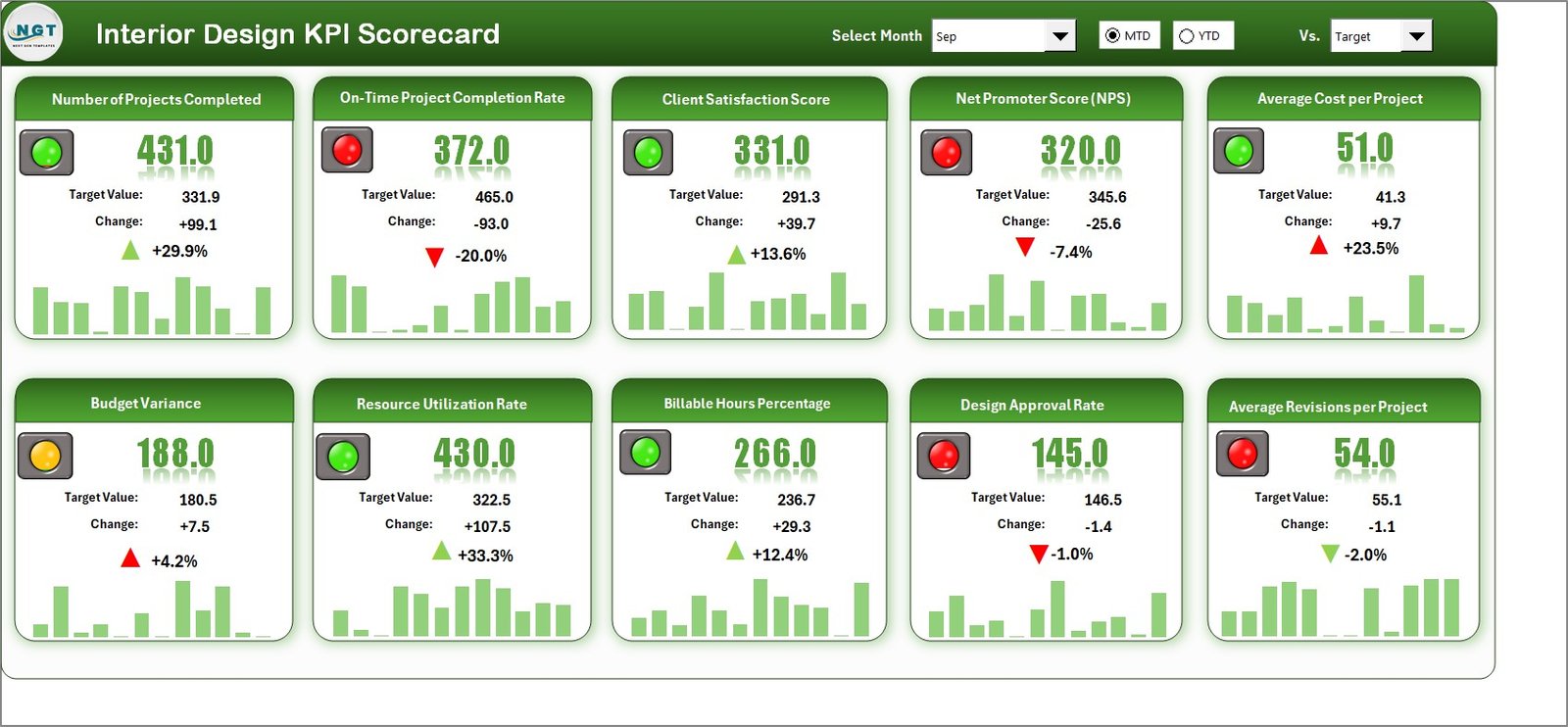
🧭 Scorecard Sheet
The main dashboard that provides an at-a-glance view of all KPIs, including KPI group, unit, type (LTB/UTB), MTD, and YTD performance.📈 KPI Trend Sheet
Allows selection of any KPI to view detailed information and MTD & YTD trend charts for Actual, Target, and Previous Year values.📝 Input Data Sheet
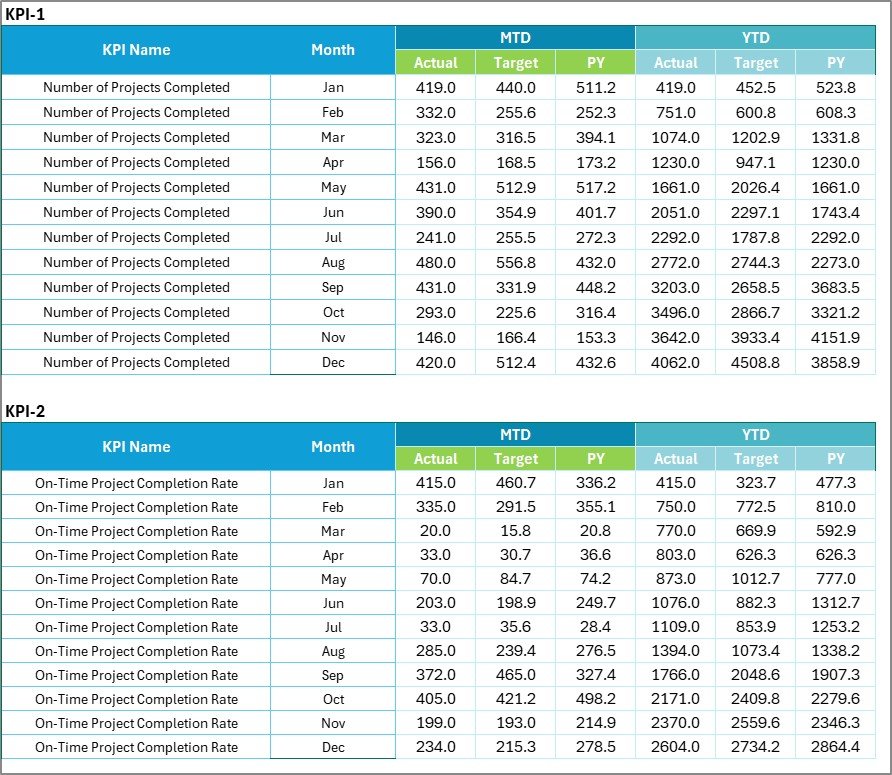
A centralized and flexible data entry sheet where users update actuals, targets, and previous year numbers.📘 KPI Definition Sheet
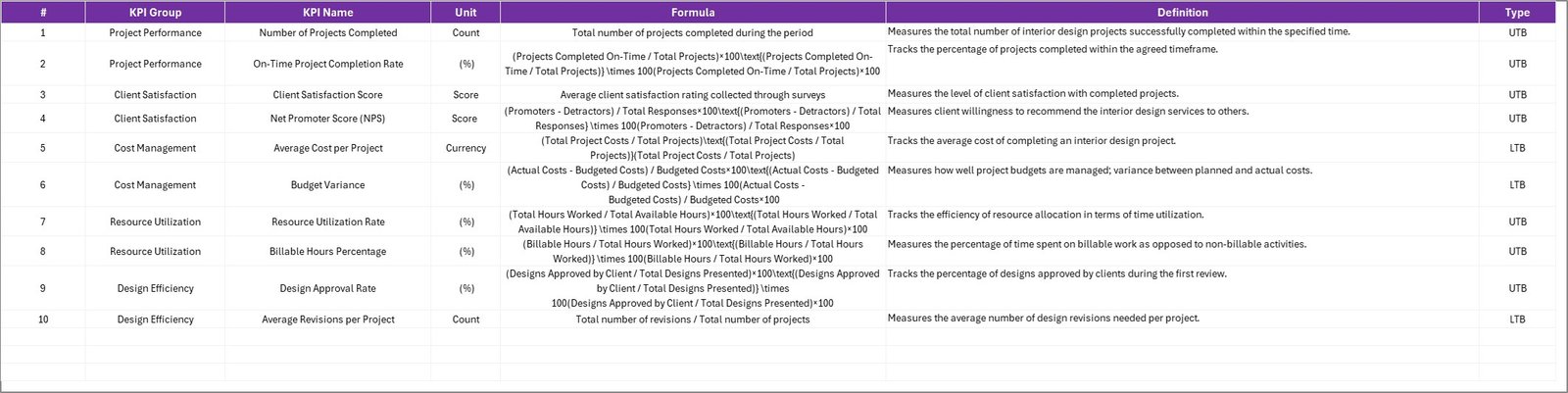
Documents KPI name, group, unit, formula, and definition to ensure clarity and consistency across the team.
Together, these sheets ensure accuracy, transparency, and professional performance reporting.
🛠️ How to Use the Interior Design KPI Scorecard in Excel
Using this KPI scorecard is simple and intuitive:
1️⃣ Define KPIs and performance targets
2️⃣ Enter actual and target data in the Input Data sheet
3️⃣ Select MTD or YTD view using dropdowns
4️⃣ Review Actual vs Target performance instantly
5️⃣ Analyze trends using charts and indicators
6️⃣ Take corrective actions based on insights
No advanced Excel skills are required — basic Excel knowledge is enough to use and maintain the scorecard.
👥 Who Can Benefit from This Interior Design KPI Scorecard?
This Excel KPI scorecard is ideal for:
🎨 Interior Designers
🏢 Interior Design Studio Owners
📋 Project Managers
🧠 Operations & Business Managers
💰 Finance & Admin Teams
Whether you run a small design studio or a growing interior firm, this scorecard adapts easily to your business needs.
📖 Click here to read the Detailed blog post
🎥 Visit our YouTube channel to learn step-by-step video tutorials
👉 Youtube.com/@PKAnExcelExpert
Watch the step-by-step video tutorial:
Compatibility and Requirements
- Works in Microsoft Excel desktop (Excel 2016 or later, or Microsoft 365).
- You pick MTD or YTD view and select a single KPI from dropdowns. Microsoft explains how in Create a drop-down list.
Frequently Asked Questions
Which sheets are included?
Four sheets: Scorecard, KPI Trend, Input Data and KPI Definition.
Where do I enter my numbers?
Enter actuals, targets and previous year numbers in the Input Data sheet. The Scorecard and KPI Trend sheets read from it.
Can I see MTD and YTD results?
Yes. You choose the MTD or YTD view with a dropdown, and the Scorecard compares actual results with targets.
How do I look at one KPI in detail?
Open the KPI Trend sheet and select a KPI. It shows the KPI details and MTD and YTD trend charts for Actual, Target and Previous Year values.
Is there a dashboard or a different platform version?
Yes. See the Interior Design KPI Dashboard in Excel, the Interior Design KPI Dashboard in Power BI and the Interior Design KPI Dashboard in Google Sheets.
Related Interior Design and KPI Templates
- Interior Design KPI Dashboard in Excel: a dashboard view of the same topic in Excel
- Interior Design KPI Dashboard in Power BI: the Power BI edition
- Interior Design KPI Dashboard in Google Sheets: the Google Sheets edition
- Project Management KPI Scorecard in Excel: a scorecard for tracking project performance
- KPI Scorecard Mega Pack: 12 scorecard templates in one download
Browse all Excel KPI dashboards.






















Reviews
There are no reviews yet.