



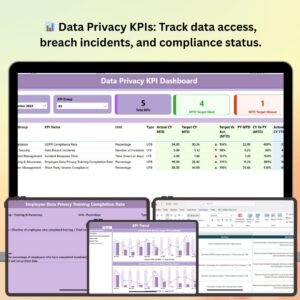
The Data Privacy KPI Dashboard in Power BI is an advanced tool designed to help organizations track, manage, and optimize their data privacy initiatives. With data privacy becoming more critical than ever, businesses need to stay on top of compliance requirements and ensure that sensitive data is handled responsibly. This Power BI-based dashboard provides key insights into data privacy performance, including compliance with regulations such as GDPR, breach detection, risk assessments, and more.
The dashboard offers a comprehensive overview of data privacy KPIs, allowing you to track various metrics such as data access requests, incident response times, and the status of compliance audits. By using this dashboard, you can improve data security, enhance privacy practices, and ensure your organization meets regulatory standards with ease.
Key Features of the Data Privacy KPI Dashboard in Power BI
📊 Comprehensive Data Privacy KPI Tracking
Monitor essential privacy KPIs such as data access requests, breach incidents, compliance audit statuses, and privacy training completion rates. Keep your organization on track with data privacy regulations.
🔒 GDPR & Regulatory Compliance Monitoring
Track GDPR compliance and other relevant regulations in real-time. Ensure that all data privacy actions align with the required legal standards to avoid penalties and data breaches.
⏱ Incident & Breach Response Tracking
Track the time taken to respond to data breaches and incidents. Monitor response times and the resolution of breaches to ensure compliance with privacy laws and best practices.
📉 Risk Assessment & Privacy Impact Metrics
Measure and evaluate the risk level associated with various data privacy actions. This helps in identifying potential areas of concern and improving data protection measures.
📅 Time-Based Performance Analysis
Monitor privacy KPIs over different periods (daily, weekly, monthly, yearly). Identify trends, measure improvements, and analyze the effectiveness of your data privacy measures over time.
⚙️ Customizable & Scalable Dashboard
Customize the dashboard to fit your organization’s specific data privacy needs. You can add new KPIs, modify visuals, and adjust tracking methods as necessary to align with your business goals.
Why You’ll Love the Data Privacy KPI Dashboard in Power BI

✅ Ensure GDPR & Regulatory Compliance
Track GDPR compliance, data protection regulations, and data handling processes in real-time, ensuring that your organization stays fully compliant.
✅ Improve Data Breach Management
Monitor breach incidents and response times to identify areas for improvement in your organization’s data security protocols. Enhance your ability to quickly respond to breaches and mitigate their impact.
✅ Track Risk & Privacy Impact
Evaluate the potential risks associated with different privacy practices, allowing you to implement proactive measures and reduce vulnerabilities.
✅ Make Informed Data Privacy Decisions
Use the insights from the dashboard to make informed decisions about privacy policies, data access controls, and incident management.
✅ Customizable to Meet Business Needs
The dashboard can be tailored to fit your organization’s specific data privacy goals, from adding new KPIs to modifying compliance requirements.
What’s Inside the Data Privacy KPI Dashboard in Power BI?
Comprehensive Data Privacy KPI Tracking: Monitor key privacy metrics like data access requests and breach incidents.
GDPR & Regulatory Compliance Monitoring: Ensure compliance with GDPR and other data privacy regulations.
Incident & Breach Response Tracking: Track the time and efficiency of data breach responses.
Risk Assessment & Privacy Impact Metrics: Measure the effectiveness of your privacy practices and identify risks.
Time-Based Performance Analysis: Track privacy KPIs over various periods to assess progress.
Customizable & Scalable: Adapt the dashboard to meet your organization’s unique data privacy needs.
How to Use the Data Privacy KPI Dashboard in Power BI
1️⃣ Download the Template: Get instant access to the Data Privacy KPI Dashboard in Power BI.
2️⃣ Integrate Data Sources: Connect your data privacy systems, including breach incident logs and compliance reports, to the dashboard.
3️⃣ Monitor Privacy KPIs: Track essential data privacy metrics such as breach response times, compliance status, and access requests.
4️⃣ Analyze Trends & Insights: Use time-based analysis to identify trends, measure effectiveness, and improve data protection practices.
5️⃣ Enhance Data Privacy & Compliance: Use the dashboard insights to ensure continuous improvement in your data privacy policies and practices.
Who Can Benefit from the Data Privacy KPI Dashboard in Power BI?
🔹 Compliance Officers & Data Privacy Managers
🔹 IT Security & Data Protection Teams
🔹 Legal & Risk Management Departments
🔹 Data Governance Specialists
🔹 Organizations with GDPR or Data Privacy Compliance Requirements
🔹 Healthcare, Financial, and Legal Services Providers
Protect sensitive data and ensure compliance with the Data Privacy KPI Dashboard in Power BI. Monitor key privacy metrics, track regulatory compliance, and improve your data security practices.
Click here to read the Detailed blog post
Visit our YouTube channel to learn step-by-step video tutorials
Youtube.com/@PKAnExcelExpert
Compatibility and Requirements
- Opens in Power BI Desktop, which is free to download from Microsoft.
- Microsoft explains how to install it in Get Power BI Desktop.
- You connect the dashboard to your own data, such as breach incident logs and compliance reports.
Frequently Asked Questions
Which KPIs does the Data Privacy KPI Dashboard track?
Data access requests, breach incidents, compliance audit status, privacy training completion rates, breach response times and risk assessment metrics.
Does it cover GDPR?
Yes. It tracks GDPR compliance and other data privacy regulations you need to follow.
Which time periods can I analyze?
Privacy KPIs can be viewed daily, weekly, monthly and yearly to show trends.
Can I add new KPIs?
Yes. You can add KPIs, change visuals and adjust tracking methods to fit your organization.
Related Data Privacy Templates
- Data Privacy KPI Dashboard in Excel: the same KPIs in an Excel workbook
- Data Privacy KPI Dashboard in Google Sheets: a browser-based version for shared editing
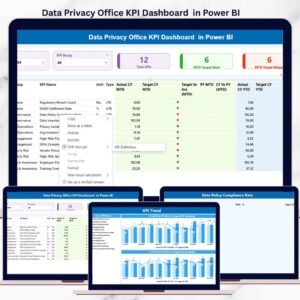
- Data Privacy Office KPI Dashboard in Power BI: KPIs for a privacy office team
- GDPR Compliance To-Do Checklist in Excel: a task list for GDPR work
- IT and Cybersecurity Operations Bundle: 8 IT and security templates for Excel and Power BI
Browse all Power BI KPI dashboards or the Power BI dashboards.







Reviews
There are no reviews yet.