

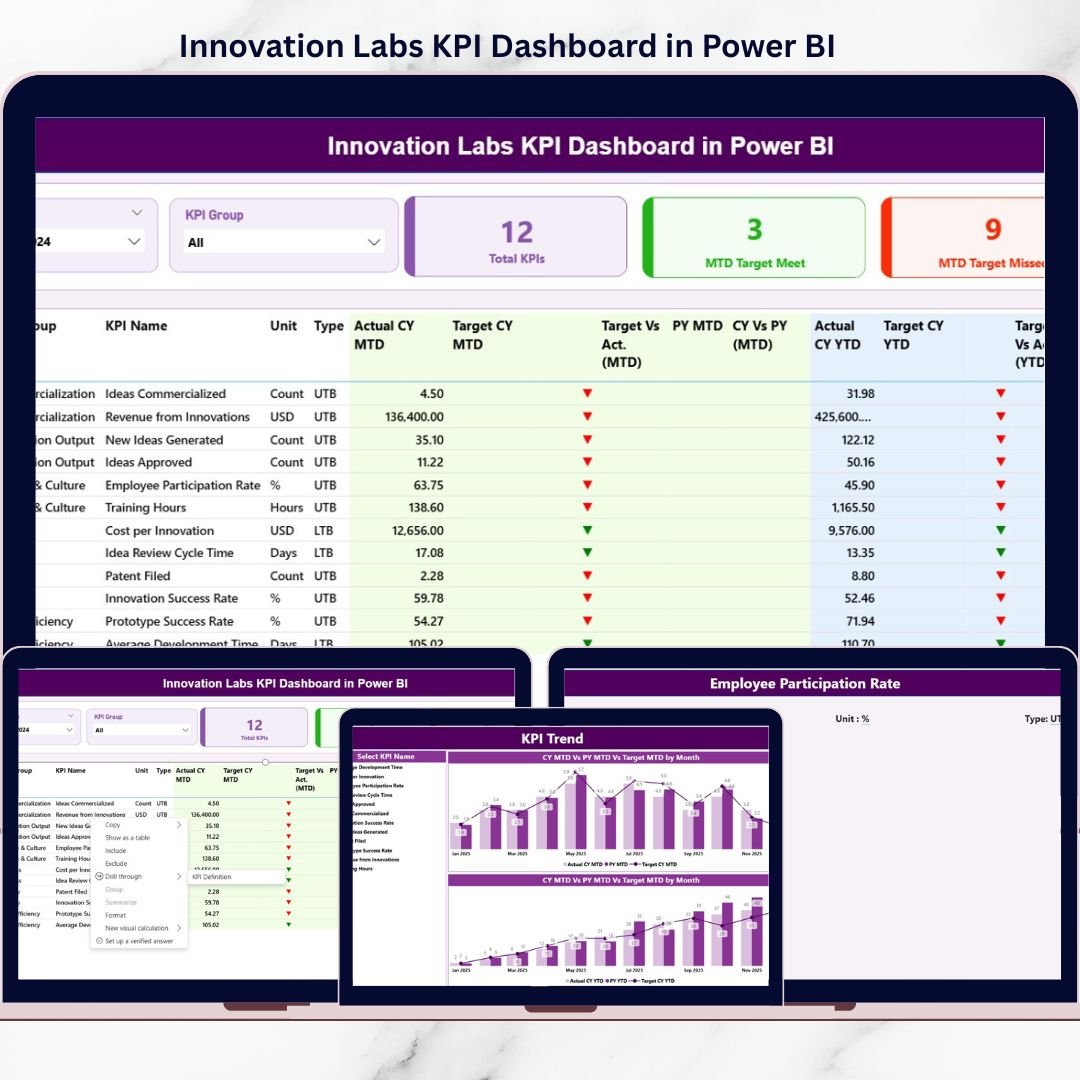

Innovation labs are where bold ideas take shape—but without proper measurement, innovation quickly turns into guesswork. That is exactly why the Innovation Labs KPI Dashboard in Power BI is a must-have solution for modern organizations that want to turn creativity into measurable business outcomes.
This ready-to-use Power BI dashboard is designed to help innovation teams, R&D leaders, and decision-makers track performance, monitor targets, and evaluate innovation success with absolute clarity. Instead of managing scattered Excel files, static charts, or manual reports, this dashboard brings all innovation KPIs into one centralized, interactive, and visual analytics platform.
By connecting Power BI directly to Excel, this dashboard ensures flexibility and ease of use. You simply update the Excel input sheets, refresh Power BI, and instantly see updated insights—no complex formulas or technical expertise required.
## 🚀 Key Features of Innovation Labs KPI Dashboard in Power BI
✨ Centralized Innovation Performance Tracking
Monitor all innovation KPIs in one structured Power BI dashboard.
📊 MTD & YTD KPI Monitoring
Track Month-to-Date and Year-to-Date actuals, targets, and trends effortlessly.
🎯 Target vs Actual Analysis
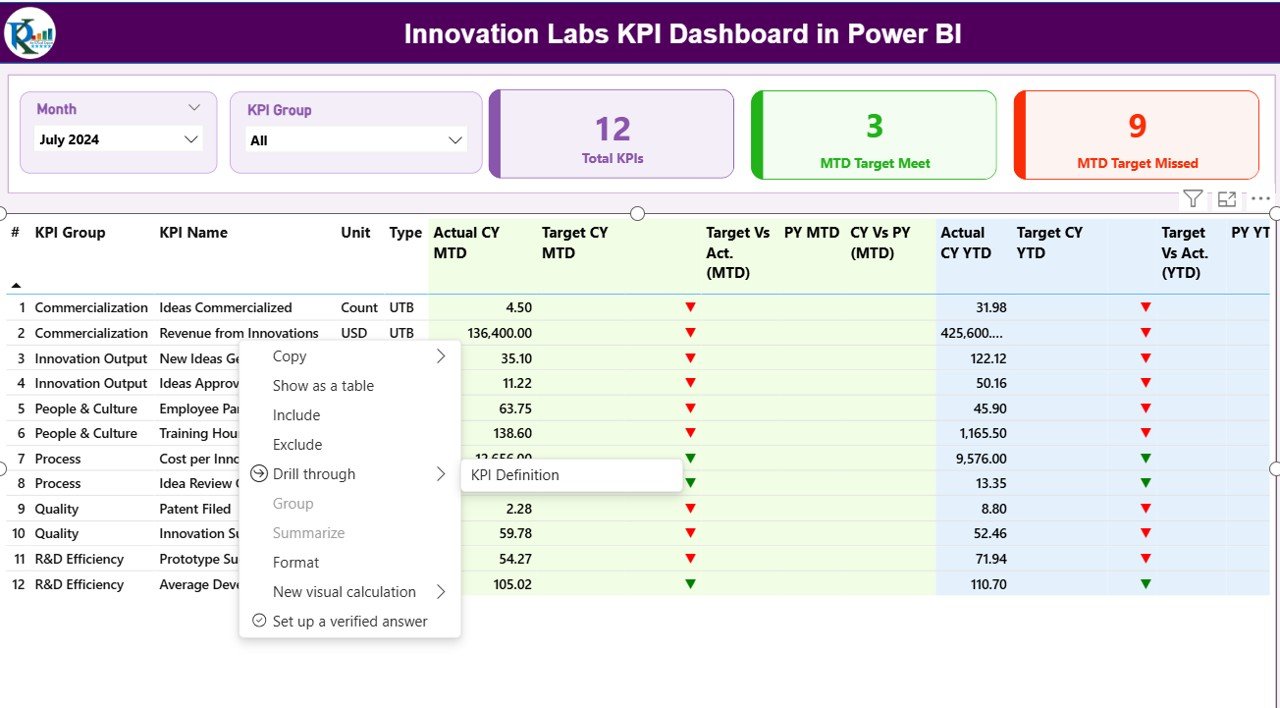
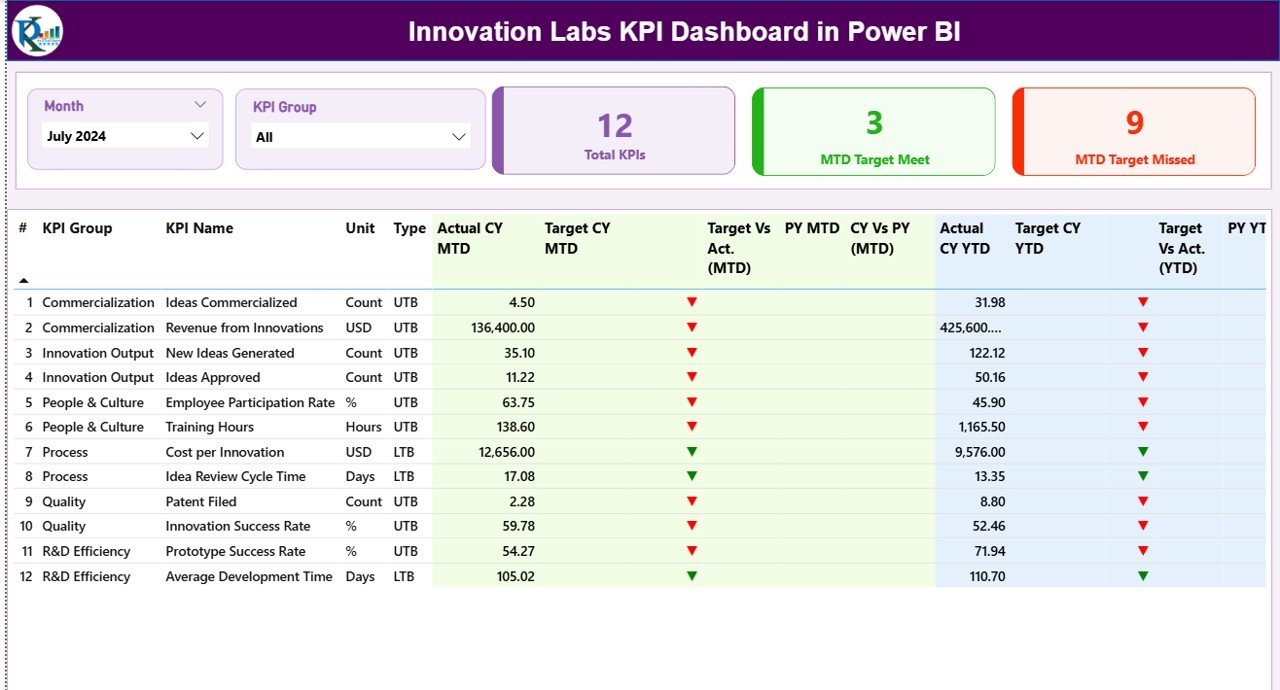
Instantly identify KPIs that are met or missed using visual indicators.
📈 Year-over-Year Comparisons
Analyze performance growth by comparing current year data with previous year values.
🎛️ Interactive Slicers
Filter data by Month and KPI Group to focus on what matters most.
🔍 Detailed KPI Performance Table
View KPI-level breakdown with units, types (UTB/LTB), targets, actuals, and variances.
📉 Trend Analysis with Combo Charts
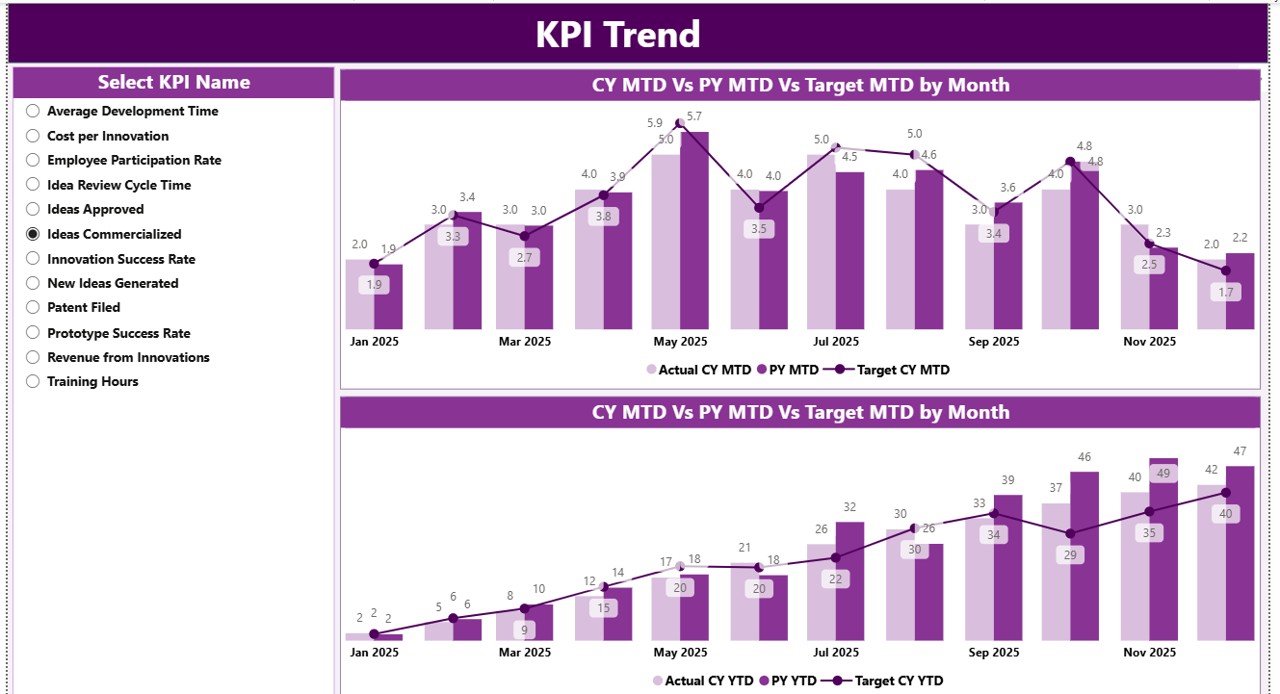
Analyze MTD and YTD trends using dynamic charts for deeper insights.
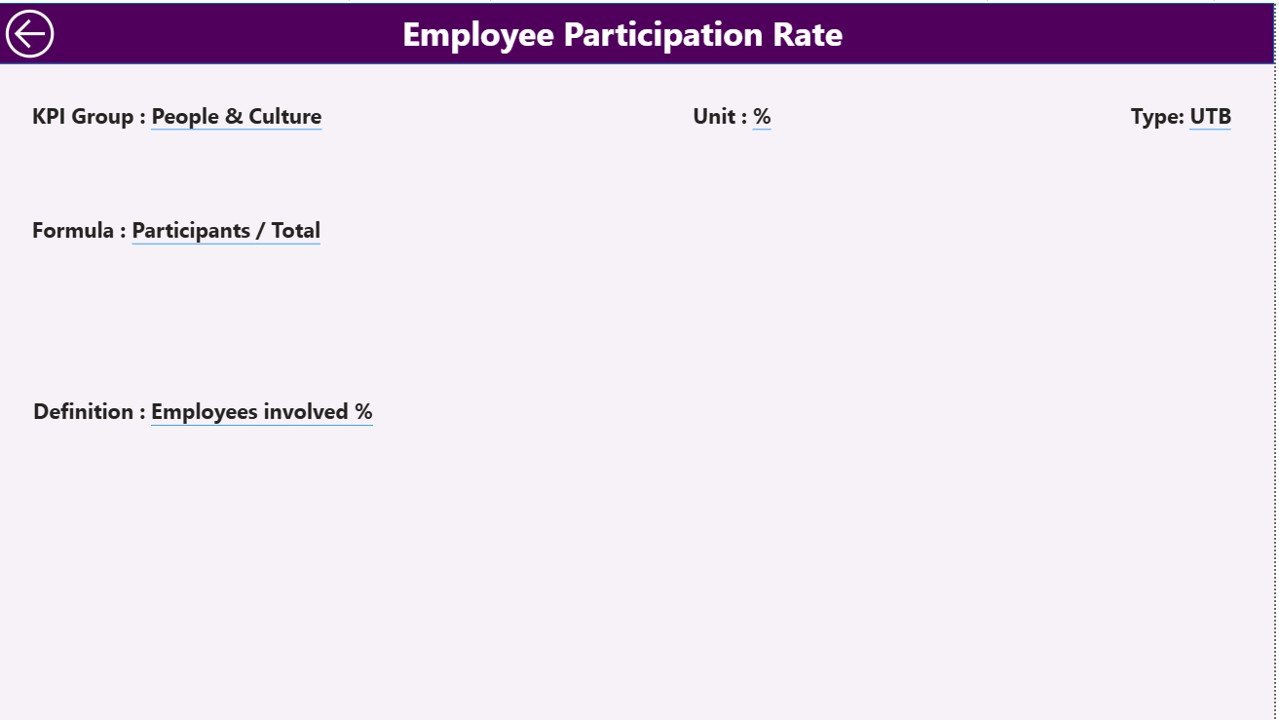
📘 KPI Definition Drill-Through Page
Access KPI formulas, definitions, units, and logic instantly with drill-through functionality.
## 📦 What’s Inside the Innovation Labs KPI Dashboard in Power BI
This Power BI file includes three professionally designed pages, each serving a specific purpose:
📌 Summary Page
A complete snapshot of innovation performance with slicers, KPI cards, and a detailed KPI table showing MTD and YTD metrics along with performance icons.
📌 KPI Trend Page
Analyze KPI movement across months using combo charts that compare Actual vs Target vs Previous Year for both MTD and YTD.
📌 KPI Definition Page
A drill-through page that displays KPI formulas, definitions, units, and UTB/LTB logic to ensure transparency and governance.
The dashboard connects to three Excel input sheets:
Input_Actual – Enter MTD and YTD actual values
Input_Target – Enter MTD and YTD target values
KPI Definition – Maintain KPI master data
## 🛠️ How to Use the Innovation Labs KPI Dashboard in Power BI
Using this dashboard is simple and user-friendly:
1️⃣ Update KPI actuals and targets in the Excel input sheets
2️⃣ Open the Power BI file
3️⃣ Click Refresh
4️⃣ Use slicers to filter by Month or KPI Group
5️⃣ Analyze performance, trends, and gaps instantly
No Power BI Service is required. Everything works seamlessly in Power BI Desktop.
## 👥 Who Can Benefit from This Innovation Labs KPI Dashboard in Power BI
This dashboard is ideal for:
🏢 Innovation Labs & R&D Teams
📊 Innovation Managers & Program Leads
🚀 Digital Transformation Teams
📈 Strategy & Business Excellence Teams
🧠 CXOs & Leadership Teams
🏭 Organizations running pilots, experiments, or innovation initiatives
If your team values clarity, accountability, and data-driven innovation, this dashboard is built for you.
Click here to read the detailed blog post
Watch the step-by-step video tutorial:
Visit our YouTube channel to learn step-by-step video tutorials
👉 YouTube.com/@PKAnExcelExpert
Compatibility and Requirements
- Works in Power BI Desktop, which is free to download. Power BI Service is not required.
- You enter data in three Excel input sheets (Input_Actual, Input_Target and KPI Definition), so you also need Microsoft Excel to edit them. Microsoft explains the install in Get Power BI Desktop.
Frequently Asked Questions
How many pages does the dashboard have?
Three pages: Summary, KPI Trend and KPI Definition.
Where do I enter my data?
Enter MTD and YTD actual values in the Input_Actual sheet and MTD and YTD targets in the Input_Target sheet. Keep your KPI master data in the KPI Definition sheet. Then refresh Power BI.
Can I filter the dashboard by month or KPI group?
Yes. The Summary page has slicers for Month and KPI Group.
Can I compare this year with last year?
Yes. The KPI Trend page uses combo charts that compare Actual, Target and Previous Year for both MTD and YTD.
Where can I see how each KPI is calculated?
The KPI Definition page is a drill-through page. It shows each KPI’s formula, definition, unit and whether it is UTB or LTB.
Is there an Excel version of this dashboard?
Yes. See the Innovation Labs KPI Dashboard in Excel.
Related Innovation Templates
- Innovation Labs KPI Dashboard in Excel: the same KPIs in Excel
- Innovation and Transformation KPI Dashboard in Power BI: a Power BI KPI view for transformation programs
- Innovation & Transformation Dashboard in Power BI: a wider dashboard for innovation work
- AI Research Labs KPI Dashboard in Power BI: KPI tracking for research labs
- Power BI Dashboard Mega Collection: 15 Power BI templates in one download
Browse all Power BI KPI dashboards.
































Reviews
There are no reviews yet.