

The best public transit dashboard template for most rail and metro teams is the Metro Rail Projects Dashboard in Power BI ($17.99), because it covers budget, zones, phases, funding and stations on five pages. Excel teams should pick the Metro Rail Projects KPI Dashboard ($14.99). The cheapest option is the Railway KPI Dashboard in Google Sheets ($9.99).
Last updated: October 2026
Key takeaways
- The Metro Rail Projects Dashboard in Power BI costs $17.99 and is the most complete executive view of budget, zones, phases, funding and station progress.
- Six templates are compared here across Excel, Power BI and Google Sheets, with prices from $9.99 to $17.99.
- The Rail Passenger Transport Dashboard in Excel ($13.99) is the only pick built around ticket revenue, travel class and station-level passenger analysis.
- The Railway KPI Dashboard in Google Sheets ($9.99) is the cheapest entry and the only cloud-collaboration option in this list.
- A spreadsheet dashboard is a reporting layer, not a replacement for scheduling, fare collection or real-time vehicle tracking software.
 Launch offer
SUMIFS, XLOOKUP, FILTER, LAMBDA and checking AI-written formulas, with real business projects. 11h 47m of video by PK, with practice files, quizzes and a capstone.
Public transit dashboard templates compared
| Template | Format | Best For | Price |
|---|---|---|---|
| Metro Rail Projects Dashboard in Power BI (Best overall) | Power BI | Executive view of budget, zones, phases, funding and stations | $17.99 |
| Metro Rail Projects KPI Dashboard in Excel | Excel | Monthly KPI reporting across construction, safety, operations and cost | $14.99 |
| Rail Passenger Transport Dashboard in Excel | Excel | Passenger and ticket revenue analysis | $13.99 |
| Metro Rail Projects Dashboard in Excel | Excel | Budget versus actual cost control | $13.99 |
| Metro Rail Projects KPI Dashboard in Power BI | Power BI | Interactive KPI tracking on a smaller budget than the project dashboard | $11.99 |
| Railway KPI Dashboard in Google Sheets (Best value) | Google Sheets | Remote teams and cloud collaboration, cheapest entry | $9.99 |
How we picked these templates
We searched the Next Gen Templates catalog of roughly 6,900 products for rail, metro, railway and transit reporting tools. We kept only paid dashboards that clearly serve rail or metro work, and we made sure Excel, Power BI and Google Sheets were each represented.
Ranking is by capability first and price second. A template that covers more of the project or passenger picture ranks above a cheaper one that covers less. We left out generic logistics and fleet tools, which are covered in our logistics and transportation dashboard templates guide.
Which are the 6 best public transit dashboard templates for 2026?
1. Metro Rail Projects Dashboard in Power BI: best overall
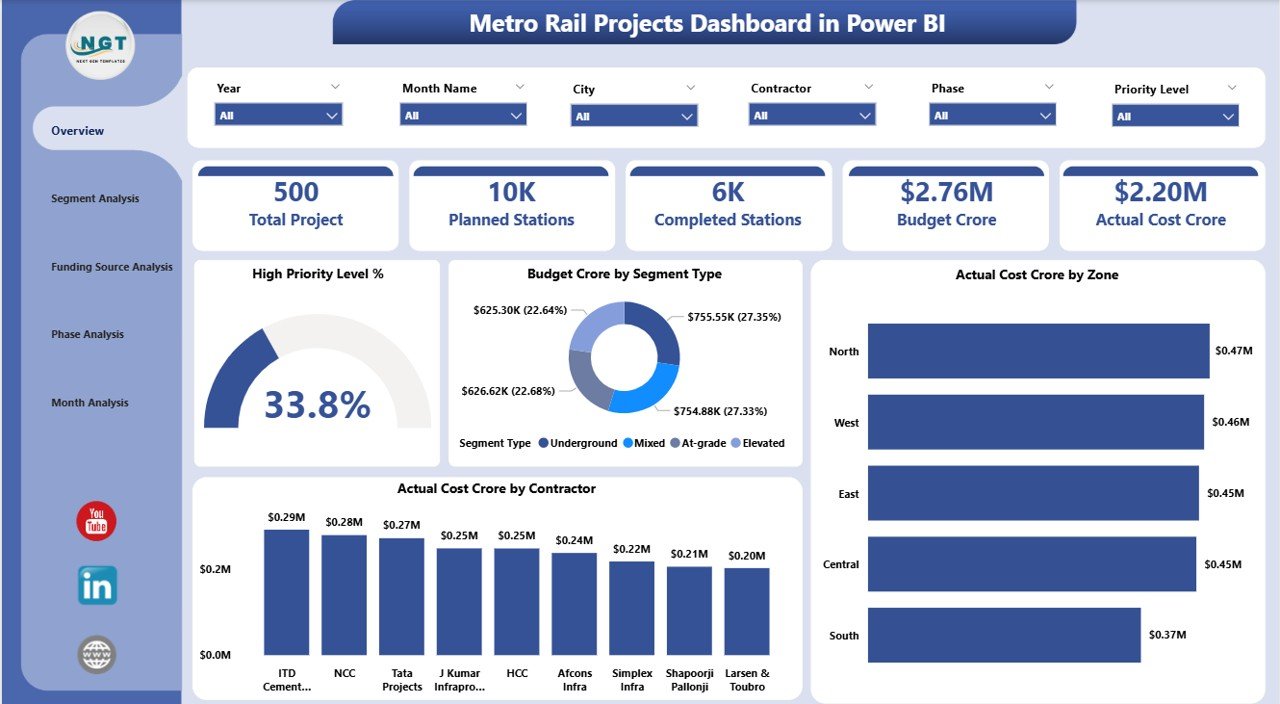
Why it is #1: it gives the widest executive view of a metro build in one file: cost, progress, funding, phases and stations, all filterable by city, zone, contractor and month.
It is a five-page Power BI report fed by flexible Excel-based data inputs. It suits metro authorities, project management offices, consultants and contractors who report to a board or a funding agency.
- Interactive slicers for city, zone, contractor, segment type and month
- Budget versus actual cost tracking for early overrun detection
- Pages for segment, phase, funding and trend analysis
- Station progress, planned versus completed
- High-priority project focus for risk-based management
Use cases: spot a contractor whose actual cost runs ahead of budget; compare cost by zone before a steering meeting; show a funding agency how money is split by source; check how many stations are complete against plan. The dashboard reports in crore, so teams using another currency unit should relabel the axes.
Price: $17.99. Get the Metro Rail Projects Dashboard in Power BI.
Best for: program directors who need one executive-ready view of a multi-year metro project.
2. Metro Rail Projects KPI Dashboard in Excel: best Excel KPI tracker
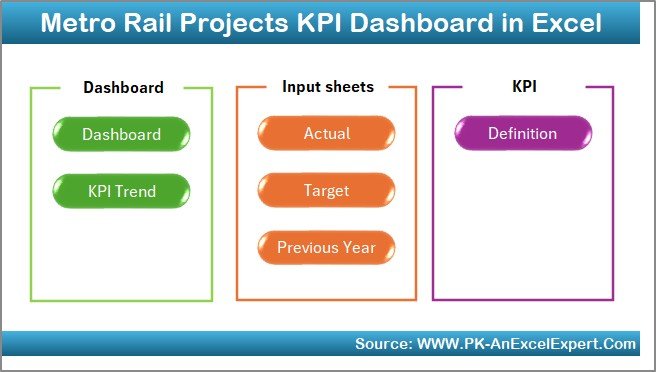
This workbook is built for the monthly review. It tracks KPIs across construction, safety, operations and cost, with a month selector that switches the whole dashboard between periods. It suits project managers, contractors and metro authority reporting teams.
- MTD and YTD KPIs with actual versus target and actual versus previous year
- Two trend charts per KPI, one MTD and one YTD
- Six quick-access navigation buttons on a summary page
- Input sheets for actuals, targets and previous year data
- A KPI dictionary so every KPI is defined the same way each month
Use cases: report tunneling and station construction progress against target; track safety KPIs month by month; compare this year to last year on cost; give new analysts a written definition of each KPI. Calculations are automated, so nobody edits formulas during the reporting cycle.
Price: $14.99. Get the Metro Rail Projects KPI Dashboard in Excel.
Best for: Excel-first teams that report a fixed KPI set every month.
3. Rail Passenger Transport Dashboard in Excel: best for passenger and ticket revenue
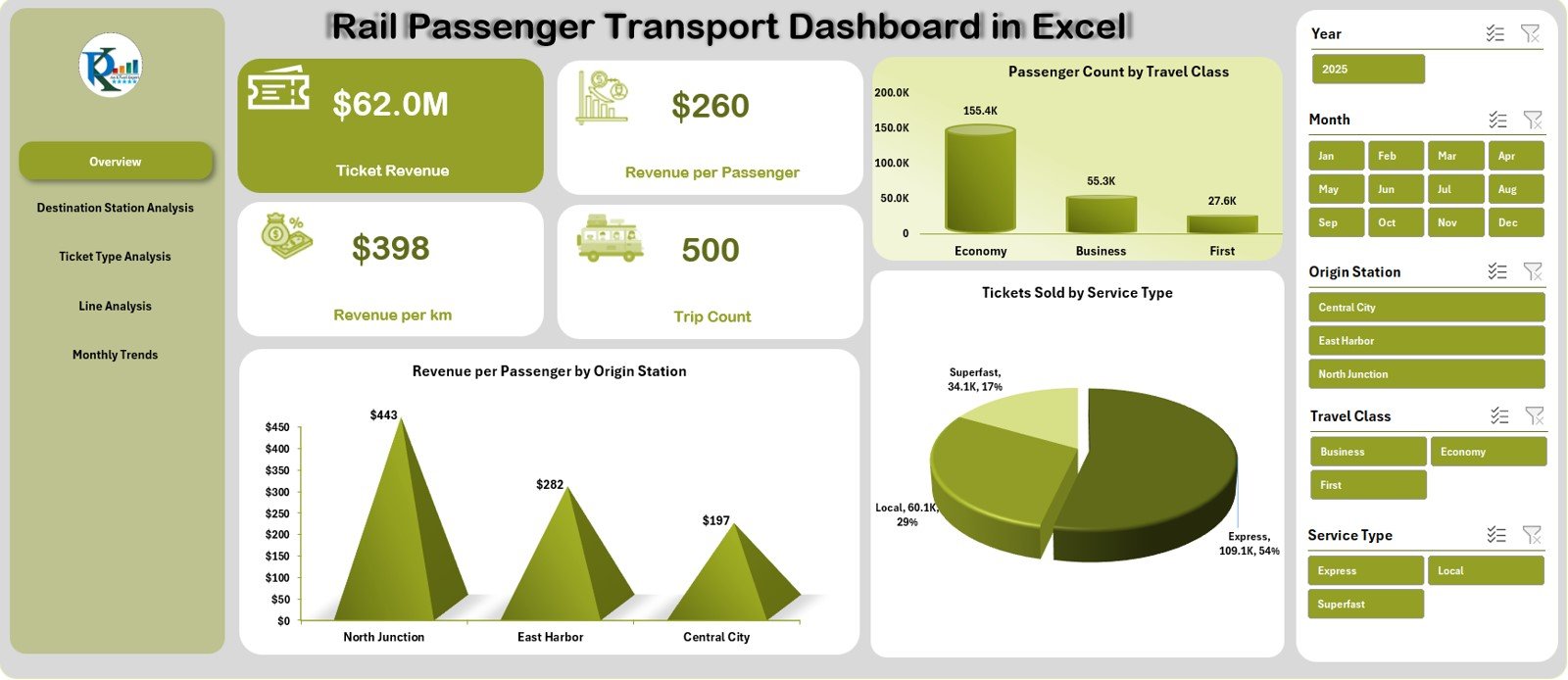
Every other template in this list tracks projects or operations KPIs. This one looks at the people riding the trains and the money they pay. It suits rail operators, planners and revenue managers.
- Five analysis pages: Overview, Destination, Ticket Type, Line and Trends
- Revenue, trip count and passenger KPIs
- Revenue per passenger and revenue per kilometer
- Travel class insights such as Economy, Sleeper and AC
- Station-wise analysis of top destinations, plus monthly trends
Use cases: find which ticket type earns the most per passenger; compare lines on revenue per kilometer; see which destination stations carry the most traffic; read monthly trends before a timetable review. A page navigator on the left side moves between views, and visual indicators mark high and low performance.
Price: $13.99. Get the Rail Passenger Transport Dashboard in Excel.
Best for: revenue and planning teams analysing ridership and fares in Excel.
4. Metro Rail Projects Dashboard in Excel: best for budget versus actual cost control
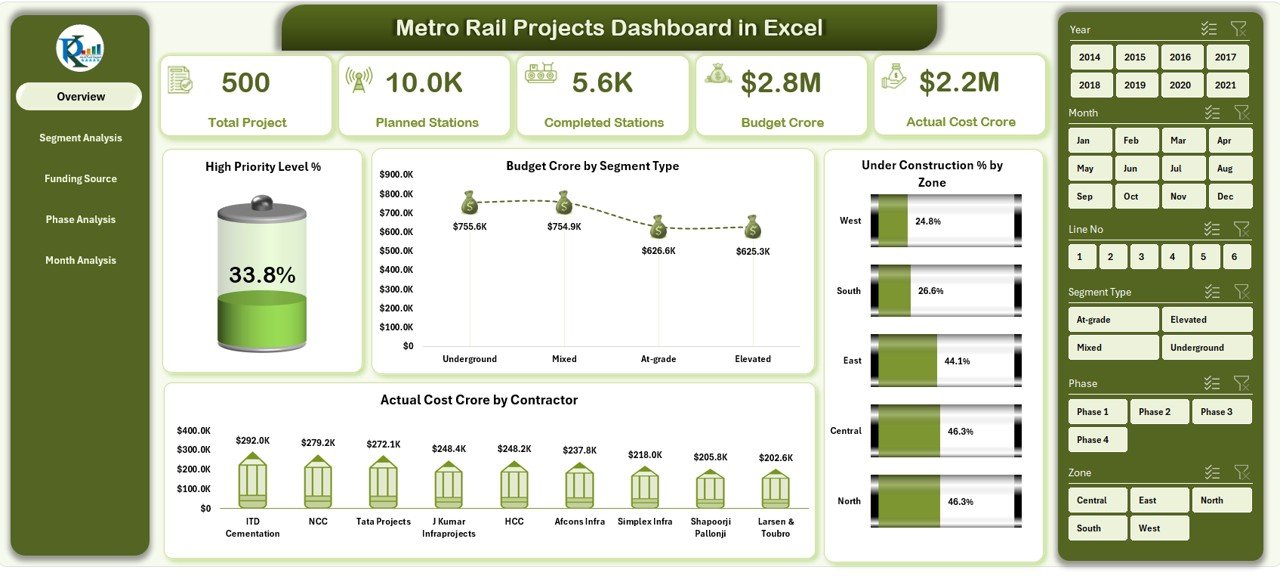
This is the Excel version of the project dashboard in position 1. It has five analytical pages, a left-side page navigator, slicers, KPI cards and automated charts. It suits metro authorities, planners, engineers and consultants who do not use Power BI.
- Overview page with five KPI cards and four charts, including High Priority Level % and Actual Cost by Contractor
- Budget versus actual cost tracking to find overruns early
- Zone and segment analysis of construction progress
- Phase-wise tracking across planning, construction and testing
- Funding source monitoring and monthly trend analysis
Use cases: check which contractor has the highest actual cost; see under-construction percentage by zone; review the phase mix before a milestone; show how funding is split. Even non-technical users can filter with slicers without writing code.
Price: $13.99. Get the Metro Rail Projects Dashboard in Excel.
Best for: project controllers who want the cost-control view without leaving Excel.
5. Metro Rail Projects KPI Dashboard in Power BI: best lower-cost Power BI pick
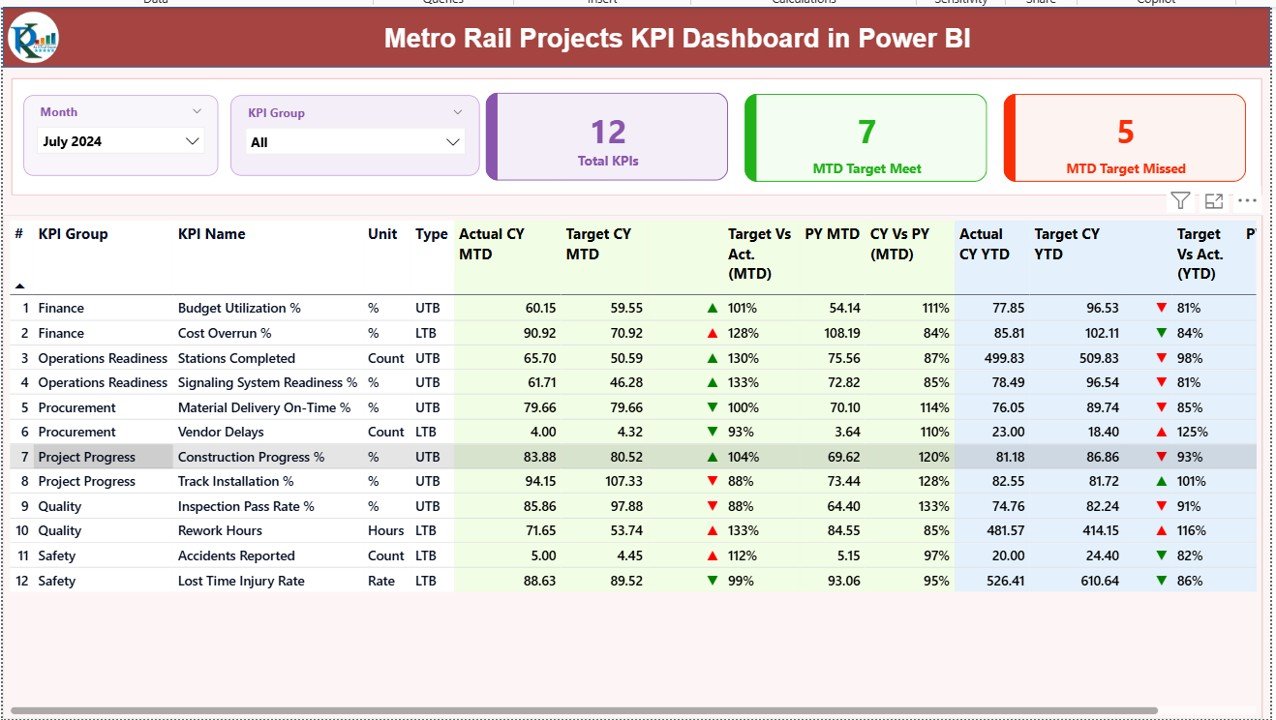
This is the Power BI counterpart of the KPI workbook in position 2. It centralises project KPIs and adds drill-through to KPI definitions. It suits leadership teams, project managers and engineers who already use Power BI.
- Month and KPI group slicers
- MTD and YTD performance side by side
- Target versus actual and current year versus previous year
- Green and red indicators that flag risk and achievement
- MTD and YTD trend charts and a KPI definition drill-through
Use cases: filter to a single KPI group for a safety review; compare this month to the same month last year; hand a board a status view with colour-coded indicators; click through to see how a KPI is calculated. It costs $6.00 less than the Power BI project dashboard, but it tracks KPIs rather than budget by zone, phase and funding.
Price: $11.99. Get the Metro Rail Projects KPI Dashboard in Power BI.
Best for: Power BI users who need a KPI scorecard rather than a full project cost view.
6. Railway KPI Dashboard in Google Sheets: best value and best for remote teams
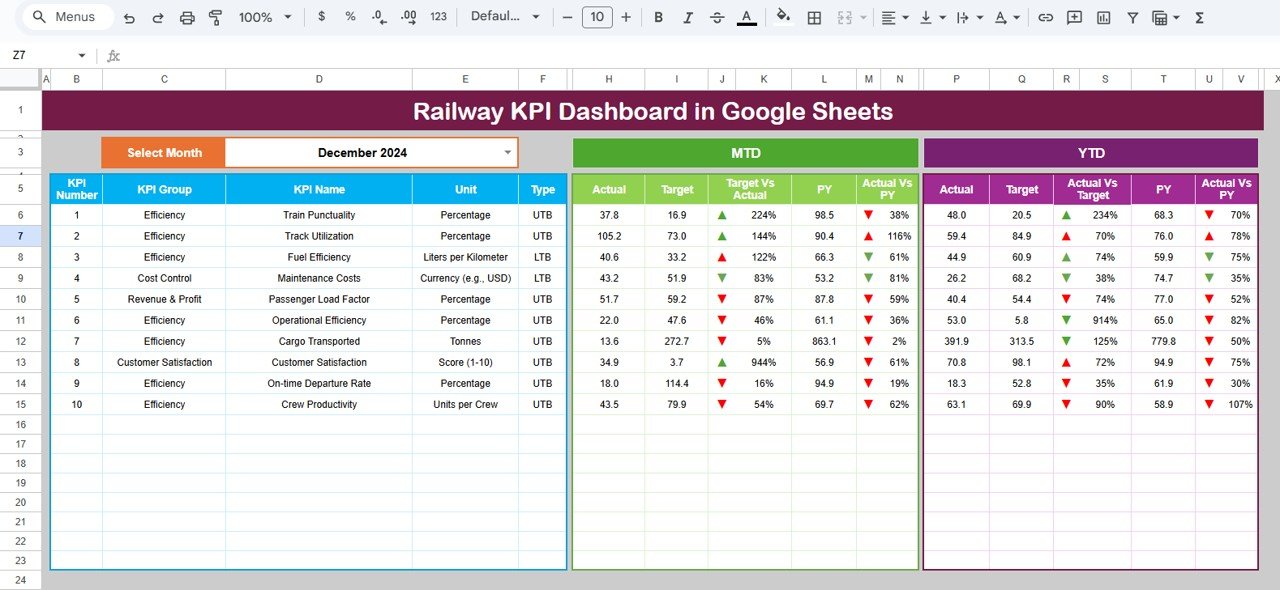
This is the lowest-priced template here and the only one that lives in the cloud. It tracks railway operational KPIs in one place and suits railway authorities, operations managers and infrastructure planners.
- Centralized railway KPI tracking
- MTD and YTD monitoring with actual versus target
- Year-over-year performance analysis
- Up and down arrows from conditional formatting
- Clear KPI definitions and auto-updating calculations
Use cases: let operations, safety and planning teams edit the same file at the same time; review MTD and YTD results in a weekly call; compare against the prior year to find seasonality; avoid paying for BI licences. It needs no installed software beyond a Google account.
Price: $9.99. Get the Railway KPI Dashboard in Google Sheets.
Best for: distributed teams that want shared, cloud-based KPI reporting at the lowest price.
Which public transit dashboard should you choose?
| If you need to… | Pick | Price |
|---|---|---|
| Report a metro build to a board or funder | Metro Rail Projects Dashboard in Power BI | $17.99 |
| Run a monthly KPI review in Excel | Metro Rail Projects KPI Dashboard in Excel | $14.99 |
| Analyse fares, classes and stations | Rail Passenger Transport Dashboard in Excel | $13.99 |
| Control budget versus actual in Excel | Metro Rail Projects Dashboard in Excel | $13.99 |
| Score KPIs interactively in Power BI | Metro Rail Projects KPI Dashboard in Power BI | $11.99 |
| Share one file across a remote team | Railway KPI Dashboard in Google Sheets | $9.99 |
A quick decision path: first decide what you measure. Money and progress on a build points to the two project dashboards. Monthly performance against targets points to the three KPI dashboards. Riders and revenue points to the passenger dashboard. Then pick the format your team already opens every day.
Combining two is common. A project office might run the Power BI project dashboard for cost and the Excel KPI dashboard for monthly safety and operations reporting. That pair costs $32.98 together.
How do you measure cost and revenue in rail reporting?
The templates do the calculations, but you should know the formulas behind the numbers so you can sanity-check them.
- Cost variance % = (actual cost – budget) / budget x 100. Positive means overrun.
- Revenue per passenger = ticket revenue / passengers.
- Revenue per kilometer = ticket revenue / kilometers travelled.
- YoY change % = (current period – same period last year) / same period last year x 100.
Worked example with made-up figures: a metro segment is budgeted at 500 crore and has an actual cost of 560 crore. Variance is (560 – 500) / 500 x 100 = 12% over budget. On the passenger side, a line earning 2,400,000 from 300,000 passengers has revenue per passenger of 8. Swap in your own numbers and the dashboards show the same ratios by contractor, zone, line or ticket type.
For a deeper look at variance logic, see our guide to budget variance analysis metrics. For the operations side of moving goods, the logistics and OTIF KPIs guide covers on-time delivery measures.
When is a spreadsheet dashboard NOT the right answer?
These templates report on data you already hold. They do not collect it. If any of the following describes your situation, buy or build specialist software instead.
- Real-time vehicle tracking or dispatch. A dashboard template will not read GPS feeds or run a control room.
- Fare collection or ticketing. The passenger dashboard analyses ticket data after the fact. It does not sell tickets.
- Timetabling and crew rostering. Those need scheduling tools.
- Strict multi-user governance on a huge programme. If hundreds of people need audited, role-based access, an enterprise project controls platform fits better.
- Large public datasets from national agencies. For benchmark data, start with the Federal Transit Administration National Transit Database and load what you need into a template.
If your need is broader public sector reporting, our roundup of government dashboard templates for the public sector may fit better than a rail-specific tool.
Frequently asked questions
What is a public transit dashboard template?
A public transit dashboard template is a ready-made workbook or report that turns rail, metro or bus data into KPIs, charts and slicers. You paste in your data and the visuals update. NGT’s rail options run from $9.99 for the Railway KPI Dashboard in Google Sheets to $17.99 for the Power BI metro projects dashboard.
Which template is best for metro construction project tracking?
The Metro Rail Projects Dashboard in Power BI ($17.99) is the most complete option. It covers budget versus actual cost, zones, phases, funding sources and station progress across five pages. If your team works in Excel only, the Metro Rail Projects Dashboard in Excel ($13.99) covers similar ground.
Can I track rail ticket revenue in Excel?
Yes. The Rail Passenger Transport Dashboard in Excel ($13.99) tracks revenue, trips and passengers, with pages for destination, ticket type, line and monthly trends. It also reports revenue per passenger and revenue per kilometer, and it needs no coding, only your own data in the sheets.
Should I use Excel or Power BI for transit reporting?
Choose Excel if your team already lives in workbooks and needs to edit data by hand. Choose Power BI if you want interactive slicers across large datasets and a polished executive view. Both formats exist for metro rail projects: $13.99 in Excel and $17.99 in Power BI for the project dashboard.
Is there a Google Sheets railway dashboard?
Yes. The Railway KPI Dashboard in Google Sheets costs $9.99 and tracks MTD and YTD KPIs, actual versus target, and year-over-year performance. It runs in the cloud, so operations, safety and planning teams can work in the same file at the same time without sending versions around.
What KPIs should a metro rail project dashboard track?
Track budget versus actual cost, cost variance percentage, percent under construction by zone, phase progress, funding by source and stations completed against plan. Operations KPIs such as punctuality and safety sit in a KPI dashboard like the Metro Rail Projects KPI Dashboard in Excel ($14.99).
How do I calculate cost variance for a rail project?
Cost variance percentage equals actual cost minus budget, divided by budget, times 100. A positive result means an overrun. For example, a section budgeted at 500 crore with actual cost of 560 crore has a 12% overrun. The Metro Rail Projects dashboards compare budget and actual cost by segment and zone.
Do these templates need coding skills?
No. The Excel templates use slicers, charts and built-in calculations, and the Power BI versions use interactive slicers with Excel-based data inputs. You replace the sample data with your own and the visuals refresh. Basic comfort with spreadsheets is enough for the Excel and Google Sheets versions.
Is a spreadsheet dashboard enough for a transit agency?
It is enough for project tracking, monthly KPI reviews and revenue analysis by a team or department. It is not enough for real-time vehicle tracking, scheduling or fare collection, which need dedicated transit software. Think of these templates as the reporting layer on top of data you already collect.
Get more public transit and KPI dashboard templates
Start with the best-value pick: the Railway KPI Dashboard in Google Sheets is $9.99, and the full-featured Metro Rail Projects Dashboard in Power BI is $17.99.
Watch walkthroughs of our dashboards on the Next Gen Templates YouTube channel. Reporting on people as well as projects? See our employee turnover and attrition metrics guide, or our training KPIs guide.