



The Career Planning Checklist in Excel is a comprehensive and practical tool designed to help individuals take charge of their career development. This easy-to-use Excel checklist allows you to track your career goals, skills, certifications, education, and achievements, helping you stay focused and organized as you navigate your career path.
Whether you’re a recent graduate, a mid-career professional, or someone looking to change careers, this checklist ensures that you’re on track to meet your professional aspirations. By breaking down your goals into actionable steps and setting timelines, this tool keeps you motivated and accountable in your career journey.

Key Features of the Career Planning Checklist in Excel:
📅 Goal Setting and Tracking
Set clear career goals and break them down into achievable tasks. Track your progress and mark off completed steps to stay motivated and focused on your objectives.
🎓 Skill Development and Certifications
Track the skills you need to develop and certifications required for your career progression. Stay on top of industry requirements and make sure you have the qualifications to move forward.
📈 Job Search Tracking
Keep track of job applications, interviews, and networking activities. Stay organized with details such as application deadlines, interview dates, and follow-up reminders.
💼 Work Experience and Achievements
Document your work history, accomplishments, and key responsibilities. Track your professional growth and milestones, such as promotions or awards, to show your career progression.
📝 Resume and Cover Letter Checklist
Use the built-in checklist for resume and cover letter optimization. Ensure your job applications are polished and ready to impress potential employers.
🚀 Why You’ll Love the Career Planning Checklist in Excel:
✅ Stay Focused on Your Goals – Set, track, and achieve your career goals with a clear and structured approach.
✅ Organize Your Career Development – Track everything from skills and certifications to job applications and networking events.
✅ Boost Career Confidence – By staying organized and having a clear plan, you’ll feel more confident in taking the next steps in your career.
✅ Track Progress – Monitor your achievements, skills gained, and job applications in one place, making it easy to stay on top of your career journey.
✅ User-Friendly – With its intuitive design and easy-to-use interface, this checklist makes career planning accessible to everyone, no matter where they are in their career.
✅ Perfect for Career Changers and New Graduates – Whether you’re just starting or transitioning into a new career, this checklist is tailored to help you succeed.
What’s Inside the Career Planning Checklist in Excel:
- Career Goals Tracker: Set and track long-term and short-term career goals with clear timelines and checkpoints.
- Skill Development Section: Identify the skills you need to develop and track your progress toward mastering them.
- Certification Tracking: List the certifications you need for career advancement and track your progress toward obtaining them.
- Job Search Organizer: Keep track of job applications, interviews, and follow-ups to stay organized during your job search.
- Work Experience Tracker: Document your work history, job responsibilities, and key achievements to highlight your career progression.
- Resume and Cover Letter Checklist: Ensure your job applications are complete with a dedicated section for optimizing your resume and cover letter.
How to Use the Career Planning Checklist in Excel:
1️⃣ Download the Template – Instantly access your Excel file upon purchase.
2️⃣ Set Your Career Goals – Define your short-term and long-term career goals, then break them down into smaller tasks.
3️⃣ Track Your Skills – List the skills you need to work on and check off each one as you complete your learning or training.
4️⃣ Apply for Jobs – Use the job search tracker to keep track of applications, interviews, and networking events.
5️⃣ Monitor Your Progress – Regularly update your work experience, achievements, and goals to reflect your career growth.
Who Can Benefit from the Career Planning Checklist in Excel:
- Job Seekers
- Recent Graduates
- Career Changers
- Mid-Career Professionals
- HR and Career Coaches
- Business Owners and Entrepreneurs
- Professionals Looking to Advance Their Careers
The Career Planning Checklist in Excel is your ultimate guide to taking control of your career, setting clear goals, and tracking your professional growth. Get organized, stay motivated, and move toward your dream career with this powerful tool.
Click here to read the Detailed blog post
https://www.pk-anexcelexpert.com/career-planning-checklist-in-excel/
Visit our YouTube channel to learn step-by-step video tutorials
Youtube.com/@PKAnExcelExpert
Compatibility and Requirements
- Works in Microsoft Excel desktop (Excel 2016 or later, or Microsoft 365).
- Keep a copy on your own computer or OneDrive and update it as your goals, skills and applications change.
Frequently Asked Questions
What sections does the Career Planning Checklist include?
Six: a career goals tracker, a skill development section, certification tracking, a job search organizer, a work experience tracker and a resume and cover letter checklist.
Can I plan both short-term and long-term goals?
Yes. You set short-term and long-term career goals, break them into smaller tasks and give each one a timeline and checkpoints.
Does it help with a job search?
Yes. The job search organizer keeps track of job applications, interviews, networking activities, deadlines and follow-ups.
Who is this checklist for?
Job seekers, recent graduates, career changers and mid-career professionals. HR teams and career coaches can also use it with the people they support.
Related Career and Goal Templates
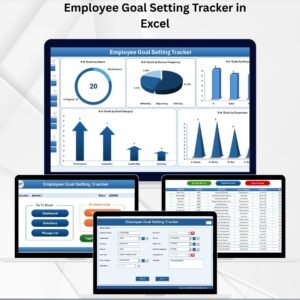
- Employee Goal Setting Tracker in Excel: track goals and progress in more detail.
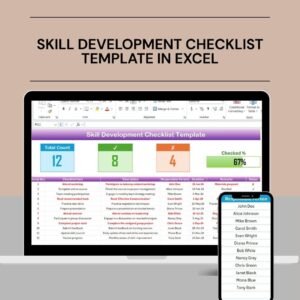
- Skill Development Checklist Template in Excel: a focused checklist for the skills you are building.
- Goal Setting Checklist in Excel: break any goal into clear steps.
- Job Application Tracker in Google Sheets: log applications and interviews in Google Sheets.
- Checklist & SOP Pack: 12 Excel and Google Sheets checklist templates in one bundle.
Browse all Excel checklist templates or the Excel HR and Payroll templates.







Reviews
There are no reviews yet.