

The best Domo alternative dashboard template is a one-time BI file you own outright instead of a consumption-priced platform contract. Our top pick is the Business Intelligence (BI) KPI Dashboard in Excel ($14.99), which rebuilds Domo’s executive card wall in a spreadsheet with no credits to burn.
Last updated: August 2026
Related guides: comparing more than one platform? See our Sisense alternatives: 6 dashboard templates in Excel & Sheets and Looker Studio alternatives in Google Sheets.
Key takeaways
- Domo publishes no price. Its official pricing page offers a 30-day trial and a consumption-based credit model, with every figure settled in a sales call.
- Vendr’s marketplace data (85 deals, last updated February 2026) puts the median Domo contract at $50,000 a year, with recorded deals from $10,920 to $175,245.
- All 8 templates in this guide are one-time purchases between $4.99 and $14.99. Buying every one costs $93.92 – about 0.19% of that median annual contract.
- Best overall is the Business Intelligence (BI) KPI Dashboard in Excel ($14.99); best value is the Business Intelligence KPI Dashboard in Google Sheets ($9.99), which runs on a free Google account.
- Templates cannot replace Domo’s connector library, Magic ETL or governed multi-thousand-user distribution – we say exactly when to stay, and when to leave.
 Launch offer
SUMIFS, XLOOKUP, FILTER, LAMBDA and checking AI-written formulas, with real business projects. 11h 47m of video by PK, with practice files, quizzes and a capstone.
What does Domo actually cost in 2026?
This is the first thing anyone evaluating a Domo alternative dashboard template wants to know, and the honest answer is that Domo will not tell you until you talk to a salesperson.
Domo’s official pricing page is a consumption-based pricing page: a 30-day free trial, a description of the credit model, and a Contact Sales button. There is no per-seat number, no plan grid, and no permanent free tier. Since Domo moved off its old Standard / Enterprise / Business Critical grid to consumption credits, the legacy tier names you still see quoted in older comparison articles no longer describe how Domo sells.
What we do have is transaction data. Vendr’s Domo marketplace report, drawn from 85 analysed deals and last updated February 2026, records an average annual contract value of $50,000, with individual contracts spanning $10,920 to $175,245 and buyers negotiating an average 12.97% discount off the opening quote. Independent pricing trackers put a minimum viable deployment for a 10-25 person team at roughly $30,000 a year, and mid-market rollouts of 50-100 users at $100,000-$150,000 before implementation services.
Read those numbers next to $93.92 – the total cost of every template in this guide – and you have the entire argument of this post in one line.
The three reasons small teams churn off Domo
1. The bill is not a seat price, it is a meter. Domo bills a licence plus credits, and credits are drawn down by activity: data ingestion, Magic ETL transformations, dataflow runs, dashboard refreshes and AI queries. That is fine when consumption is flat. It is uncomfortable when a new data source doubles your row count in a quarter and nobody can predict next year’s invoice from last year’s. Credit consumption is consistently the most-cited complaint in Domo user reviews, and Magic ETL charging on both the input and the output side is the usual reason a bill surprises someone.
2. You pay for a platform and use a wall of cards. Domo is enormous: 1,000-plus connectors, ETL, app studio, data science workspaces, embedded analytics, a mobile app, alerting, workflow. Most small and mid-size teams use a fraction of it – twelve to twenty executive cards refreshed weekly, a handful of department views, and a monthly board pack. Paying platform pricing for card-wall usage is the classic churn trigger.
3. Somebody has to run it. Domo needs an owner: connector credentials, dataset governance, row-level data permissions, credit monitoring, licence assignment and re-training every new hire. For a ten-person analytics function that overhead is proportionate. For a five-person company it is a part-time job that produces no analysis.
A template inverts all three. You pay once, the cost of running it is zero, every formula is visible and editable, and the only administration is the file itself. The trade-offs are real and we cover them honestly further down – but for a lot of teams the arithmetic is not close.
Domo feature vs the NGT template that covers it
Head-to-head. On the left, the job you are paying Domo to do. On the right, the template that does the same job and its one-time price.
| What Domo charges for | NGT template that covers it | One-time price |
|---|---|---|
| Executive card wall / KPI dashboards | Business Intelligence (BI) KPI Dashboard in Excel | $14.99 |
| Interactive drill-down, slicers, filters | Business Intelligence KPI Dashboard in Power BI | $11.99 |
| Cloud sharing and live team access | Business Intelligence KPI Dashboard in Google Sheets | $9.99 |
| Data science / model monitoring workspaces | Data Science and Analytics KPI Dashboard in Power BI | $11.99 |
| People analytics app and stakeholder packs | Human Resources Stakeholder Reporting KPI Dashboard in Excel | $14.99 |
| Marketing analytics app | Marketing Analytics Report in Excel | $4.99 |
| Governance and compliance reporting | Regulatory Reporting KPI Dashboard in Google Sheets | $9.99 |
| Domo Everywhere / embedded analytics | Insurance Analytics Dashboard in HTML | $14.99 |
Domo alternative dashboard templates compared
Every template in this guide, side by side. One row is flagged best overall, one best value, and one cheapest.
| Template | Format | Best for | Price |
|---|---|---|---|
| Business Intelligence (BI) KPI Dashboard (Best overall) | Excel | The full executive KPI wall in one offline file | $14.99 |
| Business Intelligence KPI Dashboard | Power BI | Interactive drill-down and slicer-driven analysis | $11.99 |
| Business Intelligence KPI Dashboard (Best value) | Google Sheets | Live team access on a free platform | $9.99 |
| Data Science and Analytics KPI Dashboard | Power BI | Model accuracy, pipeline and analytics-team metrics | $11.99 |
| HR Stakeholder Reporting KPI Dashboard | Excel | People metrics packaged for a board or exec team | $14.99 |
| Marketing Analytics Report (Cheapest) | Excel | Channel, campaign and spend reporting | $4.99 |
| Regulatory Reporting KPI Dashboard | Google Sheets | Compliance, audit and filing oversight | $9.99 |
| Insurance Analytics Dashboard | HTML | A browser dashboard you can embed or host | $14.99 |
How we picked these
We searched the NextGenTemplates catalogue of roughly 6,900 published products for business intelligence, analytics and executive KPI templates in Excel, Google Sheets, Power BI and HTML, then filtered to the ones that reproduce what teams actually run Domo for: a governed KPI wall with actual-versus-target logic, month-to-date and year-to-date tracking, drillable department views, and a distributable output an executive will read. We excluded single-industry dashboards that only fit one niche, anything with hard-coded numbers instead of editable KPI logic, and free files too shallow to carry a real reporting cycle. Every template below is paid, one-time, and exposes its own logic – visible formulas, or an editable semantic model – because a BI platform replacement you cannot adapt is not a replacement. Prices were verified against the live store the day this guide was written.
The 8 best Domo alternative templates for 2026
1. Business Intelligence (BI) KPI Dashboard in Excel – best overall
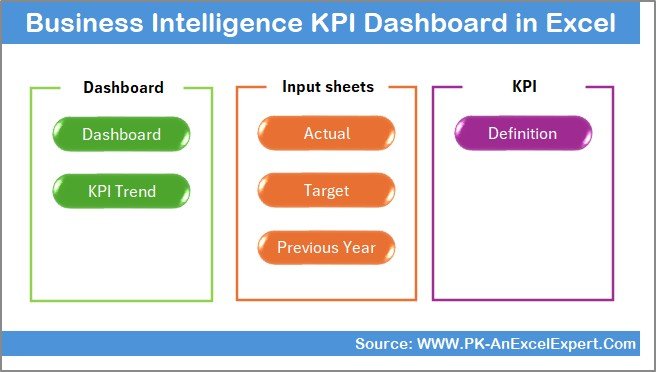
This is the closest single-file substitute for Domo’s core product. It takes the same idea – a governed set of business intelligence KPIs, each with an owner, a target and a trend – and delivers it as a formula-driven Excel workbook with an Actual, Target and Previous Year input model behind a clean dashboard front page.
Who it is for: a founder, COO or analytics lead who wants Domo’s Monday-morning card wall without a credit meter running underneath it, and whose team already lives in Excel.
What is inside:
- A Dashboard page and a KPI Trend page driven by a single month selector
- Separate Actual, Target and Previous Year input sheets, so nobody types over a formula
- MTD and YTD calculations with traffic-light status against target on every KPI
- A KPI Definition sheet – the governance layer Domo charges you to administer
In practice this replaces the twelve-to-twenty card executive view that most Domo tenants actually use. A finance lead can rebuild a monthly board pack in an afternoon: paste the month’s actuals, the traffic lights recolour, the trend chart extends, and the file emails as an attachment to people who will never log into a BI tool. Against Vendr’s $50,000 median contract, the payback period is measured in hours. If your reporting leans on the finance side, our Oracle Fusion alternatives in Excel guide covers that end of the same catalogue.
Best for: the single most complete Domo-to-spreadsheet swap. $14.99 – view the template.
2. Business Intelligence KPI Dashboard in Power BI
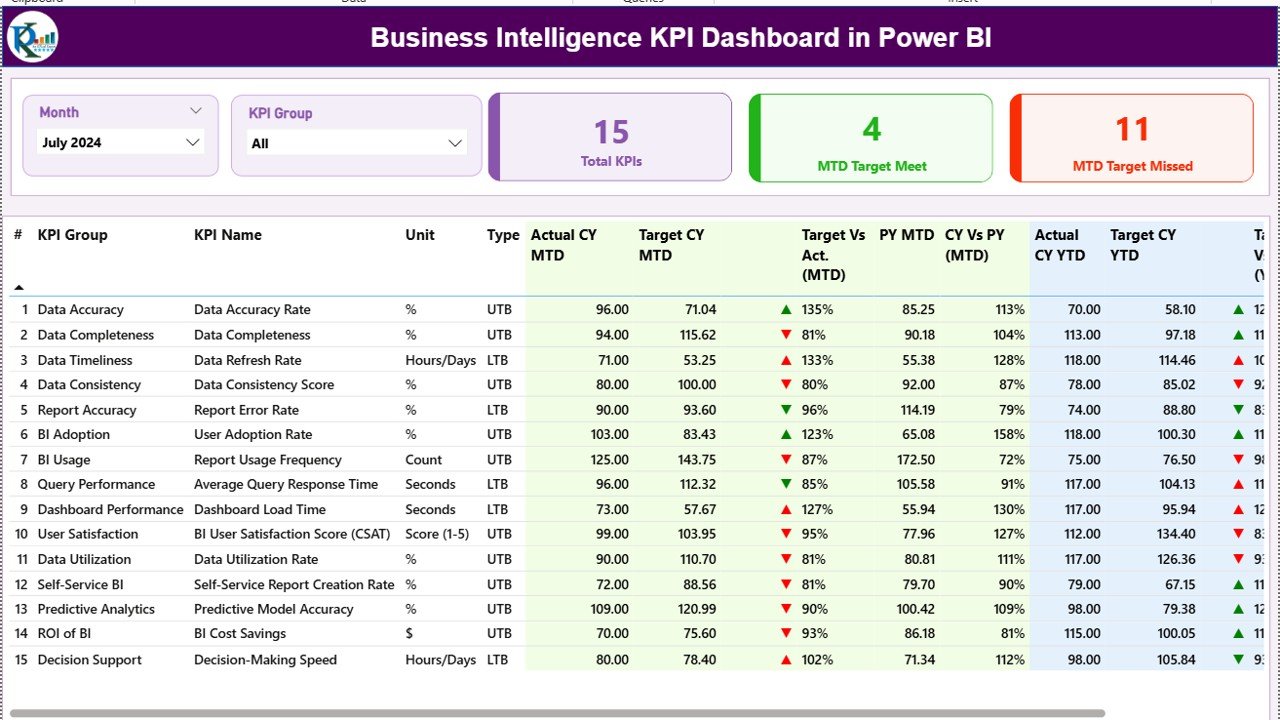
If what you will miss about Domo is the interactivity – clicking a region and watching every card re-filter – this is the honest answer. Power BI Desktop is free, and this template arrives with the semantic model, date table and DAX measures already built, so you are not starting from a blank canvas.
Who it is for: teams switching off Domo who still want drill-down, slicers and cross-filtering, and who are already inside the Microsoft stack.
What is inside:
- Pre-built semantic model with a proper date table and reusable DAX measures
- A 15-KPI scorecard page with MTD, YTD, target-versus-actual and prior-year columns
- Month and KPI Group slicers synced across pages, plus a KPI Trend page
- Drill-through detail pages so a card becomes a table in one click
The economics are the point: Power BI Desktop costs nothing to author in, and the template costs $11.99 once. Teams that need cloud publishing add Power BI licensing, which is still an order of magnitude below a consumption BI contract. For the full range by sector, see our Power BI dashboard templates ranked by industry, and our Qlik Sense alternatives guide if Qlik is also on your shortlist.
Best for: keeping interactive analysis after leaving a BI platform. $11.99 – view the template.
3. Business Intelligence KPI Dashboard in Google Sheets – best value
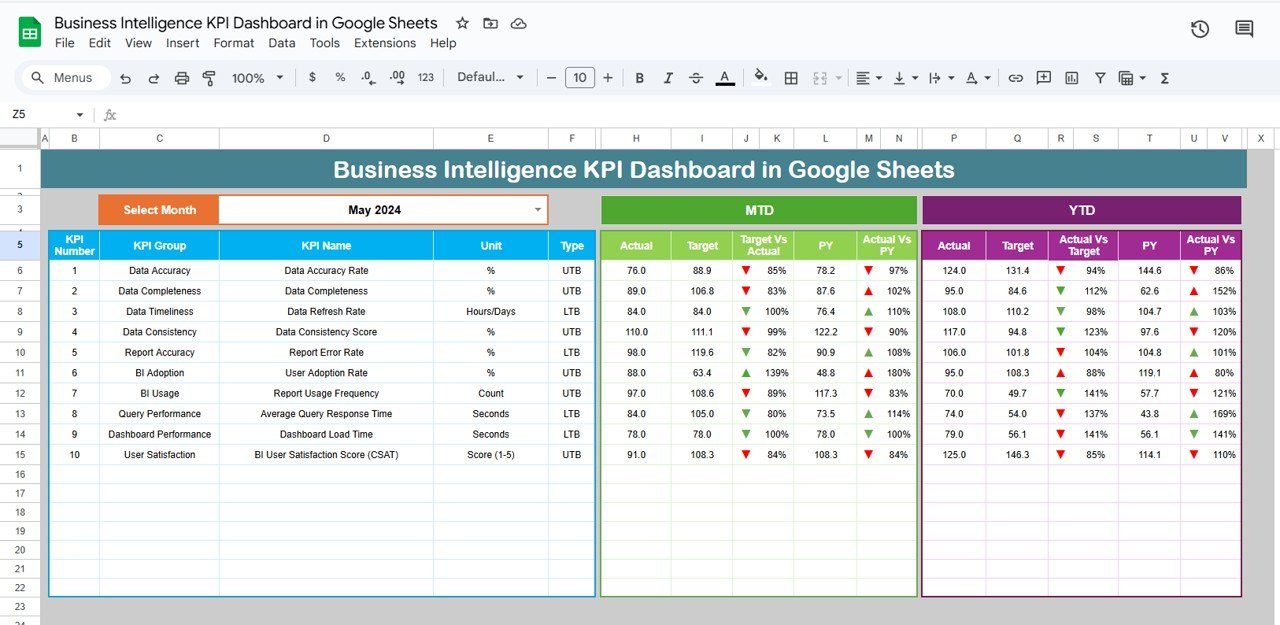
Domo’s real advantage over a desktop file is that everyone sees the same live numbers. Google Sheets gives you that for free, and this template supplies the BI logic on top: the same KPI wall, the same actual-versus-target model, in a shareable cloud document.
Who it is for: distributed or remote teams that want one live link instead of a licence per viewer, and who do not want to pay for Microsoft 365 either.
What is inside:
- Cloud-native KPI scorecard with a month picker and status indicators
- Trend and analysis tabs that recalculate as data is entered
- Native Google sharing – edit access for analysts, view-only for executives
- Version history and comments in place of a change-request queue
This is our best-value pick because the platform underneath it is free. There is no viewer licence, no seat to reclaim when someone leaves, and no credit consumption when a chart refreshes. At $9.99 it costs less than one hour of the implementation services that usually accompany a BI rollout. Pair it with our Looker Studio alternatives in Google Sheets if you are consolidating on the Google stack.
Best for: live, multi-user BI reporting at the lowest running cost. $9.99 – view the template.
4. Data Science and Analytics KPI Dashboard in Power BI
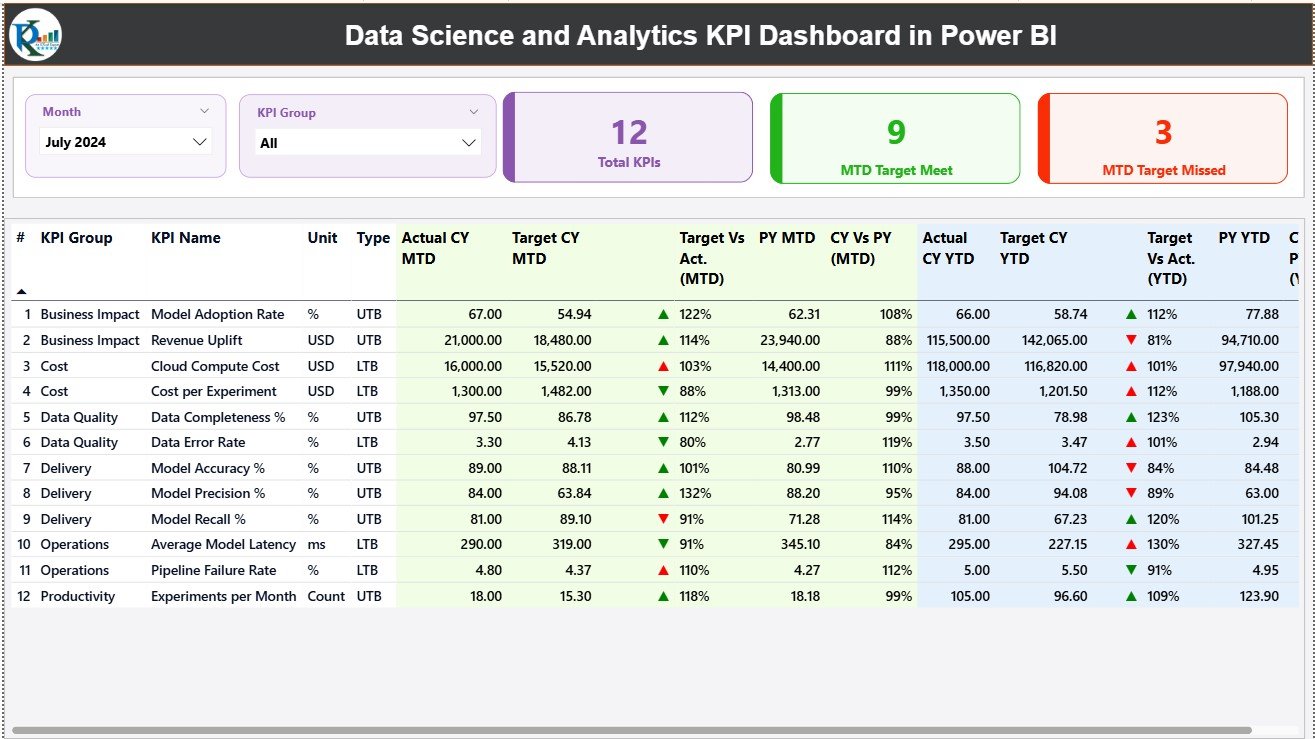
Domo sells data science workspaces and AI features as a premium layer. If what you need is not to run the models but to report on them – accuracy, drift, pipeline throughput, request backlog – this template covers the measurement side without the platform.
Who it is for: an analytics or data team that has to justify its own performance to a leadership group, and any organisation that was buying Domo mainly to monitor a modelling function.
What is inside:
- KPIs for model accuracy, prediction quality, data quality and delivery throughput
- MTD and YTD tracking with target attainment on every metric
- Slicers by KPI group and period, with a trend page for month-on-month movement
- An editable DAX layer so you can add your own model metrics
A four-person data team can run its quarterly review out of this file: which models improved, which pipelines slipped, how request volume moved. That is the reporting most teams were paying platform pricing to produce. It also pairs neatly with the BI dashboard above – one file for business metrics, one for the analytics function itself.
Best for: measuring the analytics function, not just the business. $11.99 – view the template.
5. Human Resources Stakeholder Reporting KPI Dashboard in Excel

Every BI platform ends up carrying a people-metrics app, and it is almost always the least-used and most-argued-over one. This template does that job on its own: headcount, attrition, time-to-hire, cost-per-hire and engagement, framed for the stakeholder who receives the report rather than the analyst who builds it.
Who it is for: HR leads who currently rely on an analytics team to produce their board slide, and small companies whose Domo tenant exists mostly for the monthly people pack.
What is inside:
- Stakeholder-oriented KPI set with owners and targets per metric
- Actual, Target and Previous Year inputs feeding automatic variance
- Trend charts sized for a slide, not a screen
- A definition tab so “attrition” means the same thing every quarter
The practical win is turnaround. Instead of raising a ticket and waiting for a dashboard change, the HR lead edits the file. For teams reporting on training as well, our training and learning dashboard templates cover the L&D side of the same story.
Best for: the monthly people pack, produced without an analyst. $14.99 – view the template.
6. Marketing Analytics Report in Excel – cheapest
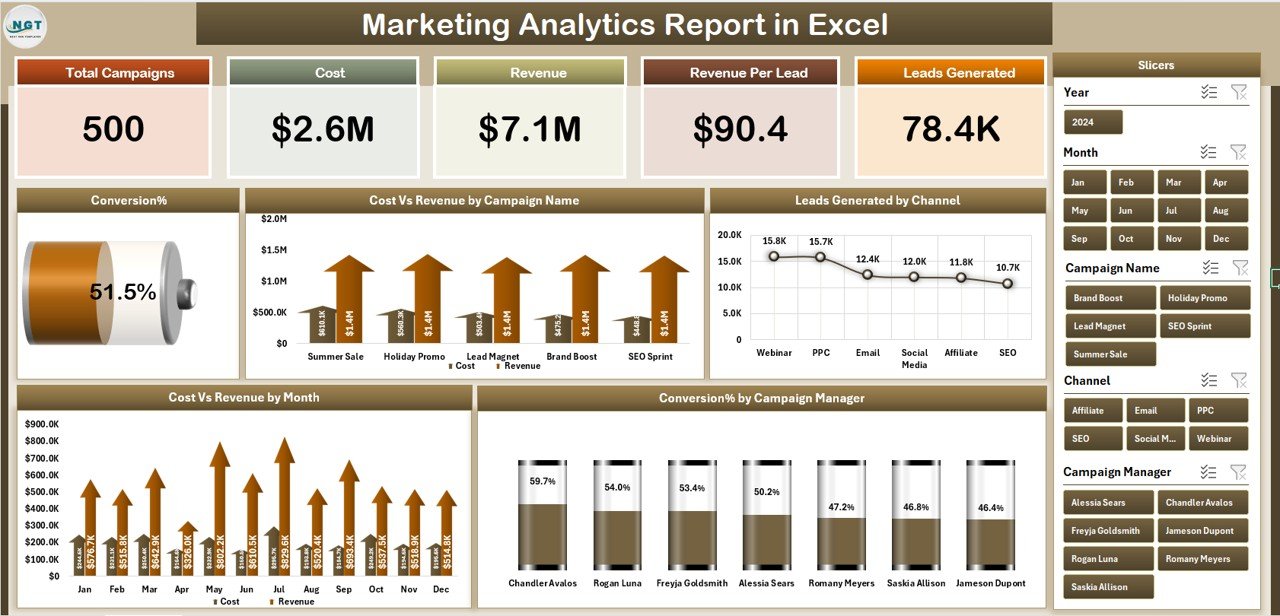
At $4.99 this is the cheapest way to test whether a template can carry a job you are currently paying a platform for. It is a marketing reporting workbook – channel performance, campaign results, spend and return – built to be filled from a CSV export rather than a live connector.
Who it is for: a marketing manager who needs a monthly report, not a real-time feed, and anyone who wants a five-dollar proof of concept before committing to a wider switch.
What is inside:
- Channel and campaign breakdowns with spend, response and conversion columns
- Summary charts that redraw as the input table grows
- A structure that maps cleanly onto a Google Ads or Meta CSV export
- Print-ready layout for the monthly review
The honest framing: this replaces a scheduled Domo card, not a live connector. If your marketing reporting cycle is monthly – and for most teams under 50 people it is – real-time was never the requirement. Buy this one first, run one cycle, and you will know within a month whether the rest of the switch is realistic.
Best for: a $4.99 proof of concept before a bigger migration. $4.99 – view the template.
7. Regulatory Reporting KPI Dashboard in Google Sheets
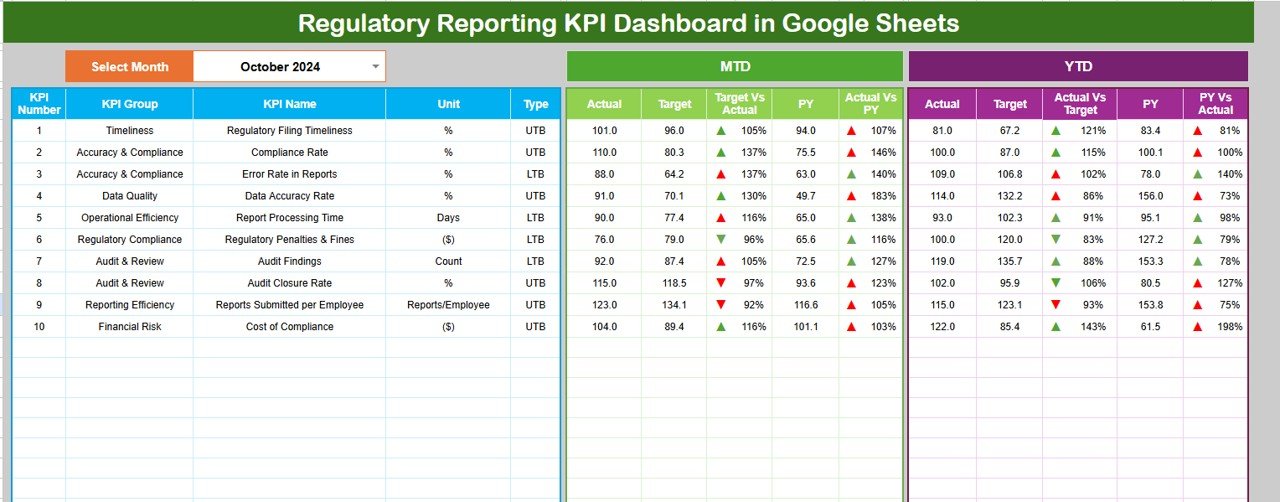
Governance is the argument most often used to justify a BI platform: audit trails, controlled distribution, a single version of the truth. This template handles the reporting half of that in Google Sheets – filing deadlines, submission accuracy, findings, remediation status – with Google’s own version history doing the change-log work.
Who it is for: compliance, risk and quality functions in regulated sectors that need a defensible monthly view without a platform contract.
What is inside:
- Compliance KPIs with target thresholds and status flags
- MTD and YTD tracking so a slipping deadline shows up before the quarter ends
- Cloud sharing with view-only distribution to auditors and reviewers
- Full Google Sheets revision history – who changed what, and when
Two caveats stated plainly: Google’s version history is not a validated audit system, and this does not give you row-level security. If your regulator requires certified controls, that is a genuine reason to keep a governed platform – see the honest-limits section below. For most internal compliance reporting it is more than enough at $9.99.
Best for: compliance oversight with a visible change history. $9.99 – view the template.
8. Insurance Analytics Dashboard in HTML
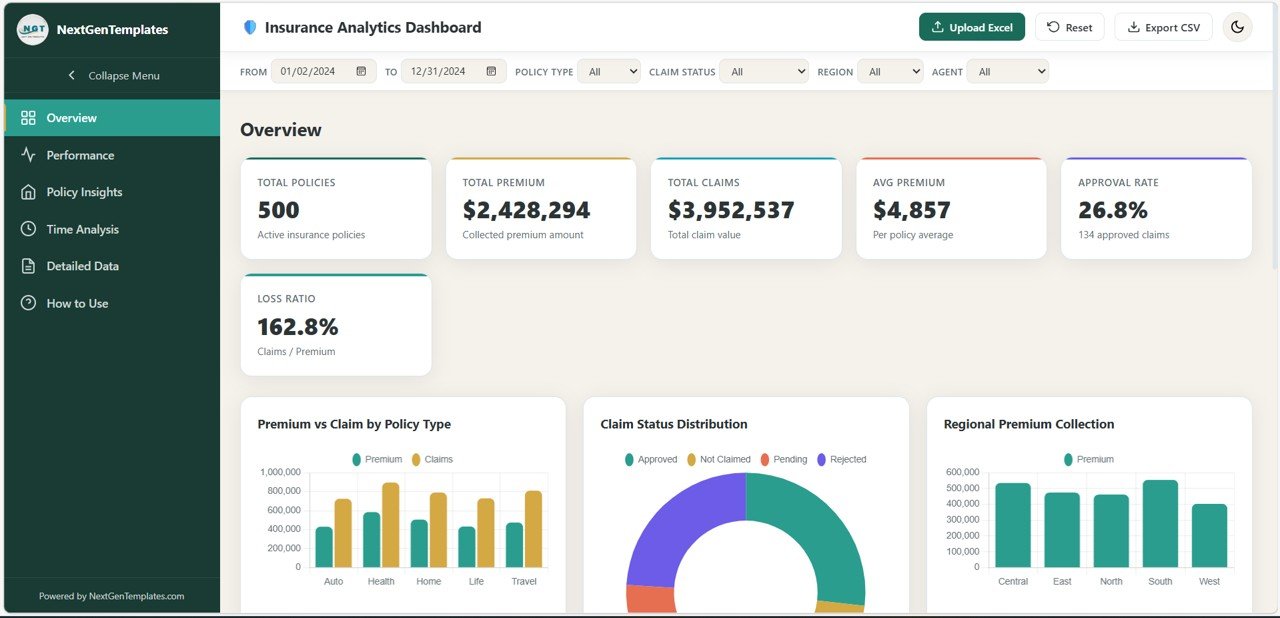
Domo Everywhere – embedding dashboards in your own product or portal – is one of the features people genuinely struggle to replace. An HTML dashboard is the low-cost answer: a self-contained browser dashboard you host yourself, with no viewer licence and no per-embed fee.
Who it is for: insurance and financial-services teams, and any business that needs a dashboard living inside an internal portal or client-facing page rather than behind a BI login.
What is inside:
- Browser-native dashboard with charts, KPI tiles and filters, no plugin required
- Insurance metrics – policies, claims, loss ratio, premium and retention – as the worked example
- Editable source files so the metrics can be re-pointed at your own data
- Runs from any static host, intranet or shared folder
It needs someone comfortable editing HTML, which the spreadsheet options do not. In exchange you get unlimited viewers at zero marginal cost, which is precisely the axis on which embedded BI pricing hurts most. Sector-specific dashboards elsewhere in the catalogue follow the same pattern – our logistics and transportation dashboard templates are a good example.
Best for: embedded or portal dashboards with unlimited viewers. $14.99 – view the template.
Get the BI stack for the price of a lunch
The three core picks together – BI KPI Dashboard in Excel ($14.99), BI KPI Dashboard in Power BI ($11.99) and BI KPI Dashboard in Google Sheets ($9.99) – come to $36.97 once, and cover offline, interactive and live-shared reporting between them. All eight templates in this guide total $93.92. Vendr’s lowest recorded Domo contract was $10,920 a year; that is 116 times the price of the entire set, every year.
How to choose between them
Four questions decide it, in this order: who builds the report, whether readers need to click, where the team works, and whether the dashboard has to live somewhere other than a file.
| If your situation is… | Buy this | Price |
|---|---|---|
| One person builds the report, everyone else reads a PDF | BI KPI Dashboard in Excel | $14.99 |
| People need to click, filter and drill for themselves | BI KPI Dashboard in Power BI | $11.99 |
| The team is remote and nobody should install anything | BI KPI Dashboard in Google Sheets | $9.99 |
| The dashboard has to live inside a portal or product | Insurance Analytics Dashboard in HTML | $14.99 |
| The Domo tenant exists mainly for one department | The matching department template (HR, marketing, compliance) | $4.99-$14.99 |
| You want to test the idea before committing | Marketing Analytics Report in Excel | $4.99 |
The sequence that works: buy the $4.99 report, run one full reporting cycle on it, and see whether anyone notices the platform is gone. If nobody does, buy the format that matches how your team consumes numbers. If somebody does notice, the next section is for you.
When Domo is still the right call
We sell templates, and we would still tell you to stay on Domo in these five situations. Getting this wrong costs far more than a subscription.
- You are ingesting from dozens of live sources. Domo’s connector library and Magic ETL exist because wiring Salesforce, NetSuite, Shopify, Google Ads and a warehouse together is genuinely hard. A template starts at a CSV paste. If your reporting depends on automated ingestion from ten-plus systems, rebuilding that with spreadsheets is a false economy.
- You need governed distribution to hundreds or thousands of viewers. Row-level security, personalised data permissions, SSO, certified datasets and an access audit trail are what a platform is for. A shared file does none of it. Past roughly 30 to 50 consumers, governance stops being optional.
- Your regulator requires validated, certified reporting controls. Google Sheets revision history is a change log, not a compliance-validated audit system. In regulated financial services, clinical or pharmaceutical reporting, that distinction is the whole argument.
- Real-time genuinely matters. Operations control rooms, live logistics, fraud monitoring, trading desks – if a decision changes on a five-minute refresh, a manually updated file is the wrong tool. Be honest about whether your cadence is truly real-time or actually monthly.
- You are embedding analytics for paying customers at scale. Domo Everywhere handles multi-tenant embedding, per-customer data isolation and white-labelling. An HTML dashboard covers a portal, not a commercial multi-tenant analytics product.
The sweet spot for these templates is a team of roughly 1 to 50 people whose reporting cadence is weekly or monthly, whose data lands in a handful of exports, and whose main need is visibility and accountability rather than automated pipelines. If that is you, the maths and the control both point at one-time files. If it is not, Domo is a fair price for a hard problem. Teams sitting in the middle often run both: the platform for pipelines, templates for the exec pack. Our Tableau alternatives guide works through the same decision from the visual-analytics side.
Managing physical stock as well as data? See our guide to Fishbowl alternatives with Excel inventory templates for spreadsheet dashboards that replace Fishbowl’s monthly seats.
Frequently asked questions
What is the best Domo alternative for small teams?
The Business Intelligence (BI) KPI Dashboard in Excel ($14.99) is the best Domo alternative for most small teams. It reproduces the executive KPI wall – actual versus target, MTD and YTD, traffic-light status and trend – in one file you buy once, with no credits, no seats and no renewal.
How much does Domo cost in 2026?
Domo does not publish prices. Its official pricing page offers a 30-day trial and describes a consumption-based credit model, with figures agreed in a sales call. Vendr’s data from 85 deals, updated February 2026, shows a median of about $50,000 a year, ranging from $10,920 to $175,245.
Why is Domo pricing so hard to find?
Because Domo prices on consumption, not seats. Your bill depends on data volume, ETL runs, refresh frequency and AI usage, so there is no single number to publish. The practical effect is that two companies of identical size can pay very different amounts, and neither can benchmark the other.
Can a spreadsheet template really replace a BI platform?
For teams of roughly 1 to 50 reporting weekly or monthly from a handful of data exports, yes. What a template cannot replace is automated ingestion from many live sources, row-level security, governed distribution to hundreds of viewers and real-time refresh. If you need those, keep the platform.
Is there a free Domo alternative?
The platforms can be free, the logic is not. Google Sheets and Power BI Desktop both cost nothing, so your only outlay is the template – $9.99 for the Google Sheets BI dashboard or $11.99 for the Power BI one. Domo itself has only a 30-day trial, with no permanent free tier.
How do I move my Domo data into a template?
Export each Domo dataset to CSV, then paste the columns into the template’s Actual, Target and Previous Year input sheets. The dashboard recalculates on its own. For the Power BI template you point the existing semantic model at your CSV or database and refresh. Budget a day for the first migration.
What do I lose by switching off Domo?
Four things, honestly: the connector library and Magic ETL pipelines, row-level security and governed distribution, real-time refresh, and the mobile app. You gain one-time pricing, a predictable bill, full visibility of every calculation and no vendor dependency. Weigh those four losses against your actual usage.
Which Domo alternative template is best for a remote team?
The Business Intelligence KPI Dashboard in Google Sheets ($9.99). It is cloud-native, so you share one live link, set edit access for analysts and view-only for executives, and everyone sees the same figures in real time without installing software or buying a viewer licence.
Are one-time templates really cheaper than Domo over a year?
By a wide margin for small teams. Vendr’s lowest recorded Domo contract was $10,920 a year and its median $50,000. All eight templates in this guide together cost $93.92 once – roughly 0.19% of that median – and there is no renewal, no seat count and no credit consumption.
Can I customise these BI dashboards?
Yes, and that was a selection criterion. Every template exposes its own logic – editable formulas in Excel and Google Sheets, an editable DAX model in Power BI, editable source files in HTML. Rename KPIs, change targets, add metrics and restyle charts. You own the file outright.
Get more BI dashboard templates
Leaving Domo is not about giving up reporting discipline – it is about owning it. For less than the cost of one hour of BI consulting you can run your executive KPI wall, your department views and your board pack on files you paid for once. Start with the Business Intelligence (BI) KPI Dashboard in Excel ($14.99) if Excel is where your team lives, the Business Intelligence KPI Dashboard in Google Sheets ($9.99) for the cheapest cloud switch, or the Business Intelligence KPI Dashboard in Power BI ($11.99) if you want interactivity. Browse the wider range of Power BI dashboard templates by industry to fill the gaps.
Prefer to see a dashboard being built before you buy? Watch full walk-throughs and tutorials on our YouTube channel: youtube.com/@NextGenTemplates.
Related: still shortlisting platforms? Compare our Sisense alternatives, Qlik Sense alternatives and Oracle Fusion alternatives guides.
Switching a support desk too? Compare our Zendesk alternatives in Excel & Google Sheets — 8 helpdesk templates that replace Zendesk ticketing, SLA and CSAT reporting from $6.99.
Comparing service tools too? See our guide to Freshdesk alternatives in Excel & Sheets.
Switching business tools to cut subscription costs? See our guide to Cin7 alternatives – 6 inventory and order templates in Excel & Sheets for the same template-versus-SaaS approach applied to inventory management.
Related: Toast POS alternatives 2026: 6 restaurant analytics templates in Excel & Sheets.
Running construction projects too? See our guide to Procore alternatives for construction teams, with eight budget, schedule and dashboard templates that swap out Procore’s five-figure annual licence.
Related: Rethinking your maintenance stack too? Compare the best MaintainX alternative CMMS templates in Excel, Google Sheets and Power BI.