

The best MaintainX alternatives are spreadsheet-based CMMS templates in Excel, Google Sheets and Power BI that handle preventive maintenance, work orders and asset KPIs for a one-time $1.99–$17.99 — with no per-seat fee. For small teams tired of MaintainX’s $20–$65 per-user monthly cost, these eight templates cover the modules you actually use.
Last updated: September 2026
Key takeaways
- MaintainX starts free but jumps to $20/user/month (Essential) and $65/user/month (Premium) on annual billing — a 10-person crew on Premium pays about $7,800 a year.
- The best overall switch is the Preventive Maintenance Dashboard in Excel at a one-time $17.99, covering PM scheduling, cost tracking and technician KPIs.
- Best value is the Office Equipment Maintenance Checklist in Google Sheets at $1.99 — cloud-shared work-order tracking without a subscription.
- Spreadsheet templates have no seat limits, no unused modules and no admin overhead — the three reasons small teams churn off MaintainX.
- MaintainX still wins for mobile technicians, IoT sensors and multi-site rollouts — we say exactly when to stay on it below.
 Launch offer
SUMIFS, XLOOKUP, FILTER, LAMBDA and checking AI-written formulas, with real business projects. 11h 47m of video by PK, with practice files, quizzes and a capstone.
Why teams look for a MaintainX alternative
MaintainX is a genuinely good mobile-first CMMS. But its pricing model is built for scale, and small maintenance teams routinely churn off it for three predictable reasons.
1. Seat cost. MaintainX’s published pricing is $0 for the Basic (free) plan — but that plan caps you at 2 work orders with procedures and 2 active repeating work orders, which no real maintenance operation survives on. Essential is $20/user/month billed annually ($25 month-to-month), and Premium — the tier that unlocks parts inventory, purchase orders and advanced analytics — is $65/user/month annually ($75 monthly). Every login is a paid seat.
2. Unused modules. Premium bundles IoT, API access, dedicated account management and multi-site controls. A five-technician workshop that just needs a PM schedule and a work-order log pays for all of it whether or not it is switched on.
3. Admin overhead. A cloud CMMS needs someone to manage users, permissions, templates and the monthly invoice. A spreadsheet lives in a file you already own — open it, edit it, done.
If any of those describe your team, a one-time template is the cheaper, simpler answer. Here is how the two approaches compare feature-for-feature.
MaintainX features vs the NGT template that covers it
This is the head-to-head switch table. Each MaintainX capability is mapped to the NextGenTemplates template that replaces it and the one-time price you pay instead of a monthly seat fee.
| MaintainX feature | NGT template that covers it | Format | One-time price |
|---|---|---|---|
| Preventive maintenance scheduling & reporting | Preventive Maintenance Dashboard in Excel | Excel | $17.99 |
| Maintenance analytics & visual reporting | Preventive Maintenance Dashboard in Power BI | Power BI | $17.99 |
| Work orders & recurring task checklists | Office Equipment Maintenance Checklist | Google Sheets | $1.99 |
| IT/asset maintenance task tracking | IT Equipment Maintenance Checklist | Google Sheets | $1.99 |
| Equipment uptime & OEE KPIs | Industrial Automation Equipment KPI Dashboard | Excel | $14.99 |
| Asset utilization & cost tracking | Equipment Leasing KPI Dashboard | Excel | $14.99 |
| Compliance & quality KPI reporting | Medical Equipment Manufacturing KPI Dashboard | Excel | $14.99 |
| Asset portfolio oversight | Asset Management Companies KPI Dashboard | Power BI | $11.99 |
MaintainX alternative CMMS templates compared
All eight templates, ranked. Buy once, own forever, no seats.
| Template | Format | Best For | Price |
|---|---|---|---|
| Preventive Maintenance Dashboard (Best overall) | Excel | Core CMMS: PM schedule + cost + technician KPIs | $17.99 |
| Preventive Maintenance Dashboard | Power BI | Interactive maintenance analytics | $17.99 |
| Office Equipment Maintenance Checklist (Best value) | Google Sheets | Shared work-order & task tracking | $1.99 |
| IT Equipment Maintenance Checklist | Google Sheets | IT asset upkeep & downtime | $1.99 |
| Industrial Automation Equipment KPI Dashboard | Excel | Machine uptime & OEE | $14.99 |
| Equipment Leasing KPI Dashboard | Excel | Asset utilization & cost | $14.99 |
| Medical Equipment Manufacturing KPI Dashboard | Excel | Regulated / compliance reporting | $14.99 |
| Asset Management Companies KPI Dashboard | Power BI | Portfolio-level asset oversight | $11.99 |
How we picked these
We searched the full NextGenTemplates catalog of 900+ paid Excel, Google Sheets and Power BI templates and shortlisted only tools that replace a specific MaintainX module — preventive maintenance, work orders, asset tracking or maintenance KPIs. We excluded generic dashboards with no maintenance context, and free templates, because a maintenance system you rely on should have a proper KPI layer and update support. Every price below is the real one-time store price in USD, and every template ships as a file you download and own.
The 8 best MaintainX alternative templates for 2026
1. Preventive Maintenance Dashboard in Excel — best overall
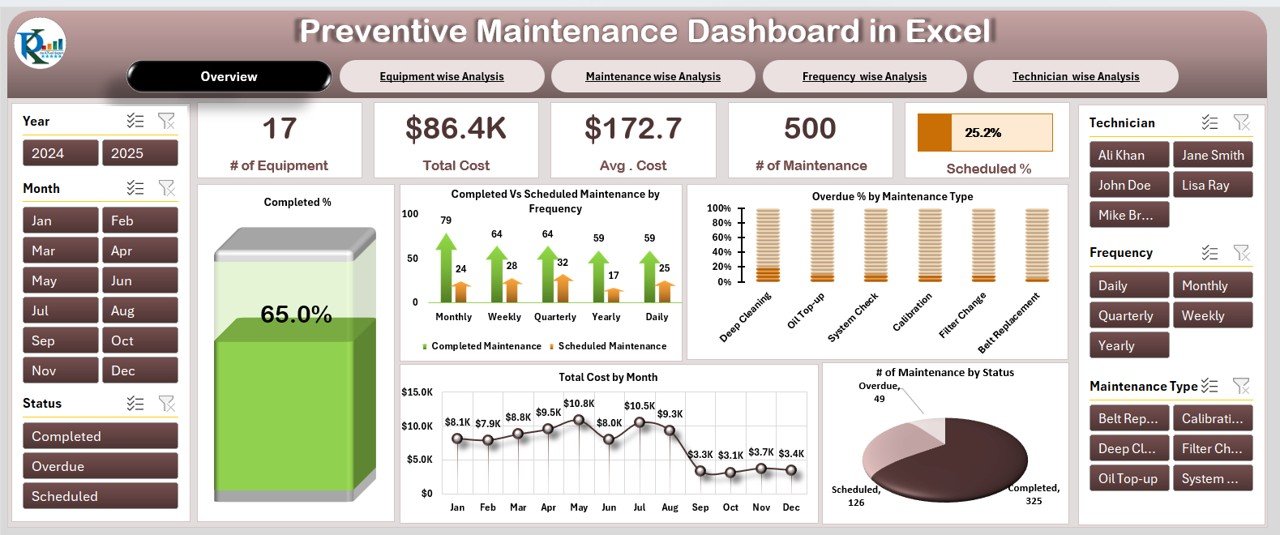
This is the closest one-file replacement for MaintainX’s core. It tracks every piece of equipment, its maintenance schedule, cost per asset and technician performance in one dashboard, so the reporting MaintainX Essential gives you sits in a spreadsheet you already know.
Who it is for: facility, workshop and plant maintenance leads who want PM scheduling and KPIs without a per-seat subscription.
What is inside:
- Maintenance KPI overview — equipment count, total and average cost, jobs completed
- Equipment-wise and maintenance-type analysis
- Technician-wise performance breakdown
- Completed-by-frequency and overdue tracking
- Status view: completed / overdue / scheduled
A 20-machine workshop can log its full PM calendar, see that reactive repairs cost $172 on average versus $86 planned, and spot the one technician clearing 65% of jobs — the same visibility MaintainX charges $20/user/month for. Replace one Essential seat and this template pays for itself in the first month.
Price: $17.99 one-time. Get the Preventive Maintenance Dashboard in Excel →
Best for: the single most direct MaintainX-to-Excel swap.
2. Preventive Maintenance Dashboard in Power BI — best for analytics
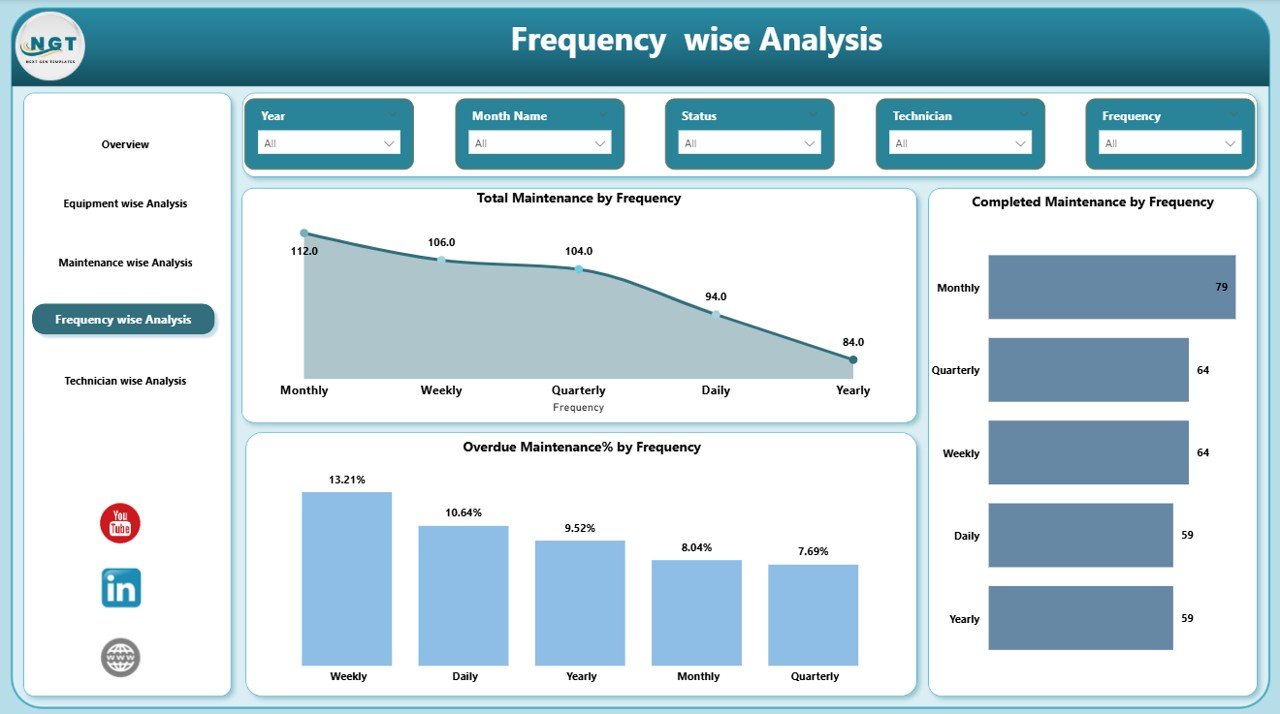
The same preventive-maintenance data model, rebuilt in Power BI with slicers, drill-through and frequency analysis. This is what you buy instead of MaintainX Premium’s advanced analytics tier — the difference between $17.99 once and $65/user/month.
Who it is for: teams that report maintenance performance upward and want interactive, filterable visuals rather than static tables.
What is inside:
- Overview, equipment-wise, maintenance-type and technician-wise pages
- Frequency-wise analysis (daily / weekly / monthly / quarterly)
- Overdue-by-frequency and completed-maintenance visuals
- Interactive slicers for year, month, technician and equipment
A multi-line plant can slice overdue work by shift, drill from a plant total into a single asset, and refresh from a data table each week — no monthly seat renewal. For a supervisor presenting to management, the interactivity matches what MaintainX Premium delivers.
Price: $17.99 one-time. Get the Preventive Maintenance Dashboard in Power BI →
Best for: maintenance analytics and management reporting.
3. Office Equipment Maintenance Checklist in Google Sheets — best value
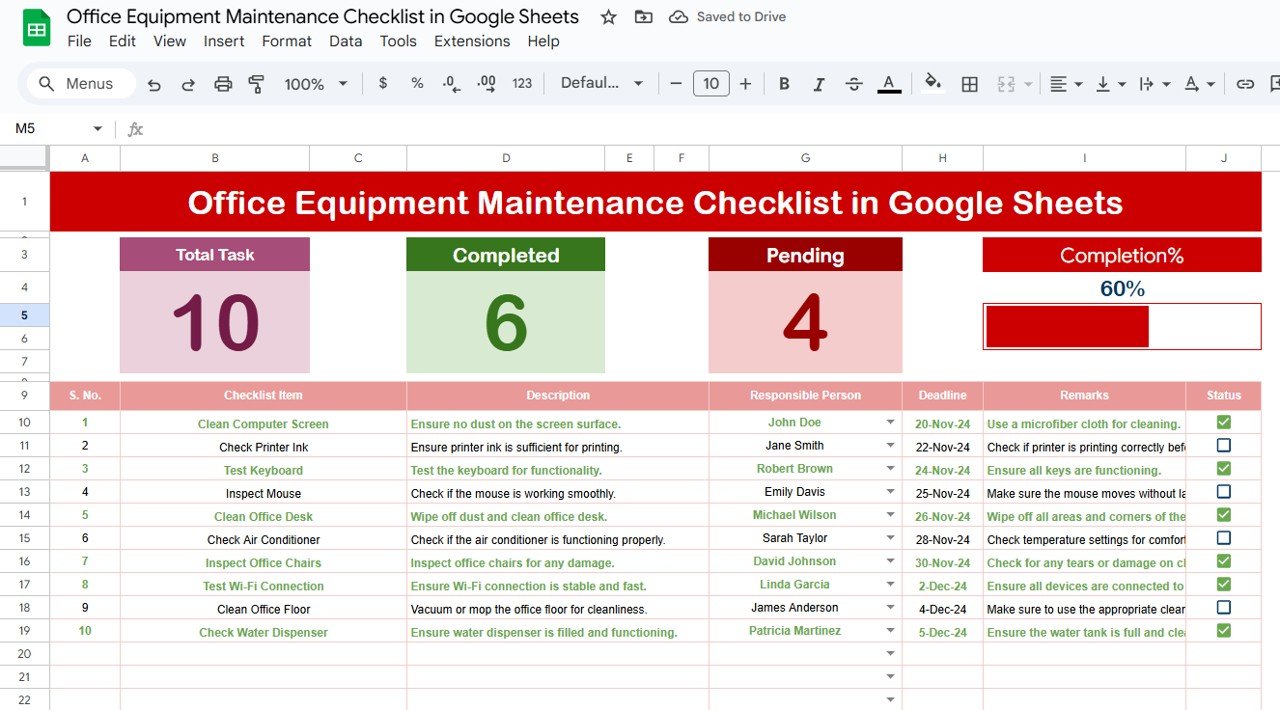
At $1.99, this is the cheapest way to replace MaintainX’s work-order and recurring-task function. It is a cloud-shared checklist where you assign tasks, set deadlines and monitor status — the daily driver of any small maintenance team.
Who it is for: offices, clinics and small facilities that need shared task tracking, not a full analytics stack.
What is inside:
- Central maintenance checklist with task, owner, deadline and status
- Dropdown-driven status and priority fields
- Google Sheets sharing so the whole team edits one live copy
- Simple summary of open vs completed tasks
Because it lives in Google Sheets, every technician with the link sees the same live list — the collaboration MaintainX sells, minus the seat fee. A three-person team can run its entire recurring-maintenance routine here for the price of a coffee.
Price: $1.99 one-time. Get the Office Equipment Maintenance Checklist →
Best for: the lowest-cost work-order replacement.
4. IT Equipment Maintenance Checklist in Google Sheets

The same shared-checklist engine tuned for IT assets — servers, laptops, network gear. If your “maintenance” is really device upkeep and downtime tracking, this is the $1.99 fit.
Who it is for: IT admins and MSPs tracking device maintenance, patch cycles and hardware downtime.
What is inside:
- Device-level task tracker with deadline, status and assignee
- Downtime and completion monitoring
- Dropdown-controlled priority and category fields
- Live Google Sheets collaboration
An IT team managing 50 endpoints can log every scheduled clean-up, flag overdue patches, and share the sheet with the help desk — no CMMS licence per admin. It slots neatly beside a helpdesk system; if you also run tickets, see our ServiceNow alternative ITSM templates.
Price: $1.99 one-time. Get the IT Equipment Maintenance Checklist →
Best for: IT device upkeep and downtime.
5. Industrial Automation Equipment KPI Dashboard in Excel
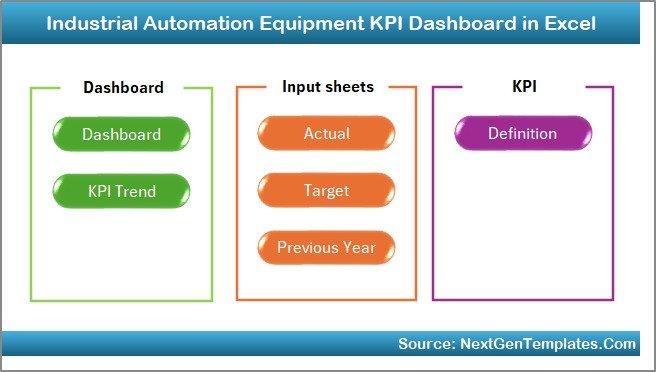
Where the preventive-maintenance dashboards track jobs, this one tracks machine performance — the uptime and efficiency KPIs a plant watches. Seven structured worksheets give you MTD and YTD tracking with actual-vs-target comparison.
Who it is for: production and reliability engineers who measure equipment output, not just repair logs.
What is inside:
- 7 worksheets: dashboard, trend, input, target and more
- MTD and YTD KPI tracking
- Actual-vs-target gap analysis
- Trend charts for uptime, output and efficiency
A plant chasing OEE can set uptime and yield targets, see the month-to-date gap at a glance, and trend it across the year — the reliability angle MaintainX only surfaces on its Premium analytics tier. For the wider machine-repair context, our CMMS Excel maintenance templates guide covers the full range.
Price: $14.99 one-time. Get the Industrial Automation Equipment KPI Dashboard →
Best for: machine uptime and OEE.
6. Equipment Leasing KPI Dashboard in Excel
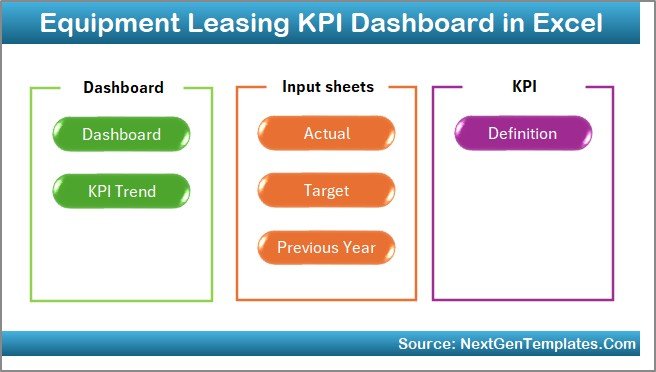
If your assets earn revenue — rental fleets, leased machinery, shared plant — this dashboard tracks utilization, revenue, cost and profitability per asset. It is the money-side companion to a maintenance log.
Who it is for: rental businesses and asset-heavy operations that need to prove each machine pays its way.
What is inside:
- Utilization-rate tracking by asset
- Revenue, cost and profitability KPIs
- MTD and YTD performance comparison
- Dashboard summary with trend visuals
A rental firm with 40 machines can see which units sit idle, which carry the highest maintenance cost against revenue, and where to reinvest — decisions MaintainX’s maintenance focus does not directly answer. Pair it with a preventive schedule and you cover both upkeep and ROI.
Price: $14.99 one-time. Get the Equipment Leasing KPI Dashboard →
Best for: asset utilization and cost/ROI.
7. Medical Equipment Manufacturing KPI Dashboard in Excel
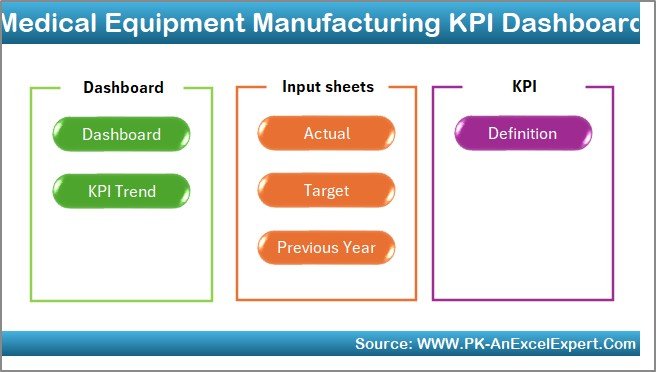
For regulated environments, maintenance is inseparable from compliance and quality. This dashboard tracks production, quality and compliance KPIs together across seven Excel sheets, so audit-ready reporting sits alongside your maintenance data.
Who it is for: medical-device, pharma and regulated manufacturers who must document equipment quality and compliance.
What is inside:
- 7-sheet system: dashboard, trend, input, target and more
- Production, quality and compliance KPIs in one view
- Actual-vs-target performance gaps
- MTD and YTD trend tracking
A device manufacturer can present compliance and equipment-quality metrics in one file at audit time — the kind of tailored reporting that would need a custom MaintainX Enterprise build. Everything is formula-driven, so an inspector can trace every number.
Price: $14.99 one-time. Get the Medical Equipment Manufacturing KPI Dashboard →
Best for: regulated / compliance reporting.
8. Asset Management Companies KPI Dashboard in Power BI
The widest-angle option: a Power BI dashboard for tracking a whole portfolio of assets by KPI, target and trend. When you manage many assets across sites rather than one workshop’s machines, this is the oversight layer.
Who it is for: asset managers and operations leads overseeing an asset portfolio and reporting to stakeholders.
What is inside:
- Centralized KPI, target and trend tracking
- Interactive Power BI visuals and slicers
- Portfolio-level roll-up with drill-down
- Refreshable from your own data source
A firm with assets across five locations can roll every site into one board, compare against targets, and drill into any single asset — multi-site visibility that MaintainX reserves for its Enterprise tier. At $11.99 once, it is the cheapest entry to portfolio-level reporting. For more Power BI options see our Power BI Premium alternatives.
Price: $11.99 one-time. Get the Asset Management Companies KPI Dashboard →
Best for: portfolio-level asset oversight.
How to choose between them
Match the template to the MaintainX job you actually do:
| If your main need is… | Buy this | Price |
|---|---|---|
| A full PM schedule + reporting in a tool you know | Preventive Maintenance Dashboard (Excel) | $17.99 |
| Interactive maintenance analytics for management | Preventive Maintenance Dashboard (Power BI) | $17.99 |
| Cheap shared work-order / task tracking | Office Equipment Maintenance Checklist | $1.99 |
| IT device upkeep and downtime | IT Equipment Maintenance Checklist | $1.99 |
| Machine uptime and OEE | Industrial Automation Equipment KPI Dashboard | $14.99 |
| Asset utilization and ROI | Equipment Leasing KPI Dashboard | $14.99 |
| Compliance / regulated reporting | Medical Equipment Manufacturing KPI Dashboard | $14.99 |
| Multi-asset, multi-site oversight | Asset Management Companies KPI Dashboard | $11.99 |
Most small teams end up buying two: a checklist for daily work orders ($1.99) and the Preventive Maintenance Dashboard for reporting ($17.99) — about $20 total, once, versus one MaintainX Essential seat every single month.
When MaintainX is still the right call
We sell templates, but a spreadsheet is not always the honest answer. Stay on — or switch to — MaintainX when:
- Your technicians work off phones in the field. MaintainX’s mobile app, offline work orders and in-app messaging are its strongest feature. A spreadsheet on a phone is painful; if the shop floor lives on mobile, pay for the app.
- You need IoT / sensor-triggered maintenance. Condition-based triggers from connected equipment are a Premium/Enterprise capability no spreadsheet replicates.
- You have many concurrent editors and need audit trails. Real-time multi-user editing with change history and role permissions is where a database CMMS beats a file. Google Sheets softens this, but at scale MaintainX wins.
- Parts inventory and purchase orders drive your workflow. MaintainX Premium’s inventory and PO modules are integrated; rebuilding that in a spreadsheet is more work than it is worth.
- You are rolling out across multiple sites with SSO. Enterprise multi-site management and single sign-on are governance features templates cannot provide.
If two or more of those are true, keep MaintainX. If none are — and for most small teams none are — the templates above do the job for a fraction of the lifetime cost.
Frequently asked questions
What is the best MaintainX alternative for a small team?
For most small teams, the Preventive Maintenance Dashboard in Excel ($17.99, one-time) paired with the Office Equipment Maintenance Checklist in Google Sheets ($1.99) covers preventive maintenance, reporting and work orders. Together they cost about $20 once, versus $20 per user every month on MaintainX Essential.
How much does MaintainX cost?
MaintainX has a free Basic plan (limited to 2 work orders with procedures), then Essential at $20/user/month billed annually ($25 monthly) and Premium at $65/user/month annually ($75 monthly). Enterprise is custom-quoted. Check the official MaintainX pricing page for the current figures, as tiers change.
Can a spreadsheet really replace a CMMS?
For small teams, yes. A well-built spreadsheet template handles preventive-maintenance scheduling, work-order tracking, cost logging and KPI reporting — the modules most teams actually use. It cannot match a database CMMS on mobile field work, IoT triggers or large multi-user audit trails, which is why we list exactly when to keep MaintainX.
Do these templates work in Google Sheets and Excel both?
Each template is built for one platform — Excel, Google Sheets or Power BI — and the format is listed on every product. The two maintenance checklists are native Google Sheets; the preventive-maintenance and KPI dashboards are Excel or Power BI. Pick the format your team already uses day to day.
Is there a free MaintainX alternative?
MaintainX’s own Basic plan is free but capped at 2 work orders with procedures, which is impractical for real use. Rather than a limited free tier, these paid templates start at just $1.99 one-time with no seat cap and no recurring fee, which works out cheaper than any subscription over a year.
Will I get updates and support with the templates?
Yes. NextGenTemplates products are supported downloads — you own the file outright and receive the current version, with help available if a formula or sheet needs adjusting for your data. There is no subscription to lapse, so the template keeps working whether or not you renew anything.
How do these templates handle work orders?
The two Google Sheets maintenance checklists are the work-order layer: you log each task with an owner, deadline, priority and status, and the whole team edits one shared live copy. For higher-volume operations you would pair a checklist with the Preventive Maintenance Dashboard so completed jobs feed your KPIs.
Can I track maintenance KPIs like MTBF and downtime?
Yes. The Preventive Maintenance and Industrial Automation Equipment dashboards track completion rates, overdue jobs, cost per asset, uptime and actual-vs-target performance with MTD/YTD trends. You can adapt the input sheets to feed metrics like mean time between failures and total downtime from your own maintenance log.
Are the templates a one-time purchase?
Every template here is a one-time purchase between $1.99 and $17.99. You download the file and own it — there are no per-user seats, no monthly renewal and no feature paywall. That is the core saving versus MaintainX’s per-seat monthly model.
What if I outgrow the spreadsheet later?
That is a fine outcome. Start on a template while your team is small and your workflow is simple, and move to MaintainX or another database CMMS when mobile field work, IoT triggers or multi-site governance become real needs. The spreadsheet keeps your historical data exportable for the migration.
Get more maintenance and CMMS templates
Ready to leave the per-seat treadmill? Start with the Preventive Maintenance Dashboard in Excel at $17.99 for full CMMS reporting, or the Office Equipment Maintenance Checklist at just $1.99 to replace work orders today. Browse the complete CMMS & equipment maintenance templates collection for the full range in Excel, Google Sheets and Power BI.
Prefer to see them in action first? Watch build walkthroughs and demos on the NextGenTemplates YouTube channel. Comparing other tools too? See our ServiceNow ITSM alternatives, Domo BI alternatives and Qlik Sense alternatives.