

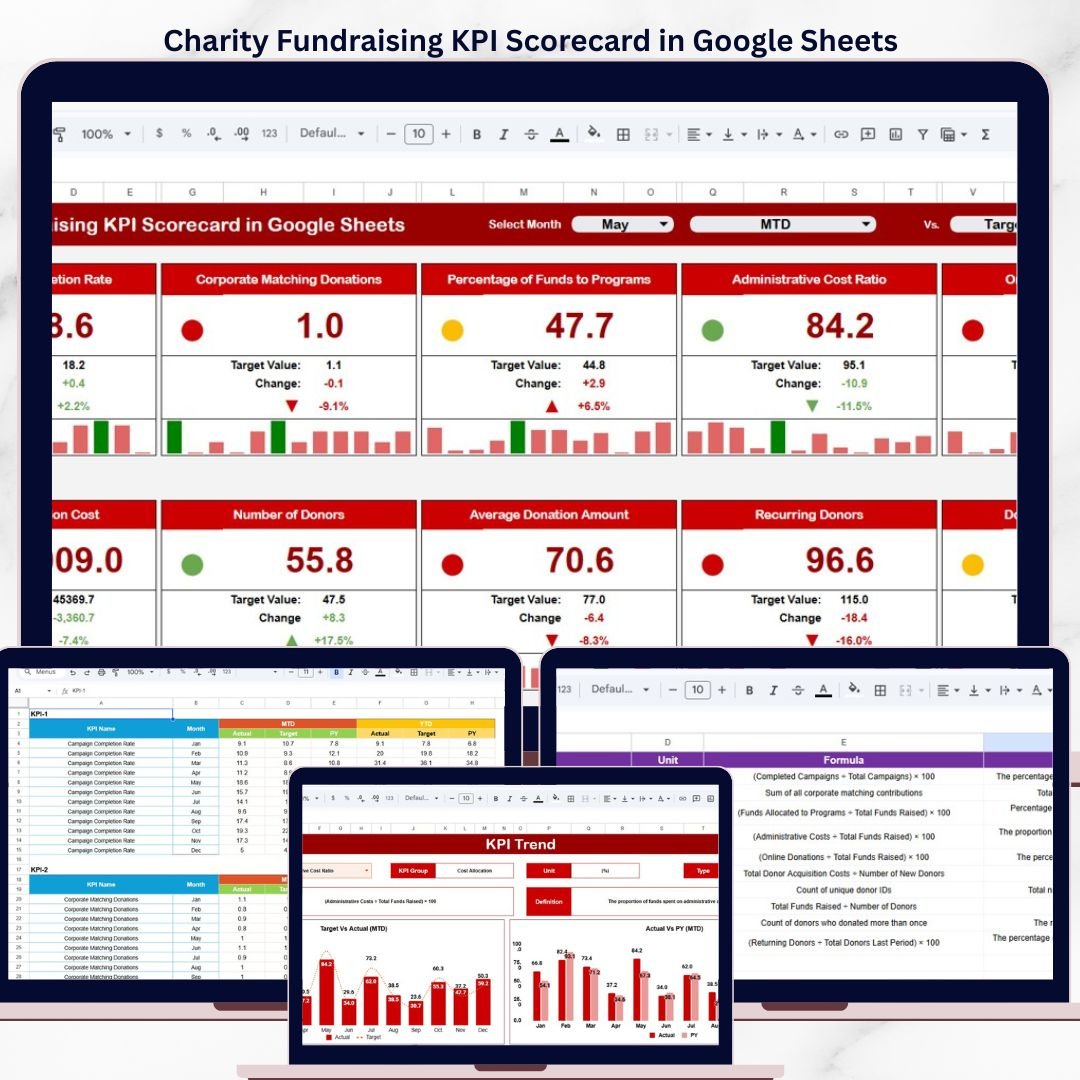
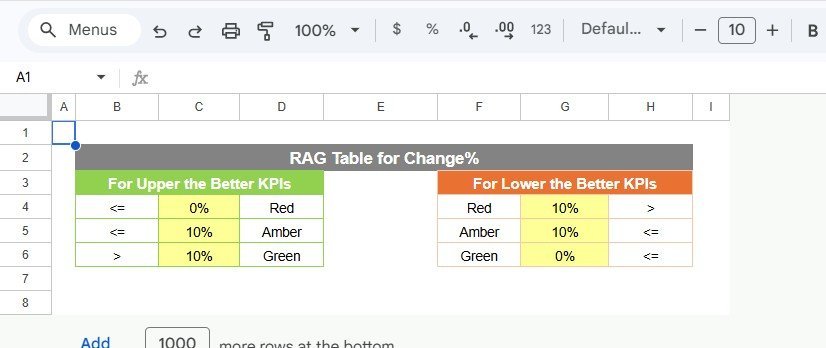

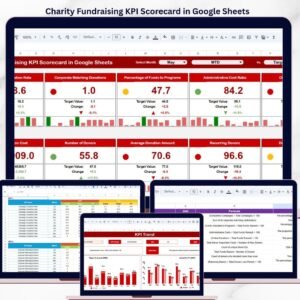
The Charity Fundraising KPI Scorecard in Google Sheets tracks fundraising KPIs across 4 purpose-built worksheets, with MTD and YTD comparisons against targets and previous-year benchmarks. It includes dropdown-driven month filtering, conditional-formatting arrows for instant status checks, trend charts for every KPI, and built-in LTB/UTB logic. Setup takes under 10 minutes — replace the sample data and the entire scorecard updates automatically.
🌍 Join 10,000+ customers in 180+ countries using NextGenTemplates to replace paid SaaS tools with one-time-purchase Excel, Google Sheets KPI Dashboards, Power BI, and HTML templates.
✅ Instant download · One-time payment of $8.99 · No subscription · No per-user fees · Lifetime access
🔑 Key Features of Charity Fundraising KPI Scorecard in Google Sheets
📊 4-sheet scorecard architecture – A main Scorecard sheet with month/MTD/YTD dropdown, a KPI Trend sheet with combo charts, an Input Data sheet for actual, target, and previous year numbers, and a KPI Definition reference sheet that drives all calculations.
🎯 MTD and YTD comparison engine – Every fundraising KPI shows Actual vs Target and Actual vs Previous Year for both month-to-date and year-to-date periods, giving nonprofit teams a full picture in one view.
🟢🔴 Conditional formatting status arrows – Green ▲ and red ▼ arrows appear automatically next to each metric based on whether performance is above or below target — no manual formatting required.
📈 Interactive KPI trend charts – Select any KPI from the dropdown on the Trend sheet and instantly see 12-month MTD and YTD line charts plotting Actual, Target, and Previous Year side by side.
🔄 Single-dropdown month filter – Change the month on the Scorecard sheet and all numbers, comparisons, and arrows refresh across the entire workbook.
📋 Structured KPI definitions – Each metric includes its KPI Group, Unit, Formula, Definition, and Type (LTB or UTB) so every stakeholder interprets the numbers consistently.
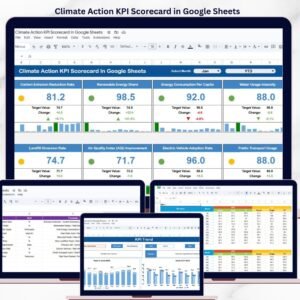
If your team manages donor metrics and campaign tracking, you may also want to explore our Climate Action KPI Scorecard in Google Sheets for a similar MTD/YTD tracking pattern applied to sustainability metrics.
📦 What’s Inside the Charity Fundraising KPI Scorecard
The template contains 4 worksheets designed to cover every aspect of charity fundraising KPI tracking:
📌 Scorecard Sheet – The main interface where you view KPI performance. Select the month, MTD, or YTD from the dropdown for performance analysis. Compare actual performance against targets for each KPI, and quickly see performance status using color-coded visuals and conditional formatting arrows. The scorecard displays all relevant information about KPIs, including MTD and YTD comparisons.
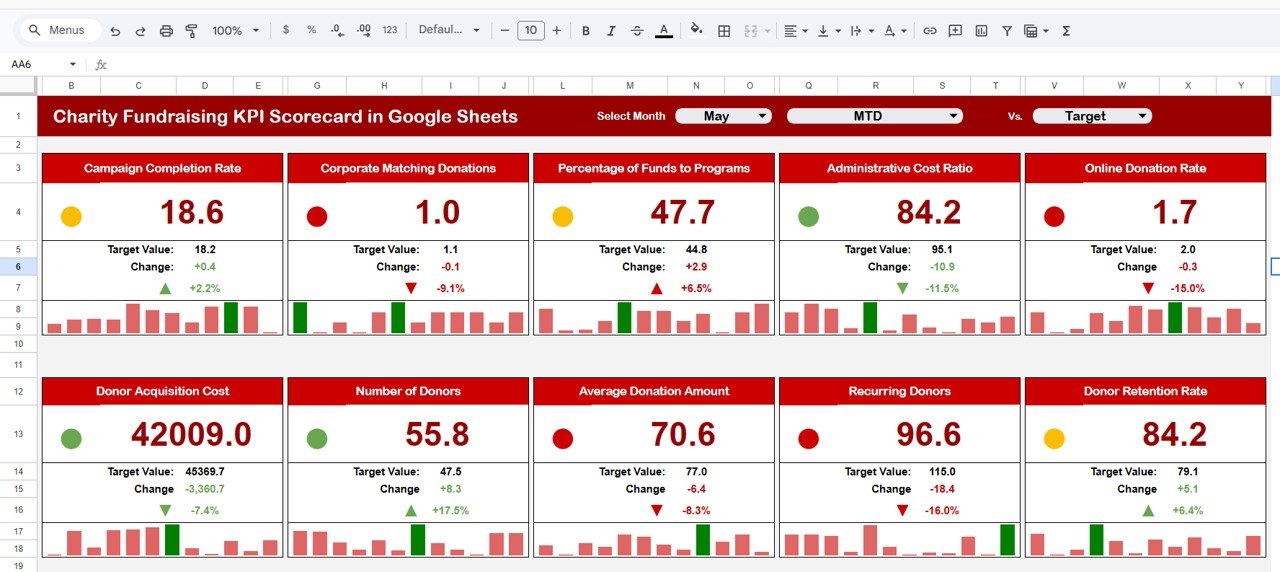
Charity Fundraising KPI Scorecard in Google Sheets
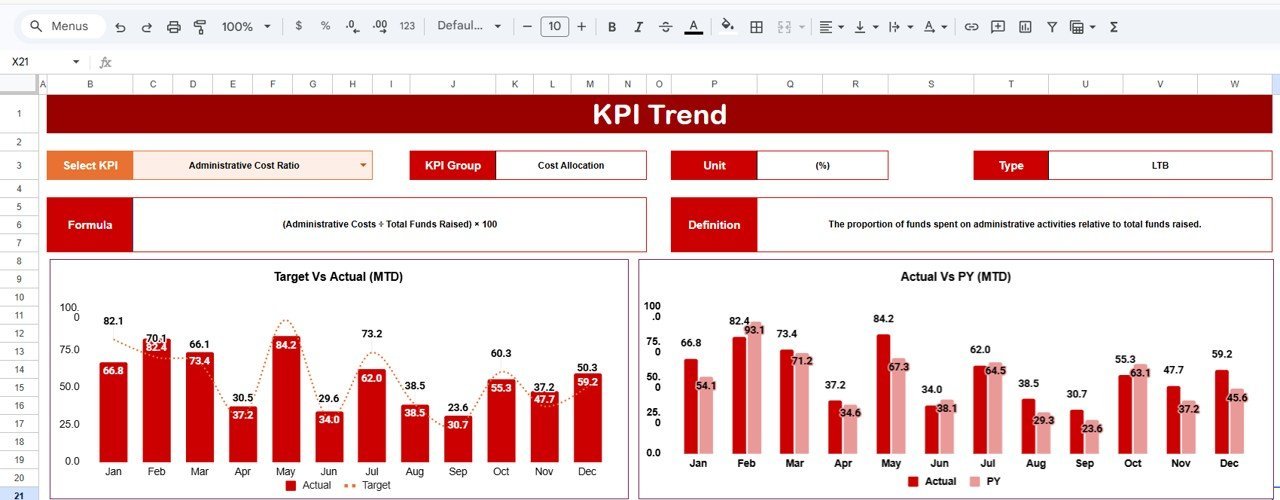
📌 KPI Trend Sheet – Select any KPI name from the dropdown on range C3. The sheet displays the KPI Group, Unit of KPI, Type (Lower the Better or Upper the Better), Formula, and Definition. Below that, MTD and YTD trend charts plot Actual, Target, and Previous Year across all 12 months.
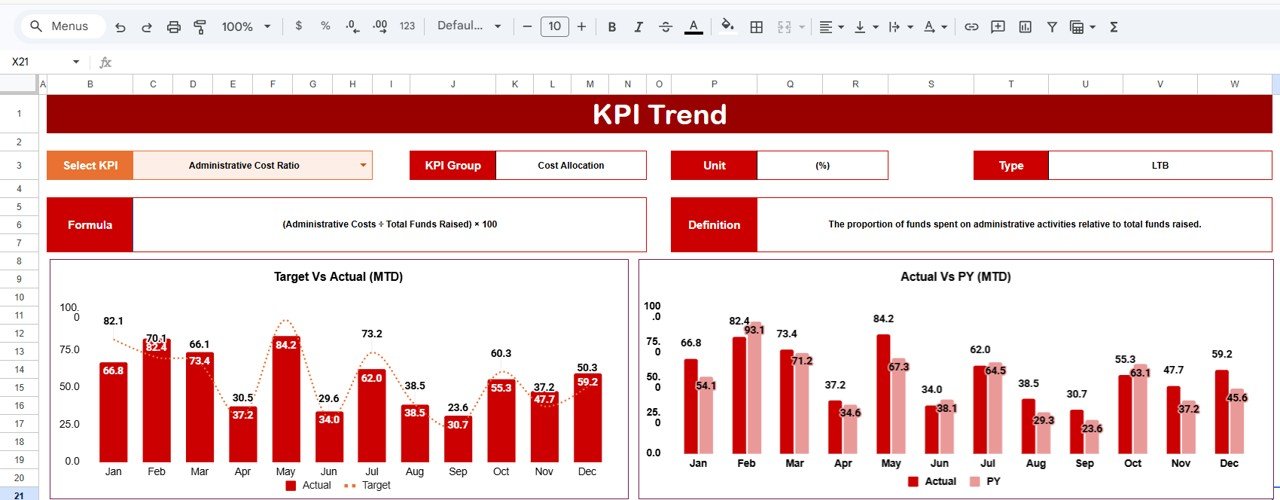
KPI Trend Sheet
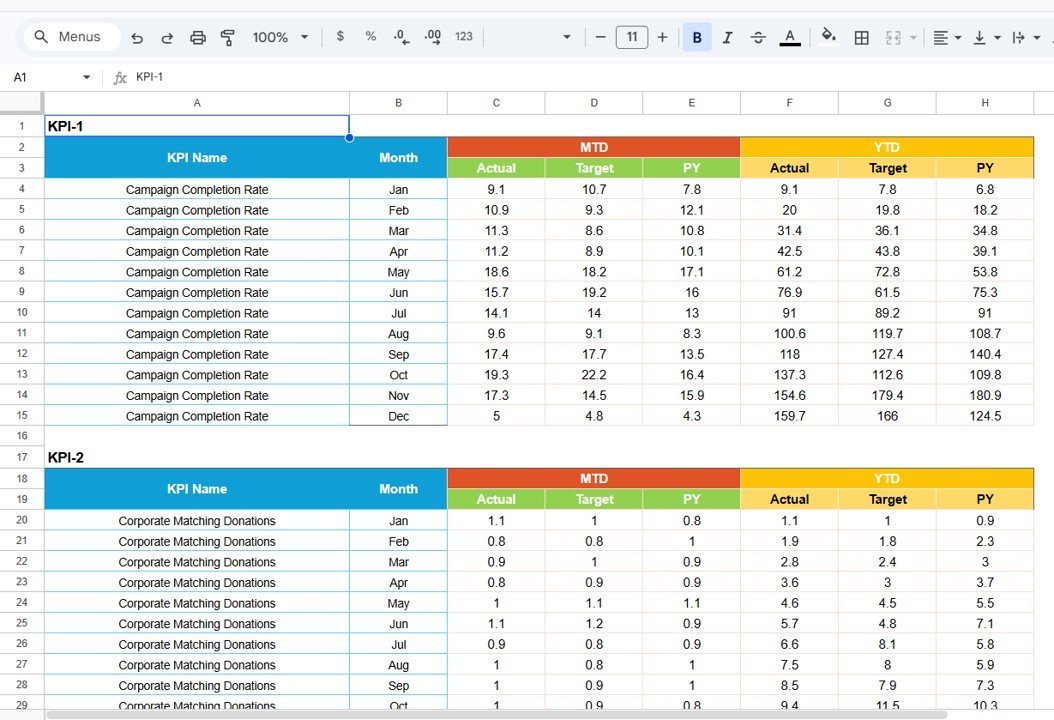
📌 Input Data Sheet – The backbone of the scorecard where you enter all KPI data. Record actual values, targets, and other metrics for each KPI. Easily update data as new results become available, ensuring the scorecard remains current.
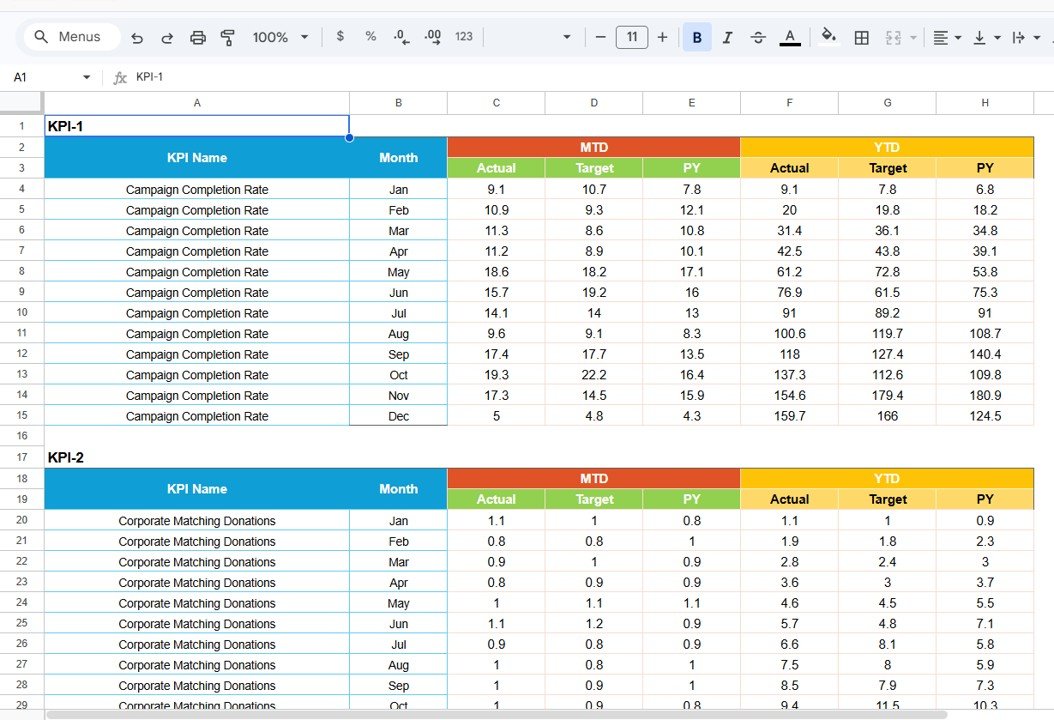
Input Data Sheet
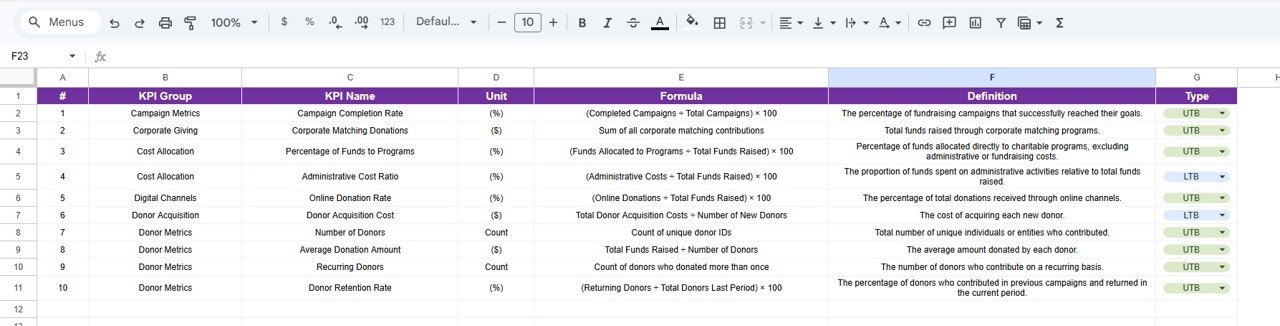
📌 KPI Definition Sheet – Enter the KPI Name, KPI Group, Unit, Formula, and KPI Definition. This provides context and consistency, especially useful for teams and stakeholders reviewing the scorecard.
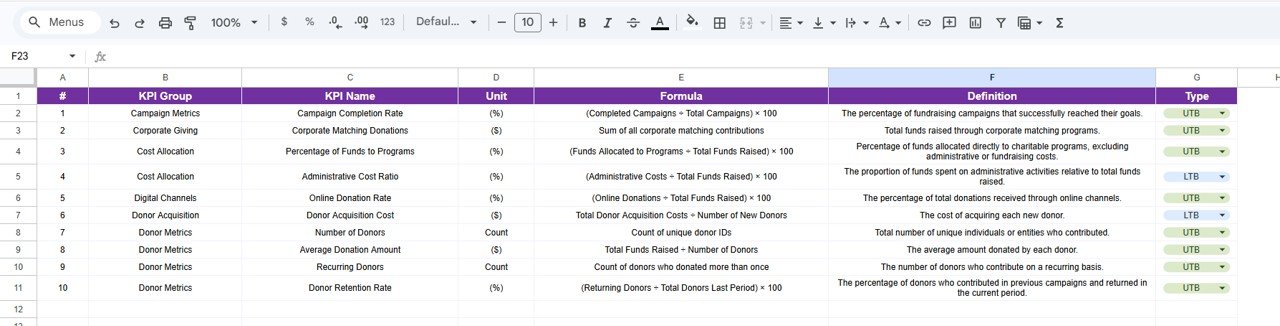
KPI Definition Sheet
📊 Charity Fundraising KPI Scorecard vs. Microsoft Excel Scorecard vs. Paid Donor SaaS — Where This Fits
| Feature | Charity Fundraising KPI Scorecard (Google Sheets) | Microsoft Excel KPI Scorecard | Paid Donor SaaS (Bloomerang / DonorPerfect / Blackbaud) |
|---|---|---|---|
| Cost | $8.99 one-time ✅ | $12.99–$16.99 one-time | $99–$500+ / month |
| Platform | Google Sheets (browser-based) ✅ | Microsoft Excel (desktop) | Cloud SaaS — vendor lock-in |
| Setup Time | Under 10 minutes ✅ | Under 10 minutes | 2–8 weeks onboarding |
| Real-Time Collaboration | ✅ Built-in | Limited (OneDrive) | ✅ Yes |
| Mobile Access | ✅ Google Sheets app | Limited | ✅ Yes |
| Customizable KPIs | ✅ Add/edit any fundraising KPI | ✅ Manual formulas | Vendor-controlled catalog |
| LTB / UTB Logic | ✅ Built-in per KPI | Manual IF formulas | ✅ Configurable |
| Year-1 Cost at 5 Users | $8.99 total ✅ | $12.99 + 5× licenses | $1,188–$6,000+ |
| Share with Link | ✅ One-click share | ❌ Email attachment | ✅ Yes |
For nonprofit teams that want fundraising KPI tracking without paying $1,188+ per year for donor management SaaS, the Charity Fundraising KPI Scorecard in Google Sheets sits in the sweet spot.
👥 Who This Template Is For — and Who It’s Not For
✅ This template is built for:
- Fundraising managers at charities and nonprofits tracking donation targets, campaign ROI, and donor retention monthly
- Executive directors reporting fundraising KPIs to board members and grant-making bodies quarterly
- Development officers comparing actual fundraising results against annual targets and previous-year benchmarks
- Small to mid-size nonprofits (5–200 staff) that need KPI tracking without paying for Bloomerang or Blackbaud
- Consultants delivering monthly fundraising performance scorecards to nonprofit clients
❌ This template is NOT for:
- Large nonprofits needing CRM integration with Salesforce NPSP, automated gift processing, or tax receipt generation
- Organizations requiring SOC 2 compliance and audit-trail logs on donation data entry
- Teams that need real-time payment gateway integration for online donations
⚙️ How to Use the Charity Fundraising KPI Scorecard in Google Sheets
1️⃣ Open the PDF guide included in your download and click the Google Sheets copy link to create your own editable copy in Google Drive.
2️⃣ Go to the KPI Definition sheet and enter your charity fundraising KPI names, groups, units, formulas, definitions, and LTB/UTB type.
3️⃣ Fill the Input Data sheet with your actual MTD and YTD data, targets, and previous year numbers for each KPI by month.
4️⃣ Open the Scorecard sheet and select any month from the dropdown — all numbers refresh automatically.
5️⃣ Use the KPI Trend sheet to select individual KPIs and review their 12-month trend charts for Actual, Target, and Previous Year.
💼 Real-World Use Cases
Anita is the development director at a 45-person animal welfare nonprofit in Toronto. She uses the Charity Fundraising KPI Scorecard in Google Sheets to track 10 fundraising KPIs including donor retention rate, average gift size, cost per dollar raised, and recurring gift percentage. The MTD vs Target comparison lets her flag underperforming campaigns at weekly team meetings — without paying $3,600/year for Bloomerang analytics.
David runs fundraising operations at a community foundation in Nairobi. He tracks grant-funded campaign targets across 8 KPIs using the scorecard and shares view-only links with board members. The KPI Trend sheet lets him show 12-month improvement trajectories during annual reporting — the visual proof funders need to approve next year’s allocation.
Priya manages a small education charity in Mumbai. She uses the scorecard to compare donor acquisition cost and average donation value across 4 fundraising channels (events, online, corporate, grants). The LTB/UTB logic means lower cost-per-dollar-raised correctly shows green arrows — something her previous Excel tracker got wrong for months.
❓ Frequently Asked Questions
What KPIs does the Charity Fundraising KPI Scorecard in Google Sheets track?
The Charity Fundraising KPI Scorecard in Google Sheets tracks any fundraising KPIs you define — donor retention rate, average gift size, cost per dollar raised, recurring giving percentage, campaign ROI, and more. Configure them in the KPI Definition sheet with group, unit, formula, and LTB/UTB type.
How long does it take to set up?
Under 10 minutes. Open the Google Sheets copy link, enter KPI definitions and paste your numbers. Everything updates automatically — no formulas to write or edit.
Can I add more fundraising KPIs?
Yes. Add new rows in the KPI Definition sheet and corresponding rows in the Input Data sheet. The Charity Fundraising KPI Scorecard in Google Sheets picks up the new KPI automatically — no structural changes needed.
How does this compare to paid donor SaaS platforms like Bloomerang or DonorPerfect?
Donor SaaS platforms cost $99–$500+ per month with 2–8 weeks onboarding. The Charity Fundraising KPI Scorecard in Google Sheets costs $8.99 one-time with 10-minute setup. It lacks automated donation processing but delivers the same monthly KPI tracking and reporting that 90% of small nonprofits need.
Does this scorecard work on mobile devices?
Yes. Google Sheets works on any device via the app or mobile browser. Multiple team members can view and edit the Charity Fundraising KPI Scorecard simultaneously.
Can I customize conditional formatting thresholds?
Yes. Edit arrow symbols, colors, and thresholds using standard Google Sheets conditional formatting settings. The LTB/UTB logic in the KPI Definition sheet controls which direction is considered positive.
Is this template available in Excel or Power BI?
NextGenTemplates offers KPI scorecards and dashboards in Excel, Google Sheets, Power BI, and HTML. Browse the Google Sheets KPI Dashboard collection for more templates.
👤 About the Author
Built by PK — Microsoft Certified Professional with 15+ years of Excel, Google Sheets, and Power BI experience. Founder of NextGenTemplates, reaching 300K+ subscribers across YouTube channels (@PK-AnExcelExpert, @NextGenTemplates, @NeoTechNavigators). Every template is hand-built and tested before release.
🔗 Explore Related Templates
📌 Climate Action KPI Scorecard in Google Sheets – Same MTD/YTD structure applied to sustainability and environmental metrics
📌 Credit Card KPI Dashboard in Google Sheets – MTD/YTD KPI tracking for financial metrics
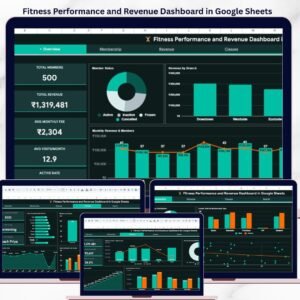
📌 Fitness Performance and Revenue Dashboard in Google Sheets – Multi-page slicer-driven dashboard with KPI cards
📌 Browse all Google Sheets KPI Dashboard Templates
📖 Click here to read the Detailed Blog Post
🎥 Visit our YouTube channel for step-by-step video tutorials
👉 YouTube.com/@NextGenTemplates
Compatibility and Requirements
- Works in Google Sheets. You need a free Google account and a web browser.
- You pick the month and the KPI from dropdowns. Google explains dropdowns in Create an in-cell dropdown list.























Reviews
There are no reviews yet.