

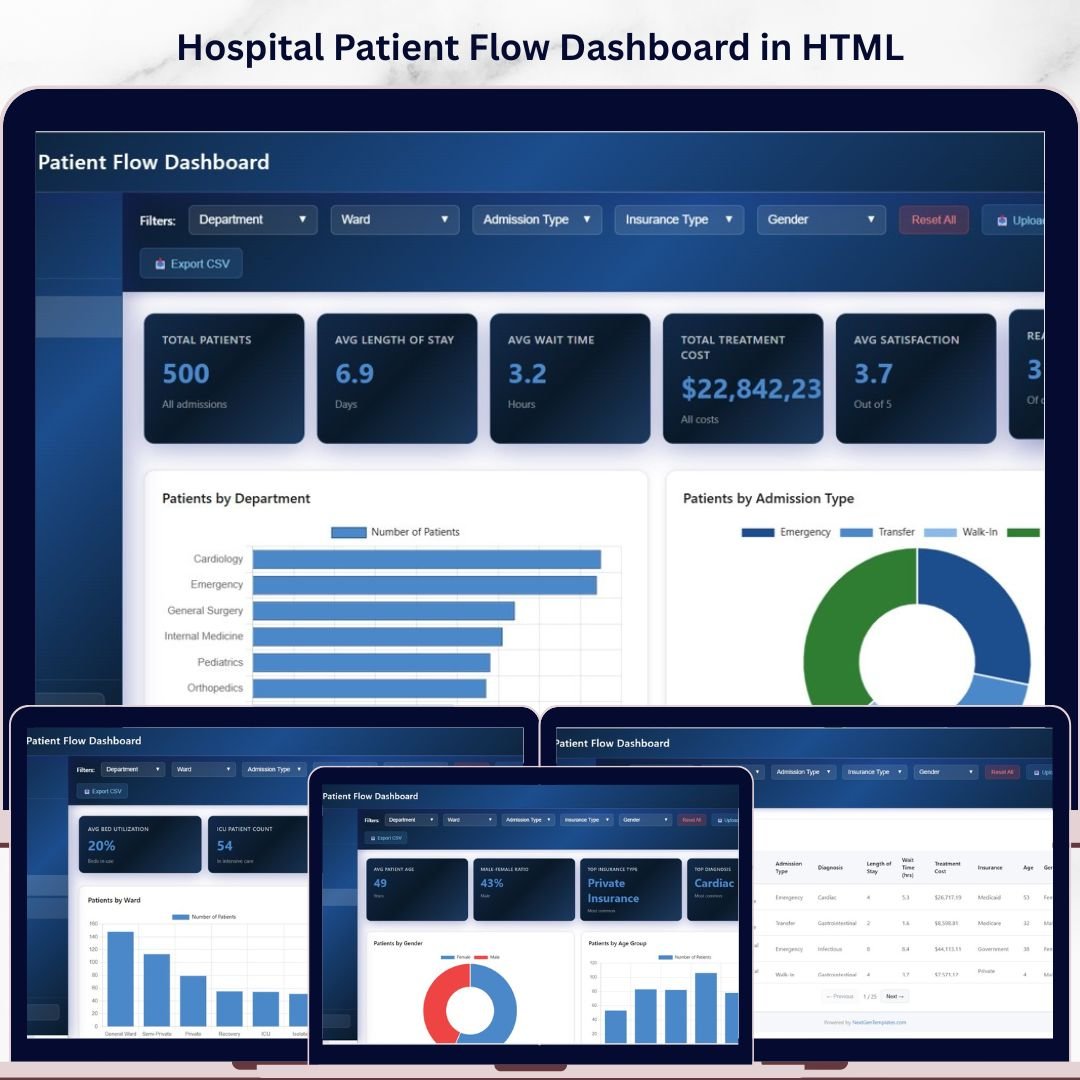

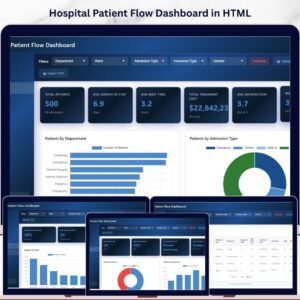
Hospital Patient Flow Dashboard in HTML is a powerful, interactive, and browser-based analytics dashboard template designed to help hospital administrators, healthcare analysts, and clinical teams monitor patient flow, treatment costs, satisfaction scores, and readmission rates across departments — all from a single HTML file that runs in any modern web browser. This dashboard includes 5 interactive pages covering Overview, Department Analysis, Patient Demographics, Capacity and Flow, and a detailed Data View page with search, sort, pagination, and CSV export features.
If you are looking for a modern, ready-to-use healthcare analytics dashboard that requires no software installation, this Hospital Patient Flow Dashboard in HTML is exactly what you need. Just open it in your favorite browser, load your data, and start making smarter decisions about patient care and hospital operations today.
🔑 Key Features of Hospital Patient Flow Dashboard in HTML
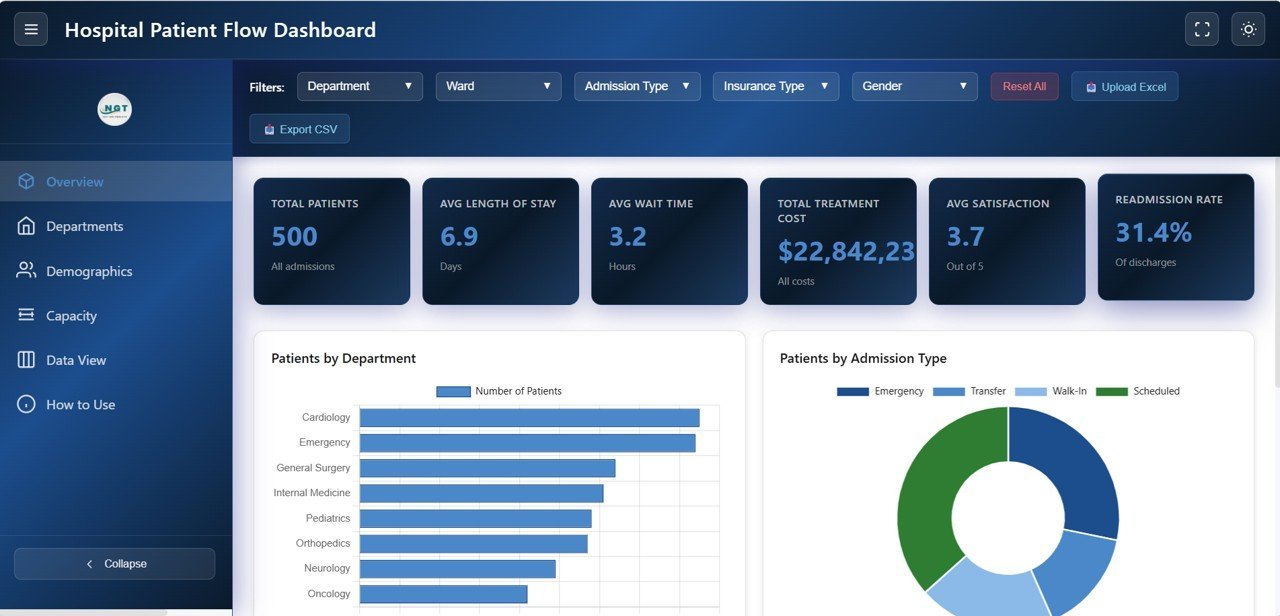
📊 Real-Time Patient Flow KPIs – Track 6 essential hospital metrics including Total Patients, Average Length of Stay, Average Wait Time, Total Treatment Cost, Average Satisfaction Score, and Readmission Rate through dynamic KPI cards on the overview page.
📈 Department-Level Performance Analysis – Deep-dive into each department’s performance with dedicated analysis of Treatment Cost by Department, Average Length of Stay by Department, Average Wait Time by Department, Satisfaction Score by Department, and Readmission Rate by Department.
🏥 Patient Demographics Insights – Understand your patient population through charts analyzing Patients by Gender, Patients by Age Group, Patients by Insurance Type, and Patients by Diagnosis Category.
🛏️ Capacity and Flow Monitoring – Optimize bed and ward utilization with analysis of Patients by Ward, Patients by Bed Type, Average Wait Time by Admission Type, and Length of Stay Distribution.
🎯 Smart Filters and Slicers – Instantly filter your data by department, date range, admission type, and more to drill down into the numbers that matter most to your hospital operations.
🖥️ Browser-Based – No Software Needed – This dashboard runs entirely inside your web browser. No Excel, Power BI, or any other software installation is required.
🎨 Professional SaaS-Style Design – Enjoy a clean, modern, premium design that looks like an enterprise-grade analytics application — not a basic spreadsheet.
🔄 Multi-Tab Navigation – Switch between 5 dashboard pages using smooth tab-based navigation for focused analysis.
📱 Responsive Layout – The dashboard is optimized to work beautifully on desktops, tablets, and mobile devices so you can check your metrics on the go.
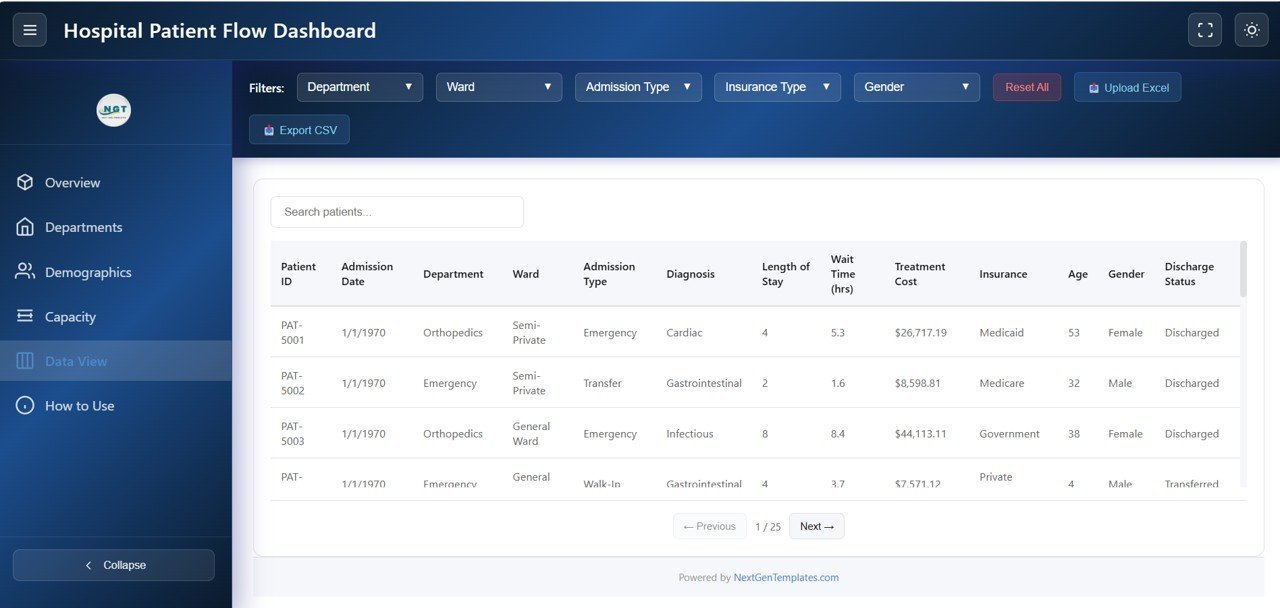
📋 Data View with Export – Review all patient records in a searchable, sortable data table with pagination and CSV export functionality.
📦 What’s Inside the Hospital Patient Flow Dashboard in HTML
This dashboard template includes 5 interactive analytical pages, each designed to give you deep insights into different areas of hospital patient flow management.
📌 Overview Page – High-level KPI cards showing Total Patients, Avg Length of Stay, Avg Wait Time, Total Treatment Cost, Avg Satisfaction Score, and Readmission Rate. Charts include Patients by Department, Patients by Admission Type, Monthly Patient Admissions, and Discharge Status Distribution. Multiple slicers let you filter the entire dashboard instantly.
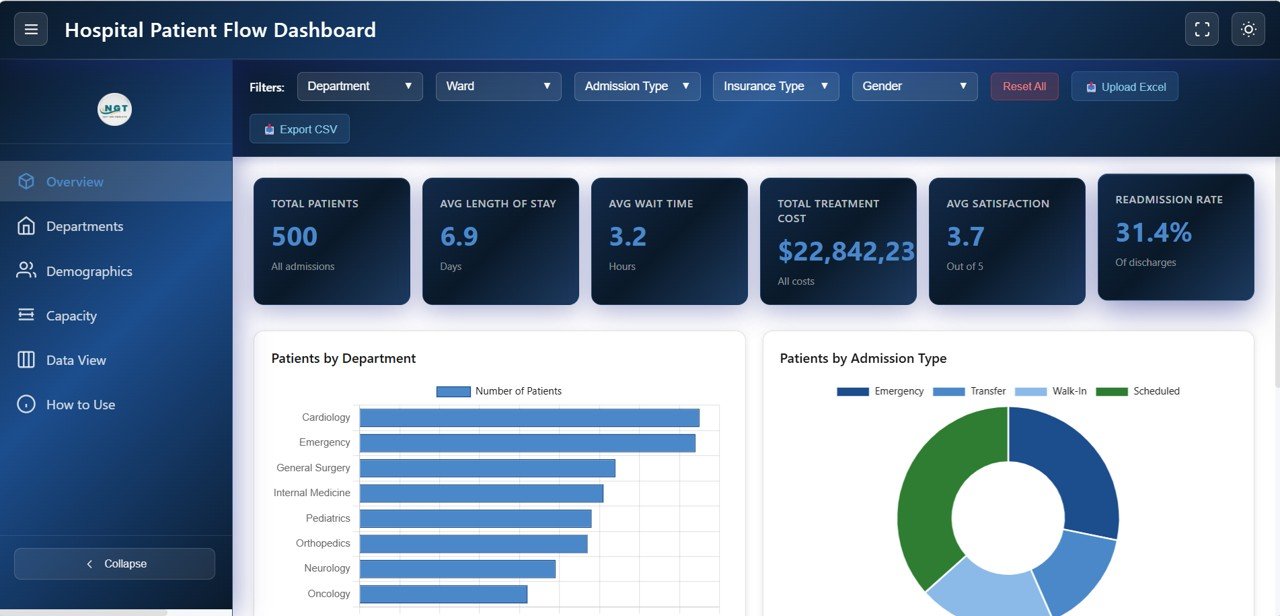 Hospital Patient Flow Dashboard Overview
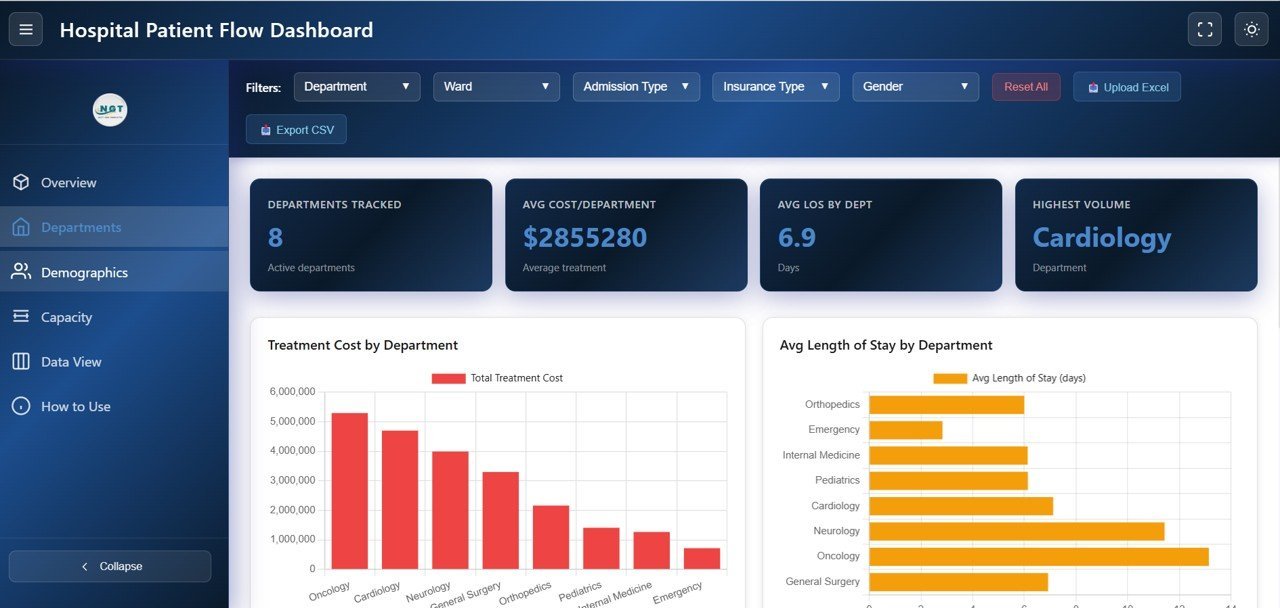
📌 Department Analysis Page – Detailed department-level insights including Treatment Cost by Department, Avg Length of Stay by Department, Avg Wait Time by Department, Satisfaction Score by Department, and Readmission Rate by Department. This page helps hospital leaders identify which departments need attention and optimize resource allocation.
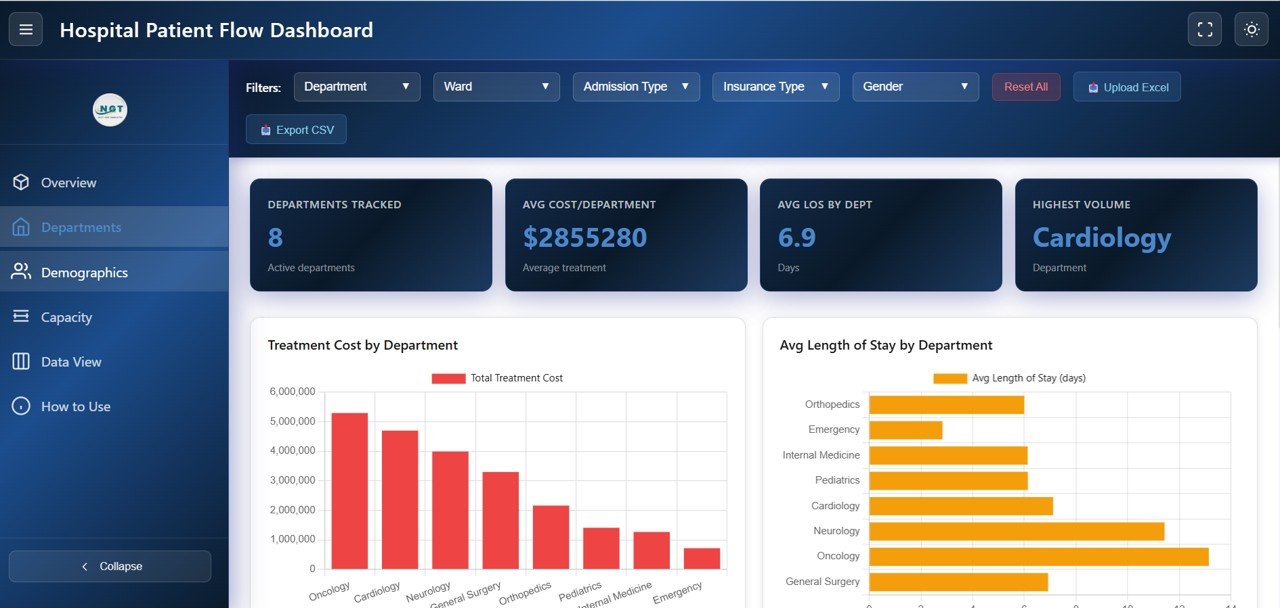 Department Analysis
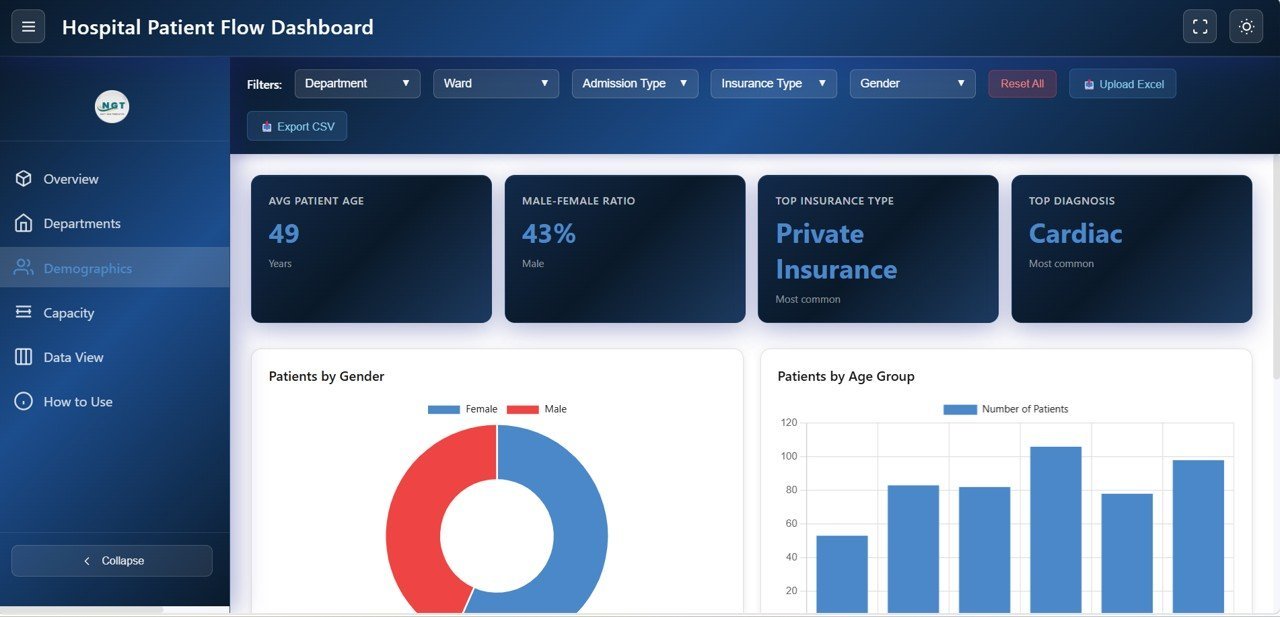
📌 Patient Demographics Page – Understand your patient population with analysis of Patients by Gender, Patients by Age Group, Patients by Insurance Type, and Patients by Diagnosis Category. These insights help hospitals tailor their services and plan for specific patient needs.
 Patient Demographics
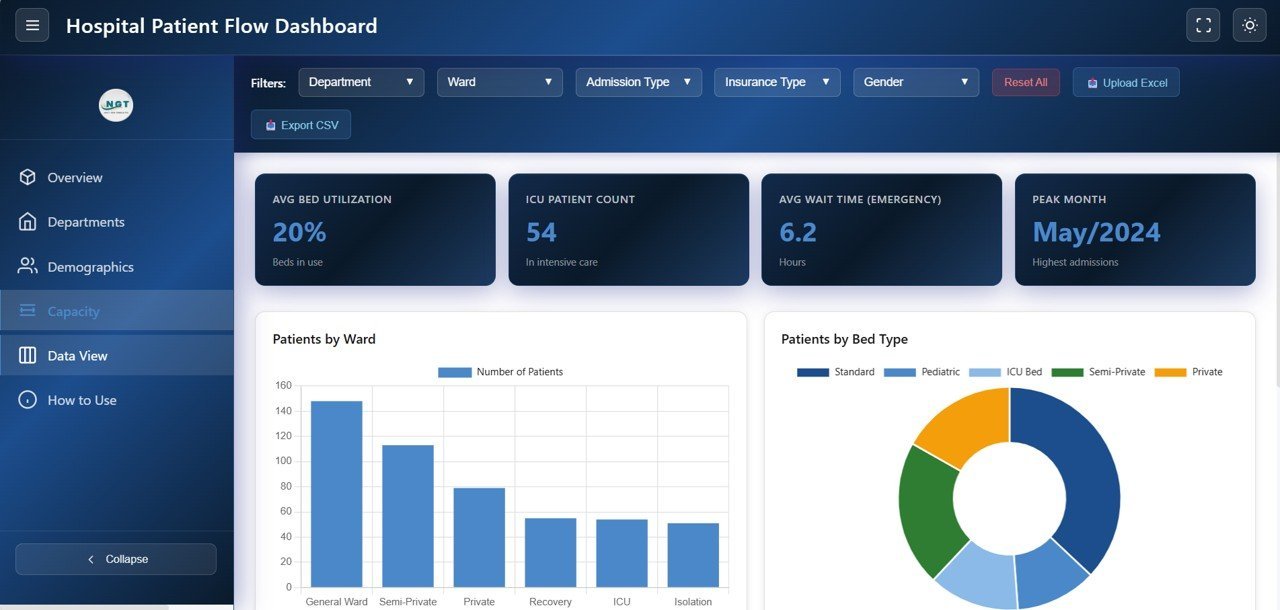
📌 Capacity and Flow Page – Monitor hospital capacity with analysis of Patients by Ward, Patients by Bed Type, Avg Wait Time by Admission Type, and Length of Stay Distribution. This page is critical for bed management, resource planning, and reducing patient wait times.
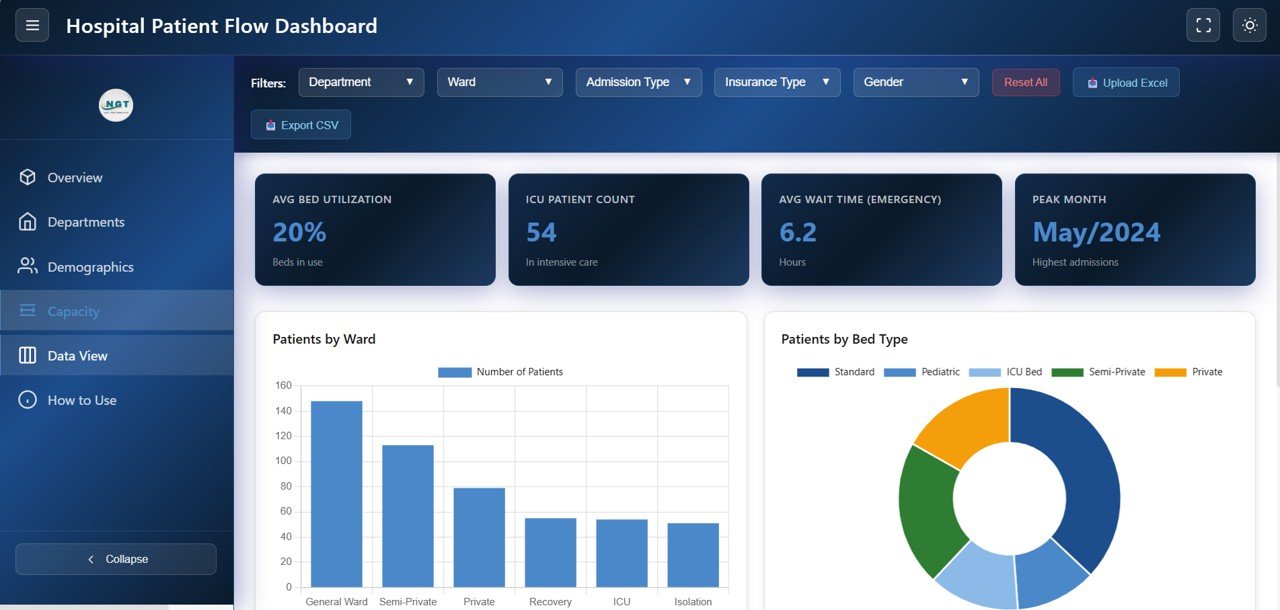 Capacity and Flow
📌 Data View Page – A detailed data table page where you can see all patient records with search, sort, and pagination features. You can also export the filtered data to CSV for use in other reporting tools.
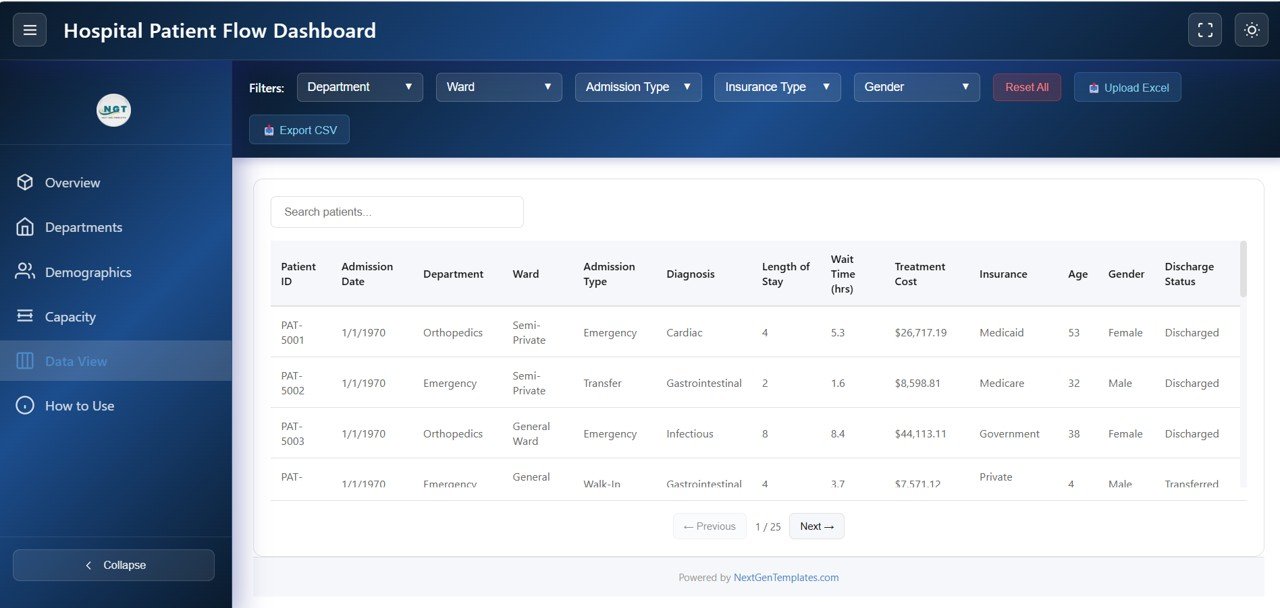 Data View
⚙️ How to Use the Hospital Patient Flow Dashboard in HTML
1️⃣ Download the Template – Purchase and download the ZIP file containing the HTML dashboard.
2️⃣ Extract and Open – Unzip the file and open the HTML file in any modern browser like Chrome, Firefox, Edge, or Safari.
3️⃣ Explore the Dashboard – Navigate through the 5 tabs to explore different analytical views of your patient flow data.
4️⃣ Customize Your Data – Replace the sample data with your actual hospital data to get real-time insights.
5️⃣ Apply Filters – Use the built-in slicers and filters to narrow down your analysis by department, admission type, date range, and more.
6️⃣ Export Data – Use the Data View page to export filtered records to CSV for further analysis or sharing.
👥 Who Can Benefit from This Hospital Patient Flow Dashboard in HTML
🏥 Hospital Administrators – Monitor patient flow, department performance, and operational metrics from a centralized view.
📊 Healthcare Data Analysts – Analyze patient demographics, treatment costs, satisfaction trends, and readmission patterns.
🩺 Clinical Quality Teams – Track readmission rates, wait times, satisfaction scores, and discharge outcomes to improve care quality.
💼 Healthcare Consultants – Present hospital performance data in a professional, interactive format that impresses stakeholders.
⚙️ Operations Managers – Optimize bed utilization, ward capacity, and patient wait times for better operational efficiency.
📚 Students and Educators – Use this as a learning tool or project submission for data analytics and healthcare management courses.
❓ Frequently Asked Questions
What KPIs does the Hospital Patient Flow Dashboard in HTML track?
The Hospital Patient Flow Dashboard in HTML tracks 6 key performance indicators including Total Patients, Average Length of Stay, Average Wait Time, Total Treatment Cost, Average Satisfaction Score, and Readmission Rate. It also provides department-level breakdowns and patient demographics analysis across 5 interactive pages.
Do I need any special software to use this HTML dashboard?
No. This dashboard runs entirely in your web browser. Simply unzip the downloaded file and open index.html in Chrome, Firefox, Edge, or Safari. No Excel, Power BI, or any other software installation is required.
Can I replace the sample data with my own hospital data?
Yes. The dashboard accepts Excel (.xlsx) data files. Simply replace the included sample data with your actual hospital records and all charts, KPI cards, and analytics will update automatically to reflect your data.
What analysis pages are included in this dashboard?
The dashboard includes 5 dedicated pages: Overview (high-level KPIs and charts), Department Analysis (cost, wait time, satisfaction by department), Patient Demographics (gender, age, insurance, diagnosis), Capacity and Flow (ward, bed type, wait time distribution), and Data View (searchable patient records with CSV export).
Is this dashboard suitable for tracking patient readmission rates?
Absolutely. The dashboard prominently displays the Readmission Rate as a KPI card on the Overview page and provides department-level readmission analysis on the Department Analysis page, helping hospitals identify and address readmission patterns.
Can I export data from this dashboard?
Yes. The Data View page includes a CSV export feature that lets you download the filtered patient dataset for use in Excel, Power BI, Google Sheets, or any other analytics tool.
🔗 Explore Related Templates
If you found this Hospital Patient Flow Dashboard useful, check out these related healthcare templates:
📌 Healthcare Analytics Dashboard in HTML – Track admissions, revenue, patient outcomes, and hospital KPIs with an interactive browser-based dashboard.
📌 Hospital Patient Flow Dashboard in Excel – The Excel version of this dashboard with pivot tables, charts, and automated formulas.
📌 Blood Banks Dashboard in Power BI – Monitor blood bank operations, inventory, and donor analytics with Power BI.
📖 Click here to read the Detailed Blog Post
Watch the step-by-step video tutorial:
🎥 Visit our YouTube channel to learn step-by-step video tutorials
👉 YouTube.com/@NextGenTemplates
Compatibility and Requirements
- Runs in a modern web browser: Chrome, Firefox, Edge or Safari. Unzip the download and open index.html. Nothing to install.
- The dashboard reads Excel (.xlsx) data files. Replace the sample data with your hospital records and the charts and KPI cards update.
- The layout works on desktops, tablets and phones, and the Data View page exports filtered records to CSV.









Reviews
There are no reviews yet.