


Running a call center is a daily balancing act. Managers handle call volumes, agent performance, service quality, and operational costs, while leadership teams expect quick and accurate performance reports. However, when call data sits across raw Excel sheets, insights remain hidden and reporting becomes slow and manual.
That is exactly why the Call Center Operations Dashboard in Excel becomes an essential performance management tool 🚀. This ready-to-use Excel dashboard converts daily call center data into clear KPIs, interactive charts, and actionable insights. Instead of spending hours preparing reports, managers instantly understand what is working, what is not, and where action is needed.
Designed specifically for call center operations, customer support teams, and service managers, this dashboard helps organizations improve customer satisfaction, control costs, and boost agent productivity—all from a single Excel file.
🔑 Key Features of Call Center Operations Dashboard in Excel
📊 5 Dedicated Analytical Pages for complete call center insights
🧭 Left-Side Page Navigator for smooth and fast navigation
🎯 Right-Side Interactive Slicers for instant filtering
😊 Customer Satisfaction Tracking at agent, team, and region level
💰 Call Handling Cost Analysis for better cost control
⏱️ Call Duration & Wait Time Monitoring for service efficiency
👥 Agent & Team Performance Visibility for targeted coaching
🧩 100% Excel-Based Solution – no macros, no add-ins required
This dashboard delivers clarity, speed, and control to call center operations.
📂 What’s Inside the Call Center Operations Dashboard
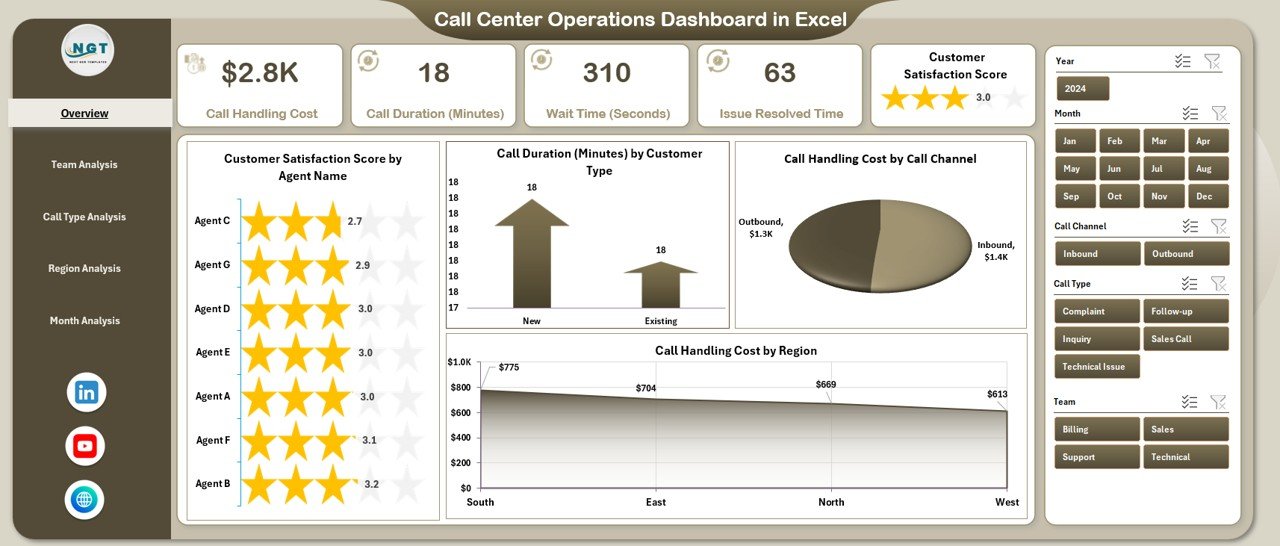
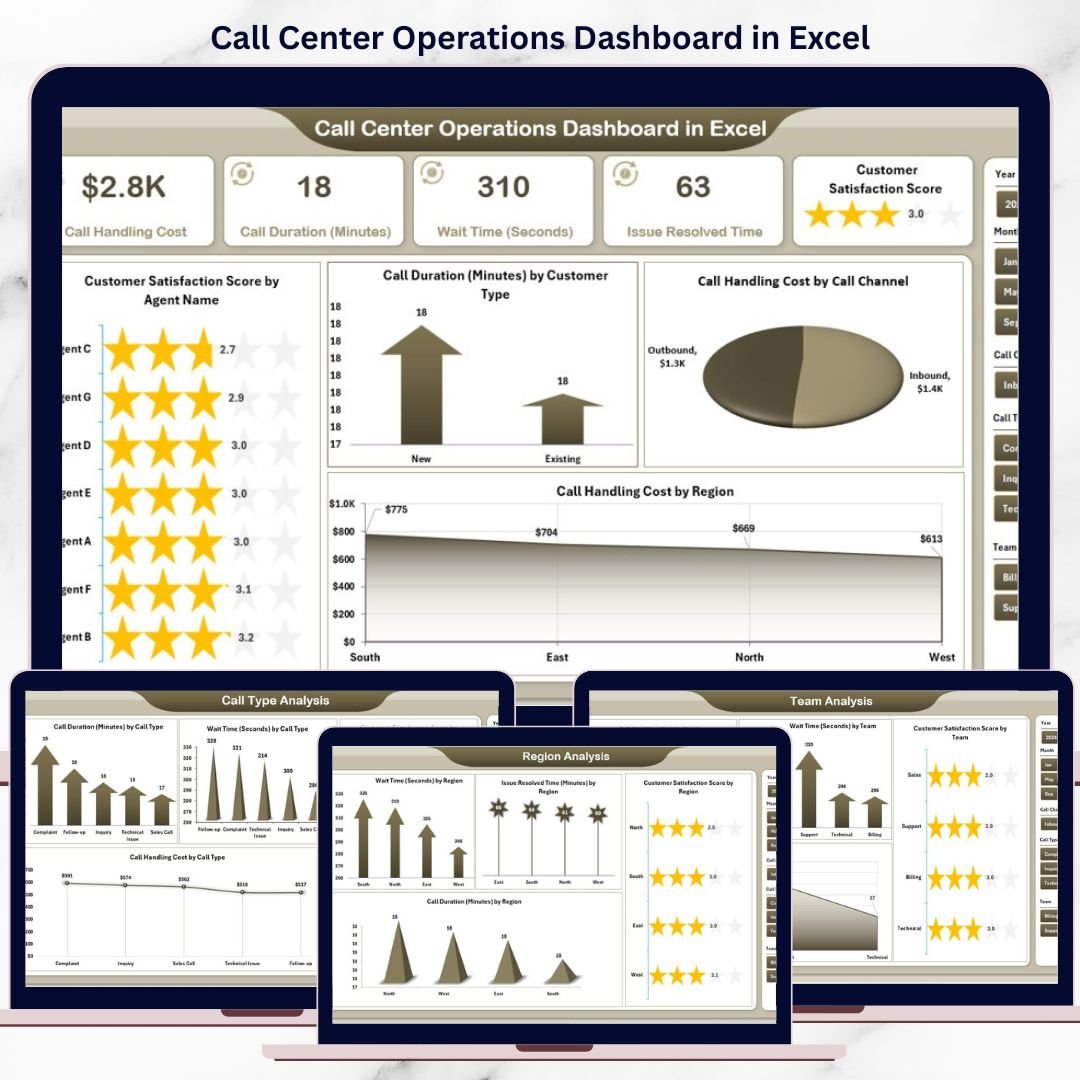
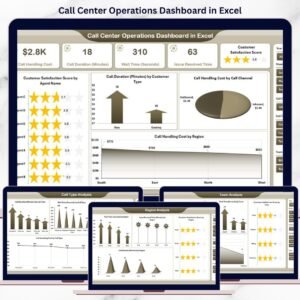
📊 Overview Page
The executive summary of call center performance. It provides a high-level snapshot using:
Customer Satisfaction Score by Agent Name
Call Duration by Customer Type
Call Handling Cost by Call Channel
Call Handling Cost by Region
This page helps managers identify performance gaps instantly.
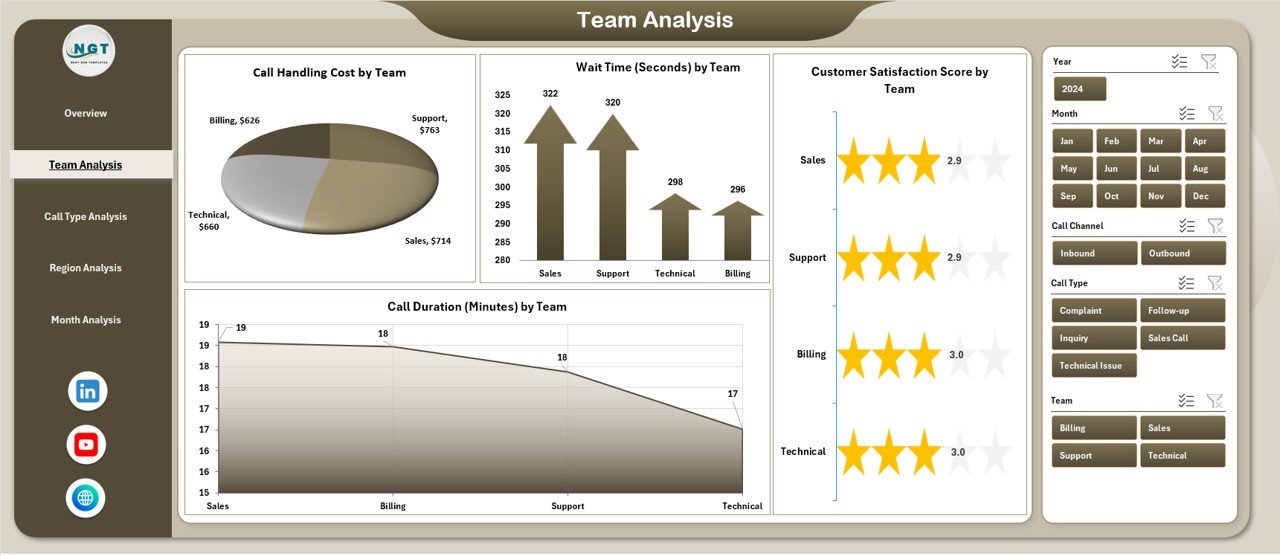
👥 Team Analysis Page
Focuses on team-level performance and efficiency:
Customer Satisfaction Score by Team
Call Duration by Team
Call Handling Cost by Team
Supervisors use this page to compare teams and improve service quality.
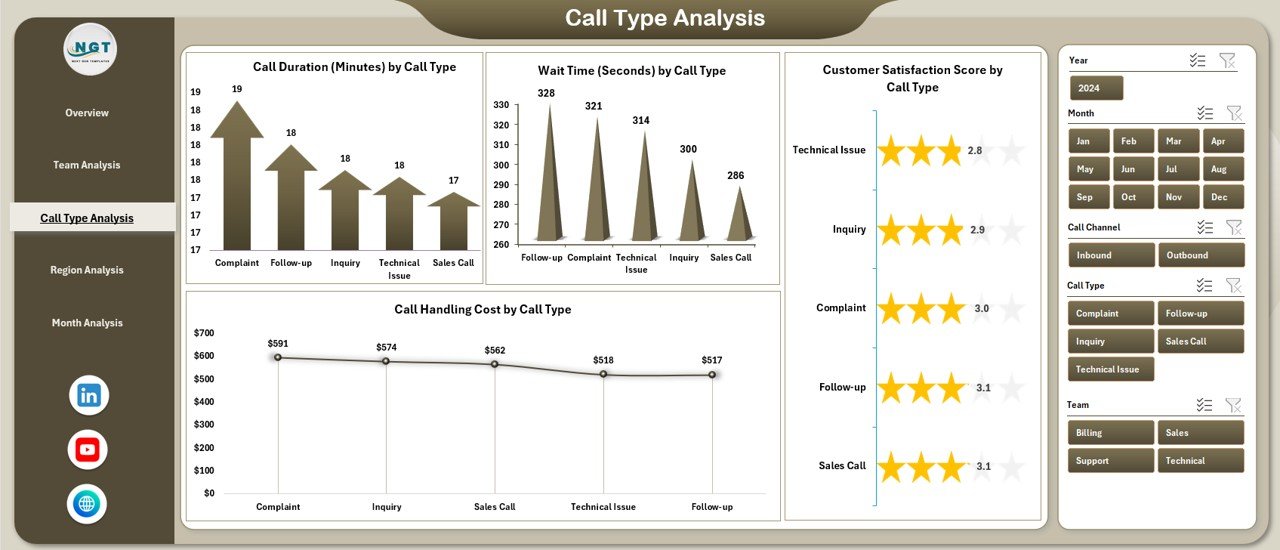
📞 Call Type Analysis Page
Highlights how different call categories impact operations:
Customer Satisfaction Score by Call Type
Call Duration by Call Type
Call Handling Cost by Call Type
Wait Time by Call Type
This page helps improve scripts, workflows, and queue management.
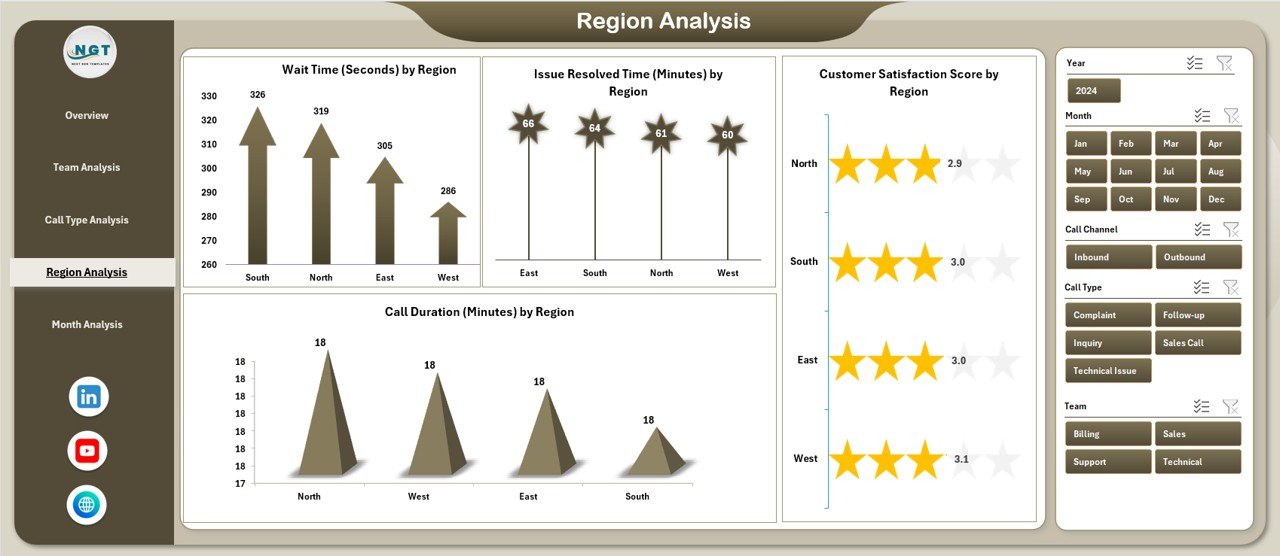
🌍 Region Analysis Page
Provides a geographic view of call center performance:
Customer Satisfaction Score by Region
Call Duration by Region
Call Handling Cost by Region
Issue Resolved Time by Region
Leadership teams make region-specific decisions using these insights.
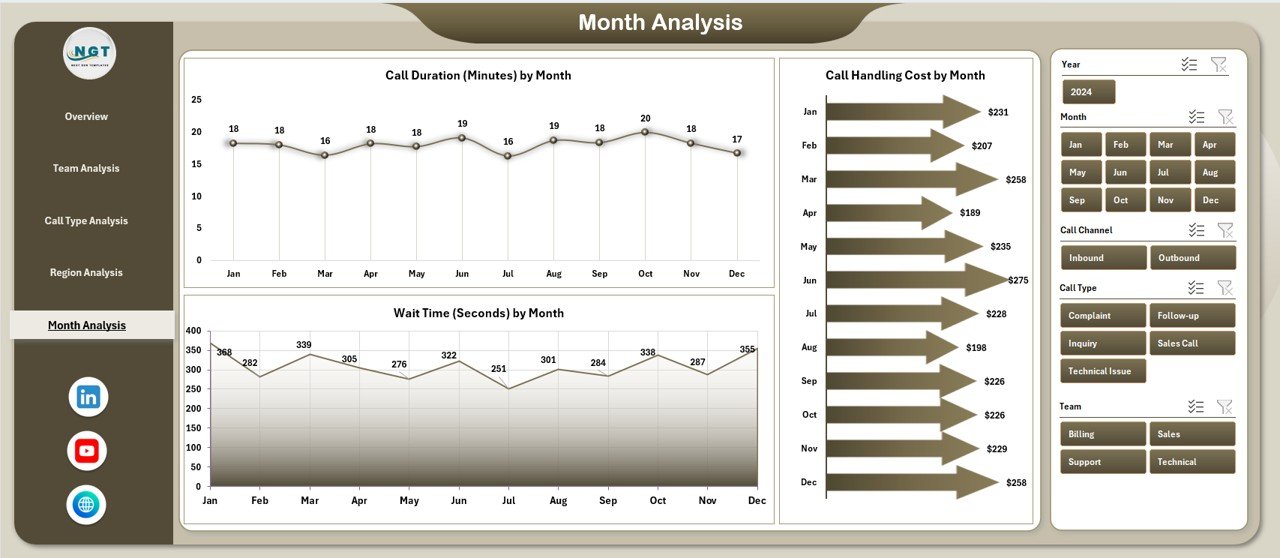
📆 Month Analysis Page
Tracks performance trends and seasonality over time:
Call Duration by Month
Call Handling Cost by Month
Wait Time by Month
This page supports staffing plans and budget forecasting.
🛠️ How to Use the Call Center Operations Dashboard in Excel
✅ Update call data in the Data Sheet
✅ Refresh pivot tables with one click
✅ Use slicers to filter by agent, team, call type, region, or month
✅ Navigate pages using the page navigator
✅ Analyze trends and take action
No advanced Excel skills are required. The dashboard is simple, intuitive, and business-ready.
👥 Who Can Benefit from This Call Center Operations Dashboard?
📞 Call Center Managers
👥 Team Leaders & Supervisors
📊 Operations Heads
💼 Business Analysts
🎧 Quality Assurance Teams
😊 Customer Experience Managers
Whether managing small support teams or large call centers, this dashboard adapts easily.
👉 Click here to read the Detailed blog post
▶️ Visit our YouTube channel to learn step-by-step video tutorials
https://youtube.com/@PKAnExcelExpert
Which call center dashboard is right for you?
We have two different call center dashboards in Excel. They answer different questions, so pick the one that matches the data you have:
| Call Center Operations KPI Dashboard | Call Center Operations Dashboard | |
|---|---|---|
| Best for | The monthly KPI review against targets and last year (AHT, FCR, CSAT, SLA %, call volume, abandon rate and more) | Digging into your call log by agent, team, call type, region and month |
| Data you enter | Monthly totals per KPI: actuals, targets and previous-year figures | One row per call: agent, team, customer type, channel, call type, region, duration, wait time, handling cost, resolution time and satisfaction score |
| Pages | 7 sheets: Summary, Dashboard, Trend Analysis, Actual Numbers, Target, Previous Year and KPI Definitions | 5 analysis pages (Overview, Team, Call Type, Region, Month) plus the Data sheet |
| How you filter | A month drop-down with MTD and YTD views, and up/down arrows against target and previous year | Slicers for agent, team, call type, region and month |
| Targets and previous year | Yes | No – it analyses actual call data |
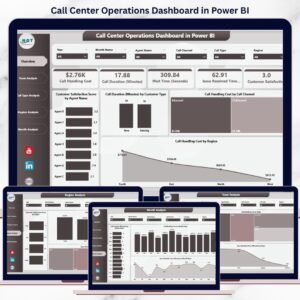
Many call centers use both: the Operations Dashboard to analyse the call log and the KPI Dashboard for the monthly management review. Also available as the KPI Dashboard in Power BI, the Operations Dashboard in Power BI and the Operations Dashboard in Google Sheets.
Watch the step-by-step video tutorial:
Compatibility and Requirements
- Works in Microsoft Excel desktop (Excel 2016 or later, or Microsoft 365).
- The dashboard uses pivot tables and slicers. Microsoft explains slicers in Use slicers to filter data.
More Questions About This Template
How many pages does the dashboard have?
Five analysis pages: Overview, Team Analysis, Call Type Analysis, Region Analysis and Month Analysis. A page navigator on the left side moves you between them.
How do I update the dashboard with my call data?
Enter your call data in the Data Sheet and refresh the pivot tables. The charts and KPIs update from there.
How can I filter the results?
Use the slicers on the right side to filter by agent, team, call type, region or month.
Which measures does it track?
Customer satisfaction score, call duration, call handling cost, wait time and issue resolved time, depending on the page. Satisfaction is shown by agent, team, call type and region.
Is there a Power BI or Google Sheets version?
Yes. See the Call Center Operations Dashboard in Power BI and the Call Center Operations Dashboard in Google Sheets.
Related Call Center Templates
- Call Center Operations KPI Dashboard in Excel: monthly KPIs against targets and last year
- Call Center Operations Dashboard in Power BI: the same analysis in Power BI
- Call Center Operations KPI Dashboard in Power BI: the KPI review in Power BI
- Call Center Operations Dashboard in Google Sheets: a browser-based version
- KPI Dashboard Library (Excel): 15 Excel KPI dashboards in one download
Browse all Excel dashboards.












Reviews
There are no reviews yet.