



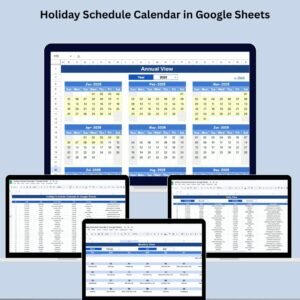
The Dynamic Holiday and Event Calendar in Google Sheets is an interactive, customizable calendar template for managing your schedule while tracking holidays and events. It suits individuals, teams and businesses that want a simple way to see dates, holidays and important events in one Google Sheets calendar. Enter a year and month, and the calendar generates automatically, so key days are not missed.
Beyond basic calendar functions, the template lets you highlight specific dates for holidays and events. You can adjust it for holidays in your country or region, which helps businesses and individuals stay organized and plan ahead.

Key Features of the Dynamic Holiday and Event Calendar in Google Sheets
- Dynamic calendar: The calendar adjusts to any month or year you enter.
- Holiday tracker and event tracker: Highlight holidays and events so they stand out and are not overlooked.
- Customizable: Change the calendar to suit your needs, including color-coded events, holidays and special dates.
- Real-time updates: Changes appear in the calendar as soon as you make them.
- User-friendly interface: The layout is easy to navigate and needs little effort to use.
- Multi-use: Works for personal, business or team scheduling, including deadlines, meetings and holidays.
- Shareable and collaborative: Share the calendar with others so everyone can plan together.
Why You’ll Love This Google Sheets Calendar
- Stay organized: Keep holidays, important events and deadlines in one place.
- Flexible and customizable: Add your own events, holidays and schedules.
- Easy to use: There is no complicated setup. Enter the year and month to generate your calendar.
- Real-time changes: The calendar updates as you add or change events and holidays.
- Region-aware planning: Adjust the calendar for holidays based on your country or region.
What’s Inside the Template
| Component | What it does |
|---|---|
| Calendar Template | A fully dynamic calendar that updates based on your year and month inputs. |
| Event and Holiday Management | Add, remove and color-code holidays or events so you can spot them quickly. |
| Customization Options | Change the design, colors and layout to fit personal or team needs. |
| User-Friendly Setup | Create and manage your calendar quickly, with little technical knowledge needed. |
| Real-Time Syncing | Share the calendar with others so everyone sees updates in real time. |
Who Is It For?
This calendar is useful for anyone who needs to track dates, holidays and events in Google Sheets:
- Business owners: track company holidays, key dates and deadlines.
- Project managers: use it as a project calendar for milestones and meetings.
- HR managers: keep a clear view of holidays across the year.
- Team leaders: share one schedule with the whole team.
- Freelancers: plan client deadlines around holidays.
- Event planners: see upcoming events at a glance.
- Personal users: organize birthdays, appointments and personal events.
How to Use the Dynamic Calendar
- Download the template: Open the fully customizable Google Sheets calendar template.
- Set your year and month: Enter the year and month. The calendar generates automatically.
- Add holidays and events: Enter the dates for holidays, events and appointments, then color-code them so they are easy to see.
- Track your schedule: Use the calendar to follow personal, business or team deadlines and activities.
- Share and collaborate: Share the calendar with your team or colleagues to plan events and schedules together.
Click here to read the detailed blog post on the Dynamic Holiday and Event Calendar in Google Sheets
Watch the Step-by-Step Video Tutorial
This video shows how the Dynamic Holiday and Event Calendar in Google Sheets works, step by step.
Visit our YouTube channel for more step-by-step video tutorials: Youtube.com/@PKAnExcelExpert
Frequently Asked Questions
What is the Dynamic Holiday and Event Calendar in Google Sheets?
It is an interactive, customizable Google Sheets calendar template. It generates a calendar for any month and year you enter and lets you highlight holidays and events.
How do I change the month or year?
Enter the year and month you want. The calendar updates automatically, with no complicated setup.
Can I add holidays for my country or region?
Yes. You can adjust the calendar for holidays based on your country or region, and add your own events and special dates.
Can I color-code events and holidays?
Yes. You can add, remove and color-code holidays and events. You can also change the design, colors and layout.
Can I share the calendar with my team?
Yes. Because it runs in Google Sheets, you can share the calendar with colleagues so everyone sees updates in real time and can plan together.
Is it suitable for project scheduling?
Yes. It works as a simple project calendar for deadlines, meetings and activities, as well as a holiday tracker and event tracker for personal or business use.
Organize your schedule, track important dates and keep key events and holidays in view with the Dynamic Holiday and Event Calendar in Google Sheets.
Also check our Attendance Template in Google Sheet
Last updated: October 2026







Reviews
There are no reviews yet.