



Resource allocation directly impacts project delivery, operational efficiency, and employee well-being. When teams are overutilized, burnout increases. When resources remain idle, costs rise. However, many organizations still rely on scattered spreadsheets, delayed reports, or manual calculations to manage resource allocation. As a result, leaders struggle to balance workloads, control costs, and plan effectively.
That is exactly why a Resource Allocation KPI Dashboard in Google Sheets becomes an essential performance management tool.
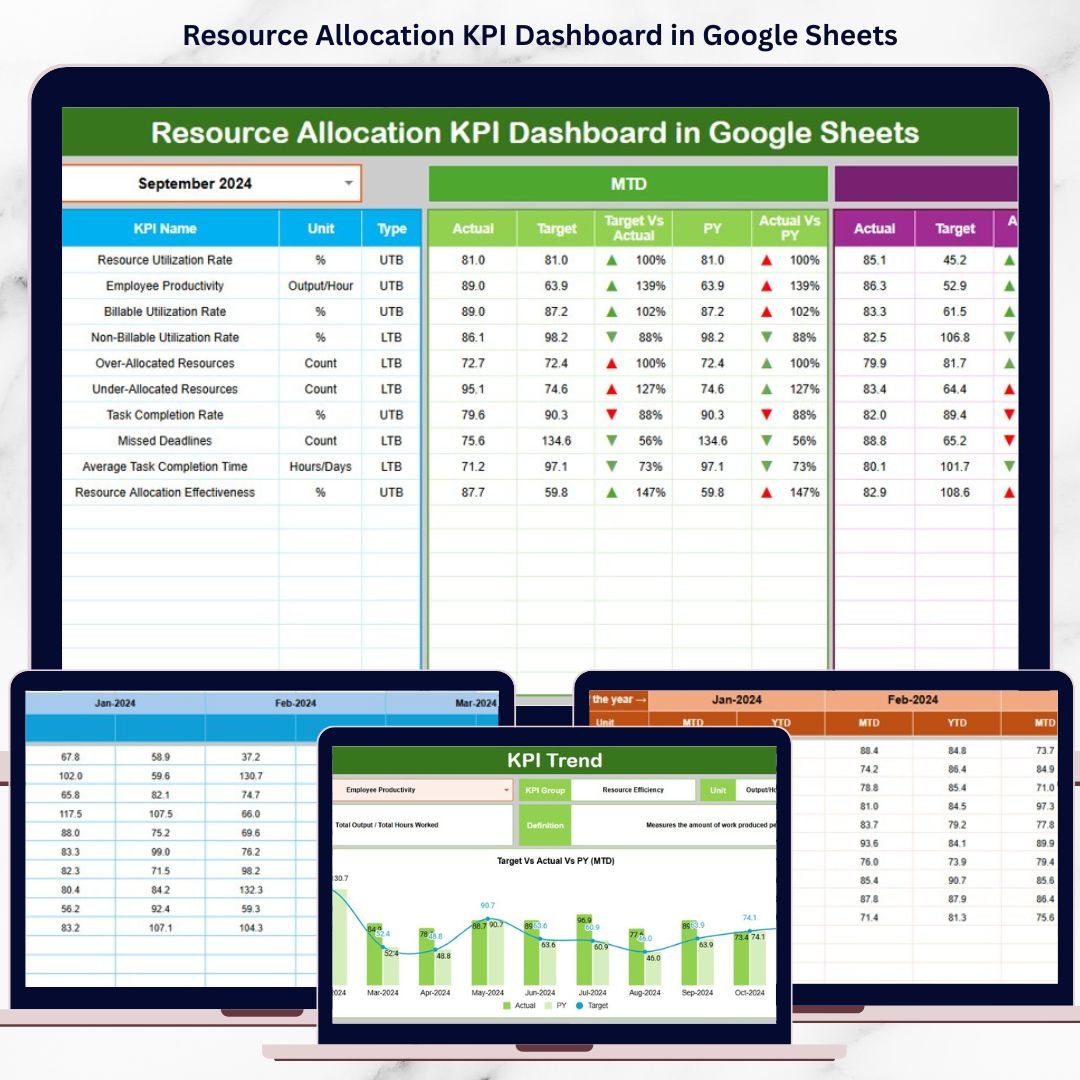
This ready-to-use dashboard provides a structured and centralized system to track how effectively resources are allocated across projects, departments, and time periods. Instead of guessing utilization levels, organizations gain real-time visibility into MTD and YTD performance, target achievement, historical trends, and improvement areas—all presented through clear KPIs and visual indicators.
Because the dashboard is built in Google Sheets, it remains easy to use, collaborative, and accessible from anywhere without the need for expensive BI tools.
🚀 Key Features of the Resource Allocation KPI Dashboard
📌 Centralized Resource Performance Tracking
Monitor all resource allocation KPIs from a single dashboard.
⚖️ Balanced Workload Visibility
Identify overutilized and underutilized resources quickly.
🎯 Target vs Actual Comparison
Measure allocation efficiency against planned targets.
📅 MTD & YTD Performance Insights
Track short-term execution and long-term allocation trends.
📊 Visual Performance Indicators
Instantly spot improvement or decline using conditional arrows.
🔍 KPI Trend Analysis
Understand how resource utilization changes over time.
📦 What’s Inside the Resource Allocation KPI Dashboard
🗂️ Dashboard Sheet Tab – Main KPI View
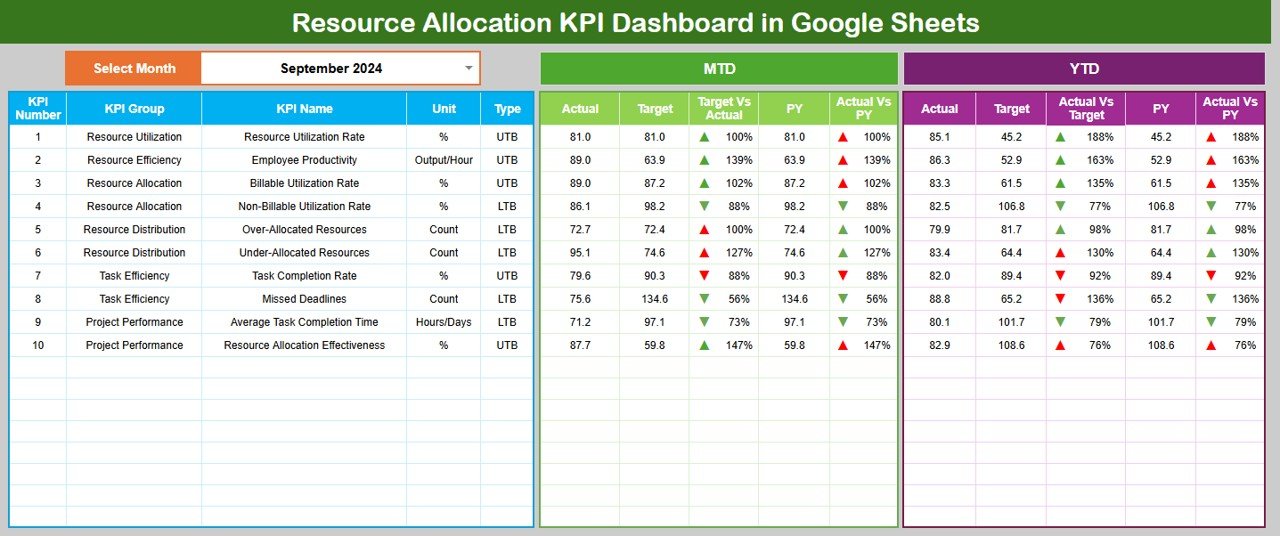
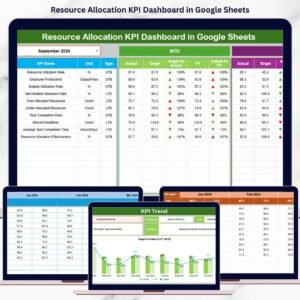
The Dashboard Sheet acts as the executive summary for resource allocation performance.
🔄 Month Selection
Select the desired month from Cell D3, and the entire dashboard updates automatically.
📅 MTD KPIs Displayed
For each KPI, the dashboard shows:
MTD Actual
MTD Target
MTD Previous Year
Target vs Actual (%)
Previous Year vs Actual (%)
Directional arrows clearly highlight whether performance is improving or declining.
📈 YTD KPIs Displayed
The dashboard also tracks:
YTD Actual
YTD Target
YTD Previous Year
Target vs Actual (%)
Previous Year vs Actual (%)
This helps leadership plan capacity and staffing strategically.
📊 KPI Trend Sheet Tab – KPI Deep Dive
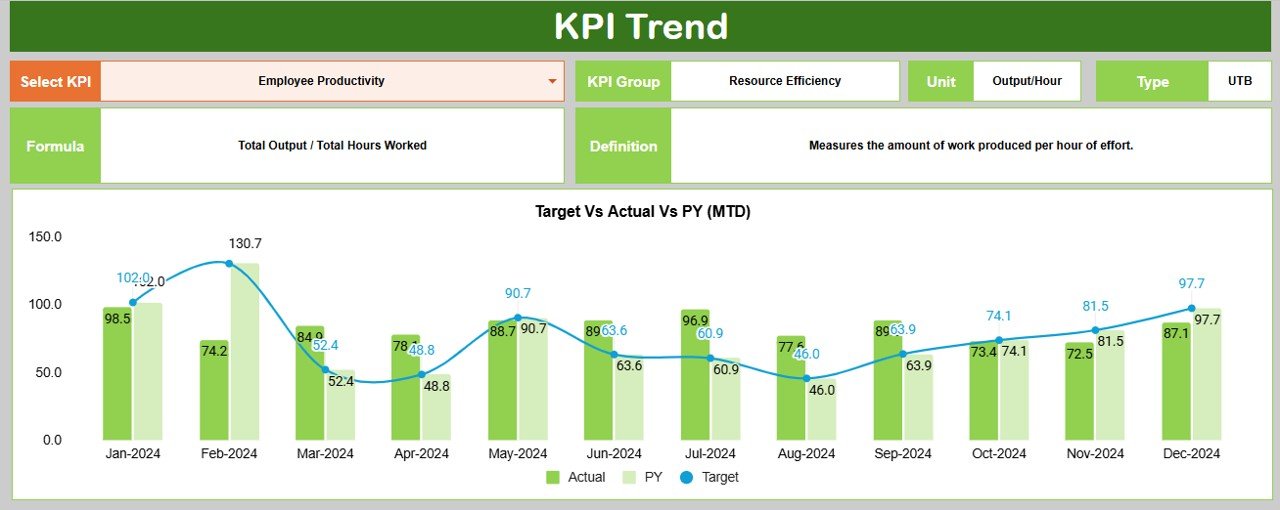
The KPI Trend Sheet enables detailed KPI analysis.
🔎 How It Works
Select a KPI name from the dropdown in Cell C3, and the sheet dynamically updates.
📌 Displayed KPI Details
KPI Group
KPI Unit
KPI Type (Upper the Better / Lower the Better)
KPI Formula
KPI Definition
This sheet ensures transparency and a clear understanding of how each KPI is calculated.
🧮 Actual Number Sheet Tab
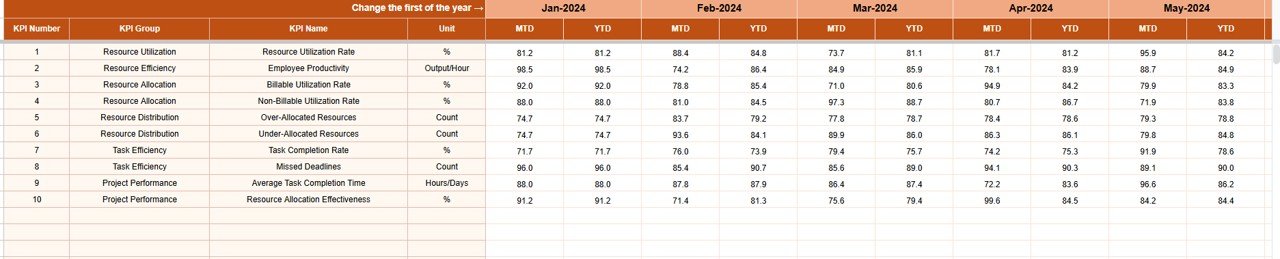
This sheet stores actual allocation performance data.
🛠️ How to Use
Enter the first month of the year in Cell E1
Input MTD Actual and YTD Actual values
All KPIs and charts update automatically, ensuring accurate reporting.
🎯 Target Sheet Tab
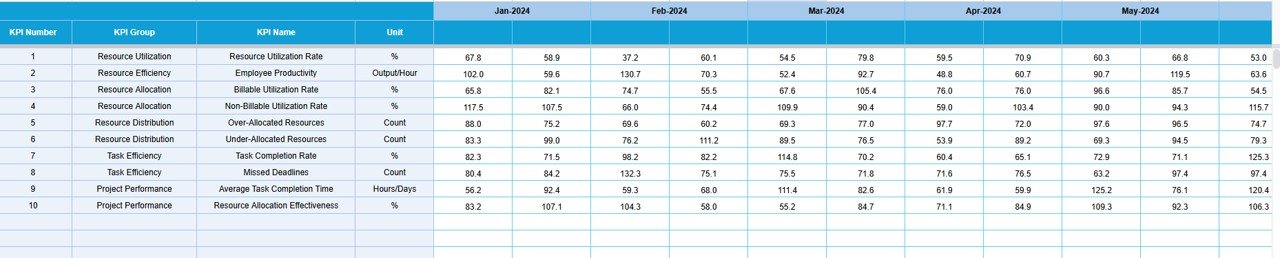
The Target Sheet defines expected allocation performance.
📥 Data Entry
Enter MTD Target values
Enter cumulative YTD Target values
Targets allow objective performance evaluation and accountability.
📆 Previous Year Number Sheet Tab
This sheet enables year-over-year analysis.
🎯 Purpose
Enter previous year MTD and YTD values
Identify recurring allocation issues
Measure improvement trends
Historical comparison supports better forecasting and planning.
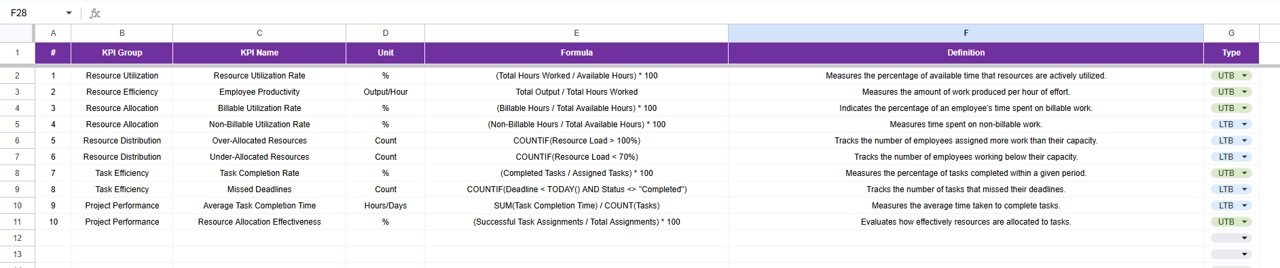
📚 KPI Definition Sheet Tab – KPI Master Library
This sheet acts as the single source of truth for all KPIs.
📋 Fields Included
KPI Name
KPI Group
Unit
Formula
Definition
KPI Type
🎯 Who Can Benefit from This Resource Allocation KPI Dashboard
📋 Project Managers & PMOs
🧑💼 HR & Workforce Planning Teams
🏢 Operations Managers
📊 Finance & Strategy Teams
🚀 Growing Organizations Across All Industries
🛠️ How to Use the Resource Allocation KPI Dashboard
Enter actual allocation data monthly
Define realistic targets
Review MTD and YTD KPIs regularly
Analyze trends using the KPI Trend Sheet
Act quickly on over- or under-utilization
Consistent usage improves planning accuracy and productivity.
🔗 ### Click here to read the Detailed blog post
Watch the step-by-step video tutorial:
▶️ Visit our YouTube channel to learn step-by-step video tutorials
👉 Youtube.com/@NeotechNavigators
Compatibility and Requirements
- Works in Google Sheets. You need a free Google account and a web browser.
- You pick the month from a dropdown on the Dashboard sheet and the KPI name from a dropdown on the KPI Trend sheet. Google explains dropdowns in Create an in-cell dropdown list.
Frequently Asked Questions
Which sheets are included?
Six sheets: Dashboard, KPI Trend, Actual Number, Target, Previous Year Number and KPI Definition.
How do I update the dashboard?
Enter the first month of the year in cell E1 of the Actual Number sheet, then add your MTD Actual and YTD Actual values. Add your goals in the Target sheet. Select a month in cell D3 of the Dashboard sheet and everything updates.
Can I compare this year with last year?
Yes. Enter last year’s MTD and YTD values in the Previous Year Number sheet. The Dashboard shows them next to your actuals and targets, with Previous Year vs Actual percentages.
How do I see the trend for one KPI?
Open the KPI Trend sheet and select a KPI name in cell C3. It shows the KPI group, unit, type (Upper the Better or Lower the Better), formula and definition.
Is there an Excel or Power BI version?
Yes. See the Resource Allocation KPI Dashboard in Excel and the Resource Allocation KPI Dashboard in Power BI.
Related Resource Allocation Templates
- Resource Allocation KPI Dashboard in Excel: the same KPIs in Excel
- Resource Allocation KPI Dashboard in Power BI: the Power BI edition
- Resource Allocation Dashboard in Google Sheets: another resource allocation dashboard in Google Sheets
- Resource Booking Management Tracker in Google Sheets: a tracker for resource bookings
- Project Manager Power Pack: 10 templates for project managers in one download
Browse all Google Sheets KPI dashboards.
























Reviews
There are no reviews yet.