



The Vacation Budget Checklist Template in Excel is an essential tool for anyone planning a vacation. Whether you’re organizing a weekend getaway or a dream vacation abroad, this customizable checklist helps you track your expenses, set a budget, and ensure you stay within your financial limits while enjoying your trip.
This easy-to-use Excel template allows you to plan, organize, and monitor your vacation costs in detail. From transportation and accommodation to meals and activities, the checklist ensures your account for every expense and helps you make informed decisions about your spending.
Key Features of the Vacation Budget Checklist Template
💸 Comprehensive Vacation Budgeting
Track every expense for your trip, including transportation, accommodation, meals, entertainment, and shopping. Stay on top of your finances and avoid any unpleasant surprises.
⚡ Real-Time Budget Monitoring
Track your actual expenses versus your planned budget in real-time. Easily see where you’re over or under your expected spending.
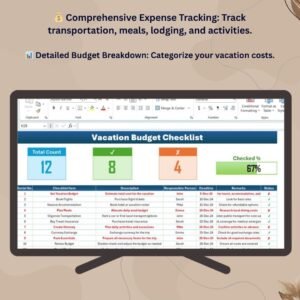
📊 Detailed Expense Breakdown
Categorize your expenses into categories like flights, lodging, meals, activities, and more. Get a clear overview of where your money is going.
📅 Customizable for Your Trip
Adapt the checklist to match your vacation style. Whether it’s a family vacation, a solo trip, or a luxury getaway, customize the sections to fit your needs.
📈 Expense Summary Dashboard
Visualize your spending with an interactive dashboard that summarizes your vacation expenses and compares them with your budget.
🖥️ User-Friendly Interface
The intuitive and simple design makes it easy to input data, track expenses, and stay organized throughout your trip planning process.
Why You’ll Love the Vacation Budget Checklist Template

✅ Stay Within Your Budget
Ensure your vacation costs don’t spiral out of control by tracking every expense and comparing it to your planned budget.
✅ Track Expenses with Ease
Easily categorize your vacation expenses and monitor them in real-time to stay on top of your spending.
✅ Customizable for Any Vacation
Whether you’re traveling on a budget or indulging in luxury, customize the checklist to suit your specific vacation needs and budget.
✅ Visualize Your Spending
Use the dashboard to get a quick overview of your spending habits, so you can make adjustments as needed.
✅ Plan Your Vacation Confidently
With a clear budget in place, you can enjoy your vacation without worrying about overspending, knowing you’ve got everything organized.
What’s Inside the Vacation Budget Checklist Template?
- Detailed Expense Breakdown: A section to track expenses such as transportation, lodging, meals, activities, and more.
- Budget Monitoring: Compare planned expenses with actual spending, ensuring you stay within your budget.
- Expense Summary Dashboard: A visual summary that provides an overview of your spending and budget progress.
- Customizable Categories: Modify sections to reflect your personal vacation plans, such as special activities or shopping budgets.
- Real-Time Updates: Track your spending in real-time as you make purchases and enjoy your vacation.
How to Use the Vacation Budget Checklist Template
1️⃣ Download the Template: Instantly access your vacation budget checklist.
2️⃣ Set Your Budget: Enter your planned budget for each category (transportation, meals, lodging, etc.).
3️⃣ Track Your Expenses: Log your actual expenses in real-time and compare them with your planned budget.
4️⃣ Analyze Your Spending: Use the dashboard to visualize your progress and ensure you stay within your financial limits.
Who Can Benefit from the Vacation Budget Checklist Template?
🔹 Vacationers & Travelers
🔹 Families Planning a Vacation
🔹 Solo Travelers on a Budget
🔹 Couples Going on a Getaway
🔹 Travel Planners & Agencies
🔹 Anyone Looking to Plan a Vacation Without Breaking the Bank
Ensure your vacation is affordable and enjoyable with this easy-to-use, customizable vacation budget checklist.
Click here to read the Detailed blog post
Visit our YouTube channel to learn step-by-step video tutorials
Youtube.com/@PKAnExcelExpert
Compatibility and Requirements
- Works in Microsoft Excel desktop (Excel 2016 or later, or Microsoft 365).
- New to Excel? Microsoft has a beginner course in Excel for Windows training.
Frequently Asked Questions
What does the template include?
A detailed expense breakdown, budget monitoring, an expense summary dashboard, customizable categories and real-time updates.
Can I compare planned and actual spending?
Yes. Enter a planned budget for each category, log actual expenses, and the template shows where you are over or under.
Which expense categories are included?
Transportation, lodging, meals, activities and more. You can add your own, such as shopping.
Is there a Google Sheets version?
Yes. The Vacation Budget Checklist in Google Sheets works in a browser with a free Google account.
Related Vacation and Travel Budget Templates
- Vacation Budget Checklist in Google Sheets: the same checklist in Google Sheets
- Vacation & Trip Budget Tracker in Google Sheets: track trip costs in a browser
- Travel Itinerary Checklist in Excel: plan each day of the trip
- Travel Packing Checklist in Excel: pack everything for the trip
- Travel Expense Report Tracker in Excel: report business travel costs
Browse all Excel checklists or the Excel financial tools.



















Reviews
There are no reviews yet.