

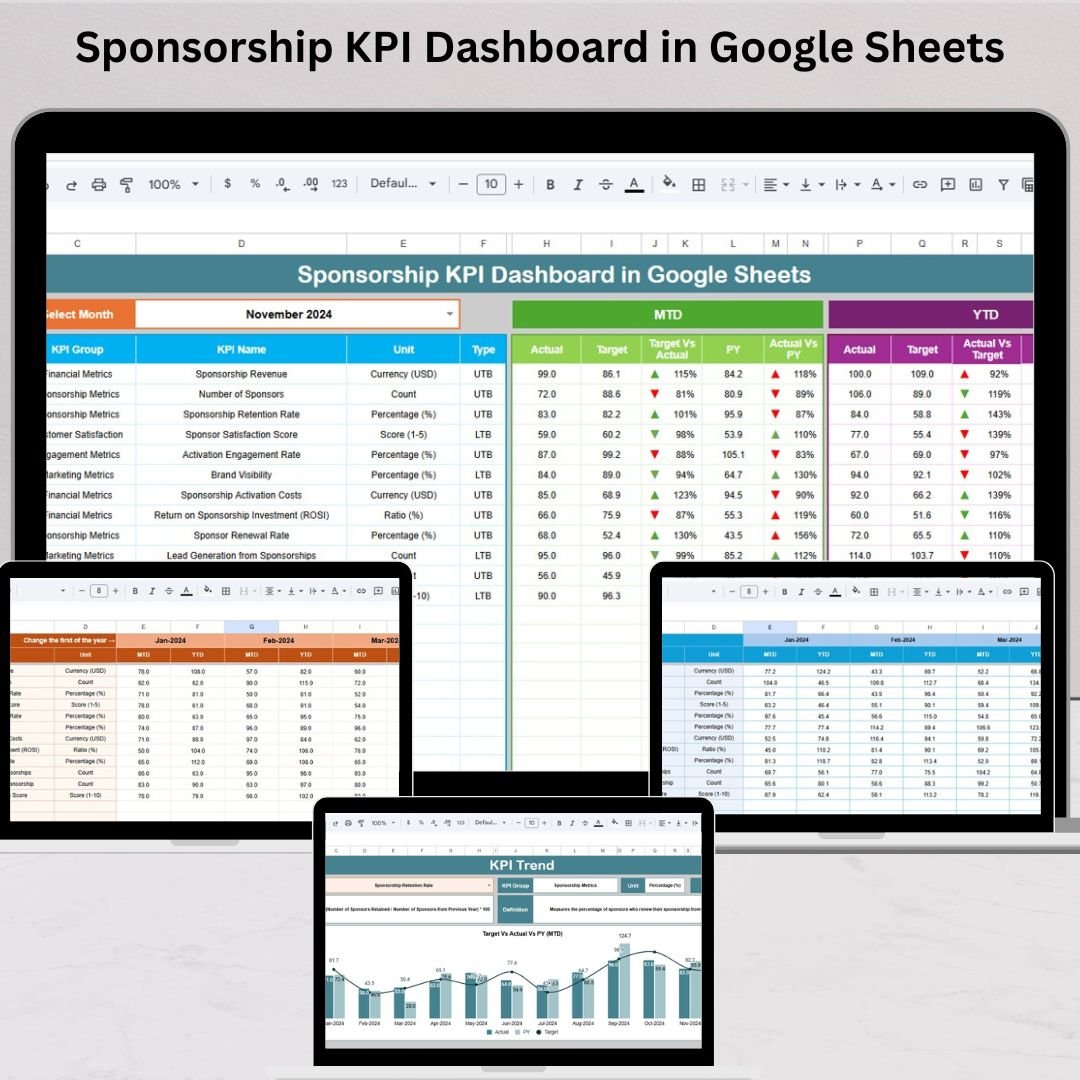

Sponsorships are one of the most powerful ways to grow a brand, host successful events, and build long-term business relationships. Whether you manage sports events, exhibitions, conferences, concerts, CSR projects, or digital partnerships, sponsorship revenue helps you scale your operations with confidence. But as competition increases, companies are no longer satisfied with guesswork—they want measurable results. That’s where the Sponsorship KPI Dashboard in Google Sheets becomes an essential tool for accurate, real-time performance tracking.Sponsorship KPI Dashboard in Google Sheets
This ready-to-use Google Sheets dashboard gives you a crystal-clear view of revenue, cost, engagement, exposure, impressions, deliverables, conversions, and sponsor satisfaction—everything needed to evaluate sponsorship performance. With automated calculations, clean visuals, and dropdown-driven navigation, this dashboard helps you make smarter decisions and improve sponsorship outcomes faster.
✨ Key Features of the Sponsorship KPI Dashboard in Google Sheets
📊 1. Complete MTD & YTD KPI Tracking
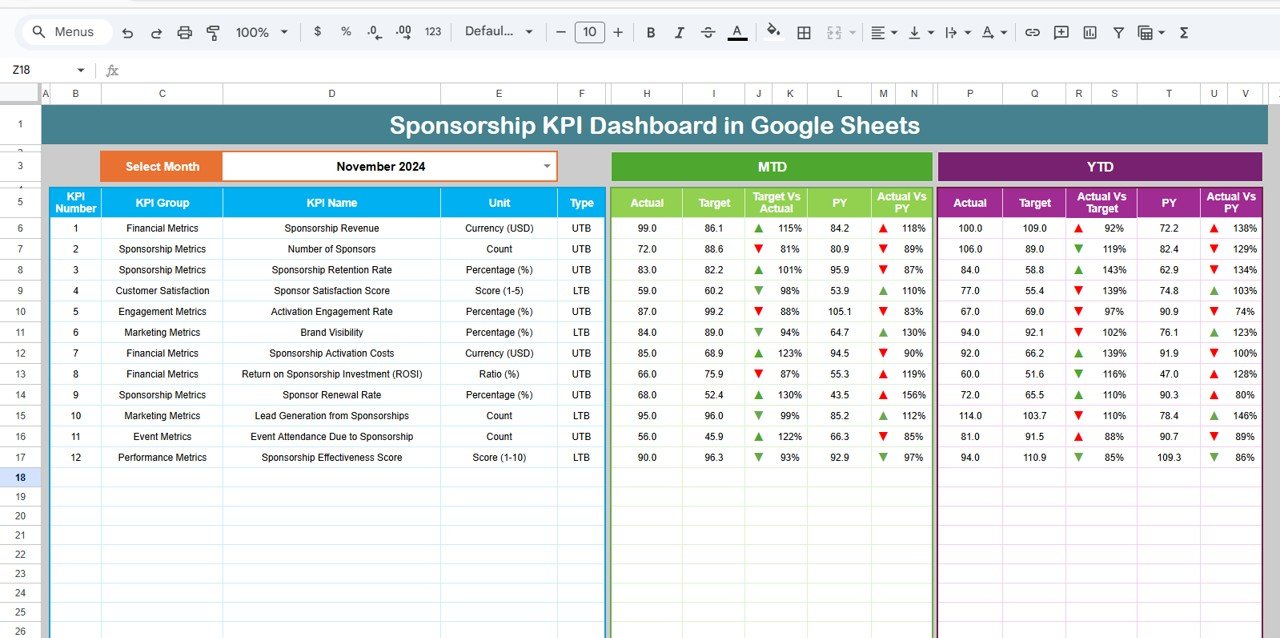
Analyze Month-To-Date and Year-To-Date performance in one click. Compare actual numbers with targets and last year’s values for every sponsorship KPI.
📈 2. Dynamic Trend Analysis
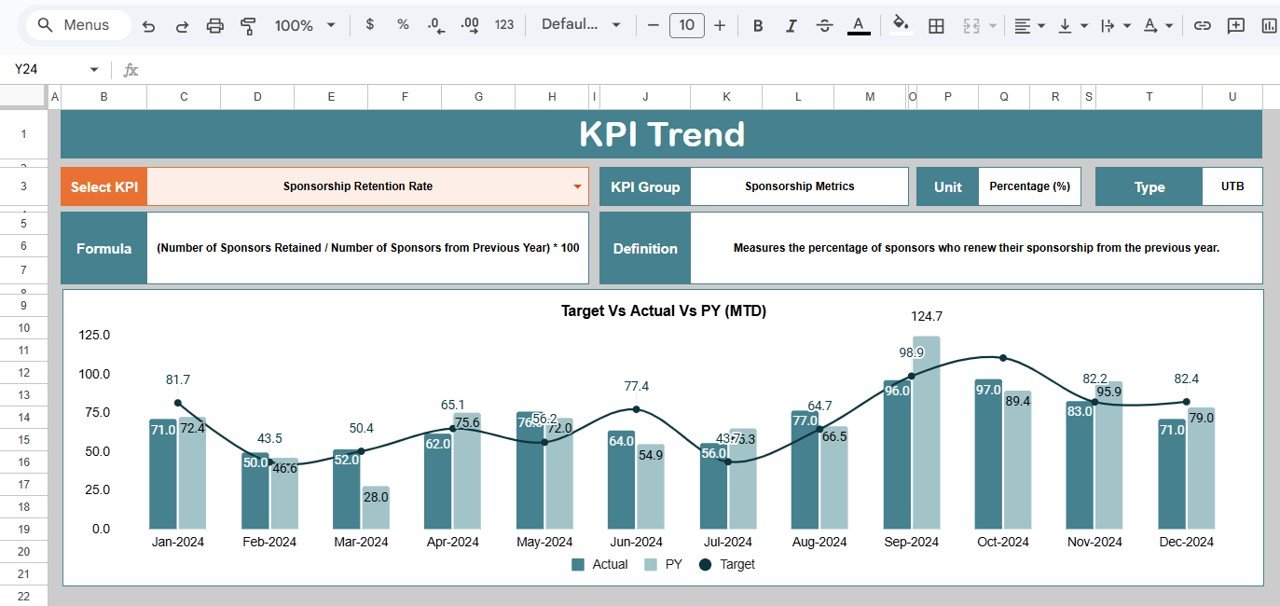
Use the KPI Trend sheet to view monthly performance patterns. Spot early issues, Discover seasonal peaks, track cost efficiency, and identify ROI opportunities.
📉 3. Auto-Updating Visual Dashboard
Change the month using the dropdown, and the full dashboard refreshes instantly. All arrows, indicators, and comparisons update automatically.
🔼🔽 4. Smart Comparison Arrows
Green arrow = improved performance
Red arrow = decline
This helps you understand results in seconds—no manual analysis required.
☁️ 5. Universal Access via Google Sheets
Enjoy cloud access, real-time edits, version history, and smooth collaboration across teams, clients, or departments.
📦 What’s Inside the Sponsorship KPI Dashboard in Google Sheets
📍 1. Dashboard Sheet – Main Reporting Page
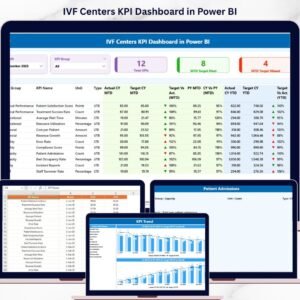
This is your control center for KPI tracking. It displays all MTD and YTD metrics with targets, last year’s numbers, variances, and arrow indicators. Select the month in Cell D3 and watch the entire dashboard transform instantly.
📈 2. KPI Trend Sheet – In-Depth KPI Analysis
Choose any KPI from the dropdown and instantly see:
KPI Group
KPI Unit
KPI Type (UTB/LTB)
KPI Formula
KPI Definition
Monthly Trend Chart
This sheet empowers decision-makers with deep insights into performance movement.
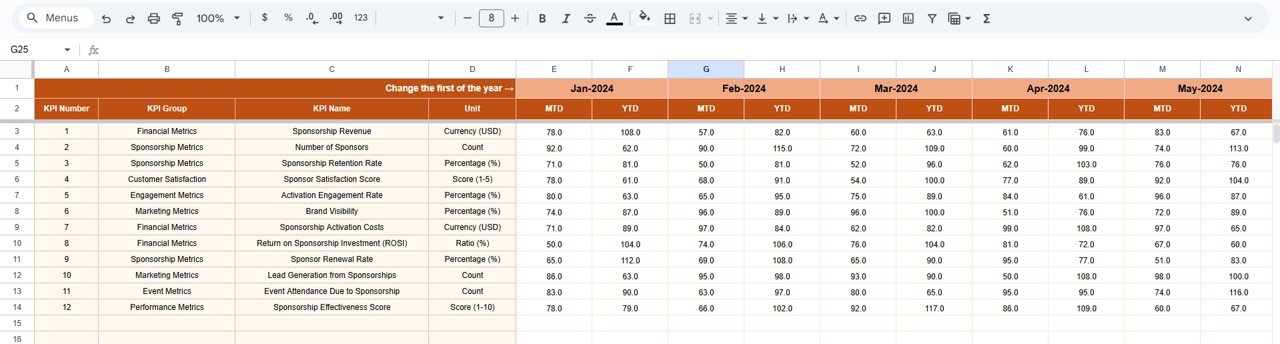
📝 3. Actual Number Sheet – Update Monthly Performance
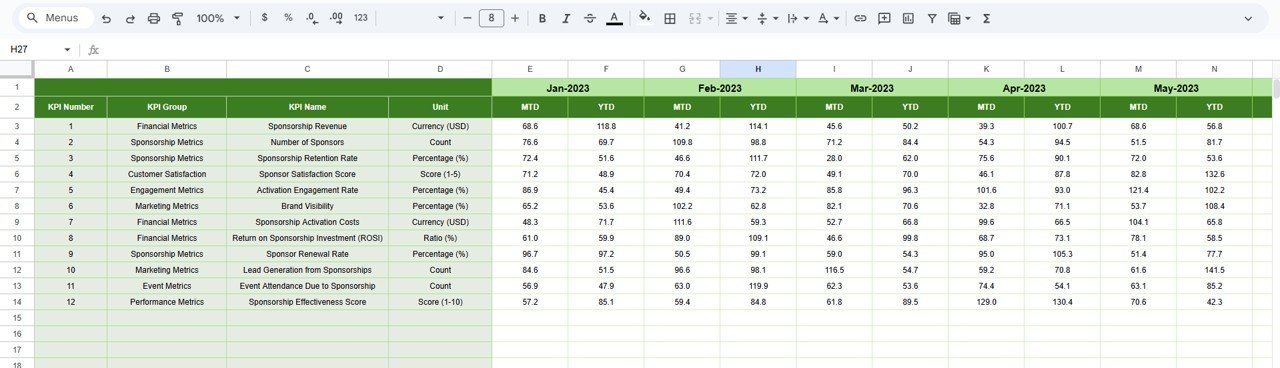
Enter your real MTD and YTD performance values here. Selecting your starting month in Cell E1 aligns all dashboard calculations perfectly.
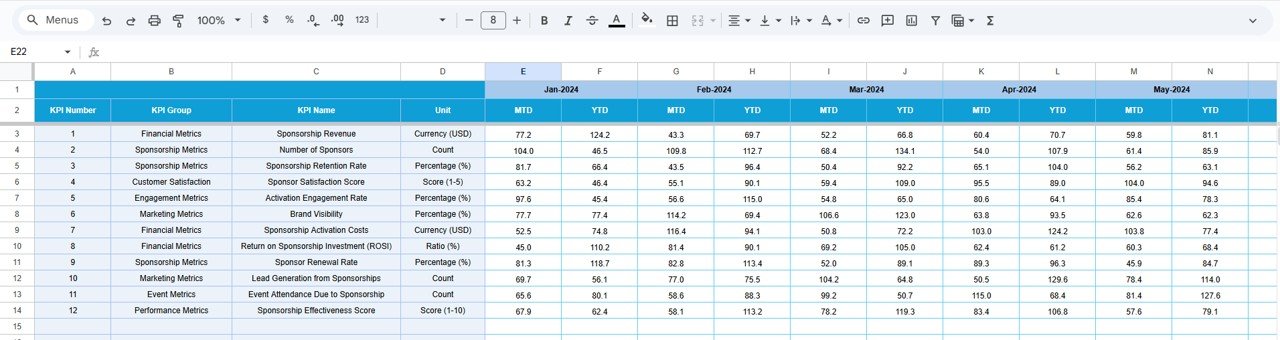
🎯 4. Target Sheet – Input Monthly & Yearly Goals
Add all your MTD and YTD target values. This makes target-vs-actual analysis simple and accurate.
📆 5. Previous Year Sheet – Track Last Year’s Results
Store your previous year’s data to compare long-term growth, retention, performance improvements, and cost changes.
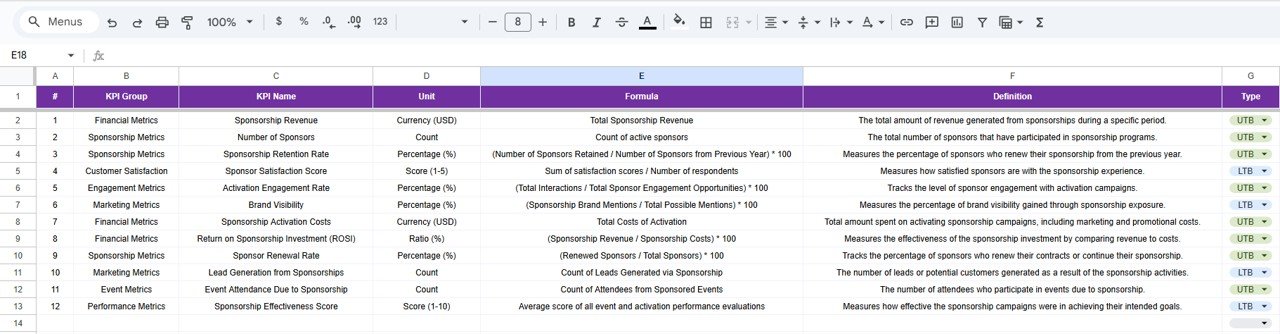
📚 6. KPI Definition Sheet – Complete Reference Guide
Includes KPI names, groups, units, formulas, definitions, and KPI types. Ideal for onboarding new team members and ensuring consistency.
🛠️ How to Use the Sponsorship KPI Dashboard in Google Sheets
1️⃣ Update Actual Values
Enter current MTD & YTD numbers regularly in the Actual sheet.
2️⃣ Add Targets
Input monthly and yearly target goals in the Target sheet.
3️⃣ Select the Month
Control your dashboard using the dropdown at the top.
4️⃣ Review KPI Comparisons
Check green/red arrows, target gaps, and previous-year comparisons.
5️⃣ Analyze Trends
Use the Trend Chart to study monthly movements and adjust strategies.
6️⃣ Use KPI Definitions
Refer to formulas and definitions for accurate reporting.
🎯 Who Can Benefit from This Sponsorship KPI Dashboard in Google Sheets
🏅 Sports Organizations
Track sponsorship value, revenue, and audience engagement.
🎤 Event Management Companies
Monitor impressions, deliverables, cost efficiency, and ROI.
🏢 Corporate Marketing Teams
Measure sponsorship impact on brand visibility and conversions.
🎪 Exhibitions & Trade Shows
Evaluate booth performance, leads generated, and sponsor satisfaction.
🎬 Entertainment & Media Companies
Track exposure, performance value, and content-driven sponsorship outcomes.
📈 Non-Profits & CSR Teams
Monitor sponsorship fulfillment, donor contributions, and impact results.
Click here to read the Detailed blog post
Watch the step-by-step video Demo:
Visit our YouTube channel to learn step-by-step video tutorials — Youtube.com/@NeotechNavigators
Compatibility and Requirements
- Works in Google Sheets. You need a free Google account and a web browser.
- You pick the month from a dropdown at the top of the Dashboard sheet, and the KPI Trend sheet has a KPI dropdown. Google explains dropdowns in Create an in-cell dropdown list.
Frequently Asked Questions
Which sheets are included?
Six sheets: Dashboard, KPI Trend, Actual Number, Target, Previous Year and KPI Definition.
How do I update the dashboard?
Enter your MTD and YTD figures in the Actual Number sheet and your goals in the Target sheet. Then choose the month from the dropdown at the top of the Dashboard sheet and the whole dashboard updates.
Can I compare this year with last year?
Yes. Add last year’s results to the Previous Year sheet. The Dashboard shows them next to your actuals and targets, with green and red arrows for improvement or decline.
How do I see the trend for one KPI?
Open the KPI Trend sheet and pick a KPI from the dropdown. It shows the KPI group, unit, type (UTB or LTB), formula, definition and a monthly trend chart.
Is there an Excel version?
Yes. See the Sponsorship KPI Dashboard in Excel.
Related Sponsorship Templates
- Sponsorship KPI Dashboard in Excel: the same dashboard for Excel
- Corporate Sponsorship Request Tracker in Google Sheets: track incoming sponsorship requests
- Sponsorship & Brand Deal Tracker in Google Sheets: keep brand deals in one sheet
- Sales KPI Dashboard in Google Sheets: a sales view of your KPIs
- Google Sheets Business Pack (Pro): 14 business templates in one download
Browse all Google Sheets KPI dashboards.
































Reviews
There are no reviews yet.