Emergencies strike when you least expect them. But what if your team was prepared—every time? Introducing the Emergency Response Tracking Checklist in Excel, your all-in-one solution for managing emergencies with speed, clarity, and confidence. Whether it’s a fire drill at your office, a medical situation at a hospital, or a lockdown in a school, this smart, customizable checklist keeps your entire response team aligned. ✅🧯
You don’t need fancy software, apps, or IT support. All you need is Excel, and you’re ready to take control of any crisis with this dynamic, easy-to-use tracker.
🔑 Key Features of Emergency Response Tracking Checklist in Excel
📋 Interactive Checklist Table

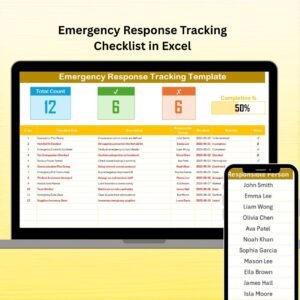
Track each emergency task step-by-step with auto-generated numbers, task descriptions, deadlines, assigned persons, and real-time status.
📊 Live Progress Summary
At the top, view the Total Count, checked (✔) Count, crossed (✘) Count, and a sleek progress bar showing how much is done—live and automated!
🔄 Dropdowns for Responsible Persons
Use the clean list in the “List” sheet to assign tasks accurately using dropdown menus.
🔐 Protected Fields
Critical formulas and status indicators are locked to prevent accidental changes.
🆓 No Macros or Coding Needed
Everything runs on built-in Excel features—no macros, no installations.
☁️ Cloud Compatible
Use it from your desktop or save it on Google Drive or OneDrive for quick emergency access.
🎨 Visual Status Indicators
Green for completed, red for missed—instantly know what’s done and what’s pending!
📦 What’s Inside the Product
✅ Ready-to-use Excel file (.xlsx)
📝 Main Checklist sheet with dropdowns and status symbols
📄 List sheet to manage assigned personnel
📊 Automated progress bar and status summary
🔍 Easy-to-read formatting and protected formulas
🧩 Real-time usability—great during live emergencies or mock drills
📌 How to Use the Product
📥 Download and open the file in Excel
✏️ Add tasks to the checklist: evacuation, alerts, first aid, etc.
👤 Assign responsible persons via dropdowns
⏰ Set deadlines for urgency
✔ Update task statuses in real-time during drills or real emergencies
📈 Track progress via the summary bar at the top
It’s that simple. And extremely effective.
👩💼 Who Can Benefit from This Checklist?
🏢 Corporate Offices – Fire evacuations, data breach plans, office lockdowns
🏥 Hospitals & Clinics – Medical emergencies, backup power checks
🏫 Schools & Universities – Lockdowns, evacuations, teacher duties
🏗️ Construction Sites – Equipment shutdowns, worker safety, emergency alerts
🚨 Security & Admin Teams – Real-time crisis response and reporting
Anyone managing people, property, or public safety needs this checklist.
🛡️ Real-World Scenarios
Plan and run fire drills
Assign staff duties for medical response
Monitor evacuation progress
Track communication with emergency services
Ensure every task is completed—and logged
Whether it’s a mock drill or a real event, this checklist ensures you’re prepared—not panicked.
🔗 Click here to read the Detailed blog post
🎥 Visit our YouTube channel to learn step-by-step video tutorials