

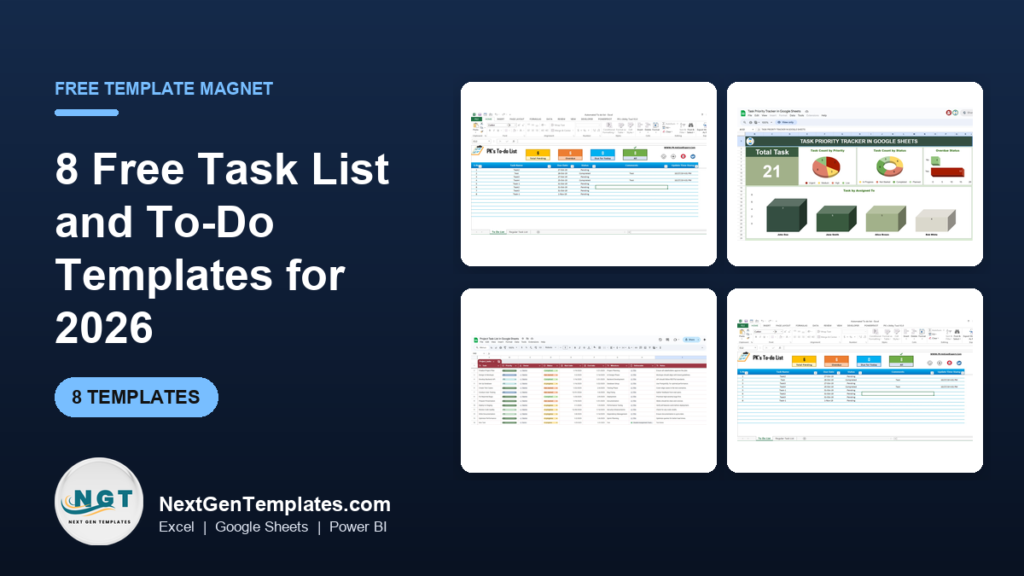
A free to do list template works fine for a short personal list: a blank grid in Excel or Google Sheets, or a built-in app template. It stops working when you need priorities, automatic status changes or team assignment. The eight upgrades below start at $3.49, and the Fully Functional To-do List in Excel is the best overall at $6.99.
Last updated: November 2026
Key takeaways
- A free to do list template is enough for one person with fewer than about 15 open tasks and no deadlines to share.
- The Fully Functional To-do List in Excel ($6.99) is the best overall upgrade: VBA automation updates statuses and timestamps, and a dashboard counts pending, overdue, due-today and completed tasks.
- The cheapest upgrades are four checklists at $3.49 each, including the Task Completion Checklist in Excel.
- Google Sheets users get three options: Task Priority Tracker ($6.99), Daily Work Schedule Checklist ($3.49) and Project Task List ($6.99).
- Buying all eight templates costs $41.92, but most people need only one or two, so pick by format and by whether you work alone or with a team.
 Launch offer
SUMIFS, XLOOKUP, FILTER, LAMBDA and checking AI-written formulas, with real business projects. 11h 47m of video by PK, with practice files, quizzes and a capstone.
Which free to do list template options are worth using, and which paid ones are worth it?
This table covers the eight paid upgrades. Prices are in USD. Every one is a single purchase from the NGT catalog, and each page lists what the template contains.
| Template | Format | Best For | Price |
|---|---|---|---|
| Fully Functional To-do List in Excel (Best overall) | Excel (VBA) | Personal and team task tracking with a dashboard | $6.99 |
| Task Priority Tracker in Google Sheets | Google Sheets | Sorting work by High, Medium and Low priority | $6.99 |
| Daily Work Schedule Checklist Template in Excel | Excel | One-day task lists with a progress bar | $3.49 |
| Daily Work Schedule Checklist in Google Sheets (Best value for Sheets) | Google Sheets | Shared daily lists with priorities | $3.49 |
| Task Completion Checklist in Excel (Best value) | Excel | Assigning tasks and tracking completion count | $3.49 |
| Task Management Outline Checklist in Excel | Excel | Structured team checklists with status icons | $3.49 |
| Project Task List in Google Sheets | Google Sheets | Project tasks with owners and deadlines | $6.99 |
| Project Task Assignment Tracker in Excel | Excel (VBA) | Project managers assigning work to a team | $6.99 |
How we picked these
We searched the NGT catalog of roughly 6,900 templates for task lists, to-do lists, checklists and task trackers, then kept paid templates that a person would actually use as a daily or project to-do list. We looked at the product name, description, categories and gallery images, and used only features stated on each product page.
We dropped templates that were really about something else, such as timesheets or full project plans. Those have their own roundups, linked further down. We also kept a spread of Excel and Google Sheets so you can choose by the tool you already open every morning.
What does a free to do list template give you?
Free options fall into three groups, and all of them do the basic job of listing tasks and ticking them off.
- A blank list you build yourself in Excel or Google Sheets: a column for the task, a column for the due date and a column for done or not done.
- The built-in templates that come with spreadsheet and note apps, which give you a ready layout with checkboxes.
- A printed or typed list in a notes app, which is quick but has no sorting or counting.
These cost nothing and take about ten minutes to set up. For a grocery run, a weekend project or a student assignment list, that is the right choice. Paying only makes sense when the list starts to cost you time.
Where free lists start to fail
The first failure is priority. A flat list of 30 items treats a tax filing the same as a dentist call. The second is status: you have to change every cell by hand, and you forget. The third is visibility, because nobody can tell how many tasks are overdue without counting rows. The fourth is sharing, when two people edit one list and nobody knows who owns what.
If you hit two of those four, an upgrade is worth the price of a coffee. Our broader guide to task and to-do management templates in Excel and Google Sheets covers the wider catalog.
The 8 best paid upgrades from a free to do list template in 2026
1. Fully Functional To-do List in Excel: best overall
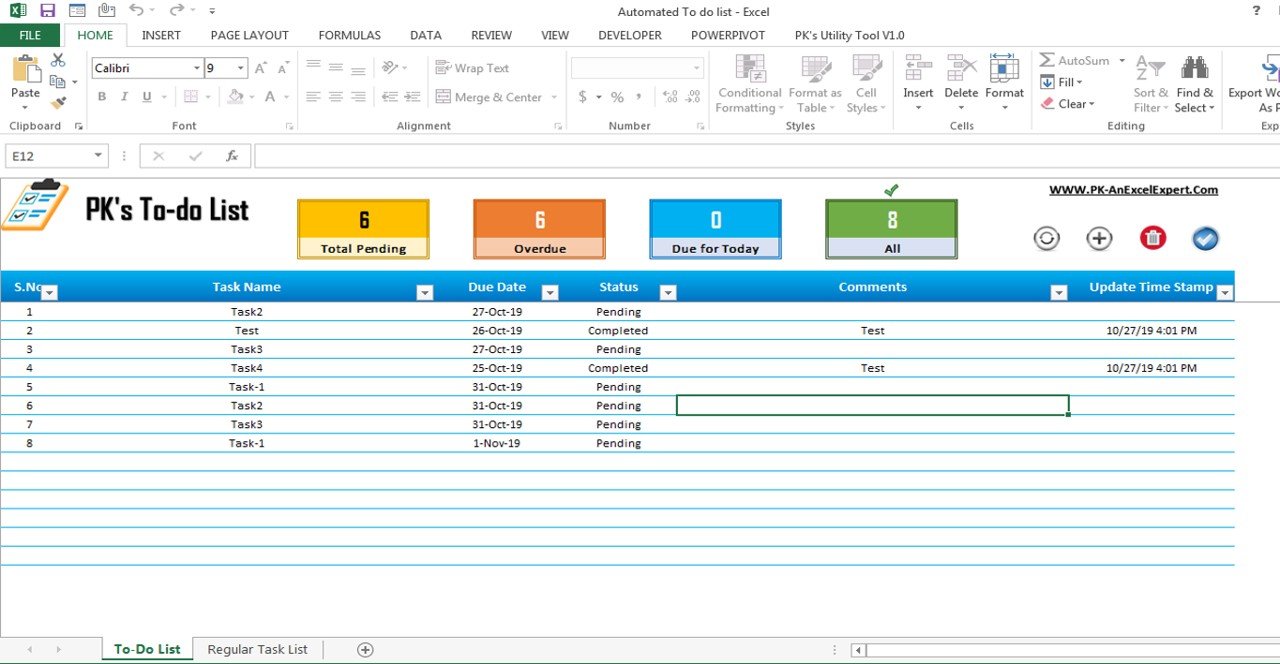
This is a ready-made, VBA-powered task tracker for individuals, professionals and teams. It ranks first because it removes the two chores that kill free lists: updating statuses by hand and counting what is overdue. It is the only template here with a dashboard of pending, overdue, due-today and completed counts.
Who it is for: anyone with a mixed daily, weekly and long-term workload who wants one place for personal and professional tasks.
- Task Name, Due Date, Status, Comments and Timestamps columns
- VBA automation for status changes and timestamps
- Dashboard showing total, pending, overdue, due-today and completed tasks
- Filters, sorting, categories and priorities
- Customizable layout, no technical skills needed
Use cases: a freelancer with 12 client tasks checks the due-today count each morning. A manager sorts a 40-row list by priority before a Monday meeting. A student filters long-term tasks by category to see what is due this week. Anyone can check the overdue number before closing the file on Friday.
Price: $6.99. Get the Fully Functional To-do List in Excel.
Best for: people who want the closest thing to a task app inside Excel.
2. Task Priority Tracker in Google Sheets
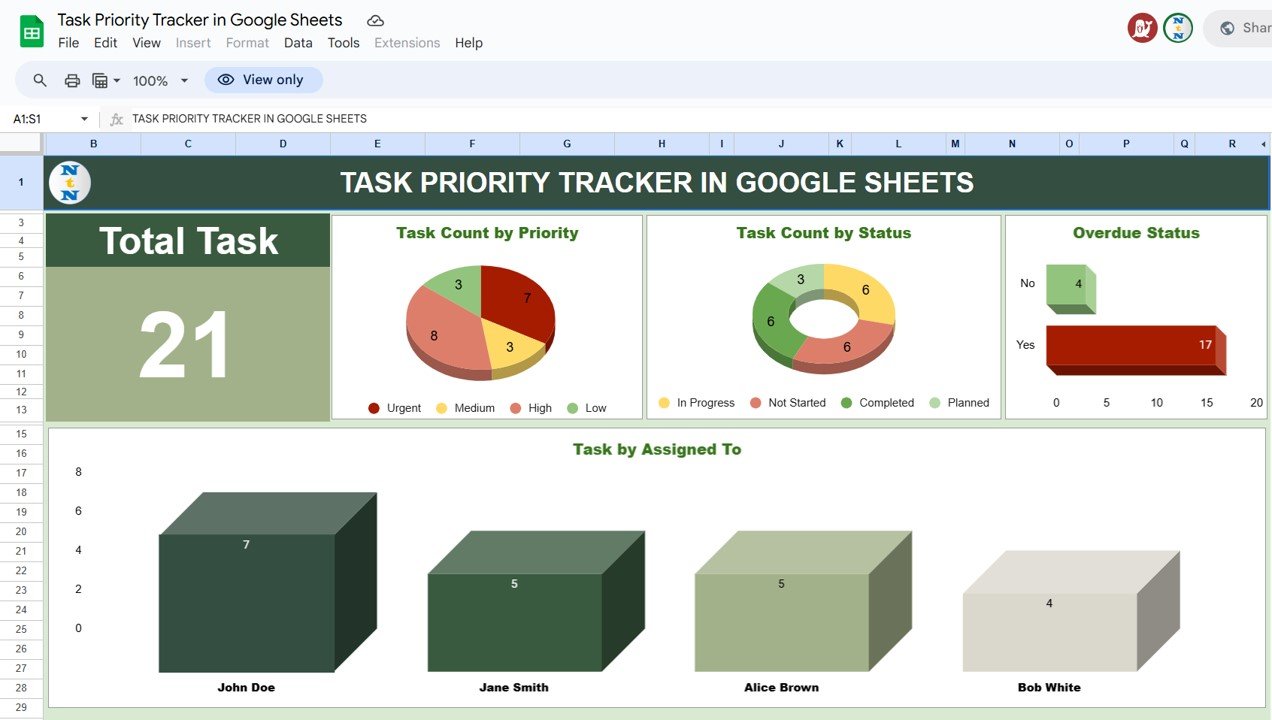
This template sorts tasks by urgency and importance, so the most critical work stays at the top. Each task gets a priority level, a deadline and a status, which answers the question of what to work on next.
Who it is for: individuals, students and teams who live in Google Sheets and want sharing without sending files around.
- High, Medium and Low priority levels with deadlines
- Status: Not Started, In Progress, Completed
- Color-coded conditional formatting
- Customizable categories and fields
- Shareable for real-time collaboration
Use cases: a project manager tags 5 tasks High and 20 Low so the short list is obvious. A small team shares one sheet and watches In Progress items move to Completed. A student marks essay deadlines High a week ahead.
Price: $6.99. See the Task Priority Tracker in Google Sheets.
Best for: Google Sheets users whose main problem is deciding what comes first.
3. Daily Work Schedule Checklist Template in Excel
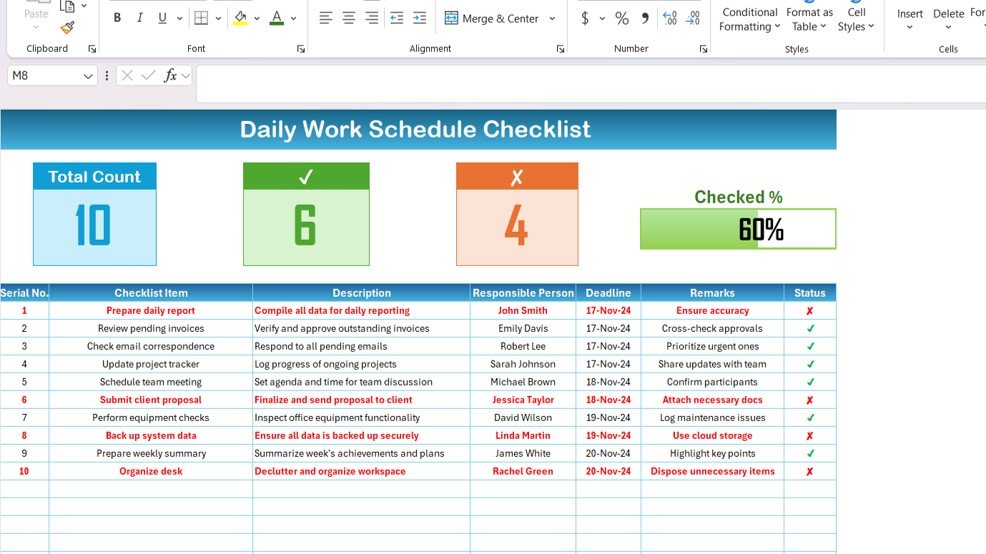
A two-worksheet checklist for planning and tracking one working day. The top section shows total task count, checked count, crossed count and a progress bar that updates as you change statuses.
Who it is for: team leaders, project managers and individual professionals who plan each day in a list.
- Daily Work Schedule Checklist sheet for recording tasks
- List sheet holding the responsible persons for dropdown assignment
- Total, Checked and Crossed counts
- Progress bar showing the completion percentage
- Fully customizable layout
Use cases: a supervisor lists 10 morning tasks and watches the bar fill by lunch. A team lead assigns each line to a name from the dropdown so spellings stay consistent. An office assistant reuses the sheet every day by clearing statuses.
Price: $3.49. Get the daily work schedule checklist in Excel.
Best for: a cheap daily planner with a visible progress bar.
4. Daily Work Schedule Checklist in Google Sheets

The Google Sheets version of the daily checklist lets you assign high, medium or low priorities, check off tasks as you finish them and share the sheet with others. At $3.49 it is the cheapest route to a shared daily list.
Who it is for: individuals and small groups who plan the day together online.
- High, medium and low priority per task
- Color-coded categories
- Customizable layout, categories and sections
- Real-time progress tracking as tasks are checked off
- Shareable for teamwork
Use cases: two co-founders share one day sheet and split 8 tasks. A shift planner colors urgent items red-first. A home-office worker keeps work and personal tasks in separate categories.
Price: $3.49. Get the daily work schedule checklist in Google Sheets.
Best for: shared daily planning on a very small budget.
5. Task Completion Checklist in Excel
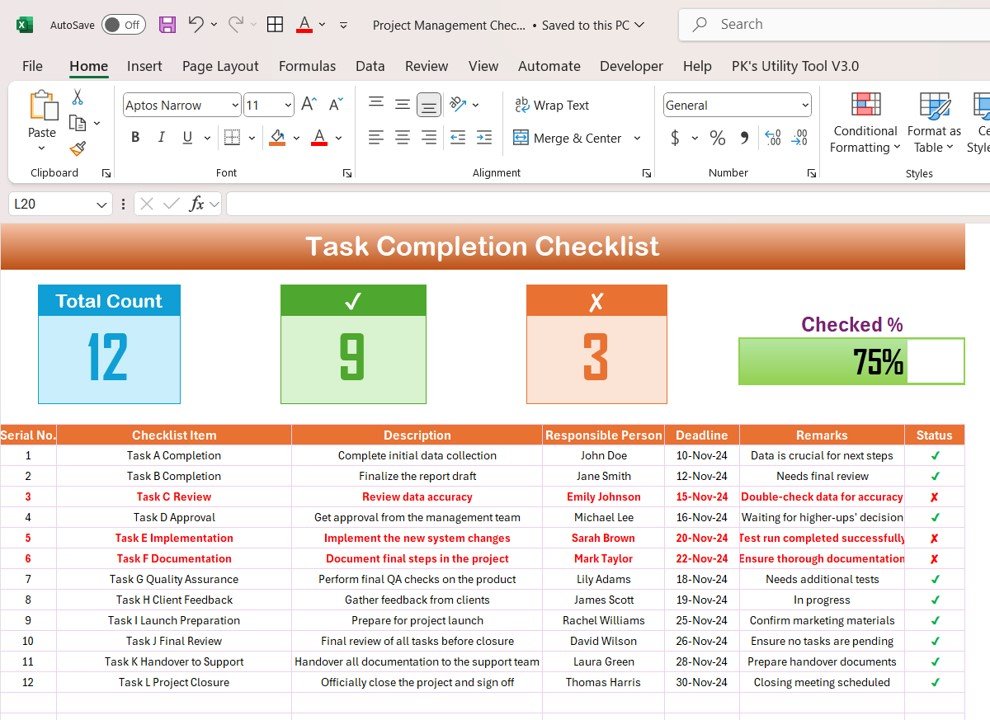
This checklist has a progress summary (total, checked and crossed counts plus a progress bar) above a table with serial number, checklist item, description, responsible person, deadline, remarks and status. A second sheet holds a dropdown list of people.
Who it is for: anyone running a project, a daily list or team assignments who wants accountability for each line.
- Progress bar that updates as tasks are completed
- Status marks: a tick for done, a cross for pending
- Responsible Person dropdown to reduce typing errors
- Deadline and Remarks columns
- Customizable, no setup required
Use cases: a team of 4 splits a 25-item launch list and each person sees their own lines. A manager reads the checked count in a weekly review. A coordinator adds remarks when a task is blocked.
Price: $3.49. Get the Task Completion Checklist in Excel.
Best for: the best value pick when you want owners and deadlines for $3.49.
6. Task Management Outline Checklist in Excel
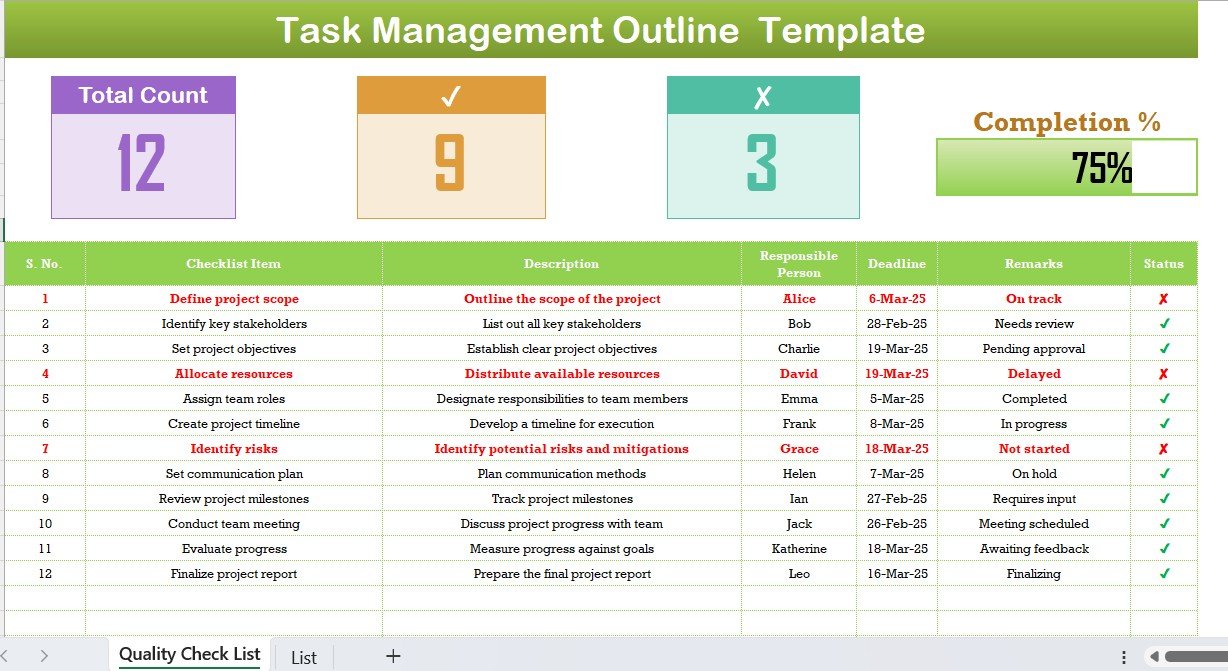
A structured checklist with a main dashboard sheet and a list sheet for responsible persons. It calculates a completion percentage from task status and marks items with color-coded indicators: green tick for completed, yellow for in progress, red cross for delayed or not started.
Who it is for: teams and individuals who want status icons and a completion rate rather than plain checkboxes.
- Automated completion percentage based on task status
- Task breakdown by Total, Completed and Pending
- Checklist items with descriptions, responsible persons, deadlines and remarks
- Dropdown list for assigning team members
- Status indicators that change as progress is updated
Use cases: a quality lead reviews the percentage before sign-off. A project team sees red crosses on delayed items and reassigns them. A manager shares a read-only copy as a status report.
Price: $3.49. Get the Task Management Outline Checklist in Excel.
Best for: teams that want a completion percentage at a glance.
7. Project Task List in Google Sheets

This is a task list for projects: tasks with deadlines, descriptions and priority levels, assignment to team members, and color-coded progress of Not Started, In Progress and Completed. It also offers a high-level overview of milestones and deadlines.
Who it is for: project managers, team leads and business owners working in Google Sheets.
- Due dates, descriptions and priorities per task
- Task assignment with status indicators
- Color-coded progress
- Customizable categories and priority levels
- Real-time collaboration
Use cases: a business owner shares one sheet with 3 contractors. A team lead filters by owner before a stand-up. A manager checks which tasks are still Not Started a week before a deadline.
Price: $6.99. Get the Project Task List in Google Sheets.
Best for: shared project task lists in Google Sheets.
8. Project Task Assignment Tracker in Excel
A tracker for assigning tasks inside a project, listed under VBA Tool and Trackers. It tracks tasks by start and end dates, categorizes them by priority and status, and shows overall project progress and completion rates.
Who it is for: project managers, team leads and business owners with a team to direct.
- Task assignment to specific team members with deadlines
- Time-based monitoring by start and end dates
- Priority (high, medium, low) and status (pending, in progress, completed)
- Overall progress and completion rates
- Customizable columns for your project
Use cases: a manager assigns 15 tasks across 5 people and checks completion rates weekly. A team lead spots tasks that need immediate attention. A small business owner adds extra columns for cost notes.
Price: $6.99. Get the Project Task Assignment Tracker in Excel.
Best for: managers who assign work rather than track their own list.
Which task list template should you choose?
| Your situation | Pick | Price |
|---|---|---|
| Solo, Excel, want a dashboard | Fully Functional To-do List in Excel | $6.99 |
| Solo or team, Google Sheets, priority matters most | Task Priority Tracker in Google Sheets | $6.99 |
| Plan one day at a time, Excel | Daily Work Schedule Checklist Template in Excel | $3.49 |
| Plan one day at a time, Google Sheets | Daily Work Schedule Checklist in Google Sheets | $3.49 |
| Need owners and deadlines on a checklist | Task Completion Checklist in Excel | $3.49 |
| Want status icons and completion percentage | Task Management Outline Checklist in Excel | $3.49 |
| Project in Google Sheets | Project Task List in Google Sheets | $6.99 |
| Project in Excel with a team | Project Task Assignment Tracker in Excel | $6.99 |
A quick tree: if you work alone, choose between the Excel dashboard and the Sheets priority tracker by the app you already use. If you work with others, choose a checklist at $3.49 for a simple list, or a project template at $6.99 when tasks have owners and dates.
Bundle versus single maths
The four checklists cost $13.96 together and the four $6.99 templates cost $27.96, so all eight come to $41.92. Most readers need one template, so buy the single product that fits and add a second only if you also work in the other format.
When is a template not the right answer?
A spreadsheet to-do list has limits, and some situations call for different software.
- If you need phone notifications and reminders that fire at a set time, a dedicated task app does that and a spreadsheet does not.
- If dozens of people update tasks at the same moment with comments, file attachments and approval flows, project management software suits better than a sheet.
- If your tasks depend on each other in long chains with a visual timeline, you want a Gantt view. See our free Gantt chart templates for Excel or the free project plan templates.
- If you only have a handful of tasks, the free blank list is enough. Do not pay for a dashboard you will not open.
The Excel VBA templates also need macros enabled, which some locked-down work computers do not allow. In that case, choose a Google Sheets option or a non-VBA checklist.
Related free template roundups
Tasks often sit next to other admin work. These guides cover neighbouring needs: free timesheet templates for tracking hours, free leave tracker templates in Excel for time off, free expense report templates for spending, and free invoice templates for billing.
Frequently asked questions
Is there a free to do list template for Excel?
Yes. You can build one in a few minutes with a task column, a due date column and a done column, or start from a built-in app template. For automatic statuses and an overdue count, the Fully Functional To-do List in Excel costs $6.99.
Is there a free to do list template for Google Sheets?
Yes. A blank sheet with task, deadline and status columns works, and Google Sheets also offers built-in templates. If you want High, Medium and Low priorities with color coding, the Task Priority Tracker in Google Sheets costs $6.99.
How do I make a to-do list in Excel?
Open a blank workbook and create columns for Task, Due Date, Status and Comments. Add a dropdown for status using data validation, then use filters to sort by due date. This takes about ten minutes and works for short lists.
What should a good task list template include?
A good task list includes the task name, a due date, a status and a priority. Team lists also need an owner and a remarks column. A summary of total, completed and pending tasks helps you see progress without counting rows.
When is it worth paying for a to-do list template?
It is worth paying when manual upkeep costs you time: changing statuses by hand, counting overdue items or sharing a list with a team. Prices here start at $3.49 for a checklist and $6.99 for a dashboard or project template.
What is the cheapest paid task checklist?
The four checklists are the cheapest at $3.49 each: Task Completion Checklist in Excel, Task Management Outline Checklist in Excel, Daily Work Schedule Checklist Template in Excel and Daily Work Schedule Checklist in Google Sheets.
Which template is best for a team task list?
For a team, the Project Task List in Google Sheets and the Project Task Assignment Tracker in Excel both assign tasks to team members with deadlines. Each costs $6.99. For a simpler list with an assignee dropdown, the Task Completion Checklist costs $3.49.
Do the Excel to-do templates need macros?
The Fully Functional To-do List in Excel is VBA-powered, so it relies on macros for status and timestamp automation. The Project Task Assignment Tracker is also listed as a VBA tool. The checklist templates are described without VBA.
Can I customize these task list templates?
Yes. The product pages describe each template as customizable, such as adjusting categories, priorities, layouts and columns. The Fully Functional To-do List in Excel is described as needing no technical skills to customize.
Where can I find more task and to-do templates?
Our guide to task and to-do management templates for Excel and Google Sheets lists more tools, and you can subscribe to the NextGenTemplates YouTube channel for tutorials and walkthroughs of the catalog.
Get more task and to-do templates
Start with the best overall pick, the Fully Functional To-do List in Excel at $6.99, or choose a $3.49 checklist if you only need a simple list. Browse the full range in our task and to-do management templates guide and watch tutorials on the NextGenTemplates YouTube channel.