

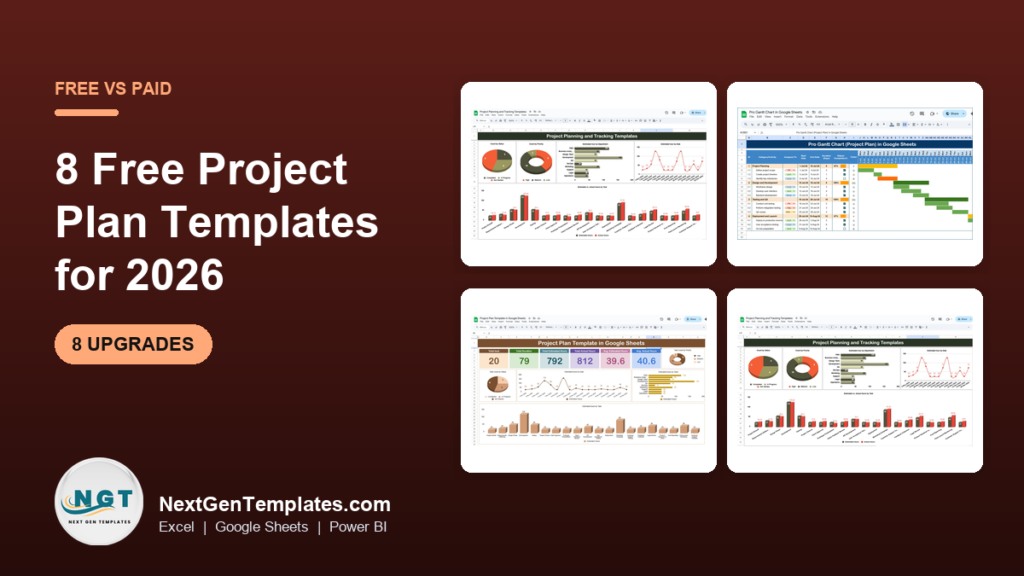
The best free project plan template in Excel is a task table with owners, dates, status and milestones, available free from Microsoft Create and Vertex42. When you need Gantt bars, budgets or reporting, paid options start at $3.49, such as the Project Management Planner Checklist in Excel.
Last updated: November 2026
Key takeaways
- A free project plan template in Excel is enough for one small project with under about 30 tasks and one person updating it.
- The Project Management Planner Checklist in Excel costs $3.49 and adds milestone tracking, resource allocation and progress monitoring.
- The Project Plan Template in Google Sheets costs $6.99 and adds Gantt charts, budget tracking and real-time sharing.
- The Pro Gantt Chart Project Planner in Google Sheets is $4.99, the cheapest paid option here with a colour-coded timeline.
- Two Power BI dashboards at $11.99 each report project KPIs once the plan is running, but neither replaces the plan itself.
 Launch offer
SUMIFS, XLOOKUP, FILTER, LAMBDA and checking AI-written formulas, with real business projects. 11h 47m of video by PK, with practice files, quizzes and a capstone.
Free project plan template Excel options compared
| Template | Format | Best For | Price |
|---|---|---|---|
| Microsoft Create project plan templates | Excel | A first plan with no spend | Free |
| Vertex42 project management templates | Excel | Free Gantt-style schedules you can edit | Free |
| Project Management Planner Checklist in Excel (Best overall) | Excel | Tasks, milestones and resources in one file | $3.49 |
| Project Plan Template in Google Sheets | Google Sheets | Teams that need Gantt and budget tracking | $6.99 |
| Pro Gantt Chart Project Planner in Google Sheets (Best value) | Google Sheets | A visual timeline at the lowest price | $4.99 |
| Project Planning and Tracking Template in Google Sheet | Google Sheets | Planning plus dashboards for shared projects | $6.99 |
| Task Management Schedule Checklist in Excel | Excel | Deadline-driven task schedules | $3.49 |
| Task Management Action Plan Checklist in Excel | Excel | Action lists with a progress bar | $3.49 |
| Health Project Management KPI Dashboard in Power BI | Power BI | Healthcare project KPI reporting | $11.99 |
| Electricity Project KPI Dashboard in Power BI | Power BI | Electricity project KPI reporting | $11.99 |
How we picked these
We searched the Next Gen Templates catalog of project management, checklist and KPI dashboard products and kept eight paid files that a reader looking for a project plan could realistically use. We excluded anything that was a loose match, such as inventory or HR files. We did not write or list any free NGT download. For the free side we point only to two established external sources, Microsoft Create and Vertex42.
Every price below is the current price in USD. Feature statements come from each product page, so nothing here is claimed that the listing does not state.
What does a free project plan template in Excel actually include?
Most free files share the same core: a task list, an owner column, start and end dates, a status field and sometimes a basic Gantt bar built with conditional formatting. That covers a plan for a website launch, an event or a small internal change.
You can find free files at Microsoft Create and Vertex42. Both publish project plan and schedule templates for Excel. Check the licence and the layout of each file before you commit a project to it, because layouts and features differ between files.
Free files stop short in predictable places: no resource view, no budget tracking, no shared editing, and no reporting you could show a sponsor. Those gaps are where the paid templates below earn their small price.
What should you check before trusting any free project plan file?
A free file can look polished and still fail in week three. Run a five-minute test before you load real data. Enter ten dummy tasks, change two start dates, add a task in the middle and see whether the formulas and the timeline follow. If they break, the file will cost you more time than it saves.
- Date logic: does the end date calculate from a duration, or must you type both? Typed dates drift when plans change.
- Locked cells: protected sheets with no password hint make edits painful.
- Row limits: some Gantt shading only covers a fixed number of rows or weeks.
- Status values: a dropdown with fixed options keeps your percent-complete formula honest. Free text does not.
- Print layout: if a sponsor wants a PDF, check it fits on one page width.
A paid file at $3.49 to $6.99 is not automatically better, so run the same test on it. The difference is that you can read the product page first and see which of these features it states.
The 8 best project plan templates for 2026
1. Project Management Planner Checklist in Excel (best overall)

This is the closest paid step up from a free Excel plan, and it stays in Excel. It ranks first because the reader searching for an Excel plan gets task scheduling, milestones and resources in a single file for $3.49.
Who it is for: project managers, team leads and business owners running small or mid-sized projects who want a structured list instead of a blank grid.
- Task list with deadlines, responsible parties and progress status
- Milestone tracking for key project phases
- Resource assignment and role definition
- Progress monitoring to spot roadblocks
- Customisable fields, categories and task priorities
Use cases: a 20-task office move with four milestones, a product launch with three owners, a quarterly audit prep list, or a client onboarding plan you repeat every month.
Price: $3.49. Get the Project Management Planner Checklist in Excel.
Best for: anyone who wants a free-style Excel plan with more structure for under $4.
2. Project Plan Template in Google Sheets

This template breaks a project into tasks and milestones, each with objectives, deadlines and owners. It adds resource allocation and budget tracking, which free templates rarely include, plus Gantt-style timeline visuals.
Who it is for: teams that share one plan and need to watch costs as well as dates.
- Task breakdown with clear deadlines and responsible members
- Timeline visualisation using Gantt charts
- Resource allocation across tasks
- Budget tracking against financial limits
- Real-time sharing and collaboration
Use cases: a website rebuild with a fixed budget, a marketing campaign with five contributors, a facilities refit where spend must be tracked weekly.
Price: $6.99. See the Project Plan Template in Google Sheets.
Best for: shared plans where budget and schedule need to sit side by side.
3. Pro Gantt Chart Project Planner in Google Sheets (best value)

At $4.99 this is the lowest-priced file here that gives you a colour-coded Gantt timeline, so it takes the best-value label. It combines a task list, progress bars, resource assignments and milestones.
Who it is for: anyone who has outgrown a plain task list and wants to see overlaps and deadlines visually.
- Tasks, subtasks and milestones with completion statuses
- Adjustable project start and end dates
- Progress tracking from not started to completed
- Resource allocation and availability
- Colour-coded Gantt timeline
Use cases: a 12-week build schedule, a multi-project tracker for one team, or a milestone view for a client report. If you want more on Gantt specifically, read our guide to free Gantt chart Excel templates.
Price: $4.99. Get the Pro Gantt Chart Project Planner.
Best for: the cheapest route to a visual project timeline.
4. Project Planning and Tracking Template in Google Sheet

This is a set of templates covering planning, task assignment and progress monitoring, with colour-coded status indicators and built-in charts for a quick project health view.
Who it is for: individuals and teams managing anything from a small team project to larger programmes.
- Project plans with timelines, milestones and deliverables
- Task assignment with deadlines
- Colour-coded progress and milestone tracking
- Visual dashboards with charts and graphs
- Customisable layouts and real-time collaboration
Use cases: a team sprint review, a client deliverable tracker, an event plan with weekly checkpoints.
Price: $6.99. See the Project Planning and Tracking Template.
Best for: shared projects that need a dashboard view alongside the plan.
5. Task Management Schedule Checklist in Excel
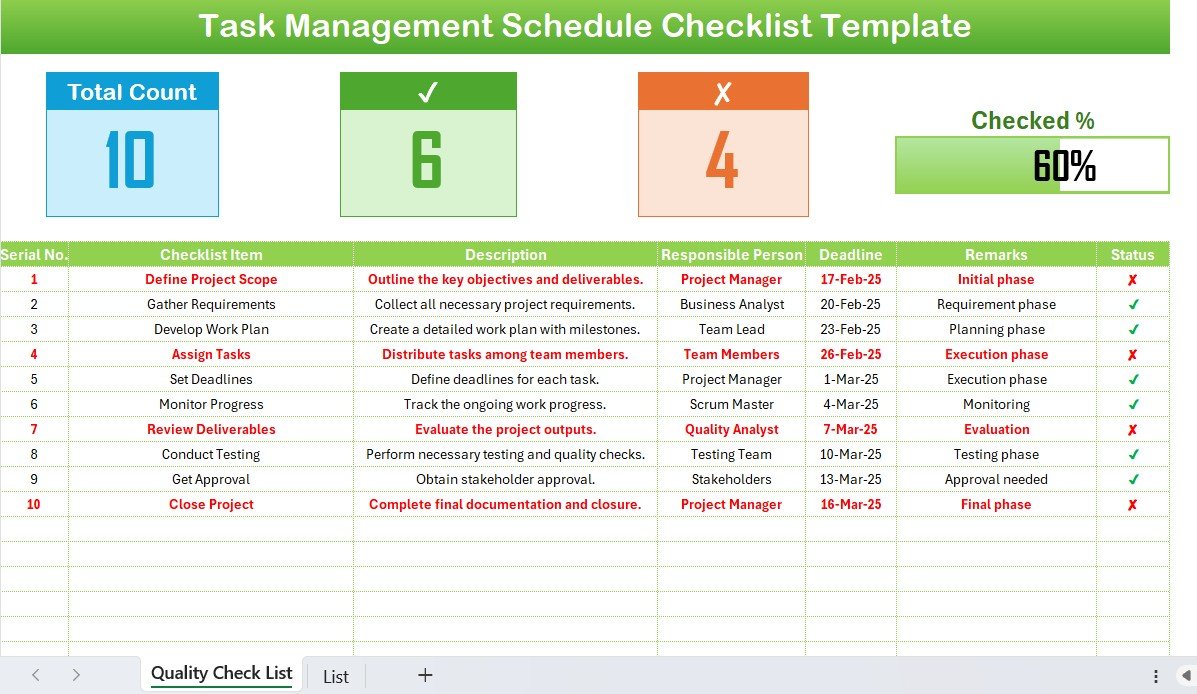
A schedule-first checklist for teams whose main worry is missed dates. Tasks are organised by deadline, priority and team member.
Who it is for: project managers, team leaders and business owners handling many tasks inside a project or daily operations.
- Scheduling by deadlines, priorities and resources
- Deadline and milestone tracking
- Task assignment with accountability
- Progress reporting: on schedule, behind or ahead
- Customisable categories and metrics
Use cases: a weekly operations schedule, a launch week countdown, a department deadline log.
Price: $3.49. Get the Task Management Schedule Checklist.
Best for: deadline-heavy work in Excel at the lowest price tier.
6. Task Management Action Plan Checklist in Excel
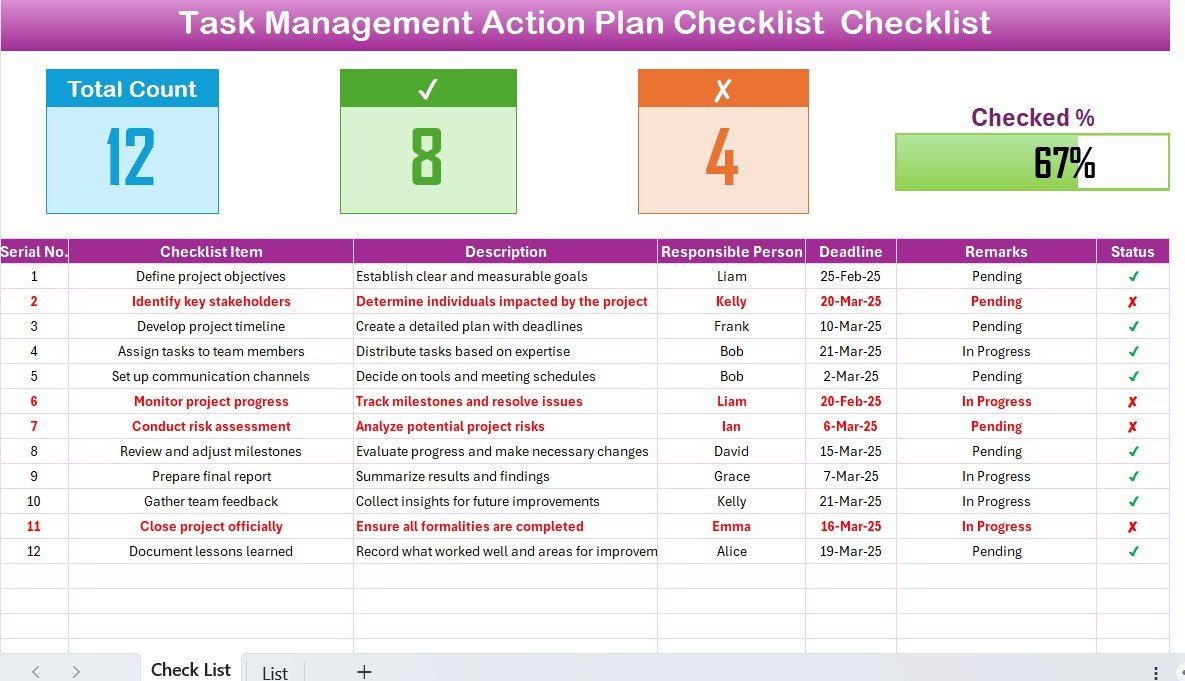
The simplest file in the list. It has two worksheets and a top panel showing total, completed and pending task counts with a progress bar.
Who it is for: teams, HR groups, students and freelancers who want an action list rather than a full plan.
- Task table with responsible person and deadline
- Dropdown assignment of team members
- Total, completed and pending counts
- Visual progress bar for completion percentage
- Fully customisable workflow fields
Use cases: a post-meeting action list, a handover checklist, a student group project tracker.
Price: $3.49. See the Task Management Action Plan Checklist.
Best for: a lightweight action plan where a Gantt chart would be overkill.
7. Health Project Management KPI Dashboard in Power BI
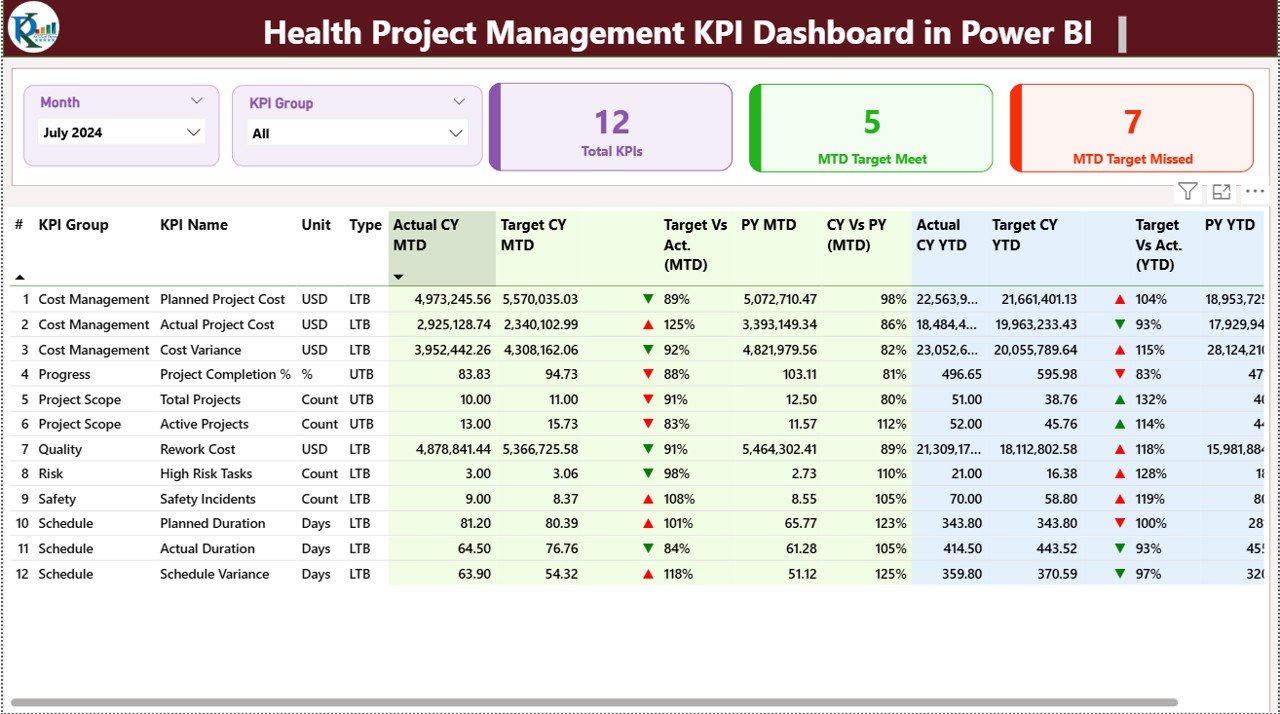
This is a reporting layer, not a plan. It tracks project KPIs for healthcare teams with data entered in Excel and shown in Power BI.
Who it is for: hospital and healthcare programme managers who report to leadership.
- Interactive Power BI report with Month and KPI Group slicers
- MTD and YTD KPI tracking
- Target versus actual comparison
- Automated status indicators
- Trend charts and an Excel-based input system
Use cases: a monthly steering committee pack, a target-miss review, a programme trend view.
Price: $11.99. Get the Health Project Management KPI Dashboard.
Best for: healthcare project reporting once the plan exists.
8. Electricity Project KPI Dashboard in Power BI

Built for electricity projects where small KPI deviations can lead to cost or schedule problems. It centralises KPIs in one Power BI report.
Who it is for: project teams running electricity or utility projects with multiple stakeholders.
- Month and KPI Group slicers
- MTD and YTD tracking
- Target versus actual analysis
- Current year versus previous year comparison
- Interactive KPI trend charts and Excel-based data input
Use cases: monthly stakeholder reporting, early detection of KPI drift, year-over-year performance reviews.
Price: $11.99. See the Electricity Project KPI Dashboard.
Best for: electricity project performance reporting.
How do I choose between a free and a paid project plan template?
| Your situation | Pick | Price |
|---|---|---|
| One small project, one editor, under 30 tasks | Free file from Microsoft Create or Vertex42 | Free |
| Excel only, need milestones and resources | Project Management Planner Checklist in Excel | $3.49 |
| Need a visual timeline cheaply | Pro Gantt Chart Project Planner in Google Sheets | $4.99 |
| Need budget plus Gantt, shared team | Project Plan Template in Google Sheets | $6.99 |
| Need to report KPIs to leadership | Health or Electricity Project KPI Dashboard in Power BI | $11.99 |
The bundle-versus-single maths is simple. Buying the $3.49 Excel planner plus the $4.99 Gantt planner costs $8.47, still less than one Power BI dashboard at $11.99. Start with the plan, add reporting later.
For a wider stack, see our project manager Excel templates stack and the project management dashboard templates roundup.
Which format should you pick: Excel or Google Sheets?
Format matters more than most buyers expect, because it decides who can edit the plan and when. Use this short rule set.
- Choose Excel when one person owns the plan, you work offline, or your company already stores files on a shared drive. The $3.49 Excel checklists fit this case.
- Choose Google Sheets when three or more people update tasks during the week and you want everyone looking at the same live file. The Google Sheets planners at $4.99 to $6.99 fit here.
- Choose Power BI only for reporting. Its data is entered in Excel and shown in the report, so it sits on top of a plan rather than replacing one.
If you are unsure, start with the cheapest Excel file. A $3.49 test costs less than an hour of your time, and you learn which columns you actually use.
Worked example: when does a plan need more than a free file?
Take a 40-task office relocation with a 12-week schedule and a $20,000 budget. A free file handles the task list. It will not tell you that three tasks share one owner in week 6, or that spend is at 70% while 50% of tasks are complete.
Planned percent complete is tasks done divided by total tasks. If 20 of 40 tasks are done, you are at 50%. Compare that to money spent, say $14,000 of $20,000, which is 70%. Spend is running ahead of progress by 20 points, and that gap is the reason to add budget tracking.
If you track earned value, the standard formulas are SPI = earned value / planned value and CPI = earned value / actual cost. A value below 1.0 means behind schedule or over budget. The Project Management Institute (pmi.org) publishes the standard definitions. Our guide to project KPIs such as CPI and SPI walks through each one.
Run the numbers once more with earned value. Suppose the planned value at week 6 is $10,000, the earned value is $8,000 and the actual cost is $14,000. SPI is 8,000 / 10,000 = 0.80, so you are 20% behind schedule. CPI is 8,000 / 14,000 = 0.57, so each dollar spent has produced about 57 cents of planned work. Both numbers sit below 1.0, and a plain task list would never have shown it.
When a template is NOT the right answer
Spreadsheets are not the right tool for every project. Buy software instead in these cases:
- You need automatic task dependencies where moving one date shifts others. Dedicated tools such as Microsoft Project handle this better than a spreadsheet.
- More than about 10 people update the plan daily and need notifications, comments and permissions. Tools such as Asana, Smartsheet, monday.com or ClickUp are built for that. Check each vendor’s current pricing page before deciding.
- You run dozens of projects that must roll up into a single portfolio view.
- Your organisation requires audit trails and approval workflows.
If you are weighing that choice, compare options in our guides to Asana alternatives in Excel and Sheets and ClickUp alternatives. A free file is also the better answer when your project is truly small. Do not pay for features you will not open.
Frequently asked questions
Is there a free project plan template in Excel?
Yes. Microsoft Create and Vertex42 both publish free project plan templates for Excel. They usually include a task list, dates, owners and status. Check the licence and features of each file. For milestones and resource tracking, a $3.49 paid planner is a modest step up.
What should a project plan template include?
A usable project plan lists tasks, owners, start and end dates, status, milestones and dependencies. Larger plans add resources, budget and risks. If a template lacks owners or dates, it is a to-do list, not a plan. Add columns for anything your sponsor asks about.
How do I make a project plan in Excel from scratch?
List every task in a column, add owner, start date, end date and status columns, then mark milestones. Use conditional formatting to shade date cells for a simple Gantt. Add a formula for percent complete, which is tasks done divided by total tasks. Keep one row per task.
Is a Gantt chart the same as a project plan?
No. A Gantt chart is a visual timeline of the tasks in a plan. A project plan also covers scope, owners, resources, budget and milestones. Many templates combine both. The Pro Gantt Chart Project Planner in Google Sheets costs $4.99 and includes a task list with its timeline.
Can I use Google Sheets instead of Excel for a project plan?
Yes, and it suits shared plans because several people edit the same file in real time. Excel suits offline work and heavier formulas. Next Gen Templates sells both: the Project Plan Template in Google Sheets is $6.99, and the Project Management Planner Checklist in Excel is $3.49.
How many tasks can a spreadsheet project plan handle?
A spreadsheet works comfortably up to a few dozen tasks with one or two editors. Past about 100 tasks with many dependencies, updating dates by hand becomes slow and error-prone. At that point dedicated project software saves more time than a template does.
What is the difference between a project plan and a task checklist?
A task checklist lists what must be done and whether it is complete. A project plan adds timing, milestones, resources and often budget. The Task Management Action Plan Checklist in Excel at $3.49 is a checklist with a progress bar, while the Project Plan Template in Google Sheets at $6.99 is a full plan.
How do I track project progress in a template?
Use a status column with set values such as not started, in progress and done, then calculate percent complete as tasks done divided by total tasks. Compare it with percent of budget spent. If spend runs well ahead of progress, investigate before the gap grows.
Do I need a Power BI dashboard for project management?
Only if you report KPIs to others each month. A plan tells the team what to do. A dashboard such as the Health Project Management KPI Dashboard in Power BI, at $11.99, shows MTD and YTD KPIs against target. Small projects rarely need it.
Get more project management templates
If a free file has run out of room, start with the Project Plan Template in Google Sheets at $6.99, or the Project Management Planner Checklist in Excel at $3.49. For reporting, the dashboards are $11.99 each. See more free options in our guides to free Excel dashboard templates, free Google Sheets dashboard templates and free Power BI dashboard templates. Watch walkthroughs on the Next Gen Templates YouTube channel.