

The best free expense report template in 2026 is Vertex42’s Travel Expense Report, which comes with a Simple Expense Report on the same page. Both work in Excel and Google Sheets, need no sign-up, and the simple version has a mileage rate cell and an “Amount to Reimburse” total. For the widest choice, Smartsheet gives away 15 expense report files.
Last updated: October 2026
This guide is for employees who need to claim back what they spent, for managers who sign off those claims, and for small-business owners and bookkeepers who pay them. First come the 8 free expense report templates worth your time. We opened every page in October 2026 and downloaded the Excel files where a direct link was offered, to check that they really are free. Then comes an honest section on when a free expense report stops being enough, with 8 paid upgrades from NextGenTemplates. If you mainly want to track your own spending rather than claim it back, our expense tracker Excel templates guide covers that job.
Key takeaways
- All 8 free expense report templates in this list cost nothing: four from Vertex42, plus Smartsheet, Zoho, the Google Sheets template gallery and our own free reimbursement form. We checked each page in October 2026.
- Best overall free expense report template: Vertex42’s Travel Expense Report and Simple Expense Report, for Excel and Google Sheets, with a mileage rate cell and a reimbursement total.
- Pick the report by the kind of claim: a trip, a week of mixed costs, a one-off purchase, or miles driven. There is a free template for each one.
- A free expense report handles one claim well. It does not show which claims are still waiting for approval, which are paid, or how much each department spends. Those gaps are why finance teams upgrade.
- The 8 paid NextGenTemplates upgrades below cost $6.99 to $39.99, paid once with no subscription. The Expense Reimbursement Tracker in Excel costs $6.99.
 Launch offer
SUMIFS, XLOOKUP, FILTER, LAMBDA and checking AI-written formulas, with real business projects. 11h 47m of video by PK, with practice files, quizzes and a capstone.
Free expense report templates compared
Every free source in this guide, side by side. One row is flagged best overall. All eight are free to download.
| # | Template | Source | Format | Best For | Price |
|---|---|---|---|---|---|
| 1 | Travel Expense Report and Simple Expense Report (Best overall) | Vertex42 | Excel, Google Sheets | A business trip or a mixed claim with mileage | Free |
| 2 | Free Expense Report Templates (15 files) | Smartsheet | Excel, Google Sheets, Word, PDF | Monthly, weekly, credit card and petty cash reports | Free |
| 3 | Weekly Expense Report | Vertex42 | Excel, Google Sheets | Staff who travel or entertain clients every week | Free |
| 4 | Employee Expense Reimbursement Form and Form with Receipts | Vertex42 | Excel, Google Sheets, OpenOffice | Office supplies, software and training costs | Free |
| 5 | Expense report | Google Sheets template gallery | Google Sheets | Teams that already work in Google Drive | Free |
| 6 | Expense Report Template | Zoho Expense | Excel (.xls), Zoho Sheet | A quick download with no sign-up | Free |
| 7 | Business Mileage Tracking Log | Vertex42 | Excel | Drivers who claim mileage | Free |
| 8 | Employee Reimbursement Form Template | NextGenTemplates | Word, Google Docs | A printable claim form with three sign-off lines | Free |
Here are the paid upgrades we recommend once a free expense report template runs out of road. One row is best overall and one is best value.
| Upgrade | Format | Best For | Price |
|---|---|---|---|
| Expense Reimbursement Management System V1.0 (Best overall) | Excel VBA | Claims, approvals, users and reports in one locked-down workbook | $19.99 |
| Expense Reimbursement Tracker in Excel (Best value) | Excel | A claims log with approval status and receipt checks | $6.99 |
| Expense Reimbursement Tracker in Google Sheets | Google Sheets | A shared claims sheet with charts by department | $6.99 |
| Travel Expense Report Tracker in Excel | Excel VBA | Trip claims with logins and a 6-chart dashboard | $6.99 |
| Travel Expense Report Tracker in Google Sheets | Google Sheets | Trip costs by currency, location and purpose | $6.99 |
| Expense Report and Tracker in Google Sheets | Google Sheets | A monthly expense report with budgets by category | $6.99 |
| Office Travel and Expense Dashboard in Excel | Excel (also Power BI, Google Sheets) | Travel spend by department, city and month | $17.99 |
| Expense & Petty Cash Management System Web App | Google Apps Script web app | Multi-branch claims, approvals and petty cash | $39.99 |
How we picked these free expense report templates
We started where people really look for a free expense report template: the big template libraries (Vertex42 and Smartsheet), the galleries built into Excel and Google Sheets, expense software companies that give away a template (Zoho, FreshBooks, Wave and others), and our own catalogue. We loaded every page in October 2026. Smartsheet’s Simple Expense Report came down as a 310 KB Excel file and its Business Expense Reimbursement Form as a 307 KB file, both without an email address. Zoho’s page says there is no need to sign up.
A source made the list only if the template downloads at no cost and does the job: it lists dated expenses, totals them, and shows what the company owes the employee. Several pages that used to rank for this search now return “page not found”, including expense report pages from FreshBooks and Wave, so they are out. Microsoft’s expense report page mostly shows budget and expense calculators rather than claim forms, so we did not give it a slot.
Search data shaped the list. In the US, “expense report template” is searched about 3,600 times a month, “expense report template excel” about 1,600 times and “free expense report template” about 590 times. “Mileage reimbursement form” gets about 880 searches, “reimbursement form template” about 480, “expense reimbursement form” about 390, and “travel expense report template” and “expense report template google sheets” about 210 each. So the list covers Excel and Google Sheets, trip reports, reimbursement forms and mileage. We took the paid upgrades from the NextGenTemplates expense and reimbursement range and matched each one to a gap that free files leave open.
The 8 best free expense report templates for 2026
1. Travel Expense Report and Simple Expense Report (Vertex42): best overall
One page, two free templates. The Travel Expense Report has a separate column for each common expense type, plus a table where you can itemise costs such as a breakdown of meals or transport. The Simple Expense Report puts every expense in one column and lets you choose the type from an editable drop-down. It also has a cell for your mileage reimbursement rate, and since a May 2020 update you can mark which lines are “to be reimbursed”. That keeps company-card charges apart from money you paid yourself, and the marked lines feed an “Amount to Reimburse” total.
Both download as Excel files for Excel 2007 or later and open as Google Sheets copies. The licence is private use, and the page was updated on 12 April 2022. If you clear the sample data, the simple version prints as a blank form for people who fill in claims by hand. The sheets carry a useful reminder: attach receipts.
Best for: a business trip or a mixed claim with some mileage. Free: get the Vertex42 travel and simple expense reports.
2. Free Expense Report Templates (Smartsheet)
Smartsheet’s page, published by Andy Marker on 27 June 2025, is the widest free collection we found, with 15 templates. You get a simple expense report with sample data (it nets out cash advances), a small-business expense report, travel, monthly, weekly, daily and annual reports, an expense report with mileage tracking that works from odometer readings, a business expense reimbursement form, a credit card expense report, a petty cash expense report that shows overages and shortages, and a few more. Most come in Excel and Google Sheets; some also come in Word, PDF and Google Docs.
The download links go straight to the files. A pop-up offers a Smartsheet trial, but you can skip it and continue to the download, and there is no form to fill in.
Best for: finding a report for an unusual case, such as credit card or petty cash claims. Free: get Smartsheet’s free expense report templates.
3. Weekly Expense Report (Vertex42)
If you claim every week, this is the most practical layout. It has a section for reimbursable costs such as mileage and other travel, a separate section for amounts charged to a company credit card, and space to document business meals. Vertex42’s author, Jon Wittwer, describes it as a simple spreadsheet with no installation and no macros, so it opens anywhere.
It comes as an Excel file and a Google Sheets version under a private-use licence, and the page was updated on 18 August 2021. The page also gives a useful reminder: for meals and entertainment, keep a record of the place, the business purpose, who you met and the amount, and hand in receipts with the report.
Best for: sales staff and consultants who spend on the road every week. Free: get the Vertex42 weekly expense report.
4. Employee Expense Reimbursement Form (Vertex42)
Not every claim is a trip. This page, updated on 18 July 2024, has three forms. The Employee Expense Reimbursement Form covers general costs such as office supplies, software and training fees. The Reimbursement Form with Receipts lets you insert receipt images below the form and print both as one PDF, with a separate sheet for viewing the receipts at a larger size. A third version is built for school PTAs and similar groups.
The forms come in Excel, Google Sheets and (for the first one) OpenOffice, under a private-use licence. The page also points readers to the IRS and GSA for mileage and per diem rates, which is the right place to look them up.
Best for: one-off purchases an employee paid for out of pocket. Free: get the Vertex42 reimbursement forms.
5. Expense report (Google Sheets template gallery)
If your team already works in Google Drive, you have a free expense report template one click away. Open Google Sheets, click Template gallery at the top of the home screen, and choose “Expense report” from the Work section. You get a ready-made form for the employee’s details and a dated list of expenses that totals itself.
The big plus is sharing. An employee can fill in the report and share it with a manager, who comments on the same file instead of a copy in an email. All you need is a free Google account. The limit is that each report is its own file, so nobody gets a list of all open claims.
Best for: small teams that live in Google Workspace. Free: open Google Sheets and pick “Expense report” from the template gallery.
6. Expense Report Template (Zoho Expense)
Zoho, which sells the Zoho Expense app, gives away a plain expense report template. You can download it as an Excel .xls file or open it online in Zoho Sheet, and the page says there is no need to sign up. It is a simple, clean layout for listing expenses and getting a total, which is all many small businesses need.
Expect some promotion of Zoho’s paid app on the page. The template itself works on its own in Excel.
Best for: a fast, no-frills download. Free: get Zoho’s free expense report template.
7. Business Mileage Tracking Log (Vertex42)
“Mileage reimbursement form” is one of the most searched terms in this topic, and a mileage log is the record behind that claim. Vertex42’s log, by Jon Wittwer and Brent Weight, records the start and end odometer readings and the business purpose of every trip. It tracks business miles against total miles, so you can work out the percentage of business use and the amount owed. The log sheet is designed to be printed, folded in half and kept in the car.
It is an Excel file for Excel 2007 or later and Excel on iPad and iPhone, under a private-use licence. Use it with the current IRS rate, which we cover in the formulas section below.
Best for: anyone who drives their own car for work. Free: get the Vertex42 business mileage log.
8. Employee Reimbursement Form Template (NextGenTemplates)
Our own free form is for companies that want a signed paper trail. It has an employee details section (name, ID, department and submission date), a table of expenses with date, description, amount and category, and a Total Amount to be Reimbursed line. The employee picks how to be paid (direct deposit, cheque or added to the next payroll) and ticks which documents are attached: receipts, invoices or other papers. Three signature lines cover the employee, the manager and finance approval.
It is 100% free, as a Word file and an editable Google Docs version. The amount column is labelled in INR, and you can change it to your currency in a few seconds.
Best for: a printable claim form with sign-offs. Free: get the free Employee Reimbursement Form Template.
Also free: Smartsheet’s Google Sheets expense report templates and Excel expense report templates pages collect more variations. If you also want to see where your own money goes each week, our free Weekly Expense Tracker in Excel does that.
Want the free expense tracker by email?
An expense report is easier to fill in when you have logged your spending as you went. We will send you our free Weekly Expense Tracker for Google Sheets: daily logging across 8 categories, automatic weekly totals and averages, a category pie chart and a budget comparison, all from your phone or laptop. No payment, no card, and you can unsubscribe at any time.
When does it pay to upgrade from a free expense report template?
A free expense report template is fine for one person sending one claim a month. Once several people claim, or someone in finance has to pay them all, the same five problems push teams towards a paid tool:
- Every claim is a separate file. Ten employees mean ten workbooks in ten emails. Nobody can see all open claims in one place, or search last quarter’s claims by name.
- No approval status. A free report has a signature line, not a status. You can’t tell which claims are pending, approved, rejected or already paid, so people chase finance by email.
- No check on receipts or duplicates. Without a receipt column and a claim ID, the same taxi fare can be claimed twice and nobody notices until the audit.
- No totals across people. A single report can’t show spending by department, by expense type or by month, so travel budgets get set by guesswork.
- Anyone can edit anything. A shared spreadsheet has no logins. An employee can change an approved amount, and there is no record of who did it.
If two or more of these apply, the time spent chasing and reconciling costs more than a one-time template. The 8 upgrades below map onto those gaps.
8 paid expense report template upgrades for when free stops working
1. Expense Reimbursement Management System V1.0 in Excel VBA: best overall upgrade
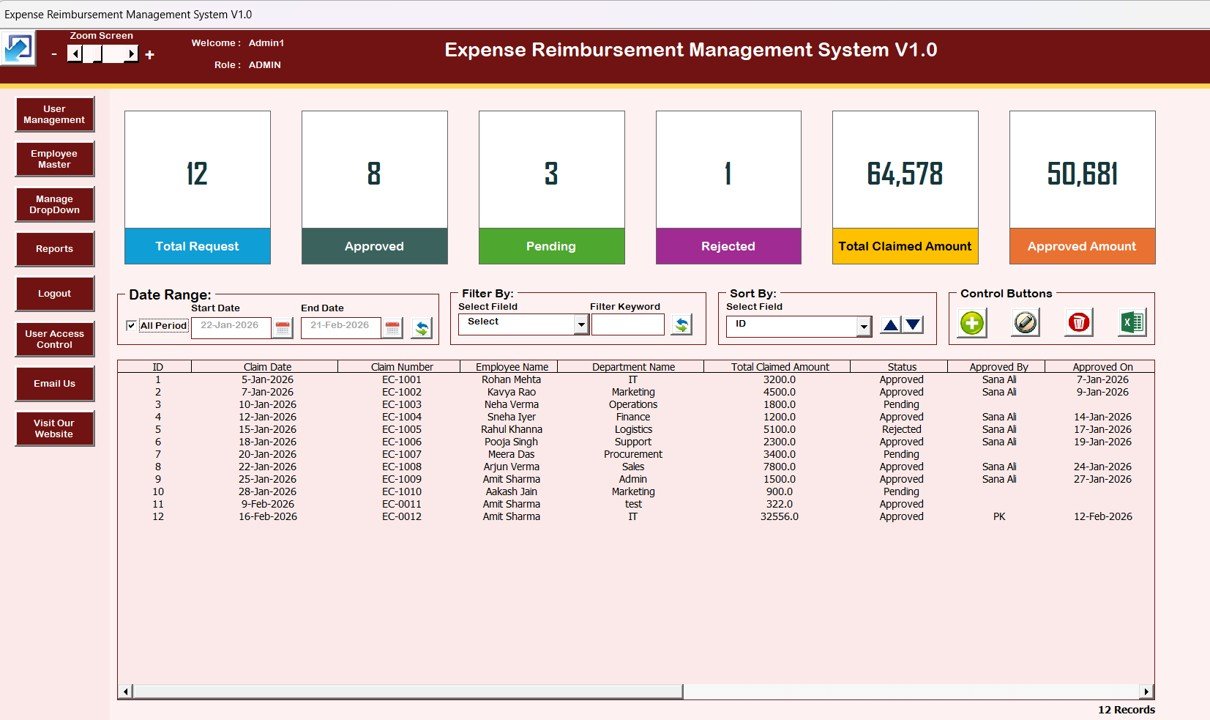
The fix for “every claim is a separate file” and “anyone can edit anything”. It opens with a login form with Admin and User roles, then a main screen that lists every claim, with date-range filters, column filters and sorting. Buttons add, update (or double-click) and delete claims, show a claim’s history and export the filtered list to Excel. A left-hand menu reaches User Management, an Employee Master, a Manage List sheet for drop-downs, a Reports module and admin-only User Access Control. Cards across the top show total requests, approved, pending, rejected, total claimed and approved amounts.
What it adds over free: one controlled register of every claim, with logins and reports by date range.
Best for: finance and HR teams in small and mid-sized companies on desktop Excel. $19.99: view the Expense Reimbursement Management System in Excel VBA.
2. Expense Reimbursement Tracker in Excel: best value

The simplest step up from a stack of separate reports. Every claim goes on one submission sheet with expense type, amount, date and receipt status, and each line carries an approval status of pending, approved or rejected. A summary shows total expenses per employee, department and category, so you can compare them with budgets or limits, and charts show spending by payment method, approval status, receipt status, department, expense type and month. The categories are yours to change.
What it adds over free: all claims in one list with approval and receipt status, for the price of a lunch.
Best for: a small business that wants a claims log in Excel. $6.99: view the Expense Reimbursement Tracker in Excel.
3. Expense Reimbursement Tracker in Google Sheets
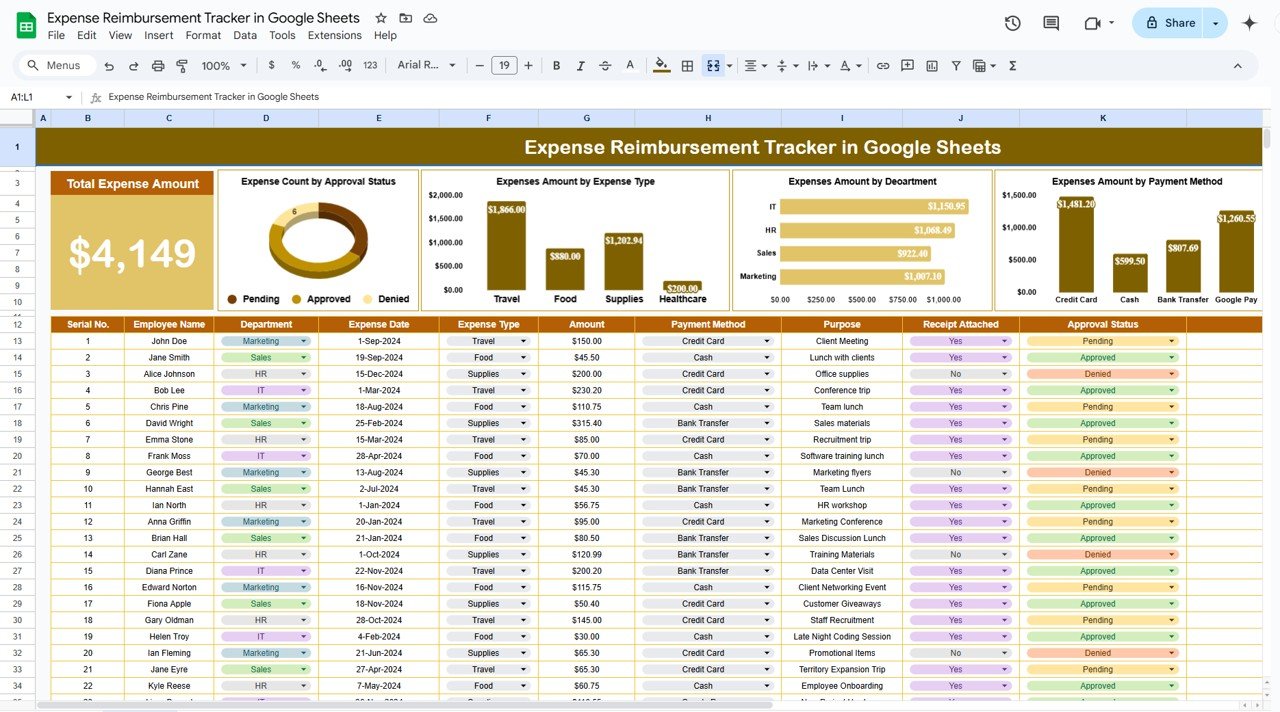
The same idea for teams that share files in Google Drive. Each claim is a row with an ID, employee, department, expense date and type, amount, payment method, purpose, a Receipt Attached checkbox and an approval status. Above the table, a Total Expense Amount card sits next to charts for count by approval status, expenses by receipt attached, by payment method, by department and by expense type.
What it adds over free: one shared claims sheet that everyone can see, with a receipt checkbox on every line.
Best for: remote and hybrid teams. $6.99: view the Expense Reimbursement Tracker in Google Sheets.
4. Travel Expense Report Tracker in Excel
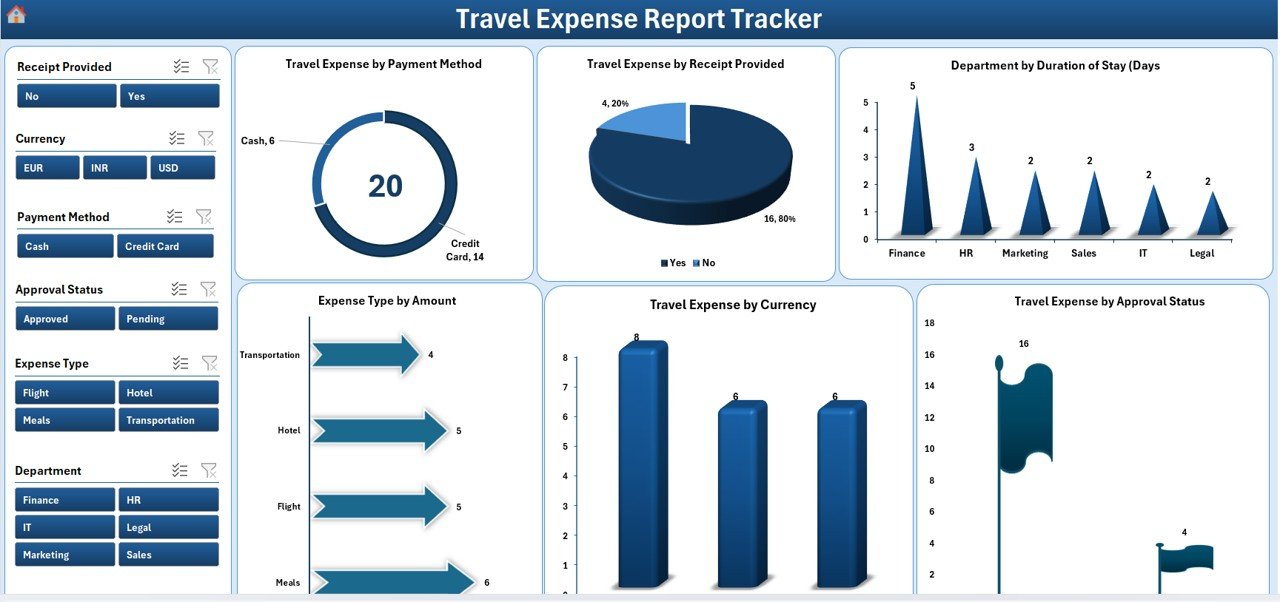
For companies where most claims are trips. It is a VBA workbook with a login form and role-based access for Admin, Employee and Finance users. A main form adds, edits and deletes trip records, and the data sheet records the employee, department, date, expense type, location, duration, currency, purpose, accommodation, meals, transport and total. The dashboard has six charts: expense by payment method, receipt status, department by length of stay, expense type by amount, expense by currency and approval status.
What it adds over free: every trip in one place, in several currencies, behind a login.
Best for: teams with frequent business travel. $6.99: view the Travel Expense Report Tracker in Excel.
5. Travel Expense Report Tracker in Google Sheets
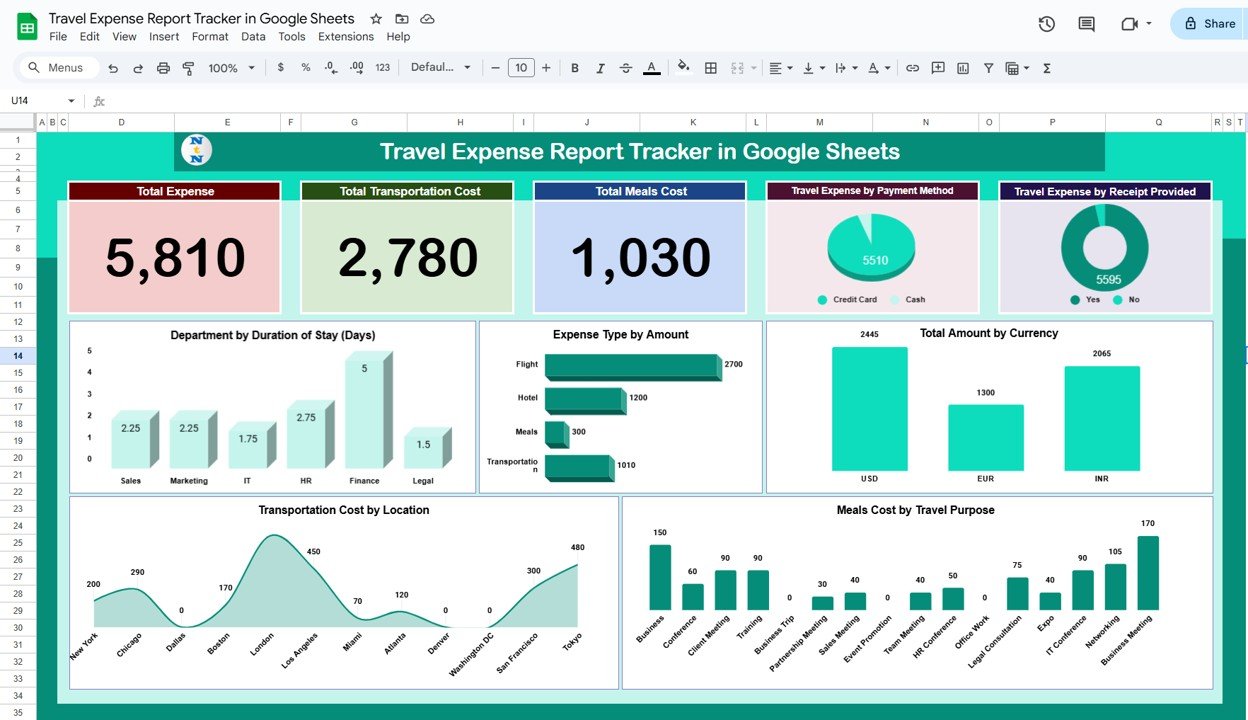
The cloud version for travel claims. Cards show total expense, total transportation cost and total meals cost. Charts break spending down by payment method, receipt provided, department by length of stay, expense type, currency, transport cost by location and meals cost by travel purpose. A search box filters by keyword and column, so you can pull up one employee’s trip or one project’s travel in seconds.
What it adds over free: travel totals by currency, place and purpose, with search.
Best for: international teams that share one travel log. $6.99: view the Travel Expense Report Tracker in Google Sheets.
6. Expense Report and Tracker in Google Sheets

For a business owner or freelancer who wants a monthly expense report rather than per-claim forms. You log each expense with a date, category and amount, set a budget for each category, and pick a month to see the expense total, the highest single expense and charts by category, payment type and description. Categories are yours to define, such as travel, office supplies or utilities, and you can share the file with an accountant.
What it adds over free: a month-by-month expense report with budget limits per category.
Best for: freelancers and small firms reporting their own costs. $6.99: view the Expense Report and Tracker in Google Sheets.
7. Office Travel and Expense Dashboard in Excel
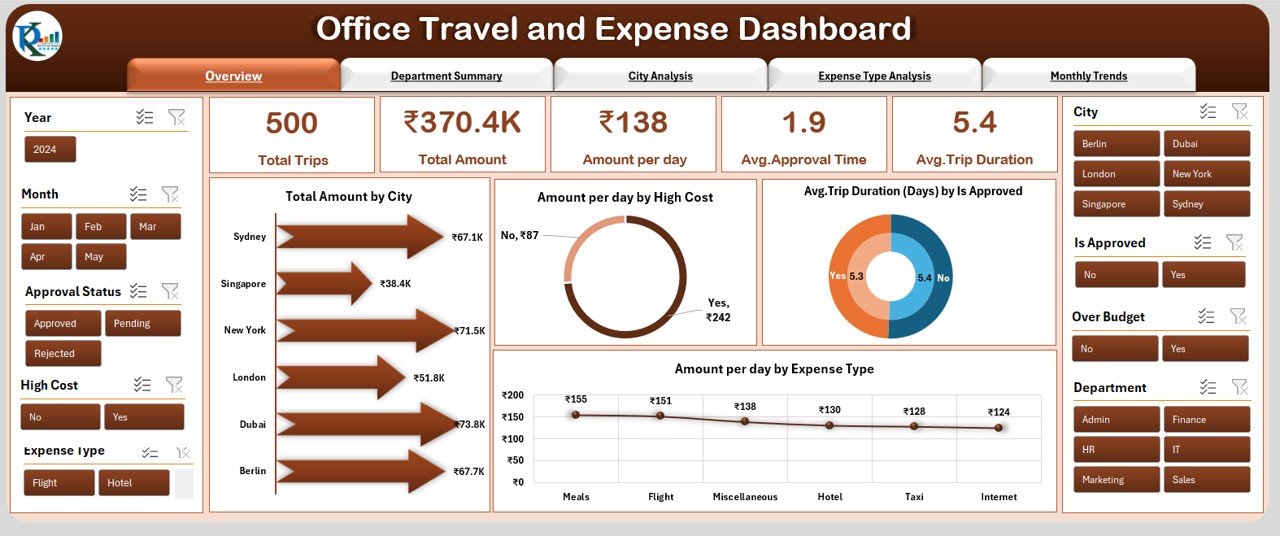
For the person who has to explain the travel budget, not just pay claims. A page navigator moves between an Overview (total spend, high-cost areas and daily spending), a Department Summary, a City Analysis (trips, average stay and spend per day in each city), an Expense Type Analysis and Monthly Trends. All of it runs from one data sheet, with a support sheet for the lookup lists.
What it adds over free: travel spend by department, city and month on one dashboard.
Best for: finance managers and office administrators. $17.99: view the Office Travel and Expense Dashboard in Excel. It is also available as an Office Travel and Expense Dashboard in Power BI ($17.99) and in Google Sheets ($6.99).
8. Expense & Petty Cash Management System Web App
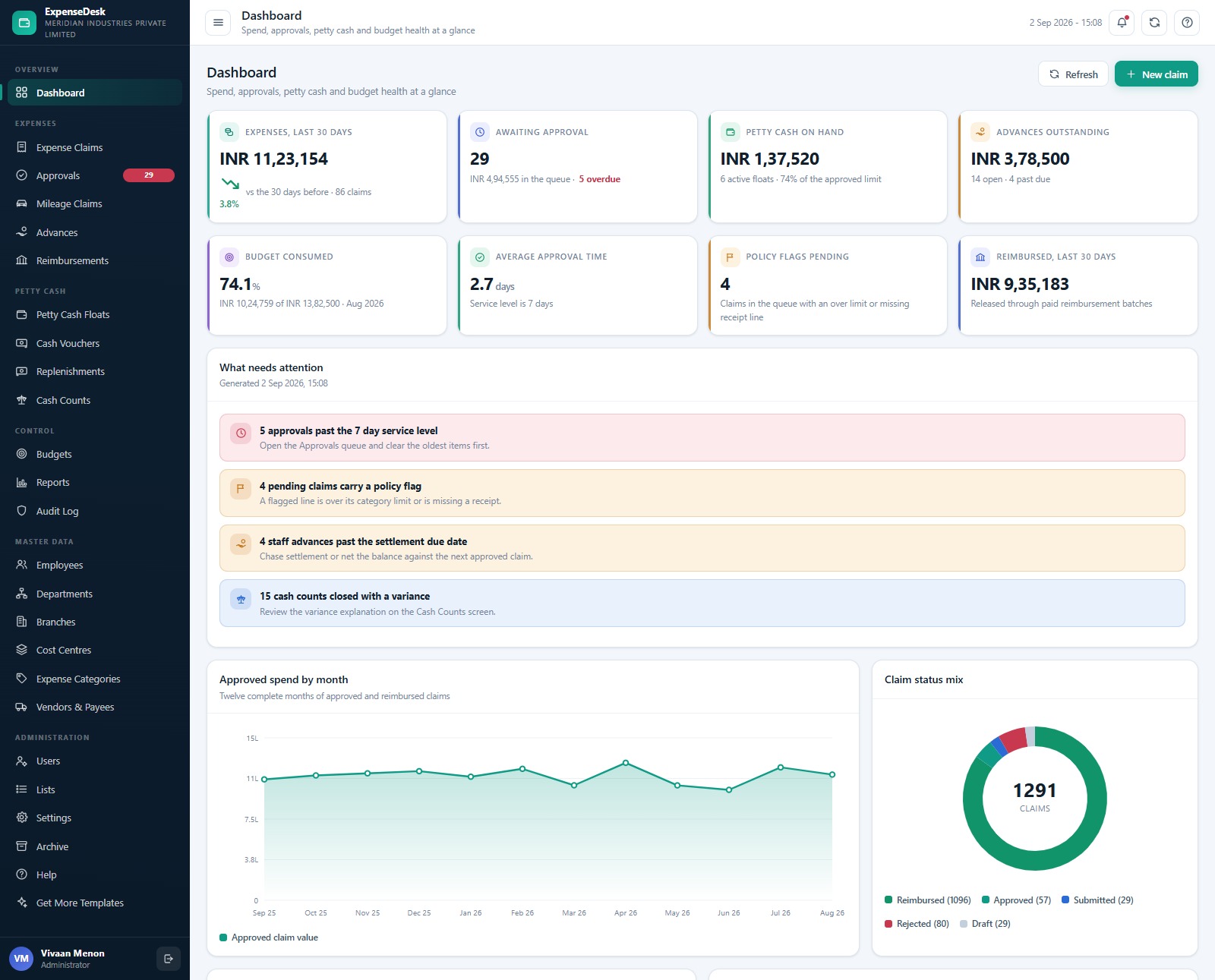
For a company with branches, several approvers and petty cash floats. It is a Google Apps Script web app with 25 screens, 6 permission roles and 16 finance reports, and it builds its own 24-sheet Google Sheets database when you run setup. Claims route to one of three approval tiers by value, and a policy flag pushes a claim up a tier. The approvals queue shows the oldest first and highlights anything past a 7-day service level. Branch floats can never go negative, cash counts must explain any variance, mileage is claimed by distance at a rate you set, staff advances net against the next claim, and every action is written to an audit log.
What it adds over free: a full claims, approvals and petty cash system without a per-user fee.
Best for: growing businesses with several branches or approvers. $39.99: view the Expense & Petty Cash Management System Web App.
Also worth a look: the Petty Reimbursement Data Entry System in Excel ($6.99) gives every claim a PR-0001 style ID and a timestamp so the same receipt is not paid twice. The Office Travel and Expense Report in Excel ($4.99) is a lighter travel report with slicers, and the Expense Management KPI Dashboard in Google Sheets ($8.99) tracks expense KPIs against target and last year.
How to choose between a free and a paid expense report template
| Your situation | Pick | Cost |
|---|---|---|
| One trip or one claim, now | Vertex42 Travel or Simple Expense Report (free #1) | Free |
| A weekly claim with meals and mileage | Vertex42 Weekly Expense Report (free #3) | Free |
| A signed paper claim form | NextGenTemplates Employee Reimbursement Form (free #8) | Free |
| Mileage only | Vertex42 Business Mileage Tracking Log (free #7) | Free |
| All claims in one list with approval status | Expense Reimbursement Tracker in Excel | $6.99 |
| A shared claims sheet in Google Drive | Expense Reimbursement Tracker in Google Sheets | $6.99 |
| Claims with logins, users and reports | Expense Reimbursement Management System V1.0 in Excel VBA | $19.99 |
| Several branches, approvers and petty cash | Expense & Petty Cash Management System Web App | $39.99 |
A simple rule: if fewer than five people claim and one person pays them, a free expense report template is enough. Once you are chasing claims by email, paying the wrong amount or asking who approved what, a tracker pays for itself the first month it stops one duplicate claim.
What should an expense report template include?
Whichever file you choose, check that it captures these fields. Missing ones are the usual reason a claim bounces back:
- Who and when: employee name and ID, department, the report period and the submission date.
- Each expense on its own line: date, description, category (travel, meals, lodging, mileage, supplies), amount and currency.
- Business purpose: one short reason per line. For meals and entertainment, also the place and who attended.
- Payment method: personal card, cash or company card, so company-paid lines are not reimbursed.
- Receipts: a column or checkbox that confirms a receipt is attached.
- Advances: any cash advance, subtracted from the total so the report shows the net amount due.
- Totals and sign-off: a total per category, the amount to reimburse, and signatures or an approval status for the employee, manager and finance.
Expense report formulas that matter in Excel
Most expense report errors are small formula slips. If you build or edit a free expense report template in Excel or Google Sheets, these six formulas cover almost every case:
- Mileage claim: =Miles*Rate. The IRS business rate is 72.5 cents a mile for 1 January to 30 June 2026 and 76 cents from 1 July 2026, so 120 miles in October is =120*0.76, or $91.20.
- Miles from the odometer: =EndReading-StartReading gives the trip distance; never type the miles by hand.
- Total by category: =SUMIFS(Amount,Category,”Meals”) totals one category from the expense list.
- Amount to reimburse: =SUMIFS(Amount,PaidBy,”Personal”)-Advance pays back only what the employee paid, less any advance.
- Missing receipts: =COUNTIFS(Receipt,”No”,Amount,”>”&25) counts lines over $25 with no receipt, a common policy limit.
- Possible duplicates: =COUNTIFS(Date,A2,Amount,C2,Employee,B2)>1 flags two lines with the same date, amount and person.
Want to see formulas like these in action? Our YouTube channel has Excel and Google Sheets walk-throughs: youtube.com/@NextGenTemplates. For dashboards that report on expenses, see our lists of free Excel dashboard templates and the travel and expense tracking dashboards guide.
When a free expense report template is NOT the right answer
- You want receipts captured from a phone. A spreadsheet doesn’t read receipts or sync card feeds. If staff will never type an expense, a paid expense app is the better fit, even with a fee per user.
- You need your company’s books, not just claims. An expense report records what to pay back. For invoices, purchase orders and accounts, see our free invoice templates, free purchase order templates and the bookkeeper template stack.
- You need tax advice. Whether a cost is deductible, or whether an allowance counts as taxable pay, is a question for a qualified accountant. A template organises the numbers; it doesn’t decide the tax treatment.
- Several people edit one Excel file by email. Copies multiply and totals drift. Use a Google Sheets tracker, or Excel saved in OneDrive or SharePoint, so everyone works on one copy.
Frequently asked questions
Where can I download a free expense report template?
Vertex42’s Travel Expense Report and Simple Expense Report are the best-built free files, for Excel and Google Sheets. Smartsheet gives away 15 expense report templates, Zoho offers one with no sign-up, and Google Sheets has an Expense report template in its gallery. None of them asks for a card.
Is there a free expense report template in Excel?
Yes. Vertex42’s travel, simple and weekly expense reports, Smartsheet’s 15 files and Zoho’s template are all free Excel downloads. Vertex42’s reimbursement form and mileage log are free Excel files too, and most of these also open as Google Sheets copies.
Does Google Sheets have a free expense report template?
Yes. Open Google Sheets, click Template gallery and choose “Expense report” under Work. Vertex42’s and Smartsheet’s templates also open as Google Sheets copies. For one shared list of every claim with approval status, the NextGenTemplates Expense Reimbursement Tracker in Google Sheets costs $6.99.
What is the difference between an expense report and a reimbursement form?
An expense report lists all costs over a period or a trip, often with categories, mileage and advances. A reimbursement form asks to be paid back for one or a few specific purchases. Many companies use the form for one-off costs and the report for travel.
How do I fill out an expense report?
Enter your name, department and the report period. Add each expense on its own line with the date, description, category, amount and business purpose. Mark how you paid, attach receipts, subtract any advance, then sign and send it to your manager.
How do I calculate mileage reimbursement?
Multiply business miles by your company’s rate. Many US employers use the IRS standard rate: 72.5 cents a mile from January to June 2026 and 76 cents from 1 July 2026. Record each trip’s odometer readings and purpose in a mileage log as proof.
Do I need receipts for every expense?
Most companies ask for a receipt above a set amount, often $25, plus a note of the business purpose. For meals and entertainment, also record the place and who attended. Check your own expense policy, and keep receipts even when the policy doesn’t require them.
How often should employees submit expense reports?
Monthly is the most common rule, and weekly suits staff who travel often. Many policies also set a deadline, such as 30 or 60 days after the expense. Regular reports keep budgets accurate and stop old receipts getting lost.
Are Vertex42 expense report templates free to use?
Yes, for private use. Vertex42 offers its expense report, reimbursement and mileage templates free under a private-use licence: you can use and edit them, but you may not redistribute or resell the files. Check the licence on each page before sharing.
When should I upgrade from a free expense report template?
Upgrade when you need all claims in one place, approval and payment status, receipt checks, totals by department, or logins. NextGenTemplates expense and reimbursement templates cost $6.99 to $39.99, paid once with no subscription.
Get your free expense report template
Start free with Vertex42’s Travel and Simple Expense Reports or Smartsheet’s 15 free expense report templates, and use our free Employee Reimbursement Form when you want signatures. When you want every claim, approval and report in one place, the Expense Reimbursement Management System V1.0 in Excel VBA is our top upgrade at $19.99. The Expense Reimbursement Tracker in Excel is the best value at $6.99, and the Travel Expense Report Tracker in Google Sheets covers shared travel claims for $6.99.
Planning the money as well as claiming it? See our list of free budget templates. Tracking hours for payroll too? Try our free timesheet templates.