

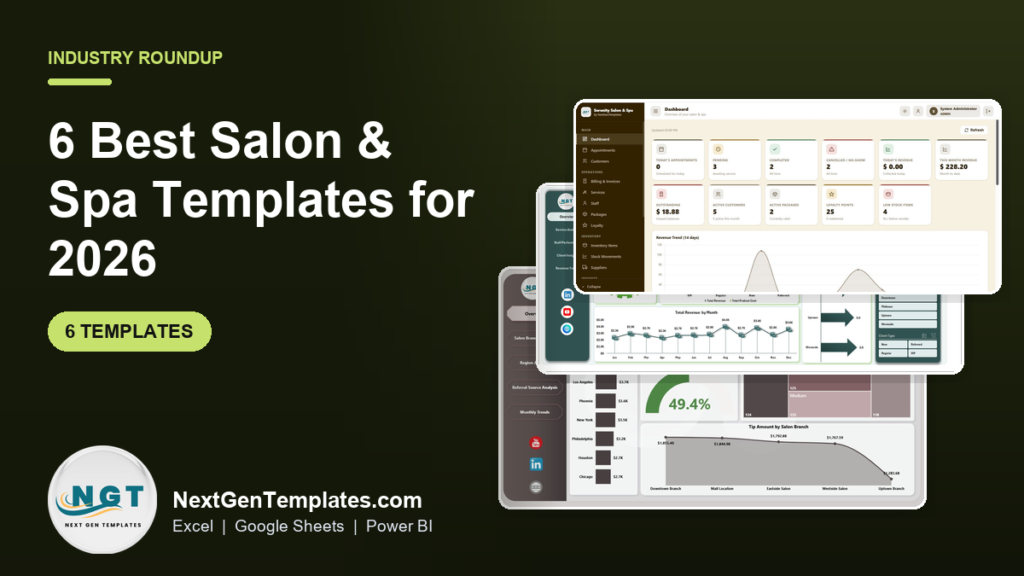
The best salon management Excel template for most small salons and spas is the Salon and Spa Management System Web App ($39.99, paid once). It runs appointments, billing, packages, loyalty points and stock on a Google Sheets back-end with staff logins. If you already use booking software and only need reporting, a $9.99 to $17.99 salon dashboard is the better buy.
Last updated: October 2026
Related guide: Membership studios have the same booking-and-retention problem. See our ranking of the 8 best gym and fitness studio templates if you run classes as well as treatments.
Key takeaways
- Vagaro lists $30 per month for one bookable calendar plus $10 for each extra calendar, so a four-chair salon pays about $60 a month, or $720 a year.
- All 6 templates in this guide are one-time purchases between $9.99 and $39.99, with no per-stylist or per-location fee.
- Best overall is the Salon and Spa Management System Web App ($39.99); best value is the Salon and Spa Dashboard in Google Sheets ($9.99).
- Five of the six are reporting dashboards that show revenue, therapist performance, client type and booking source, so they sit beside your booking tool instead of replacing it.
- No template sends SMS reminders, takes online bookings from Instagram or processes card payments. We say exactly when a salon should pay for software instead.
Salon and spa templates compared
Here are all six templates side by side. One is marked best overall and one best value.
| Template | Format | Best for | Price |
|---|---|---|---|
| Salon and Spa Management System Web App (Best overall) | Google Sheets web app | Running bookings, billing, packages, loyalty and stock with staff logins | $39.99 |
| Salon and Spa Dashboard | Excel | Service, therapist and client analysis from booking-level data | $17.99 |
| Beauty Salons KPI Dashboard | Excel | Monthly targets with MTD and YTD actual vs target and last year | $14.99 |
| Salon and Spa Dashboard (Best value) | Google Sheets | Shared, cloud-based reporting on a free Google account | $9.99 |
| Beauty Salons Dashboard | Power BI | Multi-branch chains comparing branches, regions and referral sources | $17.99 |
| Beauty Salons Dashboard | Excel | Rebooking rate, branch profit and referral tracking in Excel | $13.99 |
What does salon software actually cost?
Salon booking platforms are priced per month, and most scale with the number of stylists or calendars. That is fair for what they do: online booking, reminders and card payments. But plenty of small salons pay that bill mainly for an appointment book and a few reports.
Two published price lists make the point. According to Vagaro’s pricing page, the base plan is $30 a month for one location, and each extra bookable calendar costs $10, up to seven. A salon with four stylists is at roughly $60 a month before add-ons. GlossGenius lists $28, $56 and $168 a month for its Standard, Gold and Platinum beauty plans, plus a flat 2.6% card processing rate.
A template does not replace all of that. What it does is take over the jobs that do not need a booking platform: the appointment register for a walk-in or phone-booked salon, package and loyalty tracking, product stock, and above all the monthly review of which services, stylists and booking channels earn the money. For those jobs, a one-time $10 to $40 file is hard to beat.
How we picked these
We searched the NextGenTemplates catalogue for every salon, spa and beauty product in Excel, Google Sheets, Power BI and HTML and found 10 paid options. We kept the six that cover distinct jobs: one full management system and five reporting dashboards, each in a different format or with a different analysis focus. Two low-cost data-entry forms and two near-duplicate dashboards are listed under “Also worth a look” rather than ranked. Every pick is a paid, one-time download with editable data.
The 6 best salon and spa templates for 2026
1. Salon and Spa Management System Web App: best overall
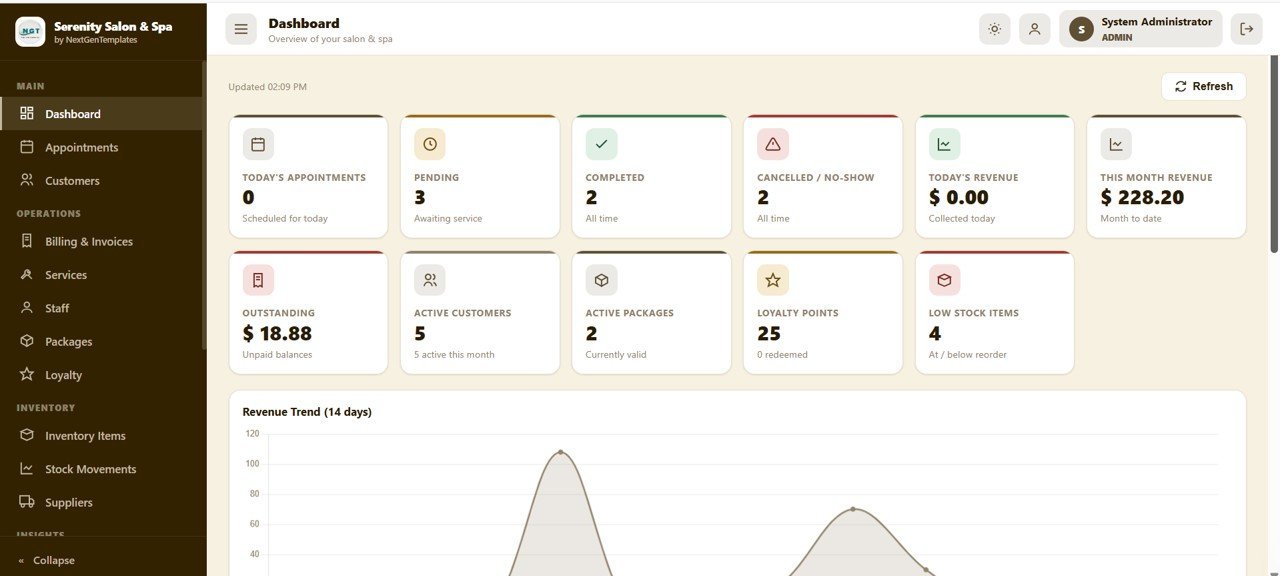
This is the only template on the list that runs the salon instead of just reporting on it. It is a web app built on Google Sheets and Google Apps Script, with 18 connected screens and role-based logins. Data lives in a sheet in your own Google Drive, and setup takes under 15 minutes.
Who it is for: a salon or day spa that books by phone and walk-in, keeps clients in a notebook or a loose spreadsheet, and wants one system for the front desk without a per-stylist fee.
What is inside:
- Five user roles: Admin, Manager, Receptionist, Therapist and Viewer, each seeing only its own screens
- 11 live dashboard KPIs, including today’s appointments, cancellations and no-shows, today’s and this month’s revenue, outstanding balances and low-stock items
- Appointment calendar in month, week and day views, with bulk import and export
- Billing with total, paid, balance and Paid or Partial status, filterable by payment mode
- Packages, memberships and prepaid wallets, a loyalty points ledger, inventory with stock movements, and a supplier directory
Use it to run the daily appointment book, sell a 6-session facial package and track sessions used, and see which clients still owe a balance. Against Vagaro’s $720 a year for a four-chair salon, it pays for itself in the first month.
Best for: small salons that want a real salon management system, not just a report. $39.99. View the Salon and Spa Management System.
2. Salon and Spa Dashboard in Excel: best for service and therapist analysis
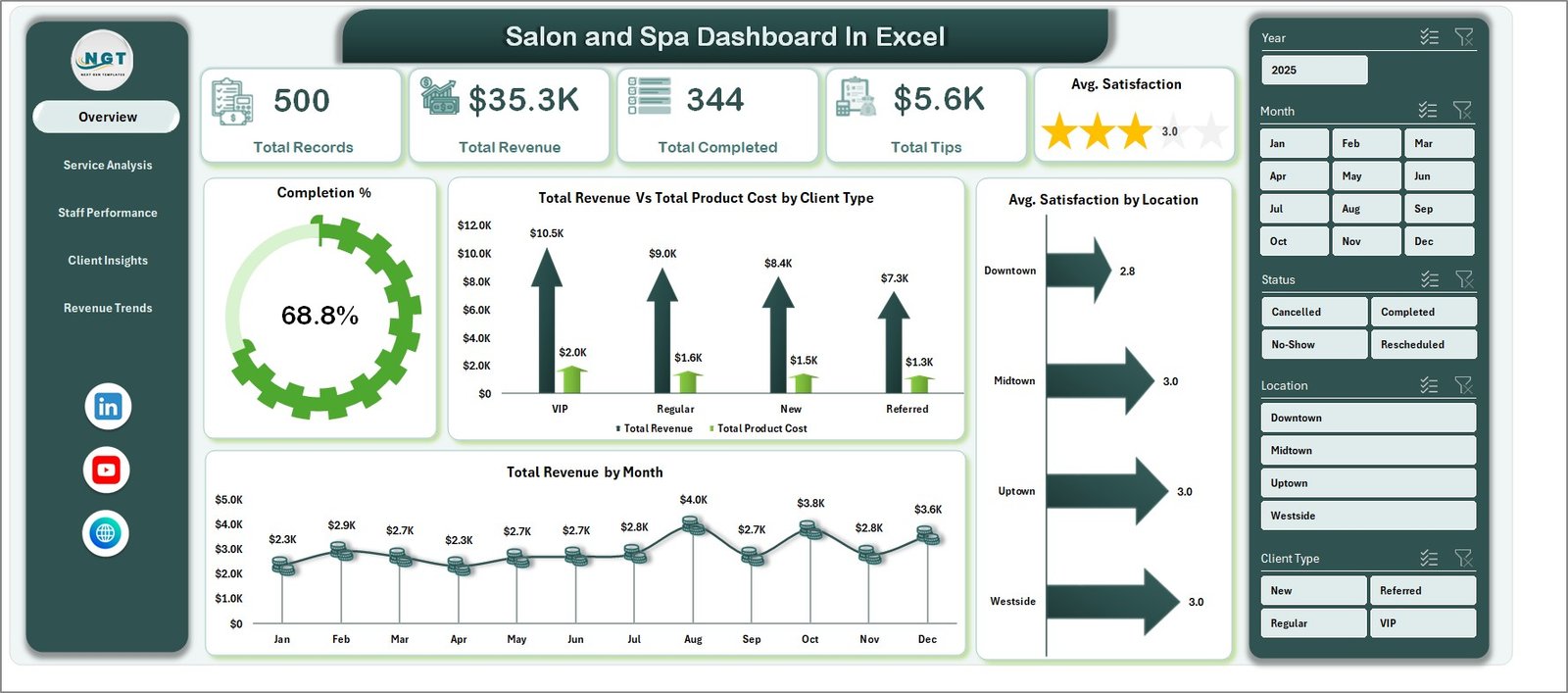
If your booking tool can export appointments to a spreadsheet, this workbook turns that export into five analysis pages. Paste the rows into the Data sheet, click Refresh All, and the pivot-driven charts and slicers update.
Who it is for: an owner or spa manager who already takes bookings in software but wants better reporting than the built-in screens give.
What is inside:
- Five pages: Overview, Service Analysis, Staff Performance, Client Insights and Revenue Trends
- KPI cards for total records, total revenue, completed bookings, total tips and average satisfaction
- Revenue vs product cost by service category and by client type
- Top five therapists by revenue, bookings, tips and satisfaction
- Bookings by source, so you can see whether walk-ins, phone or online bring the best clients
Typical use: spotting that a high-volume service such as a keratin treatment has the thinnest margin once product cost is counted, or rewarding the therapist with the best satisfaction score rather than the most bookings.
Best for: Excel-first salons with booking-level data. $17.99. View the Salon and Spa Dashboard in Excel.
3. Beauty Salons KPI Dashboard in Excel: best for monthly targets

This one works from monthly totals rather than individual bookings. You enter actuals, targets and last year’s numbers, pick a month, and every KPI shows Month-to-Date and Year-to-Date results with green and red arrows.
Who it is for: a salon owner, spa manager or franchise operator who sets monthly targets and wants a one-page scorecard for the month-end review.
What is inside:
- Home sheet with six navigation buttons
- Dashboard sheet driven by a month selector, showing MTD and YTD actual, target and previous year
- Target vs actual and previous year vs actual percentages for every KPI
- KPI Trend sheet and a KPI Definitions sheet with standard formulas, so the team reads numbers the same way
Use it to check whether a new-client promotion lifted the month against target, or whether retail product sales are behind last year. It is formulas only, with no Power BI or coding needed.
Best for: target-driven monthly reviews. $14.99. View the Beauty Salons KPI Dashboard.
4. Salon and Spa Dashboard in Google Sheets: best value
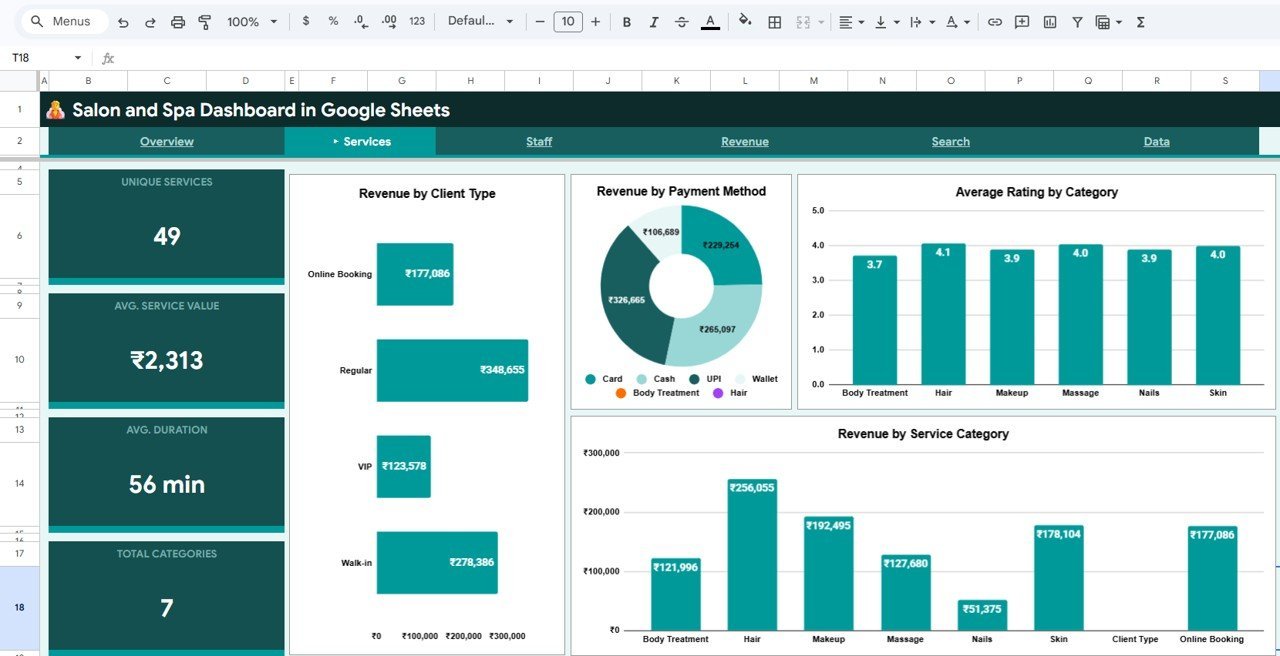
At $9.99 it is the cheapest template here, and because it runs in Google Sheets, there is no software to buy at all. The owner, the manager and a second branch can all open the same live file.
Who it is for: salons on Macs, phones or shared front-desk PCs, and owners who want to check the numbers from home.
What is inside:
- Four analysis pages (Overview, Services, Staff and Revenue) plus a Search page and a Data sheet
- KPI cards for total revenue, total profit, total appointments, average rating and completion rate
- Revenue by service category, client type and payment method; rating by category and by staff member
- Monthly revenue vs cost, profit distribution and branch revenue comparison
- Search any appointment by Record ID and see 14 fields at once
Share view-only access with stylists so they can see their own revenue and rating, and edit access with whoever enters the data.
Best for: the lowest cost and easiest sharing. $9.99. View the Google Sheets version.
5. Beauty Salons Dashboard in Power BI: best for multi-branch chains
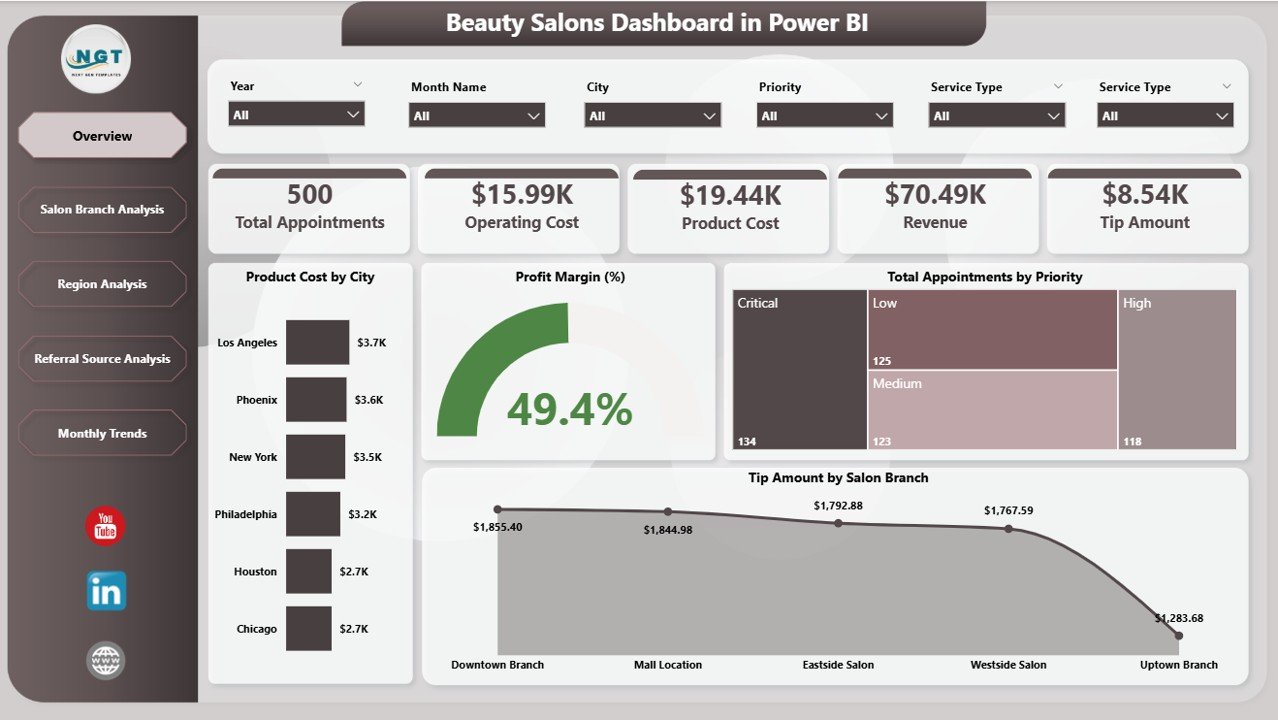
This report is built for owners who run more than one location. Its pages compare branches and regions side by side, so a weak site shows up before it becomes a loss.
Who it is for: salon groups, franchise operators and managers who already use Microsoft 365 and want slicers and drill-down rather than static charts.
What is inside:
- Five pages: Overview, Salon Branch Analysis, Region Analysis, Referral Source Analysis and Month Analysis
- KPIs for revenue, profit margin, appointments and tip amounts
- Cost and profit compared by branch
- Referral source analysis to show which marketing channel brings paying clients
- Slicers to filter every page by branch, region or month
Typical use: a quarterly review across three salons where one branch has the most appointments but the lowest profit, which points to discounting or high product cost.
Best for: chains comparing locations. $17.99. View the Power BI dashboard.
6. Beauty Salons Dashboard in Excel: best for rebooking and referrals
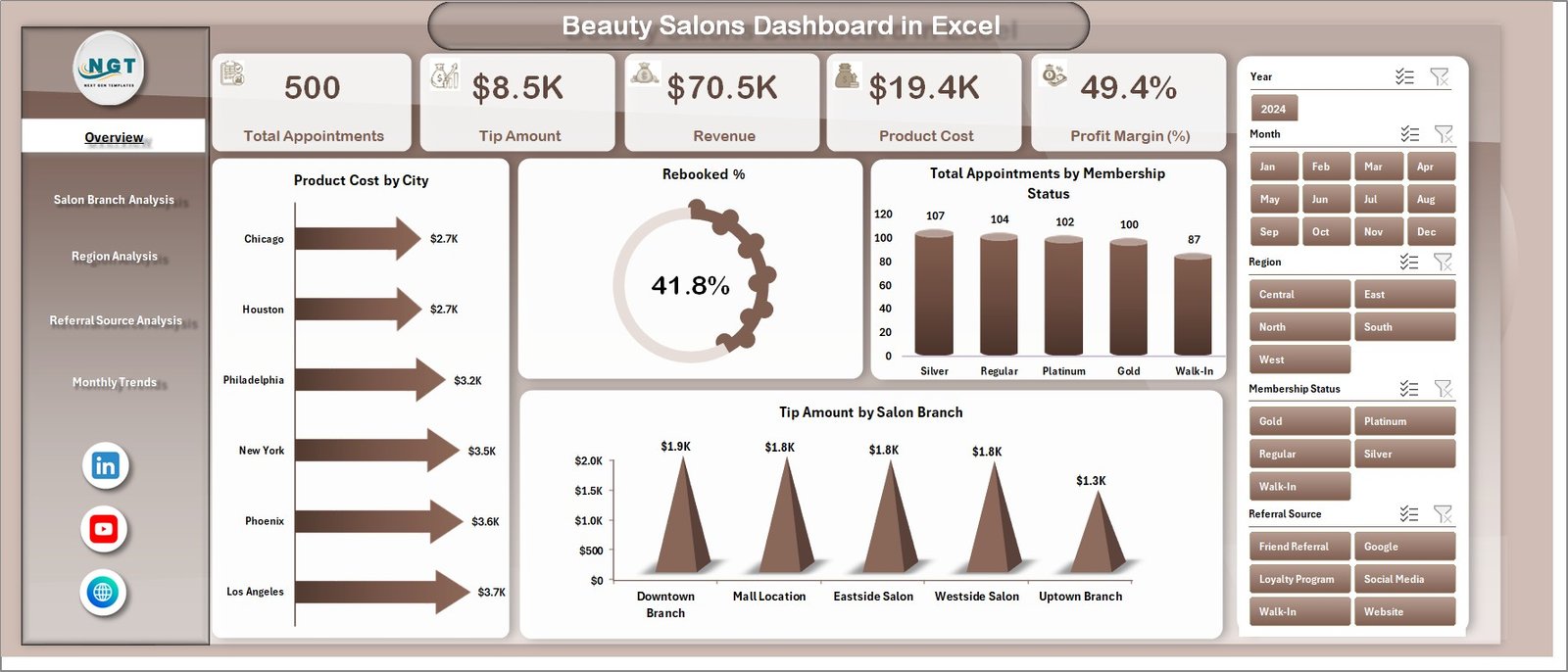
This is the Excel counterpart of the Power BI report above, with one useful addition: it tracks the rebooking rate, the clearest early sign that clients are coming back.
Who it is for: owners with one to a few branches who want branch and referral analysis but work in Excel rather than Power BI.
What is inside:
- Five pages: Overview, Salon Branch Analysis, Region Analysis, Referral Source Analysis and Month Analysis
- KPI tracking for revenue, appointments, rebooking percentage, product cost and profit
- Separate Data and Support sheets, so calculations stay out of the way of data entry
- Slicers for branch, region and referral source
Use it to compare rebooking by branch: if one site rebooks 40% of clients and another 25%, the gap is usually in how the front desk closes the visit.
Best for: retention-focused salons in Excel. $13.99. View the Beauty Salons Dashboard in Excel.
Not sure where to start? Most small salons begin with the Salon and Spa Management System ($39.99) for the front desk. If you only need reporting, the Salon and Spa Dashboard in Google Sheets is $9.99, paid once.
Also worth a look:
- The Salon Appointment Data Entry System in Excel ($5.99) is a simple VBA booking form with 14 pre-loaded services, 8 stylists and 5 booking statuses. Pick it if you only need an appointment log in Excel.
- The Salon Product Stock Data Entry System in Excel ($6.99) logs shampoo, colour and treatment stock with reorder and low-stock cards.
- The Salon and Spa Dashboard in Power BI ($17.99) is the Power BI twin of pick #2, and the Salon and Spa Dashboard in HTML ($12.99) runs in any browser with no Office licence.
Which salon and spa KPIs should you track?
The dashboards above come with sample data, and they all accept your own. These are the metrics most salons track, with a formula you can use in any of the templates:
| KPI | Formula | Why it matters |
|---|---|---|
| Rebooking rate | Clients who book their next visit before leaving ÷ clients served × 100 | The strongest single predictor of repeat revenue |
| Client retention rate | Clients seen this period who were also seen last period ÷ clients seen last period × 100 | Shows whether growth comes from loyalty or only from new clients |
| Average ticket | Service + retail revenue ÷ completed appointments | Rises with upselling and add-on treatments |
| Chair or room utilization | Booked hours ÷ available hours × 100 | An empty chair is a cost you have already paid for |
| No-show and cancellation rate | Missed or cancelled bookings ÷ total bookings × 100 | Drives deposit and confirmation policies |
| Retail revenue per client | Product sales ÷ clients served | Retail is often the highest-margin line in a salon |
| Revenue per stylist or therapist | Revenue attributed to the staff member ÷ hours worked | Fairer than raw bookings for commission and reviews |
Set targets from your own last 12 months first, then tighten them. Benchmarks vary widely by city, price point and service mix, so your own trend line is the most honest target. For more retention formulas, see our guide to 10 churn and retention metrics, and for the product side of the business, the 12 retail KPIs to track in 2026.
Can a salon management Excel template replace salon software?
For a single-location salon that books mostly by phone and walk-in, yes, for the core jobs: appointments, client history, packages, billing balances and stock. The web app at #1 covers all of these with staff logins. A salon management Excel template or Google Sheets system also gives you something most booking platforms do not: your data in a file you own, with no export fee when you leave.
Where it stops is anything that needs a live connection to clients or a payment network, which we cover in the “When a template is NOT the right answer” section below. Many salons end up with both: a free or low-tier booking app for online bookings, plus a template for reporting and packages.
How do you choose between them?
| If you need to… | Choose | Price |
|---|---|---|
| Run bookings, billing, packages, loyalty and stock | Salon and Spa Management System Web App | $39.99 |
| Analyse services, therapists and clients from booking data | Salon and Spa Dashboard in Excel | $17.99 |
| Review monthly targets in Excel | Beauty Salons KPI Dashboard in Excel | $14.99 |
| Share one live file at the lowest cost | Salon and Spa Dashboard in Google Sheets | $9.99 |
| Compare several branches interactively | Beauty Salons Dashboard in Power BI | $17.99 |
| Track rebooking and referral sources in Excel | Beauty Salons Dashboard in Excel | $13.99 |
A common pairing is the management system for daily operations plus one dashboard for the monthly review. The web app and the Google Sheets dashboard together cost $49.98 once, less than one month of GlossGenius Gold. If you want the same report in more than one format, read our guide on when to buy Excel, Google Sheets and Power BI dashboards together.
Staff rotas are a separate job. If scheduling stylists across shifts is your real pain, our Deputy alternatives for shift scheduling compares six Excel and Sheets rota templates. For product stock beyond a simple log, see the inventory management Excel templates roundup.
When a template is NOT the right answer
Being honest about this saves you a refund request and saves us one too.
- Online booking from your website or Instagram. None of the templates publishes a public booking page. If most of your clients book themselves online, keep a booking platform.
- Automated SMS and email reminders. Templates do not send reminders. If no-shows are your biggest leak, automated reminders and card-on-file deposits are worth paying for.
- Card payments at the chair. A spreadsheet records payments but does not process them. You still need a card terminal or payment app.
- Large chains with many concurrent bookings. Once dozens of staff book into the same calendar at the same time across locations, a proper multi-user database is safer than any sheet.
- Medspa and clinical treatments. If you deliver injectables or other medical treatments, client records and consent forms belong in a compliant clinical system.
In practice, many salons keep their booking app and add a dashboard on top. The app handles bookings and payments, and the template gives the owner a clean monthly view without paying for a higher plan just to unlock reports. Hotels with in-house spas face a similar split; see the 8 best hotel and resort templates.
Frequently asked questions
What is the best salon management Excel template?
The Salon and Spa Management System Web App ($39.99) is the best overall pick for small salons. It runs on Google Sheets with 18 screens covering appointments, billing, packages, loyalty points, inventory and staff, plus five user roles. If you want a pure Excel option, the $5.99 Salon Appointment Data Entry System is a simple VBA booking log.
Can I run a salon with Excel or Google Sheets?
Yes, for a single-location salon that books by phone and walk-in. A spreadsheet system can hold appointments, client history, packages, balances and stock. It cannot take online bookings, send SMS reminders or process card payments, so salons that rely on those features usually keep a booking app and use a template for reporting.
How much does salon software cost per month?
Vagaro lists $30 a month for one bookable calendar plus $10 for each extra calendar, up to seven. GlossGenius lists $28, $56 and $168 a month for its beauty plans, with 2.6% card processing. The templates in this guide are one-time purchases from $9.99 to $39.99, with no per-stylist fees.
What KPIs should a salon or spa track?
Start with rebooking rate, client retention rate, average ticket, chair or room utilization, no-show rate, retail revenue per client and revenue per stylist. The salon dashboards here show revenue, completion rate, satisfaction, tips and therapist rankings, and the KPI dashboard compares each metric with your target and last year.
Is there a salon dashboard in Google Sheets?
Yes. The Salon and Spa Dashboard in Google Sheets costs $9.99 and runs on a free Google account. It has Overview, Services, Staff and Revenue pages, five KPI cards, a branch revenue comparison and a Search page that looks up any appointment by Record ID. The whole team can open the same live file.
Do I need Power BI Pro for the salon Power BI dashboard?
No. You can open and refresh the Beauty Salons Dashboard in the free Power BI Desktop app on Windows. You only need a paid Power BI licence to publish the report online and share it with colleagues through the Power BI service. On a Mac, choose the Excel, Google Sheets or HTML version instead.
Can these templates track salon packages and memberships?
The Salon and Spa Management System Web App can. It sells combos, service packs and prepaid wallets with session counts, validity dates and prices, assigns them to clients and tracks loyalty points earned and redeemed. The dashboards report on bookings and revenue but do not manage packages.
Can I track stylist commission with these templates?
The dashboards rank therapists and stylists by revenue, bookings, tips and satisfaction, which gives you the base figures for commission. None of them calculates a commission payout automatically. Most owners add a simple column with their commission rate next to the revenue-by-staff figures.
Which salon template works without Microsoft Office?
Three do. The Salon and Spa Management System Web App and the Salon and Spa Dashboard in Google Sheets both run in Google Sheets in any browser. The Salon and Spa Dashboard in HTML ($12.99) opens straight from a folder in Chrome, Edge, Firefox or Safari with nothing to install.
Is client data safe in a salon template?
The web app uses role-based logins and stores data in a Google Sheet inside your own Drive, so access follows your Google account security. For Excel files, keep them on an encrypted, backed-up drive. Avoid storing card numbers or medical details in any spreadsheet.
Get more salon and small business templates
Start with the full system. The Salon and Spa Management System Web App is $39.99, paid once, with no monthly fee. Pair it with the Salon and Spa Dashboard in Google Sheets ($9.99) for monthly reporting.
Running another appointment-based business? Compare the 6 best dental practice templates, the veterinary clinic templates and our list of cheap Excel dashboard templates under $15.
Watch walkthroughs of our dashboards on the NextGenTemplates YouTube channel.