




Technical support teams are the backbone of customer satisfaction and operational stability. Every ticket response, resolution time, and customer interaction directly affects user trust and business continuity. However, many organizations still rely on scattered ticketing exports, static spreadsheets, or delayed reports to measure support performance. As a result, teams struggle to identify bottlenecks, meet SLAs, and improve service quality.
That is exactly why a Technical Support KPI Dashboard in Google Sheets becomes an essential performance monitoring solution.
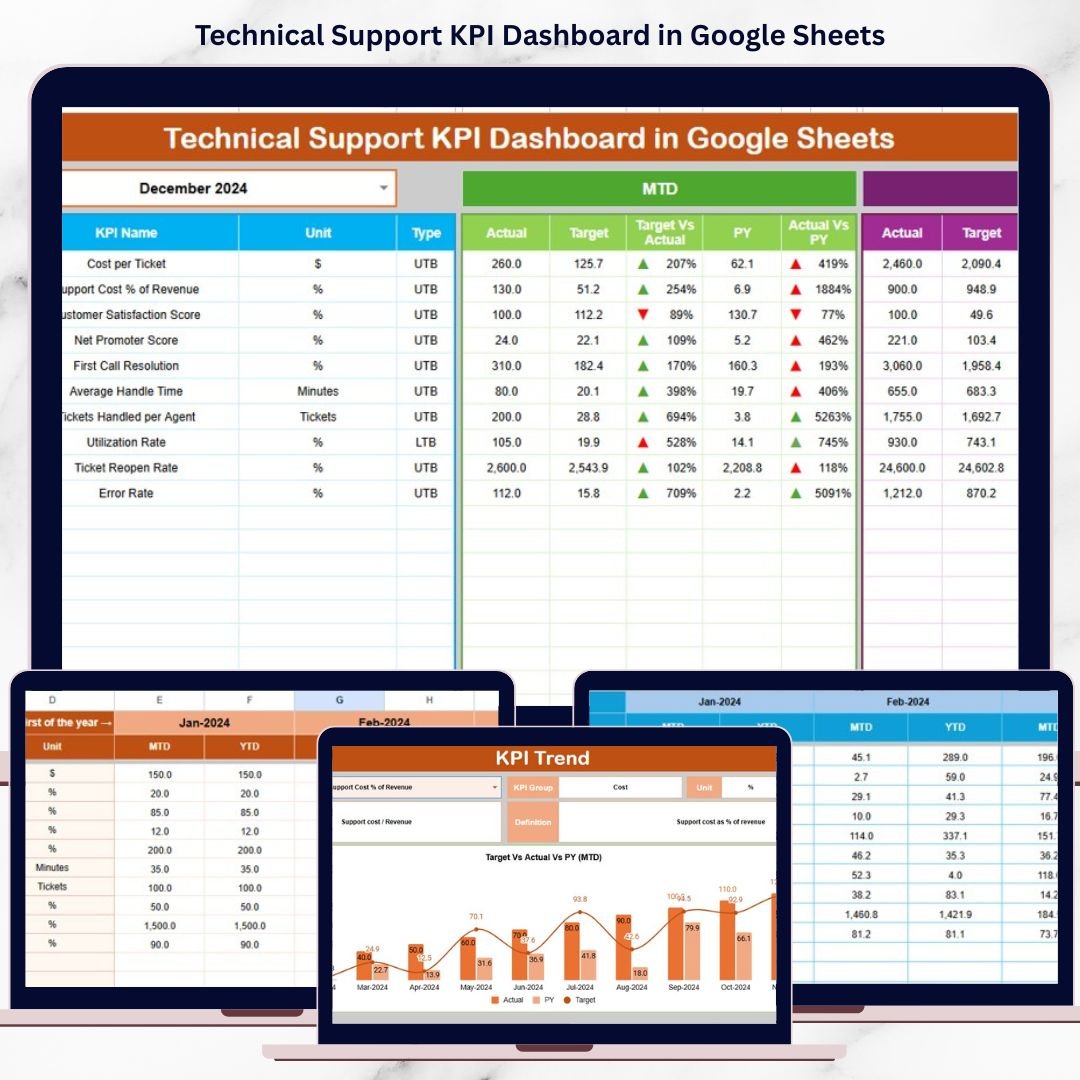
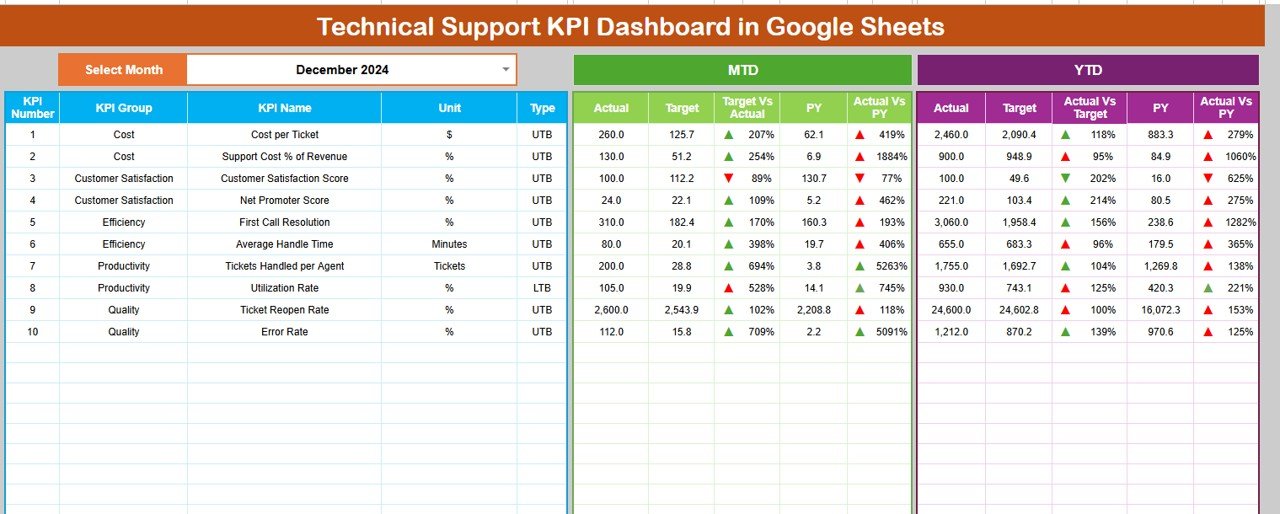
This ready-to-use dashboard provides a structured and centralized way to track technical support performance using clearly defined KPIs. Instead of manually analyzing ticket logs, teams gain instant visibility into response efficiency, resolution effectiveness, workload balance, and trend performance—supported by automated calculations and visual indicators.
Because the dashboard is built in Google Sheets, it remains easy to use, collaborative, and accessible from anywhere without expensive BI tools or complex integrations.
🚀 Key Features of the Technical Support KPI Dashboard
📌 Centralized Support Performance Tracking
Monitor all technical support KPIs from one unified dashboard.
⏱️ Response & Resolution Visibility
Track how quickly tickets are handled and resolved.
🎯 Target vs Actual Monitoring
Measure performance against defined SLAs and benchmarks.
📅 MTD & YTD Insights
Analyze short-term execution and long-term performance trends.
📊 Visual Performance Indicators
Instantly spot improvement or decline using conditional arrows.
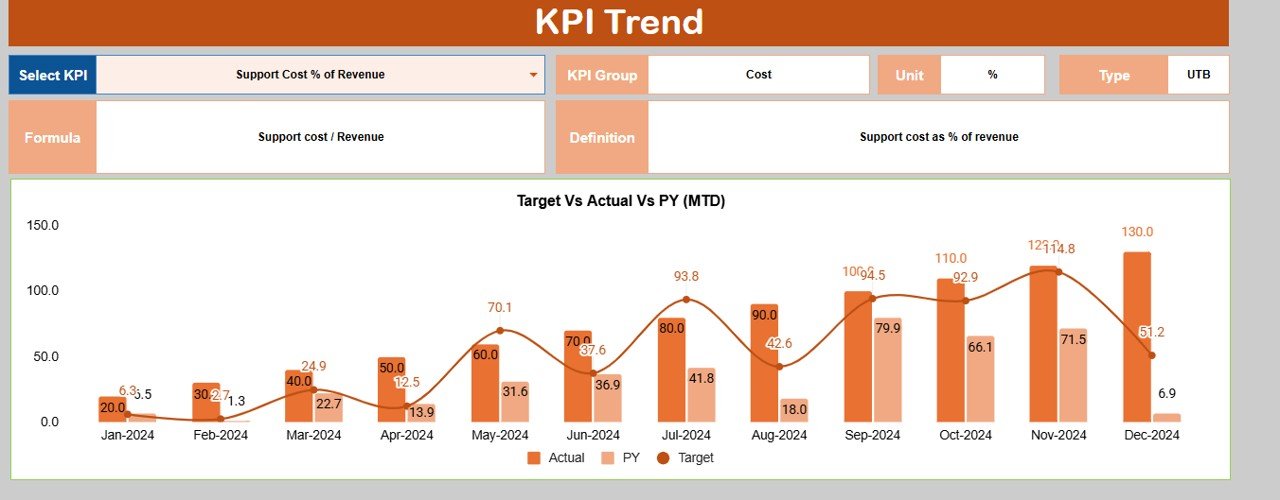
🔍 KPI Trend Analysis
Understand how support performance changes month over month.
📦 What’s Inside the Technical Support KPI Dashboard
🗂️ Dashboard Sheet Tab – Main KPI Overview
The Dashboard Sheet acts as the executive summary for technical support operations.
🔄 Month Selection
Select the reporting month from Cell D3, and the entire dashboard updates automatically.
📅 MTD KPIs Displayed
For each KPI, the dashboard shows:
MTD Actual
MTD Target
MTD Previous Year
Target vs Actual (%)
Previous Year vs Actual (%)
Directional arrows clearly indicate whether performance is improving or declining.
📈 YTD KPIs Displayed
The dashboard also tracks:
YTD Actual
YTD Target
YTD Previous Year
Target vs Actual (%)
Previous Year vs Actual (%)
This view supports long-term service quality and capacity planning.
📊 KPI Trend Sheet Tab – KPI Deep Dive
The KPI Trend Sheet helps teams understand each KPI in detail.
🔎 How It Works
Select a KPI name from the dropdown in Cell C3, and the sheet updates dynamically.
📌 Displayed KPI Details
KPI Group
KPI Unit
KPI Type (Upper the Better / Lower the Better)
KPI Formula
KPI Definition
This ensures consistent KPI interpretation across support teams and leadership.
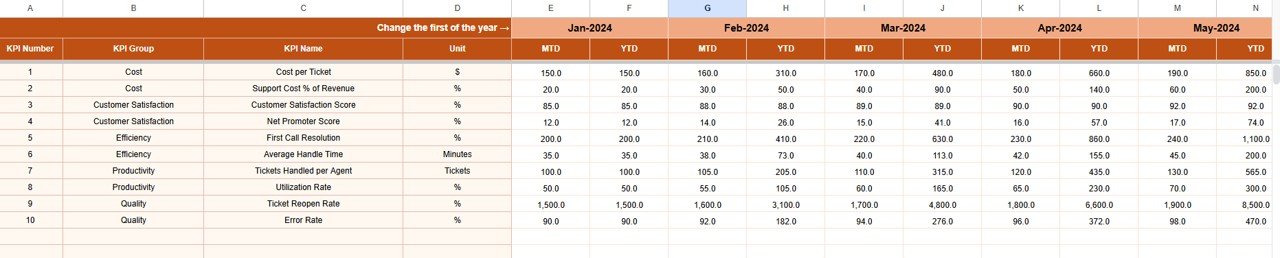
🧮 Actual Number Sheet Tab
This sheet stores actual technical support performance data.
🛠️ How to Use
Enter the first month of the year in Cell E1
Input MTD Actual and YTD Actual values
All dashboard KPIs update automatically, ensuring accuracy and consistency.
🎯 Target Sheet Tab
The Target Sheet defines expected technical support performance.
📥 Data Entry
Enter MTD Target values
Enter cumulative YTD Target values
Targets help teams measure success objectively and maintain SLA discipline.
📆 Previous Year Number Sheet Tab
This sheet enables historical comparison.
🎯 Purpose
Enter previous year MTD and YTD values
Identify recurring support issues
Measure year-over-year improvement
Historical insights support continuous service improvement.
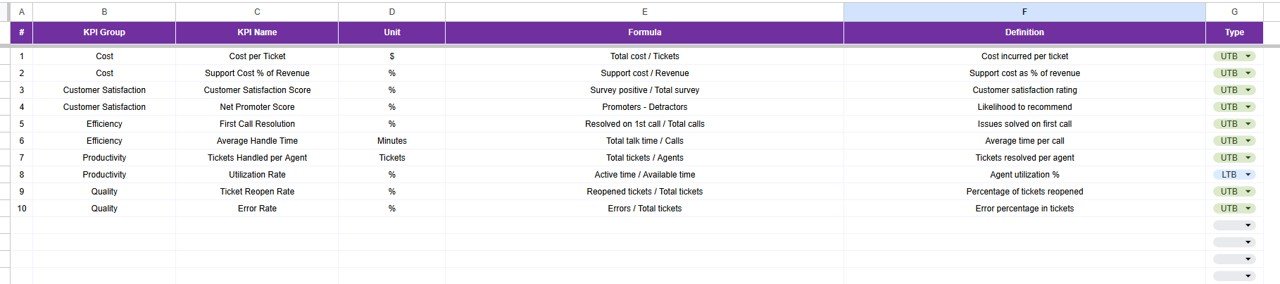
📚 KPI Definition Sheet Tab – KPI Master Library
This sheet acts as the single source of truth.
📋 Fields Included
KPI Name
KPI Group
Unit
Formula
KPI Definition
KPI Type
🎯 Who Can Benefit from This Technical Support KPI Dashboard
🖥️ IT Support & Service Desk Teams
☁️ SaaS & Application Support Teams
📋 Operations & Support Managers
📊 Customer Experience Teams
🚀 Organizations of All Sizes
🛠️ How to Use the Technical Support KPI Dashboard
Enter actual ticket performance data monthly
Define realistic SLA-based targets
Review MTD and YTD KPIs regularly
Analyze trends using the KPI Trend Sheet
Act quickly on declining performance indicators
Consistent usage improves response speed, resolution quality, and customer satisfaction.
🔗 ### Click here to read the Detailed blog post
Watch the step-by-step video tutorial:
▶️ Visit our YouTube channel to learn step-by-step video tutorials
👉 Youtube.com/@NeotechNavigators
Compatibility and Requirements
- Works in Google Sheets with a free Google account and a web browser. Nothing to install.
- The month selector in cell D3 and the KPI picker in cell C3 are dropdown lists. Google’s guide to creating an in-cell dropdown list explains how they work.
Frequently Asked Questions
Which sheets are in the Technical Support KPI Dashboard?
Six: Dashboard, KPI Trend, Actual Number, Target, Previous Year Number and KPI Definition.
How do I set it up for my year?
Enter the first month of the year in cell E1 of the Actual Number sheet, then add MTD and YTD actuals. Add targets on the Target sheet and last year’s values on the Previous Year Number sheet.
What does the Dashboard sheet show for each KPI?
MTD and YTD actual, target and previous year values, target vs actual (%) and previous year vs actual (%), with arrows that show improvement or decline.
What do Upper the Better and Lower the Better mean?
They are the KPI type set on the KPI Definition sheet. For a response time KPI, lower is better. For a resolution rate, higher is better. The arrows follow this setting.
Related Technical Support Templates
- Technical Support KPI Dashboard in Excel: the same KPIs in Excel.
- Technical Support KPI Dashboard in Power BI: the same topic in Power BI.
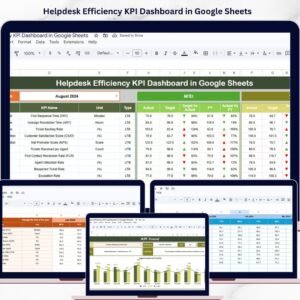
- Helpdesk Efficiency KPI Dashboard in Google Sheets: helpdesk KPIs in Google Sheets.
- IT Helpdesk Ticket Tracker in Google Sheets: log the tickets behind the KPIs.
- IT Manager & CISO Toolkit: 10 Excel, Google Sheets and Power BI IT templates.
Browse all Google Sheets KPI dashboards or the Google Sheets dashboards.

















Reviews
There are no reviews yet.